SFMSAA04052240RANGE EXTENSION WLAN ADAPTER
SmartAnt Telecom Co., Ltd.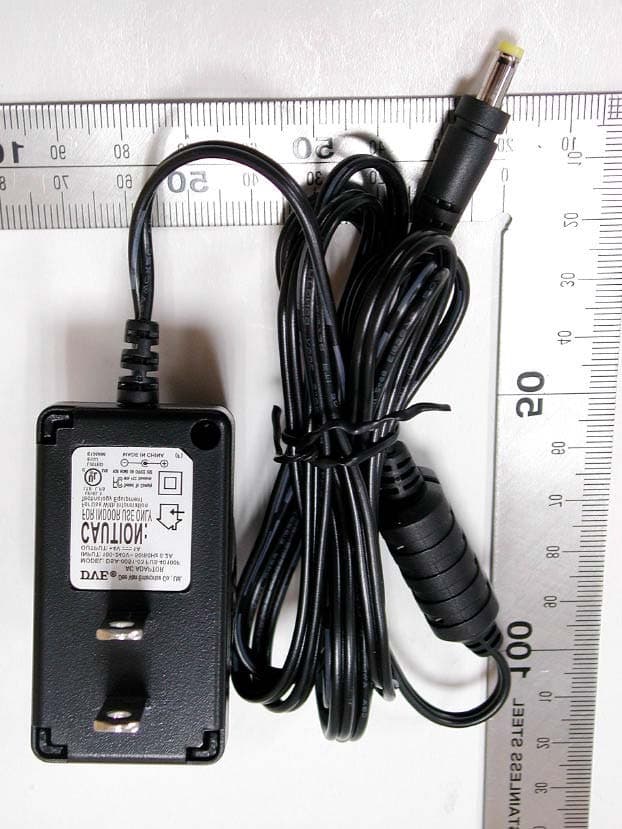
Click to zoom
Application Details
- Equipment Class
- DTS - Digital Transmission System
- Date of Grant
- Apr 18, 2005
- Application Purpose
- Original Equipment
- Date of Application
- Apr 18, 2005
- Equipment Note
- RANGE EXTENSION WLAN ADAPTER
- Frequency Range
- 2412.00000000 - 2462.00000000
- Company
- SmartAnt Telecom Co., Ltd.
- Country
- Taiwan
Documents & Files
Document Text
Text extracted from the exhibit documents filed with the FCC. Open a document above to read the original.
Users Manual
SmartAnt High Gain Ethernet Adapter for 802.11 b/g (SAA04-05224A,SAA04-05224A-05224A-EU) User’sManual 2SmartAnt Federal Communications Commission Statement This device complies with Part 15 of the FCC Rules. Operation is subject to the following two conditions: • This device may not cause harmful interference, and • This device must accept any interference received, including interference that may cause undesired operation. This equipment has been tested and found to comply with the limits for a class B digital device, pursuant to Part 15 of the Federal Communications Commission (FCC) rules. These limits are designed to provide reasonable protection against harmful interference in a residential installation. This equipment generates, uses, and can radiate radio frequency energy and, if not installed and used in accordance with the instructions, may cause harmful interference to radio communications. However, there is no guarantee that interference will not occur in a particular installation. If this equipment does cause harmful interference to radio or television reception, which can be determined by turning the equipment off and on, the user is encouraged to try to correct the interference by one or more of the following measures: • Reorient or relocate the receiving antenna. • Increase the separation between the equipment and receiver. • Connect the equipment into an outlet on a circuit different from that to which the receiver is connected. • Consult the dealer or an experienced radio/TV technician for help. WARNING! The use of a shielded-type power cord is required in or- der to meet FCC emission limits and to prevent interference to the nearby radio and television reception. It is essential that only the supplied power cord be used. Use only shielded cables to connect I/ O devices to this equipment. You are cautioned that changes or modifications not expressly approved by the party responsible for compliance could void your authority to operate the equipment. Reprinted from the Code of Federal Regulations #47, part 15.193, 1993. Washington DC: Office of the Federal Register, National Archives and Records Administration, U.S. Government Printing Office. Canadian Department of Communications This digital apparatus does not exceed the Class B limits for radio noise emissions from digital apparatus set out in the Radio Interference Regulations of the Canadian Department of Communications. This Class B digital apparatus complies with Canadian ICES-003. Cet appareil numérique de la classe B est conforme à la norme NMB-003 du Canada. Notices SmartAnt3 FCC Radio Frequency Exposure Caution Statement In order to maintain compliance with the FCC RF exposure guidelines, this equipment should be installed and operated with minimum distance20cm between the radiator and your body. Use only with supplied antenna. Unauthorized antenna, modification, or attachments could damage the transmitter and may violate FCC regulations. Any changes of modifications not expressly approved by the grantee of this device could void the users authority to operate the equipment. Installation and use of this Wireless LAN device must be in strict accordance with the instructions included in the user documentation provided with the product. Any changes or modifications (including the antennas) made to this device that are not expressly approved by the manufacturer may void the user’s authority to operate the equipment. The manufacturer is not responsible for any radio or television interference caused by unauthorized modification of this device, or the substitution or attachment of connecting cables and equipment other than manufacturer specified. It is the responsibility of the user to correct any interference caused by such unauthorized modification, substitution or attachment. Manufacturer and its authorized resellers or distributors will assume no liability for any damage or violation of government regulations arising from failing to comply with these guidelines. This device and its antenna(s) must not be co-located or operating in conjunction with any other antenna or transmitter. Declaration of Conformity (R&TTE directive 1999/5/EC) The following items were completed and are considered relevant and sufficient: • Essential requirements as in [Article 3] • Protection requirements for health and safety as in [Article 3.1a] • Testing for electric safety according to [EN 60950] • Protection requirements for electromagnetic compatibility in [Article 3.1b] • Testing for electromagnetic compatibility in [EN 301 489-1] & [EN 301] • Testing according to [489-17] • Effective use of the radio spectrum as in [Article 3.2] • Testing for radio test suites according to [EN 300 328-2] Notices 4SmartAnt Table of Contents 1.1 Welcome! ....................................................................................... 5 1.2 Package contents .......................................................................... 5 1.3 Features ........................................................................................ 6 1.3.1 Top view ................................................................................ 6 1.3.2 Bottom view .......................................................................... 7 1.3.3 Rear view .............................................................................. 7 1.4 LED indicators ............................................................................... 8 1.5 Recommended network settings.................................................. 9 1.5.1 Access Point mode .............................................................. 9 1.5.2 Ethernet adapter mode....................................................... 10 2.1 System requirements .................................................................. 13 2.2 Device installation ....................................................................... 13 2.2.1 Before you proceed ............................................................…
Text truncated - open the document above for the full version.
Users Manual
SmartAnt21 3.3.2 Launching the Web Configuration utility Using the Wireless Settings Utility Using an Internet browser To launch the Web Configuration utility using an Internet web browser: 1. Open a web browser. 2. Disable your proxy settings, if any. 3. Typehttp://192.168.1.1on the address bar of the browser, then press <Enter>. To launch the Web Configuration utility using the Wireless Setting Utility: 1. ClickStart>All Programs>Wireless AP> Wireless Settings. 2. ClickConfigurewhen the Wireless Setting Utility window appears. 3. Log on to the configuration window using the password (admin), then clickOK. 4. Disable your proxy settings, if any. 5. Click theAdvancedtab, then click theWeb Configuration Utilitybutton. This option requires you to change the IP address of the LAN adapter where the SAA04-05224A is connected. Make sure the IP address of the SAA04-05224A and your computer is on the same subnet. You can only launch the Web Configuration utility from the Wireless Settings Utility when the device is in AP mode. Switch the device to AP mode using the mode switch before launching the Wireless Set- tings Utility. 3. Configuration 6. A web browser appears. When prompted, enter the default password (admin), check the Remember my password option, then clickOK.TheWeb Configuration utility page appears. 22SmartAnt SSID (Service Set Identifier).This field displays the SSID of the device. Enabling theResponse to Broadcast SSID requestsoption allows the device to broadcast its SSID in a wireless network. This allows other wireless devices to scan and establish communication with the device. Unchecking this option hides the SSID to prevent other wireless devices from recognizing and connecting to the device. 3.3.3. Changing the access point (AP) configuration SimpleSetuppage The Simple Setup page displays the default AP settings of the SAA04-05224A. Use this page to set the AP channel, operation mode, and security. Clicking the button displays available options for that field. If you wish to load the default settings, press the device reset button for more than five seconds, then refresh your browser to display the default values. 3. Configuration SmartAnt23 Click theAssociated Stationslink (beside the SSID) to displays the list of wireless device(s) associated with the SmartAnt SAA04-05224A. The list includes the wireless device(s) MAC address and connection status. Channel.Allows you to specify the channel the device uses to communicate with other wireless device(s) in the network. The 802.11g specification supports up to 13 overlapping channels for radio communication. If several SmartAnt SAA04-05224As are operating in the same area, assign a non-overlapping channel to each device to avoid interference. Refer to page 3-21 for channel information. Operation Mode. You can adjust the SAA04-05224A operating mode to support wireless devices using IEEE 802.11b or IEEE 802.11g standards. Setting the operating mode tomixedallows the SAA04-05224A to support both wireless standards. Transmit Rate.This option allows you to specify the data transmission rate for both IEEE 802.11b and IEEE 802.11g devices. Select from 54, 48, 36, 24, 18, 12, 11, 9, 6, 5.5, 2 and 1Mbps data transfer rate. Preamble.Allows you to set the preamble mode for a 2.4GHz/11Mb network to Long, Short, or Auto. The default preamble mode isLong. OperationmodeSupported wireless client(s) BonlyIEEE802.11bclient(s)only GonlyIEEE802.11gclient(s)only MixedIEEE802.11bandIEEE802.11gclients Table 3-2: SAA04-05224A operating modes 3. Configuration 24SmartAnt MethodDescription Open system Thismethodallowsthedevicetoacceptconnection or shared keyrequestsfromanywirelessdevicewithinitsoperating range. Shared KeyOnlywirelessdevice(s)withthesameencryptionare allowedtoconnecttotheAP. WPA-PSKOnlywirelessdevice(s)withthesameTKIPencryption settingsareallowedtoconnecttotheAP. Table 3-3: Authentication methods Encryption.The encryption field allows you to set the encryption for your selected authentication method. Refer to the table below for a comparison of the encryption settings. specify a 64-bit or a 128-bit WEPkey.A64-bit encryption contains 10 hexadecimal digits or 5 ASCII characters. A 128-bit encryption contains 26 hexadecimal digits or 13 ASCII characters. Authentication Method.This option allows you to select the encryption method for securing your wireless communication. Refer to the table below for details. The following fields allow you to configure the SmartAnt SAA04-05224A security settings. * Wired Equivalent Privacy * * Temporal Key Integrity Protocol Table 3-4: Encryption settings MethodEncryption Description Open systemNoneNoencryption Shared Key64-bitWEP*Contains10hexadecimaldigitsor 5ASCIIcharacters 128-bitWEPContains26hexadecimaldigitsor 13ASCIIcharacters WPA-PSKTKIP**Contains8to63alpha-numericcharacters 3. Configuration SmartAnt25 ¡C 64-bit and 40-bit WEP keys use the same encryption method and can interoperate on wireless networks. This lower level of WEP encryption uses a 40-bit (10 hexadecimal digits assigned by the user) secret key and a 24-bit Initialization Vector assigned by the device. 104-bit and 128-bit WEP keys use the same encryption method. ¡C Keep a record of the WEP encryption keys ¡C All wireless clients in a network must have identical WEP keys with the access point to establish connection. Securing your wireless communication using WEP encryption To secure your wireless communication using the WEP encryption: 1. Assign the WEP encryption keys by manual or automatic generation. Manual Assignment. For a 64-bit encryption, enter 10 hexadecimal digits (0~9, a~f, A~F) or 5 ASCII characters in each of the four WEP keys. For 128-bit encryption enter 26 hexadecimal digits (0~9, a~f, A~F) or 13 ASCII characters in each of the four WEP keys. Automatic Generation. Type a combination of up to 64 letters, numbers, or symbols in thePassphrasefield. The Web Configuration utility uses an algorithm to generate four WEP keys base…
Text truncated - open the document above for the full version.
External Photos
External Photos of SmartAnt High Gain Ethernet Adapter--------------------------1/12 Applicant: SmartAnt Telecom Co., Ltd. FCC ID: SFMSAA04052240 IC: 5773A-SA405224 Training Research Co., Ltd., TEL: 886-2-26935155, Fax: 886-2-26934440 External Photos of SmartAnt High Gain Ethernet Adapter--------------------------2/12 Applicant: SmartAnt Telecom Co., Ltd. FCC ID: SFMSAA04052240 IC: 5773A-SA405224 Training Research Co., Ltd., TEL: 886-2-26935155, Fax: 886-2-26934440 External Photos of SmartAnt High Gain Ethernet Adapter--------------------------3/12 Applicant: SmartAnt Telecom Co., Ltd. FCC ID: SFMSAA04052240 IC: 5773A-SA405224 Training Research Co., Ltd., TEL: 886-2-26935155, Fax: 886-2-26934440 External Photos of Power Adapter-------------------------------------------------------4/12 Applicant: SmartAnt Telecom Co., Ltd. FCC ID: SFMSAA04052240 IC: 5773A-SA405224 Training Research Co., Ltd., TEL: 886-2-26935155, Fax: 886-2-26934440
ID Label/Location Info
LABEL Sample and Location information -------------------------------------------------- 1/2 Applicant: SmartAnt Telecom Co., Ltd. FCC ID: SFMSAA04052240 IC: 5773A-SA405224 Training Research Co., Ltd., TEL: 886-2-26935155, Fax: 886-2-26934440 LABEL Format: 27mm 47mm IC: 5773A-SA405224 LABEL Sample and Location information -------------------------------------------------- 2/2 Applicant: SmartAnt Telecom Co., Ltd. FCC ID: SFMSAA04052240 IC: 5773A-SA405224 Training Research Co., Ltd., TEL: 886-2-26935155, Fax: 886-2-26934440 LABEL Position:
Internal Photos
Internal Photos of SmartAnt High Gain Ethernet Adapter---------------------------5/12 Applicant: SmartAnt Telecom Co., Ltd. FCC ID: SFMSAA04052240 IC: 5773A-SA405224 Training Research Co., Ltd., TEL: 886-2-26935155, Fax: 886-2-26934440 Internal Photos of SmartAnt High Gain Ethernet Adapter---------------------------6/12 Applicant: SmartAnt Telecom Co., Ltd. FCC ID: SFMSAA04052240 IC: 5773A-SA405224 Training Research Co., Ltd., TEL: 886-2-26935155, Fax: 886-2-26934440 Internal Photos of SmartAnt High Gain Ethernet Adapter---------------------------7/12 Applicant: SmartAnt Telecom Co., Ltd. FCC ID: SFMSAA04052240 IC: 5773A-SA405224 Training Research Co., Ltd., TEL: 886-2-26935155, Fax: 886-2-26934440 Internal Photos of SmartAnt High Gain Ethernet Adapter---------------------------8/12 Applicant: SmartAnt Telecom Co., Ltd. FCC ID: SFMSAA04052240 IC: 5773A-SA405224 Training Research Co., Ltd., TEL: 886-2-26935155, Fax: 886-2-26934440 Internal Photos of SmartAnt High Gain Ethernet Adapter---------------------------9/12 Applicant: SmartAnt Telecom Co., Ltd. FCC ID: SFMSAA04052240 IC: 5773A-SA405224 Training Research Co., Ltd., TEL: 886-2-26935155, Fax: 886-2-26934440 Internal Photos of SmartAnt High Gain Ethernet Adapter --------------------------- 10/12 Applicant: SmartAnt Telecom Co., Ltd. FCC ID: SFMSAA04052240 IC: 5773A-SA405224 Training Research Co., Ltd., TEL: 886-2-26935155, Fax: 886-2-26934440 Antenna Internal Photos of SmartAnt High Gain Ethernet Adapter---------------------------11/12 Applicant: SmartAnt Telecom Co., Ltd. FCC ID: SFMSAA04052240 IC: 5773A-SA405224 Training Research Co., Ltd., TEL: 886-2-26935155, Fax: 886-2-26934440 Internal Photos of SmartAnt High Gain Ethernet Adapter---------------------------12/12 Applicant: SmartAnt Telecom Co., Ltd. FCC ID: SFMSAA04052240 IC: 5773A-SA405224 Training Research Co., Ltd., TEL: 886-2-26935155, Fax: 886-2-26934440
RF Exposure Info
Measurement of Maximum Permissible Exposure---------------------------------------- 1/3 Applicant: SmartAnt Telecom Co., Ltd. FCC ID:SFMSAA04052240 IC:5773A-SA405224 Training Research Co., Ltd., TEL: 886-2-26935155, Fax: 886-2-26934440 Measurement of Maximum Permissible Exposure 1. Foreword In adopt with the Human Exposure IEEE C95.1, and according to the FCC 1.1310. The Maximum Permissible Exposure (MPE) is obligated to measure in order to prove the safety of radiation harmfulness to the human body. The Gain of the antenna used is measured in an Anechoic chamber. The maximum total power to the antenna is to be recorded. By adopting the Friis Transmission Formula and the power gain of the antenna, we can find the distance right away from the product, where the limit of the MPE is. 2. Description of EUT FCC ID : SFMSAA04052240 Product Name : Range Extension WLAN Adapter Model Name : SAA04-052240 Classification : Mobile Device (i) Under normal use condition, the antenna is at least 20cm away from the user; (ii) Warning statement for keeping 20cm separation distance and the prohibition of operating next to the person has been printed in the user’s manual Frequency Range : 2.412GHz ~ 2.462GHz Support Channel : 11 Channels Modulation Skill : DBPSK, DQPSK, CCK, OFDM Power Type : Powered by USB interface, or AC-DC adapter, Model: DSA-0051-03 FUS 40100F I/P: 100-240VAC, 50/60Hz, 0.2A O/P: 4VDC, 1A 185cm length, non-shielded, with ferrite core Measurement of Maximum Permissible Exposure---------------------------------------- 2/3 Applicant: SmartAnt Telecom Co., Ltd. FCC ID:SFMSAA04052240 IC:5773A-SA405224 Training Research Co., Ltd., TEL: 886-2-26935155, Fax: 886-2-26934440 3. Limits for Maximum Permissible Exposure (MPE) Frequency Range (MHz) Electric Field Strength (V/m) Magnetic Filed Strength (H) (A/m) Power Density (S) (mW/cm2) Averaging Time |E| 2 , |H| 2 or S (minutes) (A) Limits for Occupational/Controlled Exposure 0.3-3.0 614 1.63 100 6 3.0-30 1842/f 4.89/f 900/f 2 6 30-300 61.4 0.163 1.0 6 300-1500 -- -- f/300 6 1500-100,000 -- -- 5 6 (B) Limits for General Population/Uncontrolled Exposure 0.3-1.34 614 1.63 100 30 1.34-30 824/f 2.19/f 180/f 2 30 30-300 27.5 0.073 0.2 30 300-1500 -- -- f/1500 30 1500-100,000 -- -- 1.0 30 [The EUT is tested in transmit and receive modes and in the first, middle and the last channel separately. The following shows only our observation have the greatest emissions.] According to OET BULLETIN 56 Fourth Edition/August 1999, Equation for Predicting RF Fields: Friis Transmission Formula: 2 22 /45262.0 )20(4 98.348.571 4 cmmW R PG S= × == ππ Estimated safe separation: cm PG R45356.13 4 98.348.571 4 = × == ππ Remarks: "The safe estimated separation that the user must maintain from the antenna is at least 13.46cm" Where: S = power density (in appropriate units, e.g. mW/cm2) P = power input to the antenna (in appropriate units, e.g., mW) G = power gain of the antenna in the direction of interest relative to an isotropic radiator R = distance to the center of radiation of the antenna (appropriate units, e.g., cm) The Numeric gain G of antenna with a gain specified in dB is determined by: G = Log -1 ( dB antenna gain / 10 ) G = Log -1 (6 / 10) = 3.98107 Measurement of Maximum Permissible Exposure---------------------------------------- 3/3 Applicant: SmartAnt Telecom Co., Ltd. FCC ID:SFMSAA04052240 IC:5773A-SA405224 Training Research Co., Ltd., TEL: 886-2-26935155, Fax: 886-2-26934440 Appendix Antenna Specification Dual-Band Directional Antenna for 2.4 / 5.2 / 5.6 / 5.8 GHz SAA04-220240 Electrical Specification Frequency range 2400 MHz - 2500MHz 5150 MHz - 5875 MHz Gain 6.0dBi 8.0 dBi VSWR 2.0 : 1 Max. 2.0 : 1 Max. Polarization Linear, vertical Linear, vertical Impedance 50 Ohms Connector RP SMA Plug (Quick) Cable ULA 100, 1m Environmental & Mechanical Characteristics Temperature - 10 o C to + 55 o C Humidity 95% @ 25 o C Radome color 6641, 668U Weight 80 g http:// www.smartant.com TEL: +886 (0)3 578-3188 FAX: +886 (0)3 578-3189 E-mail: [email protected] All rights reserved by SmartAnt Telecom Co., Ltd. P1 Dimension 81 x 71 x 24 mm Cable loss 1.2 dB 2 dB Version 1 SA2-22024 HPBW / horizontal 70 50 o o HPBW / vertical 70 60 o o Front to back ratio 12 dB 12 dB * Radome material ABS, UV resistant * Exclusive of cable loss -20 -15 -10 -5 0 5 10 0 30 60 90 120 150 180 210 240 270 300 330 -20 -15 -10 -5 0 5 10 2400 MHz 2450 MHz 2500 MHz -20 -15 -10 -5 0 5 10 0 30 60 90 120 150 180 210 240 270 300 330 -20 -15 -10 -5 0 5 10 4900 MHz 5400 MHz 5900 MHz H-plane Co-poiarizatlon Pattem -20 -15 -10 -5 0 5 10 0 30 60 90 120 150 180 210 240 270 300 330 -20 -15 -10 -5 0 5 10 2400 MHz 2450 MHz 2500 MHz -20 -15 -10 -5 0 5 10 0 30 60 90 120 150 180 210 240 270 300 330 -20 -15 -10 -5 0 5 10 4900 MHz 5400 MHz 5900 MHz V-plane Co-poiarizatlon Pattem 71 24 23 81 22.5
Test Report
Test Report -------------------------------------------------------------------------------1/59 Report No.: A5415050224, FCC Part 15.247 Training Research Co., Ltd., TEL: 886-2-26935155, Fax: 886-2-26934440 MEASUREMENT REPORT of Wireless LANEthernet Adapter Applicant:SmartAnt Telecom Co., Ltd. EUT:Range Extension WLAN Adapter Model:SAA04-052240 FCC ID:SFMSAA04052240 Tested by : Training Research Co., Ltd. TEL : 886-2-26935155 FAX : 886-2-26934440 No. 255, Nanyang Street, Shijr, Taipei Hsien 221, Taiwan, R.O.C. Test Report -------------------------------------------------------------------------------2/59 Report No.: A5415050224, FCC Part 15.247 Training Research Co., Ltd., TEL: 886-2-26935155, Fax: 886-2-26934440 CERTIFICATION We here by verify that: The test data, data evaluation, test procedures and equipment configurations shown in this report were made mainly in accordance with the procedures given in ANSI C63.4 (2003) as a reference. All test were conducted by Training Research Co., Ltd., 255 Nanyang Street, Shijr, Taipei Hsien 221, Taiwan, R.O.C. Also, we attest to the accuracy of each. We further submit that the energy emitted by the sample EUT tested as described in the report is in compliance with the technical requirements set forth in the FCC Rules Part 15 Subpart B (Declaration of Conformity) and C Section 15.247. Applicant:SmartAnt Telecom Co., Ltd. Applicant Address:6F, No.12, Li-Hsin Road, Science-Based Industrial Park, Hsinchu, Taiwan Product Name:Range Extension WLAN Adapter Model:SAA04-052240 Report No.:A5415050224 Test Date:March25, 2005 Prepared by:Approved by: Jack TsaiFrank Tsai Conditions of issue : (1) This test report shall not be reproduced except in full, without written approval of TRC. And the test result contained within this report only relate to the sample submitted for testing. (2) This report must not be used by the client to claim product endorsement by NVLAP or any agency of U.S. Government. (3) This test report, measurements made by TRC are traceable to the NIST only Conducted and Radiated Method. NVLAP LAB CODE: 200174-0 Test Report ------------------------------------------------------------------------------- 3/59 Report No.: A5415050224, FCC Part 15.247 Training Research Co., Ltd., TEL: 886-2-26935155, Fax: 886-2-26934440 Federal Communications Commission Declaration of Conformity for the following equipment: Product name : Range Extension WLAN Adapter Model name : SAA04-052240 Trade name : SmartAnt Is herewith confirmed and found to comply with the requirements of CFR 47 part15 Subpart B - Unintentional Radiators regulation. The results of electromagnetic mission evaluation are shown in the report number : A5415050224 This device complies with Part 15 of the FCC Rules. Operation is subject to the following two conditions: (1) This device may not cause harmful interference, and (2) This device must accept any interference received, including interference that may cause undesired operation Manufacturer USA local representative Company name: SmartAnt Telecom Co., Ltd. To be determined Computer address: No.49, Lane 206, Wen-Te Road, Shang-Shan Village, Chiunglin, Hsinchu, Taiwan ZIP / Postal code 307 Contact person: Bear Yang Title: Product Engineering Manager Email: [email protected] Tel / Fax: 886-3-5120869 / 886-3-5120898 Test Report -------------------------------------------------------------------------------4/59 Report No.: A5415050224, FCC Part 15.247 Training Research Co., Ltd., TEL: 886-2-26935155, Fax: 886-2-26934440 Tables of Contents I.GENERAL................................................................................................................... 6 1.1Introduction........................................................................................................... 6 1.2Description of EUT ................................................................................................ 6 1.3Test method .......................................................................................................... 7 1.4Description of Support Equipment .......................................................................... 7 1.5Configuration of System Under Test ...................................................................... 10 1.6Verify the Frequency and Channel ......................................................................... 12 1.7Test Procedure ..................................................................................................... 13 1.8Location of the Test Site ....................................................................................... 13 1.9General Test Condition ......................................................................................... 13 II.Section 15.101(a) : Equipment Authorization of Unintentional Radiators................. 14 III. Section 15.203 : Antenna Requirement....................................................................... 15 IV.Section 15.207 : Power Line Conducted Emissions for AC Powered Units............. 16 4.1Test Condition & Setup ........................................................................................ 16 4.2List of Test Instruments ......................................................................................... 17 4.3Test Result of Conducted Emissions ...................................................................... 18 Powered by Adapter............................................................................................... 19 Powered by USB.................................................................................................... 22 V.Section 15.247(a) : Technical Description of the EUT................................................ 26 VI.Section 15.247(a)(2) : Bandwidth for Direct Sequence System................................ 27 6.1Test Condition & Setup ........................................................................................ 27 6.2Test Instruments Configuration .............…
Text truncated - open the document above for the full version.
Test Setup Photos
Test Setup Photos -------------------------------------------------------------------------- 1/4 Applicant: SmartAnt Telecom Co., Ltd. FCC ID: SFMSAA04052240 IC: 5773A-SA405224 Training Research Co., Ltd., TEL: 886-2-26935155, Fax: 886-2-26934440 Conducted Test Setup Placement: (Powered by Adapter) Front View of the Test Configuration Side View of the Test Configuration Test Setup Photos -------------------------------------------------------------------------- 2/4 Applicant: SmartAnt Telecom Co., Ltd. FCC ID: SFMSAA04052240 IC: 5773A-SA405224 Training Research Co., Ltd., TEL: 886-2-26935155, Fax: 886-2-26934440 Conducted Test Setup Placement: (Powered by USB) Front View of the Test Configuration Side View of the Test Configuration Test Setup Photos -------------------------------------------------------------------------- 3/4 Applicant: SmartAnt Telecom Co., Ltd. FCC ID: SFMSAA04052240 IC: 5773A-SA405224 Training Research Co., Ltd., TEL: 886-2-26935155, Fax: 886-2-26934440 Radiated Test Setup Placement: (Powered by Adapter) Front View of the Test Configuration Rear View of the Test Configuration Test Setup Photos -------------------------------------------------------------------------- 4/4 Applicant: SmartAnt Telecom Co., Ltd. FCC ID: SFMSAA04052240 IC: 5773A-SA405224 Training Research Co., Ltd., TEL: 886-2-26935155, Fax: 886-2-26934440 Radiated Test Setup Placement: (Powered by USB) Front View of the Test Configuration Rear View of the Test Configuration
Contact Information
Applicant
Mark Lee(Product Engineering Section Manager)
Test Firm
Training Research Co., LtdJack Tsai
Technical Specifications
| # | Rule Parts | Frequency Range | Power Output |
|---|---|---|---|
| 1 | 15C | 2.41 GHz - 2.46 GHz | 571.48 mW |
Other Applications from SmartAnt Telecom Co., Ltd.
SFM-SAG-1020
Jan 03, 2008IEEE 802.11b/g Outdoor CPE
Equipment Class
DTS - Digital Transmission System
SFM-SAG-1010
Oct 25, 2007802.11bg Wireless Card
Equipment Class
DTS - Digital Transmission System
SFMSAA04050620
Apr 07, 2005Wireless USB Adapter
Equipment Class
DTS - Digital Transmission System
SFMSA205062
Sep 10, 2004Wireless LAN USB Adapter
Equipment Class
DTS - Digital Transmission System