SJ8-M370MLDIGITAL WIRELESS CAMERA AND LCD MONITOR
RDI Technology (Shenzhen) Co., Ltd.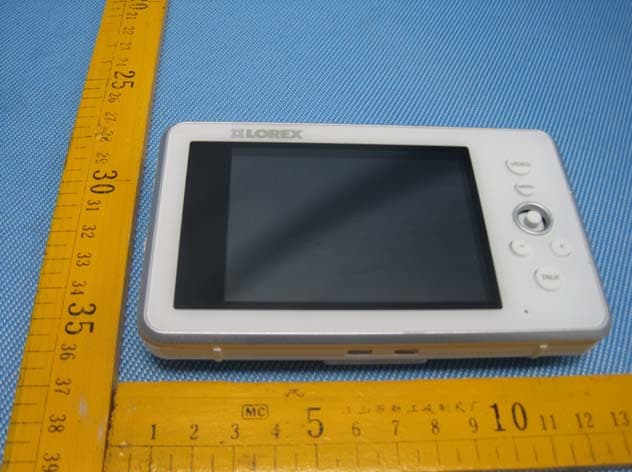
Click to zoom
Application Details
- Equipment Class
- DSS - Part 15 Spread Spectrum Transmitter
- Date of Grant
- Aug 02, 2012
- Application Purpose
- Original Equipment
- Date of Application
- Aug 02, 2012
- Equipment Note
- DIGITAL WIRELESS CAMERA AND LCD MONITOR
- Frequency Range
- 2402.00000000 - 2480.00000000
- Country
- China
Documents & Files
Document Text
Text extracted from the exhibit documents filed with the FCC. Open a document above to read the original.
Users Manual
DIGITAL WIRELESS CAMERA AND LCD MONITOR SYSTEM INSTRUCTION MANUAL MODEL: CMD6537ML CAMERA MODEL: CA650ML MONITOR MODEL ˖M370ML 1 Overview Overview Video Monitor Video Button Press the Video button to turn off the monitor. The speakers will remain on. Press the menu button to access the monitor menu options. Joystick Use the joystick to navigate system menus. Press down on the joystick to confirm a selection. Volume Control Press + / - to control the volume. Audio Level Indicator Displays the level of sound detected by the camera. Menu Button Talk Button Hold the talk button to enable two-way communication between the video monitor and camera. AUTO LED Glows blue when auto-record is enabled. Press the Next button to change lullaby. ON/OFF Switch Slide the power switch to the ON position to turn the video monitor on. Lullaby Button Press the Lullaby button once to begin playing a lullaby song. Press the Lullaby button again to stop the song. Music Buttons microSD Card Slot Insert a microSD card to record video. Power LED Glows green to indicate unit is powered on. 2 Overview Video Monitor (continued) How to use the joystick in menus The joystick allows you to navigate through the video monitor menus. Sequence/ Quad Button Press the Sequence/Quad button to view video in quad mode (4 screen split view), or in sequence view. Scan Button Scans for cameras that detect sudden noises. Charging LED Indicator Glows red to indicate video monitor is charging. Cam Button Press the Cam button to switch between channels 1-4. Power Port Connect the power adapter labeled "For Monitor" into the power port. Micro USB Connect a micro USB cable (included) between the video monitor and a computer to view video from your PC or remotely (setup required) Speaker Outputs sound received from the camera. Power Port (DC5V) Connect the power adapter labeled "For Monitor" to the charging cradle. Antenna Switch Slide the Antenna Switch towards the unlock position to reveal the antenna. OK Button Press down on the joystick to confirm a selection. Press up, down, left, or right to navigate through the menus. 3 Overview Camera Overview LED The camera has infrared (IR) LEDs that allow you to see in the dark. Sensitivity Dial Adjust the level of audio-detection sensitivity of the camera to trigger an alert. Volume Dial Adjusts the speaker volume. Battery Charging Indicator Glows to indicate battery is charging. This requires rechargable batteries (not included, part # XXXXX) Power Switch Turns the camera on and off. Speaker The speaker allows you to hear the person speaking into the video monitor. Power Port (DC5V) Plug in the connector from the power adapter labeled "To Camera" to power the camera. Microphone The microphone allows you to speak to the person through the video monitor. Pair Button Press the Pair button during the pairing process with the video monitor. Temperature Sensor Detects the room’s ambient temperature. 4 Overview OSD overview The video monitor displays the following icons during normal use. The table below summarizes the video monitor icons, and what they mean. IconMeaning No signal between the camera and video monitor. Full signal between the camera and video monitor. The camera night light is currently on. The video monitor battery is low. Auto recording is enabled. Manual recording is enabled. Two-way talk is enabled. You can now speak into the video monitor. Have factory confirm which icons will be included, and what each icon means. 5 Basic Setup Basic Setup Using the cable clips Included are a bag of cable clips that allow you to manage the wires from the power adapters. It is highly recommended that you use the cable clips keep the power cords out of reach from young children and infants. To use the cable clips, slide the wires in between the clips, then peel the protective film behind the clip. Stick the clip along the wall /table leg so that it is out of reach. Safety percautions? line art of cable clip from vince - diagram with cable setup around baby crib 6 Basic Setup Optional: Charging the camera The camera base has a built-in battery compartment where you can install three AA batteries. This may be useful if you want to temporarily monitor an area with no power outlets. To install batteries in the camera: 1Unplug the power cord from the base of the camera. 2Remove the battery cover. 3Insert three AA batteries into the battery compartment and replace the battery cover. NOTE: You can insert rechargable batteries into the camera base. Connect the power adapter into the camera base to charge the batteries. Charge the batteries for 4.5 hours for a full charge. NOTE: To order rechargable batteries, contact Lorex customer support at XXXXXXX and inquire about part number XXXXXX. . To charge the camera battery: 1Insert 3 AA batteries into the battery compartment. 2Plug the power adapter labeled "For Camera" into a power outlet. 3Connect the end of the power adapter into the port labeled DC5V. Remove battery cover from camera base. Connect the power adapter into the DC5V port 7 Basic Setup Charging the video monitor The video monitor can be charged using the cradle, or directly through the DC5V port on the side of the video monitor. The batteries stop charging once it is full. You will not"over-charge" the batteries. A full charge requires 4.5 hours. To charge the video monitor using the cradle: 1Connect the power adapter labeled "To Monitor" to a power outlet. 2Connect the end of the power adapter into the charging cradle. 3Rest the video monitor on the charging cradle, ensuring the metal contacts touch. To charge the video monitor without the cradle: 1Connect the power adapter labeled "To Monitor" to a power outlet. 2Connect the end of the power adapter into the DC5V port on the video monitor. DC5V port DC5V port 8 Basic Setup Viewing your camera To view your camera: 1Connect the camera and video monitor to a power source. NOTE: The power adapters are labeled "For Camera" and "For Monitor" 2Slid…
Text truncated - open the document above for the full version.
Cover Letter(s)
RDI Technology (Shenzhen) Co., Ltd. Federal Communications Commission Authorization and Evaluation Division Confidentiality Request regarding application for certification of FCC ID: SJ8-M370ML. Pursuant to Sections 0.457 and 0.459 of the Commission’s Rules, we hereby request confidential treatment of information accompanying this application as outlined below: Exhibit Type File Name Schematics Block Diagram Operational Description SJ8-M370ML_SCH.pdf SJ8-M370ML_BlockDiagram.pdf SJ8-M370ML_OperationDescription.pdf The above materials contain trade secrets and proprietary information not customarily released to the public. The public disclosure of these materials may be harmful to the applicant and provide unjustified benefits to its competitors. The applicant understands that pursuant to Section 0.457 of the Rules, disclosure of this application and all accompanying documentation will not be made before the date of the Grant for this application. Sincerely, RDI Technology (Shenzhen) Co., Ltd. ---------------------------- Tony Zhou / Engineering Manager
Cover Letter(s)
RDI Technology (Shenzhen) Co., Ltd. FCC ID: SJ8-M370ML POWER OF ATTORNEY July 11, 2012 Federal Communications Commission Authorization and Evaluation Division 7435 Oakland Mills Road Columbia, MD 21046 To Whom It May Concern: We, the undersigned, hereby authorize Waltek Services (ShenZhen) Co., Ltd. (Philo Zhong) on our behalf, to apply to the Federal Communications Commission on our equipment. Any and all acts carried out by Waltek Services (ShenZhen) Co., Ltd. (Philo Zhong) on our behalf shall have the same effect as acts of our own. This authorization expires on July 11, 2013. This is to advise that we are in full compliance with the Anti-Drug Abuse Act. We, RDI Technology (Shenzhen) Co., Ltd., are not subject to a denial of federal benefits pursuant to Section 5301 of the Anti-Drug Act of 1988, 21 USC853a, and no party to the application is subject to a denial of federal benefits pursuant to that section. Sincerely, RDI Technology (Shenzhen) Co., Ltd. ------------------------------- Tony Zhou / Engineering Manager
Cover Letter(s)
RDI Technology (Shenzhen) Co., Ltd. Date: July 31, 2012 To: Federal Communications Commission 7435 Oakland Mills Road Columbia, MD FCC ID: SJ8-M370ML To Whom It May Concern: This letter is to ascertain that RDI Technology (Shenzhen) Co., Ltd., Digital Wireless Camera and Lcd Monitor has been the units used for conducting FCC compliance testing, the DoC part was tested by Global Certification Corp. (Test Report No.:F12080101 ). If you have any question or concerns, pls. contact us. Sincerely, ---------------------------------------- Tony Zhou / Engineering Manager RDI Technology (Shenzhen) Co., Ltd. E-mail: [email protected] Phone: +86-755-27308306 Fax: +86-755-27308799 Address: Building C1 Xingtang Industrial Park, East Baishixia, Fuyong, Baoan, Shenzhen, China
External Photos
Page: 47 of 54 RDI Technology (Shenzhen) Co., Ltd. FCC ID: SJ8-M370ML The results shown in this test report refer only to the sample(s) tested , This Test report cannot be reproduced, except in full, without prior written permission of the Company. WALTEK SERVICES Reference No.: WT12074697-F-S-F 16 Photographs - Constructional Details 16.1 Product View 16.2 EUT – Appearance View Page: 48 of 54 RDI Technology (Shenzhen) Co., Ltd. FCC ID: SJ8-M370ML The results shown in this test report refer only to the sample(s) tested , This Test report cannot be reproduced, except in full, without prior written permission of the Company. WALTEK SERVICES Reference No.: WT12074697-F-S-F Page: 49 of 54 RDI Technology (Shenzhen) Co., Ltd. FCC ID: SJ8-M370ML The results shown in this test report refer only to the sample(s) tested , This Test report cannot be reproduced, except in full, without prior written permission of the Company. WALTEK SERVICES Reference No.: WT12074697-F-S-F
ID Label/Location Info
Page: 53 of 53 RDI Technology (Shenzhen) Co., Ltd. FCC ID: SJ8-M370ML The results shown in this test report refer only to the sample(s) tested , This Test report cannot be reproduced, except in full, without prior written permission of the Company. WALTEK SERVICES Reference No.: WT12074697-F-S-F 17 FCC Label This device complies with Part 15 of the FCC Rules. Operation is subject to the following two conditions: (1) this device may not cause interference, and (2) this device must accept any interference, including interference that may cause undesired operation of the device. The Label must not be a stick-on paper. The Label on these products must be permanently affixed to the product and readily visible at the time of purchase and must last the expected lifetime of the equipment not be readily detachable. Proposed Label Location on EUT EUT Bottom View/ proposed FCC Label Location FCC ID: SJ8-M370ML This device complies with Part 15 of the FCC Rules. Operation is subject to the following two conditions: (1) this device may not cause harmful interference, and (2) this device must accept any interference received, including interference that may cause undesired operation.
ID Label/Location Info
FCC ID Label Sample for Model: M370ML FCC ID: SJ8-M370ML This device complies with Part 15 of the FCC Rules. Operation is subject to the following two conditions:(1)this device may not cause harmful interference, and (2) this device must accept any interference received, including interference that may cause undesired operation.
Internal Photos
Page: 50 of 53 RDI Technology (Shenzhen) Co., Ltd. FCC ID: SJ8-M370ML The results shown in this test report refer only to the sample(s) tested , This Test report cannot be reproduced, except in full, without prior written permission of the Company. WALTEK SERVICES Reference No.: WT12074697-F-S-F 16.3 EUT – Open View 16.4 EUT - PCB View Page: 51 of 53 RDI Technology (Shenzhen) Co., Ltd. FCC ID: SJ8-M370ML The results shown in this test report refer only to the sample(s) tested , This Test report cannot be reproduced, except in full, without prior written permission of the Company. WALTEK SERVICES Reference No.: WT12074697-F-S-F Page: 52 of 53 RDI Technology (Shenzhen) Co., Ltd. FCC ID: SJ8-M370ML The results shown in this test report refer only to the sample(s) tested , This Test report cannot be reproduced, except in full, without prior written permission of the Company. WALTEK SERVICES Reference No.: WT12074697-F-S-F
Test Report
Page: 1 of 53 FCC TEST REPORT The results shown in this test report refer only to the sample(s) tested , This Test report cannot be reproduced, except in full, without prior written permission of the Company. WALTEK SERVICES Reference No.: WT12074697-F-S-F FCC ID : SJ8-M370ML Applicant : RDI Technology (Shenzhen) Co., Ltd. Address : Building C1 Xingtang Industrial Park, East Baishixia, Fuyong, Baoan, Shenzhen, China Equipment Under Test (EUT) : Product Name : Digital Wireless Camera and Lcd Monitor Model No. : M370ML Standards : FCC CFR47 Part 15 Section 15.247:2010 Date of Test : July 13 ~ July 19, 2012 Date of Issue : July 21, 2012 Test Engineer : Zero.Zhou / Engineer Reviewed By : Philo zhong / Manager Test Result : PASS Prepared By: Waltek Services (Shenzhen) Co., Ltd. 1/F, Fukangtai Building, West Baima Rd., Songgang Street, Baoan District, Shenzhen 518105, China Tel :+86-755-83551033 Fax:+86-755-83552400 Page: 2 of 53 RDI Technology (Shenzhen) Co., Ltd. FCC ID: SJ8-M370ML The results shown in this test report refer only to the sample(s) tested , This Test report cannot be reproduced, except in full, without prior written permission of the Company. WALTEK SERVICES Reference No.: WT12074697-F-S-F 2 Test Summary Test Items Test Requirement Result Radiated Spurious Emissions (9KHz to 25GHz) 15.205(a) 15.209 15.247(d) PASS Conduct Emission 15.207 PASS 20dB Bandwidth 15.247(a)(1) PASS Maximum Peak Output Power 15.247(b)(1) PASS Frequency Separation 15.247(a)(1) PASS Number of Hopping Frequency 15.247(a)(1)(iii) PASS Dwell time 15.247(a)(1)(iii) PASS Maximum Permissible Exposure (Exposure of Humans to RF Fields) 1.1307(b)(1) PASS Page: 3 of 53 RDI Technology (Shenzhen) Co., Ltd. FCC ID: SJ8-M370ML The results shown in this test report refer only to the sample(s) tested , This Test report cannot be reproduced, except in full, without prior written permission of the Company. WALTEK SERVICES Reference No.: WT12074697-F-S-F 3 Contents Page 1 COVER PAGE ........................................................................................................................................................ 1 2 TEST SUMMARY .................................................................................................................................................. 2 3 CONTENTS ............................................................................................................................................................. 3 4 GENERAL INFORMATION ................................................................................................................................ 5 4.1 CLIENT INFORMATION ........................................................................................................................................... 5 4.2 GENERAL DESCRIPTION OF E.U.T. ........................................................................................................................ 5 4.3 DETAILS OF E.U.T. ................................................................................................................................................ 5 4.4 DESCRIPTION OF SUPPORT UNITS .......................................................................................................................... 5 4.5 STANDARDS APPLICABLE FOR TESTING ................................................................................................................ 5 4.6 TEST FACILITY ...................................................................................................................................................... 6 4.7 TEST LOCATION .................................................................................................................................................... 6 5 EQUIPMENT USED DURING TEST .................................................................................................................. 7 6 CONDUCTED EMISSION .................................................................................................................................... 9 6.1 E.U.T. OPERATION ................................................................................................................................................ 9 6.2 EUT SETUP ......................................................................................................................................................... 10 6.3 CONDUCTED EMISSION TEST RESULT ................................................................................................................. 10 6.4 PHOTOGRAPH – CONDUCTED EMISSION TEST SETUP .......................................................................................... 13 7 RADIATED SPURIOUS EMISSIONS ............................................................................................................... 14 7.1 EUT OPERATION : ............................................................................................................................................... 14 7.2 MEASUREMENT UNCERTAINTY ........................................................................................................................... 14 7.3 TEST SETUP ......................................................................................................................................................... 15 7.4 SPECTRUM ANALYZER SETUP ............................................................................................................................. 15 7.5 TEST PROCEDURE ................................................................................................................................................ 18 7.6 CORRECTED AMPLITUDE & MARGIN CALCULATION ........................................................................................... 18 7.7 SUMMARY OF TEST RESULTS .............................................................................................................................. 19 7.8 PHOTOGRAPH – RADIATION SPURIOUS EMI…
Text truncated - open the document above for the full version.
Test Setup Photos
Page: 13 of 53 RDI Technology (Shenzhen) Co., Ltd. FCC ID: SJ8-M370ML The results shown in this test report refer only to the sample(s) tested , This Test report cannot be reproduced, except in full, without prior written permission of the Company. WALTEK SERVICES Reference No.: WT12074697-F-S-F 6.4 Photograph – Conducted Emission Test Setup Page: 28 of 53 RDI Technology (Shenzhen) Co., Ltd. FCC ID: SJ8-M370ML The results shown in this test report refer only to the sample(s) tested , This Test report cannot be reproduced, except in full, without prior written permission of the Company. WALTEK SERVICES Reference No.: WT12074697-F-S-F 7.8 Photograph – Radiation Spurious Emission Test Setup Below 30MHz 30MHz-1GHz Page: 29 of 53 RDI Technology (Shenzhen) Co., Ltd. FCC ID: SJ8-M370ML The results shown in this test report refer only to the sample(s) tested , This Test report cannot be reproduced, except in full, without prior written permission of the Company. WALTEK SERVICES Reference No.: WT12074697-F-S-F Above 1GHz
Contact Information
Applicant
Yuan Mike(Vice General Manager)
Test Firm
Waltek Services(Shenzhen) Co., Ltd.Philo zhong
Technical Specifications
| # | Rule Parts | Frequency Range | Power Output |
|---|---|---|---|
| 1 | 15C | 2.40 GHz - 2.48 GHz | 23.00 mW |
Other Applications from RDI Technology (Shenzhen) Co., Ltd.
SJ8-VC160
Jan 08, 2026Wireless Camera
Equipment Class
NII - Unlicensed National Information Infrastructure TXSJ8-M125
Jan 07, 2026Wireless Monitor
Equipment Class
NII - Unlicensed National Information Infrastructure TXSJ8-VC46
Dec 10, 2025Wireless Camera
Equipment Class
DTS - Digital Transmission System
SJ8-M124EI
Aug 08, 2024Wireless Monitor
Equipment Class
DTS - Digital Transmission System
SJ8M514
Dec 14, 2023Wireless 5 LCD Monitor
Equipment Class
DTS - Digital Transmission System