T3VDOGG003Electronic Game Caller
Primos Hunting Calls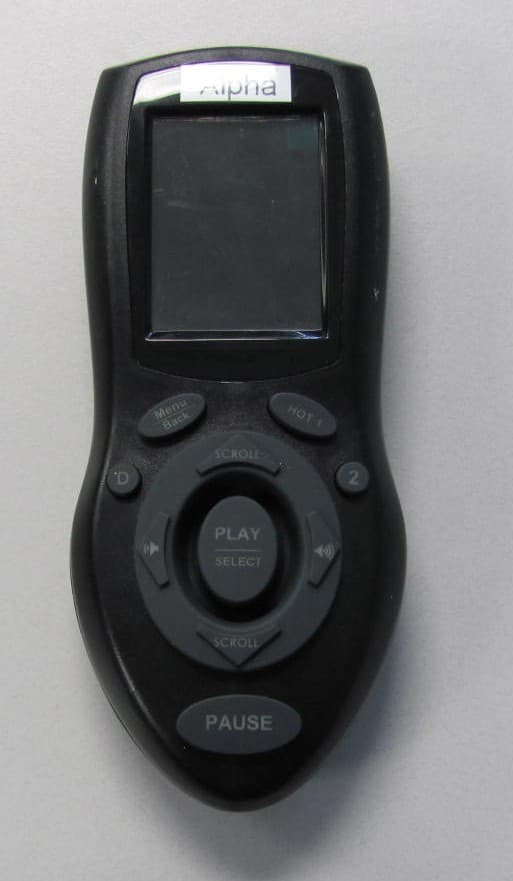
Click to zoom
Application Details
- Equipment Class
- DSS - Part 15 Spread Spectrum Transmitter
- Date of Grant
- Oct 04, 2011
- Application Purpose
- Original Equipment
- Date of Application
- Oct 04, 2011
- Equipment Note
- Electronic Game Caller
- Frequency Range
- 903.20000000 - 926.70000000
- Company
- Primos Hunting Calls
- Country
- United States
Documents & Files
Document Text
Text extracted from the exhibit documents filed with the FCC. Open a document above to read the original.
Users Manual
Turbo Dogg Instructions Model No. 3755-R & 3755-S INTRODUCTION Turbo Dogg Electronic Caller The Turbo Dogg doesn’t give you just individual sounds to choose from, it has Expert™ Hunts which allow you to have Randy Anderson and other Team Primos members actually calling for you! These are proven hunt sets that get dogs in! Powered by Single 25 watt digital amp there is No Distortion! Simple to use Remote can be operated quickly with one hand and has a range of 150 yards. Remote sound list is displayed on easy to read 1.75” Full Color LCD screen and sounds are organized by species such as coyote, fox, bobcat, deer, elk, etc. Comes with 36 sounds and 4 complete Expert™ Hunts. Professional Sound library allows you to add sounds and other newly released Expert™ Hunts. Stores over 500 sounds. Take the guess work out of “Speaking the Language” with the Alpha Dogg! ~ Will Primos PRIMOS HUNTING 604 First Street, Flora, MS 39071 – 601-879-9323 – primos.com ITEMS INCLUDED: 1. Turbo Dogg Speaker System 2. Turbo Dogg Remote 3. Instruction Manual 4. Warranty Registration Card NEEDED TO OPERATE 1. Eleven (11) (8 for Speaker and 3 for Remote) “AA” Alkaline, Lithium or Rechargeable Batteries TURBO DOGG OVERVIEW UNDERSTANDING BUTTON FUNCTIONS ON SPEAKER. POWER BUTTON - TURN ON: Press button to turn unit ‘ON’ - Red status light is illuminated - TURN OFF: Press button to turn unit ‘OFF’ - Red status light is not lit. UNDERSTANDING BUTTON FUNCTIONS ON REMOTE. POWER BUTTON - TURN ON: Press button to turn remote ‘ON’ - TURN OFF: Press button to turn unit ‘OFF’ SCROLL UP – SCROLL DOWN - VOLUME LEFT – VOLUME RIGHT ARROW BUTTONS - NAVIGATE: Use to navigate thru sounds, hunts and menu options. TIP: Hold button down to quickly scroll through sounds, hunts and menu options. - CHANGE SOUND VOLUME: Use to increase or decrease sound volume o Left Arrow – Decrease volume. TIP: Hold button down to quickly change sound volume. o Right Arrow – Increase volume. TIP: Hold button down to quickly change sound volume. MENU / BACK BUTTON - MENU: Press to enter Alpha Dogg Menu - BACK: Press to return to previous shown screen PLAY / SELECT BUTTON - PLAY: When in File Containing Sounds or Hunts , press PLAY to play highlighted sound file. Use SCROLL ARROW buttons to select new sound. Press Play again to change sound. - PLAY: When PAUSE is activated , press PLAY to resume playing sound. - SELECT: When in Alpha Dogg Menu press SELECT button to select setting. Use ARROW buttons to change setting. Press SELECT again to save setting. PAUSE BUTTON - PAUSE: When Sound or Hunt is playing , press PAUSE to stop playing sound or hunt. Press PLAY or PAUSE to resume playing sound or hunt at paused position. HOT 1 BUTTON - HOT 1: Performs programmed action instantly no matter what is playing or where you are in the menu. - Factory programmed to play KI-YI sound. Press HOT 1 to instantly play KI-YI sound. - Can be programmed for following functions: o Instantly play any selected sound in sound library. o Instantly go to My Favorite Sounds. o Recall previous played sound. o Instantly change volume level to predetermined level. o When motion decoy is connected to Decoy Port, control decoy motion. INITIAL TURBO DOGG SETUP . 1. Install recommended batteries into speaker and remote with polarities as indicated in Battery Compartments. Speaker requires 8 “AA” batteries. Remote requires 3 “AA” batteries. 2. Turn on speaker by pushing POWER button. Red LED will illuminate. 3. Turn on remote by pushing POWER button. The color LCD screen will turn on and show the Turbo Dogg Menu. Push SCROLL ▲ or ▼ to navigate through all Menu options. 4. Use SELECT and BACK buttons to navigate in and out of folders. 5. Position Speaker so signal strength on Remote has a minimum of 1 signal bar. 6. Your caller is ready to use! 7. To turn off caller, reverse above instructions. BATTERY LEVEL INDICATOR The constantly displays the battery level: Full charge Low battery Please change the battery REGISTER YOUR TURBO DOGG CALLER 1. It is very important to register your caller. This activates your warranty, allows you to download latest software updates, allows you to download sounds and Expert TM Hunts, and keeps you updated with latest information on your caller. 2. To register your caller visit www.Primos.com and/or fill out and return enclosed registration card. Note: You will need to include the serial number of the caller. It is located inside the battery compartment. PLAYING SOUNDS . 1. In Menu screen push SCROLL ▲ or ▼ to navigate through all Menu options and highlight Sounds and push Select. 2. In Sounds screen push SCROLL ▲ or ▼ to navigate through all sound options and highlight desired sound category and push SELECT. Example: Select Predator Hunting. This enters you in a menu to select sound types for hunting predators. Push SCROLL ▲ or ▼ to navigate through Predator Sound Types and highlight desired predator category and push SELECT. This enters you into a list of sounds tracks available to use on your caller. Navigate through sounds tracks and highlight desired sound. Push PLAY/SELECT to begin playing sound track. ADJUST SOUND VOLUME . 1. Push to increase volume slowly. Push to decrease volume. Hold either button down to rapidly increase/decrease volume. 2. Volume number is in lower left corner. SOUND TRACK TIME . 1. Sound track length is displayed on screen along with time played. STOP SOUND FROM PLAYING . 1. Push PAUSE button to stop sound track from playing. To resume playing track in paused position, push PAUSE. 2. To start paused sound track from beginning, use SCROLL ▲ or ▼ buttons to highlight sound track and push PLAY/SELECT. SOUND LOOP . 1. When sound track is finished playing, caller will automatically loop to beginning of track and start playing. This looping feature can be changed in Setting so sound track stops when track has finished. See Setting section in manual. NOTE: When playing MY HUNTS, when track is finished playing, caller will automatically s…
Text truncated - open the document above for the full version.
Users Manual
Alpha Dogg Instructions Model No. 3756-R & 3756-S INTRODUCTION Alpha Dogg Electronic Caller Apex of Predator Calling Technology! The Alpha Dogg doesn’t give you just individual sounds to choose from, it has Expert™ Hunts which allow you to have Randy Anderson and other Team Primos members actually calling for you! These are proven hunt sets that get dogs in! This is the most powerful “No Distortion” speaker system available. It has 2 cone speakers that can be adjusted to cover 180 degrees and one forward facing horn speaker. The 180° Rotating Cone Speakers cover more area and produce more realistic, dynamic sound. Powered by Dual 25 watt digital amps there is No Distortion! Simple to use Remote can be operated quickly with one hand and has a range of 200 yards. Remote sound list is displayed on easy to read 2.5” High Res LCD screen and sounds are organized by species such as coyote, fox, bobcat, deer, elk, etc. Comes with 75 sounds and 6 complete Expert™ Hunts. Professional Sound library allows you to add sounds and other newly released Expert™ Hunts. Stores up to 1000 sounds on 2GB of memory. Take the guess work out of “Speaking the Language” with the Alpha Dogg! ~ Will Primos PRIMOS HUNTING 604 First Street, Flora, MS 39071 – 601-879-9323 – primos.com ITEMS INCLUDED: 1. Alpha Dogg Speaker System 2. Alpha Dogg Remote 3. Alpha Dogg Speaker Handle 4. Instruction Manual 5. Warranty Registration Card NEEDED TO OPERATE 1. Eleven (11) (8 for Speaker and 3 for Remote) “AA” Alkaline, Lithium or Rechargeable Batteries ALPHA DOGG OVERVIEW UNDERSTANDING BUTTON FUNCTIONS ON SPEAKER. POWER BUTTON - TURN ON: Press button to turn unit ‘ON’ - Red status light is illuminated - TURN OFF: Press button to turn unit ‘OFF’ - Red status light is not lit. UNDERSTANDING BUTTON FUNCTIONS ON REMOTE. POWER BUTTON - TURN ON: Press button to turn remote ‘ON’ - TURN OFF: Press button to turn unit ‘OFF’ SCROLL UP – SCROLL DOWN - VOLUME LEFT – VOLUME RIGHT ARROW BUTTONS - NAVIGATE: Use to navigate thru sounds, hunts and menu options. TIP: Hold button down to quickly scroll through sounds, hunts and menu options. - CHANGE SOUND VOLUME: Use to increase or decrease sound volume o Left Arrow – Decrease volume. TIP: Hold button down to quickly change sound volume. o Right Arrow – Increase volume. TIP: Hold button down to quickly change sound volume. MENU / BACK BUTTON - MENU: Press to enter Alpha Dogg Menu - BACK: Press to return to previous shown screen PLAY / SELECT BUTTON - PLAY: When in File Containing Sounds or Hunts , press PLAY to play highlighted sound file. Use SCROLL ARROW buttons to select new sound. Press Play again to change sound. - PLAY: When PAUSE is activated , press PLAY to resume playing sound. - SELECT: When in Alpha Dogg Menu press SELECT button to select setting. Use ARROW buttons to change setting. Press SELECT again to save setting. PAUSE BUTTON - PAUSE: When Sound or Hunt is playing , press PAUSE to stop playing sound or hunt. Press PLAY or PAUSE to resume playing sound or hunt at paused position. HOT 1 BUTTON - HOT 1: Performs programmed action instantly no matter what is playing or where you are in the menu. - Factory programmed to play KI-YI sound. Press HOT 1 to instantly play KI-YI sound. - Can be programmed for following functions: o Instantly play any selected sound in sound library. o Instantly go to My Favorite Sounds. o Recall previous played sound. o Instantly change volume level to predetermined level. o When motion decoy is connected to Decoy Port, control decoy motion. HOT 2 BUTTON - HOT 2: Performs programmed action instantly no matter what is playing or where you are in the menu. - Factory programmed to play Rodent Distress sound. Press HOT 2 to instantly play Rodent Distress sound. - Can be programmed for following functions: o Instantly play any selected sound in sound library. o Instantly go to My Favorite Sounds. o Recall previous played sound. o Instantly change volume level to predetermined level. o When motion decoy is connected to Decoy Port, control decoy motion. DECOY BUTTON - DECOY BUTTON: When motion decoy is connected to Decoy Port, controls decoy motion by turning motion On/Off. NOTE: Requires standard audio wire & connector not included. - DECOY BUTTON can be programmed to act as HOT 3 BUTTON. - Can be programmed for following functions: o Instantly play any selected sound in sound library. o Instantly go to My Favorite Sounds. o Recall previous played sound. o Instantly change volume level to predetermined level. o When motion decoy is connected to Decoy Port, control decoy motion. INITIAL ALPHA DOGG SETUP . 1. Install recommended batteries into speaker and remote with polarities as indicated in Battery Compartments. Speaker requires 8 “AA” batteries. Remote requires 3 “AA” batteries. 2. Install handle on Speaker. 3. Turn on speaker by pushing POWER button. Red LED will illuminate. 4. Turn on remote by pushing POWER button. The color LCD screen will turn on and show the Alpha Dogg Menu. Push SCROLL ▲ or ▼ to navigate through all Menu options. 5. Use SELECT and BACK buttons to navigate in and out of folders. 6. Position Speaker so signal strength on Remote has a minimum of 1 signal bar. 7. Your caller is ready to use! 8. To turn off caller, reverse above instructions. BATTERY LEVEL INDICATOR The constantly displays the battery level: Full charge Low battery Please change the battery REGISTER YOUR ALPHA DOGG CALLER 1. It is very important to register your caller. This activates your warranty, allows you to download latest software updates, allows you to download sounds and Expert TM Hunts, and keeps you updated with latest information on your caller. 2. To register your caller visit www.Primos.com and/or fill out and return enclosed registration card. Note: You will need to include the serial number of the caller. It is located inside the battery compartment. PLAYING SOUNDS . 1. In Menu screen push SCROLL ▲ or ▼ to navigate through all Menu options and highlight Sounds …
Text truncated - open the document above for the full version.
Cover Letter(s)
Page 1 of 1 RP-7078A 12 East Devonwood SOLVING A WAVE OF EMI COMPLIANCE PROBLEMS Romeoville, IL 60446 July 25, 2011 Tel: (815) 293-0772 Page 1 of 1 Fax: (815) 293-0820 Federal Communications Commission Authorization and Evaluation Division 7435 Oakland Mills Rd. Columbia, MD 21046 Industry Canada Certification and Engineering Bureau Ottawa, Ontario K2H 8S2 Canada Reference FCC ID: T3VDOGG003 Reference IC ID: 9792A-DOGGR003 Organization: Primos, Inc. 2. Long Term Confidentiality Primos requests that the following materials be withheld from public inspection permanently under 47 C.F.R. 0.457 & 0.459: (1) Detailed Circuit Schematics of the EUT (2) Block Diagrams (3) EUT Description The above materials contain proprietary and confidential information not customarily released to the public. The public disclosure of these materials provides unjustified benefits to its competitors in the market. They are considered confidential trade secrets Authorized Signature Joseph Strzelecki Senior EMC Engineer Radiometrics Midwest Corporation Authorized Agent for Primos, Inc.
External Photos
Authorized Agent: Radiometrics Midwest Corporation (815) 293-0772 External EUT Photographs Front of EUT- Alpha Dogg Front of EUT- Turbo Dogg Rear of EUT Authorized Agent: Radiometrics Midwest Corporation (815) 293-0772 Rear of EUT – Battery Cover removed
ID Label/Location Info
Authorized Agent: Radiometrics Midwest Corporation (815) 293-0772 ID Label/Location Drawings of Label Photograph Showing placement of label on EUT Radiometrics Midwest Corporation (815) 293-0772 – [email protected] Technical Specifications of Labels Model: 3755-R Radiometrics Midwest Corporation (815) 293-0772 – [email protected] Model: 3756-R
Internal Photos
Authorized Agent: Radiometrics Midwest Corporation (815) 293-0772 Internal EUT Photographs Photographs of PC Board: Component Side Photographs of PC Board: Foil Side Alpha Dogg Turbo Dogg Authorized Agent: Radiometrics Midwest Corporation (815) 293-0772 Photographs of Inside of Front Covers Turbo Dogg Photograph of Rear Cover
RF Exposure Info
Authorized Agent: Radiometrics Midwest Corporation (815) 293-0772 RF Exposure This calculation is based on the highest EIRP possible from the EUT considering maximum power and antenna gain. The highest effective output power of the EUT is 11.9 mW 1 MINIMUM SEPARATION DISTANCE PER OET 65 The following information provides the minimum separation distance for the EUT, as calculated from FCC OET 65 Appendix B, Table 1B “Guidelines for General Population/Uncontrolled Exposure” SMaximum AntennaMSD Freq.GP limitRF power GainEIRPEIRPd MHzmW/cm^2 dBmdBdBmwattsmeters 9150.6110.8010.80.0120 0.0125 GP is the limit for general Population/Uncontrolled Exposure MSD is the minimum Seperation Distance Notes on above table. (S) GP limit is from OET 65 table 1B EIRP = Power in dBm + Antenna Gain in dBi MSD (Minimum Separation Distance) = ((EIRP*30)/3770*S))^0.5 NOTE: For mobile or fixed location transmitters, minimum separation distance is 20 cm, even if calculations indicate MPE distance is less 2 RF EVAULATION FOR RSS-102E Since the e.i.r.p. of the Product is 11.9 mW, it is exempt from routine SAR and RF exposure evaluations in accordance to Sections 2.5.1 or 2.5.2 of RSS-102e.
Test Report
Radiometrics Midwest Corporation - www.Radiomet.com Page 1 of 22 Electromagnetic Compatibility Test Report Tests Performed on a Primos Hunting Calls’ Remote Transciever, Models 3756-R and 3755-R Radiometrics Document RP-7078A Product Detail: FCC ID: T3VDOGG003 IC: 9792A-DOGGR003 Equipment type: 903 to 927 MHz Frequency Hopping Transmitter Test Standards: US CFR Title 47, Chapter I, FCC Part 15 Subpart C FCC Part 15 CFR Title 47: 2009 Industry Canada RSS-210, Issue 8: 2010 as required for Category I Equipment This report concerns: Original Grant for Certification FCC Part 15.247 Tests Performed For: Test Facility: Primos Hunting Calls 604 First Street Flora, Mississippi 39071 Radiometrics Midwest Corporation 12 East Devonwood Romeoville, IL 60446 (815) 293-0772 Test Date(s): (Month-Day-Year) July 12 to 21, 2011 Document RP-7078A Revisions: Rev. Issue Date Affected Sections Revised By 0 July 25, 2011 1 August 2, 2011 All Joseph Strzelecki Radiometrics Midwest Corporation www.radiomet.com Testing of the Primos Hunting Calls, Models 3756-R and 3755-R, Remote RP-7078A Rev. 1 Page 2 of 22 Table of Contents 1 ADMINISTRATIVE DATA.................................................................................................................... 3 2 TEST SUMMARY AND RESULTS......................................................................................................3 2.1 RF Exposure Compliance Requirements ..................................................................................... 4 3 EQUIPMENT UNDER TEST (EUT) DETAILS..................................................................................... 4 3.1 EUT Description............................................................................................................................ 4 3.1.1 FCC Section 15.203 & RSS-GEN Antenna Requirements .................................................... 4 3.2 Related Submittals........................................................................................................................ 4 4 TESTED SYSTEM DETAILS .............................................................................................................. 4 4.1 Tested System Configuration ....................................................................................................... 4 4.2 Special Accessories...................................................................................................................... 4 4.3 Equipment Modifications............................................................................................................... 5 5 TEST SPECIFICATIONS AND RELATED DOCUMENTS .................................................................. 5 6 RADIOMETRICS’ TEST FACILITIES.................................................................................................. 5 7 DEVIATIONS AND EXCLUSIONS FROM THE TEST SPECIFICATIONS ......................................... 6 8 CERTIFICATION ................................................................................................................................. 6 9 TEST EQUIPMENT TABLE ................................................................................................................ 6 10 TEST SECTIONS .............................................................................................................................. 6 10.1 Carrier Frequency Separation .................................................................................................... 6 10.2 Number of Hopping Frequencies ................................................................................................ 8 10.3 Time of Occupancy (Dwell Time).............................................................................................. 10 10.4 Occupied Bandwidth (20 dB or 99%)........................................................................................ 11 10.5 Peak Output Power................................................................................................................... 13 10.6 Band-edge Compliance of RF Conducted Emissions............................................................... 14 10.7 Spurious RF Conducted Emissions .......................................................................................... 15 10.8 Spurious Radiated Emissions (Restricted Band) ...................................................................... 17 10.8.1 Radiated Emissions Field Strength Sample Calculation .................................................... 17 10.8.2 Spurious Radiated Emissions Test Results (Restricted Band) .......................................... 18 10.9 Unintentional Emissions (Receive Mode) ................................................................................. 22 Notice: This report must not be reproduced (except in full) without the written approval of Radiometrics Midwest Corporation. Radiometrics Midwest Corporation www.radiomet.com Testing of the Primos Hunting Calls, Models 3756-R and 3755-R, Remote RP-7078A Rev. 1 Page 3 of 22 1 ADMINISTRATIVE DATA Equipment Under Test: A Primos Hunting Calls, Remote Models: 3755-R and 3756-R Serial Number: None These will be referred to as the EUT in this Report Date EUT Received at Radiometrics: (Month-Day-Year) Test Date(s): (Month-Day-Year) July 12, 2011 July 12 to 21, 2011 Test Report Written By: Test Witnessed By: Joseph Strzelecki Senior EMC Engineer The tests were not witnessed by personnel from Primos Hunting Calls Radiometrics’ Personnel Responsible for Test: Test Report Approved By Joseph Strzelecki Senior EMC Engineer NARTE EMC-000877-NE Chris W. Carlson Director of Engineering NARTE EMC-000921-NE 2 TEST SUMMARY AND RESULTS The EUT (Equipment Under Test) is a Remote, Models 3755-R and 3756-R, manufactured by Primos Hunting Calls. The detailed test results are presented in a separate section. The following is a summary of the test results. Emissions Tests Results Environmental Phenomena Frequency Range B…
Text truncated - open the document above for the full version.
Test Setup Photos
Authorized Agent: Radiometrics Midwest Corporation (815) 293-0772 Test Setup Photographs Photograph of Radiated Emissions Test Setup Authorized Agent: Radiometrics Midwest Corporation (815) 293-0772 Authorized Agent: Radiometrics Midwest Corporation (815) 293-0772
Contact Information
Applicant
Lorena Ramos(V.P. / Executive Assistance)
Test Firm
Radiometrics Midwest Corp.Joseph Strzelecki
Technical Specifications
| # | Rule Parts | Frequency Range | Power Output |
|---|---|---|---|
| 1 | 15C | 903.2 MHz - 926.7 MHz | 12.00 mW |
Other Applications from Primos Hunting Calls
T3VDOGG002
Oct 04, 2011Electronic Game Caller
Equipment Class
DSS - Part 15 Spread Spectrum TransmitterT3V3754
Oct 23, 2006e-PREDATOR
Equipment Class
DSC - Part 15 Security/Remote Control Transmitter
T3V7752
Mar 16, 2006e-DEER
Equipment Class
DSC - Part 15 Security/Remote Control Transmitter