TGZAP13XXBTBluetooth Printer
Able Systems Limited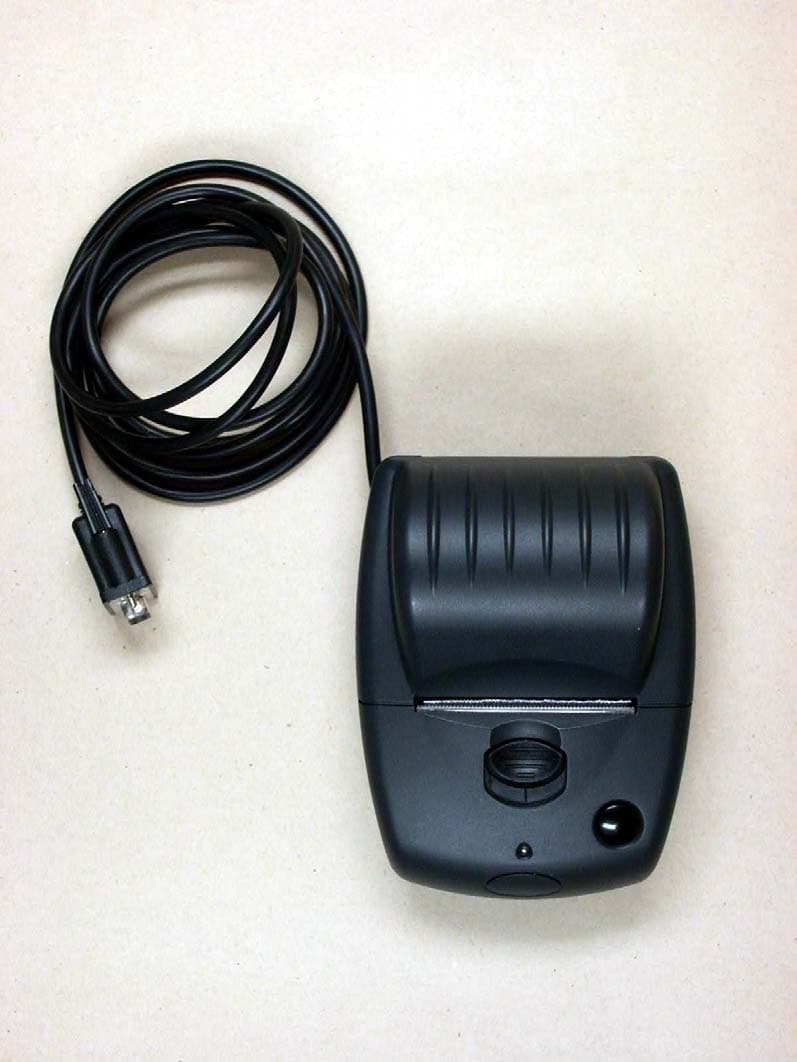
Click to zoom
Application Details
- Equipment Class
- JBP - Part 15 Class B Computing Device Peripheral
- Date of Grant
- Dec 06, 2006
- Application Purpose
- Original Equipment
- Date of Application
- Dec 05, 2006
- Equipment Note
- Bluetooth Printer
- Company
- Able Systems Limited
- Country
- United Kingdom
Documents & Files
Document Text
Text extracted from the exhibit documents filed with the FCC. Open a document above to read the original.
Users Manual
ABLE Systems Limited for all your mini-printer needs www.able-systems.com Ap1300 Thermal Portable Printer – with Bluetooth option Design registered. Bluetooth certification pending. Compact and stylish• Unique SINGLE-handed easy paper-load system – no other printer is easier! • Utilising a high speed and high quality fixed head thermal mechanism with superb quality text. • Choice of interface solutions including Serial RS232, full implementa tion IrDA ® and Bluetooth ® . • Strong case design that won’t stress the lid hinge. • Miniature size - yet takes up to 16m paper roll. • Choice of battery management within one printer (re-chargeable within the unit or use primary cells). In-vehicle solutions and mains supply also available. Typical Applications include:Mobile ticketing and recording. Use with PDA’s.Queue busting. Utility billing. In-vehiclereceipting. Financial transactions. Taxi receiptprinting. Law enforcement agencies. Test andmeasurement. Medical. Head Office(Production, Sales, Designand Repair)A BLE Systems Limited Denton DriveNORTHWICHCheshireCW9 7TUEnglandTel: +44 (0) 1606 48621Fax: +44 (0) 1606 44903E-mail:[email protected] Web address:www.able-systems.com A vailable from: Ap1300 Thermal Portable Printer – with Bluetooth option __________________________________________________________________________________________________________________________Other products available from Able Systems include: Wireless Printers Portable printers Panel mounting printers Kiosk printers In-vehicle printers Printer mechanisms & interfaces Accessories and Consumables E & OE. Copyright 2004 Able Systems Limited. All trade marks acknowledged. Specifications subject to change without no tice. Ap1300/0304/DW. Specification Ap1300 Ap1300-IR Ap1300-BT Data Input RS-232 Serial (RJ12 connector) RS-232 Serial (RJ12 connector) RS-232 Serial (RJ12 connector) Wireless Data Input N/A IrDA (IrPHY V1.0, IrLAP, IrLMP, IAS, TinyTP, IrCOMM 9-wire) Bluetooth Print Method Fixed head thermal mechanism (Fujitsu FTP-628MCL103) Print Speed 60 mm/s (at 7.2V battery voltage); 50mm/s (typical) Paper Specification Paper Roll Width: 57.5 ± 0.5mm. Max roll diameter: 36mm (Length: 14.5 - 16 meters) Accepts paper rolls with or without a core Print Width 48 mm Dots per line (graphics) 384 Dot spacing 8 dots/mm (vertical and horizontal) Sensors Paper Out (Opto reflective) and Head Up (Mechanical) Data Buffer 20 Kb Baud Rate For serial RS232 only: Up to 57,600 (9600 Default) Character Set IBM® 224 character set, CP437. (See note 1) Number of columns 12, 16, 21, 24, 42, 32 (Default). (See note 1) Font (dots) 7 x 24, 10 x 24 (Default). (See note 1) Dimensions 47 x 92 x 108 mm (H x W x L) Weight 330g (including battery and full roll of paper) Power Supply Options As standard the Ap1300 range is supplied with a shrink-wrapped re-chargeable batterypack (5 cell 6V NiMH), together with an adapter to allow the use of primary cells.Note that chargers and data or power cables need to be ordered separately (see below)or as part of a complete kit. Power supply options include: • B C1300: Universal i/p trickle charger • B C1300B: British trickle charger • BC1300FC: Universal i/p combined fast charger and 12V vehicle charger Other options • Ap1300BR-01: Combined wall mounting bracket and belt clip • Ap1300-D9: D9 to RJ12 data cable (with jack socket for alternative charging) • Ap1300BP-01: Spare NiMH battery pack Windows ® Driver Win98, WinME, WinNT, Win2k, WinXP. Download from www.able-s y stems.com Temperature Range (operating) 0 - 50°C Reliability - MCBF 10 8 print pulses or 50kms. >13 million print lines (Approx. 3,500 paper rolls). Note 1: The proprietary Font Editor Utility software (order code Ap800FEU) enables customisation of character fonts by the user . Please note that for low volume purchases theA p1300 family of printers are only available in kit form, as follows: A p1300-KIT1 : comprising an Ap1300 printer fitted with re-chargeable batteries, a BC1300universal trickle charger, an Ap1300-D9 datacable, an Ap1300BR-01 belt clip/wall bracket,two A05836TPR1 paper rolls and a primarycell cradle. A p1300-IR-KIT1 : As the AP1300-Kit1 described above but with an AP1300-IRinstead of the standard AP1300 printer. A p1300-BT-KIT1 : As the AP1300-Kit1 described above but with an AP1300-BTinstead of the standard AP1300 printer.
Users Manual
ABLE Systems Limited for all your mini-printer needs www.able-systems.com Ap1310 Thermal Portable Printer – with 38m long paper roll & label or Bluetooth options Design registered. Compact and stylishx Unique SINGLE-handed easy paper-load system – no other printer is easier! x Utilising a high speed and high quality fixed head thermal mechanism with superb quality text. x Capable of printing on linerless labels. x Choice of interface solutions including Serial RS232, full implementa tion IrDA and Bluetooth. x Strong case design that won’t stress the lid hinge. x Miniature size - yet takes up to 38m long paper roll. x Choice of battery management within one printer (re-chargeable within the unit or use primary cells). In- vehicle solutions and mains su pp l y also available. Typical Applications include:Mobile ticketing and recording. Use with PDA’s.Labelling. Queue busting. Utility billing. In-vehicle receipting. Financial transactions. Taxireceipt printing. Law enforcement agencies. Testand measurement. Medical. Hospitality. Available from: Head Office (Production, Sales, Design & Repair)A BLE Systems Limited Denton DriveNORTHWICHCheshire, CW9 7TUEnglandTel: +44 (0) 1606 48621Fax: +44 (0) 1606 [email protected] office (Sales) 1514 Meadow Brook LaneWest Chester, PA 19380,USATel: +1 610 692 4580Fax: +1 610 692 [email protected] Ap1310 Thermal Portable Printer – with 38m long paper roll & label or Bluetooth options __________________________________________________________________________________________________________________________Other products available from Able Systems include: Portable printers Panel mounting printers Kiosk printers In-ve hicle printers Printer mechanisms & interfaces Accessories Consumables E & OE. Copyright 2005 Able Systems Limited. All trade marks acknowledged. Specifications subject to change without no tice. Ap1310/1105/DW. Specification Ap1310 Ap1310-IR Ap1310-BT Data Input RS-232 Serial (RJ12 connector) RS-232 Serial (RJ12 connector) RS-232 Serial (RJ12 connector) Wireless Data Input N/A IrDA (IrPHY V1.0, IrLAP, IrLMP, IAS, TinyTP, IrCOMM 9-wire) Bluetooth Print Method Fujitsu fixed head thermal mechanism Print Speed 60 mm/s (at 7.2V battery voltage); 50mm/s (typical) Paper Specification Paper Roll Width: 57.5 ± 0.5mm. Max roll diameter: 55mm (Length: 37.7m @ 60um thickness) Accepts paper rolls with or without a core Print Width 48 mm Dots per line (graphics) 384 Dot spacing 8 dots/mm (vertical and horizontal) Sensors Paper Out (Opto reflective) and Head Up (Mechanical) Data Buffer 20 Kb Baud Rate Up to 57,600 (9600 Default) Character Set IBM® 224 character set, CP437. (See note 1) Number of columns 12, 16, 21, 24, 42, 32 (Default). (See note 1) Font (dots) 7 x 24, 10 x 24 (Default). (See note 1) Dimensions 65 x 95 x 128 mm (H x W x L) Weight 446g (including battery and full roll of paper) Power Supply Options As standard the Ap1310 range is supplied with a shrink-wrapped re-chargeable batterypack (5 cell 6V NiMH), together with an adapter to allow the use of primary cells.Note that chargers and data or power cables need to be ordered separately (see below)or as part of a complete kit. Power supply options include: x BC1300: Universal i/p trickle charger x BC1300FC: Universal i/p combined fast charger and 12V vehicle charger Other options x Ap1300BR-01: Combined wall mounting bracket and belt clip x Ap1300-D9: D9 to RJ12 data cable (with jack socket for alternative charging) x Ap1300BP-01: Spare NiMH battery pack Windows ® Driver Win98, WinME, WinNT, Win2k, WinXP. Download from www.able-s y stems.com Temperature Range (operating) 0 - 50°C Reliability - MCBF 10 8 print pulses or 50kms. >13 million print lines (Approx. 3,500 paper rolls). Note 1: The proprietary Font Editor Utility software (order code Ap800FEU) enables customisation of character fonts by the user . Please note that for low volume purchases theA p1310 family of printers are only available in kit form.The different kits and their composition will bespecified in due course. Contact our salesdepartment or your local distributor for moreinformation.There are also some new options available: Ap1310-DP as per the standard Ap1310 but suitable for use with mains power (nobatteries).Ap1310-DC as per the standard Ap1310 but with an integral DC:DC converter forautomotive applications. Availability to benotified.Ap1310-USB-DP as per the Ap1310-DP but with a USB (not RS232) serial data input (A toB connection). Availability to be notified.
Users Manual
Ap1300 Drop Test 1 Method: The production Ap1300 unit (including full paper roll) was dropped 6 times from a height of 1m onto a hard floor tile surface. After each drop, the unit was inspected for mechanical damage, and a self test printed out. Results: Test - 1 metreMechanical damage?Self Test Print? Drop A Lid opened – Roller Came out okay Drop B Lid opened – Roller Came out okay Drop C Lid opened – Roller Came out okay Drop D Lid opened – Roller Came out okay Drop E Lid opened okay Drop F Lid opened – Roller Came out okay Conclusion: Other than minor external abrasions, there was no visible mechanical damage to the unit, and the printer remained fully functional. TEST PASSED! Ap1300 Drop Test 2 Method: The production Ap1300 unit (including full paper roll) was dropped 6 times from a height of 2m onto a hard floor tile surface. After each drop, the unit was inspected for mechanical damage, and a self test printed out. Results: Test - 1 metreMechanical damage?Self Test Print? Drop A Lid opened – Roller came out – One of the battery door clips broke off okay Drop B Lid opened – Roller Came out okay Drop C Lid opened – Roller Came out – Other battery door clip broke off – Plastic around battery door screw broke and battery door came off okay Drop D Lid opened – Roller Came out – Battery door is now not held. okay Drop E Lid opened – Roller Came out – Battery door is now not held. okay Drop F Lid opened – Roller Came out – Battery door is now not held. okay Conclusion: Plenty of external abrasions. Mechanical damage to the Battery Door which meant it would only just stay on the unit. There was no other visible mechanical damage to the unit, and the printer remained fully functional. The Battery Door would certainly need replacement. TEST PASSED! Ap1300 Drop Test 3 As a final test the unit was dropped from a 1 st floor office window (approx. 6m) on to a concrete surface. Severe external abrasions. No mechanical damage or broken parts, although the printer did fail to work due to a failed crystal on the pcba. After repairing the crystal, the unit was dropped again. Severe external abrasions. The Lid opened and the Roller Came out. Both battery door clips broke off and the plastic around battery door screw broke and battery door came off. No other visible mechanical damage, and the printer still worked!. Ap1300 Packaged Kit - Drop Test 1 Method: The standard Ap1300 kit including: Ap1300 printer inside bubble bag. Boxed charger. 2 x Paper Rolls. Data Cable. Wall/Belt Mounting Kit. was dropped 6 times from a height of 2m onto a hard floor tile surface. After each drop, the packaging was opened and the contents inspected for mechanical damage, and a self test printed out. Results: Test - 2 metreMechanical damage?Self Test Print? Drop A Non okay Drop B Non okay Drop C Printer shifted forward, slight creasing to inner cardboard okay Drop D Printer shifted backward, further creasing to inner cardboard okay Drop E Damage to internal cardboard okay Drop F Damage to internal cardboard okay Conclusion: After the 6 drops, the internal cardboard had sustained creasing and slight tear damage. The contents of the packaging remained intact and free of any marks, scratches or mechanical damage. TEST PASSED!
Users Manual
Ap1300 Series Thermal Mini Printer Quick Start Guide 1. INFORMATION Product Set includes: • 1xAp1300 Printer. • 2 xRoll of 36mm Diameter Thermal Paper. • 1xData Cable (D9 – RJ12). • 1xUK only Trickle Charger. • 1 xWall/Belt Mounting Kit. • 1xQuick Start Guide. Other Accessories available: ASL Product CodeDescription AP1300-Serial RS-232 Printer (including Battery Pack). AP1300-IR-Serial RS-232 Printer with IrDA (including Battery Pack). AP1300-BT-Serial RS-232 Printer with Bluetooth TM (including Battery Pack). BC1300-Universal Input Trickle Charger (UK/Euro/USA). BC1300B-UK Only Trickle Charger. BC1300FC-Universal Fast Charger with Vehicle Input (UK/Euro/USA/Aus). A05836TPR1-36mm Diameter Thermal Paper Roll. AP1300-D9-D9 to RJ12 Data Cable. AP1300-BP-Replacement / Spare Battery Pack. 2. PREPARATION Fitting/Connecting the Battery Pack: For safety, the Battery Pack is supplied discharged and disconnected. Before use, the Battery must be connected (see below) and fully charged. 1. Remove the screw from the Battery Compartment Door. 2. Push down, and slide back the Battery Compartment Door. 3. Fit the Battery Pack Connector taking care to insert it correctly. 4. Fit the Battery Pack ensuring wires are correctly routed and not trapped, Connecting the AC Battery Charger: 1. Plug the AC Battery Charger into a suitable Mains Outlet Socket and Insert the Jack Plug into the Power Connector at the Rear of the Printer. The LED will Flash Orange to show that the Printer is on charge. There is also the option of charging the Printer via the Jack Socket in the D9 Connector. Fully charging the Battery Pack takes about 15 hours with the Trickle Charger, or about 3 hours with the Fast Charger. Loading Paper: 1. Slide the Lid Release Button forwards until the Lid springs open. 2. Unwind a small amount of paper from the roll and Insert the Paper Roll into the Printer. 3. Close the Lid down, and the paper is loaded. Pressing the paper feed button when the printer is idle advances paper at typically 50mm per second, depending on the battery voltage. However, the feed button has several additional functions: A single press and release of the button: • In idle or spooling mode, advances paper. • In sleep mode, wakes up the printer into idle mode. "Double-clicking" the button: • In idle mode, prints a demo/test message including the firmware version, encoded calibration data, and the full character set. • In spooling mode, exits spooling mode and prints any stored data. 3. OPERATION Modes Of Operation: The Ap1300 has three operating modes, when not actually printing: ü "Idle Mode": ready to accept data, but no data are in the buffer awaiting printing, and the printer motor is not running; ü “Sleep Mode": effectively switched off and awaiting either a press on the paper feed button, connection of the external charger, or some external data to exit sleep mode and enter idle mode; ü "Spooling Mode": active, but storing data for later printing. The LED is off in sleep mode. No hardware power switch is fitted. Power control is automatic or by command from the host. To save power, the printer enters sleep mode after a period of inactivity, factory-set to 30 seconds. It can also be programmed to stay awake indefinitely or to go to sleep on command. Idle Mode: In idle mode, the printer is ready to receive data, which will be printed as soon as complete lines or graphics patterns are decoded. It responds to the paper feed button in the normal way, and can also produce a demonstration print (see below). Power consumption is such that a fully-charged battery pack would last over 10 hours, but the printer will normally switch from idle mode into sleep mode when there is no activity, extending battery life. Sleep Mode: In sleep mode, power consumption is negligible, but data stored in the buffer are lost. Special routines allow for data to be printed out automatically before going to sleep. User programmable settings such as Baud rate and operational preferences are retained during sleep mode or battery replacement. The system designer can maximise battery life by arranging that the printer is generally in sleep mode, except when printing. The printer enters sleep mode as follows: ü By command from the host. ü At the end of the (programmable) period of inactivity. (This period is extended in spooling mode). But, the Ap1300 will never enter sleep mode when: ü A charger is connected. ü Data is being received. ü The RS-232 "Wake-up" control line is 'active'. ü An IrDA connection is present ( "Ap1300-IR" only ) The printer may be woken up from sleep mode as follows: ü By pressing the paper feed button. ü By connecting the external battery charger. ü By RS-232 data from the host (typically a string of 50 NUL characters). ü By the RS-232 "Wake-up" control line becomes 'active'. ü By Infra-Red activity ( "Ap1300-IR" only). Spooling Mode In spooling mode, data is received and stored, but not printed. This is useful when printing needs to be suppressed during data transfer (for example in mobile radio systems); or when the printer is unable to print because the paper has run out or the lid is open. The Ap1300 will automatically enter spooling mode when the paper is out, when the head is up, or if some other error condition occurs, or alternatively by command from the host. Spooling mode may be cleared by host command, automatically when the condition is cleared, or by "double-clicking" the feed button. Continuous Operation Please see the Ap1300 User Manual for the charger specification. Available at www.able-systems.com 4. SPECIFICATION Print Mode: Thermal Line Dot Print (8 dots/mm) Fujitsu Printer Mechanism. Interface Options: RS-232 only (6 Way RJ12)-AP1300 RS-232 + Infra-red (IrDA)-AP1300-IR RS-232 + Bluetooth TM -AP1300-BT Interface Details: RS-232 Rx, Tx, Busy, Ground, Wake-up control. Selectable baud rates and formats. IrDAIrPHY V1.0, IrLAP, IrLMP, IAS, TinyTP, IrCOMM 9-wire BluetoothFull Bluetooth Support Battery Pack: 5 Cell…
Text truncated - open the document above for the full version.
Cover Letter(s)
11.07.2005 Federal Communications Commission Authorization and Evaluation Division Equipment Authorization Branch 7435 Oakland Mills Road Columbia, MD 21046 To whom it may concern: We, the undersigned, hereby authorize Electronic Technology Systems Dr. Genz GmbH to act on our behalf in all matters relating to applications for equipment authorization AP13XX, including the signing of all documents relating to these matters. Any and all acts carried out by Electronic Technology Systems Dr. Genz GmbH on our behalf shall have the same effect as acts of our own. We also hereby certify that no party to this application is subject to a denial of benefits, including FCC benefits, pursuant to Section 5301 of the Anti-Drug Abuse Act of 1988, 21 U.S.C. 862. Sincerely, Ian Evans Engineering Manager Able Systems Limited
Cover Letter(s)
05/12/06 Federal Communications Commission Equipment Authorization Branch 7435 Oakland Mills Road Columbia, MD 21046 Request for Confidentiality Able Systems Limited FCC ID: TGZAP13XXBT FCC Part 15 Certification Gentlemen, In accordance with 0.459 of CFR 47, Able Systems Limited hereby requests confidentiality of all Block Diagrams, Circuit Description, Schematic Diagrams, Parts Lists and Operational Description attachments for the subject application. These documents contain detailed system and equipment description and related information about the product which Able Systems Limited considers to be proprietary, confidential and a custom design and otherwise would not release to the general public. Since the design is a basis from which future technological products will evolve, Able Systems Limited considers that this information would be of benefit to its competitors and that the disclosure of the information in these documents would give competitors an unfair advantage in the market. Sincerely, Ian Evans Engineering Manager Able Systems Limited
External Photos
Registration number : G0M20506-9566-C-1 ETS PRODUCT SERVICE AG STORKOWER STRASSE 38C D-15526 REICHENWALDE B. BERLIN Page 1 of 10 Appendix A. Pictures Registration number : G0M20506-9566-C-1 ETS PRODUCT SERVICE AG STORKOWER STRASSE 38C D-15526 REICHENWALDE B. BERLIN Page 2 of 10
Internal Photos
Registration number : G0M20506-9566-C-1 ETS PRODUCT SERVICE AG STORKOWER STRASSE 38C D-15526 REICHENWALDE B. BERLIN Page 3 of 10 Registration number : G0M20506-9566-C-1 ETS PRODUCT SERVICE AG STORKOWER STRASSE 38C D-15526 REICHENWALDE B. BERLIN Page 4 of 10 Registration number : G0M20506-9566-C-1 ETS PRODUCT SERVICE AG STORKOWER STRASSE 38C D-15526 REICHENWALDE B. BERLIN Page 5 of 10 Registration number : G0M20506-9566-C-1 ETS PRODUCT SERVICE AG STORKOWER STRASSE 38C D-15526 REICHENWALDE B. BERLIN Page 6 of 10 Registration number : G0M20506-9566-C-1 ETS PRODUCT SERVICE AG STORKOWER STRASSE 38C D-15526 REICHENWALDE B. BERLIN Page 7 of 10
Test Report
ETS PRODUCT SERVICE AG TEST - REPORT FCC RULES PART 15 / SUBPART B FCC ID: TGZAP13XXBT Test report no.: G0M20506-9566-C-1 Certificate: 1983.01 ETS STORKOWER STRASSE 38C, D-15526 REICHENWALDE B. BERLIN PRODUCT SERVICE AG PHONE +49-33631-888 00 FAX +49-33631-888 660 Registration number : G0M20506-9566-C-1 ETS PRODUCT SERVICE AG STORKOWER STRASSE 38C D-15526 REICHENWALDE B. BERLIN Page 1 of 25 TABLE OF CONTENTS 1 General Information 2 1.1 Notes 2 1.2 Tester 4 1.3 Testing laboratory 5 1.3.1 Location 5 1.3.2 Details of accreditation status 5 1.3.3 Test location, where different 5 1.4 Details of applicant 6 1.5 Application details 6 1.6 Test item 6 1.6.1 Description of test item 6 1.6.2 Manufacturer (if different from applicant in point 1.4) 7 1.6.3 Frequency behavior 7 1.7 Test standards 7 2 Technical test 8 2.1 Summary of test results 8 2.2 Test environment 8 2.3 Test equipment utilized 9 2.4 Test results 19 2.4.1 Conducted Emission 20 2.4.2 Spurious Emission 20 2.5 Test protocols 22 2.6 Equipment Modification 24 3 Normative references 25 Annex : Pictures and diagrams Registration number : G0M20506-9566-C-1 ETS PRODUCT SERVICE AG STORKOWER STRASSE 38C D-15526 REICHENWALDE B. BERLIN Page 2 of 25 1 General Information 1.1 Notes The purpose of conformity testing is to increase the probability of adherence to the essential requirements or conformity specifications, as appropriate. The tests were carried out and passed in accordance to the standards: FCC part 15 : January 2005 The complexity of the technical specifications, however, means that full and thorough testing is impractical for both technical and economic reasons. Furthermore, there is no guarantee that a test sample which has passed all the relevant tests conforms to a specification (only telecommunication products). Neither is there any guarantee that such a test sample will interwork with other genuinely open systems. The existence of the tests nevertheless provides the confidence that the test sample possesses the qualities as maintained and that its performance generally conforms to representative cases of communications equipment. The test results of this test report relate exclusively to the item tested as specified in 1.6. The test report may only be reproduced or published in full. Reproduction or publication of extracts from the report requires the prior written approval of the ETS PRODUCT SERVICE AG. Registration number : G0M20506-9566-C-1 ETS PRODUCT SERVICE AG STORKOWER STRASSE 38C D-15526 REICHENWALDE B. BERLIN Page 3 of 25 Important Notes: Proper labeling is required for each device. Devices shall be labeled in accordance with labeling requirements pursuant to section 15.19 and section 2.1074 of the FCC rules and RSP100 of the IC- Canada specification. Devices subject to a Declaration of Conformity shall be uniquely identified by the responsible party. This identification shall not be of a format which could be confused with the FCC Identifier required on certified, notified type accepted or type approved equipment. The responsible party shall maintain adequate identification records to facilitate positive identification for each device. The user manual or instruction manual shall included also a warning statement that changes or modifications not expressly approved by the party responsible for compliance could void the user’s authority to operate the equipment. Reference Section 15.21 Furthermore information to the user regarding to the interference potential of the device and about simple measures that can be taken to correct interference is required. Reference Section 15.105 The responsible party must warrant that each unit of equipment marketed under a Declaration of Conformity is identical to the unit tested and found acceptable with the standards and that the records maintained by the responsible party continue to reflect the equipment being produced under the Declaration of Conformity within the variation that can be expected due to quantity production and testing on a statistical basis. Registration number : G0M20506-9566-C-1 ETS PRODUCT SERVICE AG STORKOWER STRASSE 38C D-15526 REICHENWALDE B. BERLIN Page 4 of 25 1.2 Tester 07.12.2006 A. Pflug ___________________________________________________________________ Date ETS-Lab. Test Engineer Signature Technical responsibility for area of testing: 07.12.2006 N. Kaspar ____________________________________________________________________ Date ETS Name Signature Registration number : G0M20506-9566-C-1 ETS PRODUCT SERVICE AG STORKOWER STRASSE 38C D-15526 REICHENWALDE B. BERLIN Page 5 of 25 1.3 Testing laboratory 1.3.1 Location ETS PRODUCT SERVICE AG Storkower Strasse 38c D- 15526 Reichenwalde Germany Telephone : + 49 33631 888 000 Telefax : + 49 33631 888 660 1.3.2 Details of accreditation status ACCREDITED TESTING LABORATORY DAR-R EGISTRATION NUMBER: DAT-P-201/96 ACCREDITED COMPETENT BODY DAR-R EGISTRATION NUMBER: BNetzA-zS-026/96 FCC filed test laboratory Reg. No. 96970 Bluetooth Qualification Test Facility (BQTF) Accredited by Bluetooth Qualification Review Board Industry Canada filed test laboratory Reg. No. IC 3470 A2LA Accredited Certification number 1983.01 1.3.3 Test location, where different from ETS Name: ./. Street: ./. Town: ./. Country: ./. Telephone: ./. Fax: ./. Registration number : G0M20506-9566-C-1 ETS PRODUCT SERVICE AG STORKOWER STRASSE 38C D-15526 REICHENWALDE B. BERLIN Page 6 of 25 1.4 Details of applicant Name : ABLE Systems Limited Street : Denton Drive, Northwich Town : Cheshire, CW9 7TU Country : United Kingdom Telephone : +44 1606 48621 Fax : +44 1606 44903 Contact : Mr. Stephen J. Pardoe Telephone : +44 1606 48621 1.5 Application details Date of receipt of application : 07.06.2005 Date of receipt of test item : 07.06.2005 Date of test : 21.06.2005 – 22.06.2005 1.6 Test item 1.6.1 Description of test item Type of product : Bluetooth Printer Type identification : Ap1310-BT Serial number : without Photos : Please find in Appendix. Power supply : 12…
Text truncated - open the document above for the full version.
Test Setup Photos
Registration number : G0M20506-9566-C-1 ETS PRODUCT SERVICE AG STORKOWER STRASSE 38C D-15526 REICHENWALDE B. BERLIN Page 8 of 10 Registration number : G0M20506-9566-C-1 ETS PRODUCT SERVICE AG STORKOWER STRASSE 38C D-15526 REICHENWALDE B. BERLIN Page 9 of 10 Registration number : G0M20506-9566-C-1 ETS PRODUCT SERVICE AG STORKOWER STRASSE 38C D-15526 REICHENWALDE B. BERLIN Page 10 of 10
Test Setup Photos
USER GUIDE to the Ap1300 Thermal Printer Revision: “1.2 (provisional for FCC)” Filename: “ap1300usg12.doc” Date: “07 Dec. 2006” ABLE Systems Limited DENTON DRIVE, NORTHWICH, CHESHIRE, CW9 7TU, ENGLAND Tel: +44 (0)1606 48621 Fax:+44 (0)1606 44903 Website: www.able-systems.com e-mail: [email protected] Ap1300 User Guide Page 2 of 16 1 TABLE OF CONTENTS 1 Table Of Contents ........................................................................................................................ 2 2 Introduction................................................................................................................................... 3 2.1 Notes on Printer Firmware Revisions (Including Flash) ........................................................... 3 2.2 Copyright Notice And Disclaimer.............................................................................................. 3 2.3 Documentation Revision History ..............................................................................................3 2.4 Ordering Part Codes, Options and Accessories....................................................................... 4 3 Modes Of Operation ..................................................................................................................... 5 3.1 Idle Mode .................................................................................................................................. 5 3.2 Sleep Mode............................................................................................................................... 5 3.3 Spool Mode............................................................................................................................... 5 4 Battery Packs ............................................................................................................................... 6 4.1 Overview of Battery Operation ................................................................................................. 6 4.2 Fitting and Connecting the Battery Pack .................................................................................. 6 4.3 Charging the Battery................................................................................................................. 6 4.4 Battery Pack Handling Precautions ..........................................................................................7 4.5 Battery Pack Capacity .............................................................................................................. 7 4.6 Primary Cell Cradle................................................................................................…
Text truncated - open the document above for the full version.
Contact Information
Applicant
Ian Evans(Engineering Manager)
Test Firm
Eurofins Product Service GmbHRobert Kschiwan-Kaspar
Technical Specifications
| # | Rule Parts | Frequency Range | Power Output |
|---|---|---|---|
| 1 | 15B | - | - |
Other Applications from Able Systems Limited
TGZBT001
Jan 25, 2006Bluetooth Module
Equipment Class
DSS - Part 15 Spread Spectrum Transmitter