TIQ-MH2002.4GHz Bluetooth Headphone
Wi-Gear Inc.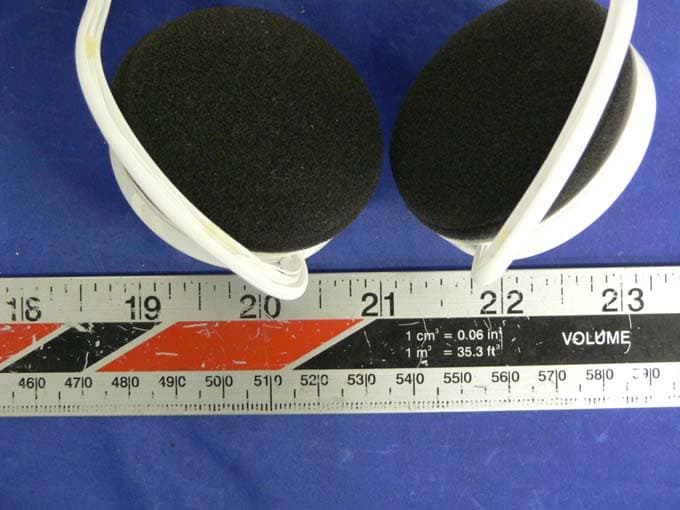
Click to zoom
Application Details
- Equipment Class
- DSS - Part 15 Spread Spectrum Transmitter
- Date of Grant
- Sep 13, 2005
- Application Purpose
- Original Equipment
- Date of Application
- Sep 13, 2005
- Equipment Note
- 2.4GHz Bluetooth Headphone
- Frequency Range
- 2402.00000000 - 2480.00000000
- Company
- Wi-Gear Inc.
- Country
- United States
Documents & Files
Document Text
Text extracted from the exhibit documents filed with the FCC. Open a document above to read the original.
Users Manual
USER GUIDE Contents Introduction 1 What's included in this package? 2 Product Features 3 Getting Started 5 Playing Music 6 Bluetooth phone operation 8 Troubleshooting 10 Specifications 11 Regulatory Information 13 Introduction Cut the cord today! Congratulations on purchasing iMuffs ™ , the first stereo wireless headphones for your iPod ™ AND Bluetooth ® phone! Soon you'll be enjoying these benefits: Wireless Freedom - Throw your iPod in your backpack and listen to your music wirelessly! No more cords to untangle or snag. Enjoy near-CD quality sound up to 30' (10m) away thanks to the Advanced Audio Distribution Profile (A2DP) and Bluetooth 2.0. Never Miss a Call - When your Bluetooth phone rings, the iMuffs automatically pause your iPod and ring in the headphones, and let you talk through the integrated microphone. Versatile - Listen to music from your laptop or desktop 1 , iPaq, or MP3 smartphone 2 . Talk on the phone or over iChat or Skype. Even chat while playing video games. Ergonomic Controls - Intuitive controls let you pause, change volume, and skip tracks right from the headphones. 1 Currently, Windows XP only and requires a Bluetooth adaptor with A2DP support. 2 Must support stereo over Bluetooth using A2DP. 1 What's Included in this Package? n iMuffs Stereo Bluetooth Headphones n iMuffs Adaptor for iPod (see below) n Travel charger/adaptor n USB cable n User Guide 2 iPod (4G)iPod photoiPod miniiPod (3G) Compatible with these models: 3 Product Features Familiarize yourself with all of the controls located on the right side of your iMuffs headphones. Please note that the two LEDs are visible only when lit. View of controls (right side) Blue LED Orange LED Next/FF button Previous/Rewind button Power switch USB charging port Volume control/ button Microphone Play/Pause/ Phone button The iMuffs Adaptor for iPod is powered by the iPod. Plug it into the headphone port of your compatible iPod. To maximize your iPod's battery life, remove the adaptor when not in use. Note that when plugged into either an iPod or an iPod mini, you still have access to the Hold switch on the iPod. iMuffs Adaptor for iPod 4 Blue LED Headphone jack 5 Getting Started Your iMuffs headphones are powered by a built-in rechargeable battery. Before using your iMuffs for the first time, you should fully charge the battery. Charging 1. Plug the smaller end of the USB cable into the USB charging port located at the bottom of the right ear cup of the headphones. 2. Plug the other end of the USB cable into an open USB port on your computer or into the travel charger and then plug the travel charger into an outlet. 3. The orange LED indicator lights up while the headphones are charging. 4. The orange LED indicator will turn off when the battery is fully charged. 5. Unplug the USB cable from the headphones. When the battery is low, the orange LED will flash, and an alert will sound in the speakers indicating that you need to recharge the headphones. Playing Music The iMuffs Adaptor for iPod enables the iPod to transmit a stereo audio signal wirelessly to your iMuffs Stereo Bluetooth Headphones, with a range of 30 feet (10 meters). 1. Turn your iMuffs headphones on with the power switch. 2. Plug the Bluetooth adaptor into the headphone port of your compatible iPod. 3. If your iPod is paused or asleep, press the play button on the iPod to resume operation. 4. Your iMuffs headphones and adaptor will automatically connect. The blue LEDs on the headphones and adaptor will flash while they seek a connection. When the connection is successful, the LEDs will stay on for 3 seconds, and music will begin playing. 5. To pause music, you may press the Play/Pause button on the headphones or the iPod itself. Pressing either button again re-starts the music where it left off. 6. To access the next track, press the Next button. To access the previous track, press the Previous button. 7. To fast-forward, press and hold the Next button. To rewind, press and hold the Previous button. 6 7 8. To increase the volume, rock the volume control up. To decrease the volume, rock the volume control down. The blue LED on the headphones will flash once whenever a button is pressed, to indicate that a Bluetooth signal has been transmitted. Accordingly, the LED on the adaptor will flash whenever a Bluetooth signal is received. Bluetooth Phone Operation Your iMuffs headphones work with Bluetooth-enabled phones. However, you will first need to pair the headphones with your Bluetooth phone before they work. Pairing with a Bluetooth phone 1. Unplug the adaptor from your iPod, and make sure your iMuffs headphones are powered off. Make sure that the Bluetooth phone is nearby. 2. Initiate "Discover" mode in your Bluetooth phone, according to your phone's user manual. 3. On the headphones, press and hold the volume button in while switching the power on. This will initiate the "Discoverable" mode in the headphones. The blue LED will begin double-flashing. 4. If asked for a PIN, enter "0000" (four zeros). 5. If the pairing process is successful, the blue LED on the headphones will stop flashing and stay on for 3 seconds. 8 9 Using with a paired Bluetooth phone When the phone rings (you will hear an audio tone in the speakers), answer the call by pressing the Play/Pause/Phone button. When the phone rings, reject the call by pressing and holding the Play/Pause/Phone button for 2 seconds. To end a call, press and hold the Play/Pause/Phone button for 2 seconds. To activate voice dialing (if supported by your phone), press and hold the volume button in for 2 seconds. To activate redial (if supported by your phone), press and hold both the Rewind and FF buttons together for 2 seconds. If you have a call waiting, answer or switch between calls by pressing the Play/Pause/Phone button. If you have a call waiting, end the active call and switch to the other call by holding the Play/Pause/Phone button for 2 seconds. Troubleshooting If you have problems using the iMuffs Ste…
Text truncated - open the document above for the full version.
Block Diagram
Headphone – MH200 Block Diagram SPI: Connect for Flash Programming via logic level card USB: Connect for Test Modes “BlueTest” Inputs: (5) Pushbuttons Output: (2) LED Stereo Audio Out: (2) Speakers Mono Audio In: (1) Unidirectional Mic BlueCore3-Multimedia IC “Single chip contains the following”
External Photos
EXHIBIT C - EUT EXTERNAL PHOTOGRAPHS EUT – Front View EUT – Rear View
ID Label/Location Info
EXHIBIT A - FCC ID LABEL INFORMATION Proposed FCC ID Label Specifications: Text is black or white in color and is left justified. Labels are silk- screened and shall be “permanently affixed” at a conspicuous location on the EUT. Proposed Label Location on EUT Bottom Side of EUT/Proposed FCC ID Label FCC ID: TIQ-MH200 This device complies with Part 15 of the FCC Rules. Operation is subject to the following two conditions: (1) this device may not cause harmful interference, and (2) this device must accept any interference received, including interference that may cause undesired operation. Industry Canada Industrie Canada IC: 6030A-MH200
Internal Photos
EXHIBIT C - EUT INTERNAL PHOTOGRAPHS EUT – Component View EUT – Solder View
Operational Description
Operational Description The iMuffs package includes two separate devices (see picture below). Using Bluetooth 2.4 GHz radio the iMuffs allows music to be played controlled and listened to all wirelessly from the Apple iPod. The “dongle” wirelessly transmits an audio stream from the stereo output of the Apple iPod to the receiving “headphones” up to 30ft using the interoperable world of Bluetooth. The headphones primarily receive the near-CD quality audio stream from a transmitting dongle connected to an Apple iPod but can also transmit simple remote commands to the dongle, which in turn uses the serial lines on the dongle to control the iPod wirelessly. The headphones can also connect to other Bluetooth devices supporting hands-free or A2DP stereo audio stream. The headphones are independently powered off an internal 3.7V Li-Polymer battery of 500mah, which is charged when connected to a powered USB port via the mini-USB port on the headphone. The dongle is powered directly off the iPod’s battery source, which requires the dongle using serial commands to first successfully identify itself as a recognized device for the iPod in order to receive sufficient power. For efficient bandwidth of streaming audio a DSP is used in the transmitting dongle, where the analog audio output of the iPod is compressed using the SBC codec and encoded for efficient Bluetooth radio transmission. As the headphones receive the audio stream using Bluetooth radio, the same DSP and SBC codec is used but this time decoding the incoming audio stream to an analog signal or actual music. Using the High-Quality SBC codec the audio is encoded / decoded at 44.1 KHz with a data transmission rate of approximately 328 kb/s which is near-CD quality. While the headphones are connected to the transmitting dongle for the iPod the built-in microphone in the headphone can allow simultaneous connection to any Bluetooth hands-free supporting device such as a mobile phone to use as a hands-free headset for full duplex conversation while taking advantage of the built in DSP for echo canceling and noise reduction. With this integration the iPod listener can choose between the two devices when connected to a mobile phone that supports Bluetooth hands-free. For example while listening to music if there is an incoming phone call the dongle will automatically pause the current song that is playing to notify the user of an incoming call with an audible ring in the headphones. Once the call has ended or ignored the song will automatically un-pause and the music will start back up from when it was last interrupted.
Test Setup Photos
EXHIBIT B - TEST SETUP PHOTOGRAPHS Radiated Emission - Front View Radiated Emission - Rear View
Contact Information
Applicant
Mark Pundsack(President & CEO)
Test Firm
Bay Area Compliance LaboratoryJohn Chan
Technical Specifications
| # | Rule Parts | Frequency Range | Power Output |
|---|---|---|---|
| 1 | 15C | 2.40 GHz - 2.48 GHz | 1.75 mW |
Other Applications from Wi-Gear Inc.

TIQ-MA110
Mar 04, 2006Bluetooth adapter to use with an Apple iPod.
Equipment Class
DSS - Part 15 Spread Spectrum Transmitter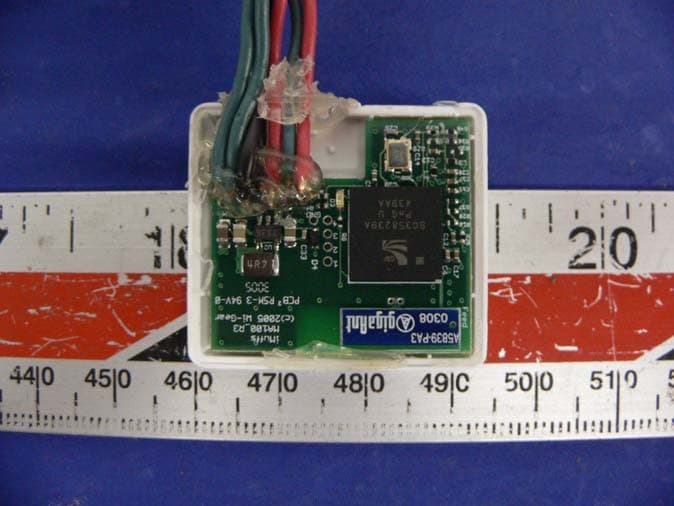
TIQ-MA100
Sep 13, 20052.4GHz Bluetooth Dongle
Equipment Class
DSS - Part 15 Spread Spectrum Transmitter