TYM-SBTA920ADeskphone Bluetooth Adapter
AVAYA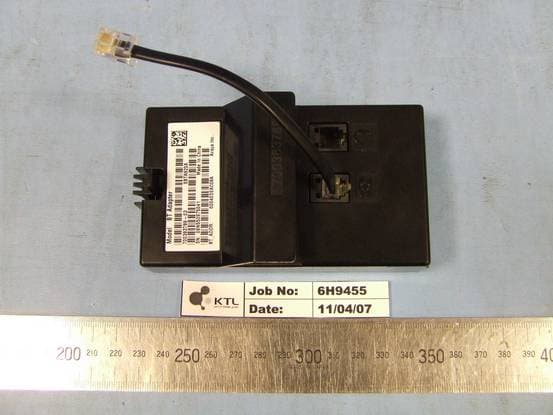
Click to zoom
Application Details
- Equipment Class
- DSS - Part 15 Spread Spectrum Transmitter
- Date of Grant
- May 09, 2007
- Application Purpose
- Original Equipment
- Date of Application
- May 09, 2007
- Equipment Note
- Deskphone Bluetooth Adapter
- Frequency Range
- 2402.00000000 - 2480.00000000
- Company
- AVAYA
- Country
- Canada
Documents & Files
Document Text
Text extracted from the exhibit documents filed with the FCC. Open a document above to read the original.
Users Manual
Material ID: 700420508 16-601978 Issue 1, May 2007 Avaya one-X™ Deskphone Edition Bluetooth ® Adapter Installation and Safety Instructions 2 Important safety instructions The most careful attention has been devoted to quality standards in the manufacture of your new module. Safety is a major factor in the design of every set. But, safety is YOUR responsibility too. Please read carefully the helpful tips listed below. These suggestions will enable you to take full advantage of your new module. Then, retain these tips for later use. Warning This equipment is NOT for residential use. It is for business systems applications ONLY. It will NOT operate on public networks. Use When using your module, the following safety precautions should always be followed to reduce the risk of fire, electric shock, and injury to persons. • Read and understand all instructions. • Follow all warnings and instructions marked on the module. • This module can be hazardous if immersed in water. To avoid the possibility of electric shock, do not use the module when you are wet. If you accidentally drop the module into water, do not retrieve it until you have first unplugged the line cord from the modular wall jack. Then, call service personnel to ask about a replacement. • Avoid using the module during electrical storms in your immediate area. There is a risk of electric shock from lightning. Urgent calls should be brief. Even though protective measures may have been installed to limit electrical surges from entering your business, absolute protection from lightning is impossible. • If you suspect a natural gas leak, report it immediately, but use a telephone away from the area in question. The module’s electrical contacts could generate a tiny spark. While unlikely, it is possible that this spark could ignite heavy concentrations of gas. • Never push objects of any kind into the module through housing slots since they may touch hazardous voltage points or short out parts that could result in a risk of electric shock. Never spill liquid of any kind on the module. If liquid is spilled, however, refer servicing to proper service personnel. • To reduce the risk of electric shock, do not disassemble this module. There are no user serviceable parts inside. Opening or removing covers may expose you to hazardous voltages. Incorrect reassembly can cause electric shock when the module is subsequently used. Service Before cleaning, unplug the module. Do not use liquid cleaners or aerosol cleaners. Use a damp cloth for cleaning. Unplug the module and be sure to refer servicing to qualified service personnel when these conditions exist : • If liquid has been spilled into the module. • If the module has been exposed to rain or water. • If the module has been dropped or the housing has been damaged. • If you note a distinct change in the performance of the module. CE mark The "CE" mark affixed to this equipment means that the unit complies with directives located at http://www.avaya.com/support. Declaration of Conformity To download the Declaration of Conformity (DoC) for this equipment, visit http://support.avaya.com/elmodocs2/DoC/ and click on the link for the appropriate model. SAVE THESE INSTRUCTIONS When you see this warning symbol on the product, refer to the user guide available from the web for more information before proceeding. USA ! 3 Consignes de sécurité Nous avons porté la plus grande attention au respect des normes de qualité et de sécurité dans la fabrication de ce module. Cependant la sécurité relève aussi de VOTRE responsabilité. Afin de tirer le meilleur parti de votre nouveau module, nous vous conseillons de lire attentivement ce document. Avertissement Cet appareil N'est PAS destiné à un usage domestique; il doit être EXCLUSIVEMENT utilisé derrière un autocommutateur privé. Il NE fonctionne PAS sur les réseaux publics. Conseils d’utilisation Vous éviterez tout risque d’incendie, de décharge électrique ou de blessure en respectant scrupuleusement les règles de sécurité énoncées ci-dessous. • Lisez attentivement toute la documentation fournie. • Respectez les mises en garde et instructions indiquées sur le module. • Protégez-le de la pluie ou de toute source d’humidité. Pour éviter tout risque de décharge électrique, utilisez-le avec des mains parfaitement sèches. S’il tombait accidentellement dans l’eau, n’essayez pas de le récupérer avant d’avoir débranché le cordon d’alimentation. Demandez ensuite son remplacement auprès du personnel qualifié. • Évitez de vous servir du téléphone pendant un orage. Si vous devez l’utiliser pour une urgence, efforcez-vous d’être bref. Bien que toutes les précautions aient été prises pour éviter les surtensions sur votre installation téléphonique, il est impossible de garantir une protection absolue contre la foudre. • Toute fuite de gaz doit être signalée sans délai à l’aide d’un poste téléphonique suffisamment éloigné de la zone en question. En effet, les contacts électriques d’un téléphone peuvent générer de petites étincelles susceptibles de provoquer une explosion en cas d’accumulation de gaz. • Ne jamais introduire quoi que ce soit dans les ouvertures du boîtier. Vous risquez de détériorer le téléphone et de recevoir une décharge électrique. Ne jamais verser de liquide sur l’appareil. Si cela arrivait accidentellement, débranchez-le et faites appel au personnel qualifié. • Ne démontez ce module sous aucun prétexte. Vous vous exposeriez à des tensions dangereuses et vous risqueriez de ne pouvoir le remettre dans son état initial. Vous ne pouvez en aucun cas le réparer vous-même. Conseils d’entretien Pour nettoyer le module, débranchez d’abord le cordon d’alimentation. N’employez aucun produit d’entretien (liquide, aérosol) mais utilisez un chiffon doux légèrement humide. Débranchez le cordon d’alimentation et faites appel au personnel qualifié, dans tous les cas suivants : • Un liquide a été renversé sur module • Le module a été exposé à une humidité excessive (pluie ou au…
Text truncated - open the document above for the full version.
Cover Letter(s)
Communication Appliance Division 27 April 2007 Authority to Act as Agent Dear Sir On behalf of Avaya Inc., I appoint KTL to act as agent in the preparation of this application for registration of the equipment described herein as “Spice BT Adapter and Module (incl. Handset and Cradle)”. Date:27 April 2007 Name:Joseph Liguori Signature: Title:Regulatory Compliance Manager Applicant:Avaya Inc. – 307 Middletown Lincroft Rd. Lincroft, NJ 07738
ID Label/Location Info
FCC ID: TYM-SBTA920A Item designationUnitScale Document NoProduct nameDocument respons / ApprovedPrepared Date Rev Sheet Tobias AnderssonLABEL, FCC PART 15, BT ADAPTER 2007-05-08 A2 Tobias AnderssonAVIH00000711-01 BT ADAPTER 1(1) 1 1 RAW LABEL, 804-AVIH00000006 Item no. Quantity Description This device complies with Part 15 of the FCC Rules. Operation is subject to the following two conditions: (1) this device may not cause harmful interference, and (2) this device must accept any interference received, including interference that may cause undesired operation. 50,80 Bill of material mmNot scaled 20,57
Operational Description
17 Pairing Devices having Bluetooth ® Wireless Technology with 9600 Series IP Telephones Your telephone accepts any handset or headset that uses Bluetooth® wireless technology and which is supported by the Headset Profile. You have to pair each device and can pair only one device at a time. Before use, pair your wireless device with your 9600 Series IP Telephone as described here. You may need to consult the user manual of your wireless device to find out how to put the device into pairing mode. The Avaya Handset has its own documentation, therefore this document focuses on pairing headsets that use Bluetooth wireless technology. Note:Unless otherwise stated, instructions to press a specific button/key refer to the softkeys at the bottom of the telephone display area or the buttons on the face of the telephone. 18 Configuring Your Wireless Device Note:After initially installing the wireless adapter, the telephone automatically completes Steps 1 through 7 for you. In this case, start the pairing process at Step 8. If you don't want to complete the pairing immediately after installing the adapter, you can always come back at a later time and start with Step 2. 1. Install the adapter according to the instructions packaged with it. 2. At the telephone, press the Avaya Menu button. 3. Select Options & Settings. If your Avaya Menu does not have an Options & Settings entry, select Phone Settings instead. 4. Press Select or OK. 5. Select Advanced Options. 6. Press Select or OK. 7. Select Bluetooth... 8. Press Add. 9. Select the type of wireless device you want to configure. 10. Press Next or OK. 11. For the Avaya headset, turn it on and then press and hold the headset Call Control button and the headset Volume Up button at the same time. When the LED begins to flash red and blue the headset is in pairing mode and you can stop holding the buttons. 19 Note:Check the User Guide that comes with the Avaya headset for additional instruction on getting the headset into pairing mode. If you are using a non- Avaya headset, you may need to consult the User Guide for that particular device. 12. Once wireless device is in pairing mode, press Start to begin pairing the adapter with it. 13. Verify that the name of the device that you are pairing displays on the telephone. If the device is an Avaya Handset, “BTH01” displays. If the device is an Avaya Headset, “ABT35H” displays. Other headsets will display a different name. If the name of the device is something other than what you expected, there may be other devices in the area that are also in pairing mode. In this unlikely situation, press Retry until the telephone displays your device. Note:The adapter automatically attempts to enter the most commonly used device Passkeys. If the passkey entry fails, the telephone prompts you to manually enter the Passkey. For Avaya products, enter 0000 and then press Enter. If you are using a non-Avaya headset, consult its User Guide to determine the Passkey. 14. When the confirmation tone sounds, press Finish. When pairing completes, the top line of the telephone display shows a Bluetooth ® logo icon to indicate the wireless device is active and within range. 20 Unpairing the wireless device You can unpair your wireless device to replace it with a different wireless device or to just disable the existing device. 1. At the telephone, press Avaya Menu. 2. Select Options & Settings. If your Avaya Menu does not have an Options & Settings entry, select Phone Settings instead. 3. Press Select or OK. 4. Select Advanced Options. 5. Press Select or OK. 6. Select Bluetooth... 7. Press Change or OK. 8. Choose one of the following options: - To disable the existing device and to pair a new device with the telephone, press Change. Proceed to pair the new device with the adapter, starting with Step 9 in the procedure above on “Configuring Your Wireless Device.” or - To disable the existing device without replacement, press Disable. Press Disable again to confirm you want to unpair the current device. 21 Using the Wireless Device for Calls When you get a call alert, use the headset to answer the call by either pressing the Headset button on your telephone or by pressing the Call Control button (sometimes referred to as the Multifunction button) on your headset. Note:While on an active call, you can go out of range without the telephone actually losing your call. Once you come back into range, your wireless device will be reconnected with the call after a brief time required to re-establish the wireless connection. Switching a call from the telephone When you are on an active call at your 9600 Series IP Telephone you may switch the call to your headset by pressing the Headset button on the telephone, or by pressing the Call Control/Multifunction button on the headset. Disconnecting a call To end an active call, either press the Headset button on the phone, or press the Call Control/Multifunction button on the headset. Support of multiple pairing of a headset with the 9600 Series IP Telephone and a cell phone The Avaya headset and the wireless adapter for 9600 Series IP Telephones support pairing with both a 9600 Series IP Telephone and a cell phone at the same time. Because each type of cellular phone may have unique ways to handle this type of operation, complete 22 operational details cannot be covered here. However, users are encouraged to experiment with this operation by pairing the Avaya headset with both devices and then attempting to make and receive calls on both the cellular telephone and the 9600 Series IP Telephone. Troubleshooting Consult your system administrator if you cannot resolve a specific condition, symptom, or problem. Symptom/ Condition Possible Cause Suggested Resolution During pairing, the telephone displays "Pairing failed." The pairing process has "timed out." Press the Retry softkey and repeat the pairing process described in this document. The Bluetooth logo icon LED is no longer illuminated. The link to the…
Text truncated - open the document above for the full version.
RF Exposure Info
No SAR Evaluation Required if power is below the following threshold: Frequency Range: 2402-2480MHz Low threshold = 60/f(GHz) mW = 60 / 2.480 = 24.19mW Conducted Output Power Measured (dBm) = 5.1 dBm Antenna Gain (dBi) = 1.7 dBi (calculated from measured conducted and radiated power) EIRP – calculated (mW) = N/A EIRP – measured (mW) = 4.8 mW As both Conducted output power 3.2 mW and EIRP 4.8 mW are below the low threshold, device complies with FCC’s RF radiation exposure limits for uncontrolled/general exposure category for a portable device.
Test Report
Total number of pages : 51 grepbl.doc Ver: g01/10 "6H9455GUS2" KTL EMC Test Report:6H9455GUS2 Applicant:Flextronics (Sweden) Apparatus:Bluetooth Adapter Model SBTA920A Authorised by : K J Anderson, Principal EMC and Radio Group Engineer Issue Date: 13 th April 2007 Authorised Copy Number: PDF KTL EMC Test Report: 6H9455GUS2 2 Contents Section 1:Introduction3 1.1General3 1.2Tests Requested By4 1.3Manufacturer4 1.4Apparatus Assessed4 1.5Test Result Summary5 1.6Notes Relating To The Assessment6 1.7Deviations from Test Standards6 Section 2:Measurement Uncertainty7 2.1Introduction7 2.2Application of Measurement Uncertainty7 2.3Measurement Uncertainty Values7 Section 3:Modifications8 3.1Modifications Performed During Assessment8 Appendix A:Formal Test Results9 A1Radiated Electric Field Spurious Emissions (Restricted Bands)10 A2Conducted Spurious Emissions (Non Restricted Bands)13 A3AC Power Conducted Emissions14 A420 dB Bandwidth and Channel Spacing16 A5Conducted carrier power17 A6Hopping frequencies18 A7Channel Occupancy19 Appendix B:Supporting Graphical Data20 Appendix C:Additional Test and Sample Details31 Appendix D:Additional Information37 Appendix E:Photographs and Figures38 Appendix F:MPE Calculation45 KTL EMC Test Report: 6H9455GUS2 3 Section 1:Introduction 1.1General This report contains an assessment of an apparatus against Electromagnetic Compatibility Standards based upon tests carried out on samples submitted to the Laboratory. Test performed by:KTL Saxon Way Priory Park West Hull HU13 9PB United Kingdom Telephone:+44 (0) 1482 801801 Fax:+44 (0) 1482 801806 Email:[email protected] Web site:www.ktl.com Tests performed by: K J Anderson, Principal EMC and Radio Group Engineer Report author:. A M Leach, EMC and Radio Group Manager This report must not be reproduced except in full without prior written permission from KTL. KTL EMC Test Report: 6H9455GUS2 4 1.2Tests Requested By This testing in this report was requested by: Flextronics (Sweden) Rombvagen 4 Verko S-37123 Karlskrona Sweden 1.3Manufacturer As above 1.4Apparatus Assessed The following apparatus was assessed between: 19/02/07 and 11/04/07 Bluetooth Module Model SBTA920A The above equipment was a Bluetooth radio module for fitting into a telephone handset KTL EMC Test Report: 6H9455GUS2 5 1.5Test Result Summary Full details of test results are contained within Appendix A. The following table summarises the results of the assessment. The statements relating to compliance with the standards below apply ONLY as qualified in the notes and deviations stated in sections 1.6 to 1.7 of this test report. Full details of test results are contained within Appendix A. The following table summarises the results of the assessment. Test TypeRegulationMeasurement standardResult Radiated spurious emissions (Restricted bands) Title 47 of the CFR: 2004, Part 15 Subpart (c) 15.247 ANSI C63.4: 2003Pass Conducted spurious emissions (Non-restricted bands) Title 47 of the CFR: 2004, Part 15 Subpart (c) 15.247 Public Notice DA 00-705 March 30, 2000 Pass AC Power conducted emissions Title 47 of the CFR: 2004, Part 15 Subpart (c) 15.207 ANSI C63.4: 2003Pass 20dB Bandwidth and Channel Spacing Title 47 of the CFR :2004, Part 15 Subpart (c) 15.247(a)(1)(i) Public Notice DA 00-705 March 30, 2000 Pass Conducted Carrier Power Title 47 of the CFR :2004, Part 15 Subpart (c) 15.247(b)(2) Public Notice DA 00-705 March 30, 2000 Pass Hopping Frequencies Title 47 of the CFR :2004, Part 15 Subpart (c) 15.247(a)(1) Public Notice DA 00-705 March 30, 2000 Pass Channel Occupancy Title 47 of the CFR :2004, Part 15 Subpart (c) 15.247(a)(1)(i) Public Notice DA 00-705 March 30, 2000 Pass Abbreviations used in the above table: Mod: ModificationANSI: American National Standards Institution CFR: Code of Federal Regulations KTL EMC Test Report: 6H9455GUS2 6 1.6Notes Relating To The Assessment With regard to this assessment, the following points should be noted: The results contained in this report relate only to the items tested and were obtained in the period between the date of initial receipt of samples and the date of issue of the report. The apparatus was set up and exercised using the configurations, modes of operation and arrangements defined in this report only. Particular operating modes, apparatus monitoring methods and performance criteria required by the standards tested to have been performed except where identified in Section 1.7 of this test report (Deviations from Test Standards). For emissions testing, throughout this test report, “Pass” indicates that the results for the sample as tested were below the specified limit (refer also to Section 2, Measurement Uncertainty). Where relevant, the apparatus was only assessed using the monitoring methods and susceptibility criteria defined in this report. All testing with the exception of testing at the Open Area Test Site was performed under the following environmental conditions: Temperature: 17 to 23 ÄC Humidity : 45 to 75 % Barometric Pressure: 86 to 106 kPa All dates used in this report are in the format dd/mm/yy. This assessment has been performed in accordance with the requirements of ISO/IEC 17025. KTL Hull is a listed electromagnetic compatibility Conformance Assessment Body (CAB) for EC access to the US market. (Decision No 3/2000 of the Joint Committee established under the Agreement on Mutual Recognition between the European Community and the United Statesof America. This decision was effective from 16 th January 2001). FCC Facility Registration number (3m semi anechoic chamber) : 90743 1.7Deviations from Test Standards There were no deviations from the standards tested to. KTL EMC Test Report: 6H9455GUS2 7 Section 2:Measurement Uncertainty 2.1Introduction The standard ISO/IEC 17025 used for laboratory accreditation requires laboratories to estimate measurement uncertainty using accepted methods of analysis. Where required, the reported expanded uncertainty is based on a standard uncertainty providing a confidence…
Text truncated - open the document above for the full version.
Contact Information
Applicant
Gwendolyn Faino(Avaya Regulatory Manager)
Test Firm
Element Materials Technology Warwick LtdKeith Wright
Technical Specifications
| # | Rule Parts | Frequency Range | Power Output |
|---|---|---|---|
| 1 | 15C | 2.40 GHz - 2.48 GHz | 3.20 mW |
Other Applications from AVAYA
TYM-C170
Sep 08, 2024Avaya Room System
Equipment Class
NII - Unlicensed National Information Infrastructure TX
TYM-C130
Sep 04, 2024Avaya Room System
Equipment Class
DTS - Digital Transmission System
TYM-C190
Sep 04, 2024Avaya Room System
Equipment Class
DSS - Part 15 Spread Spectrum Transmitter
TYM-K155V3
Nov 03, 2020IP Phone
Equipment Class
DXX - Part 15 Low Power Communication Device Transmitter
TYM-J189
Aug 20, 2020IP Phone
Equipment Class
DXX - Part 15 Low Power Communication Device Transmitter