UEOTZTCB0601V2.4 GHz RF Chalkboard
TZT USA Industries Inc.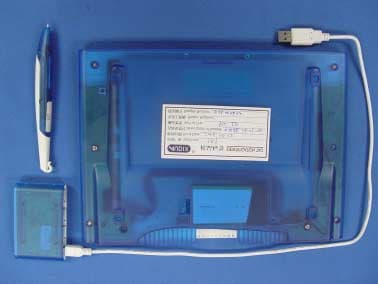
Click to zoom
Application Details
- Equipment Class
- DXX - Part 15 Low Power Communication Device Transmitter
- Date of Grant
- Aug 10, 2006
- Application Purpose
- Original Equipment
- Date of Application
- Aug 09, 2006
- Equipment Note
- 2.4 GHz RF Chalkboard
- Frequency Range
- 2408.00000000 - 2474.00000000
- Company
- TZT USA Industries Inc.
- Country
- United States
Documents & Files
Document Text
Text extracted from the exhibit documents filed with the FCC. Open a document above to read the original.
Users Manual
Page 26 TZT USA INDUSTRIES INC. 2.4G RF CHALKBOARD FCC ID : UEOTZTCB0601V Page 27 TZT USA INDUSTRIES INC. 2.4G RF CHALKBOARD FCC ID : UEOTZTCB0601V Index Page Index 1 Product Contents 2 Product Main Features 2 Parts and Details 3 Getting Started - Connect Chalkboard battery 4 - Activate pen battery 4 - Connect dongle/receiver to computer 4 - Establish wireless connection 4 - Recharge batteries 5 - Chalkboard LED indicators 6 - Cordless pen LED indicator 6 Power Chalkboard On/Off 6 Software Installation 6 How to Use This Product - eNote and Dual Monitor Software 7 - Use as a wireless writing tablet 8 - Use cordless pen as a wireless mouse 8 - Use cordless pen as a laser pointer 9 - Battery notes 9 How to Replace the Pen Tip Refill 9 Troubleshooting - Intermittent writing or cursor movement 10 - Hot Key or Dual Monitor not working 10 1 Page 28 TZT USA INDUSTRIES INC. 2.4G RF CHALKBOARD FCC ID : UEOTZTCB0601V Contents Chalkboard Cordless pen USB Receiver Instruction Manual Rechargeable Lithium Battery Program Driver Disk (Hot Keys / dual monitor / mimio studio) USB Cables (3 ft and 6 ft) AC Adaptor Pen Tether Replacement pen tips and tool Product Main Features • Digital writing tablet for Multimedia presentation • Plug and play • Hot keys and Dual monitor capability • Integrated pen charging cradle • Rechargeable pen with three button mouse function and laser Pointer • Wired or wireless operation • 2.4 GHz wireless technology for low RF interference • Ergonomic design for user’s comfort • 30 feet wireless operation range • Auto hibernation mode to prolong battery life, • Full battery charge operates for 24 hours • Charged batteries either with USB cable or A/C adaptor 2 Page 29 TZT USA INDUSTRIES INC. 2.4G RF CHALKBOARD FCC ID : UEOTZTCB0601V Parts and Details Figure 1 3 Page 30 TZT USA INDUSTRIES INC. 2.4G RF CHALKBOARD FCC ID : UEOTZTCB0601V Getting Started Connect Chalkboard Battery Pull the latch backward to open battery cover ! Insert the battery connector into the Chalkboard receptacle at proper orientation. (there is an orientation key on connector) WARNING: Incorrect battery installation may damage product and batteries ! Place the battery cover back onto the chalkboard For optimum battery performance, please fully charge the battery for 10 hours prior to initial use • Prior to Chalkboard & Receiver being synchronized, you will be unable to turn the power on the Chalkboard Activate Pen Battery Simply pull away the battery insulation insert to activate the cordless pen Connect Dongle/Receiver to Computer ! Connect receiver to computer with provided USB cable. The small connector (mini-B) is for receiver USB port • This is a plug & Play (PnP) device. No driver required for the basic Chalkboard functions Establish wireless connection • Keep Chalkboard power off during synchronization • Press the ID search button on the USB Receiver. a green LED will begin to blink • Press the Sync button on the bottom of the Chalkboard • When connection is made, LED will turn solid green • Due to stringent protocol requirements, the processing time to establish communication will be slightly longer and might require more than one attempt • USB Receiver LED will turn red when wireless devices are communicating 4 Page 31 TZT USA INDUSTRIES INC. 2.4G RF CHALKBOARD FCC ID : UEOTZTCB0601V Figure 2 Recharge Batteries • When the battery power indicator flashes, the battery needs to be recharged (Reference to Figure 1) • If you leave battery at low or no power condition for prolonged period of time you could cause irreversible damages and shorten the battery life expectancy. • Chalkboard Li battery can be charged by using either AC adaptor or USB cable • Cordless pen NIMH battery should be charged in the Chalkboard pen cradle by placing the cordless pen back into the cradle with the electrodes (same side as the laser button) facing inward 5 Page 32 TZT USA INDUSTRIES INC. 2.4G RF CHALKBOARD FCC ID : UEOTZTCB0601V Chalkboard LED Indicators • Battery power status & charging Location is the first LED light below the power button • When the Chalkboard is flashing an Orange color every 1 to 2 seconds it indicates that the charge is in progress • When light turns a steady Green the charge is completed Cordless Pen LED Indicator • Battery power indicator is located in the middle of toggle switch of the pen • Battery charging indicator is the 2 nd LED from Chalkboard power button. When it unit flashes in “Orange” at a 1 to 2 second rate the charge is in progress • When charging process is complete, it turns “Green”. The light will stay on for 5 minutes, then powers off automatically Power Chalkboard On/Off • Power button is located on the left upper corner. Once RF communication is established, the blue LED will come on by pressing the power button and remains on while the board is active • If the light comes on only briefly, and then turns off, it indicates that the system is not synchronized. If this occurs, following the steps on Page 4 “ Establish Wireless Connection” to re-synchronize the system ! To turn power off manually, press the power button and hold for 6 seconds ! Chalkboard will also turn it off automatically after no activity for 15 minutes Software Installation This is a Plug and Play device and does not require a driver to operate the chalkboard and mouse / navigation function. The eNote Hot Key and Dual monitor programs are provided for your extra flexibility. You will need to install the attached drivers to use these functions WARNING: to avoid interruption or conflict, please close other running programs before installing the Chalkboard and Mimio Software 6 Page 33 TZT USA INDUSTRIES INC. 2.4G RF CHALKBOARD FCC ID : UEOTZTCB0601V ! Insert Chalkboard program driver CD into your computer. The installation page will appear on screen with eNote Hot Key, Dual Monitor and Mimio drivers. Click on the program you want to install and simply follow the on screen step by step instructions to complete the inst…
Text truncated - open the document above for the full version.
External Photos
Page 6 TZT USA INDUSTRIES INC. 2.4G RF CHALKBOARD FCC ID : UEOTZTCB0601V Photographs Figure 1 General Appearance Figure 2 General Appearance Label Location Page 7 TZT USA INDUSTRIES INC. 2.4G RF CHALKBOARD FCC ID : UEOTZTCB0601V Figure 3 General Appearance Figure 4 General Appearance
ID Label/Location Info
Page 4 TZT USA INDUSTRIES INC. 2.4G RF CHALKBOARD FCC ID : UEOTZTCB0601V Label Drawing Please refer Exhibit 2 Figure 1 for Label Placement Location
ID Label/Location Info
Page 6 TZT USA INDUSTRIES INC. 2.4G RF CHALKBOARD FCC ID : UEOTZTCB0601V Photographs Figure 1 General Appearance Figure 2 General Appearance Label Location
Internal Photos
Page 8 TZT USA INDUSTRIES INC. 2.4G RF CHALKBOARD FCC ID : UEOTZTCB0601V Figure 5 Main Board, Component Side Figure 6 Main Board, Component Side Page 9 TZT USA INDUSTRIES INC. 2.4G RF CHALKBOARD FCC ID : UEOTZTCB0601V Figure 7 Main Board, Component Side Figure 8 Main Board, Component Side Page 10 TZT USA INDUSTRIES INC. 2.4G RF CHALKBOARD FCC ID : UEOTZTCB0601V Figure 9 Main Board, Component Side Figure 10 Main Board, Component Side Page 11 TZT USA INDUSTRIES INC. 2.4G RF CHALKBOARD FCC ID : UEOTZTCB0601V Figure 11 Main Board, Component Side Figure 12 Main Board, Component Side Page 12 TZT USA INDUSTRIES INC. 2.4G RF CHALKBOARD FCC ID : UEOTZTCB0601V Figure 13 Main Board, Component Side Figure 14 Main Board, Component Side Page 13 TZT USA INDUSTRIES INC. 2.4G RF CHALKBOARD FCC ID : UEOTZTCB0601V Figure 15 Main Board, Component Side Figure 16 Main Board, Component Side
Test Report
FCC ID:UEOTZTCB0601V Audix Technology (Shenzhen) Co., Ltd. Report No. ACS-F06315 APPLICATION FOR CERTIFICATION On Behalf of TZT USA INDUSTRIES INC. 2.4G RF CHALKBOARD Model Number: CB-06-01V Prepared for : TZT USA INDUSTRIES INC. 17526 VON KARMAN AVE. IRVINE CA 92614 U.S.A. Prepared By : Audix Technology (Shenzhen) Co., Ltd. No. 6, Ke Feng Rd., 52 Block, Shenzhen Science & Industrial Park, Nantou, Shenzhen, Guangdong, China Tel: (0755) 26639496 Report Number : ACS-F06315 Date of Test : Jun.05~20, 2006 Date of Report : Jul.03, 2006 FCC ID:UEOTZTCB0601V Audix Technology (Shenzhen) Co., Ltd. Report No. ACS-F06315 TABLE OF CONTENTS Description Page FCC Test Report for Declaration of Conformity 1. GENERAL INFORMATION ....................................................................................................... 4 1.1. Description of Device (EUT) ................................................................................................................ 4 1.2. Tested Supporting System Details ........................................................................................................ 5 1.3. Test Facility........................................................................................................................................... 6 1.4. Measurement Uncertainty ..................................................................................................................... 6 2. POWER LINE CONDUCTED EMISSION TEST.................................................................. 2-1 2.1. Test Equipment ..................................................................................................................................2-1 2.2. Block Diagram of Test Setup .............................................................................................................2-1 2.3. Power Line Conducted Emission Test Limits....................................................................................2-1 2.4. Configuration of EUT on Test ...........................................................................................................2-2 2.5. Operating Condition of EUT..............................................................................................................2-2 2.6. Test Procedure....................................................................................................................................2-2 2.7. Power Line Conducted Emission Test Results ..................................................................................2-3 3. RADIATED EMISSION TEST ................................................................................................. 3-1 3.1. Test Equipment ..................................................................................................................................3-1 3.2. Block Diagram of Test Setup .............................................................................................................3-1 3.3. Radiated Emission Limit ....................................................................................................................3-2 3.4. EUT Configuration on Test................................................................................................................3-3 3.5. Operating Condition of EUT..............................................................................................................3-3 3.6. Test Procedure....................................................................................................................................3-3 3.7. Radiated Emission Test Result...........................................................................................................3-4 4. BAND EDGES MEASUREMENT............................................................................................ 4-1 4.1. Test Equipment ..................................................................................................................................4-1 4.2. Block Diagram of Test Setup .............................................................................................................4-1 4.3. Test Standard......................................................................................................................................4-1 4.4. Bandwidth Limit ................................................................................................................................4-1 4.5. Test Procedure....................................................................................................................................4-1 5. DEVIATION TO TEST SPECIFICATIONS .......................................................................... 5-1 6. PHOTOGRAPH.......................................................................................................................... 6-1 6.1. Photos of Power Line Conducted Emission Test ...............................................................................6-1 6.2. Photos of Radiated Emission Test (In Anechoic Chamber)...............................................................6-2 6.3. Photos of Bandwidth Test ..................................................................................................................6-2 APPENDIX I (7 pages) APPENDIX II (19 pages) Audix Technology (Shenzhen) Co., Ltd. Report No. ACS-F06315 1. GENERAL INFORMATION 1.1. Description of Device (EUT) Description : 2.4G RF CHALKBOARD Model Number : CB-06-01V Applicant : TZT USA INDUSTRIES INC. 17526 VON KARMAN AVE. IRVINE CA 92614 U.S.A. Manufacturer : TZT USA INDUSTRIES INC. 17526 VON KARMAN AVE. IRVINE CA 92614 U.S.A. Power Adapter : Manufacturer: DVE M/N: DSA-5P-05 Date of Test : Jun.05~20, 2006 Audix Technology (Shenzhen) Co., Ltd. Report No. ACS-F06315 1.2. Tested Supporting System Details 1.2.1.PERSONAL COMPUTER 1.2.2.MONITOR 1.2.3.KEYBOARD 1.2.4.MOUSE EMC CODE : Test PC C M/N : Dell 2400 S/N : 3X13Q1X Manufacturer : Dell Power cord : Unshielded, detachabled…
Text truncated - open the document above for the full version.
Test Setup Photos
FCC ID:UEOTZTCB0601V Audix Technology (Shenzhen) Co., Ltd. Report No. ACS-F06315 6. PHOTOGRAPH 6.1. Photos of Power Line Conducted Emission Test FCC ID:UEOTZTCB0601V Audix Technology (Shenzhen) Co., Ltd. Report No. ACS-F06315 6.2. Photos of Radiated Emission Test (In Anechoic Chamber) 6.3. Photos of Bandwidth Test
Contact Information
Applicant
Lenny Lee(Executive Vice President)
Technical Contact
Audix Technology (Shenzhen) Co. Ltd.Ken Lu
[email protected]86 755 26639497
52 Block Shenzhen Science and Industry · Shenzhen · China
Non-Technical Contact
Audix Technology (Shenzhen) Co. Ltd.Tony xie
[email protected]86 755 26639497
Test Firm
Audix Technology (Shenzhen) Co.Smart Tsai
Technical Specifications
| # | Rule Parts | Frequency Range | Power Output |
|---|---|---|---|
| 1 | 15C | 2.41 GHz - 2.47 GHz | - |
Other Applications from TZT USA Industries Inc.

UEOTZTWS1001V
Jul 17, 2010Wireless Slate
Equipment Class
DXX - Part 15 Low Power Communication Device TransmitterUEOTZTCB0701V
Jul 08, 20072.4G RF CHALKBOARD
Equipment Class
DXX - Part 15 Low Power Communication Device Transmitter