UEOTZTWS1001VWireless Slate
TZT USA Industries Inc.
Click to zoom
Application Details
- Equipment Class
- DXX - Part 15 Low Power Communication Device Transmitter
- Date of Grant
- Jul 17, 2010
- Application Purpose
- Original Equipment
- Date of Application
- Jul 15, 2010
- Equipment Note
- Wireless Slate
- Frequency Range
- 2406.50000000 - 2471.50000000
- Company
- TZT USA Industries Inc.
- Country
- United States
Documents & Files
Document Text
Text extracted from the exhibit documents filed with the FCC. Open a document above to read the original.
Users Manual
WS-10-01 WIRELESS SLATE Operation Instructions 1.0 Operating Requirement PC or Mac computer. Operating system - Windows 98, 2000, ME & XP, Vista, Win7 and Mac OSX RF Wireless slate (operating frequency range is from 2406.5MHz to 2471.5MHz) Cordless pen Hub receiver with AC port Lithium-ion battery and AAA NiMH battery USB cable, type A to mini Hub receiver power cable, type A to 3.5mm DC AC adaptor, 5V 500mA 2.0 Operation Procedures 2.1 There are two batteries need to be installed and charged prior to use this device - Open the battery cover on the bottom of the wireless slate and install the Li-ion battery. - Pull the end cap backward to expose the pen battery compartment。Install the NiMH AAA battery into the compartment and place the end cap back. - Placing the cordless pen into the charging cradle of the slate to charge the NiMH battery. - Plug in the AC adaptor and charge the batteries10 hours. The LCD display will indicate the battery status. - When external power supplier is used, the NiMH battery will be charged first before charging the Li-ion battery. Once battery is full, LCD display indicator symbol will stop blinking. 2.2 Wired Operation - Using USB cable connects this product with computer. Mini-B connector is used to connect to this product. - When the power blue light comes on, it means that product is ready to operate - Depending the computer’s speed, there are few seconds delay to allow the computer to recognize this product - When USB cable is used, the batteries is also being charged at the same time. - When operated on USB cable, it will not turn off automatically until press the power On-Off button for 3 seconds. Once the power is turned off, all functions stop. 2.2 Wireless Operation - Connect the RF receiver to computer USB port. The LED indicator will turn on - Either on Li battery or AC adaptor, pressing the power button will turn the blue light on. If the light turns off by itself, this means that the system requires re-synchronization. - Synchronize the slate and receiver by pressing the receiver sync button and blue light should blink. Power up the wireless slate and pressing the sync button on the - If the power light turns off, then repeat the above steps. - Channel is selected automatically by the device. Once communication established, receiver indicator will blink when signal is being received. - Wireless slate will constantly transmits signal to receiver before entering “Sleep Mode”. Slate will enter sleep mode after ten minutes idling and blue LED will start to blink. For 5 more minutes of idling, slate will be turn off to save energy. During this 5 minutes, slate can be waked up by touching the board weiting surface with cordless pen - When strong external RF interference is encountered, signal transmission could be interrupted briefly. However slate will automatically switch channel and reconnect instantly. - Wireless operating distance is greater than 10 meters 3.0 Battery Charging Batteries can be charged by either AC adaptor or via USB cable. When charged with AC adaptor, Li-ion (slate) and NiMH (pen) both are charged with pen NiMH battery takes priority. When slate is operated with battery, NiMH battery is charged by Li-ion battery from pen cradle. To protect the Li-ion battery, no power is releases if it is being charged. PWM protocol is adapted for battery protection. It will automatically inspect battery for voltage, current to insure the battery safety and charging fullness. When the abnormal power supply condition is detected, LCD battery symbol will blink rapidly. When this occurs, inspect the external power sources and the batteries for abnormality. When batteries are charged normally, the LCD battery symbol will blink at 1 Hz rate. Once charging completed, the indicator will stop blink. Li battery has low voltage protection. When the protection circuit kicks in, Li battery will stop discharging. When external power supply is not connected, NiH is charged by Li battery and charging indicator will stay on for five minutes after NiH battery is full. When Li battery is re-installed or external power supply is connected, power management module will monitor the power status of the entire product. When external power supply is not used, Chalkboard will switch to sleep mode after 10 minute of idling. Li-ion battery will be check every five minutes. Once low voltage detected, charging indicator will start to blink at 4 Hz rate. Although multiple protections have been designed into this product, it is a slight possibility that the system may freeze up if abnormal procedures are conducted. If this condition is encountered, remove all power supply including Li-ion battery, wait for 10 seconds before re- install power supply to reboot the system. This product is designed to switch channels to avoid interference, channel switching will induce a brief latency. Once the source of RFI is avoided, wireless slate can resume normal operation. If product will not be used for a prolonged period, it is recommended to remove all batteries from the slate and pen to protect the devices and batteries.. If power LED flashing irregularly, remove Li-ion battery and plug in AC adaptor. This will clear the system error. Reinstall Li-ion battery and turn on the power. The blue LED should turn on. If the flashing persist, battery may need to be replaced. FCC Caution: Any changes or modifications not expressly approved by the party responsible for compliance could void the user's authority to operate this equipment. This device complies with part 15 of the FCC rules. Operation is subject to the following two conditions: (1) this device may not cause harmful interference, and (2) this device must accept any interference received, including interference that may cause undesired operation. NOTE: This equipment has been tested and found to comply with the limits for a Class B digital device, pursuant to part 15 of the FCC Rules. These limits are designed to provide reasonable …
Text truncated - open the document above for the full version.
Cover Letter(s)
TZT USA INDUSTRIES INC. Data: July 9, 2010 FCC ID:UEOTZTWS1001V Dear Sir, I hereby have entrusted the following person to be a proxy regarding application for Type Certification. Most Technology Service Co., Ltd Address: No.5, Langshan 2nd Rd, North Hi-Tech Industrial park, Nanshan, Shenzhen, Guangdong, China Name: Terry Job Title: Manager Email: [email protected] I am therefore responsible for the contents of the application. Model Name of the specified radio equipment: WS-10-01 FCC ID: UEOTZTWS1001V Product Name: Wireless Slate Signature____________________ FCC grantee contact person information. Name: LENNY LEE Title: PRESIDENT Company: TZT USA INDUSTRIES INC. Tel: 949 588 8929 Fax: 949 588 6378 Date: July 5, 2010
External Photos
FCC ID: UEOTZTWS1001V Report No.: MOST100608F2 FRONT VIEW OF SAMPLE BACK VIEW OF SAMPLE FCC ID: UEOTZTWS1001V Report No.: MOST100608F2 LEFT VIEW OF SAMPLE RIGHT VIEW OF SAMPLE FCC ID: UEOTZTWS1001V Report No.: MOST100608F2 TOP VIEW OF SAMPLE BOTTOM VIEW OF SAMPLE FCC ID: UEOTZTWS1001V Report No.: MOST100608F2 VIEW OF USB CABLE VIEW OF THE ADAPTER FCC ID: UEOTZTWS1001V Report No.: MOST100608F2 PHOTO OF THE ENTIRE SAMPLE
Internal Photos
FCC ID: UEOTZTWS1001V Report No.: MOST100608F2 INTERNAL PHOTO OF SAMPLE – 1 INTERNAL PHOTO OF SAMPLE - 2 FCC ID: UEOTZTWS1001V Report No.: MOST100608F2 INTERNAL PHOTO OF SAMPLE - 3 INTERNAL PHOTO OF THE ADAPTER-1 FCC ID: UEOTZTWS1001V Report No.: MOST100608F2 INTERNAL PHOTO OF THE ADAPTER-2
Test Report
FCC 47 CFR PART 15 SUBPART C TEST REPORT For Applicant : TZT USA INDUSTRIES INC. Address : 15520 ROCKFIELD BLVD, STE. B, IRVINE CA 92618 Product Name : Wireless Slate Model Name : WS-10-01 Brand Name : N/A FCC ID : UEOTZTWS1001V Report No. : MOST100608F2 Date of Issue : June 30, 2010 Issued by :Most Technology Service Co., Ltd. Address : No.5, 2nd Langshan Road, North District, Hi-tech Industrial Park, Nanshan, Shenzhen, Guangdong, China Tel : 86-755-8617 0306 Fax : 86-755-8617 0310 The report consists 27 pages in total. It may be duplicated completely for legal use with the approval of the applicant. It should not be reproduced except in full, without the written approval of our laboratory. The client should not use it to claim product endorsement by MOST. The test results in the report only apply to the tested sample. The test report shall be invalid without all the signatures of testing engineers, reviewer and approver. FCC ID: UEOTZTWS1001V Report No.: MOST100608F2 Page 2 of 27 TABLE OF CONTENTS 1.VERIFICATION OF CONFORMITY ........................................................................................ 3 2. GENERAL INFORMATION....................................................................................................... 4 2.1 Product Information ................................................................................................................ 4 2.2 Objective ................................................................................................................................ 5 2.3 Test Standards and Results .................................................................................................... 5 2.4 Environmental Conditions....................................................................................................... 5 3. TEST FACILITY........................................................................................................................ 6 3.1TEST FACILITY....................................................................................................................... 6 3.2 GENERAL TEST PROCEDURES .......................................................................................... 6 3.3 FCC PART 15.205 RESTRICTED BANDS OF OPERATIONS............................................... 7 4. SETUP OF EQUIPMENT UNDER TEST.................................................................................. 8 4.1 SUPPORT EQUIPMENT ........................................................................................................ 8 4.2 TEST EQUIPMENT LIST........................................................................................................9 5. 47 CFR Part 15C 15.249 Requirements................................................................................. 10 5.1 Spurious Emission Test ........................................................................................................ 10 5.1.1 Requirement...................................................................................................................... 10 5.1.2 Test Description ..................................................................................................................11 5.1.3 Test Description ................................................................................................................. 12 5.1.4 Test Result......................................................................................................................... 13 5.2 Band Edge............................................................................................................................ 22 5.2.1 Requirement...................................................................................................................... 22 5.2.2 Test Description ................................................................................................................. 22 5.2.3 Test Result......................................................................................................................... 22 5.3 LINE CONDUCTED EMISSION TEST................................................................................. 24 5.3.1. LIMITS OF LINE CONDUCTED EMISSION TEST........................................................... 24 5.3.2. BLOCK DIAGRAM OF TEST SETUP............................................................................... 24 5.3.3. PRELIMINARY PROCEDURE OF LINE CONDUCTED EMISSION TEST ...................... 25 5.3.4. FINAL PROCEDURE OF LINE CONDUCTED EMISSION TEST .................................... 25 5.3.5. TEST RESULT OF LINE CONDUCTED EMISSION TEST .............................................. 26 FCC ID: UEOTZTWS1001V Report No.: MOST100608F2 Page 3 of 27 1.VERIFICATION OF CONFORMITY Equipment Under Test: Wireless Slate Brand Name: N/A Model Number: WS-10-01 FCC ID: UEOTZTWS1001V TZT USA INDUSTRIES INC. Applicant: 15520 ROCKFIELD BLVD, STE. B, IRVINE CA 92618 TZT USA INDUSTRIES INC. Manufacturer: 15520 ROCKFIELD BLVD, STE. B, IRVINE CA 92618 Technical Standards: 47 CFR Part 15 Subpart C File Number: MOST100608F2 Date of test: June 18,2010 ~ June 30, 2010 Deviation: None Condition of Test Sample: Normal Test Result: PASS The above equipment was tested by MOST for compliance with the requirements set forth in FCC rules and the Technical Standards mentioned above. This said equipment in the configuration described in this report shows the maximum emission levels emanating from equipment and the level of the immunity endurance of the equipment are within the compliance requirements. The test results of this report relate only to the tested sample identified in this report. Tested by (+ signature): Petter Ping June 30, 2010 Review by (+ signature): July Wen June 30, 2010 Approved by (+ signature): Terry Yang June 30, 2010 FCC ID: UEOTZTWS1001V Report No.: MOST100608F2 Page 4 of 27 2. GENERAL INFORMATION 2.1 Product Information Product Wireless Slate Trade Name N/A Model Number WS-10…
Text truncated - open the document above for the full version.
Test Setup Photos
FCC ID: UEOTZTWS1001V Report No.: MOST100608F2 RADIATED EMISSION TEST SETUP FCC ID: UEOTZTWS1001V Report No.: MOST100608F2 FCC ID: UEOTZTWS1001V Report No.: MOST100608F2 FCC ID: UEOTZTWS1001V Report No.: MOST100608F2 CONDUCTED EMISSION TEST SETUP
Contact Information
Applicant
Lenny Lee(Executive Vice President)
Test Firm
Most Technology Service Co., Ltd.Mark Wen
Technical Specifications
| # | Rule Parts | Frequency Range | Power Output |
|---|---|---|---|
| 1 | 15C | 2.41 GHz - 2.47 GHz | - |
Other Applications from TZT USA Industries Inc.
UEOTZTCB0701V
Jul 08, 20072.4G RF CHALKBOARD
Equipment Class
DXX - Part 15 Low Power Communication Device Transmitter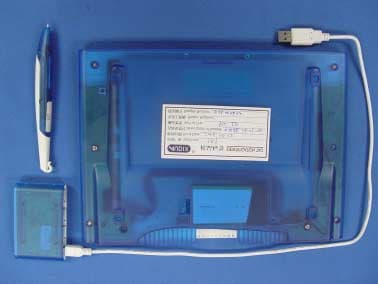
UEOTZTCB0601V
Aug 10, 20062.4 GHz RF Chalkboard
Equipment Class
DXX - Part 15 Low Power Communication Device Transmitter