UO7BD-100NAVIGATION SYSTEM
3SOFT, INC
Click to zoom
Application Details
- Equipment Class
- DXX - Part 15 Low Power Communication Device Transmitter
- Date of Grant
- Dec 07, 2006
- Application Purpose
- Original Equipment
- Date of Application
- Dec 03, 2006
- Equipment Note
- NAVIGATION SYSTEM
- Frequency Range
- 88.10000000 - 107.90000000
- Company
- 3SOFT, INC
- Country
- South Korea
Documents & Files
Document Text
Text extracted from the exhibit documents filed with the FCC. Open a document above to read the original.
Users Manual
Audio Player Select a Desired File in the Folder Chapter 5 Enjoy Media Player Functions Moves to the upper folder. Moves up and down by touch or drag to search a file. 59 Touch the Up/Down button to search a desired file for play. Press the Check button to select and play. Removes the selected file. - Press once the file for selection. (with several options) How to distinguish a folder from a file - Without extension in data : Folder - With extension in data : File Audio Player File Play Play/pause toggle. Moves 5 sec backward from the play. Moves 5 sec forward from the play. Chapter 5 Enjoy Media Player Functions 60 Play Mode Setting Stops play. Random play. Successively plays the selected music. Plays the selected music just once. Plays repeatedly the selected music. Whole play Plays music of the selected file. Audio Player File Information - Description of the file is shown in the right information. -Play time is indicated in the middle of the screen. Chapter 5 Enjoy Media Player Functions Equalizer Select ● Touch the equalizer mode, and the mode is changed by order of Normal, Rock, Hiphop, Jazz, Classical, Dance, Heavy, Disco, Soft, Live, and Hall. You can free select and enjoy your own music color with 11 types of equalizer according to your feeling. 61 Volume Adjust 1. Touch or drag the volume control on the top of the screen to adjust volume. 2. Press (-),(+) on the right button to adjust volume. Video Player Video Player Play Screen Before starting, Chapter 5 Enjoy Media Player Functions Touch the PMP menu. Touch ‘Video Player’ in the animation or the menu. Parts ①②③ ④ ⑤ ⑥ ⑦ ⑧ ⑨ ① Indicates battery level. ② Lock display ⑫ Play stop ⑬ Moves 5 sec forward from the play ⑭ Moves 5 sec backward from the play ⑮ Play/pause Deletes the file Play/ Moves downward from the selected file Moves upward from the selected file File selection bar (21) Moves to the upper folder 62 (21) ⑩ ③ Date ④ Day ⑤ Time ⑥ Volume Adjust Button ⑦ Displays file name ⑧ Video output ⑮⑭⑬ ⑫ ⑪ ⑨ Exits to the previous screen ⑩ Information about the selected video ⑪ Moves to the whole screen. Video Player Select a Desired File in the Folder Chapter 5 Enjoy Media Player Functions Moves to the upper folder. Moves up and down by touch or drag to search a file. 63 Touch the Up/Down button to search a desired file for play. Touch the Check button to play and pause. Removes the selected file. -Press once the file for selection. -Select the file and touch the play icon. How to distinguish a folder from a file - Without extension in data : Folder - With extension in data : File Video Player File Play Play/pause toggle Moves 5 sec backward from the play Moves 5 sec forward from the play Stops play Chapter 5 Enjoy Media Player Functions 64 Whole Screen Mode Setting Play/pause toggle. Moves 5 sec backward from the play. Moves 5 sec forward from the play. Stops play. External output Converts into a general screen. Video Player Whole Screen Play Chapter 5 Enjoy Media Player Functions ▶ 1 Touch the ‘Full’ icon while the video player is played ▶ 2 Touch the ‘Full’ icon, and the whole screen size is played. 65 When you are to change the mode during play, touch the screen, and the menu icon is displayed as shown in the figure. Touch the icon, and the command is executed. To exit from the whole screen, touch the Icon. 3 ♠ Touch the screen during play, and the menu icon appears as shown in [Figure 3]. The function is same even when the [MENU] button on the right is pressed down. Touch the screen or press the [MENU] button on the right, and the menu icon disappears in the screen and the whole screen is played. Video Player Video View by External Output Chapter 5 Enjoy Media Player Functions Refer to ‘Connect to TV/External Unit’ on page 25. ▶ 66 ▶ 2 1. Touch the Full icon, and the whole screen size is played. ▶Main body screen at external output 2. When you are to change the mode during play, touch the screen, and the menu icon appears on the bottom. 1. Connect the ‘AV IN’ of TV and ‘AV OUT’ of the main body with AV cable as shown in the figure. 1 3.Touch the icon. 3 To exit from the whole screen, touch the screen. ▶Video is outputted in TV. ▶The external output stops and video is played in the main body. Video Player File Information -Description of the file is shown in the right information. -Play time is indicated in the middle of the screen. Chapter 5 Enjoy Media Player Functions Volume Adjust 1. Touch or drag the volume control on the top of the screen to adjust volume. 67 2. Press (-),(+)(+) on the right button to adjust volume. Caption View Play the video, and a caption file(~smi) in the same name as the video file is automatically imported to indicate caption. This product supports a caption file in form of smi. Photo Photo Play Screen Before starting Chapter 5 Enjoy Media Player Functions Touch the PMP menu. Touch ‘Photo’ in the animation or the menu. Parts ① Battery level ①②③ ④ ⑤ ⑥ ⑦ ⑧ ⑨⑩ ② Lock display ③ Date ⑬ , : Moves by four upward/downward ⑭ Whole screen ⑮ Slide view Zoom in Preview Deletes the file Play/pause Moves upward from the selected file (21) Moves downward from the selected file (22) File selection bar (23) Moves to the upper folder 68 (23) (22) ⑪ ④ Day ⑤ Time ⑥ Volume Adjust Button ⑦ Displays file name ⑫ ⑧ Photo output ⑨ Up/down scroll (21) ⑮ ⑭ ⑬ ⑩ Exit button ⑪ Information about the selected photo ⑫ , : Moves by one forward/backward Photo Select a Desired File in the Folder Chapter 5 Enjoy Media Player Functions Moves to the upper folder. Moves up and down by touch or drag to search a file . 69 Touch the Up/Down button to search a desired file for play. Touch the Check button to play and pause. Removes the selected file. - Press once the file for selection. How to distinguish a folder from a file - Without extension in data : Folder - With extension in data : File Photo Preview The screen is viewed into four small screens. Chapter 5 Enjoy Media Player Functions How to select f…
Text truncated - open the document above for the full version.
Users Manual
Greetings Thank you for buying GD7 of GM DAEWOO. Welcome to the diversified and convenient world of Portable Multimedia Navigation GD7. GM DAEWOO’s GD7 is designed and made to be in compliance with the rigid self standard and international quality standards and goes through severe quality tests for humidity, impact, dirt, vibration and drop before production. We hope that with this product produced through such a series of processes, you will enjoy more pleasantly your life and spare times anytime and anywhere such as navigation system to help the car safely run, TV and you to view movie, listen to music and appreciate photos. This User Manual is intended to be a help to facilitate operation of the diversified and convenient functions of this product. Any damage or trouble on the product arising out of failure to be fully aware of warnings or cautions is excluded from free AS. Please be advised that you should read them before using the product. Thank you. 3 Chapter 1 Before Use Installation In The Car Installation in the Car The description on this page relates to how to right install PMP, GPS antenna, stand, power cable in the car. 4 ▶ 1 Remove dust on the front glass and mount the stand on a proper position. ▶ 2 Attach the main body to the installed stand. 3 1. Connect the adaptor to the cigar jack. ♣ For car adaptor, you must use the DC 5V adaptor only supplied by our company. If you use a general adaptor, it may cause a trouble ♣ Begin installation in the car before you start the car. Otherwise, the product may be damaged due to overcurrent. 2. Put the GPS antenna connection jack in the main body and install the GPS module as far as possible from the main body to protect the main body vulnerable to magnetism. Chapter 1 Before Use Safety Cautions Car Use Operation prohibited from driving If you operate the product while driving, it may cause a traffic accident due to carelessness in fixing your eyes on the front. Stop at a safe place for operation. The Safety Cautions are to prevent risk or damage on property by right using the product, so you must keep these. Continuous watching prohibited Driver’s continuous gazing at the screen may cause a traffic accident. The driver must normally drive the car once he/she drives. Since the GPS receiver and stand support have strong magnetism, do not bring them close to the PMP product, certainly. Fool from interference with receiving electric waves and that from driving on a tree-lined street will be recovered into normal operation when the electric wave receiving status becomes good. 5 If the product is used for a long time while the engine is stopped, the car battery may be discharged. When temperature changes are severe in the summer and winter seasons, if the product is kept in the car for a long time, it may cause a trouble. Do not keep the product in the car for hours after use. Chapter 1 Before Use Safety Cautions Power Supply For electrical stability, use AC power adaptor approved for this product, certainly; otherwise, it may cause a trouble. The Safety Cautions are to prevent risk or damage on property by right using the product, so you must keep these. If there is abnormal smell in the product or the adaptor, stop using the product immediately. For adaptor, take out the plug from the outlet and directly contact the service center. 6 Do not excessively bend the adaptor cord or let it be pressed by a heavy thing not to be broken. Firmly insert the adaptor plug so that it not be loose. Do not put in the plug in several numbers for use; it may cause abnormal heating and a fire. Take hold of the plug and adaptor with a dry hand in handling; otherwise, it may cause an electric shock. Chapter 1 Before Use Safety Cautions Power Supply When you do not use the product, separate the adaptor all the time. Otherwise, it may cause abnormal heating and a fire. The Safety Cautions are to prevent risk or damage on property by right using the product, so you must keep these. On occasion of thunder or lightning, take out the plug. Otherwise, it may cause an electric shock. If foreign substance or liquid permeates through the product, immediately turn off the power supply, take out the AC adaptor from the outlet, and take inspection from the qualified engineer. Do not disassemble, repair, and remodel. Otherwise, it may cause damage and trouble, and you cannot take free AS. 7 Do not put this product in a place with much humidity, dust or black dirt. Otherwise, it may cause a trouble. Do not place the product around a heat source at 35°C at least or in a high temperature sauna or a parked car. As the temperature of a parked car increases up to 80°C in the summer season, it may cause a trouble. Safety Cautions Use Do not put a magnet-like thing around the product. The product may be damaged by a highly magnetic thing such as magnet, CRT TV, monitor, speaker etc. Chapter 1 Before Use The Safety Cautions are to prevent risk or damage on property by right using the product, so you must keep these. Do not spray water on the product or wipe the product with chemicals such as benzene, thinner etc. It may deteriorate the surface or peel the coat, so you must not use it. 8 Do not put a heavy thing on the product. It may cause damage and trouble on the LCD. Do not let dust or foreign substance enter the product or adaptor. It may cause a trouble. Do not put a metal(coin, hair pin etc.) or a flammable foreign substance in the product or drop them onto the product. It may cause a trouble. Do not drop the product or give a strong impact(with heavy vibration) to the product. It may cause damage and trouble. Safety Cautions Use If you feel singing, reduce the volume or stop the use. Chapter 1 Before Use The Safety Cautions are to prevent risk or damage on property by right using the product, so you must keep these. Do not use an earphone while driving a bicycle, a car, or a motorcycle. ● Not to mention risk, it is violation of the law in some areas. ● It is specially dan…
Text truncated - open the document above for the full version.
Block Diagram
Video input: CCIR-656 format is the international standard of video signal and takes input from the main CPU(MP2520F). When CVBS video signal comes from the outside, the video decoder(SAA7113) IC converts it into CCIR-656 format and transfers it to the CPU. Then the CPU receives the signal and outputs it into LCD. AC97 AC97 signal is the international standard of audio signal. It converts audio in an MP3 file or a video file into AC97 format in CPU and outputs it into WM9712 IC. AC97 format of a digital signal is inputted into WM9712, and WM9712 converts it into audio of an analogue signal, and outputs it into speaker, earphone etc. Video output For LCD, digital LCD is adopted whose resolution is 480(RGB)X272. CPU outputs video signal of R8bit, G8bit and B8bit, and LCD receives the signal and outputs video. Also, the video encoder(CX25874)IC receives the same video signal and converts it into CVBS signal of an analogue signal to make it viewed in general monitor. SDRAM SDRAM is memory to execute the program in the CPU, making the program loaded onto the memory and flexibly run. Data line is read or written in 32 bits. SD CARD As a storage medium, SD CARD saves an MP3 file or a video file to enable these to be played in the set. NAND FLASH NAND FLASH is a storage medium containing all programs implemented in the set and delivered in a stored condition. CPU reads the program in FLASH to execute the program. USB 1.1 USB 1.1 is international standard and supports the USB 1.1 DEVICE function in the set. RS232 The GPS module conducts 232 communication with CPU. GPS delivers satellite information to CPU through 232 communication, and CPU receives the satellite information and indicates the current position in the screen.
Cover Letter(s)
EMC compliance Ltd. 82-1 Jeil-Ri, Yangji-Myun, Yongin-City, Kyunggi-Do, Korea EMC Compliance Ltd. 82-1, JEIL-RI, YANGJI-MYUN, YONGIN-CITY, KYUNGGI-DO, KOREA TEL: 82 31 336 9919 FAX : 82 31 336 4767 This test report shall not be reproduced except in full, Without the written approval. Confirmation letter for FM Transmitter Applicant : 3SOFT, Inc. FCC ID : UO7BD-100 We, EMC compliance, Ltd would like to answer following questions for requesting by the TCB. 1) How does this device operate? 1. Click icon for set-up mode. 2. Select output on Audio option. (Speaker, FMT, speaker & FMT) 3. Select FMT frequency by up & down key and press SET button. 4. CPU communicates with FM module by 12C data format method and send RF signals. 5. The signals are being converted in FM module. Video input: CCIR-656 format is the international standard of video signal and takes input from the main CPU(MP2520F). When CVBS video signal comes from the outside, the video decoder(SAA7113) IC converts it into CCIR-656 format and transfers it to the CPU. Then the CPU receives the signal and outputs it into LCD. AC97 AC97 signal is the international standard of audio signal. It converts audio in an MP3 file or a video file into AC97 format in CPU and outputs it into WM9712 IC. AC97 format of a digital signal is inputted into WM9712, and WM9712 converts it into audio of an analogue signal, and outputs it into speaker, earphone etc. Video output For LCD, digital LCD is adopted whose resolution is 480(RGB)X272. CPU outputs video signal of R8bit, G8bit and B8bit, and LCD receives the signal and outputs video. Also, the video encoder(CX25874)IC receives the same video signal and converts it into CVBS signal of an analogue signal to make it viewed in general monitor. SDRAM EMC compliance Ltd. 82-1 Jeil-Ri, Yangji-Myun, Yongin-City, Kyunggi-Do, Korea EMC Compliance Ltd. 82-1, JEIL-RI, YANGJI-MYUN, YONGIN-CITY, KYUNGGI-DO, KOREA TEL: 82 31 336 9919 FAX : 82 31 336 4767 This test report shall not be reproduced except in full, Without the written approval. SDRAM is memory to execute the program in the CPU, making the program loaded onto the memory and flexibly run. Data line is read or written in 32 bits. SD CARD As a storage medium, SD CARD saves an MP3 file or a video file to enable these to be played in the set. NAND FLASH NAND FLASH is a storage medium containing all programs implemented in the set and delivered in a stored condition. CPU reads the program in FLASH to execute the program. USB 1.1 USB 1.1 is international standard and supports the USB 1.1 DEVICE function in the set. RS232 The GPS module conducts 232 communication with CPU. GPS delivers satellite information to CPU through 232 communication, and CPU receives the satellite information and indicates the current position in the screen. *References-Operation description file EMC compliance Ltd. 82-1 Jeil-Ri, Yangji-Myun, Yongin-City, Kyunggi-Do, Korea EMC Compliance Ltd. 82-1, JEIL-RI, YANGJI-MYUN, YONGIN-CITY, KYUNGGI-DO, KOREA TEL: 82 31 336 9919 FAX : 82 31 336 4767 This test report shall not be reproduced except in full, Without the written approval. 2) Provide information on the device and its antenna. The EUT is composite device, main function is PMP functions; MP3 play, File up and down mode, Navigation, FM transmitter A pattern antenna is used on PCB board for transmitting. TOP EMC compliance Ltd. 82-1 Jeil-Ri, Yangji-Myun, Yongin-City, Kyunggi-Do, Korea EMC Compliance Ltd. 82-1, JEIL-RI, YANGJI-MYUN, YONGIN-CITY, KYUNGGI-DO, KOREA TEL: 82 31 336 9919 FAX : 82 31 336 4767 This test report shall not be reproduced except in full, Without the written approval. BOTTOM *References-Operation description 3) How is it installed? This device use 12V DC battery, External antenna is not used for transmitting. *References- Test report/Page 7 -4.1 production description 4) What test procedure was used? Test procedure is ANSI C63.4:2003. Please refer to test report. *References- Test report/Page 1 Test Procedure Test report/Page 10 - 5.2 Standards & results Test report/Page 10 - 6.1.1/2 Conducted Emission Test report/Page 13~14 - 6.2.1/2 Radiated emission Test report/Page 18 - 6.3.1/3 Occupied Bandwidth 5) If tested in a car, how was it configured/tested? N/A 6) Was the tuning range properly verified? The test lab should indicate in the report that the tuning controls were manually adjusted to verify maximum tuning range. Yes, The tuning range is 88.1 ~ 107.9MHz, (100KHz step) Revised contents : a few pictures were taken and put in the test report (setting as program firmware) EMC compliance Ltd. 82-1 Jeil-Ri, Yangji-Myun, Yongin-City, Kyunggi-Do, Korea EMC Compliance Ltd. 82-1, JEIL-RI, YANGJI-MYUN, YONGIN-CITY, KYUNGGI-DO, KOREA TEL: 82 31 336 9919 FAX : 82 31 336 4767 This test report shall not be reproduced except in full, Without the written approval. *MIN(88.1MHz) *STEP(100KHz) EMC compliance Ltd. 82-1 Jeil-Ri, Yangji-Myun, Yongin-City, Kyunggi-Do, Korea EMC Compliance Ltd. 82-1, JEIL-RI, YANGJI-MYUN, YONGIN-CITY, KYUNGGI-DO, KOREA TEL: 82 31 336 9919 FAX : 82 31 336 4767 This test report shall not be reproduced except in full, Without the written approval. *MAX(107.9MHz) *References- Test report/Page 21 – 6.5 Tuning controls EMC compliance Ltd. 82-1 Jeil-Ri, Yangji-Myun, Yongin-City, Kyunggi-Do, Korea EMC Compliance Ltd. 82-1, JEIL-RI, YANGJI-MYUN, YONGIN-CITY, KYUNGGI-DO, KOREA TEL: 82 31 336 9919 FAX : 82 31 336 4767 This test report shall not be reproduced except in full, Without the written approval. 7) Was the bandwidth properly tested with maximum audio input? Of course. MP3 file was used for testing. Maximum setting is required in Transmitting mode.( 88.1 ~ 107.9MHz) *References- Test report/Page 19~20 – 6.3.3 Test data
External Photos
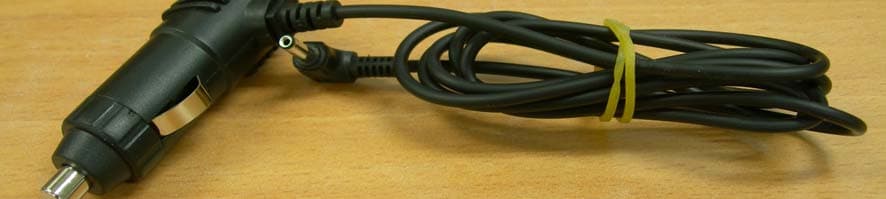
EMC Compliance Ltd. 82-1 JEIL-RI, YANGJI-MYUN, YONGIN-CITY, KYUNGGI-DO 449-825 KOREA TEL: 82 31 336 9919 FAX : 82 31 336 4767 This test report shall not be reproduced except in full, Without the written approval. External photos EMC Compliance Ltd. 82-1 JEIL-RI, YANGJI-MYUN, YONGIN-CITY, KYUNGGI-DO 449-825 KOREA TEL: 82 31 336 9919 FAX : 82 31 336 4767 This test report shall not be reproduced except in full, Without the written approval. CIGER JACK
ID Label/Location Info
EMC Compliance Ltd. 82-1, JEIL-RI, YANGJI-MYUN, YONGIN-CITY, KYUNGGI-DO, KOREA TEL: 82 31 336 9919 FAX : 82 31 336 4767 This test report shall not be reproduced except in full, Without the written approval ID Label EMC Compliance Ltd. 82-1, JEIL-RI, YANGJI-MYUN, YONGIN-CITY, KYUNGGI-DO, KOREA TEL: 82 31 336 9919 FAX : 82 31 336 4767 This test report shall not be reproduced except in full, Without the written approval ID Label Location
Internal Photos
EMC Compliance Ltd. 82-1 JEIL-RI, YANGJI-MYUN, YONGIN-CITY, KYUNGGI-DO 449-825, KOREA TEL: 82 31 336 9919 FAX : 82 31 336 4767 This test report shall not be reproduced except in full, Without the written approval Internal photos EMC Compliance Ltd. 82-1 JEIL-RI, YANGJI-MYUN, YONGIN-CITY, KYUNGGI-DO 449-825, KOREA TEL: 82 31 336 9919 FAX : 82 31 336 4767 This test report shall not be reproduced except in full, Without the written approval Main Top Main Bottom EMC Compliance Ltd. 82-1 JEIL-RI, YANGJI-MYUN, YONGIN-CITY, KYUNGGI-DO 449-825, KOREA TEL: 82 31 336 9919 FAX : 82 31 336 4767 This test report shall not be reproduced except in full, Without the written approval LCD Top LCD Bottom EMC Compliance Ltd. 82-1 JEIL-RI, YANGJI-MYUN, YONGIN-CITY, KYUNGGI-DO 449-825, KOREA TEL: 82 31 336 9919 FAX : 82 31 336 4767 This test report shall not be reproduced except in full, Without the written approval Battery Top Battery Bottom EMC Compliance Ltd. 82-1 JEIL-RI, YANGJI-MYUN, YONGIN-CITY, KYUNGGI-DO 449-825, KOREA TEL: 82 31 336 9919 FAX : 82 31 336 4767 This test report shall not be reproduced except in full, Without the written approval GPS Top GPS Bottom EMC Compliance Ltd. 82-1 JEIL-RI, YANGJI-MYUN, YONGIN-CITY, KYUNGGI-DO 449-825, KOREA TEL: 82 31 336 9919 FAX : 82 31 336 4767 This test report shall not be reproduced except in full, Without the written approval GPS Inside GIGER JACK Inside EMC Compliance Ltd. 82-1 JEIL-RI, YANGJI-MYUN, YONGIN-CITY, KYUNGGI-DO 449-825, KOREA TEL: 82 31 336 9919 FAX : 82 31 336 4767 This test report shall not be reproduced except in full, Without the written approval FMT This hole is connected with a before and behind. TOP BOTTOM
Operational Description
FM TransmitterIC NS73 動作条件 製品概要 NS73は、ワイヤレスマイク、MP3/CDプレーヤー、携帯電話向けのFMステレオトランスミッターICです。 High-Quality ITEM SYMBOL MIN. TYP. MAX. UNIT Operating Voltage VDD 2.7 3.0 3.6 V Operating Temperature Ta -30 +80 °C Storage Temperature Tstg -40 +125 °C 送信周波数範囲 ¾ 87.5MHz~108MHz ステレオ変調 32.768kHzの水晶をサポート パッケージサイズ : 3.26 x 3.26 x 0.79mm (標準値) パッケージ重量 : 1.8mg (標準値) 少ない周辺部品---サイズ : 1005以下(パワーデカップリングコンデンサを除く) 基準周波数信号は外部からも入力可能 局部発振のためのMOSバラクタを内蔵 調整不要 シリアルインターフェース : 3線式とI 2 Cをサポート 動作電源電圧 : 2.7V~3.6V (標準値 : 3.0V) 動作温度 : -30°C~+80°C CMOSプロセス 電気的性能 VDD = 3.0V+/-0.05V, Ta = 25°C, f-AF = 1kHz, Vi-AF = 90mVrms, 他条件は別途指定 特徴 PARAMETER SYM CONDITION MIN TYP MAX UNIT Current Consumption Idd 36 45 mA Standby Current Istb 1.5 20 uA Input Low level Voltage ViL IIC, LA,DA, CK pins -0.3 0 0.25 * VDDV Input High Level Voltage ViH IIC, LA,DA, CK pins 0.75 * VDDVDD VDD + 0.3V Output Low Level Voltage VoL DA pin IoL = -3mA 0 0.4 V TX Frequency fTX US band 87.5 108 MHz TX Power Output PO Rl = 50-ohm, fo = 90MHz 1 or 2 mW Modulation Deviation Dev Pre-emphasis = on +/-50 kHz Modulation Distortion(Mono) THD 0.4 1.0 % Modulation SN Ratio SNR 50 55 dB Stereo Separation SEP 25 35 dB Audio Freq. Response FR f = 50Hz - 15kHz fi = 400Hz@0dB Vi = 12mVrms -3 0 1.5 dB Audio input impedance Zaf f = 50Hz - 15kHz 50 60 kohm Pilot Tone Level PL 9 10 11 % Crystal Frequency fXT 32.768 kHz Crystal Tolerance dXT Ta = 25degC VDD=2.7V - 3.6V -20 0 20 ppm 2006/03/30 PINNAMEI, ODESCRIPTION B6 GNDD- Ground for Digital C1 GAF - Audio Ground C2 CAPC I Smoothing Capacitor for APC C3 NC - Non Connection C5 GESD - Ground C6 IIC I I 2 C or 3-wire I/F selector 0=3-wire, 1=I 2 C D1 GPA - RF Power amp Ground D2 RFO O RF Power output D5 LA I Latch for 3-wire or Address for I 2 C D6 VDDD - Digital VDD E1 VPA - RF Power amp VDD E2 VLO - LO VDD E3 TEB O Unlock detect output E4 TEA O PE output E5 CK I Clock input for I/F (Pull up R needed) E6 DA I/O Data I/O for I/F (Pull up R needed) F1 OS1 O LO tank circuit-1 F2 OS2 O LO tank circuit-2 F3 GLO - LO Ground F4 CP1 O Charge Pump output for Main Synthesizer F5 VSY - VDD for Synthesizer F6 GSY - Ground for Synthesizer AUDIO GAIN PRE_EM PILOT LEVEL PRE- EMPHASIS PRE- EMPHASIS LIMITER LPF LIMITER LPF STEREO GENERATOR PA MODULATION LEVEL SYSTEM CLOCK SYSTEM CLOCK GENERATOR OSCILLATOR & MODULATOR PRE_EM A1 RIN CB LIN VAF VESD GESDTST1TST0 VSY F6 GSY FREQUENCY SYNTHESIZER (FSA) SHIFT REGISTER IIC LOGIC LATCH CP2 XOSC X1GXTVXTLADACK VDDD GNDD GAF IIC GPA VPA RFO CAPC TEATEBOS2OS1VLOGLO A2 B2 CP1 B1 C1 B5C5A5B4F5A6A4A3B3D5E6E5B6D6 C6 F4 E1 D1 D2 C2 F3E2F1F2E3E4 Block Diagram of NS73 (top view) 1 2 3 4 5 6 ABCDFE ブロックダイヤグラム ワイヤレスマイク ポータブルCD/MDプレーヤーへの内蔵 携帯電話への内蔵 注: 出力特性は、各国の電波法に従ってください。 PIN NAME I, O DESCRIPTION A1 RIN I Audio Right signal input A2 LIN I Audio Left signal input A3 X1 I Crystal Input A4 GXT - Ground for Crystal A5 TST1 O Test output A6 CP2 O Charge Pump Output for Clock Gen. B1 VAF - Audio VDD B2 CB I De-coupling Capacitor for VDD/2 B3 VXT - VDD for Crystal B4 TST0 I Test Input B5 VESD - VDD 端子説明 応用例 〒105-0012 東京都港区芝大門1-16-3 芝大門116ビル8F http://www.niigata-s.co.jp TEL : 81-3-3437-3570 FAX : 81-3-3437-5622 詳細に関しては、弊社営業部門までお問い合わせください。 2006/03/30
Operational Description
1/32 NIIGATA SEIMITSU CO., LTD. PRODUCT SPECIFICATION 納 入 仕 様 書 MODEL NAME 型 名: NS73B0WC33-01-EF-E1 Please return one copy after stamping your acceptance sign on this product specification. When there is no return within two months from the date of the issue, this product specification will be regarded as accepted. お手数ですが、当納入仕様書に貴社受領印を押印の上、一部を当社へご返却下さい。 発行年月日より2ヶ月間以内にご返却いただけない場合、当納入仕様書は受領されたものとさせて いただきます。 新潟精密(株) NIIGATA SEIMITSU Co., Ltd. 発行年月日 DATE 2005.Dec.26 承認 APPROVED 調査 CHECKED 作成 DRAWN RECEPTION STAMP 御客様受領印 2/32 NIIGATA SEIMITSU CO., LTD. CONTENTS; 目次 1. SCOPE ; 適用···························································································································· 4 2. MODEL NAME ; 型名················································································································ 4 3. BLOCK DIAGRAM ; ブロック図································································································· 4 4. ABSOLUTE MAXIMUM SPECIFICATION ; 絶対最大定格······················································· 4 5. ELECTRICAL SPECIFICATION; 電気的仕様··········································································· 5 6. ELECTRICAL CHARACTERISTICS; 電気的特性···································································· 5 6.1. Standard Test Condition; 標準試験条件················································································· 5 6.2. Circuit of Measurement; 測定用接続図·················································································· 6 6.3. Electrical Characteristics Item; 電気的特性項目··································································· 7 7. SERIAL INTERFACE; シリアルインターフェース········································································· 8 7.1. 3-wire bus Mode; 3線シリアル方式························································································· 8 7.2. I 2 C bus Mode; I 2 C方式·········································································································· 10 7.2.1. I 2 C-bus Terminology; I 2 Cで使用される用語······································································ 10 7.2.2. START Condition and STOP Condition; 「スタート」条件と「ストップ」条件·························· 10 7.2.3. Data Transfer; データ転送·································································································11 7.2.4. Acknowledge; アクノリッジ(受信確認)·············································································· 12 7.2.5. Electrical Specification and Timing for I/O Stages ····························································13 7.2.6. Definition of Bits in a Byte; 1バイト内の各ビット定義························································· 14 7.2.7. Command Format; コマンドフォーマット············································································ 15 8. SOFTWARE CONTROL SPECIFICATION; ソフトウェア制御仕様··········································· 16 8.1. Set Register(outline); レジスタ設定(概要)············································································ 16 8.2. Standard Clock; 基準クロック································································································ 16 8.3. Muting ···································································································································· 16 8.4. Reset for Serial Interface······································································································16 8.5. PLL Setting Method; PLL(Pレジスタ)設定方法···································································· 17 8.6. Register Map; レジスタマップ································································································· 18 8.7. Controller basic operation routines····················································································· 21 9. PBFREE SOLDER REFLOW PROFILE; 鉛フリー・リフロープロファイル·································· 23 3/32 NIIGATA SEIMITSU CO., LTD. 10. OUTER DIMENSION AND TERMINALS FOR CONNECTION; 外形寸法及び外部接続端子·23 11. ASSIGNMENT OF PINS; ピン配置·························································································· 24 12. INTERNAL PIN CONFIGURATION; 端子内部構成································································· 25 13. RECOMMENDED FOOT PATTERN; 推奨フットパターン························································· 28 14. APPLICATION CIRCUIT ; 応用回路······················································································· 29 15. APPEARANCE SPECIFICATION; 外観規格·········································································· 30 16. NOTES OF USE ; 使用上の注意事項······················································································ 30 16.1. Notes of designing the board; 設計時の注意事項·························…
Text truncated - open the document above for the full version.
Contact Information
Applicant
Je Hwan Lee
Test Firm
EMC Compliance Ltd.Han-Seok Yeom
Technical Specifications
| # | Rule Parts | Frequency Range | Power Output |
|---|---|---|---|
| 1 | 15C | 88.1 MHz - 107.9 MHz | - |
Other Applications from 3SOFT, INC
UO7BD-200
Dec 07, 2006Navigation System
Equipment Class
DXX - Part 15 Low Power Communication Device Transmitter