V5PSKSmart Kiosk
PAX Technology Limited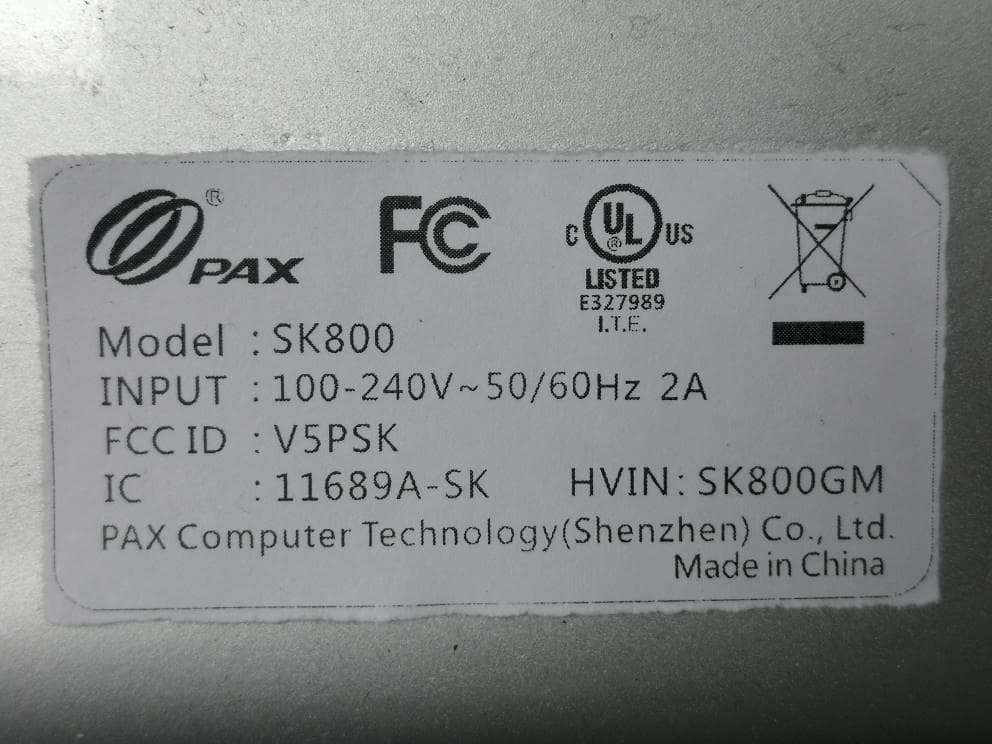
Click to zoom
Application Details
- Equipment Class
- DTS - Digital Transmission System
- Date of Grant
- Jun 18, 2020
- Application Purpose
- Original Equipment
- Date of Application
- Jun 18, 2020
- Equipment Note
- Smart Kiosk
- Frequency Range
- 2412.00000000 - 2462.00000000
- Company
- PAX Technology Limited
- Country
- China
Documents & Files
Document Text
Text extracted from the exhibit documents filed with the FCC. Open a document above to read the original.
Users Manual
SK600 Smart Kiosk Note: Product images shown may be different than actual product received PAX TECHNOLOGY LIMITED 1、ContentsChecklist Please check the components after unpacking. If any are missing, please contact the dealer. Part Qty SK600 Smart Kiosk 1 SK600 Wall Bracket 1 Printer Key 2 Thermal Paper Roll 1 M4-12 Combination Screw 2 Expansion Screw 6 Plastic Packaging 1 Power Cable 1 Telephone Handle (optional) 1 Product Manual 1 2、Product Description Side View Front View Thermal Via,Speaker,NFC/Contactless Card reader,Scan Area,Printer,Printer Key & Lock, LED Light,Camera,Display,Keyboard,Fingerprint Module,Hybrid MSR&IC Card Reader Interface Diagram Power Port,Power Button,D89 Serial,SD Card Slot,HDMI Port,RS485 Port,Micro USB, SIM Card Slot,Ethernet Port 3、Operating Instruction · Power on: Plug in the AC power cable and turn on the power button. · Contactless module indicator: Light indication when using the Contactless module. · LED working indicator: Light indication when the device is working at night. · Card Readers: Magnetic stripe card: Insert magnetic stripe card into card slot and push to the end with magnetic stripe facing down, then pull out the card at a constant speed to swipe card. IC chip card: Insert card with IC chip facing up, then push it to the end of the card slot. Keep the card inserted for 2~4 seconds until the display prompts to remove the card. Contactless card: Place the contactless card at the center of contactless card reader logo area. 4、Specifications Operating System: Android 6.0 CPU: Quad-Core Cortex A17, 1.8GHz Memory: 2GB RAM+16GB Flash Display: 15-inch, Resolution1024 x 768 pixels, multi-touch Anti-Vandalism capacitive screen Printer: 3 inch high-speed / mute thermal printer with auto cutter, printer speed: 150mm/S, Printer module is replaceable Audio: Built-in speaker, support telephone handle (optional) Camera: 5-mega pixels auto-focus front camera Fingerprint Module: Capacitive Fingerprint, Image collection 256 * 360 pix (optional) Wireless communication: LAN(10M/100M/1000M), WIFI(2.4GHz&5GHz), Bluetooth(4.0), 3G/4G Positioning: GPS, GLONASS, Galileo, QZSS, SBAS Card Slots: Micro SIM card slot x 1 Micro SD card slot(Support maximum of 128GB) x 1 Peripheral Ports: RJ45 (LAN)x1 RS232 (DB9)x1 RS485 Half-duplex (RJ-11)x1 HDMIPort(1.4)x1 Power Portx1 Micro USBx1 Note:RJ11 is the RS485 signal, which will not be connected to the public network and is only used for data transmission of the same interface device Card Readers: 2-in-1 magnetic stripe card / IC card reader; Contactless card reader Magnetic Stripe Card Reader: Complied to the standards of ISO7811 and ISO7812 IC Card Reader:Complied to the standards of ISO7816, EMV2000 L1&L2, PBOC3.0 NFC/Contactless card reader: Complied to the standards of ISO14443 Type A&B Working Environment Temperature: 0°C~50°C(32°F~122°F) R.H.: 10%~93%( non-condense) Storage Environment Temperature:-20°C~70°C(-4°F~158°F) R.H.:5%~95% (non-condense) 5、Load Printer Paper 1. When the display shows that the paper has run out, insert the key into the keyhole and turn it counterclockwise to open the printer cover. 2. Completely open the printer cover. 3. Remove the remaining paper roll. 4. Insert the new paper roll into the printer. 5. Pull out the end of the paper so that it extends past the cutting blade, Make sure the paper roll is placed in the direction as shown in the figure below. 6.Close the printer cover, and pull out the key. Printer will automatically cut off the extra paper, the paper is changed successfully. 6、Install introduction Installation List No. Part Picture Qty/pcs 1 SK600Kiosk 1 2 Wall Bracket 1 3 M6-60 Expansion Screw 6 4 M4-12 Combination Screw 2 Installation Steps 1. Use 6pcs expansion screws to fix the bracket on the wall. • Use an 8.0 mm diameter drill bit to drill holes in the wall according to the position of the bracket fixing hole. The le size is shown in the figurebelow: • Note: Hole diameter is 8.0mm, Hole depth is above 60.0mm. 2.Use the 4pcs hooks on the back of the device to hang the whole device on the wall bracket. 3. Use 2pcs M4-12 combination 3screws to attach the machine to the wall bracket at the bottom of the machine. 4. The device installation is completed. 7、Installation and Usage Tips 1) There is no built-in battery, and the device can only be powered by the power adapter. 2) Avoid exposing the device in overheated, humid, dusty, or strong electromagnetic environment. 3) Do not vibrate, shake, or drop the device. 4) Do not insert or unplug any part of the device while it is powered on. Otherwise, it may cause damage to the internal circuit. 5) If necessary, please contact PAX technical support for assistance with the device. 6) Before using the magnetic stripe /IC/contactless card, check if there is any suspicious person nearby, if so, pay attention to guard against theft. 8、FCC Regulations: This device complies with Part 15 of the FCC Rules. Operation is subject to the following two conditions: (1) This device may not cause harmful interference, and (2) this device must accept any interference received, including interference that may cause undesired operation. This equipment has been tested and found to comply with the limits for a Class B digital device, pursuant to Part 15 of the FCC Rules. These limits are designed to provide reasonable protection against harmful interference in a residential installation. This equipment generates, uses and can radiate radio frequency energy and, if not installed and used in accordance with the instructions, may cause harmful interference to radio communications. However, there is no guarantee that interference will not occur in a particular installation. If this equipment does cause harmful interference to radio or television reception, which can be determined by turning the equipment off and on, the user is encouraged to try to correct the interference by one of the following measures: Reorient or relocate the receiving …
Text truncated - open the document above for the full version.
Users Manual
SK800 Smart Kiosk Note: Product images shown may be different than actual product received PAX TECHNOLOGY LIMITED 1、ContentsChecklist Please check the components after unpacking. If any are missing, please contact the dealer. Part Qty SK800 Smart Kiosk 1 SK800 Wall Bracket 1 Printer Key 2 Thermal Paper Roll 1 M4-12 Combination Screw 2 Expansion Screw 6 Plastic Packaging 1 Power Cable 1 Telephone Handle (optional) 1 Product Manual 1 2、Product Description Side View Front View Interface Diagram 3、Operating Instruction · Power on: Plug in the AC power cable and turn on the power button. · Contactless module indicator: Light indication when using the Contactless module. · LED working indicator: Light indication when the device is working at night. · Card Readers: Magnetic stripe card: Insert magnetic stripe card into card slot and push to the end with magnetic stripe facing down, then pull out the card at a constant speed to swipe card. IC chip card: Insert card with IC chip facing up, then push it to the end of the card slot. Keep the card inserted for 2~4 seconds until the display prompts to remove the card. Contactless card: Place the contactless card at the center of contactless card reader logo area. 4、Specifications Operating System: Android 6.0 CPU: Quad-Core Cortex A17, 1.8GHz Memory: 2GB RAM+16GB Flash Display: 23.8-inch, 1920X1080 resolution, multi-touch Anti-vandalism capacitive screen. Printer: 3 inch high-speed / mute thermal printer with auto cutter, printer speed: 150mm/S, Printer module is replaceable Audio: Built-in speaker, support telephone handle (optional) Camera: 8-mega pixels auto-focus front camera Fingerprint Module: Capacitive Fingerprint, Image collection 256 * 360 pix (optional) Wireless communication:LAN(10M/100M/1000M), WIFI(2.4GHz&5GHz), Bluetooth(4.0), 3G/4G Positioning:GPS, GLONASS, Galileo, QZSS, SBAS Card Slots: Micro SIM card slot x 1 Micro SD card slot(Support maximum of 128GB) x 1 Peripheral Ports: RJ45 (LAN) x1 RS232 (DB9)x1 RS485 Half-duplex (RJ-11) x1 HDMIPort(1.4)x1 Power Port x1 Micro USB x1 Note:RJ11 is the RS485 signal, which will not be connected to the public network and is only used for data transmission of the same interface device Card Readers: 2-in-1 magnetic stripe card / IC card reader; Contactless card reader Magnetic Stripe Card Reader: Complied to the standards of ISO7811 and ISO7812 IC Card Reader:Complied to the standards of ISO7816, EMV2000 L1&L2, PBOC3.0 NFC/Contactless card reader: Complied to the standards of ISO14443 Type A&B Working Environment Temperature: 0°C~50°C(32°F~122°F) R.H.: 10%~93%( non-condense) Storage Environment Temperature:-20°C~70°C(-4°F~158°F) R.H.:5%~95% (non-condense) 5、Load Printer Paper 1. When the display shows that the paper has run out, insert the key into the keyhole and turn it counterclockwise to open the printer cover. 2. Completely open the printer cover. 3. Insert the new paper roll into the printer. 4. Pull out the end of the paper so that itextends past the cutting blade, Make surethe paper roll is placed in the direction asshown in the figure below. 5.Close the printer cover, and pull outthe key. Printer will automatically cut offthe extra paper, the paper is changed successfully. 6、Install introduction Installation List No. Part Picture Qty/pcs 1 SK800Kiosk 1 2 Wall Bracket 1 3 M6-50 Expansion Screw 6 4 M4-12 Combination Screw 2 Installation Steps 1. Use 6pcs expansion screws to fix the bracket on the wall. • Use an 8.0 mm diameter drill bit to drill holes in the wall according to the position of the bracket fixing hole. The size is shown in the figurebelow: • Note: Hole diameter is 8.0mm, Hole depth is above 60.0mm. 2.Use the 4pcs hooks on the back of the device to hang the whole device on the wall bracket. 3. Use 2pcs M4-12 combination 3screws to attach the machine to the wall bracket at the bottom of the machine. 4. The device installation is completed. 7、Installation and Usage Tips 1) There is no built-in battery, and the device can only be powered by the power adapter. 2) Avoid exposing the device in overheated, humid, dusty, or strong electromagnetic environment. 3) Do not vibrate, shake, or drop the device. 4) Do not insert or unplug any part of the device while it is powered on. Otherwise, it may cause damage to the internal circuit. 5) If necessary, please contact PAX technical support for assistance with the device. 6) Before using the magnetic stripe /IC/contactless card, check if there is any suspicious person nearby, if so, pay attention to guard against theft. 8、FCC Regulations: This device complies with Part 15 of the FCC Rules. Operation is subject to the following two conditions: (1) This device may not cause harmful interference, and (2) this device must accept any interference received, including interference that may cause undesired operation. This equipment has been tested and found to comply with the limits for a Class B digital device, pursuant to Part 15 of the FCC Rules. These limits are designed to provide reasonable protection against harmful interference in a residential installation. This equipment generates, uses and can radiate radio frequency energy and, if not installed and used in accordance with the instructions, may cause harmful interference to radio communications. However, there is no guarantee that interference will not occur in a particular installation. If this equipment does cause harmful interference to radio or television reception, which can be determined by turning the equipment off and on, the user is encouraged to try to correct the interference by one of the following measures: Reorient or relocate the receiving antenna. Increase the separation between the equipment and receiver. Connect the equipment into an outlet on a circuit different from that to which the receiver is connected. Consult the dealer or an experienced radio/TV technician for help. FCC Caution: Any changes or modifications not expressly approved by t…
Text truncated - open the document above for the full version.
Cover Letter(s)
SCS-F18: Project and Product Certification Representative Authorization Letter Page 1 of 2 Rev 6.0 775 Montague Expressway Milpitas, CA 95035 Tel: 408-526-1188 Fax: 408-526-1088 Email: [email protected] Project and Product Certification Representative Authorization Letter Reason for Amendment (current / obsolete) Revision History Approved Date From To Initial Release (obsolete) 1.0 1.0 Nov-14-2006 Revised wording (obsolete) 1.0 2.0 Sept–25-2007 Updated company template (obsolete) 2.0 3.0 Jan-31-2012 Updated letter information (obsolete) 3.0 4.0 May-23-2014 Added FCC ID field (obsolete) 4.0 5.0 Sep-16-2014 Updated company name & logo (current) 5.0 6.0 Jun-27-2018 SCS-F18: Project and Product Certification Representative Authorization Letter Page 2 of 2 Rev 6.0 PAX Technology Limited Room 2416, 24/F., Sun Hung Kai Centre, 30 Harbour Road, Wanchai, Hong Kong June 3, 2020 To: BVCPS, INC. 775 Montague Expressway, Milpitas, CA 95035 USA Dear Sir/Madam, Re: Product Certification Representative Authorization Letter We, PAX Technology Limited hereby authorize Bureau Veritas Consumer Product Services, Inc. to act as a Certification Body for certifying for the following project(s): FCC ID: V5PSK Product Description: Smart Kiosk Model: SK600,SK800 Sincerely, ____________________ Contact Person: Jenna Tan Company: PAX Technology Limited TEL: 86-755-86156663 FAX: 86-755-86156663 E-mail: [email protected]
Cover Letter(s)
PAX Technology Limited Room 2416, 24/F., Sun Hung Kai Centre, 30 Harbour Road, Wanchai, Hong Kong Date: May 12, 2020 Federal Communications Commission 7435 Oakland Mills Road - Gate A Columbia, Maryland 21046 Subject: Request for Confidentiality FCC ID: V5PSK To Whom It May Concern, Pursuant to the provisions of Sections 0.457 and 0.459 of Commission’s rules (47CFR§§0.457, 0.459), we are requesting the Commission to withhold the following attachments as confidential document from public disclosure indefinitely. Schematic Diagram Block Diagram Parts List Operational Description Tune up Procedure Software Operational Description Above mentioned document contains detailed system and equipment description are considered as proprietary information in operation of the equipment. The public disclosure of above documents might be harmful to our company and would give competitor an unfair advantage in the market. In additional to above mentioned documents, pursuant to Public Notice DA 04-1705 of the Commission’ s policy, in order to comply with the marketing regulations in 47 CFT §2.803 and the importation rules in 47 CFR §2.1204, while ensuring that business sensitive information remains confidential until the actual marketing of newly authorized devices. We are requesting the commission to grant short-term confidentiality request on the following attachments until 180 days after the Grant Date of Equipment Authorizations. External Photos Internal Photos Test Setup Photos Users Manual It is our understanding that all measurement test reports, FCC ID label format and correspondent during certification review process cannot be granted as confidential documents and those information will be available for public review once the grant of equipment authorization is issued. Best Regards, Contact Person: Jenna Tan Company: PAX Technology Limited TEL: 86-755-86156663 FAX: 86-755-86156663 E-mail: [email protected]
Cover Letter(s)
PAX Technology Limited Room 2416, 24/F., Sun Hung Kai Centre, 30 Harbour Road, Wanchai, Hong Kong Date: May 12, 2020 Declaration We, PAX Technology Limited, declare that the device, FCC ID: V5PSK, does not support any non-US channels in all the operational mode(s). All non-US frequencies, US 2.4G channel 12-13 and Country code selection are disabled through proprietary software and are not user changeable. Should you have any question or comment regarding this matter, please do not hesitate to contact me. Sincerely yours, _____________________ Contact Person: Jenna Tan Company: PAX Technology Limited TEL: 86-755-86156663 FAX: 86-755-86156663 E-mail: [email protected]
Cover Letter(s)
PAX Technology Limited Room 2416, 24/F., Sun Hung Kai Centre, 30 Harbour Road, Wanchai, Hong Kong Date: May 12, 2020 Declaration To whom it may concern, This is a WLAN/Bluetooth combination antenna with FCC ID: V5PSK. This WLAN/Bluetooth co-existence mechanism is to ensure that the WLAN and Bluetooth transmitters would not simultaneously operate. Therefore, WLAN and Bluetooth antenna in FCC ID: V5PSK should not be considered to be able to transmit simultaneously. Though the users can use WLAN and Bluetooth simultaneously, but the real situation is that WLAN and Bluetooth are used by time sharing and no overlap transmission. Should you have any question, please have my best attention. Sincerely yours, Contact Person: Jenna Tan Company: PAX Technology Limited TEL: 86-755-86156663 FAX: 86-755-86156663 E-mail: [email protected]
Cover Letter(s)
PAX Technology Limited Room 2416, 24/F., Sun Hung Kai Centre, 30 Harbour Road, Wanchai, Hong Kong Date :June 15,2020 Product Equality Declaration To Whom it may concern: FCC ID :V5PSK IC : 11689A-SK We, PAX Technology Limited, declare on our sole responsibility for the product of SK800 as below: The hardware differences between SK800 with SK600: Product size and weight are different: SK800 product: Size: 965x 390x 175 (mm) Weight:13kg SK600 product : Size: 660 x325 x 178 (mm) Weight:7.8kg Product screen size are different: SK800 screen size: 23.8" SK600 screen size: 15" Except Listings above, the others are the same. Should you have any questions or comments regarding this matter, please have my best attention. Sincerely yours, Contact Person: Jenna Tan Company: PAX Technology Limited TEL: 86-755-86156663 FAX: 86-755-86156663 E-mail: [email protected]
Cover Letter(s)
PAX Technology Limited Room 2416, 24/F., Sun Hung Kai Centre, 30 Harbour Road, Wanchai, Hong Kong Date: May 12, 2020 Power of Attorney To whom it may concern, Please be notified that I, Jenna Tan, have designated Wiky Zhang of Bureau Veritas 7Layers Communications Technology (Shenzhen) Co. Ltd as the person being responsible for this project and to sign the form 731 and other documentation. Any and all acts carried out by Wiky Zhang of Bureau Veritas 7Layers Communications Technology (Shenzhen) Co. Ltd on the matters relating to all processes required in the FCC approval and any communication needed with the national authority, shall have the same legal authority as acts on our own behalf. As defined in 47 CFR Ch. 1.U.S .C . 862, we further certify that neither the applicant nor any party to this application is subject to a denial to Federal benefits, including FCC benefits, pursuant to section 5301 of the Anti-Drug Abuse Act. This authorization is limited to the product of as following: FCC ID: V5PSK If you have any acknowledgement and response, please send it to Wiky Zhang of Bureau Veritas 7Layers Communications Technology (Shenzhen) Co. Ltd directly. Should you have any question or comment regarding this matter, please have my best attention. Sincerely yours, Contact Person: Jenna Tan Company: PAX Technology Limited TEL: 86-755-86156663 FAX: 86-755-86156663 E-mail: [email protected]
External Photos
BV 7Layers Communications Technology (Shenzhen) Co. Ltd No.B102, Dazu Chuangxin Mansion, North of Beihuan Avenue, North Area, Hi-Tech Industrial Park, Nanshan District, Shenzhen51800, China Tel: +86 755 8869 6566 Fax: +86 755 8869 6577 Email: [email protected] Page 1 of 10 Report Version 1 Reference No.: 200417W002 FCC ID: V5PSK PHOTOGRAPHS OF THE EUT SK600 BV 7Layers Communications Technology (Shenzhen) Co. Ltd No.B102, Dazu Chuangxin Mansion, North of Beihuan Avenue, North Area, Hi-Tech Industrial Park, Nanshan District, Shenzhen51800, China Tel: +86 755 8869 6566 Fax: +86 755 8869 6577 Email: [email protected] Page 2 of 10 Report Version 1 Reference No.: 200417W002 FCC ID: V5PSK BV 7Layers Communications Technology (Shenzhen) Co. Ltd No.B102, Dazu Chuangxin Mansion, North of Beihuan Avenue, North Area, Hi-Tech Industrial Park, Nanshan District, Shenzhen51800, China Tel: +86 755 8869 6566 Fax: +86 755 8869 6577 Email: [email protected] Page 3 of 10 Report Version 1 Reference No.: 200417W002 FCC ID: V5PSK BV 7Layers Communications Technology (Shenzhen) Co. Ltd No.B102, Dazu Chuangxin Mansion, North of Beihuan Avenue, North Area, Hi-Tech Industrial Park, Nanshan District, Shenzhen51800, China Tel: +86 755 8869 6566 Fax: +86 755 8869 6577 Email: [email protected] Page 4 of 10 Report Version 1 Reference No.: 200417W002 FCC ID: V5PSK BV 7Layers Communications Technology (Shenzhen) Co. Ltd No.B102, Dazu Chuangxin Mansion, North of Beihuan Avenue, North Area, Hi-Tech Industrial Park, Nanshan District, Shenzhen51800, China Tel: +86 755 8869 6566 Fax: +86 755 8869 6577 Email: [email protected] Page 5 of 10 Report Version 1 Reference No.: 200417W002 FCC ID: V5PSK BV 7Layers Communications Technology (Shenzhen) Co. Ltd No.B102, Dazu Chuangxin Mansion, North of Beihuan Avenue, North Area, Hi-Tech Industrial Park, Nanshan District, Shenzhen51800, China Tel: +86 755 8869 6566 Fax: +86 755 8869 6577 Email: [email protected] Page 6 of 10 Report Version 1 Reference No.: 200417W002 FCC ID: V5PSK BV 7Layers Communications Technology (Shenzhen) Co. Ltd No.B102, Dazu Chuangxin Mansion, North of Beihuan Avenue, North Area, Hi-Tech Industrial Park, Nanshan District, Shenzhen51800, China Tel: +86 755 8869 6566 Fax: +86 755 8869 6577 Email: [email protected] Page 7 of 10 Report Version 1 Reference No.: 200417W002 FCC ID: V5PSK SK800 BV 7Layers Communications Technology (Shenzhen) Co. Ltd No.B102, Dazu Chuangxin Mansion, North of Beihuan Avenue, North Area, Hi-Tech Industrial Park, Nanshan District, Shenzhen51800, China Tel: +86 755 8869 6566 Fax: +86 755 8869 6577 Email: [email protected] Page 8 of 10 Report Version 1 Reference No.: 200417W002 FCC ID: V5PSK BV 7Layers Communications Technology (Shenzhen) Co. Ltd No.B102, Dazu Chuangxin Mansion, North of Beihuan Avenue, North Area, Hi-Tech Industrial Park, Nanshan District, Shenzhen51800, China Tel: +86 755 8869 6566 Fax: +86 755 8869 6577 Email: [email protected] Page 9 of 10 Report Version 1 Reference No.: 200417W002 FCC ID: V5PSK BV 7Layers Communications Technology (Shenzhen) Co. Ltd No.B102, Dazu Chuangxin Mansion, North of Beihuan Avenue, North Area, Hi-Tech Industrial Park, Nanshan District, Shenzhen51800, China Tel: +86 755 8869 6566 Fax: +86 755 8869 6577 Email: [email protected] Page 10 of 10 Report Version 1 Reference No.: 200417W002 FCC ID: V5PSK
Internal Photos
BV 7Layers Communications Technology (Shenzhen) Co. Ltd No.B102, Dazu Chuangxin Mansion, North of Beihuan Avenue, North Area, Hi-Tech Industrial Park, Nanshan District, Shenzhen51800, China Tel: +86 755 8869 6566 Fax: +86 755 8869 6577 Email: [email protected] Page 1 of 38 Report Version 1 Reference No.: 200417W002 FCC ID: V5PSK PHOTOGRAPHS OF THE EUT SK600 BV 7Layers Communications Technology (Shenzhen) Co. Ltd No.B102, Dazu Chuangxin Mansion, North of Beihuan Avenue, North Area, Hi-Tech Industrial Park, Nanshan District, Shenzhen51800, China Tel: +86 755 8869 6566 Fax: +86 755 8869 6577 Email: [email protected] Page 2 of 38 Report Version 1 Reference No.: 200417W002 FCC ID: V5PSK BV 7Layers Communications Technology (Shenzhen) Co. Ltd No.B102, Dazu Chuangxin Mansion, North of Beihuan Avenue, North Area, Hi-Tech Industrial Park, Nanshan District, Shenzhen51800, China Tel: +86 755 8869 6566 Fax: +86 755 8869 6577 Email: [email protected] Page 3 of 38 Report Version 1 Reference No.: 200417W002 FCC ID: V5PSK BV 7Layers Communications Technology (Shenzhen) Co. Ltd No.B102, Dazu Chuangxin Mansion, North of Beihuan Avenue, North Area, Hi-Tech Industrial Park, Nanshan District, Shenzhen51800, China Tel: +86 755 8869 6566 Fax: +86 755 8869 6577 Email: [email protected] Page 4 of 38 Report Version 1 Reference No.: 200417W002 FCC ID: V5PSK BT/WIFI Antenna WWAN Antenna BV 7Layers Communications Technology (Shenzhen) Co. Ltd No.B102, Dazu Chuangxin Mansion, North of Beihuan Avenue, North Area, Hi-Tech Industrial Park, Nanshan District, Shenzhen51800, China Tel: +86 755 8869 6566 Fax: +86 755 8869 6577 Email: [email protected] Page 5 of 38 Report Version 1 Reference No.: 200417W002 FCC ID: V5PSK BV 7Layers Communications Technology (Shenzhen) Co. Ltd No.B102, Dazu Chuangxin Mansion, North of Beihuan Avenue, North Area, Hi-Tech Industrial Park, Nanshan District, Shenzhen51800, China Tel: +86 755 8869 6566 Fax: +86 755 8869 6577 Email: [email protected] Page 6 of 38 Report Version 1 Reference No.: 200417W002 FCC ID: V5PSK BV 7Layers Communications Technology (Shenzhen) Co. Ltd No.B102, Dazu Chuangxin Mansion, North of Beihuan Avenue, North Area, Hi-Tech Industrial Park, Nanshan District, Shenzhen51800, China Tel: +86 755 8869 6566 Fax: +86 755 8869 6577 Email: [email protected] Page 7 of 38 Report Version 1 Reference No.: 200417W002 FCC ID: V5PSK BV 7Layers Communications Technology (Shenzhen) Co. Ltd No.B102, Dazu Chuangxin Mansion, North of Beihuan Avenue, North Area, Hi-Tech Industrial Park, Nanshan District, Shenzhen51800, China Tel: +86 755 8869 6566 Fax: +86 755 8869 6577 Email: [email protected] Page 8 of 38 Report Version 1 Reference No.: 200417W002 FCC ID: V5PSK BV 7Layers Communications Technology (Shenzhen) Co. Ltd No.B102, Dazu Chuangxin Mansion, North of Beihuan Avenue, North Area, Hi-Tech Industrial Park, Nanshan District, Shenzhen51800, China Tel: +86 755 8869 6566 Fax: +86 755 8869 6577 Email: [email protected] Page 9 of 38 Report Version 1 Reference No.: 200417W002 FCC ID: V5PSK BV 7Layers Communications Technology (Shenzhen) Co. Ltd No.B102, Dazu Chuangxin Mansion, North of Beihuan Avenue, North Area, Hi-Tech Industrial Park, Nanshan District, Shenzhen51800, China Tel: +86 755 8869 6566 Fax: +86 755 8869 6577 Email: [email protected] Page 10 of 38 Report Version 1 Reference No.: 200417W002 FCC ID: V5PSK BV 7Layers Communications Technology (Shenzhen) Co. Ltd No.B102, Dazu Chuangxin Mansion, North of Beihuan Avenue, North Area, Hi-Tech Industrial Park, Nanshan District, Shenzhen51800, China Tel: +86 755 8869 6566 Fax: +86 755 8869 6577 Email: [email protected] Page 11 of 38 Report Version 1 Reference No.: 200417W002 FCC ID: V5PSK BV 7Layers Communications Technology (Shenzhen) Co. Ltd No.B102, Dazu Chuangxin Mansion, North of Beihuan Avenue, North Area, Hi-Tech Industrial Park, Nanshan District, Shenzhen51800, China Tel: +86 755 8869 6566 Fax: +86 755 8869 6577 Email: [email protected] Page 12 of 38 Report Version 1 Reference No.: 200417W002 FCC ID: V5PSK BV 7Layers Communications Technology (Shenzhen) Co. Ltd No.B102, Dazu Chuangxin Mansion, North of Beihuan Avenue, North Area, Hi-Tech Industrial Park, Nanshan District, Shenzhen51800, China Tel: +86 755 8869 6566 Fax: +86 755 8869 6577 Email: [email protected] Page 13 of 38 Report Version 1 Reference No.: 200417W002 FCC ID: V5PSK BV 7Layers Communications Technology (Shenzhen) Co. Ltd No.B102, Dazu Chuangxin Mansion, North of Beihuan Avenue, North Area, Hi-Tech Industrial Park, Nanshan District, Shenzhen51800, China Tel: +86 755 8869 6566 Fax: +86 755 8869 6577 Email: [email protected] Page 14 of 38 Report Version 1 Reference No.: 200417W002 FCC ID: V5PSK BV 7Layers Communications Technology (Shenzhen) Co. Ltd No.B102, Dazu Chuangxin Mansion, North of Beihuan Avenue, North Area, Hi-Tech Industrial Park, Nanshan District, Shenzhen51800, China Tel: +86 755 8869 6566 Fax: +86 755 8869 6577 Email: [email protected] Page 15 of 38 Report Version 1 Reference No.: 200417W002 FCC ID: V5PSK BV 7Layers Communications Technology (Shenzhen) Co. Ltd No.B102, Dazu Chuangxin Mansion, North of Beihuan Avenue, North Area, Hi-Tech Industrial Park, Nanshan District, Shenzhen51800, China Tel: +86 755 8869 6566 Fax: +86 755 8869 6577 Email: [email protected] Page 16 of 38 Report Version 1 Reference No.: 200417W002 FCC ID: V5PSK BV 7Layers Communications Technology (Shenzhen) Co. Ltd No.B102, Dazu Chuangxin Mansion, North of Beihuan Avenue, North Area, Hi-Tech Industrial Park, Nanshan District, Shenzhen51800, China Tel: +86 755 8869 6566 Fax: +86 755 8869 6577 Email: [email protected] Page…
Text truncated - open the document above for the full version.
Internal Photos
BV 7Layers Communications Technology (Shenzhen) Co. Ltd No.B102, Dazu Chuangxin Mansion, North of Beihuan Avenue, North Area, Hi-Tech Industrial Park, Nanshan District, Shenzhen51800, China Tel: +86 755 8869 6566 Fax: +86 755 8869 6577 Email: [email protected] Page 21 of 38 Report Version 1 Reference No.: 200417W002 FCC ID: V5PSK BV 7Layers Communications Technology (Shenzhen) Co. Ltd No.B102, Dazu Chuangxin Mansion, North of Beihuan Avenue, North Area, Hi-Tech Industrial Park, Nanshan District, Shenzhen51800, China Tel: +86 755 8869 6566 Fax: +86 755 8869 6577 Email: [email protected] Page 22 of 38 Report Version 1 Reference No.: 200417W002 FCC ID: V5PSK BV 7Layers Communications Technology (Shenzhen) Co. Ltd No.B102, Dazu Chuangxin Mansion, North of Beihuan Avenue, North Area, Hi-Tech Industrial Park, Nanshan District, Shenzhen51800, China Tel: +86 755 8869 6566 Fax: +86 755 8869 6577 Email: [email protected] Page 23 of 38 Report Version 1 Reference No.: 200417W002 FCC ID: V5PSK BV 7Layers Communications Technology (Shenzhen) Co. Ltd No.B102, Dazu Chuangxin Mansion, North of Beihuan Avenue, North Area, Hi-Tech Industrial Park, Nanshan District, Shenzhen51800, Chin…
Text truncated - open the document above for the full version.
Contact Information
Applicant
Jenna Tan
Test Firm
BV 7Layers Communications Technology (Shenzhen) CoEdwin Ye
[email protected]86-20-8714 8549
Technical Specifications
| # | Rule Parts | Frequency Range | Power Output |
|---|---|---|---|
| 2 | 15C | 2.41 GHz - 2.46 GHz | 216.00 mW |
Other Applications from PAX Technology Limited
V5PIM304GBWLC
Sep 05, 2026UNATTENDED PAYMENT TERMINAL
Equipment Class
DTS - Digital Transmission SystemV5PA360A380
Jul 29, 2026Smart Multilane
Equipment Class
DTS - Digital Transmission SystemV5PIM28
May 27, 2026Unattended Payment Terminal
Equipment Class
DSS - Part 15 Spread Spectrum TransmitterV5PA35WP
May 11, 2026POS Terminal
Equipment Class
DSS - Part 15 Spread Spectrum TransmitterV5PL920MAXBE
Dec 10, 2025Smart Payment Terminal
Equipment Class
DTS - Digital Transmission System