V5ULCHC31200908RS232 Wireless control
Avertronics INC.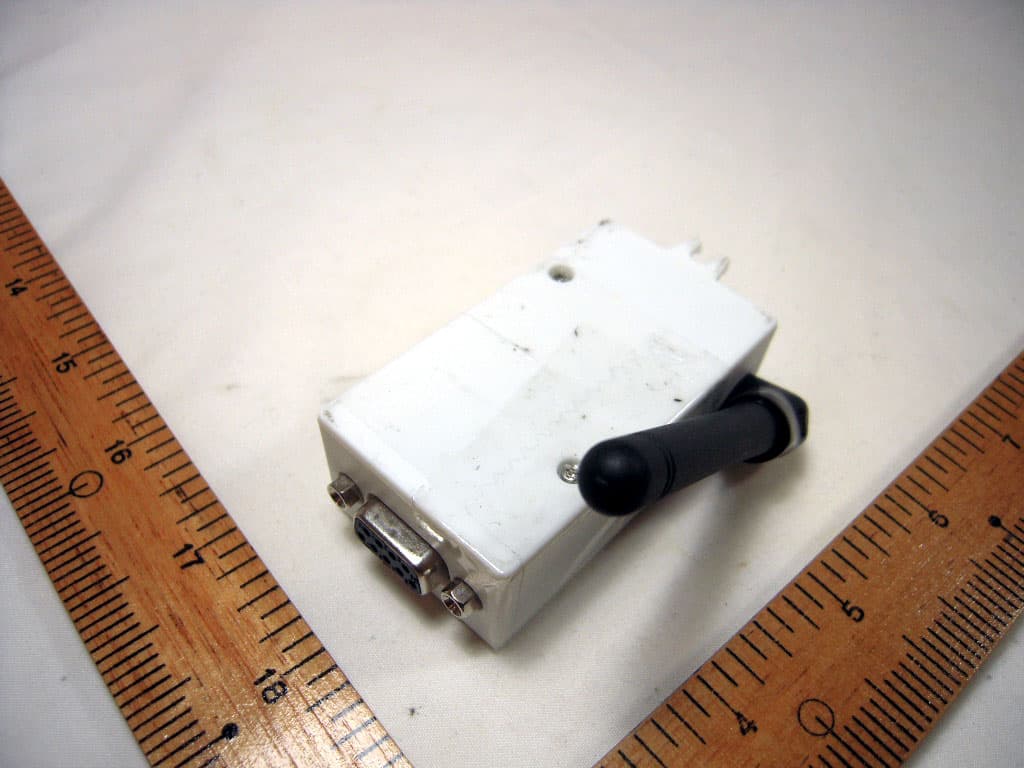
Click to zoom
Application Details
- Equipment Class
- DSC - Part 15 Security/Remote Control Transmitter
- Date of Grant
- Jan 03, 2010
- Application Purpose
- Original Equipment
- Date of Application
- Jan 03, 2010
- Equipment Note
- RS232 Wireless control
- Frequency Range
- 2405.00000000 - 2455.00000000
- Company
- Avertronics INC.
- Country
- Taiwan
Documents & Files
Document Text
Text extracted from the exhibit documents filed with the FCC. Open a document above to read the original.
Users Manual
zRS232 Wireless control_PC Software manual Receiver Number Setting : <Automatic Setting> 1. Select “Receiver Number setting” Sheet。 2. Turn ON the receiver switch which you want to setup,other receivers must turn OFF。 3. Wait until RS232 is linking。 4. Pull down the “Number setting” bar then choice the number which you would like to set。 5. Push “Setting Key” The Message shows「Setting...」, When setting is error The Message shows「Setting error...」 <Manual Setting> 1. Select “Receiver Number setting” Sheet。 2. Select field,the keyboard shows. 3. Use keyboard input,Receiver’s MAC last four digit。 (ex:Receiver MAC:D_158d0000056707 --> Please input 6707)。 4. Use keyboard to input,When finished push the「Enter」key. The message will show 「Setting...」 When message disappear then it is done then the field become to green , When it was error then message will show “Setting error”。 More then 5 seconds setting time, it shows time out。 Delete All: 1. Select “Receiver Number setting” Sheet。 2. Select “Delete All” key,The message will show「Delete...」,When message disappear then delete all is done。 Delete: 1. Select “Receiver Number setting” Sheet。 2. Pull down the “Individual delete” bar then choice the number which you would like to delete。 3. Select “Delete” key,The message will show「Delete...」,When message disappear then delete is done。 Lighting Control Dimming: 1. Select “Dim and Scene” Sheet。 2. Select following receiver (1~25) which you want to do dimming. (When receiver is link shows Green color),When receiver select the up of left side field shows Orange color and 「Dim」field shows number of receiver . 3. Use 「Dimming」 field SCROLL BAR to change brightness。 Scene setting: 1. Select “Dim and Scene” Sheet。 2. Change brightness for each of circuit。 3. In「 Scene」 「setting」 field, pull down the bar then choice the scene number which you would like to set。 4. Push Confirm key to save。 Run Scene: 1. Select “Dim and Scene” Sheet。 2. In Scene field, pull down the “Run” bar then choice the scene number which you would like to run。 3. Push the「Confirm」key to runScene。 Scene Delete: 1. Select “Dim and Scene” Sheet。 2. In Scene field, pull down the “Delete” bar then choice the scene number which you would like to delete。 3. Push 「Individual Delete」key to delete。 Scene All Delete: 1. Select “Dim and Scene” Sheet。 2. In Scene field,「Delete」field, push 「All Delete」 key to delete all。 Other Setting COM Port Setting: Normal initial is COM1 port。 If you need to change COM port then select “Other Setting” Sheet and push 「Disconnect」key to close COM port. Select the COM then push 「connect 」key to connect。 Auto Run Scenes: 1. Select range of scenes from manual。 2. Select scene change time, unit is second。 3. Push「Start」key to do auto run。
Cover Letter(s)
SCS-F18: Project and Product Certification Representative Authorization Letter Page 1 of 2 Rev 2.0 2206 Ringwood Avenue San Jose, CA 95131 Tel: 408-526-1188 Fax: 408-526-1088 Email: [email protected] Project and Product Certification Representative Authorization Letter Reason for Amendment (current / obsolete) Revision History Approved Date From To Initial Release (current) 1.0 1.0 Nov-14-2006 Revised wording (current) 1.0 2.0 Sept–25-2007 SCS-F18: Project and Product Certification Representative Authorization Letter Page 2 of 2 Rev 2.0 Avertronics INC. 2009/12/31 To: SIEMIC, INC. 2206 Ringwood Avenue, San Jose, CA 95131 USA Dear Sir/Madam, Re: Project and Product Certification Representative Authorization Letter We, Avertronics INC . hereby authorize SIEMIC, INC. to act as a Certification Body for certifying for the following project(s): RS232 Wireless control/ LCHC-31 We affirm that between SIEMIC and Avertronics INC . any difference in understanding, including test plan, measurement methods, applicable standards and relevant procedures and processes have been resolved prior to commencement of testing activities. Sincerely, C.H. Huang / Vice President Tel: +886-4-36019988 Fax: +886-4-23581828 Address: No. 10, 19th Road Industrial, Nuntun Dist., Taichung Taiwan, R.O.C.
External Photos
CERPASS TECHNOLOGY CORP. Report No.: TEFI0907268 Cerpass Technology Corp. Issued Date : Nov 05, 2009 Tel:886-2-2655-8100 Fax:886-2-2655-8200 Page No. : A1 of A3 Appendix A. Photographs of EUT
ID Label/Location Info
Label & Location
Internal Photos
CERPASS TECHNOLOGY CORP. Report No.: TEFI0907268 Cerpass Technology Corp. Issued Date : Nov 05, 2009 Tel:886-2-2655-8100 Fax:886-2-2655-8200 Page No. : A2 of A3 CERPASS TECHNOLOGY CORP. Report No.: TEFI0907268 Cerpass Technology Corp. Issued Date : Nov 05, 2009 Tel:886-2-2655-8100 Fax:886-2-2655-8200 Page No. : A3 of A3
Test Report
CERPASS TECHNOLOGY CORP. Report No.: TEFI0907268 Cerpass Technology Corp. Issued Date : Nov. 11, 2009 Tel:886-2-2655-8100 Fax:886-2-2655-8200 Page No. : 1 of 38 FCC TEST REPORT according to FCC Part 15, Subpart C (15.231) / ANSI C63.4: 2003 Laboratory Accredition The test result refers exclusively to the test presented test model / sample., Without written approval of Cerpass Technology Corp. the test report shall not be reproduced except in full. Applicant : Avertronics INC. Address : No.10, 19th Road industrial Nuntun Dist, Taichung, Taiwan. Equipment : RS232 Wireless control Model No. : LCHC-31 FCC ID : V5ULCHC31200908 Trade Name : Avertronics CERPASS TECHNOLOGY CORP. Report No.: TEFI0907268 Cerpass Technology Corp. Issued Date : Nov. 11, 2009 Tel:886-2-2655-8100 Fax:886-2-2655-8200 Page No. : 2 of 38 Contents 1. Report of Measurements and Examinations ......................................................................................... 4 1.1. List of Measurements and Examinations ................................................................................... 4 2. Test Configuration of Equipment under Test ......................................................................................... 5 2.1. Feature of Equipment under Test ............................................................................................... 5 2.2. Carrier Frequency of Channels .................................................................................................. 5 2.3. Test Mode and Test Software ..................................................................................................... 5 2.4. Description of Test System ......................................................................................................... 5 2.5. Connection Diagram of Test System .......................................................................................... 6 2.6. History of this test report ............................................................................................................ 7 3. Antenna Requirements ......................................................................................................................... 8 3.1. Standard Applicable ................................................................................................................... 8 3.2. Antenna Construction and Directional Gain ............................................................................... 8 4. General Information of Test ................................................................................................................... 8 5. Test of Conducted Emission ................................................................................................................. 9 5.1. Test Limit .................................................................................................................................... 9 5.2. Test Procedures ......................................................................................................................... 9 5.3. Typical Test Setup .................................................................................................................... 10 5.4. Measurement Equipment ......................................................................................................... 10 5.5. Test Result and Data ................................................................................................................ 11 5.6. Test Photographs ..................................................................................................................... 13 6. Test of Radiated Emission .................................................................................................................. 14 6.1. Test Limit .................................................................................................................................. 14 6.2. Test Procedures ....................................................................................................................... 15 6.3. Typical Test Setup Layout of Radiated Emission ..................................................................... 16 6.4. Measurement equipment ......................................................................................................... 16 6.5. Test Result and Data ................................................................................................................ 17 6.6. Test Photographs ..................................................................................................................... 33 7. 20dB Occupied Bandwidth Measurement .......................................................................................... 34 7.1. Test Procedure ......................................................................................................................... 34 7.2. Test Setup Layout .................................................................................................................... 34 7.3. Limits of Band Edges Measurement ........................................................................................ 34 7.4. Measurement equipment ......................................................................................................... 34 7.5. Test Result ............................................................................................................................... 34 8. Transmission Time Control ................................................................................................................. 37 8.1. Test Procedure ......................................................................................................................... 37 8.2. Test Setup Layout .................................................................................................................... 37 8.3. Test Limit .................................................................................................…
Text truncated - open the document above for the full version.
Test Setup Photos
CERPASS TECHNOLOGY CORP. Report No.: TEFI0907268 Cerpass Technology Corp. Issued Date : Nov. 11, 2009 Tel:886-2-2655-8100 Fax:886-2-2655-8200 Page No. : 13 of 38 4.6. Test Photographs Front View Rear View CERPASS TECHNOLOGY CORP. Report No.: TEFI0907268 Cerpass Technology Corp. Issued Date : Nov. 11, 2009 Tel:886-2-2655-8100 Fax:886-2-2655-8200 Page No. : 33 of 38 5.6. Test Photographs Front View Rear View
Contact Information
Applicant
C.H. Huang(Vice President)
Test Firm
Cerpass Technology CorporationEric Chen
Technical Specifications
| # | Rule Parts | Frequency Range | Power Output |
|---|---|---|---|
| 1 | 15.231 | 2.40 GHz - 2.46 GHz | - |
Other Applications from Avertronics INC.

V5ULCHC21201006
Sep 18, 20108 Scene Wall Switch
Equipment Class
DXX - Part 15 Low Power Communication Device Transmitter
V5ULCRD21200903
Feb 03, 2010Halogen Light Remote Dimmer
Equipment Class
DXX - Part 15 Low Power Communication Device Transmitter