VIXAWSBT4CBluetooth Speakerbox
Voxx Accessories Corp.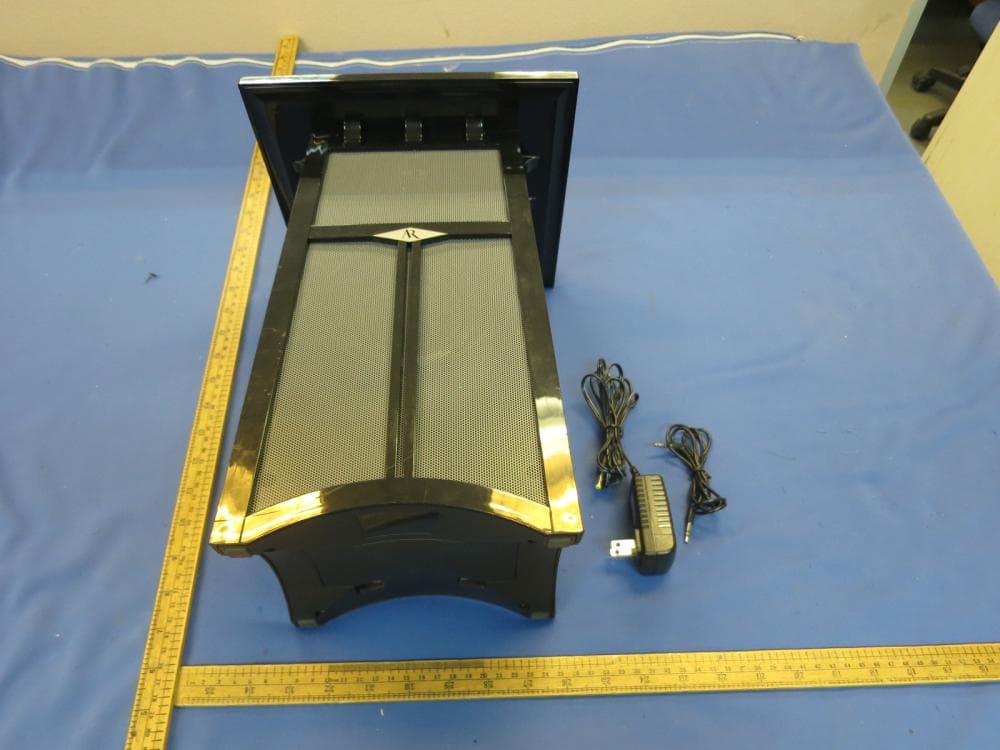
Click to zoom
Application Details
- Equipment Class
- DSS - Part 15 Spread Spectrum Transmitter
- Date of Grant
- Jan 30, 2016
- Application Purpose
- Original Equipment
- Date of Application
- Jan 30, 2016
- Equipment Note
- Bluetooth Speakerbox
- Frequency Range
- 2402.00000000 - 2480.00000000
- Company
- Voxx Accessories Corp.
- Country
- United States
Documents & Files
Document Text
Text extracted from the exhibit documents filed with the FCC. Open a document above to read the original.
Users Manual
Powering the Speaker There are two options to power your wireless speaker: using the included AC power adapter or using 8 AA batteries (not included). AC Power Adapter 1. Insert the small, round plug from the speaker AC power adapter into the jack on the bottom panel of the speaker. 2. Plug the other end of the speaker AC power adapter into any standard 120V AC wall outlet. Notes: Be sure to use the speaker AC power adapter rated 12V DC 1000 mA. The power unit should be plugged in so that it stays vertical or lies flat. AA Batteries 1. Remove the battery compartment cover on the bottom of the speaker. 2. Insert eight (8) AA batteries (not included) into the speaker following the polarity (”+” and “-”) as diagrammed inside the battery compartment. 3. Replace the battery compartment cover on the bottom of the speaker. Note: Place the rubber cap in the speaker power input jack when using batteries. DO NOT mix batteries with different chemistry types (for example, a zinc battery with an alkaline battery). DO NOT mix new and used batteries. DO NOT leave batteries installed in the product when not in use for long periods. Always remove old, weak or worn-out batteries promptly and recycle or dispose of them in accordance with local and national regulations. Introduction The portable wireless speaker makes it easy to take your music wherever you go and share it whenever you want, with Bluetooth® wireless connectivity and a built-in auxiliary input. It’s compact, easy-to-carry and simple to use. This manual covers various connection options and detailed operating instructions for making the customizable portable wireless speaker a part of your lifestyle. If, after having reviewed the instructions, you have any questions, please call toll-free 1-800-732-6866 or visit www.acoustic-research.com. Important Information RISK OF ELECTRIC SHOCK. DO NOT OPEN. CAUTION Caution: To reduce the risk of electric shock, do not remove cover (or back). No user serviceable parts inside. Refer servicing to qualified service personnel. Product Information Keep your sales receipt to obtain warranty parts and service and for proof of purchase. Attach it here and record the serial and model numbers in case you need them. These numbers are located on the product. Model No.: _____________________________________________________________________________________________ Purchase Date: _________________________________________________________________________________________ Dealer/Address/Phone: __________________________________________________________________________________ Important Safety Instructions 1. Read these instructions. 2. Keep these instructions. 3. Heed all warnings. 4. Follow all instructions. 5. Clean only with dry cloth. 6. Do not block any ventilation openings. Install in accordance with the manufacturer’s instructions. 7. Do not install near any heat sources such as radiators, heat registers, stoves, or other apparatus (including amplifiers) that produce heat. 8. Protect the power cord from being walked on or pinched particularly at plugs, convenience receptacles, and the point where they exit from the apparatus. 9. Unplug this apparatus during lightning storms or when unused for long periods of time. 10. Refer all servicing to qualified service personnel. Servicing is required when the apparatus has been damaged in any way, such as power-supply cord or plug is damaged, liquid has been spilled or objects have fallen into the apparatus, the apparatus has been exposed to rain or moisture, does not operate normally, or has been dropped. Care and Maintenance • Always use a soft cloth to clean the speaker and transmitter. Never use any product containing alcohol or other solvents as they may damage the surface. • Use caution when plugging the power transformers in an AC outlet to avoid the risk of electric shock. • If the speaker are used outside on a deck or patio, make sure you take them indoors in the event of a rainstorm to prevent possible damage. • Do not operate or store the system in extreme temperatures (below 32ºF/0ºC and above 122ºF/50ºC). Tour of the Speaker Powering the Speaker System Model AWSBT4 / AWSBT4BK / AWSBT4-B Installation and Operation Manual Portable Wireless Speaker Setting Up Bluetooth Wireless Pairing The Bluetooth-enabled device that you wish to stream audio to your speaker system must first be paired to the speaker. The process is simple, and in most cases the pairing process needs to be done only once. To pair your Bluetooth-enabled device with the speaker: 1. Make sure your device’s Bluetooth is turned on. See the wireless and/or network settings menu on your device to check. 2. If the speaker isn’t already on, press the ON/OFF button to turn it on. You will hear the turn on music to indicate the speaker is turned on. The indicator light at the back of the speaker starts flashing blue. 3. Open the Bluetooth settings menu on your device. Select “AR AWSBT4” from the list of devices available (you might have to scan for devices). If your device asks for a password, enter “0000”. 4. A confirmation screen will appear on your device once the speaker and the device are successfully paired. The blue indicator turns solid blue to indicate successful connection. The speaker is now ready for you to stream audio from your device. 5. Turn the volume on your device to at least 3/4 max, then start playing something on the device. Control the speaker volume on the speaker itself, using the Volume +/– buttons at the back of the speaker. Note: • If you notice the sound from the speaker is distorted, turn down your device’s volume. Reconnecting When you turn it on, the speaker reconnects automatically with the last paired device. When you leave the Bluetooth operating range, with the speaker turned ON, it disconnects. When you come back into the Bluetooth operating range, press the Pair button to reconnect to the last paired device. The successfully paired music will sound once it has been successf…
Text truncated - open the document above for the full version.
Cover Letter(s)
Stella Yang
External Photos
External Photos
ID Label/Location Info
Label Artwork and Location Model: AWSBT4 Model: BBB14 Location: Size: 45mm x 35mm Location: At the bottom of the sample
Internal Photos
Internal Photos
RF Exposure Info
INTERTEK TESTING SERVICES FCC ID: VIXAWSBT4C RF Exposure The equipment under test (EUT) is a Bluetooth Speakerbox, with Bluetooth FHSS technology operating in 2402-2480MHz. The EUT is powered by DC 12V from external adapter with DC 12.0V 1.0A Output or 8 AA batteries. For more detail information pls. refer to the user manual. Bluetooth Version: 2.1+EDR Antenna Type: Integral antenna Antenna Gain: 0 dBi Modulation Type: GFSK, /4-DQPSK and 8-DPSK The nominal conducted output power specified: 0dBm (Tolerance: +/-3dB) According to the KDB 447498: The maximum conducted output power for the EUT is 0.04dBm in the frequency 2402MHz and the minimum conducted output power for the EUT is -0.82dBm in the frequency 2480MHz which are within the production variation. The maximun conducted output power specified is 3.0 dBm = 2.0mW Th e source- based time-averaging conducted output power = 2.0 * Duty Cycle mW (where Duty Cycle < 100%) < 2.0 mW Th e SAR Exclusion Threshold Level: = 3.0 * (min. test separation distance, mm) / sqrt(freq. in GHz) = 3.0 * 5 / sqrt (2.480) mW = 9.5 mW Since the s ource-based time-averaging conducted output power is well below the SAR low threshold level, so the EUT is considered to comply with SAR requirement without testing. Transmitter Duty Cycle Calculation: Based on the Bluetooth Specification (BT version: 2.1+EDR), transmitter ON time is independent of packet type (DH1, DH3 and DH5). For one period for a pseudo-random hopping through all 79 RF channels, for DH5: One hopset consists of 5 TX slot and 1 RX slot. Duty factor = 5 / 6 = 0.833
Test Report
• The test results reported in this test report shall refer only to the sample actually tested and shall not refer or be deemed to refer to bulk from which such a sample may be said to have been obtained. • This report is for the exclusive use of Intertek's Client and is provided pursuant to the agreement between Intertek and its Client. Intertek's responsibility and liability are limited to the terms and conditions of the agreement. Intertek assumes no liability to any party, other than to the Client in accordance with the agreement, for any loss, expense or damage occasioned by the use of this report. Only the Client is authorized to copy or distribute this report. Any use of the Intertek name or one of its marks for the sale or advertisement of the tested material, product or service must first be approved in writing by Intertek. The observations and test results referenced from this report are relevant only to the sample tested. This report by itself does not imply that the material, product, or service is or has ever been under an Intertek certification program. • For Terms And Conditions of the services, it can be provided upon request. • The evaluation data of the report will be kept for 3 years from the date of issuance. TRF No.: FCC 15C_TX_c Intertek Testing Services Shenzhen Ltd. Kejiyuan Branch 6F , D Block, Huahan Building, Langshan Road, Nanshan District, Shenzhen, P. R. China Tel: (86 755) 8601 6288 Fax: (86 755) 8601 6751 Website: www.china.intertek-etlsemko.com Voxx Accessories Corp. A p plication For Certification FCC ID: VIXAWSBT4C Bluetooth Speakerbox Model: AWSBT4 Additional Model: BBB14 Brand name: Acoustic Research 2.4GHz Transceiver Report No.: 151204037SZN-001 We hereby certify that the sample of the above item is considered to comply with the requirements of FCC Part 15, Subpart C for Intentional Radiator, mention 47 CFR [10-1-14] Prepared and Checked by: Approved by: Sign on file Vincent Chen Engineer Andy Yan Senior Project Engineer Date: December 23, 2015 INTERTEK TESTING SERVICES TRF No.: FCC 15C_TX_c FCC ID: VIXAWSBT4C Report No.: 151204037SZN-001 i L I ST OF EXHIBITS INTRODUCTION EXHIBIT 1: General Description EXHIBIT 2: System Test Configuration EXHIBIT 3: Emission Results EXHIBIT 4: Equipment Photographs EXHIBIT 5: Product Labelling EXHIBIT 6: Technical Specifications EXHIBIT 7: Instruction Manual EXHIBIT 8: Miscellaneous Information EXHIBIT 9: Confidentiality request EXHIBIT10: Test Equipment List INTERTEK TESTING SERVICES TRF No.: FCC 15C_TX_c FCC ID: VIXAWSBT4C Report No.: 151204037SZN-001 ii MEASUREMENT/TECHNICAL REPORT Smart Glory Electronics (Shenzhen) Company Limited. M o del: AWSBT4 Additional Model: BBB14 FCC ID: VIXAWSBT4C This report concerns (check one:) Original Grant X Class II Change Equipment Type: DSS - Part 15 Spread Spectrum Transmitter Deferred grant requested per 47 CFR 0.457(d)(1)(ii)? Yes No X If yes, defer until: date Company Name agrees to notify the Commission by: date of the intended date of announcement of the product so that the grant can be issued on that date. Transition Rules Request per 15.37? Yes No X If no, assumed Part 15, Subpart C for intentional radiator − the new 47 CFR [10-1-14 Edition] provision. Report prepared by: Vincent Chen Intertek Testing Services Shenzhen Ltd. Kejiyuan Branch 6F, Block D, Huahan Building, Langshan Road, Nanshan District, Shenzhen, P. R. China Phone: (86 755) 8614 0684 Fax: (86 755) 8601 6751 INTERTEK TESTING SERVICES TRF No.: FCC 15C_TX_c FCC ID: VIXAWSBT4C Report No.: 151204037SZN-001 iii Table of Contents 1.0 General Description ............................................................................................. 2 1.1 Product Description ............................................................................................. 2 1.2 Related Submittal(s) Grants ................................................................................ 2 1.3 Test Methodology ............................................................................................... 3 1.4 Test Facility ........................................................................................................ 3 2.0 System Test Configuration .................................................................................. 5 2.1 Justification ........................................................................................................ 5 2.2 EUT Exercising Software .................................................................................... 5 2.3 Special Accessories ............................................................................................ 5 2.4 Equipment Modification ....................................................................................... 6 2.5 Measurement Uncertainty ................................................................................... 6 2.6 Support Equipment List and Description .............................................................. 6 3.0 Test Results .......................................................................................................... 8 3.1 Radiated Test Result........................................................................................... 9 3.1.1 Field Strength Calculation ................................................................................ 9 3.1.2 Radiated Emission Configuration Photograph ................................................ 10 3.1.3 Radiated Emission ......................................................................................... 10 3.1.4 Transmitter Spurious Emissions (Radiated) ................................................... 12 3.2 Conducted Emission at Mains Terminal ............................................................ 16 3.2.1 Conducted Emission Configuration Photograph ............................................. 16 3.2.2 Conducted Emissions .................................................................................... 16 3.3 Peak Power ...…
Text truncated - open the document above for the full version.
Test Setup Photos
Radiated Photos Front View of Radiated Emissions up to 1GHz Back View of Radiated Emissions up to 1GHz Front View of Radiated Emissions above 1GHz Back View of Radiated Emissions above 1GHz
Test Setup Photos
Conducted Photos Front View Side View
Contact Information
Applicant
Paul Tinaphong(Senior V.P.)
Technical Contact
Intertek Testing Services Shenzhen Ltd. Kejiyuan BStella Yang
[email protected](86-755) 8614 0612
6F, D Block, Huahan Building, Langshan Road · Shenzhen · China
Non-Technical Contact
Intertek Testing Services Shenzhen Ltd. Kejiyuan BStella Yang
[email protected](86-755) 8614 0612
Test Firm
Intertek Testing Services Shenzhen Ltd.Shawn Xing
Technical Specifications
| # | Rule Parts | Frequency Range | Power Output |
|---|---|---|---|
| 1 | 15C | 2.40 GHz - 2.48 GHz | 1.00 mW |
Other Applications from Voxx Accessories Corp.

VIXARHTVHS
Jul 22, 2024Wireless TV Headset
Equipment Class
DTS - Digital Transmission System
VIXRSH082
Mar 31, 2024OTC Hearing Aids
Equipment Class
DSS - Part 15 Spread Spectrum Transmitter
VIXRSH082RC
Mar 31, 2024Keychain Remote
Equipment Class
DTS - Digital Transmission System
VIXSPKAW740M2
Jul 17, 2023Center Stage Freestyle All-in-One Karaoke System
Equipment Class
DSS - Part 15 Spread Spectrum Transmitter
VIXSPKAW740M
Jul 15, 2023Wireless Microphone
Equipment Class
DSS - Part 15 Spread Spectrum Transmitter