VIXHPA190BT haedphone
Voxx Accessories Corp.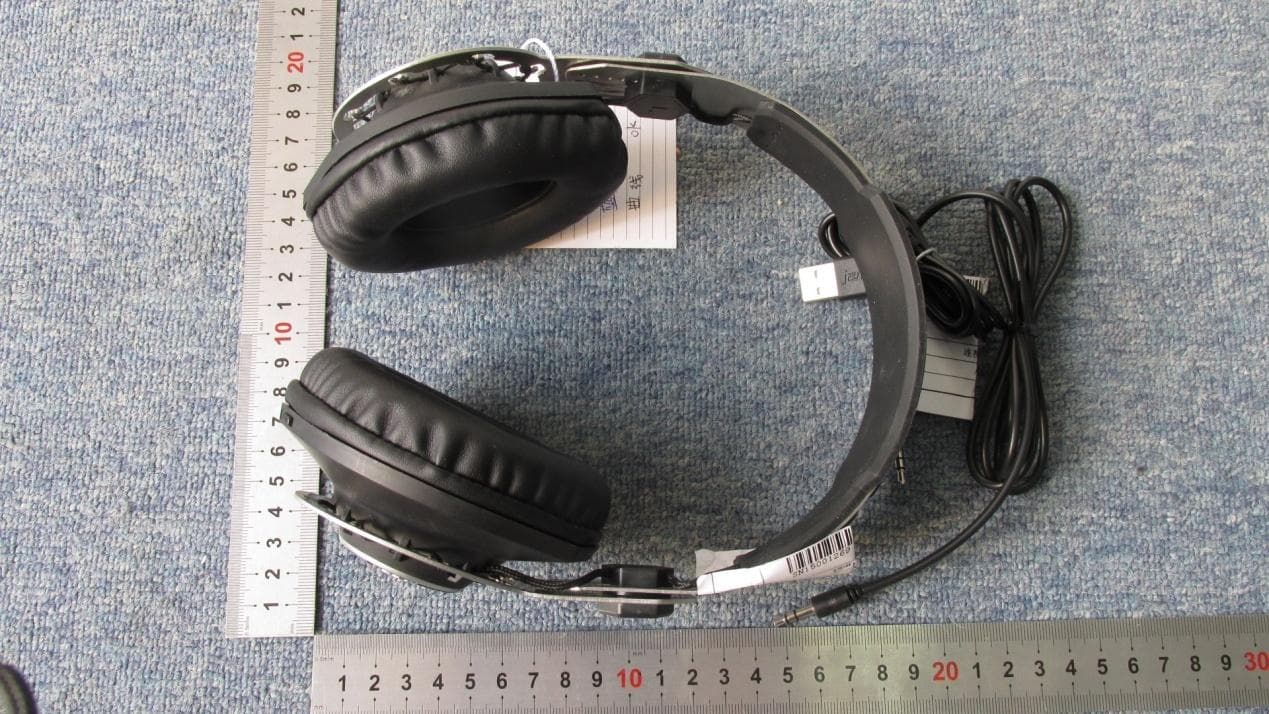
Click to zoom
Application Details
- Equipment Class
- DSS - Part 15 Spread Spectrum Transmitter
- Date of Grant
- Feb 04, 2015
- Application Purpose
- Original Equipment
- Date of Application
- Feb 04, 2015
- Equipment Note
- BT haedphone
- Frequency Range
- 2402.00000000 - 2480.00000000
- Company
- Voxx Accessories Corp.
- Country
- United States
Documents & Files
Document Text
Text extracted from the exhibit documents filed with the FCC. Open a document above to read the original.
Users Manual
Let’s get started! 808 Performer BT headphones give you two ways to enjoy your own personal concert: wirelessly and wired. This guide shows you how to get both set up. 1 Turn on the headphones 2 Performer BT Wireless Unpack Make sure you have the following items in your 808 Performer BT package: • 808 Performer BT headphones • Cloth audio cable with inline mic and controls • USB charging cable Charge up the headphones Before you start using your headphones wirelessly, you need to charge their built-in battery. Plug the included USB charging cable into the charging jack on the bottom of the right headphone. Plug the other end of the charging cable into a USB power source (like a computer or a USB charger). The charging/pairing indicator next to the charging jack turns red while the headphones are charging. It turns blue when the headphones are fully charged. Unplug the USB charging cable when the headphones are charged. Press and hold the button on the bottom of the right headphone for 3 seconds to turn the headphones on. ChargingCharged Right headphone (bottom) Performer BT Wired: Listen right away! 1 Left headphone (bottom) Plug in the headphones Plug the included audio cable into the jack on the bottom of the left headphone. 2 Carrier12:00 PM Connect to your phone Plug the other end into the headphone jack on your phone. The audio cord provides inline push-to-talk and play/pause control for select mobile phones and other electronics. Here’s how it works: If you have any questions about this product, visit 808Audio.com or call our toll-free help line at 1-800-732-6866. To play/pause music: Single click. To skip to the next song: Quick double click. To go back to the previous song: Quick triple click. To answer/end a call: Single click. Please note that not all functions work with all brands and models of phones. Each phone’s user interface works differently—see the user manual that came with your phone for more information. Right headphone (bottom) Instructions continue on the other side... The headphones beep and the pairing/ charging indicator next to the charging port begins blinking rapidly. IMPORTANT: If you’ve previously paired your phone or other Bluetooth device with these headphones, the headphones will automatically attempt to reconnect to that device when you turn them on. If you want to pair to a new device, give a short double-press to the button on the bottom of the left headphone to enter pairing mode. The indicator light begins flashing quickly and the headphones say “Pairing”—this means you’re in pairing mode. Right headphone (bottom) Using Performer BT Wirelessly Listening to music To go to the previous/next song: Press and hold the or on the right headphone. Answering/ending phone calls These headphones have a built-in microphone, so you can use them for phone calls. Your phone will ring through the headphones when you’re receiving a call. You can answer and end the call wirelessly from your headphones using the controls on the left headphone. 8 :45P M Now playin g Media volume 8 :45P M Now playin g Controlling playback and volume Set your device’s volume for music to 50%. Note: This is to make sure the sound from the headphones isn’t too loud when you start streaming. Start playing music or other audio on your device. Within seconds, the headphones start streaming the audio wirelessly via Bluetooth. Note: Bluetooth playback is disabled when something is connected to the jack on the bottom of the left headphone. To use Bluetooth, make sure nothing’s plugged in to this jack. The side of the right headphone has a control panel that lets you control music playback and volume wirelessly. To play/pause music: Press the 808 logo on the right headphone. To adjust volume: Press the (above the 808) or (below the 808) on the right headphone. IMPORTANT: Not all phones support playback control and phone answer/ end control. Check your phone’s user manual for more information if you’re having trouble with these functions. Right headphone (side) Performer BT Wireless (continued) Choose 808 Performer from the pairing options on your smartphone. (If it’s not in the list, choose “Scan” from your phone’s Bluetooth menu.) Headset 808 Perf ormer Computer 8:45P M Bluetoot h devices Note: The process of enabling Bluetooth and connecting varies from device to device. See your device’s owners manual for more information and specific instructions. Bluetooth Wireless Connection Tips • Make sure the Bluetooth capability of your device is turned on. • Make sure there’s nothing plugged into the jack on the bottom of the right headphone when you’re trying to use Bluetooth. • The headphone’s Bluetooth wireless connection works up to a range of roughly 33 feet (10 meters). This range may vary, however, based on other factors, such as room layout, wall material, obstacles, your device’s Bluetooth performance, etc. If you’re having problems connecting to the headphones, move closer to your phone. • Make sure your device supports audio transfer A2DP. • If your device asks you for a password to connect, use “0000”. To pair the headphones again After turning your headphones back on, they automatically attempt to reconnect to the last connected device. If the last connected device is not available, the headphones will enter pairing mode and be ready to pair to a new or different device. quick start guide The headphones beep when the process is complete. The pairing indicator on the right headphone turns solid blue. HPA190 QSG 01 For best results during phone calls, use the cable with inline mic. In most cases, this cable’s microphone will provide better performance than the headphones’ built-in mic. To answer or end a phone call: Press the 808 logo on the right headphone. Pair + Connect 3 Enable Bluetooth on your smartphone or other device. Wi-Fi Bluetooth Bluetooth Settings VPN Settings Wi-Fi Setting s 8:45P M PERFORMERBT
Users Manual
English Some of the following information may not apply to your particular product; however, as with any electronic product, precautions should be observed during handling and use. • Read these instructions. • Keep these instructions. • Heed all warnings. • Follow all instructions. • Do not use this apparatus near water. • Clean only with dry cloth. • Do not install near any heat sources such as radiators, heat registers, stoves, or other apparatus (including amplifiers) that produce heat. • Refer all servicing to qualified service personnel. Servicing is required when the apparatus has been damaged in any way, such as power-supply cord or plug is damaged, liquid has been spilled or objects have fallen into the apparatus, the apparatus has been exposed to rain or moisture, does not operate normally, or has been dropped. ADDITIONAL SAFETY INFORMATION • Do not use unauthorized chargers or power adapters. Use only chargers that came with your product or that is listed in the user’s guide. • Apparatus shall not be exposed to dripping or splashing and no objects filled with liquids, such as vases, shall be placed on the apparatus. • Do not attempt to disassemble the cabinet. This product does not contain customer serviceable components. Important battery information Warning: Your product contains a battery and charging system which is designed to work in temperatures that do not exceed 50°C (122°F). Leaving this product in a closed automobile or the trunk of an automobile where temperatures may exceed 50°C may result in permanent battery damage, fire, or explosion. Please remove your product from the automobile when you exit, do not place your product in the trunk of your automobile, and do not leave your product in any location where temperatures may exceed 50°C. Ecology Your product must be disposed of properly according to local laws and regulations. Because this product contains a battery, the product must be disposed of separately from the household waste. Precautions for the unit • Do not use the unit immediately after transportation from a cold place to a warm place; condensation problems may result. • Do not store the unit near fire, places with high temperature or in direct sunlight. Exposure to direct sunlight or extreme heat (such as inside a parked car) may cause damage or malfunction. • Clean the unit with a soft cloth or a damp chamois leather. Never use solvents. • The unit must only be opened by qualified personnel. Headset safety To use a headset safely, please keep the following in mind: • Do not play your headset at a high volume. Hearing experts advise against continuous extended play. • If you experience ringing in your ears, turn down the volume or stop using the headset. • Do not use a headset while driving a motorized vehicle or riding a bike. It may cause a traffic hazard and is illegal in many areas. • Even if your headset is an open-air type designed to let you hear outside sounds, don’t turn up the volume so high that can’t hear sounds around you. • Never operate heavy machinery while listening to or wearing your headphones Warning Except in case of emergency, VOXX Accessories Corporation recommends you do not use these headphones or headsets (headphones plus microphone) as aviation communication equipment as they are not engineered for many environmental conditions common in commercial or non- commercial aircraft (including, but not limited to: altitude, temperature, noise conditions, unpressurized aircraft, ect) resulting in possible interference to critical communications. Listen Responsibly To avoid hearing damage, make sure that the volume on your music player is turned down before connecting your headphones. After placing headphones in/on your ears, gradually turn up the volume until you reach a comfortable listening level. Noise levels are measured in decibels (dB), exposure to any noise at or above 85 dB can cause gradual hearing loss. Monitor your use; hearing loss is a function of loudness versus time. The louder it is, the less time you can be exposed to it. The softer it is, the more time you can listen to it. The Bluetooth® word mark and logos are registered trademarks owned by Bluetooth SIG, Inc. and any use of such marks by VOXX Accessories Corporation is under license. Other trademarks and trade names are those of their respective owners. FCC/Industry of Canada Information • Connect the equipment into an outlet on a circuit different from that to which the receiver is connected. • Consult the dealer or an experienced radio/TV technician for help. Changes or modifications not expressly approved by VOXX Accessories Corporation could void the user’s authority to operate the equipment. FCC Radiation Exposure Statement: This equipment complies with FCC radiation exposure limits set forth for an uncontrolled environment. This transmitter must not be co-located or operating in conjunction with any other antenna or transmitter. This device complies with Industry of Canada licence-exempt standard RSS 210 Operation is subject to the following two conditions: (1) This device may not cause harmful interference, and (2) this device must accept any interference received, including interference that may cause undesired operation. IC Radiation Exposure Statement: This equipment complies with Canada radiation exposure limits set forth for uncontrolled environments. This transmitter must not be co-located or operating in conjunction with any other antenna or transmitter. Industry Canada Regulatory Information CAN ICES-3 (B)/NMB-3 (B) Avis d’Industrie Canada CAN ICES-3 (B)/NMB-3 (B) Product registration Thank you for purchasing an 808 product. We pride ourselves on the quality and reliability of all our electronic products, but if you ever need service or have a question our customer service staff stands ready to help. Contact us at www.808Audio.com. PURCHASE REGISTRATION: Registering Online will allow us to contact you in the unlikely event a safety notification is r…
Text truncated - open the document above for the full version.
ID Label/Location Info
Label Label location
Test Report
Report No.: SET2015-01738 P Page 1 of 74 RF TEST REPORT Report No.: SET2015-01738 Product Name: BT headphone FCC ID: VIXHPA190 Model No. : HPA190 Applicant: Voxx Accessories Corp. Address: 3502 Woodview Trace Suite 220 Indianapolis In 46268 USA Issued by: CCIC-SET Lab Location: Electronic Testing Building, Shahe Road, Xili, Nanshan District, Shenzhen, 518055, P. R. China Tel: 86 755 26627338 Fax: 86 755 26627238 This test report consists of 74 pages in total. It may be duplicated completely for legal use with the approval of the applicant. It should not be reproduced except in full, without the written approval of our laboratory. The client should not use it to claim product endorsement by CCIC-SET. The test results in the report only apply to the tested sample. The test report shall be invalid without all the signatures of testing engineers, reviewer and approver. Any objections must be raised to CCIC-SET within 20 days since the date when the report is received. It will not be taken into consideration beyond this limit. Report No.: SET2015-01738 Page 2 of 74 Test Report Product Name ....................... : BT headphone Brand Name .......................... : 808 Trade Name ........................... : 808 Applicant ............................... : Voxx Accessories Corp. Applicant Address ................ : 3502 Woodview Trace Suite 220 Indianapolis In 46268 USA Manufacturer......................... : Dongguan Laccess Electronic Technogy Ltd. Manufacturer Address ......... : Huaxing Industrial Park, Tianxin, Qiaotou town, DongGuan, GuangDong, CHINA Test Standards ...................... : 47 CFR Part 15 Subpart C 2013:Radio Frequency Devices ANSI C63.10:2009:American National Standard for Testing Unlicensed Wireless Devices DA 00-705: Filing and Measurement Guidelines for Frequency Hopping Spread Spectrum Systems Test Result ............................ : PASS Tested by ............................. : 2015.01.28 Haigang He, Test Engineer Reviewed by ......................... : 2015.01.28 Zhu Qi, Senior Engineer Approved by ......................... : 2015.01.28 Wu Li’an, Manager Report No.: SET2015-01738 Page 3 of 74 Table of contents 1. GENERAL INFORMATION .................................................................................................... 4 1.1. EUT Description ....................................................................................................................... 4 1.2. Test Standards and Results ........................................................................................................ 5 1.3. Facilities and Accreditations ..................................................................................................... 6 2. 47 CFR PART 15C REQUIREMENTS .................................................................................... 7 2.1. Antenna requirement ................................................................................................................. 7 2.2. Number of Hopping Frequency ................................................................................................ 8 2.3. Peak Output Power.................................................................................................................. 11 2.4. 20dB Bandwidth ..................................................................................................................... 18 2.5. Carried Frequency Separation ................................................................................................. 25 2.6. Time of Occupancy (Dwell time) ........................................................................................... 28 2.7. Conducted Spurious Emissions ............................................................................................... 35 2.8. Band Edge ............................................................................................................................... 47 2.9. Conducted Emission ............................................................................................................... 58 2.10. Radiated Emission................................................................................................................... 62 2.11. RF exposure evaluation ........................................................................................................... 74 Change History Issue Date Reason for change 1.0 2015.01.28 First edition Report No.: SET2015-01738 Page 4 of 74 1. General Information 1.1. EUT Description EUT Type ............................. : BT headphone Hardware Version ................. : V1.1 Software Version .................. : V1.5 Frequency Range .................. : The frequency range used is 2402MHz - 2480MHz (79 channels, at intervals of 1MHz); The frequency block is 2400MHz to 2483.5MHz. Modulation Type .................. : Bluetooth: FHSS (GFSK(1Mbps), π/4-DQPSK(EDR 2Mbps), 8-DPSK(EDR 3Mbps)) Antenna Type ........................ : PCB Antenna Antenna Gain ........................ : 0dBi Note 1: The EUT is a BT headphone, it contains Bluetooth Module operating at 2.4GHz ISM band; the frequencies allocated for the Bluetooth Module is F(MHz)=2402+1*n (0<=n<=78). The lowest, middle, highest channel numbers of the Bluetooth Module used and tested in this report are separately 0 (2402MHz), 39 (2441MHz) and 78 (2480MHz). Note 2: For a more detailed description, please refer to Specification or User’s Manual supplied by the applicant and/or manufacturer. Note 3: a. When power on, the EUT will scan the whole frequency until a Connection command from the other BT devices. b. When receiving the signal from the other BT devices, The EUT transmit are sponse signal. c. The other devices receive the response signal and recognize it, then send a connection command to establish the connection. d. After the connection establish successfully, the data transmission is beginning. At the same time, the both devices will shift frequencies in synchronization per a…
Text truncated - open the document above for the full version.
Test Setup Photos
Conducted Emission Test setup photos Radiated Emission Test setup photos Below 1 GHz Above 1 GHz Conducted Te s t setup photo
Contact Information
Applicant
Paul Tinaphong(Senior V.P.)
Test Firm
CCIC-SETQi Zhu
Technical Specifications
| # | Rule Parts | Frequency Range | Power Output |
|---|---|---|---|
| 1 | 15C | 2.40 GHz - 2.48 GHz | 2.30 mW |
Other Applications from Voxx Accessories Corp.

VIXARHTVHS
Jul 22, 2024Wireless TV Headset
Equipment Class
DTS - Digital Transmission System
VIXRSH082
Mar 31, 2024OTC Hearing Aids
Equipment Class
DSS - Part 15 Spread Spectrum Transmitter
VIXRSH082RC
Mar 31, 2024Keychain Remote
Equipment Class
DTS - Digital Transmission System
VIXSPKAW740M2
Jul 17, 2023Center Stage Freestyle All-in-One Karaoke System
Equipment Class
DSS - Part 15 Spread Spectrum Transmitter
VIXSPKAW740M
Jul 15, 2023Wireless Microphone
Equipment Class
DSS - Part 15 Spread Spectrum Transmitter