VIXSP260Bluetooth Wireless Speaker
Voxx Accessories Corp.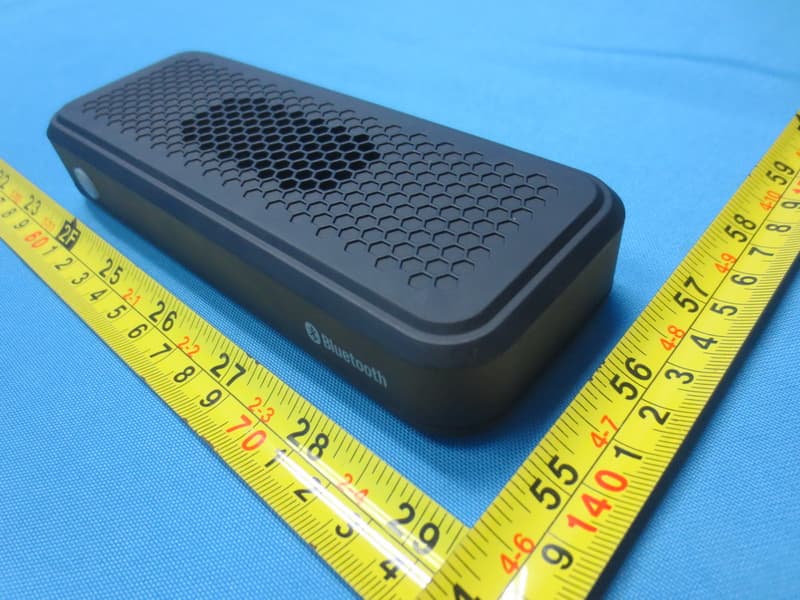
Click to zoom
Application Details
- Equipment Class
- DSS - Part 15 Spread Spectrum Transmitter
- Date of Grant
- Jan 15, 2015
- Application Purpose
- Original Equipment
- Date of Application
- Jan 14, 2015
- Equipment Note
- Bluetooth Wireless Speaker
- Frequency Range
- 2402.00000000 - 2480.00000000
- Company
- Voxx Accessories Corp.
- Country
- United States
Documents & Files
Document Text
Text extracted from the exhibit documents filed with the FCC. Open a document above to read the original.
Users Manual
QUICK START GUIDE SP260 QSG 00 Make sure the following items came in this package. Step 1: Unpack Your speaker Bluetooth wireless is a quick and easy way to connect a smartphone to a speaker or a headset. There are basically two steps to making Bluetooth work. PAIRING: The two devices get to know each other. CONNECTING: The two devices do something together (like play music). “Hi. I’m a phone.” This guide takes you through the steps to get started. Getting to know Bluetooth “Hi phone. I’m a speaker.” USB cable Before you start using the HEX XS speaker for the first time, it’s a good idea to charge it completely. Speaker side Step 3: Turn on Press and hold the button on the top of the speaker. The power up tone sounds and the button starts blinking. After a few seconds, the speaker goes to Bluetooth pairing mode to set up with your smartphone. Step 2: Charge the XS To charge the speaker: Plug the included USB cable into the DC IN jack on the side of the speaker. Plug the other end of the USB charging cable into a power source, like a computer or a USB charging adapter. The charging indicator on the side of the speaker is red while the speaker is charging. It turns green when the speaker is fully charged. Note: You can use the speaker while it’s charging. Enable Bluetooth on your smartphone or other device. Step 4: Pair + Connect If you’ve previously paired your phone or other Bluetooth device with this speaker, the speaker will automatically attempt to reconnect to that device when you switch the speaker on. If you want to pair to a new device, give a short double- press to the button. The speaker gives a signal and the button starts blinking. Wi-Fi Bluetooth Bluetooth Settings VPN Settings Wi-Fi Setting s 8:45 PM Make sure the button on the top of the speaker is blinking rapidly. (If it isn’t, give a short double-press on the button. The speaker gives an audio signal.) Choose 808 HEX XS from the pairing options on your smartphone. (If it’s not in the list, choose “Scan” from your phone’s Bluetooth menu.) The speaker gives an audio signal when it’s finished pairing and connecting to your smartphone. The button on the top of the speaker turns solid blue. Note: The process of enabling Bluetooth and connecting varies from device to device. See your device’s owners manual for more information and specific instructions. Bluetooth Wireless Connection Tips • Make sure the Bluetooth capability of your device is turned on. • Make sure there’s nothing plugged into the speaker’s AUX IN jack when you’re trying to use Bluetooth. • The Bluetooth wireless connection works up to a range of roughly 33 feet (10 meters). This range may vary, however, based on other factors, such as room layout, wall material, obstacles, your device’s Bluetooth performance, etc. If you’re having problems connecting to this speaker, move closer to it. • If your device asks you for a password to connect, use “0000”. To adjust the volume of your audio: Use the volume controls on your phone. Set your device’s volume for music to 75%. Note: This is to make sure the sound from the speaker isn’t too loud when you start streaming. Start playing music or other audio on your device. Within seconds, the speaker starts streaming the audio wirelessly via Bluetooth. Step 5: Play music 8 :45 P M Now playin g Media volume 8 :45 P M Use a 3.5mm audio cable (not included) to connect the audio output from your device to the AUX IN audio input on the speaker’s side panel. The speaker automatically switches to the AUX IN audio, and the button on the top of the speaker turns white. Using the Aux In input To listen to Bluetooth audio again, unplug the cable from the speaker’s AUX IN jack. The speaker will try to reconnect to the last Bluetooth device. Speaker side Tour of the speaker Aux In jack lets you connect an audio device directly to the speaker using a 3.5mm audio cable. button has three functions: (1) it turns the speaker on and off (press and hold), (2) puts the speaker into pairing mode (short double-press) to connect to a new Bluetooth device, and (3) indicates the speaker’s pairing/connection status: • fast blinking blue while pairing • slow blinking blue while reconnecting • solid blue when paired • solid white when the Aux In jack is in use • off when the speaker’s off. CHARGE indicator shows the charging status of the speaker: • solid red while charging • solid green when charged DC IN jack connects to the provided USB charging cable to plug the speaker into a power source or adapter. If you have any questions about this product, visit 808Audio.com or call our toll-free help line at 1-800-732-6866.
Users Manual
Important Information for 808 SP260 RISK OF ELECTRIC SHOCK. DO NOT OPEN. CAUTION Caution: To reduce the risk of electric shock, do not remove cover (or back). No user serviceable parts inside. Refer servicing to qualified service personnel. Important Safety Instructions 1. Read these instructions. 2. Keep these instructions. 3. Heed all warnings. 4. Follow all instructions. 5. Clean only with dry cloth. 6. Do not block any ventilation openings. Install in accordance with the manufacturer’s instructions. 7. Do not install near any heat sources such as radiators, heat registers, stoves, or other apparatus (including amplifiers) that produce heat. 8. Protect the power cord from being walked on or pinched particularly at plugs, convenience receptacles, and the point where they exit from the apparatus. 9. Unplug this apparatus during lightning storms or when unused for long periods of time. 10. Refer all servicing to qualified service personnel. Servicing is required when the apparatus has been damaged in any way, such as power-supply cord or plug is damaged, liquid has been spilled or objects have fallen into the apparatus, the apparatus has been exposed to rain or moisture, does not operate normally, or has been dropped. Care and Maintenance • Always use a soft cloth to clean the speaker and transmitter. Never use any product containing alcohol or other solvents as they may damage the surface. • Use caution when plugging the power transformers in an AC outlet to avoid the risk of electric shock. • If the speaker are used outside on a deck or patio, make sure you take them indoors in the event of a rainstorm to prevent possible damage. • Do not operate or store the system in extreme temperatures (below 32ºF/0ºC and above 122ºF/50ºC). Ecology Your product must be disposed of properly according to local laws and regulations. Because this product contains a rechargeable battery, the product must be disposed of separately from the household waste. For PLUGGABLE EQUIPMENT, the socket-outlet shall be installed near the equipment and shall be easily accessible. The power unit for this device should be plugged in so that it stays vertical or lies flat. The apparatus shall not be exposed to dripping or splashing or placed near objects filled with liquids. FCC Statement This device complies with Part 15 of the FCC Rules. Operation is subject to the following two conditions: 1) This device may not cause harmful interference, and 2) This device must accept any interference received, including interference that may cause undesired operation. Note: This equipment has been tested and found to comply with the limits for a Class B digital device, pursuant to part 15 of the FCC Rules. These limits are designed to provide reasonable protection against harmful interference in a residential installation. This equipment generates, uses, and can radiate radio frequency energy and, if not installed and used in accordance with the instructions, may cause harmful interference to radio communication. However, there is no guarantee that interference will not occur in a particular installation. If this equipment does cause harmful interference to radio or television reception, which can be determined by turning the equipment off and on, the user is encouraged to try to correct the interference by one or more of the following measures: • Reorient or relocate the receiving antenna. • Increase the separation between the equipment and receiver. • Connect the equipment into an outlet on a circuit different from that to which the receiver is connected. • Consult the dealer or an experienced radio/TV technician for help. Caution: Changes or modifications not expressly approved by VOXX Accessories Corporation could void the user’s authority to operate the equipment. 12 Month Limited Warranty VOXX Accessories Corporation (the “Company”) warrants to the original retail purchaser of this product that should this product or any part thereof, under normal use and conditions, be proven defective in material or workmanship within 12 months from the date of original purchase, such defect(s) will be repaired or replaced (at the Company’s option) without charge for parts and repair labor. To obtain repair or replacement within the terms of this Warranty, the product along with any accessories included in the original packaging is to be delivered with proof of warranty coverage (e.g. dated bill of sale), specification of defect(s), transportation prepaid, to the Company at the address shown below. Do not return this product to the Retailer. This Warranty is not transferable and does not cover product purchased, serviced or used outside the United States or Canada. The warranty does not extend to the elimination of externally generated static or noise, to costs incurred for the installation, removal or reinstallation of the product. The warranty does not apply to any product or part thereof which, in the opinion of the company, has suffered or been damaged through alteration, improper installation, mishandling, misuse, neglect, accident or exposure to moisture. This warranty does not apply to damage caused by an AC adapter not provided with the product, or by leaving non-rechargeable batteries in the product while plugged into an AC outlet. THE EXTENT OF THE COMPANY’S LIABILITY UNDER THIS WARRANTY IS LIMITED TO THE REPAIR OR REPLACEMENT PROVIDED ABOVE AND, IN NO EVENT, SHALL THE COMPANY’S LIABILITY EXCEED THE PURCHASE PRICE PAID BY PURCHASER FOR THE PRODUCT. This Warranty is in lieu of all other express warranties or liabilities. ANY IMPLIED WARRANTIES, INCLUDING ANY IMPLIED WARRANTY OF MERCHANTABILITY OR FITNESS FOR A PARTICULAR PURPOSE, SHALL BE LIMITED TO DURATION OF THIS WARRANTY. ANY ACTION FOR BREACH OF ANY WARRANTY HEREUNDER, INCLUDING ANY IMPLIED WARRANTY, MUST BE BROUGHT WITHIN A PERIOD OF 24 MONTHS FROM THE DATE OF ORIGINAL PURCHASE. IN NO CASE SHALL THE COMPANY BE LIABLE FOR ANY CONSEQUENTIAL OR INCIDENTAL DAMAGES WHATSOEVER. No…
Text truncated - open the document above for the full version.
External Photos
Project No.: 1412113 Page 2 of 13 Project No.: 1412113 Page 3 of 13 Project No.: 1412113 Page 4 of 13 Project No.: 1412113 Page 5 of 13
ID Label/Location Info
BC 125.0 mm 1 3 . 0 m m
Internal Photos
Project No.: 1412113 Page 6 of 13 Project No.: 1412113 Page 7 of 13 Project No.: 1412113 Page 8 of 13 Project No.: 1412113 Page 9 of 13 Project No.: 1412113 Page 10 of 13 Project No.: 1412113 Page 11 of 13 Project No.: 1412113 Page 12 of 13 Project No.: 1412113 Page 13 of 13
RF Exposure Info
FCC RF EXPOSURE REPORT FCC ID: VIXSP260 Project No. : 1412113 Equipment : Bluetooth Wireless Speaker Model : SP260 Applicant : Voxx Accessories Corp. Address : 3502 Woodview Trace, Suite 220 Indianapolis, IN 46268 USA According: : FCC Guidelines for Human Exposure IEEE C95.1 BTL Inc. B1, No. 37, Lane 365, YangGuang St., NeiHu District 114, Taipei, Taiwan TEL : (0769) 8318-3000 FAX : (0769) 8319-6000 Table for Filed Antenna Ant. Brand Model NameAntenna TypeConnector Gain(dBi) 1 N/A N/A PCB N/A -1.88 GENERAL CONCULUSION: Maximum measured transmitter power: OutputPower (dBm) Output Power (mW) Limit (mW) 0.63 1.16 10 According to FCC KDB447498 V05, Appendix A, SAR Test Exclusion Thresholds for 100 MHz – 6 GHz and ≤ 50 mm The maximum measured output peak power of this EUT is 1.16mW, less than 10mW at 5mm distance. Conclusion: No SAR evaluation required since transmitter power is below FCC threshol d
Test Report
Report No.: BTL-FCCP-1-1412113 Page 1 of 109 FCC Radio Test Report FCC ID: VIXSP260 This report concerns (check one): Original Grant Class II Change Project No. : 1412113 Equipment : Bluetooth Wireless Speaker Model Name : SP260 Applicant : Voxx Accessories Corp. Address : 3502 Woodview Trace, Suite 220 Indianapolis, IN 46268 USA Date of Receipt : Dec. 11, 2014 Date of Test : Dec. 11, 2014~Dec. 29, 2014 Issued Date : Dec. 30, 2014 Tested by : BTL Inc. Testing Engineer : (David Mao) Technical Manager : (Leo Hung) Authorized Signatory : (Steven Lu) BTL INC. No.3, Jinshagang 1st Road, Shixia, Dalang Town, Dongguan, Guangdong, China. TEL: +86-769-8318-3000 FAX: +86-769-8319-6000 Report No.: BTL-FCCP-1-1412113 Page 2 of 109 Declaration BTL represents to the client that testing is done in accordance with standard procedures as applicable and that test instruments used has been calibrated with the standards traceable to National Measurement Laboratory (NML) of CHINA, or National Institute of Standards and Technology (NIST) of U.S.A. BTL's reports apply only to the specific samples tested under conditions. It is manufacture’s responsibility to ensure that additional production units of this model are manufactured with the identical electrical and mechanical components. BTL shall have no liability for any declarations, inferences or generalizations drawn by the client or others from BTL issued reports. BTL’s reports must not be used by the client to claim product endorsement by the authorities or any agency of the Government. This report is the confidential property of the client. As a mutual protection to the clients, the public and BTL-self, extracts from the test report shall not be reproduced except in full with BTL’s authorized written approval. BTL’s laboratory quality assurance procedures are in compliance with the ISO Guide 17025 requirements, and accredited by the conformity assessment authorities listed in this test report. Limitation For the use of the authority's logo is limited unless the Test Standard(s)/Scope(s)/Item(s) mentioned in this test report is (are) included in the conformity assessment authorities acceptance respective. Report No.: BTL-FCCP-1-1412113 Page 3 of 109 Table of Contents Page 1 . CERTIFICATION 7 2 . SUMMARY OF TEST RESULTS 8 2.1 TEST FACILITY 9 2.2 MEASUREMENT UNCERTAINTY 9 3 . GENERAL INFORMATION 10 3.1 GENERAL DESCRIPTION OF EUT 10 3.2 DESCRIPTION OF TEST MODES 12 3.3 TABLE OF PARAMETERS OF TEXT SOFTWARE SETTING 12 3.4 BLOCK DIAGRAM SHOWING THE CONFIGURATION OF SYSTEM TESTED 13 3.5 DESCRIPTION OF SUPPORT UNITS 13 4 . EMC EMISSION TEST 14 4.1 CONDUCTED EMISSION MEASUREMENT 14 4.1.1 POWER LINE CONDUCTED EMISSION LIMITS 14 4.1.2 TEST PROCEDURE 14 4.1.3 DEVIATION FROM TEST STANDARD 14 4.1.4 TEST SETUP 15 4.1.5 EUT OPERATING CONDITIONS 15 4.1.6 EUT TEST CONDITIONS 15 4.1.7 TEST RESULTS 15 4.2 RADIATED EMISSION MEASUREMENT 16 4.2.1 RADIATED EMISSION LIMITS 16 4.2.2 TEST PROCEDURE 17 4.2.3 DEVIATION FROM TEST STANDARD 17 4.2.4 TEST SETUP 18 4.2.5 EUT OPERATING CONDITIONS 19 4.2.6 EUT TEST CONDITIONS 19 4.2.7 TEST RESULTS (9KHZ TO 30MHZ) 19 4.2.8 TEST RESULTS (BETWEEN 30MHZ TO 1000 MHZ) 20 4.2.9 TEST RESULTS (ABOVE 1000 MHZ) 20 5 . NUMBER OF HOPPING CHANNEL 21 5.1 APPLIED PROCEDURES 21 5.1.1 TEST PROCEDURE 21 5.1.2 DEVIATION FROM STANDARD 21 5.1.3 TEST SETUP 21 5.1.4 EUT OPERATION CONDITIONS 21 5.1.5 EUT TEST CONDITIONS 21 5.1.6 TEST RESULTS 21 Report No.: BTL-FCCP-1-1412113 Page 4 of 109 Table of Contents Page 6 . AVERAGE TIME OF OCCUPANCY 22 6.1 APPLIED PROCEDURES / LIMIT 22 6.1.1 TEST PROCEDURE 22 6.1.2 DEVIATION FROM STANDARD 22 6.1.3 TEST SETUP 22 6.1.4 EUT OPERATION CONDITIONS 23 6.1.5 EUT TEST CONDITIONS 23 6.1.6 TEST RESULTS 23 7 . HOPPING CHANNEL SEPARATION MEASUREMENT 24 7.1 APPLIED PROCEDURES / LIMIT 24 7.1.1 TEST PROCEDURE 24 7.1.2 DEVIATION FROM STANDARD 24 7.1.3 TEST SETUP 24 7.1.4 EUT TEST CONDITIONS 24 7.1.5 TEST RESULTS 24 8 . BANDWIDTH TEST 25 8.1 APPLIED PROCEDURES 25 8.1.1 TEST PROCEDURE 25 8.1.2 DEVIATION FROM STANDARD 25 8.1.3 TEST SETUP 25 8.1.4 EUT OPERATION CONDITIONS 25 8.1.5 EUT TEST CONDITIONS 25 8.1.6 TEST RESULTS 25 9 . PEAK OUTPUT POWER TEST 26 9.1 APPLIED PROCEDURES / LIMIT 26 9.1.1 TEST PROCEDURE 26 9.1.2 DEVIATION FROM STANDARD 26 9.1.3 TEST SETUP 26 9.1.4 EUT OPERATION CONDITIONS 26 9.1.5 EUT TEST CONDITIONS 26 9.1.6 TEST RESULTS 26 10 . ANTENNA CONDUCTED SPURIOUS EMISSION 27 10.1 APPLIED PROCEDURES / LIMIT 27 10.1.1 TEST PROCEDURE 27 10.1.2 DEVIATION FROM STANDARD 27 10.1.3 TEST SETUP 27 10.1.4 EUT OPERATION CONDITIONS 27 10.1.5 EUT TEST CONDITIONS 27 10.1.6 TEST RESULTS 27 11 . MEASUREMENT INSTRUMENTS LIST 28 Report No.: BTL-FCCP-1-1412113 Page 5 of 109 Table of Contents Page 12 . EUT TEST PHOTO 30 ATTACHMENT A - CONDUCTED EMISSION 34 ATTACHMENT B - RADIATED EMISSION (9KHZ-30MHZ) 37 ATTACHMENT C - RADIATED EMISSION (30MHZ TO 1000MHZ) 39 ATTACHMENT D - RADIATED EMISSION (ABOVE 1000MHZ) 46 ATTACHMENT E - NUMBER OF HOPPING CHANNEL 71 ATTACHMENT F - AVERAGE TIME OF OCCUPANCY 73 ATTACHMENT G - HOPPING CHANNEL SEPARATION MEASUREMENT 86 ATTACHMENT H - BANDWIDTH 91 ATTACHMENT I - PEAK OUTPUT POWER 96 ATTACHMENT J - ANTENNA CONDUCTED SPURIOUS EMISSION 101 Report No.: BTL-FCCP-1-1412113 Page 6 of 109 REPORT ISSUED HISTORY Issued No. Description Issued Date BTL-FCCP-1-1412113 Original Issue. Dec. 30, 2014 Report No.: BTL-FCCP-1-1412113 Page 7 of 109 1. CERTIFICATION Equipment : Bluetooth Wireless Speaker Brand Name : 808 Model Name : SP260 Applicant Voxx Accessories Corp. Manufacturer : Dong Guan Lightion Electronics Co., LTD Address : Meilin District 523823, Dalingshan, Dongguan City, Guangdong Province, China Factory : Dong Guan Lightion Electronics Co., LTD Address : Meilin District 523823, Dalingshan, Dongguan City, Guangdong Province, China Date of Test : Dec. 11, 2014~Dec. 29, 2014 Test Sample : ENGINEERING SAMPLE Standard(s ) : FCC Part15, Subpart C : 2013 (15.247) / ANSI C63.4 : 2009 / FCC Public Notice DA 00-705, March 30, 2000. The…
Text truncated - open the document above for the full version.
Test Setup Photos
Report No.: BTL-FCCP-1-1412113 Page 30 of 109 12. EUT TEST PHOTO Conducted Measurement Photos Report No.: BTL-FCCP-1-1412113 Page 31 of 109 Radiated Measurement Photos 9KHz to 30MHz Report No.: BTL-FCCP-1-1412113 Page 32 of 109 Radiated Measurement Photos 30MHz to 1000MHz Report No.: BTL-FCCP-1-1412113 Page 33 of 109 Radiated Measurement Photos Above 1000MHz
Contact Information
Applicant
Paul Tinaphong(Senior V.P.)
Technical Contact
Non-Technical Contact
BTL Inc.Cathy Wang
[email protected]86-769-83183000
Test Firm
BTL Inc.Andy Chiu
Technical Specifications
| # | Rule Parts | Frequency Range | Power Output |
|---|---|---|---|
| 1 | 15C | 2.40 GHz - 2.48 GHz | 1.00 mW |
Other Applications from Voxx Accessories Corp.
VIXARHTVHS
Jul 22, 2024Wireless TV Headset
Equipment Class
DTS - Digital Transmission System
VIXRSH082
Mar 31, 2024OTC Hearing Aids
Equipment Class
DSS - Part 15 Spread Spectrum Transmitter
VIXRSH082RC
Mar 31, 2024Keychain Remote
Equipment Class
DTS - Digital Transmission System
VIXSPKAW740M2
Jul 17, 2023Center Stage Freestyle All-in-One Karaoke System
Equipment Class
DSS - Part 15 Spread Spectrum Transmitter
VIXSPKAW740M
Jul 15, 2023Wireless Microphone
Equipment Class
DSS - Part 15 Spread Spectrum Transmitter