VIXSP891BWireless Speaker
Voxx Accessories Corp.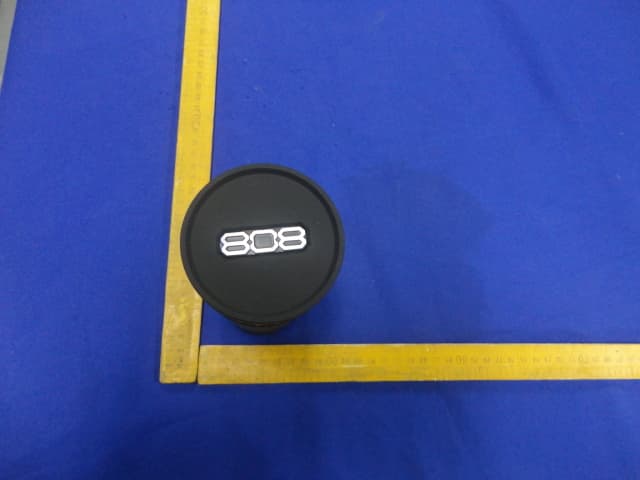
Click to zoom
Application Details
- Equipment Class
- DSS - Part 15 Spread Spectrum Transmitter
- Date of Grant
- Nov 20, 2014
- Application Purpose
- Original Equipment
- Date of Application
- Nov 20, 2014
- Equipment Note
- Wireless Speaker
- Frequency Range
- 2402.00000000 - 2480.00000000
- Company
- Voxx Accessories Corp.
- Country
- United States
Documents & Files
Document Text
Text extracted from the exhibit documents filed with the FCC. Open a document above to read the original.
Users Manual
Q U I C K S T A R T G U I D E Bluetooth wireless is a quick and easy way to connect a smartphone to a speaker or a headset. There are basically two steps to making Bluetooth work. PAIRING: The two devices get to know each other. CONNECTING: The two devices do something together (like play music). “Hi. I’m a phone.” This guide takes you through the steps to get started. Getting to know Bluetooth “Hi phone. I’m a speaker.” 1 Make sure the following items came in this package. Step 1: Unpack Your speaker USB cable Audio cable 2 Speaker back Step 2: Charge the SL Before you start using the HEX SL speaker for the first time, it’s a good idea to charge it completely. To charge the speaker: Plug the included USB cable into the Charge jack on the back of the speaker. Plug the other end of the USB charging cable into a power source, like a computer or a USB charging adapter. The charging indicator on the front of the speaker is red while the speaker is charging. It turns green when the speaker is fully charged. Note: You can use the speaker while it’s charging. Speaker front 3 Step 3: Turn on Flip the OFF / ON switch on the bottom of the speaker to the ON position. The power up tone sounds and the indicator light on the front of the speaker starts blinking. After a few seconds, the speaker goes to Bluetooth pairing mode to set up with your smartphone. Speaker bottom Speaker front 4 Enable Bluetooth on your smartphone or other device. Step 4: Pair + Connect If you’ve previously paired your phone or other Bluetooth device with this speaker, the speaker will automatically attempt to reconnect to that device when you switch the speaker on. If you want to pair to a new device, press and hold the Pair button on the side of the speaker until the speaker gives an audio signal. Wi-Fi Bluetooth Bluetooth Settings VPN Settings Wi-Fi Setting s 8:45 PM Make sure the indicator light on the front of the speaker is blinking rapidly. (If it isn’t, press and hold the Pair button on the side of the speaker until the speaker gives an audio signal.) Speaker front 5 Bluetooth Wireless Connection Tips • Make sure the Bluetooth capability of your device is turned on. • Make sure there’s nothing plugged into the speaker’s AUX IN jack when you’re trying to use Bluetooth. • The Bluetooth wireless connection works up to a range of roughly 33 feet (10 meters). This range may vary, however, based on other factors, such as room layout, wall material, obstacles, your device’s Bluetooth performance, etc. If you’re having problems connecting to this speaker, move closer to it. • If your device asks you for a password to connect, use “0000”. Choose 808 Hex SL from the pairing options on your smartphone. (If it’s not in the list, choose “Scan” from your phone’s Bluetooth menu.) Headset 808 Hex SL Computer 8:45 PM Blue tooth devices The speaker gives an audio signal when it’s finished pairing and connecting to your smartphone. The indicator light on the front of the speaker turns solid blue. Note: The process of enabling Bluetooth and connecting varies from device to device. See your device’s owners manual for more information and specific instructions. 6 To adjust the volume of your audio: Use the — and + buttons on front of the speaker. You can also use the volume controls on your phone. Set your device’s volume for music to 75%. Note: This is to make sure the sound from the speaker isn’t too loud when you start streaming. Start playing music or other audio on your device. Within seconds, the speaker starts streaming the audio wirelessly via Bluetooth. Step 4: Play music 8 :45 P M Now playin g Media volume 8 :45 P M Note: If you notice sound distorting even at low volumes, turn the volume down on your phone. Speaker front 7 Use the audio cable included with this speaker to connect the audio output from your device to the Aux In audio input on the speaker’s back panel. Using the Aux In input Speaker back The speaker automatically switches to the Aux In audio, and the pairing indicator on the front of the speaker turns white. To listen to Bluetooth audio again, unplug the cable from the speaker’s Aux In jack. The speaker will try to reconnect to the last Bluetooth device. 8 Tour of the speaker Front of the speaker Pairing indicator shows the Bluetooth status of the speaker: • fast blinking blue while pairing • slow blinking blue while reconnecting • solid blue when paired • solid white when the Aux In jack is in use • off when the speaker’s off. Charging indicator shows the charging status of the speaker: • solid red while charging • solid green when charged — and + adjust the volume of the speaker. Pairing indicator Charging indicator 9 Side of the speaker Pair button puts the speaker into pairing mode to connect to a new Bluetooth device, like a smartphone. Back of the speaker Aux In jack lets you connect an audio device directly to the speaker using the provided audio cable. Charge jack connects to the provided USB charging cable to plug the speaker into a power source or adapter. Bottom of the speaker OFF ON switch turns the speaker on and off. For more information about your new HEX SL speaker, see the User Guide. If you have any questions about this product, visit 808Audio.com or call our toll- free help line at 1-800-732-6866. SP891 QSG 00
Cover Letter(s)
SCS-F18: Project and Product Certification Representative Authorization Letter Page 1 of 2 Rev 4.0 775 Montague Expressway Milpitas, CA 95035 Tel: 408-526-1188 Fax: 408-526-1088 Email: [email protected] Project and Product Certification Representative Authorization Letter Revision History Reason for Amendment (current / obsolete) From To Approved Date Initial Release (obsolete) 1.0 1.0 Nov-14-2006 Revised wording (obsolete) 1.0 2.0 Sept–25-2007 Updated company template (obsolete) 2.0 3.0 Jan-31-2012 Updated letter information (current) 3.0 4.0 May-23-2014 SCS-F18: Project and Product Certification Representative Authorization Letter Page 2 of 2 Rev 4.0 Voxx Accessories Corp. 2014.11.04 To: SIEMIC, INC. 775 Montague Expressway, Milpitas, CA 95035 USA Dear Sir/Madam, Re: Product Certification Representative Authorization Letter We, _____ Voxx Accessories Corp.___hereby authorize SIEMIC, Inc. to act as a Certification Body for certifying for the following project(s): Product description: Wireless Speaker model name: SP891B FCC ID: VIXSP891B Sincerely, Client’s signature Client’s name / title : Milan Phillabaum / Quality Director Contact information / address :3502 Woodview Trace, Suite 220, Indianapolis,IN 46268
Cover Letter(s)
SCS-F19: Confidentiality Request Letter Page 1 of 2 Rev 3.0 775 Montague Expressway Milpitas, CA 95035 Tel: 408-526-1188 Fax: 408-526-1088 Email: [email protected] Confidentiality Request Letter Revision History Reason for Amendment (current / obsolete) From To Approved Date Initial Release (obsolete) 1.0 1.0 Nov-14-2006 Adding CFR 2.459 (obsolete) 1.0 2.0 August – 11 - 2008 Updated company template & Added text box (current) 2.0 3.0 Jan-31-2012 SCS-F19: Confidentiality Request Letter Page 2 of 2 Rev 3.0 Voxx Accessories Corp. 2014/11/04 To: Federal Communications Commission Authorization and Evaluation Division 7435 Oakland Mills Road Columbia, MD Subject: Permanent Confidentiality Request for FCC ID: VIXSP891B We hereby request confidential treatment of information accompanying this application as outlined below: - Block Diagram - Schematics - Operational Description The above materials contain trade secrets and proprietary information not customarily released to the public. The public disclosure of these materials may be harmful to the applicant and provide unjustified benefits to its competitors. The applicant understands that pursuant to Section 0.457 & 0.459 of the Rules, disclosure of this application and all accompanying documentation will not be made before the date of the Grant for this application. Sincerely, Client’s signature : Client’s name / title : Milan Phillabaum / Quality Director Contact information / address: 3502 Woodview Trace, Suite 220, Indianapolis,IN 46268
External Photos
FCC ID: VIXSP891B EST Technology Co.,Ltd Report No. ESTE-R1411007 Page 94 of 99 13. PHOTOS OF EUT External Photos M/N: SP891B FCC ID: VIXSP891B EST Technology Co.,Ltd Report No. ESTE-R1411007 Page 95 of 99 External Photos M/N: SP891B FCC ID: VIXSP891B EST Technology Co.,Ltd Report No. ESTE-R1411007 Page 96 of 99 External Photos M/N: SP891B
Internal Photos
FCC ID: VIXSP891B EST Technology Co.,Ltd Report No. ESTE-R1411007 Page 97 of 99 Internal Photos M/N: SP891B FCC ID: VIXSP891B EST Technology Co.,Ltd Report No. ESTE-R1411007 Page 98 of 99 Internal Photos M/N: SP891B Bluetooth Antenna FCC ID: VIXSP891B EST Technology Co.,Ltd Report No. ESTE-R1411007 Page 99 of 99 Internal Photos M/N: SP891B
RF Exposure Info
FCC ID: VIXSP891B EST Technology Co.,Ltd Report No. ESTE-R1411008 Page 1 of 3 FCC 47 CFR MPE REPORT Voxx Accessories Corp. Wireless Speaker Model Number: SP891B FCC ID: VIXSP891B Prepared for : Voxx Accessories Corp. 3502 Woodview Trace, Suite 220, Indianapolis, IN 46268 Prepared By : EST Technology Co., Ltd. Santun(guantai Road), Houjie Town, DongGuan City, GuangDong, China. Tel: 86-769-83081888-808 Report Number: ESTE-R1411008 Date of Test : Oct 29,2014~ Nov 10, 2014 Date of Report : Nov 11, 2014 FCC ID: VIXSP891B EST Technology Co.,Ltd Report No. ESTE-R1411008 Page 2 of 3 Maximum Permissible Exposure 1、Applicable Standard Systems operating under the provisions of this section shall be operated in a manner that ensures that the public is not exposed to radio frequency energy level in excess limit for maximum permissible exposure. In accordance with 47 CFR FCC Part 2 Subpart J, section 2.1091 this device has been defined as a mobile device whereby a distance of 0.2m normally can be maintained between the user and the device. (a)、Limits for Occupational / Controlled Exposure Frequency Range (MHz) Electric Field Strength E) (V/m) Magnetic Field Strength (H) (A/m) Power Density (S) (mW/cm2) Averaging Times︱E︱ 2 , ︱H︱2 or S (minutes) 0.3-3.0 614 1.63 (100)* 6 3.0-30 1842/f 4.89/f (900/f)* 6 30-300 61.4 0.163 1.0 6 300-1500 F/300 6 1500-10000 5 6 (b)、Limits for General Population / Uncontrolled Exposure Frequency Range (MHz) Electric Field Strength E) (V/m) Magnetic Field Strength (H) (A/m) Power Density (S) (mW/cm2) Averaging Times︱E︱ 2 , ︱H︱2 or S (minutes) 0.3-1.34 614 1.63 (100)* 30 1.34-30 824/f 2.19/f (180/f)* 30 30-300 27.5 0.073 0.2 30 300-1500 F/1500 30 1500-10000 1.o 30 Note: f=frequency in MHz; *Plane-wave equivalent power density 2、MPE Calculation Method E (V/m) = (30*P*G) 0.5/d Power Density: Pd (W/m2) = E2/377 E = Electric Field (V/m) P = Peak RF output Power (W) G = EUT Antenna numeric gain (numeric) d = Separation distance between radiator and human body (m) The formula can be changed to Pd = (30*P*G) / (377*d2) From the peak EUT RF output power, the minimum mobile separation distance, d=0.2m, as well as the gain of the used antenna, the RF power density can be obtained FCC ID: VIXSP891B EST Technology Co.,Ltd Report No. ESTE-R1411008 Page 3 of 3 3、Calculated Result and Limit Antenna gain Model Frequency (MHz) Peak output power (dBm) Peak output power (mW) (dBi) (Linear) Target power (dBm) Power Density (S) (mW/cm2)) Limited of Power Density (S) (mW/cm2 Test Result 2402 0.1391.032 0 1.00 -1±2 0.00025 1 Compiles 2441 -0.3620.920 0 1.00 -1±2 0.00025 1 Compiles GFSK 2480 -1.2680.747 0 1.00 -1±2 0.00025 1 Compiles 2402 -0.9830.797 0 1.00 -1±2 0.00025 1 Compiles 2441 -1.4940.709 0 1.00 -1±2 0.00025 1 Compiles 8-DPSK 2480 -2.3940.576 0 1.00 -1±2 0.00025 1 Compiles
Test Report
FCC ID: VIXSP891B EST Technology Co.,Ltd Report No.ESTE-R1411007 Page 1 of 99 FCC PART 15C TEST REPORT FOR CERTIFICATION On Behalf of Voxx Accessories Corp. Wireless Speaker Model Number: SP891B FCC ID: VIXSP891B Prepared for : Voxx Accessories Corp. 3502 Woodview Trace, Suite 220, Indianapolis, IN 46268 Prepared By : EST Technology Co., Ltd. Santun(guantai Road), Houjie Town, DongGuan City, GuangDong, China. Tel: 86-769-83081888-808 Report Number: ESTE-R1411007 Date of Test : Oct 29,2014~ Nov 10, 2014 Date of Report : Nov 11, 2014 FCC ID: VIXSP891B EST Technology Co.,Ltd Report No.ESTE-R1411007 Page 2 of 99 TABLE OF CONTENTS Description Page TEST REPORT VERIFICATION.........................................................................................................................3 1. GENERAL INFORMATION.................................................................................................................5 1.1. Description of Device (EUT) ........................................................................................................... 5 2. SUMMARY OF TEST.........................................................................................................................6 2.1. Summary of test result...................................................................................................................... 6 2.2. Test Facilities ................................................................................................................................... 7 2.3. Assistant equipment used for test ..................................................................................................... 8 2.4. Block Diagram ................................................................................................................................. 8 2.5. Test mode ......................................................................................................................................... 9 2.6. Channel List for Bluetooth ............................................................................................................... 9 2.7. Test Equipment............................................................................................................................... 10 3. MAXIMUM PEAK OUTPUT POWER.................................................................................................11 3.1. Limit ............................................................................................................................................... 11 3.2. Test Procedure ................................................................................................................................ 11 3.3. Test Result ...................................................................................................................................... 11 3.4. Test Data ........................................................................................................................................ 12 4. 20 DB BANDWIDTH.......................................................................................................................16 4.1. Limit ............................................................................................................................................... 16 4.2. Test Procedure ................................................................................................................................ 16 4.3. Test Result ...................................................................................................................................... 16 4.4. Test Data ........................................................................................................................................ 17 5. CARRIER FREQUENCY SEPARATION..............................................................................................21 5.1. Limit ............................................................................................................................................... 21 5.2. Test Procedure ................................................................................................................................ 21 5.3. Test Result ...................................................................................................................................... 21 5.4. Test Data ........................................................................................................................................ 22 6. NUMBER OF HOPPING CHANNEL..................................................................................................26 6.1. Limit ............................................................................................................................................... 26 6.2. Test Procedure ................................................................................................................................ 26 6.3. Test Result ...................................................................................................................................... 26 6.4. Test Data ........................................................................................................................................ 27 7. DWELL TIME.................................................................................................................................29 7.1. Limit ............................................................................................................................................... 29 7.2. Test Procedure ................................................................................................................................ 29 7.3. Test Result ...................................................................................................................................... 29 7.4. Test Data .......................................................................................................…
Text truncated - open the document above for the full version.
Test Setup Photos
FCC ID: VIXSP891B EST Technology Co.,Ltd Report No. ESTE-R1411007 Page 92 of 99 12. TEST SETUP PHOTO Conducted Test FCC ID: VIXSP891B EST Technology Co.,Ltd Report No. ESTE-R1411007 Page 93 of 99 Radiated Test (30-1000 MHz) Radiated Test (1000-25000 MHz)
Contact Information
Applicant
Paul Tinaphong(Senior V.P.)
Test Firm
EST Technology Co.,LtdIceman Hu
[email protected]86-769-83081888
Technical Specifications
| # | Rule Parts | Frequency Range | Power Output |
|---|---|---|---|
| 1 | 15C | 2.40 GHz - 2.48 GHz | 1.03 mW |
Other Applications from Voxx Accessories Corp.

VIXARHTVHS
Jul 22, 2024Wireless TV Headset
Equipment Class
DTS - Digital Transmission System
VIXRSH082
Mar 31, 2024OTC Hearing Aids
Equipment Class
DSS - Part 15 Spread Spectrum Transmitter
VIXRSH082RC
Mar 31, 2024Keychain Remote
Equipment Class
DTS - Digital Transmission System
VIXSPKAW740M2
Jul 17, 2023Center Stage Freestyle All-in-One Karaoke System
Equipment Class
DSS - Part 15 Spread Spectrum Transmitter
VIXSPKAW740M
Jul 15, 2023Wireless Microphone
Equipment Class
DSS - Part 15 Spread Spectrum Transmitter