VS9-EX1PS3BLUETOOTH HEADSET
Good Better Best Ltd trading as Gioteck
Click to zoom
Application Details
- Equipment Class
- DSS - Part 15 Spread Spectrum Transmitter
- Date of Grant
- Jul 18, 2011
- Application Purpose
- Original Equipment
- Date of Application
- Jul 18, 2011
- Equipment Note
- BLUETOOTH HEADSET
- Frequency Range
- 2402.00000000 - 2480.00000000
- Country
- United Kingdom
Documents & Files
Document Text
Text extracted from the exhibit documents filed with the FCC. Open a document above to read the original.
Users Manual
EX-01 BLUETOOTH™ HEADSET FOR PS3™ EXCLUSIVELY DESIGNED FOR GAMING ON PS3™ TM MODEL G320 Copyright © 2007, 2008, 2009 GBB Group. All Rights Reserved. Gioteck™ and the Gioteck Logo are trademarks of GBB Group Ltd. PlayStation is a registered trademark of Sony Digital Entertainment. This product is not endorsed or manufactured by Sony Digital Entertainment. Playstation®, Playstation 3® & PS3® are registered trademarks of Sony Computer Entertainment Inc. All other third party products and company names mentioned are either the trade names or trademarks of their respective owner. 02 | CONTENTS & PRECAUTIONS CONTENTS 03 | Product Features & Details 04 | Setup 06 | Reversing Earhook 08 | Charging 09 | Operation 10 | Troubleshooting 11 | Care & Maintenance PRODUCT FEATURES & DETAILS | 03 thankyou Thank you for purchasing the EX-01 Bluetooth™ Headset from Gioteck. We hope that this product will go beyond your expectations for a quality made accessory. Please read this booklet thoroughly before using the product and review the PS3 manual for additional details regarding PS3 operation. Thank you & enjoy! features & details The EX-01 Wireless Bluetooth™ Headset has been exclusively designed for gamers and gaming, not mobile phones! So you can now maximise your game time without an irritating, uncomfortable earpiece, and still hear your opponent creeping up behind you on your surround sound system! precautions • Use only as intended. • This is a precision product and should be handled with care. • To avoid electrical shock, do not take the product apart. • Do not store in areas of extreme heat or cold. • Do not allow product to get wet or dirty; doing so may damage the product. • Do not clean with benzene, paint thinner, acetone, alcohol, or other such solvents. warnings This symbol indicates important installation, operation or maintenance instructions. Always follow these instructions closely. This symbol is intended to alert the user to the presence of potentially harmful or dangerous substances within the product’s enclosure. This symbol may also indicate a procedure that will void your product warranty. Recycling is important and will help to protect our environment and reduce landfill waste. This symbol on the product or in the manual means that your electrical and electronic equipment should NOT be disposed of in normal household waste at the end of its life. It should be disposed of separately. Please take it to a collection point for electrical waste. 01 | Microphone 02 | Speaker 03 | Earhook 04 | LED Feedback 05 | Volume Decrease 06 | Power / Mute 07 | Volume Increase 01 02 03 04 05 06 07 04 | SETUPSETUP | 05 Within the Settings' menu, press X on Accessory Settings. Enter 0000 (four zeros) as the Pass Key and press X on OK. Press X on the icon labelled: Audio Device Settings. pairing your headset Press X on the icon labeled: Register Bluetooth® Device. Press X on Yes. At the next screen, prepare the Headset to be paired with the PS3 by holding down the power button until the LED flashes Blue & Green. When the LEDs are flashing alternately Blue & Green the headset is ready to be paired. 9 SECONDS Press X on Start Scanning. Once Scan is complete, the PS3 will recognize all Bluetooth devices within range. Locate EX-01 from the list of available devices and press X to be prompted for a Pass Key. You should then be taken to a new screen stating: Register completed. Go to the Settings menu, press X on Accessory Settings. Choose PS3 EX-01 as your input and output device from the lists. Press X to confirm your choices. Scroll down and press X when you have highlighted Connect [Bluetooth®]. Your Headset is now ready to use... enjoy :) 06 | REVERSING EARHOOKREVERSING EARHOOK | 07 reversing the earhook The EX-01 ships with two earhooks, each marked [L] for the left ear and [R] for the right ear. After selecting the appropriate earhook, follow the instructions below: Using your fingernail tip, carefully prise open the shiney fascia shell from the back of the headset upwards and forwards. REAR HOOKS Once clear of the body, unhook from the front hook. Lift clear from the body. Noting the 4 earhook pins, gently pull away the existing earhook, and store safely. Line-up the earhook holes with the pins and gently guide the replacement earhook over the top until set in position. Hook the front fascia hook under the front hook cavity, then slowly push the rear hooks into place. FRONT HOOKFRONT HOOK EARHOOK PINS EARHOOK HOLES 08 | CHARGINGOPERATION | 09 charging your headset The headset contains a rechargeable Li-ion polymer battery. Prior to using the headset for the first time, it is strongly recommended to fully charge the battery. Connect the USB cable to your PS3™ [1] and the mini usb [2] to the headset's charging socket [3]. The LED will illuminate green during the charging process and will be off when fully charged. NOTE: Charging indication will be delayed for a few minutes if the headset has not been used for a long time. Operating your headset To power on your headet, press and hold the power button for 3 seconds until the LED flashes Blue. NOTE: If the LED flashes Green only, the battery will need to be charged. To power off your headet, press and hold the power button for 3 seconds until the LED flashes Green. charging time Normally the battery is fully recharged within 3 hours. As soon as the battery is fully charged, the LED will be off or weak Green. Disconnect the USB cable from the PS3™ and the headset. game time The fully charged battery offers up to 4 hours continuous use. It is advisable to always recharge after lengthy gameplay so the headset is fully charged for the next round. adjusting volume Tap the + button to increase the volume in increments until the headset reaches your desired volume level. Tap the - button to decrease the volume in increments until the headset reaches your desired volume level. muting Press the power button briefly (less than 1 second) repeat the process to un-mu…
Text truncated - open the document above for the full version.
Block Diagram
BC6130 SINGLE BLUETOOTH CHIP AUDIO CODEC Crystal MCU I/O 1.5V Regulator 1.8V Regulator Charger Manager LED MMI LI-POLY BATTERY USB 5V INPUT Crystal 16MHz RF Front Class 2 ANT Speaker Microphone MIC BIAS
Cover Letter(s)
Good Better Best Ltd. (FCC ID : VS9-EX1PS3) POWER OF ATTORNEY DATE: 2011-07-14 Federal Communications Commission Authorization and Evaluation Division 1435 Oakland Mills Road To Whom It May Concern: We, the undersigned, hereby authorize SEM.Test Compliance Service Co., Ltd. Jandy So on our behalf, to apply to the Federal Communications Commission on our equipment. Any and all acts carried out by SEM.Test Compliance Service Co., Ltd. This is to advise that we are in full compliance with the Anti-Drug Abuse Act. We, Good Better Best Ltd, are not subject to a denial of federal benefits pursuant to Section 5301 of the Anti-Drug Act of 1988, 21 USC853a, and no party to the application is subject to a denial of federal benefits pursuant to that section. Sincerely, Good Better Best Ltd. (Graeme boxall) (PRODUCT MANAGER)
External Photos
Good Better Best Ltd. Model: EX1PS3 REPORT NO.: STR11078014I FCC Part 15.247 EXHIBIT 2 - EUT EXTERNAL PHOTOGRAPHS EUT View 1 EUT View 2
ID Label/Location Info
Good Better Best Ltd. Model: EX1PS3 REPORT NO.: STR11078014I FCC Part 15.247 EXHIBIT 1- PRODUCT LABELING Proposed FCC ID Label Format FCC ID: VS9-EX1PS3 Specifications : Text is Black in color and justified. Labels are printed in indelible ink on permanent adhesive silk-screened onto the EUT or shall be affixed at a conspicuous location on the EUT. Proposed Label Location on EUT FCC ID Label Location
ID Label/Location Info
Good Better Best Ltd. Model: EX1PS3 REPORT NO.: STR11078014I FCC Part 15.247 EXHIBIT 1- PRODUCT LABELING Proposed FCC ID Label Format FCC ID: VS9-EX1PS3 Specifications : Text is Black in color and justified. Labels are printed in indelible ink on permanent adhesive silk-screened onto the EUT or shall be affixed at a conspicuous location on the EUT. Proposed Label Location on EUT FCC ID Label Location
Internal Photos
Good Better Best Ltd. Model: EX1PS3 REPORT NO.: STR11078014I FCC Part 15.247 EXHIBIT 3 - EUT INTERNAL PHOTOGRAPHS EUT Housing and Board View Solder Board-Component View 1 Good Better Best Ltd. Model: EX1PS3 REPORT NO.: STR11078014I FCC Part 15.247 Solder Board-Component View 2
Operational Description
CIRCUIT DESCRIPTION 1. Schematic diagram description The EX1PS3 Bluetooth headset based on CSR BC6130A04 QFN chipset, It is support the headset profile and handfree profile. It is compliant to Bluetooth v2.1 + EDR specification. References to the document <The EX1PS3 Bluetooth Headset schematic diagram> U1(BC6130A04) is a single chip Radio and baseband IC for Bluetooth 2.4GHZ systems. it provides Bluetooth RF of the 2402-2480MHz Tx frequency, baseband and some power regulator functions. It is integrated DC +1.8V power supply. +1.8V uses for the PIO pull up such as the buttons. U2 is serial EERPOM, it use for store the configurations of MMI. XT1 is a crystal oscillator, provides 16M clock reference. EX1PS3 uses PCB copper antenna for RF transceiver. EX1PS3 has Blue and Red indicator lights to show different working state, and has MFB, Volume up, Volume Down buttons to operation the headset. 2.The Signal Path description When the EX1PS3 headset connects to a mobile phone , the built-in MCU will control the RF modem to process the baseband signal, indicate the working state by the LED. When uses the headset, the voice can be picked by microphone. There are Multi-function Button, Volume up button and Volume Down button for you to increase the volume or decrease the volume of the speaker.
Test Report
Good Better Best Ltd. Model: EX1PS3 REPORT NO.: STR11078014I PAGE 1 OF 35 FCC Part 15.247 FCC Part 15C Measurement and Test Report For Good Better Best Ltd. 61-63 The Green, Stotfold Herts, SG5 4AN United Kingdom. FCC ID: VS9-EX1PS3 Report Concerns: Original Report Equipment Type: Bluetooth headset Model: EX1PS3 Report No.: STR11078014I Test Date: 2011-07-04 to 2011-07-18 Issue Date: 2011-07-19 Tested By: Seven Song / Engineer Reviewed By: Lahm Peng / EMC Manager Approved & Authorized By: Jandy so / PSQ Manager Prepared By: SEM.Test Compliance Service Co., Ltd. 3/F, Jinbao Commerce Building, Xin'an Fanshen Road, Bao'an District, Shenzhen, P.R.C.(518101) Tel.: +86-755-33663308 Fax.: +86-755-33663309 Website: www.semtest.com.cn Note: This test report is limited to the above client company and the product model only. It may not be duplicated without prior permitted by SEM.Test Compliance Service Co., Ltd . Good Better Best Ltd. Model: EX1PS3 REPORT NO.: STR11078014I PAGE 2 OF 35 FCC Part 15.247 TABLE OF CONTENTS 1. GENERAL INFORMATION ...................................................................................................................................4 1.1 PRODUCT DESCRIPTION FOR EQUIPMENT UNDER TEST (EUT)...............................................................................4 1.2 TEST STANDARDS...................................................................................................................................................4 1.3 TEST METHODOLOGY.............................................................................................................................................4 1.4 TEST FACILITY.......................................................................................................................................................5 1.5 EUT EXERCISE SOFTWARE....................................................................................................................................5 1.6 ACCESSORIES EQUIPMENT LIST AND DETAILS.......................................................................................................5 1.7 EUT CABLE LIST AND DETAILS.............................................................................................................................5 2. SUMMARY OF TEST RESULTS ...........................................................................................................................6 3. §15.203 - ANTENNA REQUIREMENT..................................................................................................................7 3.1 STANDARD APPLICABLE.........................................................................................................................................7 3.2 TEST RESULT..........................................................................................................................................................7 4. NUMBER OF HOPPING CHANNELS AND CHANNEL SPACING .................................................................8 4.1 STANDARD APPLICABLE.........................................................................................................................................8 4.2 TEST EQUIPMENT LIST AND DETAILS.....................................................................................................................8 4.3 TEST PROCEDURE...................................................................................................................................................8 4.4 ENVIRONMENTAL CONDITIONS..............................................................................................................................8 4.5 SUMMARY OF TEST RESULTS/PLOTS......................................................................................................................9 5. DWELL TIME OF A HOPPING CHANNEL ......................................................................................................11 5.1 STANDARD APPLICABLE.......................................................................................................................................11 5.2 TEST EQUIPMENT LIST AND DETAILS...................................................................................................................11 5.3 TEST PROCEDURE.................................................................................................................................................11 5.4 ENVIRONMENTAL CONDITIONS............................................................................................................................11 5.5 SUMMARY OF TEST RESULTS/PLOTS....................................................................................................................12 6. 20-DB BANDWIDTH ..............................................................................................................................................14 6.1 STANDARD APPLICABLE.......................................................................................................................................14 6.2 TEST EQUIPMENT LIST AND DETAILS...................................................................................................................14 6.3 TEST PROCEDURE.................................................................................................................................................14 6.4 ENVIRONMENTAL CONDITIONS............................................................................................................................14 6.5 SUMMARY OF TEST RESULTS/PLOTS....................................................................................................................14 7. POWER OUTPUT...................................................................................................................................................17 7.1 STANDARD APPLICABLE.................................................................................................................…
Text truncated - open the document above for the full version.
Contact Information
Applicant
Stephen Withers(Consultant)
Test Firm
SEM.Test Compliance Service Co., Ltd.Jandy So
Technical Specifications
| # | Rule Parts | Frequency Range | Power Output |
|---|---|---|---|
| 1 | 15C | 2.40 GHz - 2.48 GHz | 1.00 mW |
Other Applications from Good Better Best Ltd trading as Gioteck
VS9-WX4NSW
Jul 25, 2022WIRELESS CONTROLLER
Equipment Class
DSS - Part 15 Spread Spectrum Transmitter
VS9-FL400
Dec 07, 2015Bluetooth Headset
Equipment Class
DSS - Part 15 Spread Spectrum Transmitter
VS9-FL300
Sep 29, 2015Bluetooth Headset
Equipment Class
DSS - Part 15 Spread Spectrum Transmitter
VS9LP1D
Jul 29, 2015Bluetooth Chat Headset Dongle
Equipment Class
DSS - Part 15 Spread Spectrum Transmitter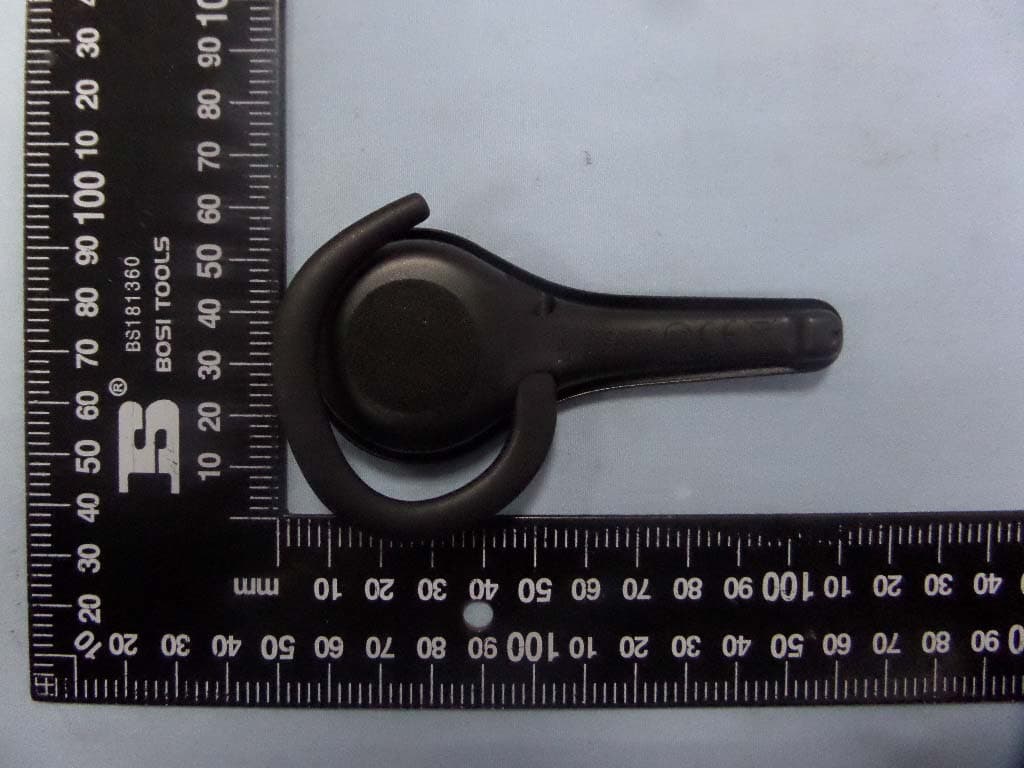
VS9LP1
Jul 28, 2015Bluetooth headset
Equipment Class
DSS - Part 15 Spread Spectrum Transmitter