VSM20198201820010Touchscreen Thermostat
World Excel Company Ltd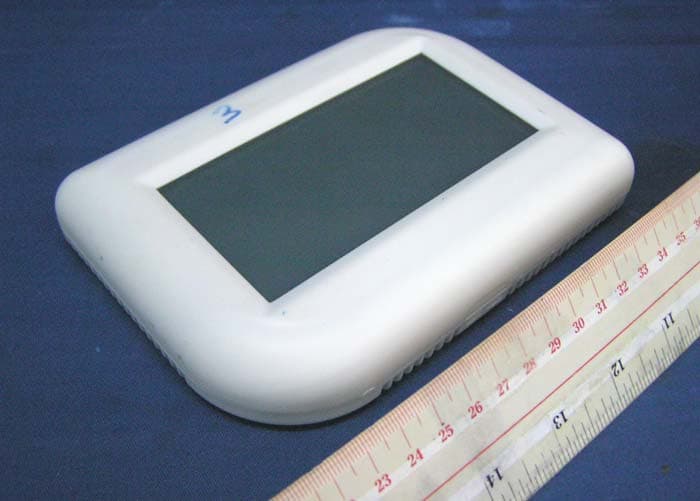
Click to zoom
Application Details
- Equipment Class
- DSC - Part 15 Security/Remote Control Transmitter
- Date of Grant
- Sep 19, 2011
- Application Purpose
- Original Equipment
- Date of Application
- Sep 19, 2011
- Equipment Note
- Touchscreen Thermostat
- Frequency Range
- 433.92000000 - 433.92000000
- Company
- World Excel Company Ltd
- Country
- Hong Kong
Documents & Files
Document Text
Text extracted from the exhibit documents filed with the FCC. Open a document above to read the original.
Users Manual
TS820 Touchscreen RF Wireless Thermostat 110915 CAUTION: 1. Turn off TS820 electronic source and the electrical devices (e.g. heater, cooler) which will be connected before installation and maintenance. 2. The installer must be a trained service engineer. 1. Installation Location The thermostat should be mounted on an inner wall 60” above the floor in position where it is readily affected by changes of the general room temperature with freely circulating air. Prevent direct exposure to sunlight; dripping or splashing area. Do not place this unit at a location where air circulation is low, or where it has great temperature changes (e.g. near door). Do not place the thermostat near heat generating sources (radiators, hot air vents, TV or lights). 2. Wiring of receiver This thermostat works with receiver RT01R/MA. For thermostat use : For heat-pump use : (need to connect W and Y) CAUTION : TURN OFF any electrical devices before wiring. There are 5 terminals. Connect RH and RC to power supply. Connect terminals G, Y and W as shown in the figure above for Fan, Cooling and Heating. Push all cables back into wall prior to fixing to avoid trapping wires. Do not use metal conduit or of cable provided with a metal sheath. 3. Mounting 1. Base housing - Adjust the base on the wall or junction box and ensure the base is at surface level and cover the junction box comfortably - If necessary, pull the cables out at the middle hole of the base - Place the 2pcs of wall anchors at the wall if necessary. - Fasten the base with the 2pcs of long screws 2. Insert the 2XAA batteries into the thermostat battery case (Beware of wrong battery poles) 3. Hold the thermostat on the base. Align the screw blocks with the pins at the back of the thermostat. 4. Push the thermostat straight onto the base until snaps into place. Communication Setup 1. There is a blue 8-pin dip switch on both the transmitter and receiver. 2. Set them to be the same so that they can communicate to each other. ( 256 choices ) 3. After placing you thermostat, select FAN to ON instead of AUTO. 4. After the above step is made, wait for about 10 seconds. The receiver’s FAN LED should then be turned on. 5. In case the LED is not turned on, please try the following. i. Check both transmitter and receiver have the same address setting. ii. If problem continues, power down receiver for at least half a minute and then power it on. Then try toggle the fan status so as to check communication. Feature list: ● Battery powered (2 “AA” alkaline batteries) ● Temperature display in °F or °C ● Temp. Measurable Range: 32 – 99 °F / 0 – 40 °C ● EEPROM stores system settings ● Calendar ● Real clock in 12hr/ 24hr ● Real clock in 12hr/ 24hr ● Daylight Saving Index ● Filter, UV, and Energy usage counter ● Filter, UV and Energy usage limit setting ● Cleaning screen mode ● Security mode System Setup mode There are 8 settings in the setup mode: 1. Calendar 2. 24/12 hours selection 3. C/F display selection 4. Fan HE/HG selection 5. Thermostat / Heat-pump selection 6. Span Selection 7. Delay/ Long delay selection 8. DST (Daylight savings time) selection 9. Screen lock selection Press and hold SYSTEM for 5 seconds to enter the setup mode. During setup mode, press CONFM to accept current setting and proceed to next setting. Press EXIT to discards changes and return to normal mode. Calendar Press / to change the year, month and year Press CONFM to accept changes and proceed to next setting. 24/12 hours Press / to choose either 12h (12-hour) or 24h (24-hour) representation. Press CONFM to accept changes and proceed to next setting. C/F display Press / to change temperature unit to display in °C/°F Press CONFM to accept changes and proceed to next setting. Fan HE/HG Press / to toggle between HE/HG setting. Press CONFM to accept changes proceed to next setting. (HE/HG setting is effective for thermostat only) Heat On Cool On HE Fan On Fan On HG Fan Off Fan On Thermostat / Heat-pump Press / to toggle between th / HP selection. ( th = thermostat, HP = heat pump ) Press CONFM to accept changes. If HP (heat pump) is selected, it will go to B/O selection. Press / to toggle B / O selection. Press CONFM to accept changes and proceed to next setting. Span Selection “P” represents span and will be displayed in either °C / °F depending on the previous temperature unit setting. Press / to change span setting. The selectable values are 0.5°C(1°F) / 1.0°C(2°F) / 1.5°C(3°F). Press CONFM to accept changes and proceed to next setting. Delay/ Long delay Press / to change Delay/ Long delay selection. Delay for Heat on and Cool on is to prevent short cycling of system. Press CONFM to accept changes and proceed to next setting. ( Delay setting is effective for thermostat only. When HP is selected, there will always be a 4~5 minutes off-on interval.) Delay Long delay Heat mode 5~10sec 4~5 min Cool mode 4~5 min 4~5 min DST (Daylight savings time) Press or to turn on or off DST function. If the date is in the DST period, the clock will be automatically activated, Press CONFM to accept changes and proceed to next setting. Remark: The DST bases on the USA time zone. Security lock Press or to turn on/off the screen lock function. Press CONFM to accept changes. When ON is selected, a 4-digit password is required. The screen shows a 4-digit password. Press / on the left to change the password number. P1 represents the 1 st digit password (read from left), which is selected. After setting all 4 digits, press CONFM to activate the security mode and return to normal mode. When security mode is activated, “” is shown on the LCD and all keys are disabled expect SYSTEM. Disable the security mode. 1. Press “SYSTEM” and enter the correct password. 2. If the password is correct, security mode will be deactivated. Otherwise the security mode remains activated. (* security lock cannot maintains once power is lost ) View Calendar 1. Press the Weekday to show current date. 2. Press the EXIT to return the norm…
Text truncated - open the document above for the full version.
External Photos
INTERTEK TESTING SERVICE Report No.: HK11080741-1 FCC ID: VSM20198201820010 Equipment Photographs Model : TS820T/MA (External)
ID Label/Location Info
Drawing no: TS820.MA.WORKI.1.110906.11.CDR WORLD EXCEL TS820T/MA CUSTOMER TS820 WORKINST 生產資料 WEXCEL World Excel Company Limited C File: TS820.MA.WORKI.1.110906.11.CDR CORELDRAW File Edition: ANNY NG 2011-09-06 Page REV 1 DATE REV DESCRIPTION NAME APRVD 110906 1 1/1 TS010 P/N: 9TS010~491 底殼 面殼原料: ABS757 WHITE (白色) RAL9003 RoHS 符合2002/95/EC指令 Limit of RoHS (RoHS的限量指標) 鎘Cadmium (Cd) <0.01% 鉛Lead (Pb) <0.1% 汞Mercury (Hg) <0.1% 六價鉻Hexavalent chromium (Cr ) <0.1% 多溴聯苯Polybrominated biphenyls (PBB) <0.1% 多溴二苯醚Polybrominated biphenyls ethers (PBDE) <0.1% 6+ TS082T/MAMODEL: TS012 TOP HOUSING (面殼) PART NO.:(編號號碼): 9TS012~391 RAW MATERIAL(面殼原料):白色 RAL9003 VH800 記號為>ABSV< White RoHS 用 不需移印任何標誌 貼 在 此 處 貼在此處 Model: TS820 Input: Battery 2x1.5V ‘AA’ Transmitting Frequency: 433MHz TOUCHSCREEN THERMOSTAT FCC ID:VSM20198201820010 FCC STATEMENT This device complies with Part 15 of the FCC Rules. Operation is subject to the following two conditions:(1) This device may not cause harmful interference, and (2) This device must accept any interference received, including interference that may cause undesired operation. THERMOSTAT Contact voltage: 24Vac 50/60Hz Control range of temperature: 5 ~ 35 C/41 ~ 95 F Contact type: SPST Control System: HEAT/COOL/OFF TS820 TOUCHSCREEN 12 3 4 5 6 7 8 QC LOCATION LABEL SIZE: 26x12(H)mm DWN: GVT~~.1EVTZ.1.050205.11.CDR PCB 板 12 3 4 5 6 7 8 貼在此處 MODEL(型號):TS820T/MA(24V) PRODUCT LABEL(產品貼紙) SIZE(尺寸): 82 X 40mm(H) COLOR(要求顏色): BLACK ON WHITE(白底黑字) MATERIAL(物料完成): PP COATING,STRONG ADHESIVE RoHS DWN:TS820.T.1EMA5.1.110419.11.CDR MODEL(型號): TS820T/MA BOTTOM FCC LABEL(底殼貼紙-FCC ID CODE) SIZE(尺寸): 45 X 38mm(H) COLOR(要求顏色): BLACK ON WHITE(白底黑字) MATERIAL(完成物料): PP COATING,STRONG ADHESIVE RoHS DWG:TS820.T.1EMA9.2.110419.11.CDR MODEL(型號): TS820T/MA RATING/WIRING LABEL(底殼貼紙) SIZE(尺寸): 23 X 23mm(H) COLOR(要求顏色): BLACK ON WHITE(白底黑字) MATERIAL(完成物料): PP COATING,STRONG ADHESIVE RoHS DWG:TS820.T.1EMA9.1.110419.11.CDR 型號: TS820T/MA 底板: TS032 包裝: TS820T/MA底殼底放入包螺絲包, 而RT01R/MA放在同一個白盒, 卡通箱貼紙: 無 註:1.此型號使用TS010面,底殼(ABS757 1 需附說明書 料)WHITE (白色) RAL9003 貼在此處
Internal Photos
INTERTEK TESTING SERVICE Report No.: HK11080741-1 FCC ID: VSM20198201820010 Equipment Photographs Model : TS820T/MA (Internal) INTERTEK TESTING SERVICE Report No.: HK11080741-1 FCC ID: VSM20198201820010 Equipment Photographs Model : TS820T/MA (Internal) INTERTEK TESTING SERVICE Report No.: HK11080741-1 FCC ID: VSM20198201820010 Equipment Photographs Model : TS820T/MA (Internal)
Test Report
INTERTEK TESTING SERVICES Report No.: HK11080741-1 Sample No.: 1/2 Code: FCC15C_f / Effective Date: 24 Jun 2011 ( of ) Average Factor Plot – Pursuant to FCC Part 15 Section 15. 231 Requirement INTERTEK TESTING SERVICES Report No.: HK11080741-1 Sample No.: 1/2 Code: FCC15C_f / Effective Date: 24 Jun 2011 ( of ) Average Factor Plot – Pursuant to FCC Part 15 Section 15. 231 Requirement INTERTEK TESTING SERVICES Report No.: HK11080741-1 Sample No.: 1/2 Code: FCC15C_f / Effective Date: 24 Jun 2011 ( of ) Average Factor Plot – Pursuant to FCC Part 15 Section 15. 231 Requirement
Test Report
INTERTEK TESTING SERVICES Report No.: HK11080741-1 Sample No.: 1/2 Code: FCC15C_f / Effective Date: 24 Jun 2011 ( of ) Bandwidth Plot – Pursuant to FCC Part 15 Section 15. 231 Requirement
Test Report
- The test report only allows to be revised within the retention period unless further standard or the requirement was noticed. - This report is for the exclusive use of Intertek's Client and is provided pursuant to the agreement between Intertek and its Client. Intertek's responsibility and liability are limited to the terms and conditions of the agreement. Intertek assumes no liability to any party, other than to the Client in accordance with the agreement, for any loss, expense or damage occasioned by the use of this report. Only the Client is authorized to permit copying or distribution of this report and then only in its entirety. Any use of the Intertek name or one of its marks for the sale or advertisement of the tested material, product or service must first be approved in writing by Intertek. The observations and test results in this report are relevant only to the sample tested. This report by itself does not imply that the material, product, or service is or has ever been under an Intertek certification program. Intertek Testing Services Hong Kong Ltd. 2/F., Garment Centre, 576 Castle Peak Road, Kowloon, Hong Kong. Tel: (852) 2173 8888 Fax: (852) 2785 5487 Website: www.hk.intertek-etlsemko.com TEST REPORT Report No.: HK11080741-1 World Excel Company Limited Application For Certification (Original Grant) (FCC ID: VSM20198201820010) Transmitter Prepared and Checked by: Approved by: Signed On File Wong Kwok Yeung, Kenneth Lead Engineer Chan Chi Hung, Terry Assistant Supervisor Date: September 19, 2011 INTERTEK TESTING SERVICES Report No.: HK11080741-1 FCC ID: VSM20198201820010 i GENERAL INFORMATION World Excel Company Limited BRAND NAME: N/A, MODEL: TS820T/MA FCC ID: VSM20198201820010 Grantee: World Excel Company Limited Grantee Address: Room B, 26/F., Capital Trade Centre, 62 Tsun Yip Street, Kwun Tong, Kowloon, Hong Kong Contact Person: Neddy Tse Tel: (852) 2304 0993 ext 815 Fax: (852) 2304 0881 e-mail: [email protected] Manufacturer: N/A Manufacturer Address: N/A Brand Name: N/A Model: TS820T/MA Type of EUT: Transmitter Description of EUT: Touchscreen Thermostat Serial Number: N/A FCC ID: VSM20198201820010 Date of Sample Submitted: August 11, 2011 Date of Test: August 29, 2011 Report No.: HK11080741-1 Report Date: September 19, 2011 Environmental Conditions: Temperature: +10 to 40°C Humidity: 10 to 90% INTERTEK TESTING SERVICES Report No.: HK11080741-1 FCC ID: VSM20198201820010 ii SUMMARY OF TEST RESULT World Excel Company Limited BRAND NAME: N/A, MODEL: TS820T/MA FCC ID: VSM20198201820010 TEST SPECIFICATION REFERENCE RESULTS Maximum Peak Output Power 15.247(b), (c) / RSS-210 A8.4 N/A Hopping Channel Carrier Frequencies Separation 15.247(e) / RSS-210 A8.1 (for 2.4GHz Digital) N/A 20dB Bandwidth of the Hopping Channel 15.247(a) / RSS-210 A8.1 N/A Number of Hopping Frequencies 15.247(e) / RSS-210 A8.1 N/A Average Time of Occupancy of Hopping Frequency 15.247(e) / RSS-210 A8.1 N/A Antenna Conducted Spurious Emissions 15.247(d) / RSS-210 A8.5 N/A Radiated Spurious Emissions 15.247(d) / RSS-210 A8.5 N/A RF Exposure Compliance 15.247(i) / RSS-Gen 5.6 N/A Transmitter Power Line Conducted Emissions 15.207 / RSS-Gen 7.2.4 N/A Transmitter Field Strength (for 27MHz) 15.227 / RSS-310 3.8 N/A Transmitter Field Strength (for 40MHz) 15.229 / RSS-210 A2.7 N/A Transmitter Field Strength, Bandwidth and Timing Requirement 15.231(a) / RSS-210 A1.1.1 (for Remote Control) N/A Transmitter Field Strength, Bandwidth and Timing Requirement 15.231(e) / RSS-210 A1.1.5 (for 433MHz) Pass Transmitter Field Strength and Bandwidth Requirement 15.239 / RSS-210 A2.8 (for 88-108MHz) N/A Transmitter Field Strength and Bandwidth Requirement 15.249 / RSS-210 A2.9 (for 902-928MHz or 2.4GHz) N/A Transmitter Field Strength and Bandwidth Requirement 15.235 / RSS-310 3.9 (for 49MHz) N/A Digital Device Radiated Emissions 15.109 / RSS-210 2.5 Pass Digital Device Conducted Emissions 15.107 / ICES-003 N/A Note : 1. The EUT uses a permanently attached antenna which, in accordance to section 15.203, is considered sufficient to comply with the pervisions of this section. 2. Pursuant to FCC part 15 Section 15.215(c), the 20 dB bandwidth of the emission was contained within the frequency band designated (mentioned as above) which the EUT operated. The effects, if any, from frequency sweeping, frequency hopping, other modulation techniques and frequency stability over excepted variations in temperature and supply voltage were considered. INTERTEK TESTING SERVICES Report No.: HK11080741-1 FCC ID: VSM20198201820010 iii Table of Contents 1.0 General Description.................................................................................................. 1 1.1 Product Description................................................................................................. 1 1.2 Related Submittal(s) Grants.................................................................................... 1 1.3 Test Methodology.................................................................................................... 1 1.4 Test Facility ............................................................................................................. 1 2.0 System Test Configuration ...................................................................................... 2 2.1 Justification.............................................................................................................. 2 2.2 EUT Exercising Software ........................................................................................ 2 2.3 Special Accessories ................................................................................................ 2 2.4 Equipment Modification........................................................................................... 2 2.5 Measurement Uncertainty....................................................................................... 2 2.6 Support Equipment List and Description .............................…
Text truncated - open the document above for the full version.
Test Report
INTERTEK TESTING SERVICES Report No.: HK11080741-1 Sample No.: 1/2 Code: FCC15C_f / Effective Date: 24 Jun 2011 ( of ) Timing Plot – Pursuant to FCC Part 15 Section 15. 231 Requirement INTERTEK TESTING SERVICES Report No.: HK11080741-1 Sample No.: 1/2 Code: FCC15C_f / Effective Date: 24 Jun 2011 ( of ) Timing Plot – Pursuant to FCC Part 15 Section 15. 231 Requirement
Test Setup Photos
INTERTEK TESTING SERVICE Report No: HK11080741-1 FCC ID: VSM20198201820010 Configuration Photographs Worst-Case Radiated Emissions (Front View) Model : TS820T/MA INTERTEK TESTING SERVICE Report No: HK11080741-1 FCC ID: VSM20198201820010 Configuration Photographs Worst-Case Radiated Emissions (Back View) Model : TS820T/MA
Contact Information
Applicant
KK Au(Engineering Manager)
Technical Contact
Intertek Testing Services Hong Kong LtdTerry Chan
[email protected]2173 8503
2/F Garment Centre · Kowloon · Hong Kong
Non-Technical Contact
Intertek Testing Services Hong Kong LtdTerry Chan
[email protected]2173 8503
Test Firm
Intertek Testing Services Hong Kong Ltd.Billy Chow
Technical Specifications
| # | Rule Parts | Frequency Range | Power Output |
|---|---|---|---|
| 1 | 15.231(e) | 433.92 MHz - 433.92 MHz | - |
Other Applications from World Excel Company Ltd

VSMZN020TC15
Oct 08, 2015Wireless Zone thermostat
Equipment Class
DTS - Digital Transmission System
VSMWT830TC15
Sep 28, 2015Wireless Zone thermostat
Equipment Class
DTS - Digital Transmission System