VWU-VBTH-100SBluetooth handsfree speaker
Shanghai Hehui Safety Products Manufacture Co., LTD.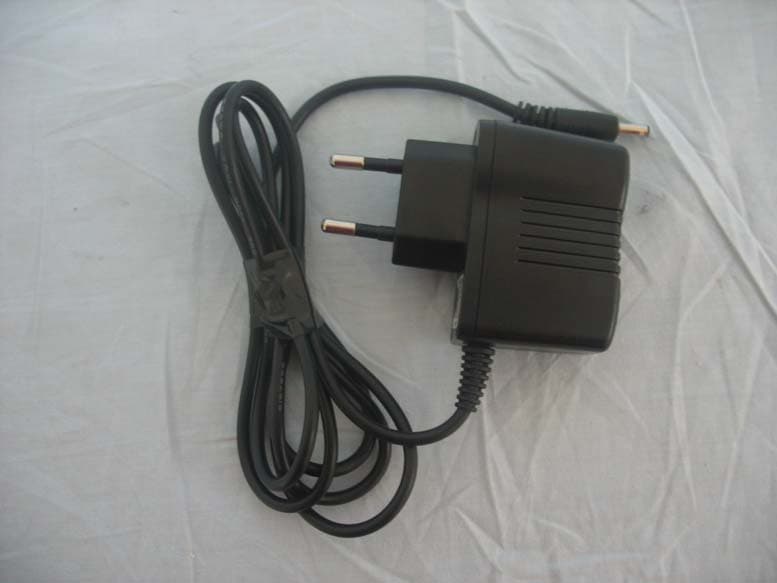
Click to zoom
Application Details
- Equipment Class
- DSS - Part 15 Spread Spectrum Transmitter
- Date of Grant
- Jan 20, 2008
- Application Purpose
- Original Equipment
- Date of Application
- Jan 20, 2008
- Equipment Note
- Bluetooth handsfree speaker
- Frequency Range
- 2402.00000000 - 2480.00000000
- Country
- China
Documents & Files
Document Text
Text extracted from the exhibit documents filed with the FCC. Open a document above to read the original.
Users Manual
Bluetooth stereo headset user guide Bluetooth Introduction The Bluetooth headset is a portable headset solution based on Bluetooth wireless technology. Bluetooth wireless technology is a short-range radio communication technology intended to replace the cables connecting electronic devices. The technology uses a globally available frequency range intended to ensure communication compatibility worldwide. You can connect your headset to your mobile phone or any device with Bluetooth wireless technology that supports the Headset profile or the Handsfree profile. When the headset is connected to your mobile phone, you can handle incoming and outgoing calls, listen to music,and adjust the volume, using the buttons on the headset. The inbuilt BlueTooth Headset in motorcycle helmet contain BlueTooth Cell Discreteness、Control Buttons and Earphone.The BlueTooth Cell Discreteness contain Inserted BlueTooth、Battery and Shell. Figure 1 Earphone Bluetooth Cell Discreteness Control Buttons Caution Do not let your battery, charger, and headset get wet. Listening at full volume to music or voice through a headset may damage your hearing. BlueToothHeadSet Control Buttons BUTTON_MFB Call handling Button BUTTON_VOL+ Volume Increase BUTTON_VOL- Volume Decrease FCC NOTICE This equipment has been tested and found to comply with the limits for a Class B digital device, pursuant to part 15 of the FCC Rules. These limits are designed to provide reasonable protection against harmful interference in a residential installation. This equipment generates, uses and can radiate radio frequency energy and, if not installed and used in accordance with the instructions, may cause harmful interference to radio communications. However, there is no guarantee that interference will not occur in a particular installation. If this equipment does cause harmful interference to radio or television reception, which can be determined by turning the equipment off and on, the user is encouraged to try to correct the interference by one or more of the following measures: -Reorient or relocate the receiving antenna. -Increase the separation between the equipment and receiver. -Connect the equipment into an outlet on a circuit different from that to which the receiver is connected. -Consult the dealer or an experienced radio/ TV technician for help. CAUTION: Any changes or modifications not expressly approved by the grantee of this device could void the user's authority to operate the equipment. RF exposure warning: The equipment complies with FCC RF exposure limits set forth for an uncontrolled environment. The equipment must not be co-located or operating in conjunction with any other antenna or transmitter. To use your headset, your phone or music device should support the following Bluetooth profiles: Profile Description HFP (HandsfreeProfile) Providing a wireless means for both remote control of the Mobile Phone by the Hands-Free device and voice connections between the Mobile Phone and the Hands-Free device. A2DP (Advanced Audio Distribution Profile) Stereo music streaming Bluetooth Interference Issues The quality of Bluetooth transmission may also be affected by the position of your music device. Should you experience choppy or distorted audio, move the position of your music device or phone to a different location until the signal improves. Getting started Before you can use your headset, you should first: Charge the headset battery. Pair the headset with a device, for example, a mobile phone. Charging The headset comes with a built-in rechargeable battery. We recommend that you charge the battery before using the headset for the first time. Connect the charger to the headset and to the mains. The charging time is about 4 hours.During charging, the indicator shows a steady red light. When the battery is fully charged, the indicator red light will switches off. When you using the headset, if you hear a cadent tone, and the indicator red light flashes rhythmically, battery needs recharging. To charge, please use the handle on Charging Port Rubber Cover gently pull out the Cover, and circumgyrate about 180 degrees. Expose the Charging Port and Plug the Charger Plug into the BlueTooth headset’s Charging Port. At this time near the Control Buttons the indicator light turns red when the battery is charging. As Figure2 and Figure 3 shown. Charging Port Charging Port Rubber Cover Charging Plug Figure 2 Figure3 To turn the headset on Press and hold the Call Handling Button(MFB) for approximately 2 seconds until you hear a short low tone followed by a short high tone. The headset indicator light flashes yellow. When turned on, the headset automatically establishes handsfree phone and streaming music connections with the last connected Bluetooth devices (phone and/or music devices). To turn the headset off Press and hold the Call Handling Button(MFB) for approximately 5 seconds until will hear a short high tone followed by a short low tone. The headset indicator light switches off. To pairing the headset with a phone Before using the headset,you should pair the headset to a phone. The phone enter the searching BlueDevice mode and with the headset turned off, press and hold the Call Handling Button(MFB) for approximately 5 seconds until the indicator light yellow and red on the Control Buttons flashes alternately. Operate the phone to discover and connect the headset. The headset passkey is 8888. If pairing success the headset indicator blue light flashes slowly and indicator red light is off. Pairing, done only once. Each time you use your headphones, it will be automatically connected to your phone. Note:Before enter pairing mode,please make sure other BlueDevices are closed. Using the headset Listening to music Your headset allows you to listen to music from your Bluetooth streaming music source. Note: When placing or receiving calls, music playing from a Bluetooth music source is automatically paused. When the call is finished, music pla…
Text truncated - open the document above for the full version.
Attestation Statements
Shanghai Hehui Safety Products Co.,LTD. Date: January 14, 2008 Federal Communications Commission Authorization and Evaluation Division FCC ID: VWU-VBTH-100S ATTESTATION FCC ID: VWU-VBTH-100S Product: Bluetooth Handsfree Speaker Model: VBTH-100S We don't provide any controls or software to allow operation outside the USA frequency band when we sell this product in USA. Sincerely, ____________________________ David Xu/assistant manager Shanghai Hehui Safety Products Co.,LTD.
Cover Letter(s)
RF_160, Issue 02 Declaration of Authorization We Name: Shanghai Hehui Safety Products Co.,LTD Address: 8 Fengjin Rd.,Fengxian District, Shanghai 201401,China City: Shanghai. Country: China Declare that: Name Representative of agent: Micki Ho (1) Agent Company name: Quietek Corp. Address: Fl.2, No.345, Xin-hu 2 nd Rd., Nei-hu District City: Taipei Country: Taiwan is authorized to apply for Certification of the following product(s): Product description: Bluetooth Helmet Type designation: VBTH-100S Trademark: N/A on our behalf. Date: 2008/1/17 City: Shanghai Name: David Xu Function: Sale Manager Signature: Notes: (1): Required for FCC application (2): For FCC it must be the Grantee Code “owner” or the authorized agent.
Cover Letter(s)
Shanghai Hehui Safety Products Co.,LTD. Date: January 14, 2008 Federal Communications Commission Authorization and Evaluation Division FCC ID: VWU-VBTH-100S Confidentiality Request Pursuant to Sections 0.457 and 0.459 of the Commission’s Rules, the Applicant hereby requests confidential treatment of information accompanying this Application as outlined below: 1 Schematics 2 Block Diagram 3 Operational Description The above materials contain trade secrets and proprietary information not customarily released to the public. The public disclosure of these matters might be harmful to the Applicant and provide unjustified benefits to its competitors. The Applicant understands that pursuant to Rule 0.457, disclosure of this Application and all accompanying documentation will not be made before the date of the Grant for this application. Sincerely, David Xu/assistant manager Shanghai Hehui Safety Products Co.,LTD
External Photos
Bluetooth Helmet (M/N: VBTH-100S) ¾ EUT Photograph – external Photographs (1) EUT Photo (2) EUT Photo (3) EUT Photo (4) EUT Photo (5) EUT Photo (6) EUT Photo (7) EUT Photo
ID Label/Location Info
Bluetooth Helmet (M/N: VBTH-100S) Bluetooth Helmet Model: VBTH-100S This device complies with part 15 of the FCC Rules. Operation is subject to the following two conditions: (1) This device may not cause harmful interference, and (2) this device must accept any interference received, including interference that may cause undesired operation. FCC ID: VWU-VBTH-100S Bluetooth Helmet (M/N: VBTH-100S) Label Position
Internal Photos
Wireless-AG 23dBm Network Mini PCI Adapter (M/N: IWAVEPORT WLM54AGP23) ¾ EUT Photograph – internal Photographs (1) EUT Photo (2) EUT Photo (3) EUT Photo (4) EUT Photo (5) EUT Photo
Test Report
Test Report Product Name : Bluetooth Helmet Model No. : VBTH-100S FCC ID : VWU-VBTH-100S Applicant : Shanghai Hehui Safety Products Co., LTD Address : 8 Fengjin Rd., Fengxian District, Shanghai 201401, China Date of Receipt : 2007/09/27 Issued Date : 2007/01/21 Report No. : 07AS012-RF-US-P06V01 The test results relate only to the samples tested. The test results shown in the test report are traceable to the national/international standard through the calibration of the equipment and evaluated measurement uncertainty herein. This report must not be used to claim product endorsement by CNLA, NVLAP, NIST or any agency of the Government. The test report shall not be reproduced except in full without the written approval of QuieTek Corporation. Report No: 07AS012-RF-US-P06V01 Page: 2 of 76 Test Report Certification Issued Date : 2007/01/21 Report No. : 07AS012-RF-US-P06V01 Product Name : Bluetooth Helmet Applicant : Shanghai Hehui Safety Products Co., LTD Address : 8 Fengjin Rd., Fengxian District, Shanghai 201401, China Manufacturer 1 : Shanghai Hehui Safety Products Co., LTD Manufacturer 2 : YiDong Electronic Co., LTD Model No. : VBTH-100S FCC ID : VWU-VBTH-100S Rated Voltage : AC 120 V / 60 Hz EUT Voltage : DC 3.7V Trade Name : N/A Applicable Standard : FCC CFR Title 47 Part 15 Subpart C: 2007 ANSI C63.4: 2003 Test Result : Complied Performed Location : SuZhou EMC laboratory No.99 Hongye Rd., Suzhou Industrial Park Loufeng Hi-Tech Development Zone., SuZhou, China TEL: +86-512-6251-5088 / FAX: +86-512-6251-5098 FCC Registration Number: 800392 Documented By : ( Any Liu ) Reviewed By : ( Dream Cao ) Approved By : ( Murphy Wang ) Report No: 07AS012-RF-US-P06V01 Page: 3 of 76 Laboratory Information We , QuieTek Corporation, are an independent EMC and safety consultancy that was established the whole facility in our laboratories. The test facility has been accredited by the following accreditation Bodies in compliance with ISO 17025, EN 45001 and Guide 25: The related certificate for our laboratories about the test site and management system can be downloaded from QuieTek Corporation’s Web Site : http://tw.quietek.com/modules/myalbum/ The address and introduction of QuieTek Corporation’s laboratories can be founded in our Web site : http://www.quietek.com/ If you have any comments, Please don’t hesitate to contact us. Our contact information is as below: HsinChu Testing Laboratory : No.75-2, 3rd Lin, Wangye Keng, Yonghxing Tsuen, Qionglin Shiang, Hsinchu County 307, Taiwan, R.O.C. TEL:+886-3-592-8858 / FAX:+886-3-592-8859 E-Mail : [email protected] LinKou Testing Laboratory : No. 5-22, Ruei-Shu Valley, Ruei-Ping Tsuen, Lin-Kou Shiang, Taipei, Taiwan, R.O.C. TEL : 886-2-8601-3788 / FAX : 886-2-8601-3789 E-Mail : [email protected] Suzhou Testing Laboratory : No.99 Hongye Rd., Suzhou Industrial Park Loufeng Hi-Tech Development Zone., SuZhou, China TEL : +86-512-6251-5088 / FAX : 86-512-6251-5098 E-Mail : [email protected] Taiwan R.O.C. : BSMI, DGT, CNLA Germany : TUV Rheinland Norway : Nemko, DNV USA : FCC, NVLAP Japan : VCCI 0914 1313 1596 Report No: 07AS012-RF-US-P06V01 Page: 4 of 76 TABLE OF CONTENTS Description Page 1. General Information..................................................................................................... 6 1.1. EUT Description...................................................................................................... 6 1.2. Mode of Operation .................................................................................................. 8 1.3. Tested System Details ............................................................................................ 9 1.4. Configuration of Tested System............................................................................ 10 1.5. EUT Exercise Software......................................................................................... 11 2. Technical Test ............................................................................................................ 12 2.1. Summary of Test Result........................................................................................ 12 2.2. Test Environment .................................................................................................. 13 3. Conducted Emission ................................................................................................. 14 3.1. Test Equipment .....................................................................................................14 3.2. Test Setup............................................................................................................. 14 3.3. Limit..... ................................................................................................................15 3.4. Test Procedure ..................................................................................................... 15 3.5. Uncertainty ........................................................................................................... 15 3.6. Test Result ............................................................................................................ 16 4. Radiated Emission .................................................................................................... 23 4.1. Test Equipment .....................................................................................................23 4.2. Test Setup............................................................................................................. 23 4.3. Limit..... ................................................................................................................24 4.4. Test Procedure ..................................................................................................... 25 4.5. Uncertainty ........................................................................................................... 25 4.6. Test Result .........................................................…
Text truncated - open the document above for the full version.
Test Setup Photos
Page: 1 of 5 Bluetooth Helmet (M/N: VBTH-100S) ¾ Test Setup Photographs for Conducted Emission Page: 2 of 5 Test Mode : Mode 1: Transmit Description : Front View of Conducted Emission Test Setup Test Mode : Mode 1: Transmit Description : Back View of Conducted Emission Test Setup Page: 3 of 5 ¾ Test Setup Photographs for Radiated Emission Test Mode: Mode 1: Transmit Description: Front View of Radiated Test for Under 1GHz Test Mode: Mode 1: Transmit Description: Back View of Radiated Test for Under 1GHz Page: 4 of 5 Test Mode: Mode 1: Transmit Description: Front View of Radiated Test for Above 1GHz Test Mode: Mode 1: Transmit Description: Back View of Radiated Test for Above 1GHz Page: 5 of 5
Contact Information
Applicant
David Xu(Sale manager)
Technical Contact
QuieTek Technology (Suzhou) Co.,Ltd.Dream Cao
[email protected]+86-512-6251-5088
No.99 Hongye RD.Suzhou Industrial zone · Suzhou · China
Non-Technical Contact
QuieTek CorporationMicki Ho
[email protected]886-2-8792-6808
Test Firm
DEKRA Testing and Certification (Suzhou) Co., Ltd.Jerry Pan
Technical Specifications
| # | Rule Parts | Frequency Range | Power Output |
|---|---|---|---|
| 1 | 15C | 2.40 GHz - 2.48 GHz | 300.00 µW |
Other Applications from Shanghai Hehui Safety Products Manufacture Co., LTD.
VWU-Y6900
Aug 24, 2010BlueTooth Headset
Equipment Class
DXX - Part 15 Low Power Communication Device Transmitter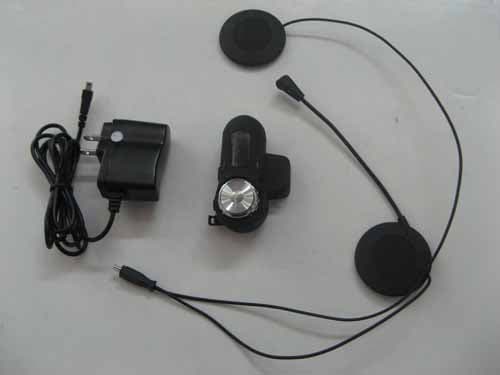
VWUY6600
Mar 23, 2010BLINC POD; MODEL: Y6600
Equipment Class
DSS - Part 15 Spread Spectrum Transmitter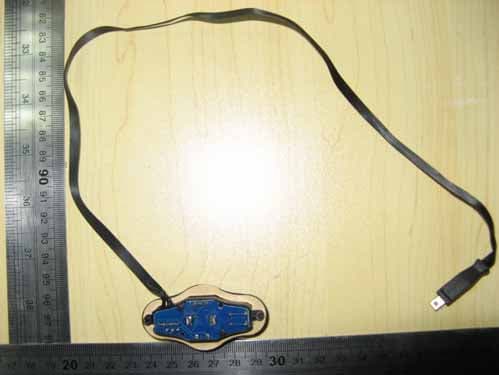
VWU-Y6400
Jan 19, 2010Blinc; Model: Y6400
Equipment Class
DSS - Part 15 Spread Spectrum Transmitter