W53CARDPRINTERCard Printer
HiTi Digital, Inc.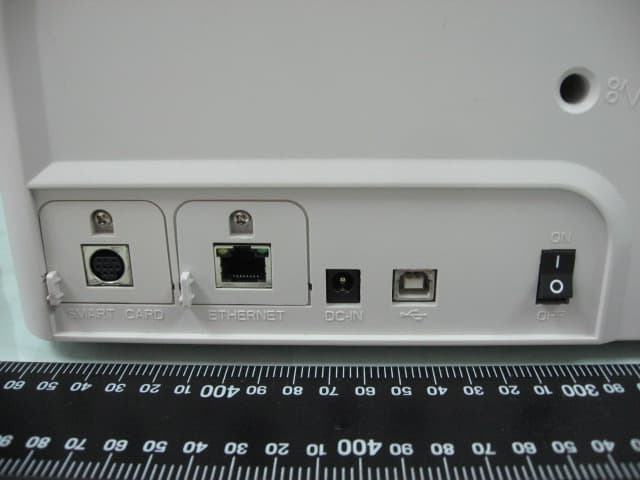
Click to zoom
Application Details
- Equipment Class
- DXX - Part 15 Low Power Communication Device Transmitter
- Date of Grant
- Feb 11, 2013
- Application Purpose
- Original Equipment
- Date of Application
- Feb 11, 2013
- Equipment Note
- Card Printer
- Frequency Range
- 13.56000000 - 13.56000000
- Company
- HiTi Digital, Inc.
- Country
- Taiwan
Documents & Files
Document Text
Text extracted from the exhibit documents filed with the FCC. Open a document above to read the original.
Users Manual
HiTi user manual ͐ᮢ⦦͐ᮢ⦦ᆙ ͐ᮢ⦦ ͐ᮢ⦦ᆙ www.hiti.com HiTi Digital, Inc. HiTi CS-200e user manual CONTENTS PREFACE Announcements Chapter 1. Getting ready 1.1 Checking box contents 1.2 Appearance of the printer and key functions 1.3 Installation 1.3.1 Ribbon Installing 1.3.2 Printer Connecting (Power & USB) 1.3.3 Card Placing Chapter 2. Start Printing 2.1 Printer driver installation 2.2 Print settings Chapter 3. Printer maintenance 3.1 General warranty information notice announcement 3.2 Routine / Regular printer cleaning 3.2.1 Using cleaning card 3.2.2 Using dust arrester 3.2.3 Cleaning TPH (Thermal Print Head) Chapter 4. Help diagnosis 4.1 Warnings / Error messages and diagnosis 4.1.1 LCM control panel 4.1.2 Control panel warning messages 4.2 Identify installed driver software version 4.3 Troubleshooting 4.3.1 Printing problems 4.3.2 Releasing from card jams 4.4 Technical support Appendix A: Technical Specifications Appendix B: FCC Compliance Statement 01 03 03 04 06 06 07 08 10 10 11 12 12 13 14 15 16 17 17 17 18 19 20 20 21 22 23 25 English HiTi CS-200e user manual Copyright HiTi CS Card Printer © 2011. All rights reserved. Trademarks acknowledgement HiTi CS Card Printer is a trademark of HiTi Digital Inc. product. All other trademarks belong to their respective holders. Warranty Refer to the warranty card supplied with your card printer package box for warranty terms, conditions and limitations. Copyright notice 01 English Users must comply with the copyright regulations applicable in their own country. This manual must not be reproduced, translated, photocopied, transmitted or any kind to be duplicated in whole or in part, for any reasons and by any electronic or mechanical means whatsoever without the express a written consent of the HiTi Digital Inc. All the information contained in this document is subject to changed without prior notice. HiTi Digital Inc. cannot be held liable for any errors that may be found in this manual, or for any loss or damage arising accidentally or as a result of dissemination or use of this manual. HiTi CS-200e user manual Knowing your new printer Warranty Registration Please do take time to register online at www.hiti.com and you will be rewarded with a special offer after registration is completed. Assistant Icons The following assistant icons will show up in this guide to indicate important information to be noticed. 02 We thank you for choosing HiTi CS card printer, the beginning of our long term successful association with you together. With HiTi CS card printer, you will be able to enjoy easy operating, high quality plastic cards printing conveniently for personalized ID card, credit cards, membership cards and badges from various level of thickness and color style. Please ensure HiTi CS card printer to use the original consumables from HiTi Digital Inc. For more details, visit our website at www.hiti.com . Getting ready to start The main purpose of this user guide is to guide you to set up your printer step by step. Please take time to read through this carefully and complete the installation before start operating. This will save you time during installation and use, help you to understand more about this printer and its features. Should you discover any errors in this guide, please do help us by emailing us at [email protected] . English Special warning noticeMore in-depth information notice HiTi CS-200e user manual 1.1 Checking box contents Accessories provide with your HiTi CS card printer: Chapter1. Getting ready HiTi CS card printer is supplied with several accessories and please do take time to check it closely. The accessories contents list may vary depending from your region/location. Card output hopper Weight module USB cable Power adaptor Power cord user manualMaster CD Dust arrester with cleaning roller Cleaning kit 03 English If any of below item is missing, please contact your nearest HiTi customer support facility of your local HiTi CS card printer distributor. user manual HiTi CS-200e user manual 1.2 Appearance of the printer and key functions Top cover opening button LCM control panel Input card cover Input card feeder (100cards) Spec. label Manual releasing card jam screw socket (flathead screwdriver) Smart IC encoding expansion socket (Optional) Manual card feed input location Ethernet expansion socket (Optional) Power socket USB cable connection socket ON / OFF hard power switch button 04 English HiTi CS-200e user manual 05 English Thermal print head Ribbon ID key socket Card thickness adjustor Dust arrester socket Ribbon spool fitting position (color coded) HiTi CS-200e user manual 1.3 Installation 1.3.1 Ribbon Installing a. Open the top cover. b. Place the ribbon ID key into ID key socket. c. Insert the ribbon as shown. abcd d. Close the top cover slowly and press until a click sound is heard. 06 Using the original HiTi CS Card Printer Ribbon consumables will optimize your printer’s performance and avoid causing damages to it. Use of non HiTi original consumables will void the manufacturer’s warranty policy for the printer. English Please ensure your ribbon format is corresponded to installed ribbon ID key’s label. Please make sure your ribbon film is facing top side during installation and also ensure the color of ribbon spool/core is matching to the ribbon adapter/holder. To optimize printing quality, please engage in printer cleaning every time when the ribbon is changed. HiTi CS-200e user manual 1.3.2 Printer Connecting (Power & USB) Power USB a. Connect power cable to power adaptor, then plug the power connector to printer’s power socket b. Plug the power plug to an earthed power socket c. Switch ON from the ON/OFF button to power up the printer, then the LCM control panel should light up and display “ready” message which indicates the printer is under working condition. Refer to the print driver installation section of this user guide for more details, and follow the instruction carefully. 07 English Please make sure the power p…
Text truncated - open the document above for the full version.
External Photos
ETC Report No.:12-09-RBF-017-03 Sheet 1 of 26 Sheets FCC ID.: W53CARDPRINTER Rev. No 1.0 CONSTRUCTED PHOTOS of EUT (A)EUT 1. 2. ETC Report No.:12-09-RBF-017-03 Sheet 2 of 26 Sheets FCC ID.: W53CARDPRINTER Rev. No 1.0 CONSTRUCTED PHOTOS of EUT 3. 4. ETC Report No.:12-09-RBF-017-03 Sheet 3 of 26 Sheets FCC ID.: W53CARDPRINTER Rev. No 1.0 CONSTRUCTED PHOTOS of EUT 5. 6. ETC Report No.:12-09-RBF-017-03 Sheet 4 of 26 Sheets FCC ID.: W53CARDPRINTER Rev. No 1.0 CONSTRUCTED PHOTOS of EUT 7. 8.
Internal Photos
ETC Report No.:12-09-RBF-017-03 Sheet 5 of 26 Sheets FCC ID.: W53CARDPRINTER Rev. No 1.0 CONSTRUCTED PHOTOS of EUT 9. 10. ETC Report No.:12-09-RBF-017-03 Sheet 6 of 26 Sheets FCC ID.: W53CARDPRINTER Rev. No 1.0 CONSTRUCTED PHOTOS of EUT 11. 12. ETC Report No.:12-09-RBF-017-03 Sheet 7 of 26 Sheets FCC ID.: W53CARDPRINTER Rev. No 1.0 CONSTRUCTED PHOTOS of EUT 13. 14. ETC Report No.:12-09-RBF-017-03 Sheet 8 of 26 Sheets FCC ID.: W53CARDPRINTER Rev. No 1.0 CONSTRUCTED PHOTOS of EUT 15. 16. ETC Report No.:12-09-RBF-017-03 Sheet 9 of 26 Sheets FCC ID.: W53CARDPRINTER Rev. No 1.0 CONSTRUCTED PHOTOS of EUT 17. 18. ETC Report No.:12-09-RBF-017-03 Sheet 10 of 26 Sheets FCC ID.: W53CARDPRINTER Rev. No 1.0 CONSTRUCTED PHOTOS of EUT 19. 20. ETC Report No.:12-09-RBF-017-03 Sheet 11 of 26 Sheets FCC ID.: W53CARDPRINTER Rev. No 1.0 CONSTRUCTED PHOTOS of EUT 21. 22. ETC Report No.:12-09-RBF-017-03 Sheet 12 of 26 Sheets FCC ID.: W53CARDPRINTER Rev. No 1.0 CONSTRUCTED PHOTOS of EUT 23. 24. ETC Report No.:12-09-RBF-017-03 Sheet 13 of 26 Sheets FCC ID.: W53CARDPRINTER Rev. No 1.0 CONSTRUCTED PHOTOS of EUT 25. 26. ETC Report No.:12-09-RBF-017-03 Sheet 14 of 26 Sheets FCC ID.: W53CARDPRINTER Rev. No 1.0 CONSTRUCTED PHOTOS of EUT 27. 28. ETC Report No.:12-09-RBF-017-03 Sheet 15 of 26 Sheets FCC ID.: W53CARDPRINTER Rev. No 1.0 CONSTRUCTED PHOTOS of EUT 29. 30. ETC Report No.:12-09-RBF-017-03 Sheet 16 of 26 Sheets FCC ID.: W53CARDPRINTER Rev. No 1.0 CONSTRUCTED PHOTOS of EUT 31. 32. ETC Report No.:12-09-RBF-017-03 Sheet 17 of 26 Sheets FCC ID.: W53CARDPRINTER Rev. No 1.0 CONSTRUCTED PHOTOS of EUT 33. 34. ETC Report No.:12-09-RBF-017-03 Sheet 18 of 26 Sheets FCC ID.: W53CARDPRINTER Rev. No 1.0 CONSTRUCTED PHOTOS of EUT 35. 36. ETC Report No.:12-09-RBF-017-03 Sheet 19 of 26 Sheets FCC ID.: W53CARDPRINTER Rev. No 1.0 CONSTRUCTED PHOTOS of EUT 37. 38. ETC Report No.:12-09-RBF-017-03 Sheet 20 of 26 Sheets FCC ID.: W53CARDPRINTER Rev. No 1.0 CONSTRUCTED PHOTOS of EUT 39. 40. ETC Report No.:12-09-RBF-017-03 Sheet 21 of 26 Sheets FCC ID.: W53CARDPRINTER Rev. No 1.0 CONSTRUCTED PHOTOS of EUT 41. 42. ETC Report No.:12-09-RBF-017-03 Sheet 22 of 26 Sheets FCC ID.: W53CARDPRINTER Rev. No 1.0 CONSTRUCTED PHOTOS of EUT 43. 44. ETC Report No.:12-09-RBF-017-03 Sheet 23 of 26 Sheets FCC ID.: W53CARDPRINTER Rev. No 1.0 CONSTRUCTED PHOTOS of EUT 45. 46. ETC Report No.:12-09-RBF-017-03 Sheet 24 of 26 Sheets FCC ID.: W53CARDPRINTER Rev. No 1.0 CONSTRUCTED PHOTOS of EUT 47. 48.
Test Report
Rev. No 1.0 FCC Part 15 EMI TEST REPORT of E.U.T. : Card Printer FCC ID. : W53CARDPRINTER Model : CS-200e;CTC-940 Working Frequency : 13.56 MHz for APPLICANT : HiTi Digital, Inc. ADDRESS : 9F., No.225, Sec. 3, Beixin Rd., Xindian Dist. New TaipeiI City, 231 Taiwan Test Performed by ELECTRONICS TESTING CENTER, TAIWAN NO. 34, LIN 5, DING FU TSUN, LINKOU HSIANG TAIPEI HSIEN, TAIWAN, R.O.C. Tel : (02)26023052 Fax : (02)26010910 http://www.etc.org.tw ; e-mail : [email protected] Report Number : 12-09-RBF-017-03 ETC Report No.:12-09-RBF-017-03 FCC ID.: W53CARDPRINTER Rev. No 1.0 TEST REPORT CERTIFICATION Applicant : HiTi Digital, Inc. 9F., No.225, Sec. 3, Beixin Rd., Xindian Dist. New TaipeiI City, 231 Taiwan Manufacture : HiTi Digital, Inc. 9F., No.225, Sec. 3, Beixin Rd., Xindian Dist. New TaipeiI City, 231 Taiwan Description of EUT : a) Type of EUT : Card Printer b) Trade Name : HiTi c) Model No. : CS-200e;CTC-940 d) FCC ID : W53CARDPRINTER e) Working Frequency : 13.56 MHz f) Power Supply : I/P:100-240V,2.5A,50-60Hz O/P:24V,4.16A Regulation Applied : FCC Rules and Regulations Part 15 Subpart C I HEREBY CERTIFY THAT; The data shown in this report were made in accordance with the procedures given in ANSI C63.4 and the energy emitted by the device was founded to be within the limits applicable. I assume full responsibility for accuracy and completeness of these data. Note : 1. The results of the testing report relate only to the items tested. 2. The testing report shall not be reproduced except in full, without the written approval of ETC Issued Date : Dec. 26, 2012 Test Engineer : (Vincent Chang) Approve & Authorized Signer : S. S. Liou, Section Manager EMC Dept. II of ELECTRONICS TESTING CENTER, TAIWAN ETC Report No.:12-09-RBF-017-03 FCC ID.: W53CARDPRINTER Rev. No 1.0 Table of Contents Page 1. GENERAL INFORMATION ............................................................................................................................... 1 1.1 PRODUCT DESCRIPTION................................................................................................................................... 1 1.2 CHARACTERISTICS OF DEVICE:................................................................................................................................ 1 1.3 TEST METHODOLOGY.............................................................................................................................................. 1 1.4 TEST FACILITY........................................................................................................................................................ 1 2. DEFINITION AND LIMITS ................................................................................................................................ 2 2.1 DEFINITION............................................................................................................................................................. 2 2.2 RESTRICTED BANDS OF OPERATION........................................................................................................................ 2 2.3 LIMITATION............................................................................................................................................................. 2 2.4 LABELING REQUIREMENT........................................................................................................................................ 4 2.5 USER INFORMATION................................................................................................................................................ 4 3 SYSTEM TEST CONFIGURATION ................................................................................................................... 5 3.1 JUSTIFICATION........................................................................................................................................................ 5 3.2 DEVICES FOR TESTED SYSTEM................................................................................................................................5 4. RADIATED EMISSION MEASUREMENT ...................................................................................................... 6 4.1 APPLICABLE STANDARD.......................................................................................................................................... 6 4.2 MEASUREMENT PROCEDURE................................................................................................................................... 6 4.3 TEST DATA.............................................................................................................................................................. 8 4.3.1 Below 30MHz .................................................................................................................................................. 8 4.3.2 30MHz – 1GHz................................................................................................................................................ 9 4.4 FIELD STRENGTH CALCULATION........................................................................................................................... 11 4.5 RADIATED TEST EQUIPMENT.................................................................................................................................. 11 4.8 MEASURING INSTRUMENT SETUP.......................................................................................................................... 11 4.9 RADIATED MEASUREMENT PHOTOS...................................................................................................................... 12 5 FREQUENCY STABILITY MEASUREMENT................................................................................................ 13 5.1 PROVISIONS APPLICABLE...................................................................................................................................... 13 5.2 MEASUREMENT PRO…
Text truncated - open the document above for the full version.
Test Setup Photos
ETC Report No.:12-09-RBF-017-03 Sheet 12 of 21 Sheets FCC ID.: W53CARDPRINTER Rev. No 1.0 4.9 Radiated Measurement Photos ETC Report No.:12-09-RBF-017-03 Sheet 20 of 21 Sheets FCC ID.: W53CARDPRINTER Rev. No 1.0 6.6 Photos of Conduction Measuring Setup
Contact Information
Applicant
KuanChih Huang(Vice General Director)
Technical Contact
ELECTRONICS TESTING CENTER, TAIWANS.S. LIOU
[email protected]886-2-26023052
NO. 34, LIN 5, DINGFU TSUEN, LINKOU SHIANG, · TAIPEI COUNTY · Taiwan
Test Firm
Taiwan Testing and Certification CenterAnderson Ku
Technical Specifications
| # | Rule Parts | Frequency Range | Power Output |
|---|---|---|---|
| 1 | 15C | 13.56 MHz - 13.56 MHz | - |
Other Applications from HiTi Digital, Inc.
W5388D303500AT
Jul 08, 2026Photo Printer
Equipment Class
DXX - Part 15 Low Power Communication Device Transmitter
W5388D2335000T
Nov 29, 2014Printer
Equipment Class
DXX - Part 15 Low Power Communication Device Transmitter
W5388D2035001
Oct 01, 2014HiTi Photo Printer
Equipment Class
DXX - Part 15 Low Power Communication Device Transmitter
W53HTP910L
Sep 29, 2013Digital Photo Printer
Equipment Class
DXX - Part 15 Low Power Communication Device Transmitter