WD3UA28SEBluetooth Headset
Channel Enterprises (HK) Ltd.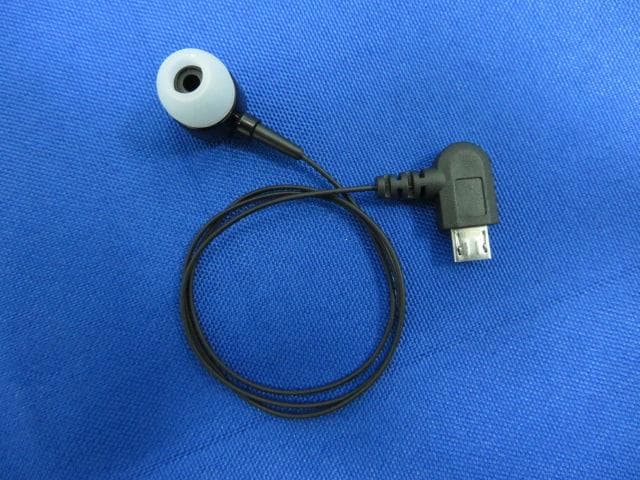
Click to zoom
Application Details
- Equipment Class
- DTS - Digital Transmission System
- Date of Grant
- Mar 19, 2014
- Application Purpose
- Original Equipment
- Date of Application
- Mar 19, 2014
- Equipment Note
- Bluetooth Headset
- Frequency Range
- 2402.00000000 - 2480.00000000
- Country
- China
Documents & Files
Document Text
Text extracted from the exhibit documents filed with the FCC. Open a document above to read the original.
Users Manual
UA-28SE Retractable Stereo Headset User Manual Contents ............ 3 Components ............ 4 UA-28SE Overview ............ 5 Retractable Mechanism ............ 6 How to Wear Your Headset ............ 7-9 Charging Your Headset ............ 10 Getting Started ............ 11 Pairing Your Headset with a Bluetooth ® wireless technology enabled device ............ 11 Pairing Your Headset with Two Bluetooth ® wireless technology enabled devices (Multi-point) ............ 12 Reconnecting Your Headset ............ 13 Using Your Headset ............ 14-17 Troubleshooting ............ 20-21 Listening the music ............ 18-19 Safety Precautions ............ 22 Maintenance ............ 23 Declaration of Conformity ............ 24 FCC Compliance Statement ............ 24-25 3 Bluetooth ® V4.0 Bluetooth ® HFP v1.6 wideband speech (HD voice ready), HSP v1.2, A2DP v1.2, AVRCP v1.4 Operating Distance: 10 meters with no obstructions Operating Temperature: 0-50 degree celsius Charging Time*: Around 1.5 hours Talk Time*: Up to 7 hours Music Time*:Up to 6 hours Standby Time*: Up to 240 hours Battery Type and Capacity: Rechargeable Li-Polymer 100mAh Dimension: 55(L) x 25.5(W) x 15(H) mm Weight: 21g *May be varied by mobile phone settings and operator 4 Components 1 UA28SE headset 1 USB saver charger 1 USB Cable 1 Neck Strap 1 Earphone cable with the micro USB plug 1 Micro USB / 3.5mm female plug connector 1 Manual 1 Pouch 2 set L/S inear cushion Thank you for choosing the iXchange UA-28SE Retractable Stereo Bluetooth® Headset. We hope you enjoy it! Inside the package, you should find: 5 UA-28SE Overview 1 2 3 4 6 7 8 9 1. Rewind Button 2. Status Indicator 3. Multi-function Button (MFB) 4. Volume Button 5. Microphone 6. Earpiece 7. Clip 8. Micro USB Charging Socket 9. Neck Strap hole 5 6 Retractable Mechanism The earpiece cord can be extended by gently pulling on the cord. The cord can be retracted (shortened) by pressing the Rewind Button. PULL PRESS 7 How to Wear Your Headset UA-28SE is designed, A. to clip onto your clothing, or 8 How to Wear Your Headset (cont’d) B. fasten by a neck strap to wear comfortably and securely around your neck Step 1. Loop the thin end of the neck strap through the slot on the Headset. Step 2. Loop the thicker side of the neck strap through the loop created by the thin wire and pull until snug. Step 3. Once pulled through, you can wear your Headset around your neck. 9 How to Wear Your Headset (cont’d) B. To release the strap , hold the strap and pull outwardly. (S ee the picture on left) • Use the provided neck strap only. • It may be necessary to bring the microphone closer to your mouth for lowering background noise. 10 Charging Your Headset charger into the power source and connect the other end to micro USB charging Before using your UA-28SE (”Headset”) for the first time, please plug the socket of headset to charge the battery ful ly. StatusStatus IndicatorAudio (Earpiece) 1. ChargingRed light ONNo sound 2. Fully chargedBlue light ONNo sound 3. Low batteryRed light for every 5 seconds A short beep every 20 seconds 4. Out of batteryOFFNo sound • Use only the supplied charger for charging • To extend the battery life, re-charging the battery every 6 months. • Charging indication will be delayed in a few seconds if the headset has not been used for a long period of time. 11 Getting Started Turning Your Headset On and Off: A. Turning on B. Turning off Pairing Your Headset with a Bluetooth ® wireless technology enabled device 1. Turn on the Bluetooth ® function in the device. 2. Place the headset and the device where they are visible, within arm’s length from each other. 3. Ensure the headset is OFF. 4. To activate the device’s pairing mode, press and hold the MFB until the 5. Search the headset, select “UA-28SE” and enter the passcode “0000”. If your device supports “Simple Pairing” function, no code is required. Press and hold the MFB until the status indicator flashes blue. Press and hold the MFB until the status indicator flashes red. 12 Pairing Your Headset with Two Blue- tooth ® wireless technology enabled devices (Multi-point) UA-28SE supports a Multi-point function to allow simultaneous pairing of the headset with two devices. 1. Pair the headset with the first device (follow the step in “Pairing Your Headset with a Bluetooth wireless technology enabled device”). 2. Turn off the headset and the Bluetooth® function of the first paired device. 3. Pair the headset with the second device (follow the step in “Pairing Your Headset with a Bluetooth wireless technology enabled device”). 4. Activate the Bluetooth connection with the headset and the first paired device on the device’s menu. • For some devices, you may need to manual press “connect” to connect the headset. • If the pairing cannot be completed within two minutes, the headset will auto- matically go to standby mode and then turn off after five minutes. Repeat steps to pair both devices again. 13 Reconnecting Your Headset 1. If the headset has been powered off, it will reconnect to the phone auto- matically after switching on the headset, if not, press reconnect on the phone. 2. If the phone has been powered off and headset is then disconnected, the headset will reconnect automatically when phone turns on again. Otherwise, turns on the headset again. 14 Using Your Headset FunctionButtonAudio (Speaker) Status Indicator Incoming Call--Ringtone (Musice will stop durung incoming call) Blue light flash 3 times in every 3 seconds Answer a Call (Standby mode / music playing mode) Pr ess MFB once to accept ‘Di Do’ tone once During the call, blue light flash in every 5 seconds Answer a Second Call 1. Press MFB once to end the current call and accept the second Call 2. Press and hold Vol + once to hold the current call and accept the second Call -- -- During the call, blue light flash in every 5 seconds Call RejectPr ess the MFB twice‘Di Do’ tone once Blue light flash once • Reject a second call directly on the other co…
Text truncated - open the document above for the full version.
External Photos
1 of 4 External Photo (1) EUT Photo (2) EUT Photo (3) EUT Photo (4) EUT Photo (5) EUT Photo (6) EUT Photo (7) EUT Photo (8) EUT Photo
ID Label/Location Info
Label & Label Location
Internal Photos
1 of 5 Internal Photo (1) EUT Photo (2) EUT Photo (3) EUT Photo (4) EUT Photo (5) EUT Photo (6) EUT Photo (7) EUT Photo (8) EUT Photo (9) EUT Photo
RF Exposure Info
MRT Technology (Suzhou) Co., Ltd Report No.: 1403RSU01002 Phone: +86-512-66308358 Report Version: V01 Fax: +86-512-66308368 Issue Date: 03-20-2014 Web: www.mrt-cert.com FCC ID: WD3UA28SE Page Number: 1 of 4 RF Exposure Evaluation Declaration FCC ID: WD3UA28SE APPLICANT: Channel Enterprises(H.K.) Ltd. Application Type: Certification Product: Bluetooth Headset Model No.: UA28SE, UA28SE-B, UA28SE-V, UA31SE, UA31SE-B, UA31SE-V Brand Name: iXchange FCC Classification: FCC Part 15 Spread Spectrum Transmitter(DTS) Test Date: March 13 ~ 17, 2014 Reviewed By : ( Engineer: Sunny Sun ) Approved By : ( Manager: Robin Wu ) The test results relate only to the samples tested. The test results shown in the test report are traceable to the national/international standards through the calibration of the equipment and evaluated measurement uncertainty herein. The test report shall not be reproduced except in full without the written approval of MRT Technology (Suzhou) Co., Ltd. Report No.: 1403RSU01002 FCC ID: WD3UA28SE Page Number: 2 of 4 Revision History Report No. Version Description Issue Date 1403RSU01002 Rev. 01 Initial report 03-20-2014 Report No.: 1403RSU01002 FCC ID: WD3UA28SE Page Number: 3 of 4 1. RF Exposure Evaluation 1.1. Limits According to FCC 1.1310: The criteria listed in the following table shall be used to evaluate the environment impact of human exposure to radio frequency (RF) radiation as specified in 1.1307(b) LIMITS FOR MAXIMUM PERMISSIBLE EXPOSURE (MPE) Frequency Range (MHz) Electric Field Strength (V/m) Magnetic Field Strength (A/m) Power Density (mW/cm 2 ) Average Time (Minutes) (A) Limits for Occupational/ Control Exposures 300-1500 -- -- f/300 6 1500-100,000 -- -- 5 6 (B) Limits for General Population/ Uncontrolled Exposures 300-1500 -- -- f/1500 6 1500-100,000 -- -- 1 30 f= Frequency in MHz Calculation Formula: P d = (P out *G)/(4*pi*r 2 ) Where P d = power density in mW/cm 2 P out = output power to antenna in mW G = gain of antenna in linear scale Pi = 3.1416 r = distance between observation point and center of the radiator in cm (The minimum distance is 20cm) P d is the limit of MPE, 1mW/cm². If we know the maximum gain of the antenna and the total power input to the antenna, through the calculation, we will know the distance r where the MPE limit is reached. Report No.: 1403RSU01002 FCC ID: WD3UA28SE Page Number: 4 of 4 1.2. Test Procedure Software provided by client enabled the EUT to transmit and receive data at lowest, middle and highest channel individually. The temperature and related humidity: 18°C and 78% RH. 1.3. Test Result of RF Exposure Evaluation Product Bluetooth Headset Test Item RF Exposure Evaluation Antenna Gain: The maximum Gain measured in fully anechoic chamber is 0dBi for 2.4GHz in logarithm scale. Output Power into Antenna: Test Mode Frequency Band (MHz) Maximum output power to antenna (mW) Limit of Power Density S(mW/cm²) Bluetooth 2402~2480 0.242 1 Per FCC KDB 447498 D01v05r02, the SAR exclusion threshold for distances<50mm is defined by the following equation: Based on the maximum conducted power of Bluetooth and the antenna to use separation distance, Bluetooth SAR was not required; [(0.242mW/5)* √2.480] = 0.076 < 3.0. Note: When the minimum test separation distance is < 5 mm, a distance of 5 mm is applied to determine SAR test exclusion. The End
Test Report
MRT Technology (Suzhou) Co., Ltd Report No.: 1403RSU01001 Phone: +86-512-66308358 Report Version: V01 Fax: +86-512-66308368 Issue Date: 03-20-2014 Web: www.mrt-cert.com FCC ID: WD3UA28SE Page Number: 1 of 47 FCC ID: WD3UA28SE APPLICANT: Channel Enterprises(H.K.) Ltd. Application Type: Certification Product: Bluetooth Headset Model No.: UA28SE, UA28SE-B, UA28SE-V, UA31SE, UA31SE-B, UA31SE-V Brand Name: iXchange FCC Classification: Digital Transmission System (DTS) FCC Rule Part(s): Part 15.247 Test Procedure(s): ANSI C63.10-2009, KDB 558074 D01v03r01 Test Date: March 13 ~ 17, 2014 MEASUREMENT REPORT FCC PART 15.247 Bluetooth V 4.0 Reviewed By : ( Engineer: Sunny Sun ) Approved By : ( Manager: Robin Wu ) The test results relate only to the samples tested. This equipment has been shown to be capable of compliance with the applicable technical standards as indicated in the measurement report and was tested in accordance with the measurement procedures specified in KDB 558074 D01v03r01. Test results reported herein relate only to the item(s) tested. The test report shall not be reproduced except in full without the written approval of MRT Technology (Suzhou) Co., Ltd. Report No.: 1403RSU01001 FCC ID: WD3UA28SE Page Number: 2 of 47 CONTENTS Description Page Revision History............................................................................................................................. 4 §2.1033 General Information ......................................................................................................... 5 1. INTRODUCTION ..................................................................................................................... 6 1.1. Scope ........................................................................................................................... 6 1.2. MRT Test Location ....................................................................................................... 6 2. PRODUCT INFORMATION ..................................................................................................... 7 2.1. Equipment Description .................................................................................................. 7 2.2. Device Capabilities ....................................................................................................... 8 2.3. Test Configuration ........................................................................................................ 8 2.4. EMI Suppression Device(s)/Modifications ..................................................................... 8 2.5. Labeling Requirements ................................................................................................. 8 3. DESCRIPTION OF TEST ........................................................................................................ 9 3.1. Evaluation Procedure ................................................................................................... 9 3.2. AC Line Conducted Emissions ..................................................................................... 9 3.3. Radiated Emissions .................................................................................................... 10 4. ANTENNA REQUIREMENTS ................................................................................................. 11 5. TEST EQUIPMENT CALIBRATION DATA ............................................................................ 12 6. MEASUREMENT UNCERTAINTY ......................................................................................... 13 7. TEST RESULT ...................................................................................................................... 14 7.1. Summary .................................................................................................................... 14 7.2. 6dB Bandwidth Measurement ..................................................................................... 15 7.2.1. Test Limit ................................................................................................................ 15 7.2.2. Test Procedure used ............................................................................................... 15 7.2.3. Test Setting ............................................................................................................. 15 7.2.4. Test Setup ............................................................................................................... 15 7.2.5. Test Result .............................................................................................................. 16 7.3. Output Power Measurement ....................................................................................... 17 7.3.1. Test Limit ................................................................................................................ 17 7.3.2. Test Procedure Used .............................................................................................. 17 7.3.3. Test Setting ............................................................................................................. 17 7.3.4. Test Setup ............................................................................................................... 17 7.3.5. Test Result of Output Power ................................................................................... 18 Report No.: 1403RSU01001 FCC ID: WD3UA28SE Page Number: 3 of 47 7.4. Power Spectral Density Measurement ........................................................................ 19 7.4.1. Test Limit ................................................................................................................ 19 7.4.2. Test Procedure Used .............................................................................................. 19 7.4.3. Test Setting ............................................................................................................. 19 7.4.4. Test Setup ...........…
Text truncated - open the document above for the full version.
Test Setup Photos
1 of 3 Test Setup Photo Description: Front view of Conducted Emission Test Setup Description: Back view of Conducted Emission Test Setup Description: Radiated Emission Test Setup for 9kHz ~ 30MHz Description: Radiated Emission Test Setup for 30MHz ~ 1GHz Description: Radiated Emission Test Setup for 1GHz ~ 18GHz Description: Radiated Emission Test Setup for 18GHz ~ 25GHz
Contact Information
Applicant
Ming Chan(Director)
Test Firm
MRT Technology (Suzhou) Co., LtdWu Jian
[email protected]86-512-66308358
Technical Specifications
| # | Rule Parts | Frequency Range | Power Output |
|---|---|---|---|
| 1 | 15C | 2.40 GHz - 2.48 GHz | 400.00 µW |
Other Applications from Channel Enterprises (HK) Ltd.
WD31516
Jun 30, 2011Retractable Bluetooth Headset
Equipment Class
DXT - Part 15 Low Power Transceiver, Rx Verified