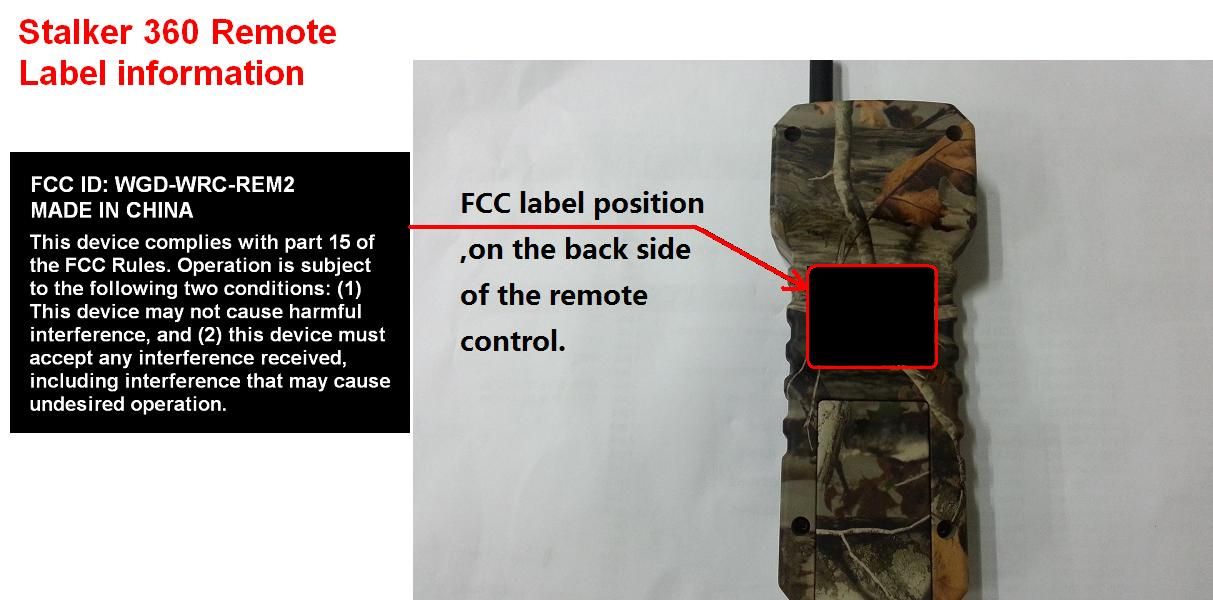
WGD-WRC-REM2Stalker 360 Remote
GSM LLC
Click to zoom
Application Details
- Equipment Class
- DSC - Part 15 Security/Remote Control Transmitter
- Date of Grant
- Jun 10, 2014
- Application Purpose
- Original Equipment
- Date of Application
- Jun 10, 2014
- Equipment Note
- Stalker 360 Remote
- Frequency Range
- 433.00000000 - 433.00000000
- Company
- GSM LLC
- Country
- United States
Documents & Files
Document Text
Text extracted from the exhibit documents filed with the FCC. Open a document above to read the original.
Users Manual
Stalker 360 – User’s Manual V1.0 1 The following is a guide to assist you with the operations & trouble shooting of your new Western Rivers MP 3 electronic game caller. We appreciate you as our customer and wish you the best of success. Good luck and happy hunting! STALKER 360 BUTTON PAD & REMOTE BUTTON OPERATIONS POWER BUTTON: The “Power” button on the game caller is designed to manually turn your game caller to ON or OFF status. By pressing and holding the button down for a few seconds you will turn the unit on. The Western Rivers welcome screen with come up and then go to your library list. If you want to turn the unit off, you must press & hold down this button until the display goes to a blank screen and is no longer illuminated. The power button on the remote control functions the same way as the game caller. This button is designed to put the caller into a “Standby Mode” while in use! This button will not power off the game caller. The battery will discharge if you fail to manually turn unit off on the main button pad. (See Battery Maintenance) The game caller must be turned on before you can control it with the remote. The “Power” button on the Remote Control unit is designed to remotely turn the game caller to the ON or STANDBY status only from a remote location. Press the button on the remote once to turn unit ON, press & hold to power game caller OFF. When game caller is in a standby mode, it is operating on minimum battery consumption. If power button doesn’t appear to work on either unit, please check the battery and replace. Low battery level will also affect the operation of the button pad. Make sure that game caller is showing a full to half battery cycle life before taking it to the field. (See Battery Maintenance). IMPORTANT NOTE: The game caller will need to be connected to the remote after you upload or delete ANY sounds into the systems hard drive so that the remote can recognize the new order of the playlist selections (See Downloads & Uploads). PLAY / ENTER BUTTON: The “Play” button on both units will start the pre-selected sound you have chosen. The “Play” button on either unit can be activated by firmly pressing the button. Press & hold is not required. You can also play two different sounds out of the speakers. In order to do this you need to choose your first selected sound. Once sound is playing press the Previous button to go back to the playlist and select and play your second sound. This icon also acts as the “Enter” button, so if you want to go back or make a selection choice you’d press this button. If either “Play” button on either unit appears not to work, check the battery for status. If you use the button pad on the game caller to operate the functions of the caller, the LCD on the remote control will not show the same information. Requests transmitted from the remote control will be shown on the game caller’s LCD. PAUSE BUTTON: The “Pause” button on both units will pause the play of the current sound selected. If the “Pause” button appears not to work on either unit, check the battery for status. By pressing the PLAY button will restart the paused sound at the exact same location it was paused at. The volume of the unit will automatically resume at the same level as previous setting when this function is activated. If you use the button pad on the game caller to operate the functions of the caller, the LCD on the remote control will not show the same information. Requests transmitted from the remote control will be shown on the game caller’s LCD. NEXT BUTTON: The “Next” button on both units allows the user to scan in a downward motion to arrive at the desired sound to play that is seen on the LCD. To activate, firmly press and release for each scan to the next selection. Press & hold will scan the entire selection. For best results rename and reload sounds in your special grouping. If the “Next” button appears not to work on either unit, check the battery for status. If you use the button pad on the game caller to operate the functions of the caller, the LCD on the remote control will not show the same information. Requests transmitted from the remote control will be shown on the game caller’s LCD. PREVIOUS BUTTON: The “Previous” button on both units allows the user to scan in a upward motion to arrive at the desired sound to play that is seen on the LCD. To activate, firmly press and release for each scan to the previous selection. Press & hold will scan the entire selection. For best results rename and reload sounds in your special grouping. If the “Previous” button appears not to work on either unit, check the battery for status. If you use the button pad on the game caller to operate the functions of the caller, the LCD on the remote control will not show the same information. Requests transmitted from the remote control will be shown on the game caller’s LCD. NEXT 10 BUTTON: The “Next 10” button recalls ten (10) sounds at once thus allowing you to instantly scan through your entire library of sounds in the order they were loaded very quickly. The Stalker 360 – User’s Manual V1.0 2 button function is the same on both the game caller and the remote. If the “Next 10” button appears not to work on either unit, check the battery for status. If you use the button pad on the game caller to operate the functions of the caller, the LCD on the remote control will not show the same information. Requests transmitted from the remote control will be shown on the game caller’s LCD. PREVIOUS 10 BUTTON: The “Previous 10” button recalls ten (10) sounds at once, thus allowing you to instantly scan through your entire library of sounds in the order they were loaded very quickly. The button function is the same on both the game caller and the remote. If the “Previous 10” button appears not to work on either unit, check the battery for status. If you use the button pad on the game caller to operate the functions of the caller, the LCD on the remote control will not s…
Text truncated - open the document above for the full version.
Cover Letter(s)
3385 Roy Orr Blvd. Grand Prairie, TX 75050 Phone: (469) 586-0422 Fax: (469) 586-0463 GSM, LLC Phone: (469) 586-0422 Fax: (469) 586-0463 Website: www.gsmoutdoors.com Date : May 7, 2014 PHOENIX TESTLAB GmbH Königswinkel 10 D-32825 Blomberg Dear Sirs, Re. : Letter of Appointment This is the letter of authorization to accept our appointment of The Hong Kong Standards and Testing Centre Ltd. Mr. KC Lee as agent for GSM LLC., 3385 ROY ORR BLVD., GRAND PRAIRIE, TEXAS, UNITED STATES, 75050., to sign applications before the Commission on our behalf, to make representations to you on our behalf, and to receive and exchange data between our company and the Commission in connection with Certification of the following product of GSM LLC. Product name : Stalker 360 Remote Model : WRC-REMOTE-G2 This authorization will expire one year from the date of this letter. _________________________ EUGENE CHENG Vice President International Sourcing GSM LLC Good Sportsman Marketing, LLC
External Photos
PHOTOGRAPH OF THE PRODUCT FRONT VIEW OF THE PRODUCT REAR VIEW OF THE PRODUCT PHOTOGRAPH OF THE PRODUCT LEFT VIEW OF THE PRODUCT RIGHT VIEW OF THE PRODUCT PHOTOGRAPH OF THE PRODUCT TOP VIEW OF THE PRODUCT BTTOM VIEW OF THE PRODUCT
Internal Photos
PHOTOGRAPH OF THE PRODUCT INNER CIRCUIT TOP VIEW PHOTOGRAPH OF THE PRODUCT INNER CIRCUIT BOTTOM VIEW PHOTOGRAPH OF THE PRODUCT
Test Report
STC Test Report Date: 2014-04-09 Page 1 of 29 No. : HM169053 T h e H o n g K o n g S t a n d a r d s a n d T e s t i n g C e n t r e L t d . 10 Dai Wang Street, Taipo Industrial Estate, N.T., Hong Kong Tel: (852) 2666 1888 Fax: (852) 2664 4353 Homepage: www.hkstc.org E-mail: [email protected] This report shall not be reproduced unless with prior written approval from the Hong Kong Standards and Testing Centre Ltd. For full text of “Conditions of Issuance of Test Report”, please refer to overleaf or refer to the website of Homepage. Applicant (SUE002): GSM LLC. 3385 ROY ORR BLVD., GRAND PRAIRIE, Texas, United States, 75050 Manufacturer: GSM LLC. 3385 ROY ORR BLVD., GRAND PRAIRIE, Texas, United States, 75050 Description of Sample(s): Submitted sample(s) said to be Product: Stalker 360 Remote Brand Name: Western Rivers Model Number: WRC-REMOTE-G2 FCC ID: WGD-WRC-REM2 Date Sample(s) Received: 2014-03-25 Date Tested: 2014-04-04 Investigation Requested: Perform ElectroMagnetic Interference measurement in accordance with FCC 47CFR [Codes of Federal Regulations] Part 15: 2013 and ANSI C63.4:2009 for FCC Certification. Conclusion(s): The submitted product COMPLIED with the requirements of Federal Communications Commission [FCC] Rules and Regulations Part 15. The tests were performed in accordance with the standards described above and on Section 2.2 in this Test Report. Remark(s): --- Dr. LEE Kam Chuen Authorized Signatory ElectroMagnetic Compatibility Department For and on behalf of The Hong Kong Standards and Testing Centre Ltd. STC Test Report Date: 2014-04-09 Page 2 of 29 No. : HM169053 T h e H o n g K o n g S t a n d a r d s a n d T e s t i n g C e n t r e L t d . 10 Dai Wang Street, Taipo Industrial Estate, N.T., Hong Kong Tel: (852) 2666 1888 Fax: (852) 2664 4353 Homepage: www.hkstc.org E-mail: [email protected] This report shall not be reproduced unless with prior written approval from The Hong Kong Standards and Testing Centre Ltd. For Conditions of Issuance of this test report, please refer to the overleaf or Homepage CONTENT: Cover Page 1 of 29 Content Page 2-3 of 29 1.0 General Details 1.1 Test Laboratory Page 4 of 29 1.2 Applicant Details Page 4 of 29 Applicant Manufacturer 1.3 Equipment Under Test [EUT] Page 5 of 29 Description of EUT operation 1.4 Date of Order Page 5 of 29 1.5 Submitted Sample(s) Page 5 of 29 1.6 Test Duration Page 5 of 29 1.7 Country of Origin Page 5 of 29 2.0 Technical Details 2.1 Investigations Requested Page 6 of 29 2.2 Test Standards and Results Summary Page 6 of 29 3.0 Test Results 3.1 Emission Page 7-12 of 29 3.2 Bandwidth Measurement Page 13-14 of 29 STC Test Report Date: 2014-04-09 Page 3 of 29 No. : HM169053 T h e H o n g K o n g S t a n d a r d s a n d T e s t i n g C e n t r e L t d . 10 Dai Wang Street, Taipo Industrial Estate, N.T., Hong Kong Tel: (852) 2666 1888 Fax: (852) 2664 4353 Homepage: www.hkstc.org E-mail: [email protected] This report shall not be reproduced unless with prior written approval from The Hong Kong Standards and Testing Centre Ltd. For Conditions of Issuance of this test report, please refer to the overleaf or Homepage Appendix A List of Measurement Equipment Page 15 of 29 Appendix B Duty Cycle Correction During 100 msec Page 16-25 of 29 Appendix C Manual Operation Page 26 of 29 Appendix D Photographs Page 27-29 of 29 STC Test Report Date: 2014-04-09 Page 4 of 29 No. : HM169053 T h e H o n g K o n g S t a n d a r d s a n d T e s t i n g C e n t r e L t d . 10 Dai Wang Street, Taipo Industrial Estate, N.T., Hong Kong Tel: (852) 2666 1888 Fax: (852) 2664 4353 Homepage: www.hkstc.org E-mail: [email protected] This report shall not be reproduced unless with prior written approval from The Hong Kong Standards and Testing Centre Ltd. For Conditions of Issuance of this test report, please refer to the overleaf or Homepage 1.0 General Details 1.1 Test Laboratory The Hong Kong Standards and Testing Centre Ltd. EMC Laboratory 10 Dai Wang Street, Taipo Industrial Estate New Territories, Hong Kong Telephone: 852 2666 1888 Fax: 852 2664 4353 1.2 Applicant Details Applicant GSM LLC. 3385 ROY ORR BLVD., GRAND PRAIRIE, Texas, United States, 75050 Manufacturer GSM LLC. 3385 ROY ORR BLVD., GRAND PRAIRIE, Texas, United States, 75050 STC Test Report Date: 2014-04-09 Page 5 of 29 No. : HM169053 T h e H o n g K o n g S t a n d a r d s a n d T e s t i n g C e n t r e L t d . 10 Dai Wang Street, Taipo Industrial Estate, N.T., Hong Kong Tel: (852) 2666 1888 Fax: (852) 2664 4353 Homepage: www.hkstc.org E-mail: [email protected] This report shall not be reproduced unless with prior written approval from The Hong Kong Standards and Testing Centre Ltd. For Conditions of Issuance of this test report, please refer to the overleaf or Homepage 1.3 Equipment Under Test [EUT] Description of Sample Submitted sample(s) said to be Product: Stalker 360 Remote Manufacturer: GSM LLC. 3385 ROY ORR BLVD., GRAND PRAIRIE, Texas, United States, 75050 Brand Name: Western Rivers Model Number: WRC-REMOTE-G2 Rating: 9Vd.c. (“6F22” size battery x 1) 1.3.1 Description of EUT Operation The Equipment Under Test (EUT) is a GSM LLC., Stalker 360 Remote. The EUT is a 433MHz transmitter, when the buttons of EUT are pressed, a RF signal will be transmitted to Receiver. 1.4 Date of Order 2014-03-25 1.5 Submitted Sample(s): 1 Sample 1.6 Test Duration 2014-04-04 1.7 Country of Origin China STC Test Report Date: 2014-04-09 Page 6 of 29 No. : HM169053 T h e H o n g K o n g S t a n d a r d s a n d T e s t i n g C e n t r e L t d . 10 Dai Wang Street, Taipo Industrial Estate, N.T., Hong Kong Tel: (852) 2666 1888 Fax: (852) 2664 4353 Homepage: www.hkstc.org E-mail: [email protected] This report shall not be reproduced unless with prior written approval from The Hong Kong Standards and Testing Centre Ltd. For Conditions of Issuance of this test report, please refer to the overleaf or Homepage 2.0 Technical Details 2.1 Investigations Requested Perform ElectroMagnetic Interference measurement in accordance w…
Text truncated - open the document above for the full version.
Test Setup Photos
PHOTOGRAPH OF THE PRODUCT MEASUREMENT OF RADIATED EMISSION TEST SET UP
Contact Information
Applicant
EUGENE CHENG(SALES MANAGER)
Test Firm
Hong Kong Standards and Testing CenterWison Wong
Technical Specifications
| # | Rule Parts | Frequency Range | Power Output |
|---|---|---|---|
| 1 | 15.231 | 433 MHz - 433 MHz | - |
Other Applications from GSM LLC

WGD-WRC-REMO
Aug 16, 2012Game Call Remote
Equipment Class
DSR - Part 15 Remote Control/Security Device Transceiver