X5B-PL6422AWireless Dongle
Performance Designed Products, LLC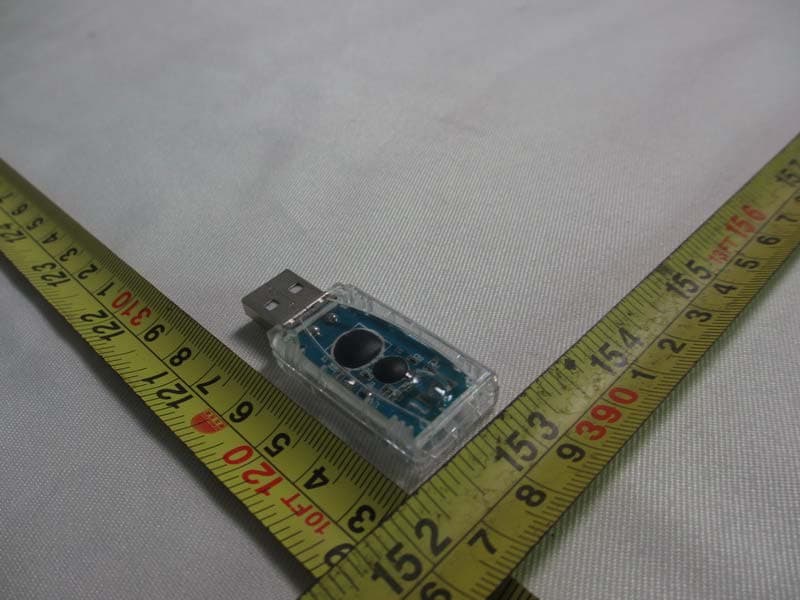
Click to zoom
Application Details
- Equipment Class
- DSS - Part 15 Spread Spectrum Transmitter
- Date of Grant
- Aug 04, 2013
- Application Purpose
- Original Equipment
- Date of Application
- Aug 04, 2013
- Equipment Note
- Wireless Dongle
- Frequency Range
- 2409.00000000 - 2476.00000000
- Country
- United States
Documents & Files
Document Text
Text extracted from the exhibit documents filed with the FCC. Open a document above to read the original.
Users Manual
AFTERGLOW® AP.2 For PlayStation®3 For: PL-6422 Thank you for purchasing the AFTERGLOW® AP.2 Wireless for PlayStation®3! Contents: 1 AFTERGLOW® AP.2 for PlayStation®3. 1 AFTERGLOW® Wireless Link USB Adapter 1 USB Charge Cable 1 Manual Using the AFTERGLOW® AP.2: 1) The AFTERGLOW® AP.2 is designed to work with the Sony PlayStation®3 videogame system. 2) Your new AP.2 Wireless controller features an integrated rechargeable battery pack that should be fully PlayStation®3 when it is powered on. Connect the mini-USB plug to your AP.2 controller. The indicator Wireless Link USB Adapter into one of your PlayStation®3’s USB ports while the system is powered on. Press any button on your AP.2 controller and an automatic pairing will take place. 4) After pairing is complete your AP.2 controller will show it’s controller number designation via one of 4 indicator LEDs. It is now ready to use. Time for some gaming! soon to avoid interruption of play. Changing AFTERGLOW® Modes: AP.2 must be connected to a PlayStation®3 console to function. 2) The AFTERGLOW® button on the AP.2 is located near the controller indicator lights on the controller. 3) The AFTERGLOW® AP.2’s default setting is “ON.” 4) Press the AFTERGLOW® button once to change to “VIBRATION” mode. Lighting occurs in this mode when the AP.2 rumble motors activate. 5) Press the AFTERGLOW® button once more to change to “OFF” mode. No lighting occurs in this mode. 6) Press the AFTERGLOW® button once more to return to “ON” mode. 7) Cycle through the three settings as often as you like and enjoy the AFTERGLOW® in your favorite mode! Frequently Asked Questions Can I charge my AP.2 controller before the battery is completely drained? -Yes, you can charge the AP.2 any time you like. You will not damage the battery by charging when the battery still carries a charge. Can I use my AP.2 controller while it is charging via USB? -Yes, you can play with the AP.2 and charge it at the same time. Can I use multiple AP.2 controllers with my PlayStation®3? -Yes, you can use up to 4 AP.2 controllers with your PlayStation®3 provided your system has 4 USB ports available. My AP.2 controller will not sync with the PlayStation®3. What can I do? controller and a wireless link should be established. Make sure your PlayStation 3 is powered on and that your AP.2 controller’s battery has a charge. CAUTION authority to operate the equipment. This equipment has been tested and found to comply with the limits for a Class B digital device, pursuant to part 15 of the FCC Rules. These limits are designed to provide reasonable protection against harmful interference in a residential installation. This equipment generates, uses and can radiate radio frequency energy and, if not installed and used in accordance with the instructions, may cause harmful interference to radio communications. However, there is no guarantee that interference will not occur in a particular installation. If this equipment does cause harmful interference to radio or television reception, which can be following measures: —Reorient or relocate the receiving antenna. —Increase the separation between the equipment and receiver. —Consult the dealer or an experienced radio/TV technician for help. “For ages 12+” ® FCC ID for Controller: X5B-PL6422 FCC ID for Dongle: X5B-PL6422A © 2011 Performance Designed Products LLC. All rights reserved. PDP is a trademark, and AFTERGLOW is a registered trademark, of Performance Designed Products LLC. PlayStation®3 is a registered trademark of Sony Computer Entertainment, Inc. This product is not designed, manufactured, sponsored or endorsed by Sony Computer Entertainment. For technical questions please visit www.pdp.com or call: 1-800-331-3844 (USA ONLY) *please keep this information for future reference 1840 East 27th Street Vernon, CA 90058 USA CBX II - 382-390 Midsummer Blvd., Milton Keynes, Buckinghamshire MK9 2RG UK 2 year limited warranty. See www.pdp.com for details. This device complies with FCC radiation exposure limits set forth for an uncontrolled environment and it also complies with Part 15 of the FCC RF Rules. Operation is subject to the following two conditions: (1) this device may not cause harmful interference, and (2) this device must accept any interference received, including interference that may cause undesired operation. Merci d’avoir acheté l’AFTERGLOW MD AP.2 sans fil pour PlayStation MD 3! Contenu : 1 AFTERGLOW MD AP.2 pour PlayStation MD 3. 1 adaptateur USB de connexion sans fil pour l’AFTERGLOW MD 1 Câble USB de charge 1 manuel Utilisation de l’AFTERGLOW MD A P. 2 : 1) L’A F T E R G L O W MD AP 2 est conçu pour être utilisé avec le système de jeux vidéo Sony PlayStation MD 3. 2) Cette manette sans fil AP.2 neuve intègre un bloc-batterie rechargeable qui doit être complètement chargé avant toute première utilisation. Pour cela, connectez la prise USB large à un port USB alimenté, tel que celui de la PlayStation MD 3 quand elle est en marche. Connectez la miniprise USB à votre manette AP.2. Les témoins DEL de la manette AP.2 clignoteront dès que la charge débutera. 3) Quand la charge est terminée les témoins DEL de l’AP.2 s’éteindront. À ce moment là, insérez l’adaptateur de connexion sans fil pour l’AFTERGLOW MD dans l’un des ports USB de la PlayStation MD 3 quand le système est en marche. Appuyez sur n’importe quel bouton de la manette AP.2 pour lancer le couplage automatique. 4) Quand le couplage est terminé, la manette AP.2 affiche son numéro d’identification dans l’un des 4 témoins DEL. Elle est désormais prête à être utilisée. C’est le moment de jouer! 5) Quand la batterie de l’AP.2 est faible, le témoin DEL clignote rapidement. Il est alors nécessaire de charger la manette dès que possible pour éviter l’interruption du jeu. Modification des modes de l’AFTERGLOW MD : 1) L’A F T E R G L O W MD AP.2 intègre trois (3) modes d’effets lumineux : « ON » (Activé), « VIBRATION » et « OFF » (Désactivé). L’AP.2 doit être connectée à une console PlayStation …
Text truncated - open the document above for the full version.
Users Manual
5) Cuando la batería de su AP.2 esté baja, el indicador LED parpadeará rápidamente. Usted tendrá que cargar su control lo antes posible para evitar una interrupción en el juego. Cambio de modo del AFTERGLOW®: 1) El AFTERGLOW® AP.2 cuenta con tres (3) modos de efectos de iluminación: “ON” (Activado), “VIBRATION” (Vibración) y “OFF” (Desactivado). Se necesita conectar el AP.2 a la PlayStation ®3 para que funcione.2) El botón del AFTERGLOW® en el AP.2 está situado cerca de los indicadores luminosos del control. 3) El ajuste predefinido del AFTERGLOW® AP.2 es “ON” (Activado). 4) Presione el botón del AFTERGLOW® una vez para cambiar al ajuste de “VIBRATION” (Vibración). La iluminación se produce en este modo cuando los motores para la vibración del AP.2 se activen. 5) Presione el botón del AFTERGLOW® una vez más para cambiar al modo “OFF” (Desactivado). No iluminación se produce en este modo. 6) Para regresar al modo activado (ON), presione el botón del AFTERGLOW™ una vez más. 7) ¡Alterne entre los tres ajustes tan a menudo como guste y disfrute del AFTERGLOW® en su modo favorito! Preguntas frecuentes ¿Se puede cargar mi control AP.2 antes que la batería sea completamente descargada? -Sí, pueda cargar el AP.2 cuando quiera. No se dañará la batería si se carga cuando no esté descargada. ¿Se puede usar el control AP.2 mientras está cargando usando el USB? -Sí, pueda jugar con su AP.2 y cargarlo al mismo tiempo. ¿Se puede usar varios controles AP.2 con mi PlayStation®3? -Sí, se pueden usar hasta 4 AP.2 controles con su PlayStation®3 siempre y cuando su sistema tenga 4 puertos USB disponibles. Mi control AP.2 no se sincroniza con la PlayStation®3. ¿Qué tengo que hacer? -La primera vez que inserte el adaptador USB de conexión inalámbrica para el AP.2 un indicador luminoso del adaptador parpadeará. Presione varios botones en su control AP.2 y un enlace inalámbrico tiene que establecerse. Asegúrese que su PlayStation 3 esté encendido y que la batería de su control AP.2 esté cargada. © 2011 Performance Designed Products LLC. Todos los derechos reservados. PDP es una marca comercial, y AFTERGLOW es una marca registrada de Performance Designed Products LLC. PlayStation®3 es una marca registrada de Sony Computer Entertainment, Inc. Este producto no está diseñado, fabricado o promocionado por Sony Computer Entertainment. Si tiene preguntas técnicas, favor visite www.pdp.com o llame al: 1-800-331-3844 (EE.UU. ÚNICAMENTE) * Por favor guarde esta información para referencia en el futuro. 1840 East 27th Street Vernon, CA 90058 USA CBX II - 382-390 Midsummer Blvd., Milton Keynes, Buckinghamshire MK9 2RG UK Garantía limitada de 2 años. Refiérase a www.pdp.com para obtener más detalles. Vielen Dank für den Kauf des AFTERGLOW® AP.2 Wireless für PlayStation®3! Inhalt: 1 AFTERGLOW® AP.2 für PlayStation®3 1 AFTERGLOW® Wireless-USB-Adapter 1 USB-Ladekabel 1 Bedienungsanleitung Verwendung des AFTERGLOW® AP.2: 1) Der AFTERGLOW® AP.2 ist zum Gebrauch mit der Sony PlayStation®3 gedacht. 2) Dein neuer AP.2 Wireless-Controller hat einen integrierten Akkupack, der vor dem ersten Einsatz voll ständig aufgeladen werden sollte. Hierzu schließt du den großen USB-Stecker an einen USB-Port an, der Strom liefert, z. B. einen USB-Port an der eingeschalteten PlayStation®3. Den Mini-USB-Stecker verbindest du mit dem AP.2-Controller. Die LEDs am AP.2-Controller blinken, während der Akku geladen wird. 3) Wenn der Akku vollständig geladen ist, leuchten die LEDs am AP.2 nicht mehr. Jetzt schließt du den AFTERGLOW® Wireless-USB-Adapter an einen USB-Port an der eingeschalteten PlayStation®3 an. Drück eine beliebige Taste am AP.2-Controller. Nun wird der Controller automatisch mit dem Adapter gekoppelt (Pairing). 4) Nach Abschluss des Pairing-Vorgangs wird am AP.2-Controller die Controllernummer angezeigt, indem eine der vier LEDs aufleuchtet. Jetzt ist alles startklar. Zeit für die erste Game-Runde! 5) Wenn der Akku im AP.2 fast leer ist, blinkt die LED in schnellem Rhythmus. Du solltest den Controller dann aufladen, damit er nicht später mitten im Spiel nicht mehr funktioniert. Ändern der AFTERGLOW®-Modi: 1) Der AFTERGLOW® AP.2 hat drei Lichteffektmodi: „EIN“, „VIBRATION“ und „AUS“. Der AP.2 kann nur in Verbindung mit einer PlayStation®3-Konsole verwendet werden. 2) Die AFTERGLOW®-Taste am AP.2 befindet sich neben den Controller-LEDs. 3) Standardmäßig ist beim AFTERGLOW® AP.2 die Einstellung „EIN“ aktiv. 4) Drück die AFTERGLOW®-Taste einmal, um in den Modus „VIBRATION“ umzuschalten. In diesem Modus siehst du die Lichteffekte, wenn die Vibrationsmotoren des AP.2 aktiviert werden. 5) Drück die AFTERGLOW®-Taste noch einmal, um in den Modus „AUS“ umzuschalten. In diesem Modus sind die Lichteffekte ausgeschaltet. 6) Drück die AFTERGLOW®-Taste noch einmal, um wieder in den Modus „EIN“ umzuschalten. 7) Du kannst zwischen den einzelnen Modi beliebig umschalten, um den AFTERGLOW® an das jeweilige Spiel anzupassen. Häufige Fragen Kann ich den AP.2-Controller auch schon aufladen, wenn der Akku noch nicht leer ist? - Ja, du kannst den AP.2 jederzeit aufladen. Auch wenn der Akku noch nicht leer ist, geht er dadurch nicht schneller kaputt. Kann ich den AP.2-Controller benutzen, während er über USB aufgeladen wird? - Ja, du kannst den AP.2 gleichzeitig aufladen und ihn zum Spielen benutzen. Kann ich mehrere AP.2-Controller an meine PlayStation®3 anschließen? - Ja, du kannst bis zu vier AP.2- Controller an deine PlayStation®3 anschließen, sofern an der Konsole noch vier USB-Anschlüsse frei sind. Ich bekomme den AP.2-Controller nicht mit der PlayStation®3 synchronisiert. Was muss ich beachten? - Wenn du den AP.2 Wireless-USB-Adapter an die Konsole anschließt, blinkt eine LED am Adapter. Wenn du jetzt ein paar Tasten am AP.2-Controller drückst, sollte die Funkverbindung hergestellt werden. Achte darauf, dass die PlayStation 3 eingeschaltet und der Akku im AP.2-Controller aufgeladen ist. © 2011 Performance Designed Products LLC. Alle Rechte vorbehalten. PD…
Text truncated - open the document above for the full version.
Cover Letter(s)
Performance Designed Products, LLC To: Federal Communications Commission 7435 Oakland Mills Road Columbia, MD 21046 Subject: Request for confidentiality FCC ID: X5B-PL6422A Dear FCC TCB: 1. Long-Term Confidentiality Pursuant to 47 CFR Section 0.459(a) & (b), we hereby requests non-disclosure and confidential treatment of the following materials submitted in support of FCC certification application: Schematic Block diagram Operational description Above materials contain secrets, proprietary and technical information, which would customarily be guarded from competitors under 47 CFR, section 0.457(d)(2). Disclosure or publication or any portion of this company confidential material to other parties could cause substantial competitive harm and provide unjustified benefits for competitors. Sincerely, Tom Roberts 2013-07-29
Cover Letter(s)
Declaration of Authorization We Name: Performance Designed Products, LCC Address: 14144 Ventura Blvd City: Oaks Country: United States Declare that: Name Representative of agent: Cathy Wang Agent Company name: Neutron Engineering, Inc. Address: No.3 Jinshagang 1 st R oad, Shixia, Dalang Town City: Dong Guan Country: China is authorized to apply for Certification of the following product(s), and sign all related documents, including the 731 forms: Pr oduct de scription: AFTERGLOW PS3 WIRELESS DONGLE Type designation: PL-6422A Trademark: AFTERGLOW on our behalf. Date: 2013-07-29 City: Oaks Name: Tom Roberts Function: Chief Technical Officer Signature:
External Photos
Neutron Engineering Inc. Project No.: 1306C235A Page 2 of 5
ID Label/Location Info
Silkscreen in PANTONE Cool Grey 9c 11.5mm Model No.: PL-6422A FCC ID: X5B-PL6422A IC: 8814A-PL6422A Model No.: PL-6422A FCC ID: X5B-PL6422A IC: 8814A-PL6422A
Internal Photos
Neutron Engineering Inc. Project No.: 1306C235A Page 3 of 5 Neutron Engineering Inc. Project No.: 1306C235A Page 4 of 5 Neutron Engineering Inc. Project No.: 1306C235A Page 5 of 5
Test Report
Neutron Engineering Inc. Report No.: NEI-FICP-1-1306C235A Page 1 of 66 FCC&IC Radio Test Report FCC ID: X5B-PL6422A IC: 8814A-PL6422A This report concerns (check one): Original Grant Class II Change Issued Date : Jul. 12, 2013 Project No. : 1306C235A Equipment : AFTERGLOW PS3 WIRELESS DONGLE Model Name : PL-6422A Applicant : Performance Designed Products, LLC Address : 14144 Ventura Blvd. Suite 200, Sherman Oaks, CA 91423 Tested by: Neutron Engineering Inc. EMC Laboratory Date of Receipt: Jun. 27, 2013 Date of Test: Jun. 27, 2013~ Jul. 11, 2013 Testing Engineer : (David Mao) Technical Manager : (Leo Hung) Authorized Signatory: (Steven Lu) Neutron Engineering Inc. No.3,Jinshagang 1st Road, ShiXia, Dalang Town, Dong Guan, China. TEL : (0769) 8318-3000 FAX : (0769) 8319-6000 Neutron Engineering Inc. Report No.: NEI-FICP-1-1306C235A Page 2 of 66 Declaration Neutron represents to the client that testing is done in accordance with standard procedures as applicable and that test instruments used has been calibrated with the standards traceable to National Measurement Laboratory (NML) of CHINA, or National Institute of Standards and Technology (NIST) of U.S.A. Neutron's reports apply only to the specific samples tested under conditions. It is manufacture’s responsibility to ensure that additional production units of this model are manufactured with the identical electrical and mechanical components. Neutronshall have no liability for any declarations, inferences o r generalizations drawn by the client or others from Neutron issued reports. Neutron’s reports must not be used by the client to claim product endorsement by the authorities or any agency of the Government. This report is the confidential property of the client. As a mutual protection to the clients, the public and Neutron-self, extracts from the test report shall not be reproduced except in full with Neutron’s authorized written approval. Neutron’s laboratory quality assurance procedures are in compliance with the ISO Guide 17025 requirements, and accredited by the conformity assessment authorities listed in this test report. Limitation For the use of the authority's logo is limited unless the Test Standard(s)/Scope(s)/Item(s) mentioned in this test report is (are) included in the conformity assessment authorities acceptance respective. Neutron Engineering Inc. Report No.: NEI-FICP-1-1306C235A Page 3 of 66 Table of Contents Page 1 . CERTIFICATION 5 2 . SUMMARY OF TEST RESULTS 6 2.1 TEST FACILITY 7 2.2 MEASUREMENT UNCERTAINTY 7 3 . GENERAL INFORMATION 8 3.1 GENERAL DESCRIPTION OF EUT 8 3.2 DESCRIPTION OF TEST MODES 10 3.3 TABLE OF PARAMETERS OF TEXT SOFTWARE SETTING 10 3.4 BLOCK DIGRAM SHOWING THE CONFIGURATION OF SYSTEM TESTED 11 3.5 DESCRIPTION OF SUPPORT UNITS 12 4 . EMC EMISSION TEST 13 4.1 CONDUCTED EMISSION MEASUREMENT 13 4.1.1 POWER LINE CONDUCTED EMISSION LIMITS 13 4.1.2 MEASUREMENT INSTRUMENTS LIST AND SETTING 13 4.1.3 TEST PROCEDURE 14 4.1.4 DEVIATION FROM TEST STANDARD 14 4.1.5 TEST SETUP 14 4.1.6 EUT OPERATING CONDITIONS 14 4.1.7 TEST RESULTS 15 4.2 RADIATED EMISSION MEASUREMENT 18 4.2.1 RADIATED EMISSION LIMITS 18 4.2.2 MEASUREMENT INSTRUMENTS LIST ANS SETTING 19 4.2.3 TEST PROCEDURE 20 4.2.4 DEVIATION FROM TEST STANDARD 20 4.2.5 TEST SETUP 21 4.2.6 EUT OPERATING CONDITIONS 22 4.2.7 TEST RESULTS (BETWEEN30 – 1000 MHZ) 24 4.2.8 TEST RESULTS (ABOVE 1000 MHZ) 31 5 . NUMBER OF HOPPING CHANNEL 43 5.1 APPLIED PROCEDURES / LIMIT 43 5.1.1 MEASUREMENT INSTRUMENTS LIST AND SETTING 43 5.1.2 TEST PROCEDURE 43 5.1.3 DEVIATION FROM STANDARD 43 5.1.4 TEST SETUP 43 5.1.5 EUT OPERATION CONDITIONS 43 5.1.6 TEST RESULTS 44 6 . AVERAGE TIME OF OCCUPANCY 45 Neutron Engineering Inc. Report No.: NEI-FICP-1-1306C235A Page 4 of 66 Table of Contents Page 6.1 APPLIED PROCEDURES / LIMIT 45 6.1.1 MEASUREMENT INSTRUMENTS LIST 45 6.1.2 TEST PROCEDURE 45 6.1.3. TEST SETUP LAYOUT 45 6.1.4. TEST DEVIATION 45 6.1.5. EUT OPERATION DURING TEST 45 6.1.6. TEST RESULTS 46 7 . HOPPING CHANNEL SEPARATION MEASUREMENT 48 7.1 APPLIED PROCEDURES / LIMIT 48 7.1.1 MEASUREMENT INSTRUMENTS LIST AND SETTING 48 7.1.2 TEST PROCEDURE 48 7.1.3 DEVIATION FROM STANDARD 48 7.1.4 TEST SETUP 48 7.1.5 EUT OPERATION CONDITIONS 48 7.1.6 TEST RESULTS 49 8 . BANDWIDTH TEST 50 8.1 APPLIED PROCEDURES / LIMIT 50 8.1.1 MEASUREMENT INSTRUMENTS LIST AND SETTING 50 8.1.2 TEST PROCEDURE 50 8.1.3 DEVIATION FROM STANDARD 50 8.1.4 TEST SETUP 50 8.1.5 EUT OPERATION CONDITIONS 50 8.1.6 TEST RESULTS 51 9 . PEAK OUTPUT POWER TEST 53 9.1 APPLIED PROCEDURES / LIMIT 53 9.1.1 MEASUREMENT INSTRUMENTS LIST AND SETTING 53 9.1.2 TEST PROCEDURE 53 9.1.3 DEVIATION FROM STANDARD 53 9.1.4 TEST SETUP 53 9.1.5 EUT OPERATION CONDITIONS 53 9.1.6 TEST RESULTS 54 10 . ANTENNA CONDUCTED SPURIOUS EMISSION 56 10.1 APPLIED PROCEDURES / LIMIT 56 10.1.1 MEASUREMENT INSTRUMENTS LIST AND SETTING 56 10.1.2 TEST PROCEDURE 56 10.1.3 DEVIATION FROM STANDARD 56 10.1.4 TEST SETUP 56 10.1.5 EUT OPERATION CONDITIONS 56 10.1.6 TEST RESULTS 57 11 . EUT PHOTOS 63 Neutron Engineering Inc. Report No.: NEI-FICP-1-1306C235A Page 5 of 66 1. CERTIFICATION Equipment : AFTERGLOW PS3 WIRELESS DONGLE Brand Name : AFTERGLOW Model Name : PL-6422A Applicant : Performance Designed Products, LLC Manufacturer : Performance Designed Products, LLC Address : 14144 Ventura Blvd. Suite 200, Sherman Oaks, CA 91423 Factory : Performance Designed Products, LLC Address : 14144 Ventura Blvd. Suite 200, Sherman Oaks, CA 91423 Date of Test : Jun. 27, 2013~ Jul. 11, 2013 Test Item : ENGINEERING SAMPLE Standard(s) : FCC Part15, Subpart C(15.247) / ANSI C63.4 : 2009 FCC Public Notice DA 00-705, March 30, 2000. Canada RSS-210:2010 RSS-GEN Issue 3, Dec 2010 The above equipment has been tested and found compliance with the requirement of the relative standards by Neutron Engineering Inc. EMC Laboratory. The test data, data evaluation, and equipment configuration contained in our test report (Ref No. NEI-FICP-1-1306C235A) were obtained utilizing the test procedures, test …
Text truncated - open the document above for the full version.
Test Setup Photos
Neutron Engineering Inc. Report No.: NEI-FICP-1-1306C235A Page 63 of 66 11. EUT PHOTOS Conducted Measurement Photos Neutron Engineering Inc. Report No.: NEI-FICP-1-1306C235A Page 64 of 66 Radiated Measurement Photos 9K~30MHz Neutron Engineering Inc. Report No.: NEI-FICP-1-1306C235A Page 65 of 66 Radiated Measurement Photos 30~1000MHz Neutron Engineering Inc. Report No.: NEI-FICP-1-1306C235A Page 66 of 66 Radiated Measurement Photos Above 1000MHz
Contact Information
Applicant
Tom Roberts(Chief Technical Officer)
Test Firm
BTL Inc.Daisy Dai
Technical Specifications
| # | Rule Parts | Frequency Range | Power Output |
|---|---|---|---|
| 1 | 15C | 2.41 GHz - 2.48 GHz | 1.00 mW |
Other Applications from Performance Designed Products, LLC
X5B-049037X
Aug 22, 2024PDP REALMz Wireless Controller for Xbox
Equipment Class
DTS - Digital Transmission SystemX5B-049037T
Aug 22, 2024PDP REALMz Wireless Dongle for Xbox
Equipment Class
DTS - Digital Transmission SystemX5B-500253
Aug 02, 2024Rematch Wireless Controller for Nintendo Switch
Equipment Class
DSS - Part 15 Spread Spectrum TransmitterX5B-500246
Aug 01, 2024Wireless Controller for Nintendo Switch
Equipment Class
DSS - Part 15 Spread Spectrum TransmitterX5B-049038X
Jun 28, 2024Phantom Air Wireless Headset for Xbox / Phantom Air Wireless Headset for Play Station
Equipment Class
DSS - Part 15 Spread Spectrum Transmitter