X5B-PL8694Disney Infinity controller for Wii/Wii U
Performance Designed Products, LLC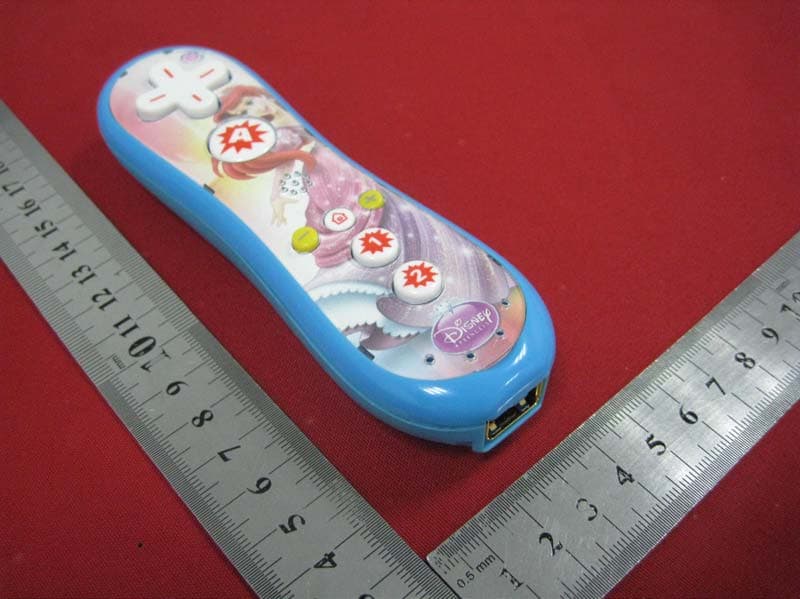
Click to zoom
Application Details
- Equipment Class
- DSS - Part 15 Spread Spectrum Transmitter
- Date of Grant
- Oct 25, 2013
- Application Purpose
- Original Equipment
- Date of Application
- Oct 25, 2013
- Equipment Note
- Disney Infinity controller for Wii/Wii U
- Frequency Range
- 2402.00000000 - 2480.00000000
- Country
- United States
Documents & Files
Document Text
Text extracted from the exhibit documents filed with the FCC. Open a document above to read the original.
Users Manual
WII REMOTE USER MANUAL Congratulations on your purchase of the INFINITY Remote for Wii™. The contents of this package include: 1 – Remote for Wii™ 1 – User Manual Before using this product, please attach the wrist strap to the end of the Remote. Battery Instructions: Open the battery compartment located on the back of the Remote Insert the 2 AAA batteries, ensuring correct polarity (see figure 2) Close the Remote battery compartment (see figure 3) Synchronization: Press the “POWER” button on the top left hand side of the Remote to switch it on Synchronize the Remote with the Wii™ console o Press the “SYNC” button located on the Wii™ console (see figure 4) o Press the “SYNC” button located on the Remote (see figure 5) Standby Mode: The Remote will automatically enter standby mode when not in use for a period of time. To exit standby mode, press any button on the Remote. Troubleshooting Tips: Remote not working: Change the batteries in the Remote Remote may be in standby mode (refer to Standby Mode Instructions) Ensure the Remote is properly synchronized with the Wii™ console Refer to the Wii™ console Instruction Manual for more troubleshooting tips WARNING: Changes or modifications not expressly approved by the party responsible for compliance could void your authority to operate the equipment. USE THE WRIST STRAP. Game play can involve rapid or vigorous motion. Please use the wrist strap to prevent losing your grip on the controller and causing damage to the Remote or surrounding objects, or injury to other people. WEAR THE WRIST STRAP WHEN ONE IS PROVIDED. Make sure all players use the wrist strap and that the strap is secure. When sharing a Remote between multiple players, make sure each person uses the wrist strap properly. Wearing the wrist strap will prevent you from accidentally dropping or throwing the Remote during game play, which could damage the Remote or surrounding objects, or cause injury to other people. DO NOT LET GO OF THE CONTROLLER DURING GAME PLAY. Read the Instruction booklet for the game you are playing and follow all game control instructions for correct use of the Remote or accessory controllers. Hold the Remote securely and avoid excessive motion, as it may cause you to let go of the Remote and may break the wrist strap. If your hands become moist, stop and dry your hands. ALLOW ADEQUATE ROOM AROUND YOU DURING GAME PLAY. 1. Stay at least three (3) feet away from the television. 2. As you may move around during game play, make sure objects and other people are out of your range of movement or arm motion to prevent damage or injury. Important Safeguards & Precautions: This unit is for indoor use only Do not expose to dust, direct sunlight, wet weather conditions, high humidity, high temperature Do not expose the unit to splashing, dripping rain or moisture Do not immerse in liquid Do not disassemble Do not use if the equipment is damaged Never carry the unit by the cable For external cleaning, use a soft, clean, cloth only NOTE: THE MANUFACTURER IS NOT RESPONSIBLE FOR ANY RADIO OR TV INTERFERENCE CAUSED BY UNAUTHORIZED MODIFICATIONS TO THIS EQUIPMENT. MODIFICATIONS WILL VOID THE USER AUTHORITY TO OPERATE THE EQUIPMENT. CAUTION: Changes or modifications to this equipment not expressly approved by the manufacturer could void the users authority to operate the equipment. This equipment has been tested and found to comply with the limits for a Class B digital device, pursuant to part 15 of the FCC Rules. These limits are designed to provide reasonable protection against harmful interference in a residential installation. This equipment generates, uses and can radiate radio frequency energy and, if not installed and used in accordance with the instructions, may cause harmful interference to radio communications. However, there is no guarantee that interference will not occur in a particular installation. If this equipment does cause harmful interference to radio or television reception, which can be determined by turning the equipment off and on, the user is encouraged to try to correct the interference by one or more of the following measures: —Reorient or relocate the receiving antenna. —Increase the separation between the equipment and receiver. —Connect the equipment into an outlet on a circuit different from that to which the receiver is connected. —Consult the dealer or an experienced radio/TV technician for help. FCC ID: X5B-PL8694 This device complies with FCC radiation exposure limits set forth for an uncontrolled environment and it also complies with Part 15 of the FCC RF Rules. Operation is subject to the following two conditions: (1) this device may not cause harmful interference, and (2) this device must accept any interference received, including interference that may cause undesired operation. IC: 8814A-PL8694 This device complies with Industry Canada RSS-210. Operation is subject to the following two conditions: (1) this device may not cause interference, and (2) this device must accept any interference, including interference that may cause undesired operation of the device. Le présent appareil est conforme aux CNR d'Industrie Canada applicables aux appareils radio RSS-210. L'exploitation est autorisée aux deux conditions suivantes : (1) l'appareil ne doit pas produire de brouillage, et (2) l'utilisateur de l'appareil doit accepter tout brouillage radioélectrique subi, même si le brouillage est susceptible d'en compromettre le fonctionnement. ©2010 Performance Designed Products. All Rights Reserved. All other trademarks, brands and names are the property of their respective owners
Cover Letter(s)
DATE Equipment Autorisation Division Federal Communications Commission 7435 Oakland Mills Road Columbia, MD 21046 FCC ID:___X5B-PL8694__ _____ Product Name:_Disney Infinity controller for Wii/Wii U ____ _ Request for Confidentiality Pursuant to Sections 0.457 and 0.459 of the commissions rules, we hereby request that the following documents be held confidential: (List here the documents for which you are seeking confidentiality – for example ...) • Schematics • Block diagram • Operational Description These materials contain trade secrets and proprietary information and are not customarily released to the public. The public disclosure of this information might be harmful to the company and provide unjustified benefits to our competitors. Dated this 2013- 08-21 Day of 20 By: Tom roberts Signature Printed Title: Chief Technical Officer On behalf of : Performance Designed Products LLC Telephone: 13232349911
External Photos
1 of 2 ATT Product Service Co., Ltd. (CBTL Lab of UL/Demko) No. 3, ChangLianShan Industrial Park, ChangAn Town, DongGuan City, GuangDong, China. Phone: 86-769-8509 8000; Fax: 86-769-8509 8777 E-mail:[email protected] External photos 2 of 2 ATT Product Service Co., Ltd. (CBTL Lab of UL/Demko) No. 3, ChangLianShan Industrial Park, ChangAn Town, DongGuan City, GuangDong, China. Phone: 86-769-8509 8000; Fax: 86-769-8509 8777 E-mail:[email protected]
ID Label/Location Info
1 of 1 ATT Product Service Co., Ltd. (CBTL Lab of UL/Demko) No. 3, ChangLianShan Industrial Park, ChangAn Town, DongGuan City, GuangDong, China. Phone: 86-769-8509 8000; Fax: 86-769-8509 8777 E-mail:[email protected] Label Location Label Location
Internal Photos
1 of 3 ATT Product Service Co., Ltd. (CBTL Lab of UL/Demko) No. 3, ChangLianShan Industrial Park, ChangAn Town, DongGuan City, GuangDong, China. Phone: 86-769-8509 8000; Fax: 86-769-8509 8777 E-mail:[email protected] Internal Photos 2 of 3 ATT Product Service Co., Ltd. (CBTL Lab of UL/Demko) No. 3, ChangLianShan Industrial Park, ChangAn Town, DongGuan City, GuangDong, China. Phone: 86-769-8509 8000; Fax: 86-769-8509 8777 E-mail:[email protected] 3 of 3 ATT Product Service Co., Ltd. (CBTL Lab of UL/Demko) No. 3, ChangLianShan Industrial Park, ChangAn Town, DongGuan City, GuangDong, China. Phone: 86-769-8509 8000; Fax: 86-769-8509 8777 E-mail:[email protected]
RF Exposure Info
According to 447498 1 D01 General RF Exposure Guidance v05 The 1-g and 10-g SAR test exclusion thresholds for 100 MHz to 6 GHz at test separation distances ≤ 50 mm are determined by: [(max. power of channel, including tune-up tolerance, mW)/(min. test separation distance, mm)] ·[√f(GHz)] ≤ 3.0 for 1-g SAR and ≤ 7.5 for 10-g extremity SAR,16 where f(GHz) is the RF channel transmit frequency in GHz Power and distance are rounded to the nearest mW and mm before calculation The result is rounded to one decimal place for comparison So 2.38/5·[√2.441(GHz)]=0.74< 3.0 for 1-g SAR So SAR evaluation is not required.
Test Report
Report No.: 13EAB06003 61 1 of 40 ATT Product Service Co., Ltd. (CBTL Lab of UL/Demko) No. 3, ChangLianShan Industrial Park, ChangAn Town, DongGuan City, GuangDong, China. Phone: 86-769-8509 8000; Fax: 86-769-8509 8777 E-mail:[email protected] FCC CERTIFICATION TEST REPORT FOR FCC ID: X5B-PL8694 Report Reference No. ....................... : 13EAB08034 11 Date of issue ..................................... : 2013-9-15 Testing Laboratory ............................ : ATT Product Service Co., Ltd. Address ............................................. : No. 3, ChangLianShan Industrial Park, ChangAn Town, DongGuan City, GuangDong, China. Applicant’s name .............................. : Performance Designed Products,LLC Address ............................................. : 14144 Ventura Blvd, Suite 200 Sherman Oaks, CA 91423 U.S.A Manufacturer ..................................... : Performance Designed Products,LLC Test specification: Test item description ........................ : Disney Infinity controller for Wii/Wii U Trade Mark ....................................... : Model/Type reference ..................... : PL-8694 Refer to page 5 for details. Ratings .............................................. : DC 3V Responsible Engineer Approved by (Mike Yang/ Engineer) (Tomy Wu /EMC Manager) Report No.: 13EAB06003 61 2 of 40 ATT Product Service Co., Ltd. (CBTL Lab of UL/Demko) No. 3, ChangLianShan Industrial Park, ChangAn Town, DongGuan City, GuangDong, China. Phone: 86-769-8509 8000; Fax: 86-769-8509 8777 E-mail:[email protected] TABLE OF CONTENTS TEST REPORT DECLARE ......................................................................................................................... 4 1.Summary of test Standards and results ................................................................................................. 5 2.General test information ........................................................................................................................... 6 2.1ACCRESITATIONS ................................................................................................................................ 6 2.2Description of EUT .................................................................................................................................. 6 2.3Accessories of EUT ................................................................................................................................ 6 2.4Assistant equipment used for test ........................................................................................................ 6 2.5Block diagram of EUT configuration for test ....................................................................................... 6 2.6Test environment conditions ................................................................................................................. 7 2.7Measurement uncertainty ...................................................................................................................... 7 3.Maximum Peak Output Power................................................................................................................. 8 3.1Test equipment ........................................................................................................................................ 8 3.2Block diagram of test setup ................................................................................................................... 8 3.3Limits ......................................................................................................................................................... 8 3.4Test Procedure ........................................................................................................................................ 8 3.5Test Result ............................................................................................................................................... 8 4. 20dB Bandwidth .................................................................................................................................. 10 4.1 Test equipment .................................................................................................................................. 10 4.2 Block diagram of test setup ............................................................................................................. 10 4.3 Limits ................................................................................................................................................... 10 4.4 Test Procedure .................................................................................................................................. 11 4.5 Test Result ......................................................................................................................................... 12 4.6 Original test data ............................................................................................................................... 12 5. Carrier Frequency Separation ........................................................................................................... 14 5.1 Test equipment .................................................................................................................................. 14 5.2 Block diagram of test setup ............................................................................................................. 14 5.3 Limits ................................................................................................................................................... 14 5.4 Test Procedure .................................................................................................................................. 14 5.5 Test Result ......................................................................................................................................... 15 5.6 Original test data ..................…
Text truncated - open the document above for the full version.
Test Setup Photos
1 of 2 ATT Product Service Co., Ltd. (CBTL Lab of UL/Demko) No. 3, ChangLianShan Industrial Park, ChangAn Town, DongGuan City, GuangDong, China. Phone: 86-769-8509 8000; Fax: 86-769-8509 8777 E-mail:[email protected] Test setup photograph 2 of 2 ATT Product Service Co., Ltd. (CBTL Lab of UL/Demko) No. 3, ChangLianShan Industrial Park, ChangAn Town, DongGuan City, GuangDong, China. Phone: 86-769-8509 8000; Fax: 86-769-8509 8777 E-mail:[email protected]
Contact Information
Applicant
Tom Roberts(Chief Technical Officer)
Test Firm
ATT Product Service Co., Ltd.Dick Lian
Technical Specifications
| # | Rule Parts | Frequency Range | Power Output |
|---|---|---|---|
| 1 | 15C | 2.40 GHz - 2.48 GHz | 2.38 mW |
Other Applications from Performance Designed Products, LLC
X5B-049037X
Aug 22, 2024PDP REALMz Wireless Controller for Xbox
Equipment Class
DTS - Digital Transmission SystemX5B-049037T
Aug 22, 2024PDP REALMz Wireless Dongle for Xbox
Equipment Class
DTS - Digital Transmission SystemX5B-500253
Aug 02, 2024Rematch Wireless Controller for Nintendo Switch
Equipment Class
DSS - Part 15 Spread Spectrum TransmitterX5B-500246
Aug 01, 2024Wireless Controller for Nintendo Switch
Equipment Class
DSS - Part 15 Spread Spectrum TransmitterX5B-049038X
Jun 28, 2024Phantom Air Wireless Headset for Xbox / Phantom Air Wireless Headset for Play Station
Equipment Class
DSS - Part 15 Spread Spectrum Transmitter