Text extracted from the exhibit documents filed with the FCC. Open a document above to read the original.
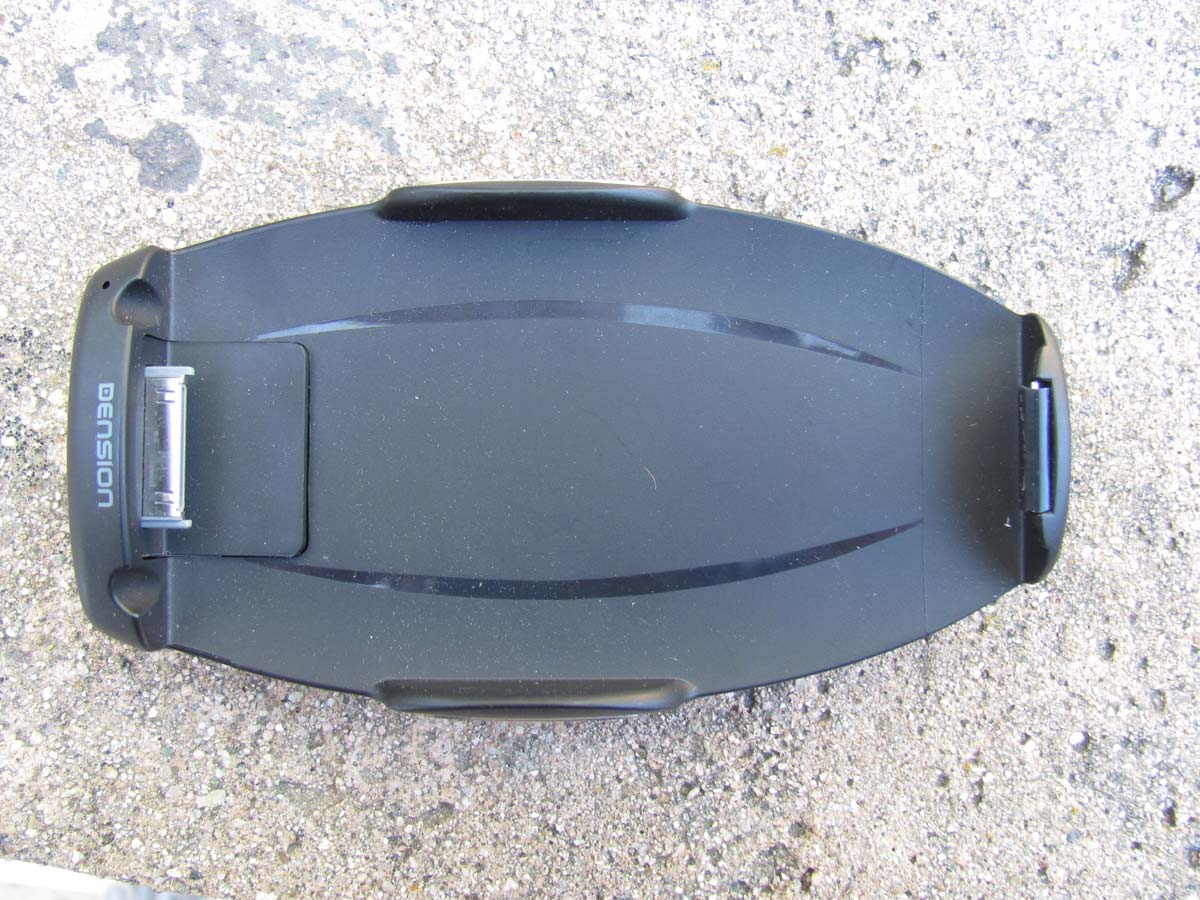
1) Ab o Car Do c make p Car Doc • We b Acc loc a • Car Ne v Goo • Col o Mat To rea c recomm http://ww 2) Car 2.1) Na O J J J Jump t o 2.2) Br o You ca n and dow you are out ck Mode ad honecalls a ck Mode Pre bradio: ess more t h ation and ge Finder: ver forget ag ogle Maps. or Settings: ch the colo r ch the highe mended to u ww.cardock Dock Mod vigating in One level b Jump to the Jump to the Jump to the o the main owser lists n always bro wn. During s not touchin Car dds an optio and use map emium gives han 30000 r enre. gain, where rs of Car Do est comfort w use the Den kforiphone.c de n the menu back in the e iPod plays e webradio e main men menu s owse the lis swiping the ng the displ r Dock for i U onal contro pping in the s you extra radio station e you parked ock Mode w with the you nsion Car D com system b y menu screen playscreen u sts (categor header and ay, the hea iPhone & C User Manua l layer to yo e car simply features co ns around t d. Car finde with your da ur iPhone in Dock for iPh y header an ries, songs, d footer will der and foo Car Dock M al our iPhone t y and safely ompared to t he world, ca er will route ashboard ba n the car an hone. For m nd footer b phonebook disappear. oter will retu Mode that allows y y. the free Ca ategorized you to you r acklight colo nd ensure sa more inform buttons k, etc.) by s . After the li urn. you to play r Dock Mo d by languag r parked car or. afe driving, mation pleas swiping them st is stoppe music, de: e, r via it is se check m up ed and In case of the li s You ca n 2.3) M a M P N S 2.4) M u i W 2.5) iP o R S [ P N P P A Tappin g iPod pla 2.6) W e P P A i ’ s of having m st. By using n select a lis ain menu Music menu Phone men Navigation Settings me usic Menu iPod browse Webradio b od Playscre Repeat one Shuffle on/o Previous tra Next track / Play song Pause song Actual iPod g the song i ay program. ebradio Pla Play station Pause statio Add station int he Settin ’Fix it’ wizar station. (On many items g this slider st item by ta u nu menu enu er browser een e/on/off off ack / rewind / fast forwar g play progr a nformation . ayscreen n on to presets ngs menu) rd of TuneIn nly available in a list, a s you can se apping on it d rd am section of t (only availa n Radio. Us e in case of semi-transp arch the list t. the iPod pla able if you e se this to rep being on th parent slider t alphabetic ayscreen wi entered you port a probl he Webradio r will appea cally. ll also dire c r TuneIn ac em with an o Playscree r on the righ ct you to the ccount infor internet ra d en) ht side e actual mation dio Bitrate: Shows the available and actual bitrates of the selected webradio station Info: • Webradio is only available in Car Dock Mode Premium. Please see Section 3 for information about upgrading to Car Dock Mode Premium • The quality of the webradio playback may vary depending on the quality of the available internet connection • Some webradio stations are not permanently available 2.7) Phone Menu Contact list Favorite contacts (This is a separate list from the iPhone’s own list. Modification of this favorite list and the iPhone’s own favorite list will not have effect on each other.) Recent calls (This is a separate list from the iPhone’s own list. iPhone’s own recent call list will register all calls. This list will only register the calls if the Car Dock Mode was active when receiving or initiating the call.) Dial Pad 2.8) Phone contact details Add to favorites (This button will add the contact only to the favorite list of the Car Dock Mode, not to the own favorite list of the iPhone) 2.9) Favorite contacts By swiping the contact to the left you can remove it from the favorite list of the Car Dock Mode. (This will not have effect on the own favorite contact list of the iPhone) 2.10) Recent calls By swiping the contact to the left you can remove it from the recent call list of the Car Dock Mode. (This will not have effect on the own recent call list of the iPhone) 2.11) Navigation Menu Google maps Car finder 2.12) Google Maps Show current position Map view Satellite view Hybrid view Activate header and footer (The header and footer will automatically disappear after a while in map mode) By tapping the middle of the display when in map mode, you can change between graphical view and address view. Info: • The iPhone needs to have GPS reception to show your position. GPS reception is limited in places surrounded by high buildings, in garages and other covered places. 2.13) Car finder Save current position. By tapping this button the current GPS position will be saved and the previously saved GPS position will be deleted (even if it was saved automatically when removing the iPhone from the Dension Car Dock for iPhone) Route to the saved position. By tapping this button the Car Dock Mode will be automatically closed and the route will be show non the built-in Google Maps app of the iPhone If the ’Auto Save’ function is switched on in the Settings menu and you use the Dension Car Dock for iPhone, then your position will be saved every time when removing the iPhone from the Car Dock. (The previously saved positions will be deleted) Info: • Car Finder is only available in Car Dock Mode Premium. Please see Section 3 for information about upgrading to Car Dock Mode Premium • The iPhone needs to have GPS reception when saving the actual GPS position. GPS reception is limited in places surrounded by high buildings, in garages and other covered places. • If the saved position is in 50 metres (150 feet), then the routing to the saved position will not be started. 2.14) Settings menu 2.14.1) Info for Car Drivers: You can learn more about the Dension Car Dock for iPhone by tapping the ’Car Dock for iPhone’ button. 2.14.2) FM Frequency Settings: If your Dension Car Dock for iPhone includes an FM transmitter, you can • switch the FM transmitter of the Dension Car Dock for iPhone on/off. • setup the FM transmission frequency of the Dension Car Dock for iPhone. …
Text truncated - open the document above for the full version.
Correspondence by Project Project Number: Correspondence Number Memo X6LIPH1CR0-2 1) The FCC label needs to have the two part statement on it and must have the FCC logo removed. Please see submittal of corrected label.
Report Number: B10224D1 FCC Part 15 Subpart B and FCC Section 15.239 Test Report Car Dock for iPhone Model: IPH1CR0 Brea Division 114 Olinda Drive Brea, CA 92823 (714) 579-0500 Agoura Division 2337 Troutdale Drive Agoura, CA 91301 (818) 597-0600 Silverado Division 19121 El Toro Road Silverado, CA 92676 (949) 589-0700 Lake Forest Division 20621 Pascal Way Lake Forest, CA 92630 (949) 587-0400 Page 1 of 18 FCC PART 15 SUBPART B and C TEST REPORT for CAR DOCK FOR iPHONE MODEL: IPH1CR0 Prepared for DENSION AUDIO SYSTEMS SZTREGOVA u. 1. BUDAPEST, HUNGARY, H-116 Prepared by:_____________________ KYLE FUJIMOTO Approved by:____________________ JAMES ROSS COMPATIBLE ELECTRONICS INC. 114 OLINDA DRIVE BREA, CALIFORNIA 92823 (714) 579-0500 DATE: APRIL 5, 2011 REPORTAPPENDICESTOTAL BODYA B C D E PAGES 18 2 2 2 11 21 56 This report shall not be reproduced except in full, without the written approval of Compatible Electronics. Report Number: B10224D1 FCC Part 15 Subpart B and FCC Section 15.239 Test Report Car Dock for iPhone Model: IPH1CR0 Brea Division 114 Olinda Drive Brea, CA 92823 (714) 579-0500 Agoura Division 2337 Troutdale Drive Agoura, CA 91301 (818) 597-0600 Silverado Division 19121 El Toro Road Silverado, CA 92676 (949) 589-0700 Lake Forest Division 20621 Pascal Way Lake Forest, CA 92630 (949) 587-0400 Page 2 of 18 TABLE OF CONTENTS Section / Title PAGE GENERAL REPORT SUMMARY 4 SUMMARY OF TEST RESULTS 4 1. PURPOSE 5 2. ADMINISTRATIVE DATA 6 2.1 Location of Testing 6 2.2 Traceability Statement 6 2.3 Cognizant Personnel 6 2.4 Date Test Sample was Received 6 2.5 Disposition of the Test Sample 6 2.6 Abbreviations and Acronyms 6 3. APPLICABLE DOCUMENTS 7 4. DESCRIPTION OF TEST CONFIGURATION 8 4.1 Description of Test Configuration – EMI 8 4.1.1 Cable Construction and Termination 9 5. LISTS OF EUT, ACCESSORIES AND TEST EQUIPMENT 10 5.1 EUT and Accessory List 10 5.2 EMI Test Equipment 11 6. TEST SITE DESCRIPTION 12 6.1 Test Facility Description 12 6.2 EUT Mounting, Bonding and Grounding 12 6.3 Facility Environmental Characteristics 12 7. TEST PROCEDURES 13 7.1 RF Emissions 13 7.1.1 Conducted Emissions Test 13 7.1.2 Radiated Emissions (Spurious and Harmonics) Test 14 7.1.3 Bandwidth of the Fundamental 16 7.1.4 RF Emissions Test Results 17 8. CONCLUSIONS 18 Report Number: B10224D1 FCC Part 15 Subpart B and FCC Section 15.239 Test Report Car Dock for iPhone Model: IPH1CR0 Brea Division 114 Olinda Drive Brea, CA 92823 (714) 579-0500 Agoura Division 2337 Troutdale Drive Agoura, CA 91301 (818) 597-0600 Silverado Division 19121 El Toro Road Silverado, CA 92676 (949) 589-0700 Lake Forest Division 20621 Pascal Way Lake Forest, CA 92630 (949) 587-0400 Page 3 of 18 LIST OF APPENDICES APPENDIX TITLE A Laboratory Accreditations and Recognitions B Modifications to the EUT C Additional Models Covered Under This Report D Diagram, Charts, and Photos Test Setup Diagram Antenna and Amplifier Factors Radiated Emissions Photos E Data Sheets LIST OF FIGURES FIGURE TITLE 1 Conducted Emissions Test Setup 2 Plot Map And Layout of Radiated Test Site – 3 Meters Report Number: B10224D1 FCC Part 15 Subpart B and FCC Section 15.239 Test Report Car Dock for iPhone Model: IPH1CR0 Brea Division 114 Olinda Drive Brea, CA 92823 (714) 579-0500 Agoura Division 2337 Troutdale Drive Agoura, CA 91301 (818) 597-0600 Silverado Division 19121 El Toro Road Silverado, CA 92676 (949) 589-0700 Lake Forest Division 20621 Pascal Way Lake Forest, CA 92630 (949) 587-0400 Page 4 of 18 GENERAL REPORT SUMMARY Compatible Electronics Inc. generates this electrom agnetic emission test report, which is an independent testing and consulting firm. The test report is based on testing performed by Compatible Electronics personnel according to the measurement procedures described in the test specifications given below and in the "Test Procedures" section of this report. The measurement data and conclusions appearing herein relate only to the sample tested and this report m ay not be reproduced without the written permission of Compatible Electronics, unless done so in full. This report must not be used to claim product endorsem ent by NVLAP, NIST or any other agency of the U.S. Government. Device Tested: Car Dock for iPhone Model: IPH1CR0 S/N: N/A Product Description: See Expository Statement Modifications: The EUT was not modified in order to meet the specifications. Customer: Dension Audio Systems Sztregova u. 1. Budapest, Hungary, H-116 Test Date: February 24, 2011 Test Specification: EMI requirements CFR Title 47, Part 15, Subpart B Test Procedure: ANSI C63.4 Test Deviations: The test procedure was not deviated from during the testing. SUMMARY OF TEST RESULTS TEST DESCRIPTION RESULTS 1 Conducted RF Emissions 150 kHz to 30 MHz This test was not performed because the EUT operates on battery power only. 2 Radiated RF Emissions 10 kHz – 2000 MHz (Transmit, Receive, and Digital Portion) Complies with the Class B limits of CFR Title 47, Part 15, Subpart B; and Subpart C, sections 15.205, 15.209, and 15.239. Highest reading in relation to spec limit: 45.03 (Avg) dBuV @ 98.1 MHz (*U = 3.34 dB) *U = Expanded Uncertainty with a coverage factor of k=2 Report Number: B10224D1 FCC Part 15 Subpart B and FCC Section 15.239 Test Report Car Dock for iPhone Model: IPH1CR0 Brea Division 1 14 Olinda Drive Brea, CA 92823 (714) 579-0500 Agoura Division 2337 Troutdale Drive Agoura, CA 91301 (818) 597-0600 Silverado Division 19121 El Toro Road Silverado, CA 92676 (949) 589-0700 Lake Forest Division 20621 Pascal Way Lake Forest, CA 92630 (949) 587-0400 Page 5 of 18 1. PURPOSE This document is a qualification test report based on the Electromagnetic Interference (EMI) tests performed on the Car Dock for iPhone, Model: IPH1CR0. The EMI measurements were performed according to the measurement procedure described in ANSI C63.4. The tests were performed in order to determine whether the electromagnetic emissions from the equipment under test, referred to as EUT hereafter, are withi…
Text truncated - open the document above for the full version.
114 Olinda Drive · Brea, California · United States
| # | Rule Parts | Frequency Range | Power Output |
|---|---|---|---|
| 1 | 15C | 88.1 MHz - 107.9 MHz | - |

Wi-Drive
Equipment Class
DTS - Digital Transmission System
