XS9HSK50Z000A1Z-Wave Portable Scenario Controller
HomeScenario, Inc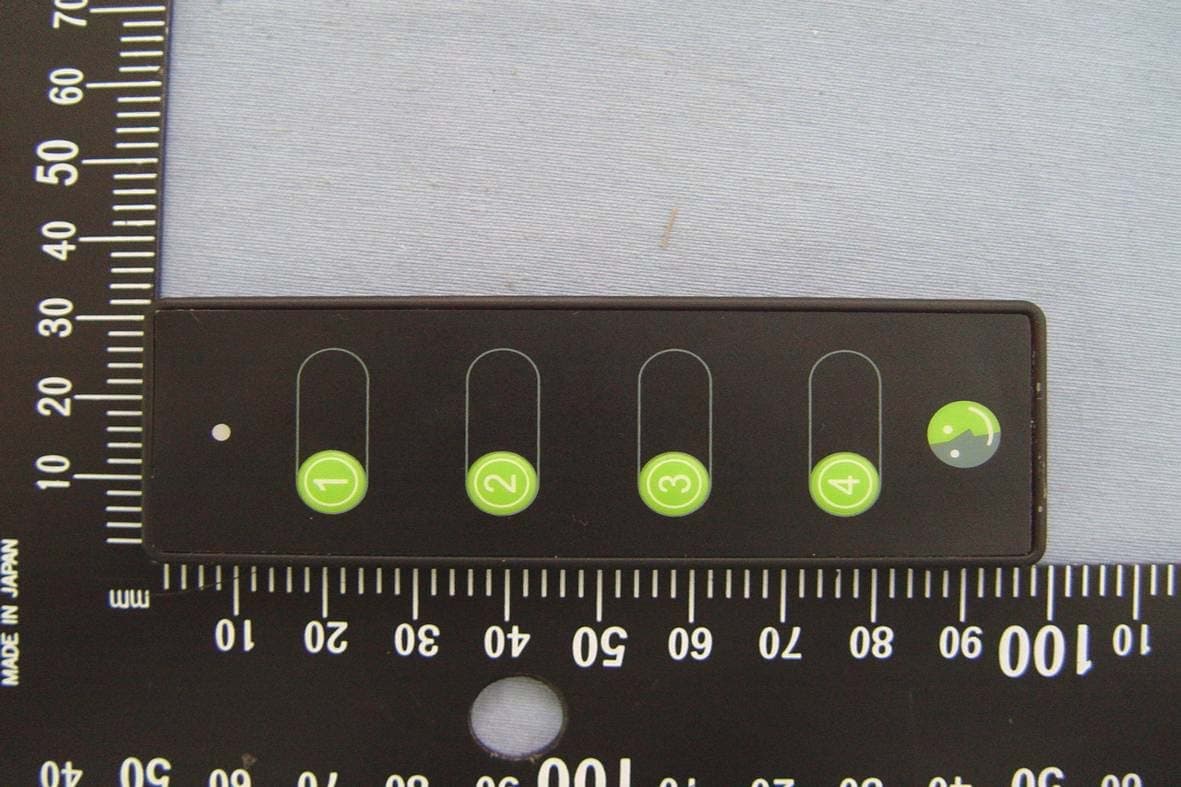
Click to zoom
Application Details
- Equipment Class
- DXX - Part 15 Low Power Communication Device Transmitter
- Date of Grant
- Jan 27, 2010
- Application Purpose
- Original Equipment
- Date of Application
- Jan 27, 2010
- Equipment Note
- Z-Wave Portable Scenario Controller
- Frequency Range
- 908.42000000 - 908.42000000
- Company
- HomeScenario, Inc
- Country
- Taiwan
Documents & Files
Document Text
Text extracted from the exhibit documents filed with the FCC. Open a document above to read the original.
Users Manual
Z-Wave Portable Scenario Controller / HomeScenario Introduction The HSK-50Z is a Z-Wave Scene Controller. HSK-50Z can include/exclude Z-Wave device, and provide two channels to associated. HSK-50Z can also assign association to connect the controlling device and to be controlled device. In addition, The Scenario Hub HSC-200 can include the HSK-50Z, and it will be a scenario controller. Replicating Network and Channel setting can join the primary controller made HSK-50Z to be a secondary controller. The HSK-50Z has LED and four button at frond side, and each button have three way Signal Click, Hold and Release. At the back side have a configure switch and a 3V mercury battery. Externals of HSK-50Z stalling Battery and Configure Switch In LED 4 Buttons Please put in a 3V mercury battery Configure switch White is configuration mode Green is operation mode Z-Wave Portable Scenario Controller / HomeScenario ncluding a Z-Wave Device to the NetworkI To including a Z-Wave device to the network, we should make sure the device has not been ther network, please follows the steps in Excluding a Z-Wave Device from the Network” to exclude the device. 1. Turn the configure switch(back side) to CONFIGURATION mode. The switch color 2. Press & release BUTTON(1), the LED in front will blink in GREEN color (to expire 3. ROGRAM button on the device, the LED in front will turn solid 4. ion in NOT successful, the LED in front will turn solid RED for 2 sec; xcluding a Z-Wave Device from the Network included in other network. If the device already in o “ The following steps can be used to include a new device. will be WHITE. in 10 sec). Press & release P GREEN for 2 sec, if successful. If the Inclus user has to redo 2&3. E To remove the device from the network. Perform the following steps: 1. Turn the configure switch(back side) to CONFIGURATION mode. The switch color 2. Press & release BUTTON(2), the LED in front will blink in YELLOW color (to 3. ROGRAM button on the device, the LED in front will turn solid 4. NOT successful, the LED in front will turn solid RED for 2 sec; Associati will be WHITE. expire in 10 sec). Press & release P GREEN for 2 sec, if successful. If the Exclusion in user has to redo 2 & 3. ng a Z-Wave Device to a Channel HSK-50 provides support for two channels, which can control the on/off/dim state of ) and BUTTON(2), and the BUTTON(3) and UTTON(4) is for channel 2. Before associating a Z-Wave device to a channel, you should make 1. Turn the configure switch(back side) to CONFUGURATION mode. The switch HITE. 2. Press & release BUTTON(3), the LED in front will turn solid in GREEN color (to 3. ON(2) to connect with CANNEL 1, or press GREEN color (to expire in 10 sec). 5. t will turn solid RED for 2 sec; devices. The channel 1 is composed of BUTTON(1 B sure the device has been already included in HSK-50Z. Perform the following steps: color will be W expire in 10 sec). Press & release BUTTON(1) or BUTT & release BUTTON(3) or BUTTON(4) to connect with CHANNEL 2. The LED in front will blink in 4. Press & release PROGRAM button on the device, the LED in front will turn solid GREEN for 2 sec, if successful. If the association is NOT successful, the LED in fron Z-Wave Portable Scenario Controller / HomeScenario 6. e you would like to associate to the selected Not Dis-as user has to redo steps 2 to 4. Repeat steps 2 to 4 for each devic operation button. e: The button 1&3 is ON or DIM UP, the button 2&4 is OFF or DIM DOWN. sociating a Z-Wave Device to a Channel you want to change the Z-Wave device to other channel or you do not want to associate in e from the channel. Perform the following teps: color will be WHITE. 2. Press & release BUTTON(4), the LED in front will turn solid in YELLOW color (to 3. ON(2) to disconnect with CHANNEL 1, or ll blink in YELLOW color (to expire in 10 sec). 5. turn solid RED for 6. e you would like to dis-associate. Enable All O If any channels, you can dis-associating the Z-Wave devic s 1. Turn the configure switch(back side) to CONFUGURATION mode. The switch expire 10 sec). Press & release BUTTON(1) or BUTT press & release BUTTON(3) or BUTTON(4) to disconnect with CHANNEL 2. The LED in front wi 4. Press & release PROGRAM button on the device, the LED in front will turn solid GREEN for 2 sec, if successful. If the Dis-association is NOT successful, the LED in front will 2 sec; user has to redo steps 2 to 4. Repeat steps 2 to 4 for each devic n/ Off Enable all the devices included in HSK-50Z, and control them to do all On/ Off. Perform the ll be WHITE. 2. Press & hold BUTTON(1) & BUTTON(4) for 2 sec, and the LED in front will blink 3. UTTON(1) or BUTTON(3) , the LED in front will turn solid 4. will turn solid RED for 2 sec; user has to redo 2 No delete. Note 2: In case one or more associations are made to the selected button again the All Resett following steps: 1. Turn the configure switch(back side) to CONFIGURATION mode. The switch color wi in GREEN color (to expire 10 sec). Press & release B GREEN for 2 sec, if successful. If NOT successful, the LED in front & 3. te 1: All associations previously made to the selected operation button pair will be On/ Off will automatically be disabled. ing Network & Channels Resetting the network & channels to default setting. Perform the following steps: 1. Turn the configure switch(back side) to CONFIGURATION mode. The switch color will be WHITE. Z-Wave Portable Scenario Controller / HomeScenario 2. Press & hold BUTTON(1) & BUTTON(4) for 2 sec, and the LED in front will blink 3. BUTTON(2) & BUTTON(3) for about 10 sec until the LED in uring the resetting process. Including in GREEN color (to expire 10 sec). Press & keep hold front will turn solid GREEN for 2 sec to mean successful. The LED in front will alternate GREEN, RED, YELLOW d 4. If NOT successful, the LED in front will turn solid RED for 2 sec, and user has to redo 2 & 3. & Replicating Network & Channel Settings If you already had a primary controller (HSK-50Z), You can add a …
Text truncated - open the document above for the full version.
Cover Letter(s)
HomeScenario Type: Printed Gain: 1.48dBi 990115--908M-E CCS WUGU Antenna Pattern Job No.:990115--908M-E Date:2010-01-15 Time:11:09 Temp.()/Hum.(%):25/80% Tested by: Mark.Y Center freq.(MHz): 908 Polarization : E Plane Max gain(dBi):1.48 Min gain(dBi):-18.62 Avg gain(dBi):-2.36 990115--908M-H CCS WUGU Antenna Pattern Job No.:990115--908M-H Date:2010-01-15 Time:11:11 Temp.()/Hum.(%):25/80% Tested by: Mark.Y Center freq.(MHz): 908 Polarization : H Plane Max gain(dBi):-14.51 Min gain(dBi):-32.39 Avg gain(dBi):-18.06
External Photos
Compliance Certification Services Inc. Report No.: 91111002 Date of Issue: December 31, 2009 Page 1 Total Page: 6 Rev. 00 EXTERNAL PHOTOGRAPHS OF EUT
Internal Photos
Compliance Certification Services Inc. Report No.: 91111002 Date of Issue: December 31, 2009 Page 2 Rev. 00 INTERNAL PHOTOGRAPHS OF EUT Compliance Certification Services Inc. Report No.: 91111002 Date of Issue: December 31, 2009 Page 3 Rev. 00 Printed Antenna Module Compliance Certification Services Inc. Report No.: 91111002 Date of Issue: December 31, 2009 Page 4 Rev. 00 Compliance Certification Services Inc. Report No.: 91111002 Date of Issue: December 31, 2009 Page 5 Rev. 00 Compliance Certification Services Inc. Report No.: 91111002 Date of Issue: December 31, 2009 Page 6 Rev. 00
Test Report
Compliance Certification Services Inc. Report No.: 91111002-RP1 FCC ID: XS9HSK50Z000A1 Date of Issue: December 30, 2009 Note: This report shall not be reproduced except in full, without the written approval of Compliance Certification Services Inc. This document may be altered or revised by Compliance Certification Services Inc. personnel only, and shall be noted in the revision section of the document. Page 1 Total Page: 21 Rev. 00 FCC 47 CFR PART 15 Subpart C TEST REPORT For Z-Wave Portable Scenario Controller Model Number: HSK-50Z Trade Name: HomeScenario Issued to HomeScenario, Inc. 12F No. 17 Sec. 3 Chongcing S. Rd. Taipei 100, TAIWAN, R.O.C. Issued by Compliance Certification Services Inc. No. 11, Wu-Gong 6 th Rd., Wugu Industrial Park, Taipei Hsien 248, Taiwan (R.O.C.) http://www.ccsemc.com.tw [email protected] Compliance Certification Services Inc. Report No.: 91111002-RP1 FCC ID: XS9HSK50Z000A1 Date of Issue: December 30, 2009 Page 2 Rev. 00 TABLE OF CONTENTS 1. TEST RESULT CERTIFICATION................................................................................................................ 3 2. EUT DESCRIPTION...................................................................................................................................... 4 3. TEST METHODOLOGY ............................................................................................................................... 5 3.1 EUT CONFIGURATION................................................................................................................. 5 3.2 EUT EXERCISE............................................................................................................................. 5 3.3 GENERAL TEST PROCEDURES...................................................................................................... 5 3.4 FCC PART 15.205 RESTRICTED BANDS OF OPERATIONS.................................................. 6 3.5 DESCRIPTION OF TEST MODES.................................................................................................... 6 4. INSTRUMENT CALIBRATION................................................................................................................... 7 4.1 MEASURING INSTRUMENT CALIBRATION............................................................................... 7 4.2 MEASUREMENT EQUIPMENT USED .................................................................................. 7 4.3 MEASUREMENT UNCERTAINTY ........................................................................................ 8 5. FACILITIES AND ACCREDITATIONS ...................................................................................................... 9 5.1 FACILITIES .................................................................................................................................. 9 5.2 EQUIPMENT................................................................................................................................. 9 5.3 TABLE OF ACCREDITATIONS AND LISTINGS.............................................................................. 10 6. SETUP OF EQUIPMENT UNDER TEST ...................................................................................................11 6.1 SETUP CONFIGURATION OF EUT................................................................................................ 11 6.2 SUPPORT EQUIPMENT ........................................................................................................ 11 7. FCC PART 15.249 REQUIREMENTS ........................................................................................................ 12 7.1 20 DB BANDWIDTH.............................................................................................................. 12 7.2 SPURIOUS EMISSION .......................................................................................................... 14 7.3 POWERLINE CONDUCTED EMISSIONS ........................................................................... 19 APPENDIX I PHOTOGRAPHS OF TEST SETUP ............................................................................................20 Compliance Certification Services Inc. Report No.: 91111002-RP1 FCC ID: XS9HSK50Z000A1 Date of Issue: December 30, 2009 Page 3 Rev. 00 1. TEST RESULT CERTIFICATION Applicant: HomeScenario, Inc. 12F No. 17 Sec. 3 Chongcing S. Rd. Taipei 100, TAIWAN, R.O.C. Equipment Under Test: Z-Wave Portable Scenario Controller Tr a d e N a m e : HomeScenario Model Number: HSK-50Z Date of Test: November 12, 2009 APPLICABLE STANDARDS STANDARD TEST RESULT FCC 47 CFR Part 15 Subpart C No non-compliance noted We hereby certify that: The above equipment was tested by Compliance Certification Services Inc. The test data, data evaluation, test procedures, and equipment configurations shown in this report were made in accordance with the procedures given in ANSI C63.4: 2003 and the energy emitted by the sample EUT tested as described in this report is in compliance with the requirements emission limits of FCC Rules Part 15.107, 15.109,15.207, 15.209 and 15.249. The test results of this report relate only to the tested sample identified in this report. Approved by: Reviewed by: Rex Lai Gina Lo Section Manager Section Manager Compliance Certification Services Inc. Compliance Certification Services Inc. Compliance Certification Services Inc. Report No.: 91111002-RP1 FCC ID: XS9HSK50Z000A1 Date of Issue: December 30, 2009 Page 4 Rev. 00 2. EUT DESCRIPTION Product Z-Wave Portable Scenario Controller Trade Name HomeScenario Model Number HSK-50Z Model Discrepancy N/A EUT Power Rating Power form Mercury Battery Frequency Range 908.42MHz Modulation Technique FSK Antenna Gain Gain: 1.48 dBi Antenna Designation Printed Antenna Remark: 1. The sample selected for test was production product and was provided by manufacturer. 2. This submittal(s) (test report) is intended for FCC ID: XS9HSK50Z000A1 filing to comply with Section 15.107…
Text truncated - open the document above for the full version.
Test Setup Photos
Compliance Certification Services Inc. Report No.: 91111002-RP1 FCC ID: XS9HSK50Z000A1 Date of Issue: December 30, 2009 Page 20 Rev. 00 APPENDIX I PHOTOGRAPHS OF TEST SETUP Conducted Emission Set Up Photo Compliance Certification Services Inc. Report No.: 91111002-RP1 FCC ID: XS9HSK50Z000A1 Date of Issue: December 30, 2009 Page 21 Rev. 00 Radiated Emission Set up Photos
Contact Information
Applicant
Beth Tsai
Technical Contact
Compliance Certification Services Inc.Celia Hsieh
No.11, Wu-gong 6th Rd., · Taipei Hsien · Taiwan
Test Firm
Compliance Certification Services Inc.Kurt Chen
Technical Specifications
| # | Rule Parts | Frequency Range | Power Output |
|---|---|---|---|
| 1 | 15C | 908.42 MHz - 908.42 MHz | - |
Other Applications from HomeScenario, Inc
XS9HSK-200Z
Apr 17, 2010IR Control Station
Equipment Class
DXX - Part 15 Low Power Communication Device Transmitter
XS9HSC000000A1
Dec 17, 2009Advanced Scenario Hub/Music Server
Equipment Class
DXX - Part 15 Low Power Communication Device Transmitter