Text extracted from the exhibit documents filed with the FCC. Open a document above to read the original.
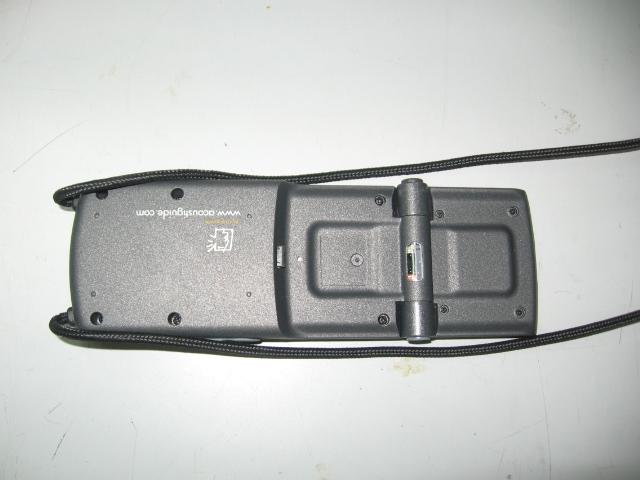
O O p p u u s s P P G G I I A A O O p p e e r r a a t t i i o o n n M M a a n n u u a a l l Version Date By Description 1.00 26 October 2009 Shmuel Shalem First version 1.01 1 November 2009 Shmuel Shalem Added regulation requirements Opus PGIA Operation Manual page 2 of 5 03 December, 2009 1. Description 1.1. Target & Concept 1.1.1. The PGIA (Portable Group Item Activator) is a feature in the Opus system providing a single dedicated Opus (the “Guide”) to remotely trigger a specific Item in a group of Opus’s (the “Visitors”) residing in its vicinity. The triggered Item plays in the pre-selected Tour & Language of each Visitor, creating a system concept of “multi-language” yet “group-controlled”. 1.1.2. The feature is based on the short-range RF communication capability that is built-in in all Opus Players. 1.1.3. The Visitors can be pre-assigned a “group number” and a Guide can associate itself to this group so members of other groups in the vicinity will not be affected. 1.1.4. Note that this capability requires the following software layer versions: o uCode version 2.15 or higher o OS version 4.03 or higher o App version 3.51 or higher 1.2. “Visitor” Opus operation 1.2.1. Turn the Opus ON by pressing the PLAY key. 1.2.2. Enter through the Start-screen, and then select a Tour and a Language. 1.2.3. Leave the Player at the Numeric-entry-screen; this is where the remote-activation is possible. 1.2.4. When an Item is remotely triggered, the screen backlight is highlighted, and the Item starts its playback automatically. 1.2.5. When an Item is playing, all playback controls work as in manual operation, i.e. the Volume, Pause/Resume, Stop etc. 1.2.6. If returning to menus is required, use the following Special Codes: o 9 9 9 9 PLAY return to Start-screen o 9 9 9 8 PLAY return to Tours menu screen Opus PGIA Operation Manual page 3 of 5 03 December, 2009 o 9 9 9 7 PLAY return to Languages menu screen 1.2.7. To turn the Opus OFF, use any of the following: o 9 8 0 3 PLAY o Press STOP continuously for more than 5 seconds 1.3. “Guide” Opus operation 1.3.1. Turn the Opus ON by pressing the PLAY key. 1.3.2. Enter through the Start-screen into the Numeric-entry-screen. 1.3.3. To remotely-trigger an Item to the Visitors in the Group, dial its numeric-label and press PLAY. A “transmission” animated screen appears for the period at which the auto-trigger signal is repeatedly transmitted, and then automatically disappears. The screen is back to the numeric-entry mode for the next possible activation. 1.3.4. The Auto-trigger transmission time is set by default to ~20 seconds. It can be modified through the Content. 1.3.5. If it is required to remotely STOP the Visitors in the Group, use the following Special Code: o 9 9 0 0 PLAY 1.4. Associating Visitors & Guide to a Group 1.4.1. By default, all Visitor & Guide Opus’s are shipped with Group 0 association. This means “no Group boundary”. 1.4.2. Groups can be assigned in a “Group-range”, default is 1-16. 1.4.3. If needed, the Group-range can be modified through the Content package. 1.4.4. A Visitor assigned to Group N can be activated by a Guide N or by a Guide 0. 1.4.5. A Guide assigned to Group N can activate Visitors of Group N and Visitors of Group 0. 1.4.6. In general it is recommended to either use “0” for the whole site (if there are no physical conflicts between groups) OR to avoid “0” and use groups partitioning through the whole system, visually marking the Opus’s accordingly. Opus PGIA Operation Manual page 4 of 5 03 December, 2009 1.4.7. Any Visitor or Guide Opus can be associated to a Group by programming it using the following Special Codes: o 9 9 0 2 PLAY View current Group o 9 9 0 1 PLAY X X PLAY Modify Group to XX 1.4.8. The new Group association is saved into the Opus internal Content memory, so it stays the same through OFF/ON sequence (i.e. no need to re-program it after each opus turning ON). 1.5. Operation “tips” 1.5.1. Using the Opus’s with the speaker folded-in provides a better RF performance. This is applicable to both the Visitor and the Guide Opus’s. 1.5.2. The Visitors should wear the Opus using the neck-strap, on the body front and not on the shoulder/side. 1.5.3. The Guide performs best during activation when being held in the hand and pointed to the Visitors (a “natural” position). 1.5.4. It may be required for the Guide to move around the Group Visitors for all visitors to be triggered, since the visitors may be in different positions and the human-body attenuates the transmitted signal. Opus PGIA Operation Manual page 5 of 5 03 December, 2009 1.6. Regulation The FCC Wants You to Know This equipment has been tested and found to comply with the limits for a Class B digital device, pursuant to Part 15 of the FCC rules. These limits are designed to provide reasonable protection against harmful interference in a residential installation. This equipment generates uses and can radiate radio frequency energy and, if not installed and used in accordance with the instructions, may cause harmful interference to radio communications. However, there is no guarantee that interference will not occur in a particular installation. If this equipment does cause harmful interference to radio or television reception, which can be determined by turning the equipment off and on, the user is encouraged to try to correct the interference by one or more of the following measures: a) Reorient or relocate the receiving antenna. b) Increase the separation between the equipment and receiver. c) Connect the equipment to an outlet on a circuit different from that to which the receiver is connected. d) Consult the dealer or an experienced radio/TV technician. FCC Warning Modifications not expressly approved by the manufacturer could void the user authority to operate the equipment under FCC Rules. Acoustiguide’s Opus User’s Manual This device complies with Part 15 of the FCC Rules. Operation is subject to the following two conditions: (1) This device may no…
Text truncated - open the document above for the full version.
17 Atir Yeda St. | Kfar-Saba 44643, Israel | Tel: +972-9-7634400 | Fax: +972-9-7634411 | www.espro.com www.acoustiguide.com New York • Washington DC • London • Paris • Berlin • Amsterdam • Salzburg • Milan • Madrid • Prague • Porto • St. Petersburg • Tel Aviv • Istanbul • Mexico City • Rio de Janeiro • Taipei • Shanghai • New Delhi • Sydney December 2, 2009 Letter of individual Authorization to sign Form 731 To: Timco Engineering Inc. To Whom It May Concern We hereby authorize Shaike Raz of ITL as an authorized individual to sign for form 731 in the favor of FCC ID: XVIESLP4X00 application. Thank you,
17 Atir Yeda St. | Kfar-Saba 44643, Israel | Tel: +972-9-7634400 | Fax: +972-9-7634411 | www.espro.com www.acoustiguide.com New York • Washington DC • London • Paris • Berlin • Amsterdam • Salzburg • Milan • Madrid • Prague • Porto • St. Petersburg • Tel Aviv • Istanbul • Mexico City • Rio de Janeiro • Taipei • Shanghai • New Delhi • Sydney Federal Communications Commission Authorization and Evaluation Division Subject: Confidentiality Request regarding application for certification of FCC ID: XVIESLP4X00 December 2, 2009 Dear Sirs Pursuant to Sections 0.457 and 0.459 of the Commission’s Rules, we hereby request confidential treatment of information accompanying this application as outlined below: CONF APPENDIX ESLP4X00 Schem.pdf (Schematics) CONF APPENDIX ESLP4X00 PartsLst.pdf (BOM, Parts List) CONF APPENDIX ESLP4X00 BlkDia.pdf (Block Diagram) The above materials contain trade secrets and proprietary information not customarily released to the public. The public disclosure of these materials may be harmful to the applicant and provide unjustified benefits to its competitors. The applicant understands that pursuant to Section 0.457 of the Rules, disclosure of this application and all accompanying documentation will not be made before the date of the Grant for this application. Sincerely,
17 Atir Yeda St. | Kfar-Saba 44643, Israel | Tel: +972-9-7634400 | Fax: +972-9-7634411 | www.espro.com www.acoustiguide.com New York • Washington DC • London • Paris • Berlin • Amsterdam • Salzburg • Milan • Madrid • Prague • Porto • St. Petersburg • Tel Aviv • Istanbul • Mexico City • Rio de Janeiro • Taipei • Shanghai • New Delhi • Sydney December 2, 2009 To: Timco Engineering Inc. To Whom It May Concern We hereby authorize Shaike Raz of ITL to act on the behalf of Espro Ltd, regarding the FCC ID Certification process for the following applications Unit Name /Model: ESLP-4100 and ESLP-4200 FCC ID: XVIESLP4X00 Thank you,
ESLP-4100 ESLP-4200
ESLP-4100 FCC Label Location ESLP-4200 FCC Label Location
FCC Labels for ESLP-4100 and ESLP-4200
Silk Screen Example Silk Screen Location Full FCC Label Location
Opus Click OPUS TOUCH
Operation Description Opus is a revolutionary family of compact and robust screen-based players, developed and designed specifically for on-site interpretation of museums and visitor venues. This category-breaking family of guides ushers in a new world of interpretive possibilities for institutions that value sophisticated design and require rugged, easy to use players. With Opus, institutions can provide visitors access to various digital resources – video, images and animation on top of the traditional audio – in a platform catering exactly to the needs of their visitors. The high-performance computing capabilities of Opus will amaze visitors accustomed to sophisticated graphic images and digital movies: its processing speed and memory capacity enable delivery of high resolution MP4 movie files and the CD-quality sound that users of consumer technology demand. Opus can be programmed by clients with its Content Management System that is easy to set up and install. The administrative user interface is intuitive and flexible, allowing for simple additions and deletions of content, as well as more complex functions, like integration of timed audio with video and images. Opus is also the first interpretive guide that offers the flexibility of a compact player and a wand within one player. It comes in two formats: Opus Click™ - a keypad-driven guide, and Opus Touch™ - a touch screen guide.
Test Report E93821.02 Error! Reference source not found. Page 1 of 27 ITL FCCMASVE 1.25 26 March 2003 DATE: 11 January 2010 I.T.L. (PRODUCT TESTING) LTD. FCC Radio Test Report for Espro Information Technologies Ltd. 1. Opuslick * Equipment under test: Player: Touch 2. Opus Player: C 1. ESLP-4100 2. ESLP-4200* * See Sections 1.3 and 2.1 of this report. Written by: ____________________________ Y. Raz, Documentation Approved by: _____________________________ E. Ever, Test Engineer Approved by: _____________________________ I. Raz, EMC Laboratory Manager This report must not be reproduced, except in full, without the written permission of I.T.L. (Product Testing) Ltd. This report relates only to items tested. Test Report E93821.02 Error! Reference source not found. Page 2 of 27 ITL FCCMASVE 1.25 26 March 2003 Measurement/Technical Report for Es. 1. Opu Click pro Information Technologies Ltd Equipment under test: s Player: Touch 2. Opus Player: ESLP 4100 FCC ID: XVIESLP4X00 ESLP 4200 FCC ID: XVIESLP4X00 This report concerns: Original Grant: x Class I change: Class II change: 47CFR15 Section 15.249 (a-b) Measurement procedure used is ANSI C63.4-2003. Application for Certification Applicant for this device: prepared by: (different from "prepared by") Ishaiahou Raz Eyal Ben Gigi ITL (Product Testing) Ltd. Espro Information Kfar Bin Nun Technologies Ltd. D.N. Shimshon 99780 17 Atir Yeda St., Kfar-Saba Israel 44643, Israel Tel: +972-8-915-3100 Tel: +972-09-763-4400 Fax: +972-8-915-3101 Fax: +972-09-763-4411 Email: [email protected] Email: [email protected] TABLE OF CONTENTS 1. GENERAL INFORMATION ------------------------------------------------------------------------------- 4 1.1 Administrative Information ................................................................................. 4 1.2 List of Accreditations ......................................................................................... 5 1.3 Product Description ........................................................................................... 6 1.4 Test Methodology .............................................................................................. 6 1.5 Test Facility ....................................................................................................... 6 1.6 Measurement Uncertainty ................................................................................. 6 2. SYSTEM TEST CONFIGURATION --------------------------------------------------------------------- 7 2.1 Justification ........................................................................................................ 7 2.2 EUT Exercise Software ..................................................................................... 7 2.3 Special Accessories .......................................................................................... 7 2.4 Equipment Modifications ................................................................................... 7 2.5 Configuration of Tested System ........................................................................ 7 3. FIELD STRENGTH OF FUNDAMENTAL ------------------------------------------------------------- 8 3.1 Test Specification .............................................................................................. 8 3.2 Test Procedure .................................................................................................. 8 3.3 Measured Data .................................................................................................. 8 3.4 Test Instrumentation Used, Field Strength of Fundamental ........................... 10 4. SPURIOUS RADIATED EMISSION 9 KHZ - 1000 MHZ ----------------------------------------- 11 4.1 Test Specification ............................................................................................ 11 4.2 Measured Data ................................................................................................ 11 4.3 Test Instrumentation Used .............................................................................. 12 4.4 Field Strength Calculation ............................................................................... 13 5. SPURIOUS RADIATED EMISSION 1.0 - 23 GHZ ------------------------------------------------- 14 5.1 Spurious Radiated Emission Above 1 GHz ..................................................... 14 5.2 Test Data ......................................................................................................... 15 5.3 Test Instrumentation Used .............................................................................. 16 6. SET UP PHOTOGRAPHS ------------------------------------------------------------------------------- 17 7. PHOTOGRAPHS OF TESTED E.U.T. ---------------------------------------------------------------- 18 8. APPENDIX A - CORRECTION FACTORS ---------------------------------------------------------- 19 8.1 Correction factors for CABLE ......................................................................... 19 8.2 Correction factors for CABLE ......................................................................... 20 8.3 Correction factors for CABLE ......................................................................... 21 12.6 Correction factors for LOG PERIODIC ANTENNA ........................................ 22 8.4 Correction factors for LOG PERIODIC ANTENNA ........................................ 23 8.5 Correction factors for BICONICAL ANTENNA ............................................... 24 8.6 Correction factors for Double-Ridged Waveguide Horn .................................. 25 8.7 Correction factors for Horn Antenna ............................................................. 26 8.8 Correction factors for ACTIVE LOOP ANTENNA ........................................... 27 Test Report E93821.02 Error! Reference source not found. Page 3 of 27 ITL FCCMASVE 1.25 26 March 2003 1. General Information 1.1 Administrative Information Test Report E93821.02 Error…
Text truncated - open the document above for the full version.
Test Setup
| # | Rule Parts | Frequency Range | Power Output | Emission |
|---|---|---|---|---|
| 1 | 15C | 2.43 GHz - 2.43 GHz | 441.00 µW | A1D |

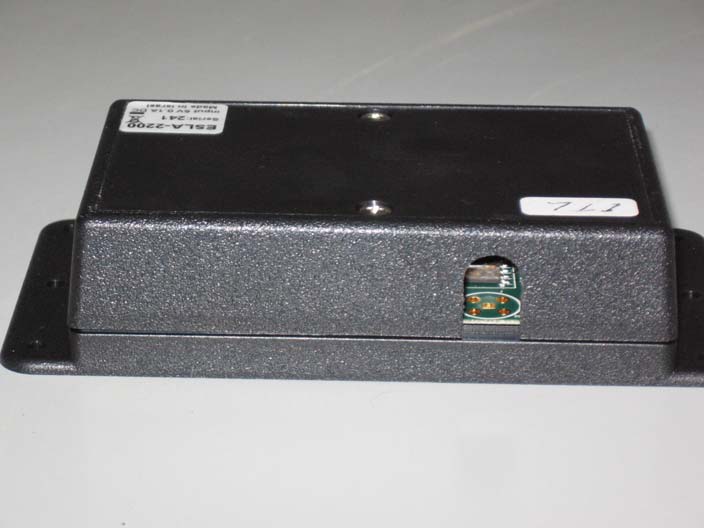
OPUS ACTIVATOR ANTI-THEFT ACTIVATOR
Equipment Class
DXX - Part 15 Low Power Communication Device Transmitter