XW2MOBILITYGPS Navigator with MP3 Player and audio book reader
KAPSYS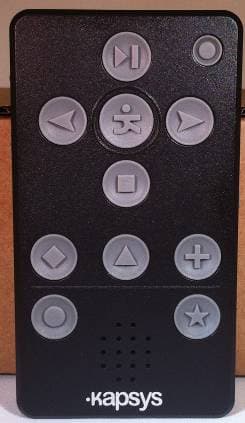
Click to zoom
Application Details
- Equipment Class
- JBP - Part 15 Class B Computing Device Peripheral
- Date of Grant
- Mar 18, 2012
- Application Purpose
- Original Equipment
- Date of Application
- Mar 18, 2012
- Equipment Note
- GPS Navigator with MP3 Player and audio book reader
- Company
- KAPSYS
- Country
- France
Documents & Files
Document Text
Text extracted from the exhibit documents filed with the FCC. Open a document above to read the original.
Users Manual
KAPTEN MOBILITY USER’S GUIDE Revision 2 1 Introduction to Kapten Mobility 1.1 Introduction Kapten Mobility is primarily a navigation device designed for visually impaired people using GPS satellite-positioning system incorporated in. Kapten Mobility is fully accessible thanks to its vocal man machine interface, which implements speech recognition and voice synthesizer. Kapten Mobility is more than a simple GPS navigator. It will make your journey easier and will facilitate your mobility thanks to its rich-content features such as geo localization, navigation, and map discovery. Moreover, Kapten will allow you to memorize your preferred points of interest in order to guide you there whenever you want. Such point of interest is called K-Tag. In addition, Kapten Mobility incorporates two multimedia functions: MP3 music player and Daisy format audio book reader. 1.2 Disclaimer Please listen carefully this message. The Kapten Mobility, using GPS system, is dedicated for pedestrians, but can also be used in car. During a navigation cession with Kapten Mobility, we invite you to respect carefully warnings described herein. Whatever your travel mode, navigation instructions given by Kapten should not exempt you from respecting strictly the rules and regulations and adapt a responsible behavior. Your attention should be focused primarily on your way: stay alert and attentive during your trip and respect other users, which may be pedestrians, cyclists, motorcyclists and motorists. Finally, use common sense before obeying an instruction to Kapten Mobility navigation instructions. Scrupulously observe the signals and the geometry of the sidewalks and streets. If you are unable to take the path indicated by Kapten Mobility, it will automatically recalculate your route with your new position. Please note that Kapten Mobility embeds GPS technology. The accuracy of your position is derived; in one hand, the quality of the GPS signal, which depends heavily on the environment where you are and how you carry your phone; and in other hand, depends on digital mapping. Thus we cannot guarantee the accuracy of the navigation instructions. Thank you for respecting these guidelines. 1.3 Various technologies used in Kapten Mobility It includes several advanced technologies: Geo localized digital map, Speaker independent speech recognition, Voice synthesizer with text to speech capability, Multi-transport navigation engine including pedestrian, public transport and car navigation; Geo localized public transport database, MP3 reader, And, Audio book reader. Following paragraphs describe the way the above technologies are used in Kapten Mobility. 1.3.1 GPS GPS, which stands for Global Positioning System, is most used satellite-positioning system. Kapten Mobility’s navigation engine combines GPS satellite information and digital map data in order to guide you between two geographical points or addresses. Depending on navigation mode, Kapten Mobility’s navigation engine applies different algorithms and generates appropriate navigation announcements for guidance. 1.3.2 Voice recognition Speech recognition allows user to dictate by voice commends to Kapten Mobility. Such commands are used for: Select a function, Navigate in user interface menus, Enter destination address, Interact with Kapten Mobility. User shall dictate such entries by using either Kapten Mobility’s microphone or microphone of headphones. 1.3.3 Voice synthesizer Voice synthesis is a technique to create human voice from any text. It also called TEXT TO SPEECH technology. Combination of speech recognition and voice synthesis together brings a new way of interaction for Kapten Mobility’s men machine interface. 1.3.4 MP3 reader MP3 is an audio format for storing sound or music, without audible loss of quality to the human ear. Kapten Mobility uses an MP3 player to play music files stored in its storage space. 1.3.5 Audio book reader Kapten Mobility uses an audio book reader compatible with Daisy standards using HTML format or MP3 stored in Kapten Mobility’s memory space. 1.4 Box content The Kapten Mobility box consists of: The Kapten Mobility A USB cable that allows you to connect Kapten Mobility to a computer in order to download multimedia content and update its firmware A wall charger that allows you to charge the battery A necklace that allows you to attach and carry your Kapten Mobility either the top or bottom of the product A headset with two headphones, a microphone and a push-to-talk button 1.5 Getting started 1.5.1 Charging the battery Before using Kapten for the first time, you need to charge Kapten Mobility’s battery. To do this connect the USB cable to your product and plug the other end of the wall charger contained in the box. Charge your Kapten Mobility for 7 hours before you start using the product. 1.5.2 Start Kapten Mobility To start Kapten Mobility, press 3 seconds on the button at the top right corner of the front panel. The product will start by reminding you instructions for use and safety. 1.5.3 GPS signal acquisition The Kapten Mobility uses GPS technology as a positioning system. Therefore it must be used outdoors in an open area with good visibility of the sky, without being fully handhold to avoid degrading the GPS signal reception. Note that the preferred way of carrying the product is put it in a pocket or using necklace. At first use, Kapten Mobility can take 5 to 15 minutes to find its position. Once the position is found you should then hear the message: "GPS reception is up” 1.6 Embedded User Help The current document is made available to you through audio book reader. Moreover, at any time, you can use the contextual help of Kapten Mobility by performing a long press the play button, or using the voice command "I need help." 2 Interact with Kapten Mobility This part explains how to interact with Kapten Mobility through its interfaces using either keypad or speech recognition technology. It introduces to voice menu concept…
Text truncated - open the document above for the full version.
Cover Letter(s)
7 layers AG Borsigstr.11 40880 Ratingen Germany Attn: Reviewing Engineer Federal Communications Commission 7435 Oakland Mills Road Columbia, MD 21046 CONFIDENTIALITY REQUEST FOR “KAPTEN Mobility” FCC-ID: XW2MOBILITY Sirs, In accordance with FCC Rule Section 0.457 and 0.459 of CFR 47, 7 layers AG (authorized by KAPSYS) hereby requests the following documentation as Long-term confidential: - Schematic diagrams - Block diagrams - Operational Description Short-term confidential (until 15. April 2012): - Internal Photos - External Photos - Test Setup Photos - User Manual These documents contain detailed system and equipment description and related information about the product, which KAPSYS considers to be proprietary. This information should never get into the possession of competitors, which would be harmful for our business. Do not hesitate to contact me if you have any additional questions. Carsten Steinroeder Ratingen, 20/01/2012
External Photos
It is strictly forbidden to distribute, use, or copy the document or its content without permission of the documents owner. Any abuse will be followed by the legal rights consequences. All rights remain by the owner 9/10 7.3 Wall Power Supply (USB) It is strictly forbidden to distribute, use, or copy the document or its content without permission of the documents owner. Any abuse will be followed by the legal rights consequences. All rights remain by the owner 10/10 7.4 Headset 7.5 USB Cable END OF DOCUMENT
External Photos
It is strictly forbidden to distribute, use, or copy the document or its content without permission of the documents owner. Any abuse will be followed by the legal rights consequences. All rights remain by the owner 6/10 7 Pictures 7.1 External pictures It is strictly forbidden to distribute, use, or copy the document or its content without permission of the documents owner. Any abuse will be followed by the legal rights consequences. All rights remain by the owner 7/10
ID Label/Location Info
It is strictly forbidden to distribute, use, or copy the document or its content without permission of the documents owner. Any abuse will be followed by the legal rights consequences. All rights remain by the owner 6/12 7 Label definition
Internal Photos
It is strictly forbidden to distribute, use, or copy the document or its content without permission of the documents owner. Any abuse will be followed by the legal rights consequences. All rights remain by the owner 9/12 8.2 Internal pictures It is strictly forbidden to distribute, use, or copy the document or its content without permission of the documents owner. Any abuse will be followed by the legal rights consequences. All rights remain by the owner 10/12
Test Report
KAPSYS Model: 301 REPORT NO.: STR11108117E-3 PAGE 1 OF 26 FCC PART 15B FCC Part 15B Measurement and Test Report For KAPSYS 790 AVENUE DU DOCTEUR MAURICE DONAT – 06250 - MOUGINS – SOPHIA ANTIPOLIS – FRANCE Report Concerns: Original Report Equipment Type: KAPTEN MOBILITY Model: 301 Report No.: STR11108117E-3 Test Date: 2011-10-18 to 2011-11-07 Issue Date: 2011-11-08 Tested By: Vigoss Xiong/ Engineer Reviewed By: Lahm Peng / EMC Manager Approved & Authorized By: Jandy so / PSQ Manager Prepared By: SEM.Test Compliance Service Co., Ltd 3/F, Jinbao Commerce Building, Xin'an Fanshen Road, Bao'an District, Shenzhen, P.R.C.(518101) Tel.: +86-755-33663308 Fax.: +86-755-33663309 Website: www.semtest.com.cn Note: This test report is limited to the above client company and the product model only. It may not be duplicated without prior permitted by SEM.Test Compliance Service Co., Ltd . SEM. Test Compliance KAPSYS Model: 301 REPORT NO.: STR11108117E-3 PAGE 2 OF 26 FCC PART 15B TABLE OF CONTENTS 1. GENERAL INFORMATION ...................................................................................................................................3 1.1 PRODUCT DESCRIPTION FOR EQUIPMENT UNDER TEST (EUT)...............................................................................3 1.2 TEST STANDARDS...................................................................................................................................................3 1.3 TEST METHODOLOGY.............................................................................................................................................3 1.4 TEST FACILITY.......................................................................................................................................................4 1.5 EUT EXERCISE SOFTWARE....................................................................................................................................4 1.6 ACCESSORIES EQUIPMENT LIST AND DETAILS.......................................................................................................4 1.7 EUT CABLE LIST AND DETAILS.............................................................................................................................4 2. SUMMARY OF TEST RESULTS ...........................................................................................................................5 3. §15.107 (A) CONDUCTED EMISSIONS ................................................................................................................6 3.1 MEASUREMENT UNCERTAINTY..............................................................................................................................6 3.2 TEST EQUIPMENT LIST AND DETAILS.....................................................................................................................6 3.3 TEST PROCEDURE...................................................................................................................................................6 3.4 BASIC TEST SETUP BLOCK DIAGRAM.....................................................................................................................6 3.5 ENVIRONMENTAL CONDITIONS..............................................................................................................................7 3.6 SUMMARY OF TEST RESULTS/PLOTS......................................................................................................................7 3.7 CONDUCTED EMISSIONS TEST DATA......................................................................................................................7 4. §15.109(A)- RADIATED EMISSION ....................................................................................................................12 4.1 MEASUREMENT UNCERTAINTY............................................................................................................................12 4.2 TEST EQUIPMENT LIST AND DETAILS...................................................................................................................12 4.3 TEST PROCEDURE.................................................................................................................................................12 4.4 TEST RECEIVER SETUP.........................................................................................................................................13 4.5 CORRECTED AMPLITUDE & MARGIN CALCULATION............................................................................................13 4.6 ENVIRONMENTAL CONDITIONS............................................................................................................................13 4.7 SUMMARY OF TEST RESULTS/PLOTS....................................................................................................................13 EXHIBIT 1- PRODUCT LABELING .......................................................................................................................18 PROPOSED FCC LABEL FORMAT................................................................................................................................18 PROPOSED LABEL LOCATION ON EUT .......................................................................................................................18 EXHIBIT 2 - EUT PHOTOGRAPHS........................................................................................................................19 EXHIBIT 3 - TEST SETUP PHOTOGRAPHS ........................................................................................................24 EXHIBIT 4 - SCHEMATICS .....................................................................................................................................26 EXHIBIT 5 - USERS MANUAL ................................................................................................................................26 SEM. Test Compliance KAPSYS Model: 301 REPORT NO.: STR1110…
Text truncated - open the document above for the full version.
Test Setup Photos
KAPSYS Model: 301 REPORT NO.: STR11108117E-3 PAGE 24 OF 26 FCC PART 15B EXHIBIT 3 - TEST SETUP PHOTOGRAPHS Conducted Emission Receiving Mode Downloading Mode SEM. Test Compliance KAPSYS Model: 301 REPORT NO.: STR11108117E-3 PAGE 25 OF 26 FCC PART 15B Radiated Emission Receiving Mode Downloading Mode SEM. Test Compliance
Contact Information
Applicant
Xavier de Villepin(Financial Director)
Test Firm
7layers AGRobert Machulec
Technical Specifications
| # | Rule Parts | Frequency Range | Power Output |
|---|---|---|---|
| 1 | 15B | - | - |
Other Applications from KAPSYS

XW2KAPTEN-NG
Jan 17, 2010Mobile GPS Receiver
Equipment Class
JBP - Part 15 Class B Computing Device Peripheral