YGD-D1301CAR MEDIA PLAYER
Sunbobo Digital Co. Ltd.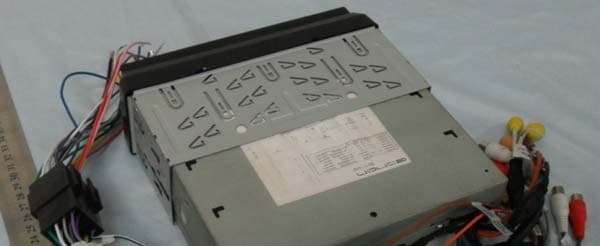
Click to zoom
Application Details
- Equipment Class
- DSS - Part 15 Spread Spectrum Transmitter
- Date of Grant
- Jun 13, 2010
- Application Purpose
- Original Equipment
- Date of Application
- Jun 13, 2010
- Equipment Note
- CAR MEDIA PLAYER
- Frequency Range
- 2402.00000000 - 2480.00000000
- Company
- Sunbobo Digital Co. Ltd.
- Country
- Hong Kong
Documents & Files
Document Text
Text extracted from the exhibit documents filed with the FCC. Open a document above to read the original.
Users Manual
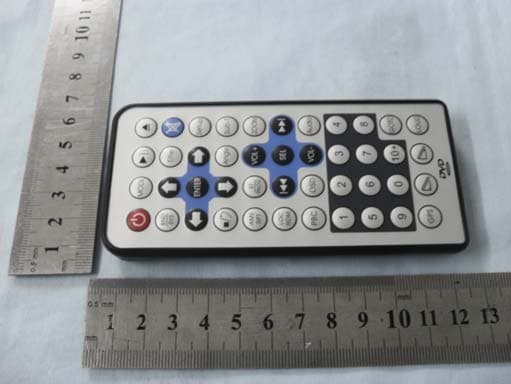
Model:D1301 D1301 Front Rear Audio Video Sys Exit Thank you for buying this product, please read through these operating instructions, so you will know how to operate your model properly. after you have finished reading the instructions, put them away in a safe place for future reference . NOTE: Due to the continuous product improvement, specifications and design are subject to change without prior notice. CONTENTS IMPORTANT: Please adjust screen to make the touching effect function best when you initiate the unit for the first time. For the details, please refer to the operation at Page 13. PRECAUTIONS FRONT PANEL BASIC OPERATION REMOTE CONTROL RADIO OPERATION SYSTEM SETUP CABLE CONNECTION ACCESSORIES INSTALLATION TROUBLE SHOOTING SPECIFICATION MP3 OPERATION SYSTEM MENU BLUETOOTH OPERATION TV OPERATION 2 4 18 14 19 DVD/VCD/CD OPERATION26 29 37 39 42 41 41 34 6 22 25 IPOD OPERATION36 1 CONTENTS 1 PRECAUTIONS The unit is designed for 12VDC,negative ground operation system only. Before installing the unit, make sure your vehicle is connected to DC12V negative ground system. Be sure to connect the color coded leads according to the diagram.Incorrect , connections may cause the unit to malfunction or damage the vehicle s electrical system. Be sure to connect the speaker (-) leads to the speaker (-) terminal. Never connect the left and right channel speaker cables each other or to the vehicle body. Make sure all the connections are completely correct before turning on your unit. When replacing the fuse(s), the re-placement must be of the same amperage as shown on the fuse holder. Do not block vents or radiator panels. Blocking them will causeheat to build up inside and mayresult in fire. After completing the installation and beginning to play the unit (including replacing the battery),please remove the guard against theft front-panel at first, and then press RESET button on the base with pointed object (such as ball-point pen) to set the unit to initial status. Notes on Installation 2 This unit can play the following discs only: PRECAUTIONS *Do not attempt to modify the unit, modifying the unit may cause an accident. *Stop the vehicle before carrying out any operation that could interfere with your driving. *Do not work in extremely high or low temperature. Be sure the temperature inside the vehicle is between +60 C and -10 C before turning on your unit . *To enjoy optimum sound and images while playing, handle the discs as follows: Handle the disc by its edge to keep the disc clean, and do not touch the surface. Do not use your CDs with paste residue or ink attached. Do not use CDs with labels or stickers attached, which may leave a sticky residue while beginning to peel off. (Shown as the picture) Clean the discs with an optional cleaning cloth. Wipe each disc from the center out. (Shown as the picture) Type of disc 12cm VIDEO DVD Label on the disc Recorded material Size of disc Sound and moving pictures VCD MP3 12cm CD 12cm NOTE: The unit is compatible with VCD1.0/2.0/3.0 version and DVCD disc. 12cm Sound and moving pictures Sound only Sound only TM 3 FRONT PANEL 1 2 3 4 5 6 7 8 11 10 9 12 13 16 15 MENU TILT 191818 17 IR A/V IN 14 TA SRC REL DN UP VOL A/V IN PTYAFOPEN BAND/ IR POWER MIC DISP MUTE 4 1.REL:Press to open the guardagainst theft front-panel. 2.VOL:Rotate VOL button clock wiseto increase the volume level; and rotate VOL button anticlockwise to decreasethe volume level. Press the button to select one of the audio control:L-front/R-front/L-rear/R-rear/Subwoof /Bass/Middle/Treble/TILT/Volume. Rotate the button to adjust the selecteditem 3. / / / :In radio mode, long press switches to manual seek station . Short press switches to automatic. In playback mode, short press to select previous or next track or chapter. Long press will perform fast reverse or fast forward. 4. /BAND: Press to pause or play playback mode. In radio mode, press to change current band. 5.SRC: Press to switch sources. 6.POWER/MUTE:Press to turn on the unit, press and hold the button for 1 second or longer to turn off the unit. In power on, press to shut off the sound output, press it again to resume previous sound. 7.A/V IN: Insert the A/V cord, then press PWR/SRC button to selectAUX1 source. 8.SD slot: Insert SD card, the unit will play the files of SD card automatically. NOTE: Once the SD card could not eject automatically after pressing, just pull it out manually . 9.USB slot: Insert USB device, the unit will play the files of USB automatically. 10. IR window 11. :Short press to eject a disc. 12. OPEN: Press to open or close the TFT panel. 13. DISP/AF: in radio mode, press to turn the AF function on/offpress and hold to display the current time ,source of the front and rear display and media (Disc,USB,SD)available. 14. MIC 15. TA: In radio mode, press to turn the TA function on /off 16. PTY: press to switch PTY program type 17. RESET: press to return to the initialization 18. / (TILT):Press to set the angle of TFT panel. 19. MENU:In DVD mode, press to display DVD SETUP menu; Long press or press in other mode to display SYSTEM SETUP menu. 5 FRONT PANEL SYSTEM MENU The users can perform operationby touching screen directly. Radio Operation 1. BACKLIGHT Turn on /off the backlight. (The function can be used to change the screen brightness while travelling at night) 2. SOURCE To display the SOURCE screen 3.Station preset button To display the preset station list (touch one of the station preset button to recall the radio which stored on the position; long touch to save the current frequency into the station) 4.BAND To switch bands. 5.LOC To select strong or weak stations reception 6.EQ To select a preset equalizer mode. 7.LOUD To switch LOUD control function on/off 8.PAGE 1 To switch to RDS operation page.(Refer to RDS Opetation for detail) 9.SEEK-/SEEK+ To seek a station automatically, To seek a station manually(long touch). 10.AMS To browse preset stations. To search and store stations automatically(long touch)…
Text truncated - open the document above for the full version.
Block Diagram
YC,TFT VEDIO TV VEDIOTV AUDIOTV AUDIOAUXRADIO OUTDVD AUDIOBT AUDIO SUBWOOFAUDIO YC,CVBS TV VEDIOAUXVEDIO IN CVBS REAR VEDIO OUTTFT VEDIO AUDIO RADIO OUT MN101E31 TA7419 FM6502 RADIO TUNNER MOTOR DRIVERBA6247 MT 1389L/K FLASH IC EPROMAVS6416 TV TUNNER SD USB TW8826 DRIVER TFT DISPLAY BOARD BLUETOOTH KEYBOARD TDA 7388 LOADER SHARP 61 I2C BUS I2C UART RGB KEYVALUE DPDM SDDATA I2C UART MOTOR 8.664MHZ 32.764MH 27MHZ BT ANT 2.4GHZ
Cover Letter(s)
深圳市华标电子科技有限公司 Bontek Compliance Testing Laboratory Ltd DATE: June 1,2010. Dear TCB Section of Timco Engineering, Inc., Thank you for cooperation. I would like to submit FCC application of Sunbobo Digital CO.LTD. . FCC ID: YGD-D1301 by your TCB Approval today. Best Regards, Bontek Compliance Testing Laboratory Ltd. Tony Wu/General Manager
Cover Letter(s)
Sunbobo Digital CO.LTD. FCC ID: YGD-D1301 POWER OF ATTORNEY June 1, 2010 Federal Communications Commission Authorization and Evaluation Division 7435 Oakland Mills Road Columbia, MD 21046 To Whom It May Concern: We, the undersigned, hereby authorize Bontek Compliance Testing Laboratory Ltd.(Tony Wu) on our behalf, to apply to the Federal Communications Commission on our equipment. Any and all acts carried out by Bontek Compliance Testing Laboratory Ltd. (Tony Wu) on our behalf shall have the same effect as acts of our own. This is to advise that we are in full compliance with the Anti-Drug Abuse Act.We, Sunbobo Digital CO.LTD.are not subject to a denial of federal benefits pursuant to Section 5301 of the Anti-Drug Act of 1988, 21 USC853a, and no party to the application is subject to a denial of federal benefits pursuantto that section. Sincerely, Sunbobo Digital CO.LTD. Terry Sze (Assistant General Manager)
External Photos
External Photographs EUT - Front View EUT - Rear View
ID Label/Location Info
FCC ID Label Sample for FCC ID: YGD-D1301 FCC ID: YGD-D1301 Model: D1301 This device complies with Part 15 of the FCC Rules. Operation is subject to the following two conditions: (1) this device may not cause harmful interference, and (2) this device must accept any interference received, including interference that may cause undesired operation.
ID Label/Location Info
FCC ID Location FCC ID Location
Internal Photos
Internal Photographs EUT –Screen View EUT –PCB View BT Module BT Module BT Antenna Bluetooth module view:
Operational Description
Operation description First of all, power on the car media player ,then you can running bluetooth, waitting for the bluetooth connect to other device, you can use bluetooth earphonen to listen music.
Test Report
Test Report of FCC Part 15 C for FCC Certificate On Behalf of Sunbobo Digital CO.LTD. FCC ID: YGD-D1301 Product Description: Car Media Player Model No.: D1301 Supplementary Model No.: E0821、 D1001 、D1302 、 D1201、 D1202 (All Models just different with colour) Prepared for: Sunbobo Digital CO.LTD. Block A,12/F,Victorious Factory Bldg.35 Tseuk Luk Street,San Po Kong,Kowloon,Hongkong. Prepared by: Bontek Compliance Testing Laboratory Ltd 1/F, Block East H-3, OCT Eastern Ind. Zone, Qiaocheng East Road, Nanshan, Shenzhen, China Tel: 86-755-86337020 Fax: 86-755-86337028 Report No.: BCT10ER-0698E Issue Date: June 1, 2010 Test Date: May 15~June 1, 2010 Test by: Reviewed By: Kendy Wang Tony Wu Report No.: BCT10ER-0697E Page 2of 43 FCC ID: YGD-D1301 TABLE OF CONTENTS 1. GENERAL INFORMATION....................................................................................................................................4 1.1 PRODUCT DESCRIPTION FOR EQUIPMENT UNDER TEST (EUT).........................................................................4 1.2 RELATED SUBMITTAL(S) / GRANT (S)...................................................................................................................4 1.3 TEST METHODOLOGY...........................................................................................................................................4 1.4 TEST FACILITY......................................................................................................................................................5 2. SYSTEM TEST CONFIGURATION......................................................................................................................6 2.1 EUT CONFIGURATION..........................................................................................................................................6 2.2 EUT EXERCISE.....................................................................................................................................................6 2.3 GENERAL TEST PROCEDURES.............................................................................................................................6 2.4 LIST OF MEASURING EQUIPMENTS USED............................................................................................................7 3. SUMMARY OF TEST RESULTS...........................................................................................................................9 4. TEST OF HOPPING CHANNEL BANDWIDTH................................................................................................10 4.1 APPLICABLE STANDARD.....................................................................................................................................10 4.2 EUT SETUP........................................................................................................................................................10 4.3 TEST EQUIPMENT LIST AND DETAILS.................................................................................................................10 4.4 TEST PROCEDURE..............................................................................................................................................10 4.5 TEST RESULT......................................................................................................................................................10 5. TEST OF HOPPING CHANNEL SEPARATION...............................................................................................14 5.1 APPLICABLE STANDARD.....................................................................................................................................14 5.2 EUT SETUP........................................................................................................................................................14 5.3 TEST EQUIPMENT LIST AND DETAILS.................................................................................................................14 5.4 TEST PROCEDURE..............................................................................................................................................14 5.5 TEST RESULT......................................................................................................................................................14 6. TEST OF NUMBER OF HOPPING FREQUENCY...........................................................................................18 6.1 APPLICABLE STANDARD.....................................................................................................................................18 6.2 EUT SETUP........................................................................................................................................................18 6.3 TEST EQUIPMENT LIST AND DETAILS.................................................................................................................18 6.4 TEST PROCEDURE..............................................................................................................................................18 6.5 TEST RESULT......................................................................................................................................................18 7. TEST OF DWELL TIME OF EACH FREQUENCY...........................................................................................20 7.1 APPLICABLE STANDARD.....................................................................................................................................20 7.2 EUT SETUP........................................................................................................................................................20 7.3 TEST EQUIPMENT LIST AND DETAILS.................................................................................................................20 7.4 TEST PROCEDURE...............................................................................…
Text truncated - open the document above for the full version.
Contact Information
Applicant
Terry Sze(General Manager)
Test Firm
Bontek Compliance Testing Laboratory LtdTony Wu
Technical Specifications
| # | Rule Parts | Frequency Range | Power Output |
|---|---|---|---|
| 1 | 15C | 2.40 GHz - 2.48 GHz | 260.00 µW |
Other Applications from Sunbobo Digital Co. Ltd.
YGD-G2216
May 15, 2011CAR MEDIA PLAYER
Equipment Class
DSS - Part 15 Spread Spectrum Transmitter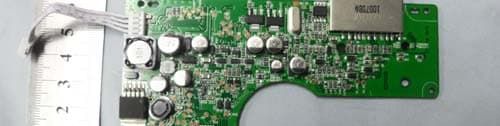
YGD-D1308
Apr 26, 2011CAR MEDIA PLAYER
Equipment Class
DSS - Part 15 Spread Spectrum Transmitter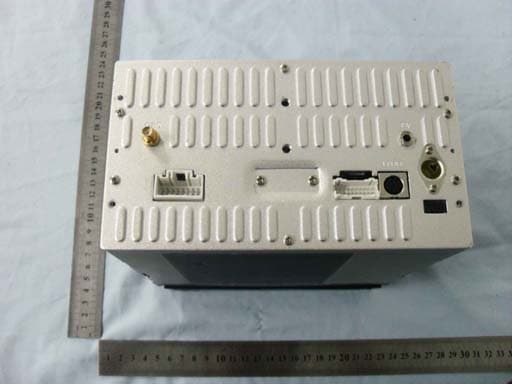
YGD-G2217
Apr 13, 2011CAR MEDIA PLAYER
Equipment Class
DSS - Part 15 Spread Spectrum Transmitter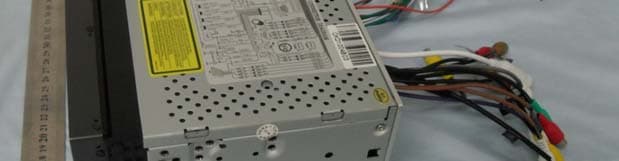
YGD-D2208
Jun 08, 2010CAR MEDIA PLAYER
Equipment Class
DSS - Part 15 Spread Spectrum Transmitter