FCCID.CO- FCC ID Database
HomeCompaniesEquipment ClassesSearch

© 2026 FCC ID Database. All rights reserved.

AboutContactData sourced from FCC public records
  1. Home/
  2. eComm Solutions Inc./
  3. YMWK23XX01

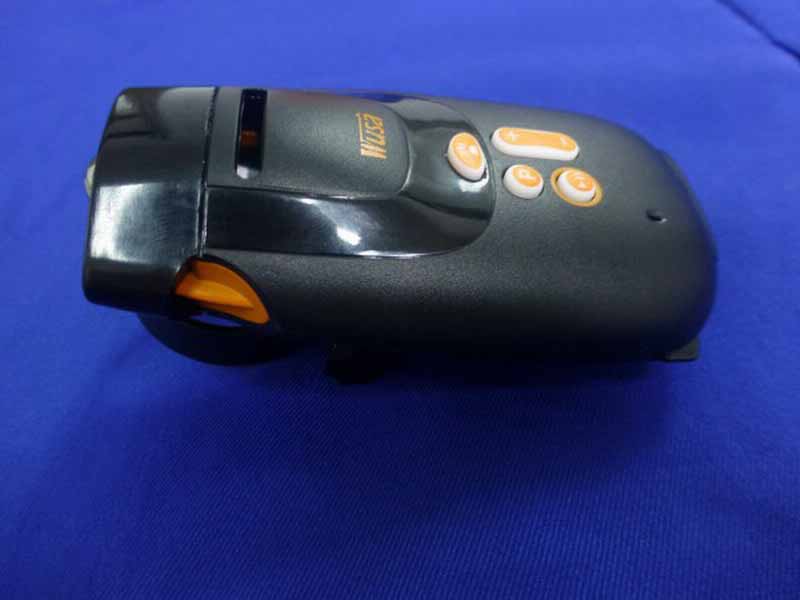
YMWK23XX01All-in-One Cycling Kit

eComm Solutions Inc.
All-in-One Cycling Kit - FCC ID YMWK23XX01 - eComm Solutions Inc.
Click to zoom

Application Details

Equipment Class
DSS - Part 15 Spread Spectrum Transmitter
Date of Grant
Dec 29, 2013
Application Purpose
Original Equipment
Date of Application
Dec 28, 2013
Equipment Note
All-in-One Cycling Kit
Frequency Range
2402.00000000 - 2480.00000000
Company
eComm Solutions Inc.
Country
Taiwan

Documents & Files

Select a file to view

Users Manual

↗

Cover Letter(s)

↗
↗

External Photos

↗

ID Label/Location Info

↗

Internal Photos

↗

RF Exposure Info

↗

Test Report

↗

Test Setup Photos

↗

Document Text

Text extracted from the exhibit documents filed with the FCC. Open a document above to read the original.

Users Manual

Button Long Press (3 seconds or more) Single Press Power ON / OFF Play / Pause Bluetooth Enable (3 seconds) Pairing(5 seconds) Phone Pick up MP3/FM (K230F) EQ modes (K230C) Adjustment of headlight Headlight modes Next track (while Playing) Random mode (while Pause) FM tuning (K230F) Volume up Back track (while Playing) Resume (while Pause) FM tuning (K230F) Volume down OFF ON Regular Blinking Slow Blinking Fast Blinking Blinking (twice a time) Red Light System off *FM playing *FM tuning MP3 playing Micro SD unloaded MP3 pause Blue Light Bluetooth off BT. on BT. playing BT. linked BT. pairing BT. Un-linked A: Speaker B: Micro SD & USB C: Battery Cover D: Microphone E: Control Panel F: Bicycle Mounting Ring G: Head Light Let the cover be parallel. Push the battery cover forward.. When the cover reached, then push down. 1 WUSA K230 3 in 1 Bluetooth Cycling Kit WUSA K230/K230F/K230C Model index: K230C - MP3 player K230 - MP3 player & Bluetooth ready K230F - MP3 player, Bluetooth ready & FM radio Package includes:  WUSA K230 cycling kit  Micro USB cable  Ring Sponge  Docking  Bicycle Mounting Assembly  User Guide Getting started 1. Insert micro SD card and four AAA batteries and make sure the batteries are installed properly according to the illustration below. It is recommended to use rechargeable batteries (ex: NiH, NiMn) for environmental protection and better performance 2. When putting on the battery cover, put the batteries into the K230 till the battery cover has reached the mounting gap on the bottom of the K230, then mount the tail gap of K230. 3. To turn it ON, hold the start button at least 3 seconds till hearing "WUSA". For turning OFF, hold the start button for 3 seconds. 4. K230 will turn OFF automatically when idle for 10 minutes or in low power state. Light Indication Bluetooth setting (K230/K230F) Turn ON K230 with micro SD card inserted. There are two states in K230 Bluetooth settings - Pairing and Activate. Once your Bluetooth device has paired with K230, it will link with K230 automatically when Bluetooth function is enabled at both sides. Pairing: When conducting the initial pairing with Bluetooth device, press for 5 seconds till the Blue light fast blink. You will also hear a sound "DUDU" at the same time. Activate the Bluetooth pairing mode on your Bluetooth device (ex: iPhone, smart phone and computers). When your Bluetooth device discovers K230, pair with K230 by pressing "K230" on your Bluetooth device. ( Enter "0000" if required) The pairing is successfully when K230 is blinking blue light slowly. Activating: After conducting the initial pairing, K230 will automatically link with Bluetooth function enabled devices which has been paired with K230. When K230 is On, activate the Bluetooth mode by holding for 3 seconds. To disconnect the K230 with Bluetooth device, hold for 5 seconds, when the blue light goes OFF and made a beep sound, the Bluetooth function is OFF. Playing Music 1. Holdfor 3 seconds to turn on K230 with micro SD card inserted, Click again to play the music stored in Micro SD card. 2. Pressingand for volume up or down. Holdor for 3 seconds to the next or previous track. Random mode: Hold thefor 3 seconds while MP3 is pause till the red light blinking even slower. Resume from Random: Hold thefor 3 seconds while MP3 is in pause to resume from random playing. Playing Music via Bluetooth device (K230/K230F) Link up your Bluetooth device with K230, and choose K230 as music player on your Bluetooth device setting. K230 control buttons can be used for Play/Pause, Volume Up and Down as well. FM mode (K230F) 1. Pause the MP3, single press on to switch into FM mode. Holdor 3 seconds for tuning while single press for volume adjustment. Single press on will mute the FM; press again to resume. 2. If micro SD card is not inserted, K230F will switch to FM mode automatically when power ON. Phone answering on K230/K230F 1. Bluetooth hands free& headset profiles patch incoming phone call to K230, when there is a phone call, K230 will stop the music and start beeping indicating an incoming phone call, then clickto answer the phone call. 2. When linked up with computer, K230 served as microphone and speaker for real time internet communication such as Skype. File download into Micro SD card 1. K230 supports MP3、WMV & WAV format, music files can be downloaded by USB cable. Please turn off the K230 before proceeding. 2. Insert Micro SD card into K230 and plug in Micro USB cable with computer and K230 for file downloading. LED headlight 1. Hold for 3 seconds to turn on the K230, click to turn on the headlight. 2. The lighting mode will be changed from General light, High beam and Flashing by pressing once. Hold when the headlight is on to adjust the brightness to your desired level upon release the button. Installation on bicycle 1. Using the adjustable docking with ring sponge to make K230 be stable on your bike. Ring sponge can be trimmed into appropriate length as long as you need. Put the ring sponge between the mounting ring and handle bar or stem. 2. Using the adjustable base to fix the direction for best illuminative angle as pictures below. If necessary, please add some glue on the screw in order to refrain from screw losing. 3. For the completion, sliding K230 into base for engaged till hearing a "KA" sound. Using portable power supply for K230 Besides AAA battery portable power bank is also working for K230 1. Inserting the Micro SD card when the K230 is off, connect K230 with the power bank with micro USB cable. Upon connecting, you will hear a sound "WUSA". K230 will automatically distinguish if the connection is for data transfer or external power supply. K230 will be at pause mode in 10 seconds after plug-in power bank. 2. Pressing the play button once, music will continue. . 3. Please be cautious of water leakage when you are using the portable power bank, and avoiding from damage of K230. Note: Do not attempt to service WUSA product yourself. Never attem…

Text truncated - open the document above for the full version.

Cover Letter(s)

eComm Solutions Inc. 5 Hsin-Yi Road Section 5, Suite 3F20, Taipei Taiwan 11011, ROC Tel:+886.2.8780 4549 Fax:+886.2.8780 4519 Confidentiality Letter Date: Oct. 18, 1013 Subject: Confidentiality Request for FCC ID: YMWK23XX01 Pursuant to FCC 47 CRF 0.457(d) and 0.459 and IC RSP-100, Section 10, the applicant requests that a part of the subject FCC application be held confidential. Type of Confidentiality Requested Exhibit Short Term Permanent Block Diagrams Short Term Permanent Internal Photos Short Term Permanent Operation Description/Theory of Operation Short Term Permanent Part List/Tune-Up Procedure Short Term Permanent Schematics Short Term Permanent User’s Manual eComm Solutions Inc. has spent substantial effort in developing this product and it is one of the first of its kind in industry. Having the subject information easily available to "competition" would negate the advantage they have achieved by developing this product. Not protecting the details of the design will result in financial hardship. Permanent Confidentiality: The applicant requests the exhibits listed above as permanently confidential be permanently withheld from public review due to materials that contain trade secrets and proprietary information not customarily released to the public. Short-Term Confidentiality: The applicant requests the exhibits selected above as short term confidential be withheld from public view for a period of ___180 ___ days from the date of the Grant of Equipment Authorization and prior to marketing. This is to avoid premature release of sensitive information prior to marketing or release of the product to the public. Applicant is also aware that they are responsible to notify TUV Rheinland in the event information regarding the product or the product is made available to the public. TUV Rheinland will then release the documents listed above for public disclosure pursuant to FCC Public Notice DA 04-1705. Sincerely, By: __________________________ _______Frank Lay _______ (Signature/Manager) (Print name)

External Photos

R AUDIX Technology (Shenzhen) Co., Ltd. FCC ID:YMWK23XX01 page Audix Technology (Shenzhen) Co., Ltd. Report No. ACS-F13313 14-1 14. PHOTOS OF THE EUT Figure 1 General Appearance of the EUT Figure 2 General Appearance of the EUT R AUDIX Technology (Shenzhen) Co., Ltd. FCC ID:YMWK23XX01 page Audix Technology (Shenzhen) Co., Ltd. Report No. ACS-F13313 14-2 Figure 3 General Appearance of the EUT Figure 4 General Appearance of the EUT R AUDIX Technology (Shenzhen) Co., Ltd. FCC ID:YMWK23XX01 page Audix Technology (Shenzhen) Co., Ltd. Report No. ACS-F13313 14-3 Figure 5 General Appearance of the EUT Figure 6 General Appearance of the EUT

ID Label/Location Info

PN-89280 29 x 19 mm K230 XXXXXX Made in Taiwan 892801FYMDD00001 FCC ID : YMWK23XX01 XXXXXXXXXXXXXX

Internal Photos

R AUDIX Technology (Shenzhen) Co., Ltd. FCC ID:YMWK23XX01 page Audix Technology (Shenzhen) Co., Ltd. Report No. ACS-F13313 14-4 Figure 7 Inside of the EUT Figure 8 Inside of the EUT R AUDIX Technology (Shenzhen) Co., Ltd. FCC ID:YMWK23XX01 page Audix Technology (Shenzhen) Co., Ltd. Report No. ACS-F13313 14-5 Figure 9 Inside of the EUT Figure 10 Inside of the EUT R AUDIX Technology (Shenzhen) Co., Ltd. FCC ID:YMWK23XX01 page Audix Technology (Shenzhen) Co., Ltd. Report No. ACS-F13313 14-6 Figure 11 Inside of the EUT Figure 12 Inside of the EUT R AUDIX Technology (Shenzhen) Co., Ltd. FCC ID:YMWK23XX01 page Audix Technology (Shenzhen) Co., Ltd. Report No. ACS-F13313 14-7 Figure 13 Inside of the EUT Figure 14 Inside of the EUT R AUDIX Technology (Shenzhen) Co., Ltd. FCC ID:YMWK23XX01 page Audix Technology (Shenzhen) Co., Ltd. Report No. ACS-F13313 14-8 Figure 15 Inside of the EUT Figure 16 Inside of the EUT R AUDIX Technology (Shenzhen) Co., Ltd. FCC ID:YMWK23XX01 page Audix Technology (Shenzhen) Co., Ltd. Report No. ACS-F13313 14-9 Figure 17 Inside of the EUT Figure 18 Components Side of the PCB R AUDIX Technology (Shenzhen) Co., Ltd. FCC ID:YMWK23XX01 page Audix Technology (Shenzhen) Co., Ltd. Report No. ACS-F13313 14-10 Figure 19 Components Side of the PCB Figure 20 Components Side of the PCB R AUDIX Technology (Shenzhen) Co., Ltd. FCC ID:YMWK23XX01 page Audix Technology (Shenzhen) Co., Ltd. Report No. ACS-F13313 14-11 Figure 21 Components Side of the PCB Figure 22 USB Cable

RF Exposure Info

Product Name:All-in-One Cycling Kit Model Number: WUSA K230 FCCID: YMWK23XX01 RADIO FRREQUENCY EXPOSURE COMPLIANCE RESULT : PASS Test standard : FCC KDB Publication 447498 D01 V05 Since maximum peak output power of the transmitter is<10mW, i.e.0.009346mW<10mW, hence the EUT is exclueded from SAR evaluation according to FCC KDB Publication 447498 D01:General RF Exposure Guidance V05.

Test Report

R AUDIX Technology (Shenzhen) Co., Ltd. FCC ID:YMWK23XX01 Audix Technology (Shenzhen) Co., Ltd. Report No. ACS-F13313 FCC PART 15C TEST REPORT FOR CERTIFICATION On Behalf of eComm Solutions Inc. All-in-One Cycling Kit Model Number: WUSA K230 FCC ID: YMWK23XX01 Prepared for : eComm Solutions Inc. Suite 3F20, 5 Hsin-Yi Road Sec. 5, Taipei, Taiwan Prepared By : Audix Technology (Shenzhen) Co., Ltd. No. 6, Ke Feng Rd., 52 Block, Shenzhen Science & Industrial Park, Nantou, Shenzhen, Guangdong, China Tel: (0755) 26639496 Report Number : ACS-F13313 Date of Test : Sep.12~Oct.26, 2013 Date of Report : Nov.19, 2013 R AUDIX Technology (Shenzhen) Co., Ltd. FCC ID:YMWK23XX01 Audix Technology (Shenzhen) Co., Ltd. Report No. ACS-F13313 TABLE OF CONTENTS Description Page 1. SUMMARY OF STANDARDS AND RESULTS ......................................................... 1-1 1.1. Description of Standards and Results................................................................................... 1-1 2. GENERAL INFORMATION ......................................................................................... 2-1 2.1. Description of Device (EUT) ............................................................................................... 2-1 2.2. Test information ................................................................................................................... 2-2 2.3. Tested Supporting System Details ....................................................................................... 2-2 2.4. Block Diagram of Test Setup ............................................................................................... 2-2 2.5. Test Facility.......................................................................................................................... 2-3 2.6. Measurement Uncertainty (95% confidence levels, k=2) .................................................... 2-3 3. POWER LINE CONDUCTED EMISSION TEST....................................................... 3-1 3.1. Test Equipments................................................................................................................... 3-1 3.2. Block Diagram of Test Setup ............................................................................................... 3-1 3.3. Power Line Conducted Emission Test Limits ...................................................................... 3-1 3.4. Configuration of EUT on Test ............................................................................................. 3-1 3.5. Operating Condition of EUT................................................................................................ 3-2 3.6. Test Procedure...................................................................................................................... 3-2 3.7. Power Line Conducted Emission Test Results..................................................................... 3-2 4. RADIATED EMISSION MEASUREMENT ................................................................ 4-1 4.1. Test Equipment .................................................................................................................... 4-1 4.2. Block Diagram of Test Setup ............................................................................................... 4-1 4.3. Radiated Emission Limit Standard: FCC 15.209 ................................................................. 4-2 4.4. EUT Configuration on Test.................................................................................................. 4-2 4.5. Operating Condition of EUT................................................................................................ 4-3 4.6. Test Procedure...................................................................................................................... 4-3 4.7. Radiated Emission Test Results ........................................................................................... 4-3 5. CONDUCTED SPURIOUS EMISSIONS ..................................................................... 5-1 5.1. Test Equipment .................................................................................................................... 5-1 5.2. Limit ..................................................................................................................................... 5-1 5.3. Test Procedure...................................................................................................................... 5-1 5.4. Test result ............................................................................................................................. 5-1 6. CARRIER FREQUENCY SEPARATION TEST ........................................................ 6-1 6.1. Test Equipment .................................................................................................................... 6-1 6.2. Limit ..................................................................................................................................... 6-1 6.3. Test Results. ......................................................................................................................... 6-1 7. 20 DB BANDWIDTH TEST ........................................................................................... 7-1 7.1. Test Equipment .................................................................................................................... 7-1 7.2. Limit ..................................................................................................................................... 7-1 7.3. Test Results .......................................................................................................................... 7-1 8. NUMBER OF HOPPING FREQUENCY TEST .......................................................... 8-1 8.1. Test Equipment .................................................................................................................... 8-1 8.2. Limit ..............…

Text truncated - open the document above for the full version.

Test Setup Photos

R AUDIX Technology (Shenzhen) Co., Ltd. FCC ID:YMWK23XX01 page Audix Technology (Shenzhen) Co., Ltd. Report No. ACS-F13313 13-1 13. PHOTOGRAPH OF TEST 13.1.Photos of Conducted Emission at Mains Terminals Test R AUDIX Technology (Shenzhen) Co., Ltd. FCC ID:YMWK23XX01 page Audix Technology (Shenzhen) Co., Ltd. Report No. ACS-F13313 13-2 13.2.Photos of Radiated Emission Test R AUDIX Technology (Shenzhen) Co., Ltd. FCC ID:YMWK23XX01 page Audix Technology (Shenzhen) Co., Ltd. Report No. ACS-F13313 13-3 (Above 1000MHz)

Contact Information

Applicant

Frank Lay(Mr.)
[email protected]+886.2.87804549Fax: +886.2.87804519

Technical Contact

Audix Technology (Shenzhen) Co., Ltd.Sunny Lu
[email protected]8675526639497

No. 6, Ke Feng Rd., 52 Block, · Shenzhen · China

Non-Technical Contact

Audix Technology (Shenzhen) Co., Ltd.Sunny Lu
[email protected]8675526639497

Test Firm

Audix Technology (Shenzhen) Co., Ltd.Smart Tsai
[email protected]86-755-26639495Fax: 86-755-26632877

Technical Specifications

#Rule PartsFrequency RangePower Output
115C2.40 GHz - 2.48 GHz3.67 mW
Confidentiality
Long Term
Grant Notes
Power Output listed is conducted.

Other Applications from eComm Solutions Inc.
MuziLighter - FCC ID YMWK2XXV01 - eComm Solutions Inc.
YMWK2XXV01

MuziLighter

Sep 06, 2010

Equipment Class

DSS - Part 15 Spread Spectrum Transmitter