ZA4-A130BLUETOOTH HEADSET
CARIT INTERNATIONAL LIMITED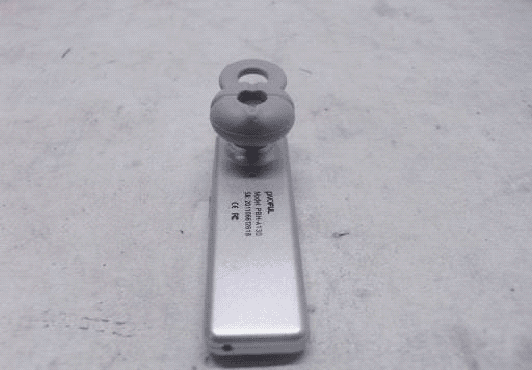
Click to zoom
Application Details
- Equipment Class
- DXX - Part 15 Low Power Communication Device Transmitter
- Date of Grant
- Sep 05, 2011
- Application Purpose
- Original Equipment
- Date of Application
- Sep 05, 2011
- Equipment Note
- BLUETOOTH HEADSET
- Frequency Range
- 2402.00000000 - 2480.00000000
- Company
- CARIT INTERNATIONAL LIMITED
- Country
- China
Documents & Files
Document Text
Text extracted from the exhibit documents filed with the FCC. Open a document above to read the original.
Users Manual
User Manual IntroductionBy using Bluetooth headset, you can make a call evenwhen you are travelling outside or having in the office. Youcan connect the headset to your mobile phone whichsupports the Bluetooth tec hnology. Before you use the product, you are suggested to read this manual carefully forbetter understanding about the product functions, ourservice support and warranty information.Product descriptionProduct: Mono BluetoothCharge: AC adapter DC 5V 150MA USB cable +5VBluetooth Version: Class 2.1Support agreement: HFP 1.5, HSP1.0The Bluetooth headset is fit for the 2.1 Bluetooth and theEDR standards. And it also supports the 1.1 and 1.5 handsfree modes. Please consult the producer to make sure if thisheadset is compatible to your devices.Pairing the headset1. Please make sure to put the two items within 1 M2. Make sure that the headset is power off, and push the button for a while until the red indicator is flashedalternated with the blue indicator; the headset is in the situation of pairing. 3. Open the “Bluetooth searching” or “add new device” toselect the headset from the list.4. Input the code”0000” to build the connection. Details on your mobile phone user manual. You don’t have torebuild the connection the next time you use. Some cellphones can connect automatically without code. When the pairing is completed, the headset will be on thefunction list of Bluetooth devices, you can check theequipment on the list.Charging the batteryThe build-in battery of the headset can not be disassembled.Please do not attempt to take the battery out, it may causedamage to the headset.For the first time you use headphones, please charge forthe headsets for 5 hours to achieve optimal battery capacityand life time.1 Connect the charge cable or USB cable to the headset.During charging, the red light will be on, when it goes out,the charging is completed. Normally, the charging time isabout 3 hours.2 Low-power AlarmWhen the power goes low, the headset will buzz withinterval, and please charge for the headset.Warm tips Before using the headset, please check out if thecharger is fit for the headset. Do not use any other types of charger, because itmay cause broken. When the charger is not using, please disconnectthe link and remove the charger from the powersupply. Over charging could shorter the life time of the battery. Without using for a long period, thebattery could discharge itself. Extremely cold or hot environment could shortenthe capacity and the life time. Please keep theheadset ideally in the condition of 15 °C to 25 °C . When the temperature is under 0 °C ,the performance of battery would be affected. Do not put the headset into water or fire. Turn headset onWhen the headset is power off, press and hold thefunctional button for a while and then the blue indicator willlight.Turn headset offWhen the headset is power on, press and hold thefunctional button for a while and then the indicator will off.Answer PhoneWhen the call comes in, the headset and phone will beep orring, push the functional key to answer the phone.End the CallDuring the call, push the functional key to hang up or youcan wait for the disconnecting performed by your party.Redialing for the Last CallUnder the standby condition, quickly push the functional keytwice to redial the last call.Refuse the CallWhen the call comes in, push the functional key for 2seconds to refuse the call.Voice dialWhen you push the functional button once, the mobilephone remains you that you can start the voice dialing, saythe name saved in your contacts , it will dial automatically. Ps. Make sure that your mobile phone support the voice dialing function.Volume adjustmentDuring call, shortly push volume (+) to increase the volumeDuring call, shortly push volume (-) to decrease the volumeNote: If Bluetooth headset don’t have the volume button,please adjust your mobile phone the volume.Warm tips : To protect your hearing, please set the volume on the safety level.All the functions above are only fit to Bluetooth headsetwhich supports the Bluetooth hands free function. Differentbrands or different menus may cause different usingmethods. Please check your manual of your mobile phone.FAQ: 1. What is the working distance of the Bluetooth headset? Answer : 30 inches (or 10 meters) 2. Is the Bluetooth headset fit for cordless telephone?Answer : the Bluetooth headset is not fit for cordless telephone.3. Is the Bluetooth headset fit for PC or PDA?Answer : It only fit for devices which support the Bluetooth function and Bluetooth standard above.4. Will the Bluetooth headset be disturbed?Answer : Cordless telephone or wireless internet device may cause disturbs with some sound. Put theearphone away from these devices to avoid disturb.5. Will the Bluetooth headset cause interference to the car devices, broadcast or computers? Answer : The power of Bluetooth headset is lower than normal mobile phone, and it only can send the globalstandard signs.6. Will the other Bluetooth users hear my call? Answer : It’s the private connection between your headset and device. It can not be monitored by thirdparty. The sign it send is much lower than normalmobile phones.7. How to maintain the Bluetooth headset?Answer : Clean the earphone by little humid clean soft cloth.8. Why the Bluetooth headset disconnect during using occasionally? Answer : Out of efficient distance or low voltage may cause the earphone out of connection. Elimination of breakIf you can’t connect the earphone and the device, pleaseperform the steps following: Make sure the headset has been charged; theearphone is power on and paired with the device. Make sure the Bluetooth function of device hasstarted up. Make sure the distance between earphone anddevice is within 10 meters and there are nobarriers between them. If all these steps can not solve your problem, please chargeit and take out the battery of your cell phone.Product Maintains Switch off the earphone before you put it intopocket…
Text truncated - open the document above for the full version.
Cover Letter(s)
CARIT INTERNATIONAL LIMITED FCC ID: ZA4-A130 POWEROF ATTORNEY September 06, 2011 Federal Communications Commission Authorization and Evaluation Division 7435 Oakland Mills Road Columbia, MD 21046 To Whom It May Concern: We, CARIT INTERNATIONAL LIMITED, hereby authorizeMost Technology Service Co., Ltd.(Terry YANG/ Manager) on our behalf, to apply to the Federal Communications Commission on our equipment. Any and all acts carried out byMost Technology Service Co., Ltd.(Terry YANG/ Manager) on our behalf shall have the same effect as acts of our own. This authorization expires onSeptember 30, 2011. This is to advise that we are in full compliance with the Anti-Drug Abuse Act. We, Shenzhen Afoundry Electronic Co., Ltd. are not subject to a denial of federal benefits pursuant to Section 5301 of the Anti-Drug Act of 1988, 21 USC853a, and no party to the application is subject to a denial of federal benefits pursuant to that section. Comon Cai (Manager) CARIT INTERNATIONAL LIMITED September 06, 2011
External Photos
FRONT VIEW OF SAMPLE BACK VIEW OF SAMPLE LEFT VIEW OF SAMPLE RIGHT VIEW OF SAMPLE PHOTO OF POWER SUPPLY
Internal Photos
INTERNAL PHOTO OF SAMPLE - 1 INTERNAL PHOTO OF SAMPLE -2 INTERNAL PHOTO OF SAMPLE -3 INTERNAL PHOTO OF POWER SUPPLY-1 INTERNAL PHOTO OF POWER SUPPLY-2
Operational Description
Operation Deseription ProductBluetooth headset Power supplyDC5.0Vfor USB port Frequency range2402~2480MHZ ModulationGFSK Channel Number79 Maximum power0~4dBm
Parts List/Tune Up Info
Shenzhen Carit Manufacture Co. , Ltd PBH-A118 Bluetooth BOM Model:PBH-A118 revision: 1/A product Name:Bluetooth ordinal article nu mber description specifi cations Quantity unit 1 PBH-A118 V1.0 0PCS 2 2129A118011C0 PBH-A118 PCBA V1.0 1PCS 3 4-B341-A118-20-R0 PCB PBH-A118 V2.0/FR-4/37.5*13MM/16PCS/0.05 1PCS 4 4-M100-4010-00-00 MIC 10mm IM4010L-45C108C33 40*15 1PCS 5 4-M200-0040-00-00 SPK ¢10 110db±3db 40MM 1PCS 6 4-I43V-7060-00-00 BAT 401120 60MAH 20mm×0.5mm 1PCS 7 4-JH05-0200-00-00 DC 2.0MM 0.6MM 1PCS 8 2129A118021W1 PBH-A118 charger 5.2V 400MAH 2.0 1PCS 9 2129A118081W1 PBH-A118 Color box 350g 319*310mm Logo UV 1PCS 10 2129A118091W1 PBH-A118 specification 210*143mm 105g 1PCS 11 3-459-0001 A128 Carton K=A 350*280*230mm 1PCS 12 2129A118031W0 PBH-A118 top cover A118 webpage ABS+PC UV 1PCS 13 2129A118041W0 PBH-A118 bot cover A118 webpage ABS+PC UV 1PCS 14 2129A118051W0 PBH-A118 SPK cover A118 webpage ABS+PC UV 1PCS 15 2129A118061W0 PBH-A118 key cover A118 webpage ABS+PC UV 1PCS 16 2129A118071W0 PBH-A118 led cover A118 Transparent webpage ABS920 1PCS 17 2129A128061W0 A128 lab PE Φ 27mm 1PCS 18 3-407-0002 A128 certification 45*45mm 157g 1PCS 19 3-402-0029 Year, Month, Day YMD lab Φ6mm 1PCS 20 3-357-0013 A128 spk sleeve pp 50 1PCS 21 911801301 screw KA1.8*1.0*3.0 MM 2PCS 22 911545301 screw PA1.5*4.5MM 1PCS Shenzhen Carit Manufacture Co. , Ltd PBH-A118 Bluetooth BOM Model:PBH-A118 revision: 1/A product Name:Bluetooth ordinal article nu mber description specifi cations Quantity unit 23 2129A118101W0 PBH-A118 sponge 7.0*1.7*0.1mm 1PCS 24 2129A118111W0 PBH-A118 EVA sponge 2.2*8.0*3.0mm 1PCS 25 2129128C021W0 A128C Capsule 0.5g PVC 256*168mm 1PCS 26 2129A118131W0 PBH-A118 Capsule bot 0.6g PS 105*167*43mm 1PCS 27 4-CC35-105P-55-00 CAP 105P ±20% 0603 C12、C15 2PCS 28 4-CC25-104P-55-00 CAP 104P±20% 16V 0402 C17 1PCS 29 4-L220-05N6-D0-00 inductance 5.6nH ±1% 0402 C19 1PCS 30 4-CC25-105P-55-00 CAP 105P ±20% 16V 0402 C20、C11、C14 3PCS 31 4-CC25-0223-35-00 CAP 22nF ±5% 0402 C3、C1 2PCS 32 4-CC35-106P-55-00 CAP 106P ±20% 16V 0603 C7、C6 2PCS 33 4-CC25-010P-35-00 CAP 10P 16V ±5% 0402 C8、C10 2PCS 34 4-CC35-475P-45-00 CAP 475P 10V ±10% 0603 C9、C18 2PCS 35 4-L220-02N2-J0-00 inductance 2.2nH ±5% 0402 L1 1PCS 36 4-DED0-0000-R0-00 LED 红灯 R-LED 0603A LED2 1PCS 37 4-DED0-0000-SB-00 LDE 蓝灯 高亮 LED-SB 0603 LED3 1PCS 38 4-RS21-01K5-J0-00 RESE 1.5K ±5% 0402 R1 1PCS 39 4-RS21-02K7-J0-00 RESE 2.7K ±5% 0402 R2 1PCS 40 4-RS21-04K7-J0-00 RESE 4.7K ±5% 0402 R3 1PCS 41 4-RS21-0000-J0-00 RESE OR ±5% 0402 R4 1PCS 42 4-RS31-001R-F0-00 RESE 1R ±1% 0603 R5 1PCS 43 4-KT22-1201-00-00 switch IT-1201 SW1 1PCS 44 4-USSC-1632-00-QO IC ISSC1632N-213 QFN48 U1 1PCS 45 4-UHT2-4LC0-00-B0 IC HT24LC08 TSSOP8 U2 1PCS 46 4-XC01-016M-00-20 crystal 16MHz 3225 40Ω ±10PPM 9PF X2 1PCS
Schematics
is1632.sch-1 - Thu Sep 10 09:36:51 2009
Test Report
FCC 47 CFR PART 15 SUBPART C TEST REPORT For Applicant: CARIT INTERNATIONAL LIMITED Address: 2/F, Building D, Area E, YingTai Industrial Zone, Baoan District, Shenzhen, Guangdong, China 518109 Product Name: Bluetooth Headset Model Name: A130, A138, CH33 Brand Name: N/A FCC ID: ZA4-A130 Report No.: MOST110808F2 Date of Issue: August. 25, 2011 Issued by:Most Technology Service Co., Ltd. Address: No.5, Langshan 2nd Road, North District, Hi-tech Industrial Park, Nanshan, Shenzhen, Guangdong, China Tel:86-755-8617 0306 Fax:86-755-8617 0310 The report consists 35 pages in total. It may be duplicated completely for legal use with the approval of the applicant. It should not be reproduced except in full, without the written approval of our laboratory. The client should not use it to claim product endorsement by MOST. The test results in the report only apply to the tested sample. The test report shall be invalid without all the signatures of testing engineers, reviewer and approver. FCC ID: ZA4-A130Report No.: MOST110808F2 Page 2 of 35 TABLE OF CONTENTS 1.VERIFICATION OF CONFORMITY...........................................................................................................................3 2. GENERAL INFORMATION............................................................................................................................................4 2.1 Product Information......................................................................................................................................................4 2.2 Objective........................................................................................................................................................................5 2.3 Test Standards and Results........................................................................................................................................5 2.4 Environmental Conditions...........................................................................................................................................5 3. TEST FACILITY...............................................................................................................................................................6 3.1TEST FACILITY.............................................................................................................................................................6 3.2 GENERAL TEST PROCEDURES..............................................................................................................................6 3.3 FCC PART 15.205 RESTRICTED BANDS OF OPERATIONS.............................................................................7 4. SETUP OF EQUIPMENT UNDER TEST....................................................................................................................8 4.1 SUPPORT EQUIPMENT.............................................................................................................................................8 4.2 TEST EQUIPMENT LIST.............................................................................................................................................9 5. 47 CFR Part 15C 15.249 Requirements...................................................................................................................10 5.1 SPURIOUS EMISSION TEST..................................................................................................................................10 5.1.1 REQUIREMENT......................................................................................................................................................10 5.1.2 TEST DESCRIPTION.............................................................................................................................................11 5.1.3 TEST DESCRIPTION.............................................................................................................................................12 5.1.4 TEST RESULT.........................................................................................................................................................13 5.2 BAND EDGE...............................................................................................................................................................20 5.2.1 REQUIREMENT......................................................................................................................................................20 5.2.2 TEST DESCRIPTION.............................................................................................................................................20 5.2.3TEST RESULT..........................................................................................................................................................20 5.3 LINE CONDUCTED EMISSION TEST....................................................................................................................23 5.3.1. LIMITS OF LINE CONDUCTED EMISSION TEST...........................................................................................23 5.3.2. BLOCK DIAGRAM OF TEST SETUP.................................................................................................................23 5.3.3. PRELIMINARY PROCEDURE OF LINE CONDUCTED EMISSION TEST..................................................24 5.3.4. FINAL PROCEDURE OF LINE CONDUCTED EMISSION TEST..................................................................24 5.3.5. TEST RESULT OF LINE CONDUCTED EMISSION TEST.............................................................................25 APPENDIX 1......................................................................................................................................................................27 PHOTOGRAPHS OF TEST SETUP..............................................................................................................................…
Text truncated - open the document above for the full version.
Test Setup Photos
FCC ID: ZA4-A130Report No.: MOST110808F2 Page 28 of 35 CE TEST SETUP RE TEST SETUP FCC ID: ZA4-A130Report No.: MOST110808F2 Page 29 of 35
Contact Information
Applicant
Comon Cai(Manager)
Test Firm
Most Technology Service Co., Ltd.Mark Wen
Technical Specifications
| # | Rule Parts | Frequency Range | Power Output |
|---|---|---|---|
| 1 | 15C | 2.40 GHz - 2.48 GHz | - |
Other Applications from CARIT INTERNATIONAL LIMITED
ZA4-A118
Aug 08, 2011BLUETOOTH HEADSET-BLUETOOTH PORTION
Equipment Class
DXX - Part 15 Low Power Communication Device Transmitter
ZA4-A128
Mar 27, 2011Bluetooth Headset
Equipment Class
DSS - Part 15 Spread Spectrum Transmitter