ZDRMP436WCDMA SMART PHONE
Matsunichi Digital Development (Shenzhen) Co., Ltd.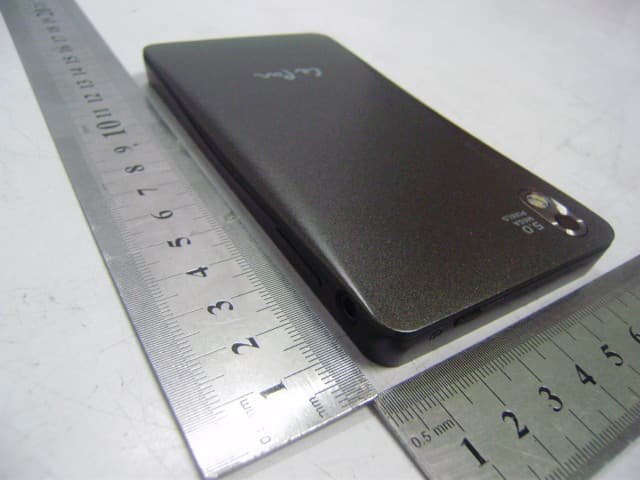
Click to zoom
Application Details
- Equipment Class
- JBP - Part 15 Class B Computing Device Peripheral
- Date of Grant
- Apr 26, 2012
- Application Purpose
- Original Equipment
- Date of Application
- Apr 26, 2012
- Equipment Note
- WCDMA SMART PHONE
- Country
- China
Documents & Files
Document Text
Text extracted from the exhibit documents filed with the FCC. Open a document above to read the original.
Users Manual
Basic Knowledge Assembly Smart Phone Overview Ear-speaker Front Camera lens Home Button Return Button Search Button Menu Button Connector for charger / mini USB cable Touch Panel Speaker Microphone Headset Jack Volume Button Proximity Sensor Light Sensor Power Button Main Camera lens Flash LED Strap Hole Rear Cover Turning On the Phone To turn on the phone Press and hold the power button on the top of the phone until the phone vibrates. It may take a while for the phone to start up. If the screen goes dark, press the power button briefly to activate it. To unlock the screen, drag to the right across the screen. Press and hold the power button until the options menu opens. In the options menu, tap Power off. Then tap OK. It may take a while for the phone to shut down. To Turn off the phone To unlock the screen Using These Buttons Using the Touch Screen Insert the tip of your finger firmly into the opening on the bottom side of the phone, between the phone and the rear cover. Then lift up the cover slowly but firmly. Remove the rear cover, then insert the SIM card and the memory card separately in slots and and place the battery according to the electrode orientation. 1 2 Insert the rear cover after the battery was placed. : Open a list of options available in the current screen or application. : Go to the Home screen; Press and hold it to open a window showing your recently used applications. : Open Google search. : Go back to the previous screen. To zoom the screen, you can tap the buttons / when they are available. You may have to drag the screen ( in any direction ) to make the zoom icons appear. To zoom the screen, you can also place two fingers on the screen at once and pinch them together ( to zoom out ) or spread them apart ( to zoom in ). -+ Zooming Scrolling To scroll, move your finger up or down on the screen. You may also need to scroll to the sides on some web pages. To scroll more quickly, flick your finger in the direction you want to go on the screen. You can wait for the scrolling movement to stop by itself, or you can stop it immediately by tapping the screen. Le Pan Smart Phone MP436 Quick Start Guide Getting Started Home screen Connecting to NetworkCalling 1 Tap Launcher icon → Settings → Wireless & Networks →tap Wi-Fi to open. The device scans for available wireless networks. 2 Tap Wi-Fi settings. The names and security settings of discovered Wi-Fi networks will be displayed in the Wi-Fi networks list. 3 Slide and touch the name of the network that you would like to connect to. 4 Enter a password if required, then tap Connect to connect to the Wi-Fi network. Note: When your device is connected to a wireless network, the Wi-Fi icon appears in the status bar to indicate the signal strength. To connect to Wi-Fi Network 1 Tap Launcher icon → Settings → Wireless & Networks →tap Mobile network. 2 Select Data enabled, you can use Mobile network now. Note: To use mobile network, you should insert a SIM card first. To connect to Mobile network For detailed instruction about how to operate the phone, please refer to the Extended User's Guide which save on the Micro SD card, you can find it in File Manager. Hotline: 1-855-537-2672 More support at: www.lepantab.com 1 From the Home screen, tap . 2 Dial the number on the phone pad. 3 Tap to call. To delete a number, tap . Tap . To end a call 1 From the Home screen, tap , then find and tap Messaging. 2 Tap New message at the top of the screen. 3 Tap the recipient's number in the above box or select recipient by tapping the icon . 4 Tap in the bottom box to compose the message. 5 To send the message, tap Send. Note: If you exit a message before sending, it gets saved as a draft. The conversation gets tagged with the word Draft. Messaging Press . Flick right or left. 1 Press to open your Home screen. 2 Touch and hold an item until it magnifies and the phone vibrates then drag it to . The status bar at the top of your screen shows what's going on in your phone. Drag the status bar downwards. Drag the tab at the bottom of the Notification panel upward or press . To go to the Home screen To browse the Home screens To delete an item from your Home screen Status and notifications To open the Notification panel To close the Notification panel 封底 80G双铜,四色双面印刷 折叠后尺寸:70X110mm 70mm 1 1 0 m m All rights reserved. FCC RF Exposure Information and Statement The SAR limit of USA (FCC) is 1.6 W/kg averaged over one gram of tissue. Device types MP436 (FCC ID: ZDRMP436) has also been tested against this SAR limit. The highest SAR value reported under this standard during product certification for use at the ear is 0.466W/kg and when properly worn on the body is 1.18W/kg. This device was tested for typical body-worn operations with the back of the handset kept 1.5cm from the body. To maintain compliance with FCC RF exposure requirements, use accessories that maintain a 1.5cm separation distance between the user's body and the back of the handset. The use of belt clips, holsters and similar accessories should not contain metallic components in its assembly. The use of accessories that do not satisfy these requirements may not comply with FCC RF exposure requirements, and should be avoided. FCC WARNING This device complies with Part 15 of the FCC Rules. Operation is subject to the following two conditions: (1) this device may not cause harmful interference, and (2) this device must accept any interference received, including interference that may cause undesired operation. NOTE 1: This equipment has been tested and found to comply with the limits for a Class B digital device, pursuant to part 15 of the FCC Rules. These limits are designed to provide reasonable protection against harmful interference in a residential installation. This equipment generates, uses and can radiate radio frequency energy and, if not installed and used in accordance with the instructions, may cause harmful interference to radio communications. However, there is no guarantee that …
Text truncated - open the document above for the full version.
External Photos
Matsunichi Digital Development (Shenzhen) Co., Ltd Model: MP436 REPORT NO.: STR12038238I-1 FCC PART 22H&24 EXHIBIT 2 - EUT EXTERNAL PHOTOGRAPHS EUT View 1 EUT View 2 Matsunichi Digital Development (Shenzhen) Co., Ltd Model: MP436 REPORT NO.: STR12038238I-1 FCC PART 22H&24 EUT View 3
ID Label/Location Info
Matsunichi Digital Development (Shenzhen) Co., Ltd Model: MP436 REPORT NO.: STR12038238I-1 FCC PART 22H&24 EXHIBIT 1- PRODUCT LABELING Proposed FCC ID Label Format FCC ID: ZDRMP436 Specifications : Text is Black in color and justified. Labels are printed in indelible ink on permanent adhesive silk-screened onto the EUT or shall be affixed at a conspicuous location on the EUT. Proposed Label Location on EUT FCC ID Label Location
ID Label/Location Info
Matsunichi Digital Development (Shenzhen) Co., Ltd Model: MP436 REPORT NO.: STR12038238I-1 FCC PART 22H&24 EXHIBIT 1- PRODUCT LABELING Proposed FCC ID Label Format FCC ID: ZDRMP436 Specifications : Text is Black in color and justified. Labels are printed in indelible ink on permanent adhesive silk-screened onto the EUT or shall be affixed at a conspicuous location on the EUT. Proposed Label Location on EUT FCC ID Label Location
Internal Photos
Matsunichi Digital Development (Shenzhen) Co., Ltd Model: MP436 REPORT NO.: STR12038238I-1 FCC PART 22H&24 EXHIBIT 3 - EUT INTERNAL PHOTOGRAPHS EUT Housing and Board View 1 EUT Housing and Board View 2 Matsunichi Digital Development (Shenzhen) Co., Ltd Model: MP436 REPORT NO.: STR12038238I-1 FCC PART 22H&24 EUT Housing and Board View 3 EUT Housing and Board View 4 Matsunichi Digital Development (Shenzhen) Co., Ltd Model: MP436 REPORT NO.: STR12038238I-1 FCC PART 22H&24 Solder Board-Component View 1 Solder Board-Component View 2
Parts List/Tune Up Info
Tune up procedure Tune up procedure shall be over the power range or at specific operating power levels. 1. It must provide an operational voltage (3.4 ~ 4.2V DC) to turn on the device and on one certain channel in service mode by means of company proprietary software. 2. Base station simulator (Agilent 8960) measures the 2G/3G device specific RF characteristics. 3. The maximum gains of each individual device are adjusted until the target value met. z For GSM 850 band: PCL = 5, PWR = 33 ± 1 dBm z For PCS 1900 band: PCL = 5, PWR = 30 ± 1 dBm z For WCDMA Band II 850: PWR = 24 ± 1 dBm z For WCDMA Band V: PWR = 24 ± 1 dBm z For Wi-Fi PWR = 13 ± 1 dBm z For BLUETOOTH PWR = ‐6 ‐ 4 dBm Then these appropriate gain settings are stored in each device individually. The user has no possibility to change these settings later on, and during manufacturing each device will be individual calibrated. The measurement is done in fully calibrated setup, which is based on a Agilent 8960 base station simulator. Furthermore, the highest power level is verified afterwards in a call measurement on three channels (low, middle and high).
Test Report
Matsunichi Digital Development (Shenzhen) Co., Ltd Model: MP436 REPORT NO.: STR12038238I-4 PAGE 1 OF 17 FCC PART 15B FCC PART 15B MEASUREMENT AND TEST REPORT FOR Matsunichi Digital Development (Shenzhen) Co., Ltd F/22, Matsunichi Building, No.9996, Shennan Boulevard, Nanshan District, Shenzhen, China FCC ID: ZDRMP436 Report Concerns: Original Report Equipment Type: WCDMA Smart Phone Model: MP436 Report No.: STR12038238I-4 Test Date: 2012-03-29 to 2012-04-23 Issue Date: 2012-04-24 Tested By: Silin Chen / Engineer Reviewed By: Lahm Peng / EMC Manager Approved & Authorized By: Jandy so / PSQ Manager Prepared By: SEM.Test Compliance Service Co., Ltd 3/F, Jinbao Commerce Building, Xin'an Fanshen Road, Bao'an District, Shenzhen, P.R.C.(518101) Tel.: +86-755-33663308 Fax.: +86-755-33663309 Website: www.semtest.com.cn Note: This test report is limited to the above client company and the product model only. It may not be duplicated without prior permitted by SEM.Test Compliance Service Co., Ltd . Matsunichi Digital Development (Shenzhen) Co., Ltd Model: MP436 REPORT NO.: STR12038238I-4 PAGE 2 OF 17 FCC PART 15B TABLE OF CONTENTS 1. GENERAL INFORMATION ...................................................................................................................................3 1.1 PRODUCT DESCRIPTION FOR EQUIPMENT UNDER TEST (EUT)...............................................................................3 1.2 TEST STANDARDS...................................................................................................................................................3 1.3 TEST METHODOLOGY.............................................................................................................................................4 1.4 TEST FACILITY.......................................................................................................................................................4 1.5 EUT EXERCISE SOFTWARE....................................................................................................................................4 1.6 ACCESSORIES EQUIPMENT LIST AND DETAILS.......................................................................................................4 1.7 EUT CABLE LIST AND DETAILS.............................................................................................................................4 2. SUMMARY OF TEST RESULTS ...........................................................................................................................5 3. §15.107 (A)- CONDUCTED EMISSION .................................................................................................................6 3.1 MEASUREMENT UNCERTAINTY..............................................................................................................................6 3.2 TEST EQUIPMENT LIST AND DETAILS.....................................................................................................................6 3.3 TEST PROCEDURE...................................................................................................................................................6 3.4 BASIC TEST SETUP BLOCK DIAGRAM.....................................................................................................................6 3.5 ENVIRONMENTAL CONDITIONS..............................................................................................................................7 3.6 TEST RECEIVER SETUP...........................................................................................................................................7 3.7 SUMMARY OF TEST RESULTS/PLOTS......................................................................................................................7 3.8 CONDUCTED EMISSIONS TEST DATA......................................................................................................................7 4. §15.109(A)- RADIATED EMISSION ....................................................................................................................10 4.1 MEASUREMENT UNCERTAINTY............................................................................................................................10 4.2 TEST EQUIPMENT LIST AND DETAILS...................................................................................................................10 4.3 TEST PROCEDURE.................................................................................................................................................10 4.5 CORRECTED AMPLITUDE & MARGIN CALCULATION............................................................................................11 4.6 ENVIRONMENTAL CONDITIONS............................................................................................................................11 4.7 SUMMARY OF TEST RESULTS/PLOTS....................................................................................................................11 Matsunichi Digital Development (Shenzhen) Co., Ltd Model: MP436 REPORT NO.: STR12038238I-4 PAGE 3 OF 17 FCC PART 15B 1. GENERAL INFORMATION 1.1 Product Description for Equipment Under Test (EUT) Client Information Applicant: Matsunichi Digital Development (Shenzhen) Co., Ltd Address of applicant: F/22, Matsunichi Building, No.9996, Shennan Boulevard, Nanshan District, Shenzhen, China Manufacturer 1: Matsunichi Digital Development (Shenzhen) Co., Ltd Address of manufacturer: No.5, KeJi Road, PingShan Industrial Estate, PinShan New District, Shenzhen, China Manufacturer 2: Guangzhou Singulargold Electronics Co., Ltd Address of manufacturer: No.6, Lianhua yan Road, Science City, Guangzhou Hi-Tech Industrial Development Zone, Guangzhou, China General Description of E.U.T Items Description EUT Description: WCDMA Smart Phone Trade Name: Matsunichi / Le Pan Model No.: MP436 Power Supply: Input 100-240V/50/60Hz Output 5V DC Adaptor DC 3.7V Battery Adaptor Model: KSAS0060500…
Text truncated - open the document above for the full version.
Test Setup Photos
Matsunichi Digital Development (Shenzhen) Co., Ltd Model: MP436 REPORT NO.: STR12038238I-4 FCC PART 15B EXHIBIT 4 - TEST SETUP PHOTOGRAPHS Conducted Emission Test Setup View Radiation Emission Test Setup (Below 30MHz) Matsunichi Digital Development (Shenzhen) Co., Ltd Model: MP436 REPORT NO.: STR12038238I-4 FCC PART 15B Radiation Emission Test Setup (30MHz to 1GHz) Test Mode: Charging & Playing Test Mode: Downloading Matsunichi Digital Development (Shenzhen) Co., Ltd Model: MP436 REPORT NO.: STR12038238I-4 FCC PART 15B Radiation Emission Test Setup (Above 1GHz)
Contact Information
Applicant
Hongtao Chen(Engineer)
Test Firm
SEM.Test Compliance Service Co., Ltd.Jandy So
Technical Specifications
| # | Rule Parts | Frequency Range | Power Output |
|---|---|---|---|
| 1 | 15B | - | - |
Other Applications from Matsunichi Digital Development (Shenzhen) Co., Ltd.
ZDRTC978
Jul 04, 2012TABLET PC
Equipment Class
DTS - Digital Transmission System
ZDRTC975
Mar 19, 2012TABLET PC
Equipment Class
DTS - Digital Transmission System
ZDRTC979
Nov 20, 2011TABLET PC
Equipment Class
DTS - Digital Transmission System
ZDRTC970
Apr 05, 2011MODE DE VIE
Equipment Class
DTS - Digital Transmission System