ZGAGX-7059MID
Gardex Electronics Co.,Ltd.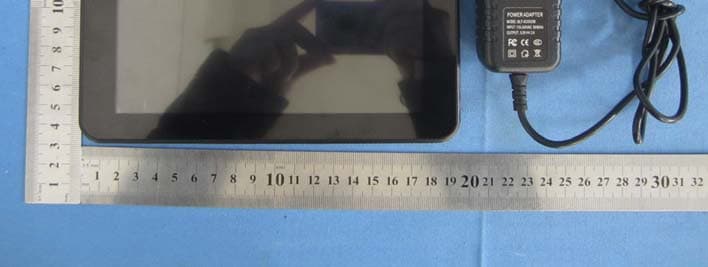
Click to zoom
Application Details
- Equipment Class
- DTS - Digital Transmission System
- Date of Grant
- Dec 11, 2013
- Application Purpose
- Original Equipment
- Date of Application
- Dec 11, 2013
- Equipment Note
- MID
- Frequency Range
- 2422.00000000 - 2452.00000000
- Company
- Gardex Electronics Co.,Ltd.
- Country
- China
Documents & Files
Document Text
Text extracted from the exhibit documents filed with the FCC. Open a document above to read the original.
Users Manual
1 USER MANUAL GX‐7059 2 Safety Precautions Read these safety instructions before using your device and store them for possible future reference. Always follow these basic safety precautions when using your Mobile device. This reduces the risk of fire, electric shock, and injury. ● Do not expose this product to rain or moisture. ● Keep the device out of direct sunlight and heat sources. ● Protect the power cord. Route power cords so that they are not likely to be walked on or pinched by items placed on or against them. Pay particular attention to the point where the cord attaches to the device. ● Only use the AC adapter included with the device. Using any other power adapter voids your warranty. ● Do not remove the cover. There are no user-serviceable parts inside. ● If the charger cord is damaged, have it repaired by the manufacturer, its service or a similarly qualified person in order to avoid any hazard. ● The charger is not intended for use by persons (including children) with reduced physical, sensory or mental capacity. Persons who have not read the manual, unless they have received explanations by a person responsible for their safety and supervision should not use this unit. ● Children should be monitored to ensure that they do not play with the charger. ● The charger should always be readily accessible. ● The device should not be exposed to dripping or splashing water. ● No objects filled with liquids such as vases shall be placed on the device. ● Always leave a minimum distance of 10 cm around the unit to ensure sufficient ventilation. ● Naked flame sources, such as candles, should not be placed on top of the device. ● The device is intended for use only in a temperate climate. ● CAUTION: Danger of explosion if battery is incorrectly replaced or not replaced by the same type or equivalent. ● The battery should not be exposed to excessive heat such as sunshine, fire or similar. ● Different types of batteries, new and used batteries should not be mixed. ● The battery must be installed according to the polarity. ● If the battery is worn, it must be removed from the product. ● The battery must be disposed of safely. Always use the collection bins provided (check with your dealer) to protect the environment. Clean your Device Treat the screen gently. To clean fingerprints or dust from the screen, we recommend using a soft, non- abrasive cloth such as a camera lens cloth. SWITCH OFF IN RESTRICTED AREAS Turn off the power when the useof the mobile device is not authorized or when it may cause interference or danger, for example; on board an aircraft, near medical equipment, fuel, chemicals or blasting sites. ROAD SAFETY COMES FIRST Check the current laws and regulations in the area where you drive, regarding the use of mobile devices such as this mobile device. • Do not hold this mobile device while driving • Concentratefully on driving • Radio Frequency (RF) can affect certain electronic systems in your car, such as the audio-stereo system or security equipment. • An airbag inflates with great force. Do not store the mobile device or any of its accessories in the area above the bag or in its deployment area. INTERFERENCE All wireless devices are susceptible to interference which can affect their performance. 3 AUTHORISED PERSONNEL Only qualified personnel are authorized to install or repair this product. ACCESSORIES Only use batteries, chargers and other accessories which are compatible for this device. Do not connect incompatible accesssories to the device. KEEP YOUR DEVICE DRY Your device is not water proof. Keep it dry. CHILDREN Keep the mobile device in a safe place out of the reach of children. Your mobile device contains small pieces which can present a choking hazard. Specification Display Type: 7 inch TFT panel Max Resolution: 800 x 480 Processor Type: Boxchip A13 Storage drive type: 4GB System RAM: 512M DDRIII Operating System: Android 4.0 Touch Panel: Resistant Touch Panel Wireless connection : 802.11b/g/n Built-in battery capacity: Li-polymer rechargeable battery 2500mAH Out-put: DC 5V---2A 1. Outlook Description 4 2. Power Button Usage Starting up:Long press the power button for 3 seconds. Power off:Long press the power buƩon for 3 seconds →click power off → click confirm Screen off and on :Short press power button to turn off or turn on screen Mandatory shutdown: If the device has no response, long press the power button for 6 seconds to perform mandatory power off Notice: In case of no necessary conditions, It's better not use mandatory power off. Power off should be performed normally according to the standard steps. 3.Desktop 3‐1 Introduction of Main Interface Press and hold the power button to boot up the machine, the screen after boot‐up is in a locked state, slide on unlock icon to unlock, then you will enter the main interface as shown below. Through this interface you can browse menu used recently, replace wallpaper, add widgets or program shortcut, open procedures or carry out other operations. 5 3‐1‐1.Status bar: tap on status bar at the lower right corner with finger, you can open notification bar to read prompt message, networking status, battery status, and check date and time. 3‐1‐2.Return button: tap with finger, you can return to the previous operation or exit the application program. 3‐1‐3. Main interface: tap main interface button to enter the main interface: ● Add: its function is to add small icons with a variety of functions or widgets, folders, wallpapers; you can delete icons on main interface by holding down the icon to be deleted, when there is X‐Remove icon appear, drag this icon directly to X for deletion ● File Manager: view all the procedures in this machine and uninstall programs; ● Wallpaper: in this menu, you can set up your favourite pictures as the background of the main interface. ● Search: enter Web page search waiting state, input website here for search. ● Setting: touch and directly enter the system setting menu interface. 3‐1‐4.Men…
Text truncated - open the document above for the full version.
Cover Letter(s)
Date: 2013-12-10 To: Federal Communications Commission 7435 Oakland Mills Road Columbia, MD FCC ID: ZGAGX-7059 To Whom It May Concern: This letter is to ascertain that Gardex Electronics Co., Ltd. Product MID has been the units used for conducting FCC compliance testing, the DoC part will be tested by FCC recognized test lab. If you have any question or concerns, pls. contact us. Sincerely, Company Officer: RD Engineer / Wei Ma Telephone Number: 13751190048 Email: [email protected]
Cover Letter(s)
Example of Agents letter (for TCB – TCB approval): Gardex Electronics Co., Ltd. Date 10/12/2013 TUV SUD BABT TCB Octagon House, Segensworth Road, Fareham, Hampshire, PO15 5RL Dear Sir or Madam, We, Gardex Electronics Co., Ltd. (address: No.0309 Bldg B, Marina Bay Center, Haixiu Rd, Baoan District Center, Shenzhen, China.), hereby authorize Jackson Long (Company name: Maxwell Interational Ltd. Address: Room 509, Hongfa center building, Baoan District, Shenzhen, Guangdong, China )to act as our agent in all matters relating to applications for equipment authorization, including the signing of all documents relating to these matters. This authorization expires on 10/12/2014 Yours sincerely, Company Officer: RD Engineer / Wei Ma Telephone Number: 13751190048 Email: [email protected]
Cover Letter(s)
Gardex Electronics Co., Ltd. Date 10/12/2013 TUV SUD BABT TCB Octagon House, Segensworth Road, Fareham, Hampshire, PO15 5RL Confidentiality Request FCC ID: ZGAGX-7059 Pursuant to Sections 0.457(d)(1)(ii) and 0.459 of the Commission’s Rules, Gardex Electronics Co., Ltd. hereby requests permanent confidential treatment of information accompanying this application as outlined below: Schematics Block Diagrams Operation Description The above materials contain trade secrets and proprietary information not customarily released to the public. The public disclosure of these matters might be harmful to the Applicant and provide unjustified benefits to its competitors. The Applicant understands that pursuant to Rule 0.457(d)(1)(ii), disclosure of this Application and all accompanying materials will not be made before the date of the Grant for this Application. Yours sincerely, Company Officer: RD Engineer / Wei Ma Telephone Number: 13751190048 Email: [email protected]
ID Label/Location Info
Label location
ID Label/Location Info
Label Length=10cm Width=2.5cm Product name: MID Model No.: UD-I7059 FCC ID: ZGAGX-7059 This device complies with part 15 of the FCC Rules. Operation is subject to the following two conditions: (1) This device may not cause harmful interference, and (2) this device must accept any interference received, including interference that may cause undesired operation
RF Exposure Info
Global United Technology Services Co., Ltd. 2nd Floor, Block No.2, Laodong Industrial Zone, Xixiang Road Baoan District, Shenzhen, China 518102 Telephone: +86 (0) 755 2779 8480 Fax: +86 (0) 755 2779 8960 Page 1 of 1 FCC ID: ZGAGX-7059 The device has a standalone transmission. According to KDB 447498 section 4.3.1, the 1-g SAR test exclusion thresholds at test separation distances≤ 50 mm are determined by: [(max. power of channel, including tune-up tolerance, mW)/(min. test separation distance, mm)]·[√f(GHz)] ≤ 3.0 The maximum tune-up limit power is 8.66dBm(7.345mW) @ 2.412GHz For the head and body SAR, use 5mm as the conservative minimum test separation distance, [(max. power of channel, including tune-up tolerance, mW)/(min. test separation distance, mm)]·[√f(GHz)] =2.32≤ 3.0 So standalone SAR measurements are not required for both head and body.
Test Report
Report No.: MWR1312002701 Address: Room 509, Hongfa center building, Baoan District, Shenzhen, Guangdong, China Telephone: +86 (0)755 2302 1970, Fax: +86 (0)755 2302 1970, E-mail:[email protected], Website: www.maxwell-lab.org FCC Report Product Description: MID Model No.: UD-I7059 FCC ID: ZGAGX-7059 Applicant: Gardex Electronics Co., Ltd. Address: No.0309 Bldg B, Marina Bay Center, Haixiu Rd, Baoan District Center, Shenzhen, China. Applicable standards: FCC Part 15 Subpart C Section 15.247:2012 Test Date:2 December ~ 9 Decmber, 2013 Issued Date:9 Decmber, 2013 Test Result:Complied Jackson Long Laboratory Manager The test result in this test report relate only to the tested samples in this report . This report shall not be reproduced except in full without the written approval of Maxwell Interational Ltd. Report No.: MWR1312002701 Page: 2 of 55 2 Version Version No. Date Description 00 9 Decmber, 2013 Original Prepared By: Date: 9 Decmber, 2013 Martin Ao Project Engineer Check By: Date: 9 Decmber, 2013 Dixon Hao Reviewer Report No.: MWR1312002701 Page: 3 of 55 3 Contents Page 1 COVER PAGE ...........................................................................................................................................1 2 VERSION .................................................................................................................................................. 2 3 CONTENTS .............................................................................................................................................. 3 4 TEST SUMMARY ..................................................................................................................................... 4 5 GENERAL INFORMATION ...................................................................................................................... 5 5.1 CLIENT INFORMATION......................................................................................................................... 5 5.2 GENERAL DESCRIPTION OF EUT......................................................................................................... 5 5.3 TEST MODE........................................................................................................................................ 6 5.4 TEST FACILITY.................................................................................................................................... 7 5.5 TEST LOCATION................................................................................................................................. 7 6 TEST INSTRUMENTS LIST ..................................................................................................................... 8 7 MEASUREMENT DATA AND TEST RESULTS...................................................................................... 9 7.1 ANTENNA REQUIREMENT:.................................................................................................................... 9 7.2 CONDUCTED EMISSIONS................................................................................................................... 10 7.3 CONDUCTED PEAK OUTPUT POWER.................................................................................................. 13 7.4 CHANNEL BANDWIDTH...................................................................................................................... 18 7.5 POWER SPECTRAL DENSITY............................................................................................................. 23 7.6 BAND EDGES.................................................................................................................................... 28 7.6.1 Conducted Emission Method ..................................................................................................... 28 7.6.2 Radiated Emission Method ........................................................................................................31 7.7 SPURIOUS EMISSION......................................................................................................................... 36 7.7.1 Conducted Emission Method ..................................................................................................... 36 7.7.2 Radiated Emission Method ........................................................................................................41 Report No.: MWR1312002701 Page: 4 of 55 4 Test Summary Test Item Section in CFR 47 Result Antenna requirement 15.203/15.247 (c) Complied AC Power Line Conducted Emission 15.207 Complied Conducted Peak Output Power 15.247 (b)(3) Complied Channel Bandwidth 15.247 (a)(2) Complied Power Spectral Density 15.247 (e) Complied Band Edge 15.247(d) Complied Spurious Emission 15.205/15.209 Complied Complied: The EUT has complied with the essential requirements in the standard. N/A: Not Applicable. Report No.: MWR1312002701 Page: 5 of 55 5 General Information 5.1 Client Information Applicant: Gardex Electronics Co., Ltd Address: No.0309 Bldg B, Marina Bay Center, Haixiu Rd, Baoan District Center, Shenzhen, China. Manufacturer: Gardex Electronics Co., Ltd Address: No.0309 Bldg B, Marina Bay Center, Haixiu Rd, Baoan District Center, Shenzhen, China. Factory: Gardex Electronics Co., Ltd Address: No.0309 Bldg B, Marina Bay Center, Haixiu Rd, Baoan District Center, Shenzhen, China. 5.2 General Description of EUT Product Name: MID Model No.: UD-I7059 WiFi Support Protocol: 802.11b/g/n(H20)/n(H40) Operation Frequency: 2412MHz~2462MHz (802.11b/802.11g/802.11n(H20)) 2422MHz~2452MHz (802.11n(H40)) Channel numbers: 11 for 802.11b/802.11g /802.11n(H20) 7 for 802.11(H40) Channel separation: 5MHz Modulation technology: (IEEE 802.11b) Direct Sequence Spread Spectrum (DSSS) Modulation technology: (IEEE 802.11g/802.11n) Orthogonal Frequency Division Multiplexing(OFDM) Antenna Type: Integral Antenna gain: 2dBi (declare by Applicant) Power supply: DC 3.7V Adapter information: Model No.: BLT-…
Text truncated - open the document above for the full version.
Test Setup Photos
Radiated Emission Conducted Emission
Contact Information
Applicant
Wei Ma(Manager)
Test Firm
Global United Technology Service Co., LtdRobinson Lo
Technical Specifications
| # | Rule Parts | Frequency Range | Power Output |
|---|---|---|---|
| 2 | 15C | 2.42 GHz - 2.45 GHz | 6.50 mW |
Other Applications from Gardex Electronics Co.,Ltd.

ZGAGX-7012
Jul 28, 2014MID
Equipment Class
DTS - Digital Transmission System
ZGAGX-9014
Jul 28, 2014MID
Equipment Class
DTS - Digital Transmission System