ZPF-WKS-1000K2.4GHz Wireless Keyboard
Shenzhen Eastech Co., Ltd.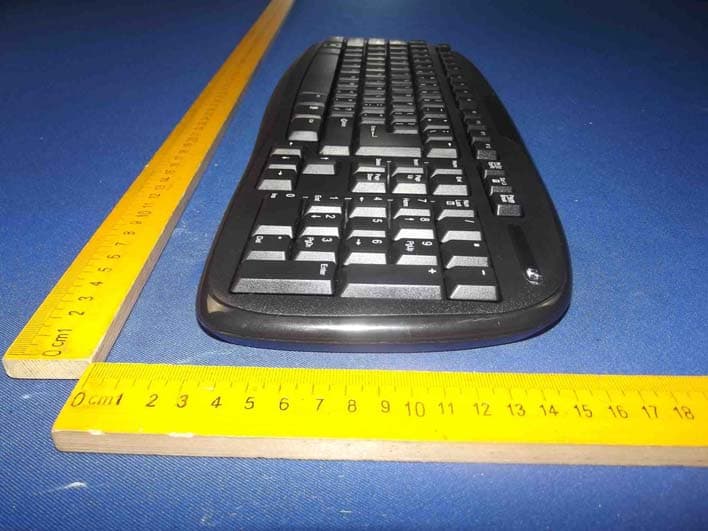
Click to zoom
Application Details
- Equipment Class
- DXT - Part 15 Low Power Transceiver, Rx Verified
- Date of Grant
- Apr 26, 2015
- Application Purpose
- Original Equipment
- Date of Application
- Apr 26, 2015
- Equipment Note
- 2.4GHz Wireless Keyboard
- Frequency Range
- 2408.00000000 - 2474.00000000
- Company
- Shenzhen Eastech Co., Ltd.
- Country
- China
Documents & Files
Document Text
Text extracted from the exhibit documents filed with the FCC. Open a document above to read the original.
Users Manual
- 1 - 2.4GHz wireless keyboard & Mouse Kit S-1000K ( 1 ) 2.4GHz WIRELESS OPTICAL MOUSE USER MANUAL COMPLIANCE WITH FCC REGULATIONS This device complies with Part 15 of the FCC Rules. Operation is subject to the following two conditions: (1) this device may not cause harmful interference, and (2) this device must accept any interference received, including interference that may cause undesired operation. PLEASE READ THIS USER MANUAL COMPLETELY BEFORE OPERATING THIS UNIT AND RETAIN THIS BOOKLET FOR FUTURE REFERENCE - 2 - This equipment has been tested and found to comply with the limits for a Class B digital device, pursuant to Part 15 of the FCC Rules. These limits are designed to provide reasonable protection against harmful interference in a residential installation. This equipment generates, uses and can radiate radio frequency energy and, if not installed and used in accordance with the instructions, may cause harmful interference to radio communications. However, there is no guarantee that interference will not occur in a particular installation. If this equipment does cause harmful interference to radio or television reception, which can be determined by turning the equipment off and on, the user is encouraged to try to correct the interference by one or more of the following measures: - Reorient or relocate the receiving antenna. - Increase the separation between the equipment and receiver. - Connect the equipment into an outlet on a circuit different from that to which the receiver is connected. - Consult the dealer or an experienced radio/TV technician for help. CAUTION:Changes or modifications not expressly approved by the party responsible for compliance could void the user’s authority to operate the equipment. FUNCTIONS AND CONTROLS ItemDescription 1Left Button 2Scroll Wheel with Button (Middle Button): for Windows based PC only 3Right Button 4PowerSwitch - ON: turns Mouse on. - OFF: turns Mouse off (recommended when not in use). 5Optical Sensor System: red light will be emitted when power is turned on 6Battery Compartment: hidden underneath cover and holds 2 x AAA batteries (not included) 7USB Receiver Storage Compartment: hidden underneath Battery Compartment Cover. Always store the USB Receiver in this compartment when not in use. 8USB Receiver GETTING STARTED - 3 - Installing/Replacing Batteries This Wireless Optical Mouse operates on two ‘AAA' (UM-4) siz e batteries (not included). 1. Slide Power Switch to “OFF”. 2. Remove the battery compartment cover located at the botto m cabinet. 3. Remove all old batteries at the same time (if any). 4. Following the polarity diagram shown inside the batter y compartment, insert two fresh ‘AAA' (UM-4) size alkaline batteries or Ni-MH rechargeable batteries (not included). 5. Replace the battery compartment cover making sure it is securely closed. 6. Slide Power Switch to “ON” to use. IMPORTANT :Be sure that the batteries are installed correctly. Wrong polarity may damage the unit. 7. When the mouse response or cursor movement slows down noticeably, the batteries are becoming weak and need to be replaced. Please remove all the old batteries and replace with fresh good quality alkaline or NiMH batteries as soon as possible. WARNINGS! Batteries must be installed or replaced by an adult. The use of good quality alkaline batteries is recommended. Place batteries based on the polarity shown on the battery compartment. Only use the recommended type of batteries. Non rechargeable batteries are not to be recharged Rechargeable batteries are only to be charged under adult supervision Rechargeable batteries are to be removed before being charged. DO NOT mix different types of batteries together. DO NOT mix new and old batteries together. If you do not use the product for an extended period of time, we recommend that you take out the batteries. Remove exhausted batteries from the product. Battery leak may cause damage. DO NOT short circuit the terminals of the battery. DO NOT throw batteries into an open flame. They may explode. Keep the packaging for future reference as it contains important information Installing of the USB Receiver (Compatible with OS: Windows 2000/XP/Vista/7 and Mac OS X 10.5 – 10.6) 1. Remove the Battery Compartment Cover and carefully slide out the US B Receiver from its designated compartment adjacent to the battery compartment. 2. Insert the USB Receiver of the Optical Mouse directly into a USB port (USB 1.1-3.0) of your computer running on either Windows or Mac OS. 3. Your USB Receiver will be automatically installed by the plug and play function of the Windows or Mac OS. Note:There is no need to remove the USB Receiver from the USB port of your computer even after turning off unless you need to free up the USB port for other device. OPERATING INSTRUCTIONS Left Button Use this button to select an item from a pop up or pull down menu or to click a function button. Right Button Use this button to access the quick menu of a related function. - 4 - Scroll Wheel with Button (Middle Button) – Middle Button for Windows Only 1. Under normal operation, rotate the Scroll Wheel for fast browsing up/down in an internet browser and in other document files. 2. For Windows users only: To enable smooth auto scrolling, press the Scroll Wheel Button. A double arrow icon, showing the anchor point, and a floating arrow icon, showing the current mouse position, will appear. To scroll up/down, move the mouse until the floating arrow icon becomes an up/down arrow. The farther away the floating arrow is from the anchor point, the faster th e scrolling speed. Press the Middle Button again to exit the auto scroll function when you have finished. Sleep Mode When the mouse is left idle for 8 minutes, it will enter sleep mode for battery power saving. Press the Left, Right or Scroll Wheel Button to wake up the Mouse and resume normal operation. Manual Pairing This product features auto ID pairing function. The USB Receiver …
Text truncated - open the document above for the full version.
Cover Letter(s)
SCS-F18: Project and Product Certification Representative Authorization Letter Page 1 of 2Rev 5.0 775 Montague Expressway Milpitas, CA 95035 Tel: 408-526-1188 Fax: 408-526-1088 Email: [email protected] Project and Product Certification Representative Authorization Letter Reason for Amendment (current / obsolete) Revision History Approved Date FromTo Initial Release (obsolete)1.01.0Nov-14-2006 Revised wording (obsolete)1.02.0Sept–25-2007 Updated company template (obsolete)2.03.0Jan-31-2012 Updated letter information (obsolete)3.04.0May-23-2014 Added FCC ID field (current)4.05.0Sept 16 2014
Cover Letter(s)
SCS-F19: Confidentiality Request LetterPage 1 of 2 Rev 4.0 775 Montague Expressway Milpitas, CA 95035 Tel: 408-526-1188 Fax: 408-526-1088 Email: [email protected] Confidentiality Request Letter Reason for Amendment (current / obsolete) Revision History Approved Date FromTo Initial Release (obsolete)1.01.0Nov-14-2006 Adding CFR 2.459 (obsolete)1.02.0August – 11 - 2008 Updated company template & Added text box (obsolete) 2.03.0Jan-31-2012 Added IC confidentiality letter form (current)3.04.0March-26-2015 SCS-F19: Confidentiality Request LetterPage 2 of 2 Rev 4.0 (Shenzhen Eastech Co., Ltd.) (2015-04-22) To: Federal Communications Commission Authorization and Evaluation Division 7435 Oakland Mills Road Columbia, MD Subject:Permanent Confidentiality Requestfor FCC ID:ZPF-WKS-1000K We hereby request confidential treatment of information accompanying this application as outlined below: -Bloc kDiagram - Schematics - Operational Description The above materials contain trade secrets andproprietary information not customarily released to the public. The public disclosure of these materials may be harmful to the applicant and provide unjustified benefits to its competitors. The applicant understands that pursuant to Section 0.457 & 0.459 of the Rules, disclosure of this application and all accompanying documentation will not be made before the date of the Grant for this application. Sincerely, Client’s signature Anny Xi / Sales Company Name: Shenzhen Eastech Co., Ltd. Address: Block A, Baizhushan Industrial Park, Shajing Street, Bao'an District, Shenzhen City, China Email: [email protected]
Cover Letter(s)
Declaration on model difference 产品差异声明 Page 1 of 1 We the undersigned hereby confirm that any of our production units bearing the following model numbers are identical in circuitry and electrical, mechanical and physical construction; the only differences are the Color and model no. for trading purpose. 我们在下面签名并据此确认:以下产品型号之间的差异仅为颜色及型号不同,其它设计完全相同。 Production name 产品名称 Trade name 商标 INPUTModel no. 型号 FCC ID 2.4GHz Wireless Keyboard N.A.DC 3.0V S-1000K, EK- 814W, EK- 815W, EK- 830W, EK- 838W, EK- 839W ZPF-WMS-1000K Confirmed by: Name in full:_ _Anny Xi__ ________Authorzed signature:__ ______ Position:_ Sales__ _____ Date: __2015-4-22____________ Company Name:__ Shenzhen Eastech Co., Ltd. _____________
External Photos
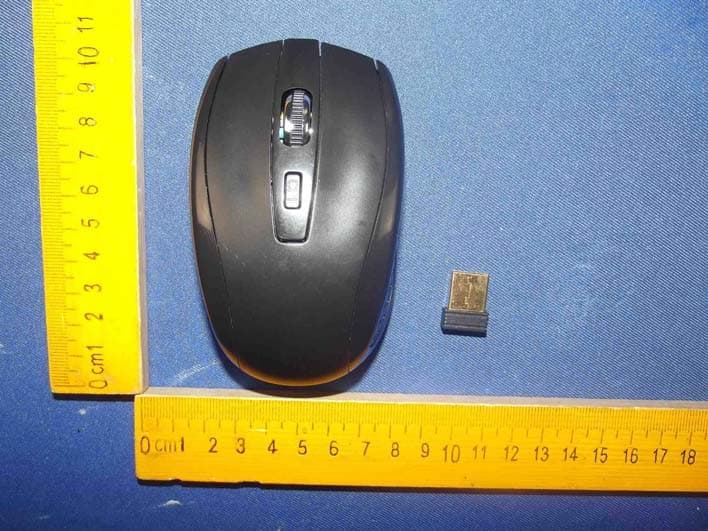
Figure 1 The EUT-Top View Figure 2 The EUT-Bottom View Figure 3 The EUT-Front View Figure 4 The EUT-Back View Figure 5 The EUT-Right View Figure 6 The EUT-Left View
ID Label/Location Info
Label Location On EUT
ID Label/Location Info
Product Name:2.4GHz Wireless Keyboard Model No.:S-1000K FCC ID:ZPF-WKS-1000K
Internal Photos
Figure 7 The EUT-Inside View Figure 8 PCB of the EUT-Front View Figure 9 PCB of the EUT-Back View Figure 10 PCB of the EUT-Module View Antenna
Test Report
ShenzhenAnbotekComplianceLaboratoryLimited FCCID: ZPF-WKS-1000KPage1 of 32 ReportNo. : R011504006E ShenzhenAnbotekComplianceLaboratoryLimited Tel:(86)755-26066544Fax:(86)755-26014772www.anbotek.com FCCTESTREPORT for ShenzhenEastechCo., Ltd. 2.4GHzWirelessKeyboard ModelNo.: S-1000K,EK-814W,EK-815W,EK-830W,EK-838W,EK-839W ReportNumber:R011504006E DateofTest:Apr.17~22,2015 DateofReport:Apr.22,2015 Preparedfor:ShenzhenEastechCo.,Ltd. Address:BlockA, BaizhushanIndustrialPark,ShajingStreet,Bao'an District,ShenzhenCity,China PreparedBy:ShenzhenAnbotekComplianceLaboratoryLimited Address:1/F.,Building1, SECIndustrialPark,No.0409QianhaiRoad, NanshanDistrict,Shenzhen,Guangdong,China Tel:(86)755-26066544 Fax:(86)755-26014772 ShenzhenAnbotekComplianceLaboratoryLimited FCCID: ZPF-WKS-1000KPage2 of 32 ReportNo. : R011504006E ShenzhenAnbotekComplianceLaboratoryLimited Tel:(86)755-26066544Fax:(86)755-26014772www.anbotek.com TABLEOF CONTENTS Description Page Test Report 1. GENERALINFORMATION......................................................................................................4 1.1. Descriptionof Device(EUT)................................................................................................................4 1.2. AuxiliaryEquipmentUsedduringTest ................................................................................................5 1.3. Descriptionof Test Facility..................................................................................................................5 1.4. MeasurementUncertainty.....................................................................................................................5 2. TESTPROCEDURE....................................................................................................................6 3. RADIATIONINTERFERENCE................................................................................................7 3.1 . Requirements(15.249,15.209):............................................................................................................7 3.2. Test Procedure......................................................................................................................................7 3.3. Test Results...........................................................................................................................................7 4. BANDEDGE................................................................................................................................13 4.1 . Requirements(15.249):.......................................................................................................................13 4.2. Test Procedure....................................................................................................................................13 4.3. Test Configuration:.............................................................................................................................13 4.4. Test Results.........................................................................................................................................14 5. OCCUPIEDBANDWIDTH......................................................................................................23 5.1 . Requirements:....................................................................................................................................23 5.2. Test SET-UP.......................................................................................................................................23 5.3 Test Equipment....................................................................................................................................23 5.4. Test Results.........................................................................................................................................23 6. ANTENNAAPPLICATION......................................................................................................26 6.1. Antennarequirement...........................................................................................................................26 6.2. Result..................................................................................................................................................26 7. PHOTOGRAPH.........................................................................................................................27 7.1. Photoof RadiationEmissionTest .......................................................................................................27 APPENDIXI (ExternalPhotos)(3 Pages) APPENDIXII (InternalPhotos)(2 Pages) ShenzhenAnbotekComplianceLaboratoryLimited FCCID: ZPF-WKS-1000KPage3 of 32 ReportNo. : R011504006E ShenzhenAnbotekComplianceLaboratoryLimited Tel:(86)755-26066544Fax:(86)755-26014772www.anbotek.com TESTREPORT Applicant: ShenzhenEastechCo., Ltd. Manufacturer: ShenzhenEastechCo., Ltd. EUT: 2.4GHzWirelessKeyboard ModelNo.: S-1000K,EK-814W,EK-815W,EK-830W,EK-838W,EK-839W SerialNo.: N.A . TradeMark: N.A. Rating: DC 3.0V MeasurementProcedureUsed: FCCPart15SubpartC, Paragraph15.207,15.249& 15.209 Thedevicedescribedaboveis testedby ShenzhenAnbotekComplianceLaboratory Limitedto determinethe maximumemissionlevelsemanatingfromthe deviceand the severelevelsof the devicecan endureand its performancecriterion.The measurement resultsare containedin this test reportand ShenzhenAnbotekComplianceLaboratory Limitedis assumedfull of responsibilityfor the accuracyand completenessof these measurements.Also,thisreportshowsthatthe EUT(EquipmentUnderTest)is technicallycompliantwiththe FCCPart 15 SubpartC requirements. Thisreportappliesto abovetestedsampleonlyand shallnot be reproducedin part without writtenapprovalof ShenzhenAnbotekComplianceLaboratoryLimited. DateofTest:Apr.17~22,2015 Preparedby: (TestedEngineer/KeboZhang) Reviewer: (ProjectManager/AmyDing) Approved&AuthorizedSigner: (Manager/TomChen) ShenzhenAnbotekComplianceLaboratoryLimi…
Text truncated - open the document above for the full version.
Test Setup Photos
1. Photo of Radiation Emission Test
Contact Information
Applicant
Anny Xi(Sales)
Test Firm
Shenzhen Anbotek Compliance Laboratory LimitedDaniel zhu
[email protected]86-755-26014771
Technical Specifications
| # | Rule Parts | Frequency Range | Power Output |
|---|---|---|---|
| 1 | 15C | 2.41 GHz - 2.47 GHz | - |
Other Applications from Shenzhen Eastech Co., Ltd.
ZPF-WMS-1000K
Apr 26, 20152.4GHz Wireless Mouse
Equipment Class
DXT - Part 15 Low Power Transceiver, Rx VerifiedZPFS-1000K
Jun 04, 20122.4G Wireless Keyboard
Equipment Class
DXX - Part 15 Low Power Communication Device Transmitter