ZVABD000013D Blu-ray Disc Player
Tonly Technology Co., Ltd.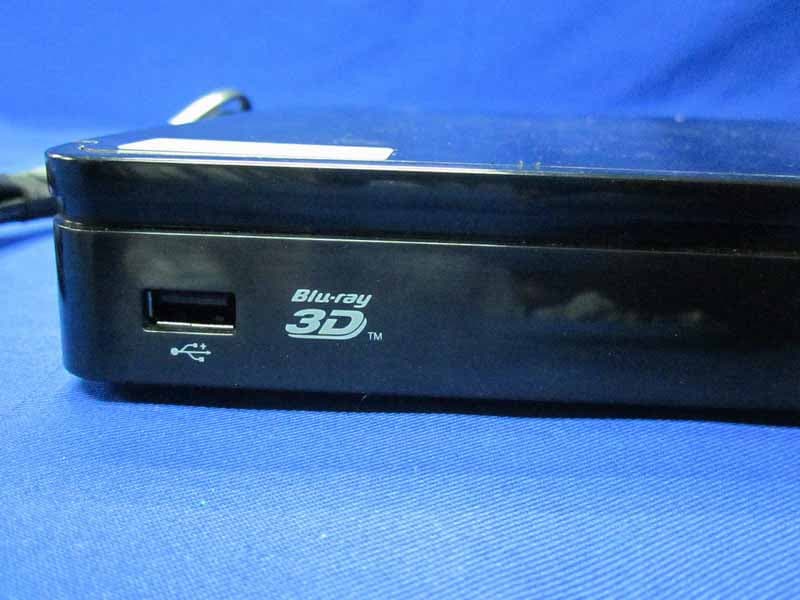
Click to zoom
Application Details
- Equipment Class
- DTS - Digital Transmission System
- Date of Grant
- Sep 12, 2011
- Application Purpose
- Original Equipment
- Date of Application
- Sep 11, 2011
- Equipment Note
- 3D Blu-ray Disc Player
- Frequency Range
- 2422.00000000 - 2452.00000000
- Company
- Tonly Technology Co., Ltd.
- Country
- China
Documents & Files
Document Text
Text extracted from the exhibit documents filed with the FCC. Open a document above to read the original.
Users Manual
FCC RF Radiation Exposure Statement : This equipment complies with FCC RF radiation exposure limits set forth for an uncontrolled environment. This device and its antenna must not be co-located or operating in conjunction with any other antenna or transmitter. “To comply with FCC RF exposure compliance requirements, this grant is applicable to only Mobile Configurations. The antennas used for this transmitter must be installed to provide a separation distance of at least 20 cm from all persons and must not be co-located or operating in conjunction with any other antenna or transmitter.” 1 0 5 m m 148 mm
Users Manual
MODEL VBR338 QUICK START GUIDE 3D BLU-RAY ™ PLAYER WITH INTERNET APPS FOR FULL USER MANUAL GO TO VIZIO.COM/SUPPORT VIZIO BEFORE YOU BEGIN IMPORTANT SAFETY INFORMATION You may experience discomfort while watching 3D content. You may feel symptoms of eye strain, vision fatigue, color or depth distortion, motion sickness, nausea, dizziness, disorientation, or other discomforts. If you experience any of these symptoms, stop watching and take a break for at least thirty minutes before resuming. If the symptoms are severe or continue even after you have stopped watching 3D content, consult a doctor. Take care to monitor children’s watching of 3D content. Children (including teenagers) may be more at risk of experiencing discomfort while watching 3D content and less likely to report symptoms. Monitor children’s 3D content viewing and watch for signs of discomfort. Some viewers may be susceptible to epileptic seizures or strokes when viewing 3D images, even if those conditions have not been previously diagnosed. If you or anyone in your family has a history of seizures or strokes, or if you have any other reason to think you or someone under your supervision may be susceptible to epileptic seizures or strokes, consult a doctor before watching 3D content. Even if you do not experience any of the above symptoms, take regular breaks from watching 3D content. Before you set up your Blu-ray Player, make sure your TV has an available HDMI port. This port is usually found on the back or side of the TV. This Blu-ray Player is designed to play high-definition audio and video using an HDMI cable. HDMI cables come in various lengths and are available for purchase from most retailers. HDMI PACKAGE CONTENTS 3D Blu-ray Player Remote with Batteries This Quick Start Guide HELP VIZIO REDUCE PAPER WASTE. DOWNLOAD THE FULL USER MANUAL AT VIZIO.COM/SUPPORT HDMI Cable AAA BA TTER Y AAA BA TTER Y FIRST-TIME SETUP Remove the battery cover from the remote. Insert the batteries, matching the + and - symbols in the compartment with the + and - symbols on the batteries. Replace the cover. Connect the power cord from the back of the Blu-ray Player to an electrical outlet. 12 Connect the included HDMI cable to the HDMI port on the back of the Blu-ray Player. Connect the other end of the HDMI cable to the HDMI port on your TV. Your Blu-ray Player is ready to use. 34 When inserting a disc, hold the disc by the edges. Gently push the disc into the slot until the Player takes it. The Player will pull the disc in. Never force a disc into the Player. To your TV GETTING TO KNOW YOUR PLAYER FRONT BACK Power Button Touch to turn Player on or off. Eject Button Touch to eject disc. USB Port Insert USB thumb drive to play photos and music. Supported files include .jpg and .mp3. Ethernet HDMI Digital Optical Audio Out RCA Stereo Audio Out Digital Coaxial Audio Out Power Cord Disc Slot Insert disc here. USING THE REMOTE EJECT Eject the disc. SETUP Open the Setup menu. STOP Halt playback. PLAY/PAUSE Press to play or pause disc. TV RES Change output resolution of the Player. INFO Open disc info window. OK Select the highlighted menu option. PIP Enable picture-in-picture.* RETURN Go to the previous menu screen. V BUTTON Open the Player main menu. SEARCH Find specific title, chapter, or time.* A-B Create a playback loop.* REWIND/FAST FORWARD Press repeatedly to increase speed. POWER Turn Player on or off. PREVIOUS/NEXT Go to the next track or chapter on disc. APP LAUNCHER Quickly launch app on button. TITLE MENU Open disc title menu. DISC MENU Open the disc menu. APP SHORTCUTS Control Internet Apps and other disc functions. Press Red to exit apps. ARROW Navigate on-screen menus. AUDIO Change disc audio track.* SUBTITLE Change disc subtitle track.* ANGLE Select viewing angle.* CANCEL Clear entered numbers/letters. REPEAT Continuously play selected track.* BATTERY COMPARTMENT Insert batteries here. VIZIO TV VOLUME Adjust volume or mute a VIZIO TV. *Supported discs only. IMPORTANT Do not cover this area. This is the transmitter. A LT Press and hold this key to enter a blue character. For example, press A LT and W to enter a # character. SHIFT Press and hold this key to enter a capital letter. ARROW Use to navigate on-screen menus. APP SHORTCUTS Control Internet Apps and other disc functions. Press Red to exit apps. When using the remote, point it at the right side of the player. The sensor is located there. *Router/Modem/Ethernet Cable Not Included SETTING UP YOUR NETWORK CONNECTION To enjoy online content and streaming video, you must connect the Blu-ray Player to your home network. For the best online experience, you should have a high-speed internet connection (Minimum 1Mbps-higher is better). Connect an Ethernet cable* to the Ethernet port on the back of the Blu-ray Player. Ethernet cables are available from many retailers in lengths up to 50 feet. Router / Modem 1 Connect the other end of the ethernet cable to the Ethernet port on your router or modem*. The next time you turn the Player on, the network connection will be automatically detected. 2
Users Manual
GETTING STARTED WITH NETFLIX For your free Netflix trial, go to your computer, then enter www.netflix.com/VIZIO and sign up using the code on your TV screen. Ensure your Blu-ray Player is connected to your network. Use the Left/Right Arrow buttons on the remote to highlight Netflix. Press SELECT. Follow the on-screen instructions until your code is displayed. www.netflix.com/VIZIO *Use of Netflix and Internet Apps is expressly subject to certain terms and conditions; see Legal section for details. 12 34 Your Netflix setup is complete. You can now enjoy movies and television programs streaming directly to your TV! 3D TVMATCHING 3D GLASSES 3D BLU-RAY PLAYER BLU-RAY 3D MOVIE SEE YOUR 3D TV USER MANUAL FOR INSTRUCTIONS ON HOW TO ENJOY 3D. HIGH SPEED HDMI CABLE ++ + WHAT YOU NEED TO VIEW 3D VIZIO RECOMMENDS VIZIO’s Home Theater Sound Bar with Wireless Subwoofer delivers exceptional audio performance in a stylish, slim design – a perfect complement for 40” and larger TVs. With a wireless subwoofer that fits nearly anywhere and a sound bar with table-stand or wall-mount options, this powerful sound system is a versatile addition to any home theater. And with HDMI inputs, it supplies HD audio and video through one simple cable to your entire home theater. My Blu-Ray or DVD disc does not play. • Ensure the disc is clean and free of scratches. • If you are using parental controls, the disc may not play. See Using Parental Controls in the User Guide. I cannot connect the Player to my network. • Unplug the modem/router and the Player. Wait 10 seconds, then turn them back on. • See Connecting to Your Network in the User Guide. • Ensure the ethernet cable is securely connected to both the Player and your modem/router. • Refer to your modem/router user guide. There is no power. • Ensure the power cord is securely connected to a working electrical outlet. • Press the Power/Standby button on the remote or touch the Power/Standby control on the Player. • Try plugging the power cord into a different electrical outlet. HELP TOPICS The picture quality seems low. • Connect the Player to an HDTV capable of displaying 720p or 1080p for the best picture quality. • Ensure the cables connecting the Player to your TV are securely connected. • Watch Blu-ray discs for the best picture quality. DVD discs are limited to 480p resolution. • To view streaming video (Netflix, VUDU, etc), a high-speed wired Internet connection is required. Nothing happens when I press buttons on the remote. • Place new batteries in the remote. Ensure the batteries are inserted correctly. • Ensure no objects are blocking the front of the Blu-ray Player. • When using the remote, point it directly at the Blu-ray Player. • If you see , the action you are trying to perform is not allowed by the Player or disc. The Internet Apps are not working. • If you experience issues with Netflix, Pandora, VUDU, or BLOCKBUSTER services, please contact: www.netflix.com/help or 1-866-579-7113 www.pandora.com/support www.VUDU.com/support or 1-888-554-8838 1-866-692-2789 Netflix: Pandora: VUDU: BLOCKBUSTER: I cannot view movies in 3D. • Ensure you have a 3D TV with matching 3D glasses, a high-speed HDMI cable, and a Blu-ray 3D disc. • Ensure the Player is connected to your 3D TV with a high-speed HDMI cable. • If you have a 3D TV that uses active-shutter 3D glasses, ensure the glasses have full batteries. • Ensure your 3D TV is in 3D mode, and that the movie you are playing is a Blu-ray 3D disc. ON PARTS AND LABOR Covers units purchased as new in United States and Puerto Rico Only VIZIO provides a warranty to the original purchaser of a new Product against defects in materials and workmanship for a period of one year of non-commercial usage and ninety (90) days of commercial use. If a Product covered by this warranty is determined to be defective within the warranty period, VIZIO will either repair or replace the Product at its sole option and discretion. To obtain warranty service, contact VIZIO Technical Support via email: [email protected] or via phone at 877 MY VIZIO (877.698.4946) from 6:00AM to 9:00PM Monday through Friday and 8:00AM to 4:00PM Saturday and Sunday, Pacific Time, or visit www.VIZIO.com. PRE-AUTHORIZATION MUST BE OBTAINED BEFORE SENDING ANY PRODUCT TO A VIZIO SERVICE CENTER. Proof of purchase in the form of a purchase receipt or copy thereof is required to show that a Product is within the warranty period. Parts and Labor There will be no charge for parts or labor during the warranty period. Replacement parts and Products may be new or recertified at VIZIO’s option and sole discretion. Replacement parts and Products are warranted for the remaining portion of the original warranty or for ninety (90) days from warranty service or replacement, whichever is greater. Type of Service Defective Products must be sent to a VIZIO service center to obtain warranty service. VIZIO is not responsible for transportation costs to the service center, but VIZIO will cover return shipping to the customer. PRE- AUTHORIZATION IS REQUIRED BEFORE SENDING ANY PRODUCT TO A VIZIO SERVICE CENTER FOR WARRANTY SERVICE. Product returns to VIZIO’s service centers must utilize either the original carton box and shipping material or packaging that affords an equal degree of protection. VIZIO Technical Support will provide instructions for packing and shipping the covered Product to the VIZIO service center. ONE-YEAR LIMITED WARRANTY Limitations and Exclusions VIZIO’s one-year limited warranty only covers defects in materials and workmanship. This warranty does not cover, for example: cosmetic damage, normal wear and tear, improper operation, improper voltage supply or power surges, signal issues, damages from shipping, acts of God, any type of customer misuse, modifications or adjustments, as well as installation and set-up issues or any repairs attempted by anyone other than by a VIZIO authorized service center. Products with unreadable or removed serial numbers, or req…
Text truncated - open the document above for the full version.
External Photos
R AUDIX Technology (Shenzhen) Co., Ltd. FCC ID: ZVABD00001 Page 14-1 Audix Technology (Shenzhen) Co., Ltd. Report No. ACS-F11162 14. PHOTOGRAPH OF EUT Figure 1 General Appearance of the EUT Figure 2 General Appearance of the EUT R AUDIX Technology (Shenzhen) Co., Ltd. FCC ID: ZVABD00001 Page 14-2 Audix Technology (Shenzhen) Co., Ltd. Report No. ACS-F11162 Figure 3 General Appearance of the EUT Figure 4 General Appearance of the EUT R AUDIX Technology (Shenzhen) Co., Ltd. FCC ID: ZVABD00001 Page 14-3 Audix Technology (Shenzhen) Co., Ltd. Report No. ACS-F11162 Figure 5 General Appearance of the EUT Figure 6 General Appearance of the EUT R AUDIX Technology (Shenzhen) Co., Ltd. FCC ID: ZVABD00001 Page 14-4 Audix Technology (Shenzhen) Co., Ltd. Report No. ACS-F11162 Figure 7 General Appearance of the EUT Figure 8 Inside of the EUT
ID Label/Location Info
This product complies with FDA Rule 21CFR Subchapter J in effect at date of manufacture This device complies with part 15 of the FCC Rules. Operation is subject to the following two conditions (1) This device may not cause harmful interference and (2) This device must accept any interference received including interference that may cause undesired operation. This class B digital apparatus meetsa ll r equirementsof the Canadian interference-causing equipment regulations. Manufactured under license from Dolby Laboratories. Dolby and the double-D symbol are trademarks of Dolby Laboratories Label: S/N: Manufactured: VIZIO Inc. 39 Tesla, Irvine, CA 92618 Model: VBR338 P/N:10300080136 AC:120V~60Hz, 0.15A Made in China Silkscreen black C and white hollow out 67-V337B1-0E0B1 FCC ID : ZVABD00001 58 mm 1 2 m m Label
Internal Photos
R AUDIX Technology (Shenzhen) Co., Ltd. FCC ID: ZVABD00001 Page 14-4 Audix Technology (Shenzhen) Co., Ltd. Report No. ACS-F11162 Figure 7 General Appearance of the EUT Figure 8 Inside of the EUT R AUDIX Technology (Shenzhen) Co., Ltd. FCC ID: ZVABD00001 Page 14-5 Audix Technology (Shenzhen) Co., Ltd. Report No. ACS-F11162 Figure 9 Inside of the EUT Figure 10 Inside of the EUT R AUDIX Technology (Shenzhen) Co., Ltd. FCC ID: ZVABD00001 Page 14-6 Audix Technology (Shenzhen) Co., Ltd. Report No. ACS-F11162 Figure 11 Inside of the EUT Figure 12 Component Side of the PCB R AUDIX Technology (Shenzhen) Co., Ltd. FCC ID: ZVABD00001 Page 14-7 Audix Technology (Shenzhen) Co., Ltd. Report No. ACS-F11162 Figure 13 Component Side of the PCB Figure 14 Component Side of the PCB R AUDIX Technology (Shenzhen) Co., Ltd. FCC ID: ZVABD00001 Page 14-8 Audix Technology (Shenzhen) Co., Ltd. Report No. ACS-F11162 Figure 15 Component Side of the PCB Figure 16 Component Side of the PCB R AUDIX Technology (Shenzhen) Co., Ltd. FCC ID: ZVABD00001 Page 14-9 Audix Technology (Shenzhen) Co., Ltd. Report No. ACS-F11162 Figure 17 Component Side of the PCB Figure 18 Component Side of the PCB R AUDIX Technology (Shenzhen) Co., Ltd. FCC ID: ZVABD00001 Page 14-10 Audix Technology (Shenzhen) Co., Ltd. Report No. ACS-F11162 Figure 19 Component Side of the PCB Figure 20 Component Side of the PCB R AUDIX Technology (Shenzhen) Co., Ltd. FCC ID: ZVABD00001 Page 14-11 Audix Technology (Shenzhen) Co., Ltd. Report No. ACS-F11162 Figure 21 Component Side of the PCB Figure 22 Component Side of the PCB R AUDIX Technology (Shenzhen) Co., Ltd. FCC ID: ZVABD00001 Page 14-12 Audix Technology (Shenzhen) Co., Ltd. Report No. ACS-F11162 Figure 23 Component Side of the PCB Figure 24 Component Side of the PCB R AUDIX Technology (Shenzhen) Co., Ltd. FCC ID: ZVABD00001 Page 14-13 Audix Technology (Shenzhen) Co., Ltd. Report No. ACS-F11162 Figure 25 Component Side of the PCB Figure 26 Component Side of the PCB R AUDIX Technology (Shenzhen) Co., Ltd. FCC ID: ZVABD00001 Page 14-14 Audix Technology (Shenzhen) Co., Ltd. Report No. ACS-F11162 Figure 27 Component Side of the PCB Figure 28 Component Side of the PCB R AUDIX Technology (Shenzhen) Co., Ltd. FCC ID: ZVABD00001 Page 14-15 Audix Technology (Shenzhen) Co., Ltd. Report No. ACS-F11162 Figure 29 Remote Controller Figure 30 Remote Controller R AUDIX Technology (Shenzhen) Co., Ltd. FCC ID: ZVABD00001 Page 14-16 Audix Technology (Shenzhen) Co., Ltd. Report No. ACS-F11162 Figure 31 HDMI Cable
RF Exposure Info
R AUDIX Technology (Shenzhen) Co., Ltd. FCC ID: ZVABD00001 Page 11-1 Audix Technology (Shenzhen) Co., Ltd. Report No. ACS-F11162 11. MPE ESTIMATION 11.1.Limit for General Population/ Uncontrolled Exposures Frequency Power density (mW/ cm 2 ) Averaging time(minutes) 300MHz----1.5GHz F/1500 30 1.5GHz---100GHz 1.0 30 Frequency(MHz) Power density (mW/ cm 2 ) Averaging time(minutes) 2412 1 30 2437 1 30 2462 1 30 Note: F= Frequency in MHz 11.2.Estimation Result EUT: 3D Blu-ray Disc Player M/N:VBR337 Test date:2011-07-31 Pressure: 101.4 kpa Humidity: 52 % Tested by: Leo-Li Test site: RF Site Temperature:25°C Cable loss: 1 dB Attenuator loss: 20 dB Antenna Gain: 1.53 dBi Test Mode CH Frequency (MHz) Peak Output Power (dBm) Output Power (mW) Antenna Gain (dBi) Antenna Gain (Linear) MPE 11b CH1 2412 21.99 158.12 1.53 1.42 0.0448 CH6 2437 22.28 169.04 1.53 1.42 0.0479 CH11 2462 22.77 189.23 1.53 1.42 0.0536 11g CH1 2412 23.22 209.89 1.53 1.42 0.0594 CH6 2437 26.75 473.15 1.53 1.42 0.1340 CH11 2462 24.83 304.09 1.53 1.42 0.0861 11n HT20 CH1 2412 24.36 272.90 1.53 1.42 0.0773 CH6 2437 28.29 674.53 1.53 1.42 0.1910 CH11 2462 24.53 283.79 1.53 1.42 0.0803 11n HT40 CH1 2422 22.77 189.23 1.53 1.42 0.0536 CH4 2437 28.56 717.79 1.53 1.42 0.2032 CH7 2452 24.43 277.33 1.53 1.42 0.0785 Note:The estimate distance is 20cm
Test Report
R AUDIX Technology (Shenzhen) Co., Ltd. FCC ID: ZVABD00001 Audix Technology (Shenzhen) Co., Ltd. Report No. ACS-F11162 FCC PART 15C TEST REPORT FOR CERTIFICATION On Behalf of TCL Technoly Electronics (Huizhou) Co., Ltd. 3D Blu-ray Disc Player Brand Name Model Number VIZIO VBR337, VBR337-CA VBR337-MX ,VBR338 VBR338-CA,VBR338-MX FCC ID: ZVABD00001 Prepared for : TCL Technoly Electronics (Huizhou) Co., Ltd. Section 19, Zhongkai High-tech development Zone,Huizhou City,Guangdong, China Prepared By : Audix Technology (Shenzhen) Co., Ltd. No. 6, Ke Feng Rd., 52 Block, Shenzhen Science & Industrial Park, Nantou, Shenzhen, Guangdong, China Tel: (0755) 26639496 Report Number : ACS-F11162 Date of Test : Jun.24~Jul.31, 2011 Date of Report : Aug.03, 2011 R AUDIX Technology (Shenzhen) Co., Ltd. FCC ID: ZVABD00001 Audix Technology (Shenzhen) Co., Ltd. Report No. ACS-F11162 TABLE OF CONTENTS Description Page 1. SUMMARY OF STANDARDS AND RESULTS ...................................................... 1-1 1.1. Description of Standards and Results ...............................................................................1-1 2. GENERAL INFORMATION ...................................................................................... 2-1 2.1. Description of Device (EUT) ............................................................................................2-1 2.2. Test information ................................................................................................................2-2 2.3. Tested Supporting System Details ....................................................................................2-3 2.4. Block diagram of connection between the EUT and simulators .......................................2-3 2.5. Test Facility.......................................................................................................................2-4 2.6. Measurement Uncertainty (95% confidence levels, k=2) .................................................2-4 3. POWER LINE CONDUCTED EMISSION TEST.................................................... 3-1 3.1. Test Equipments................................................................................................................3-1 3.2. Block Diagram of Test Setup ............................................................................................3-1 3.3. Power Line Conducted Emission Test Limits...................................................................3-1 3.4. Configuration of EUT on Test ..........................................................................................3-1 3.5. Operating Condition of EUT.............................................................................................3-2 3.6. Test Procedure...................................................................................................................3-2 3.7. Power Line Conducted Emission Test Results .................................................................3-2 4. RADIATED EMISSION TEST ................................................................................... 4-1 4.1. Test Equipment .................................................................................................................4-1 4.2. Block Diagram of Test Setup ............................................................................................4-1 4.3. Radiated Emission Limit...................................................................................................4-2 4.4. EUT Configuration on Test...............................................................................................4-3 4.5. Operating Condition of EUT.............................................................................................4-3 4.6. Test Procedure...................................................................................................................4-3 4.7. Radiated Emission Test Results ........................................................................................4-4 5. CONDUCTED SPURIOUS EMISSIONS .................................................................. 5-1 5.1. Test Equipment .................................................................................................................5-1 5.2. Limit..................................................................................................................................5-1 5.3. Test Procedure...................................................................................................................5-1 5.4. Test result ..........................................................................................................................5-1 6. BAND EDGE COMPLIANCE TEST ......................................................................... 6-1 6.1. Test Equipment .................................................................................................................6-1 6.2. Limit..................................................................................................................................6-1 6.3. Test Produce ......................................................................................................................6-1 6.4. Test Results .......................................................................................................................6-1 7. 6dB Bandwidth Test ..................................................................................................... 7-1 7.1. Test Equipment .................................................................................................................7-1 7.2. Limit..................................................................................................................................7-1 7.3. Test Procedure...................................................................................................................7-1 7.4. Test Results ........................................................................................…
Text truncated - open the document above for the full version.
Test Setup Photos
R AUDIX Technology (Shenzhen) Co., Ltd. FCC ID: ZVABD00001 Page 13-1 Audix Technology (Shenzhen) Co., Ltd. Report No. ACS-F11162 13. PHOTOGRAPH OF TEST 13.1.Photos of Power Line Conducted Emission Test R AUDIX Technology (Shenzhen) Co., Ltd. FCC ID: ZVABD00001 Page 13-2 Audix Technology (Shenzhen) Co., Ltd. Report No. ACS-F11162 13.2.Photos of Radiated Emission Test 30-1000MHz R AUDIX Technology (Shenzhen) Co., Ltd. FCC ID: ZVABD00001 Page 13-3 Audix Technology (Shenzhen) Co., Ltd. Report No. ACS-F11162 (Above 1000MHz)
Contact Information
Applicant
Hao Wang(Compliance Director)
Technical Contact
AUDIX Technology (Shenzhen) Co., LtdLu Ken
[email protected]86-755-26639497
52 Block Shenzhen Science&Industry · Shenzhen · China
Test Firm
Audix Technology (Shenzhen) Co.Smart Tsai
Technical Specifications
| # | Rule Parts | Frequency Range | Power Output |
|---|---|---|---|
| 2 | 15C | 2.42 GHz - 2.45 GHz | 720.00 mW |
Other Applications from Tonly Technology Co., Ltd.
ZVAOH000037
Apr 28, 2026BDX Character Robot
Equipment Class
DSS - Part 15 Spread Spectrum TransmitterZVAOH000038
Apr 28, 2026LoRa Backpack
Equipment Class
DSS - Part 15 Spread Spectrum TransmitterZVAYY7870E
Apr 01, 2026WIRELESS SPEAKER
Equipment Class
DSS - Part 15 Spread Spectrum TransmitterZVAYY7871E
Mar 31, 2026WIRELESS SPEAKER
Equipment Class
DTS - Digital Transmission System
ZVASB000027
Nov 06, 20232.1 Soundbar System
Equipment Class
DSS - Part 15 Spread Spectrum Transmitter