2ADW3-87953Bluetooth Speaker
LEADER INNOVATIONS LTD.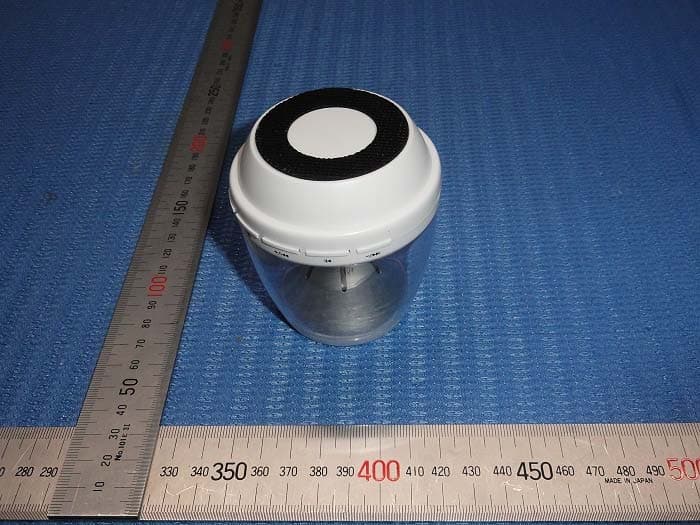
Click to zoom
Application Details
- Equipment Class
- DSS - Part 15 Spread Spectrum Transmitter
- Date of Grant
- Jul 17, 2015
- Application Purpose
- Original Equipment
- Date of Application
- Jul 16, 2015
- Equipment Note
- Bluetooth Speaker
- Frequency Range
- 2402.00000000 - 2480.00000000
- Company
- LEADER INNOVATIONS LTD.
- Country
- China
Documents & Files
Document Text
Text extracted from the exhibit documents filed with the FCC. Open a document above to read the original.
Users Manual
1.Please check to make sure the device to which you are pairing has Bluetooth® capabilities. This information should be included in your phone or music player’s instructions or packaging. 2.Make sure that the speaker is turned off. 3.Place the speaker and the smart phone or music player in proximity so that both devices are in view. 4.Press the power button to turn on. Lights will flash and the voice prompt will let you know the device is in pairing mode. 5.Check your smartphone or music player for the speaker under the Bluetooth® pairing options and select. A tone will sound when pairing has been achieved. Note: Some mobile phones or other devices m ay pair automatically when re-started. Answer / End a Call When a call comes in, the ring will be heard through the headset. 1.Press the pause\play button >II to answer the call. 2.You may also accept or decline a call using your phone’s functions. 3.To end a call, Press the pause\play button >II to hang up. You may also end the call using your phone’s functions. Auxiliary Line-In Mode (Plugging in a phone or music player) Plug one end of the provided 3.5mm AUX cable into the smart phone of music player’s headphone or speaker jack and plug the other end into the 87953. The speaker will automatically switch to Line-In mode and a voice prompt will announce “audio input.” Operate the song selections from the smart phone or music player. (Volume can be operated on the speaker or phone.) Please Note: Next and Previous song function buttons are not available in AUX Line-In mode. (Use your music player controls.) TF Card Mode Plug the TF Card into the slot and use the Bluetooth® protocols for the button functions. Precautions •Please only use the computer USB or the DC 5V power adaptor matching the Micro USB interface to charge. Only use quality cords and adaptors. •Please keep and use in normal environments. Exposure to extreme elements such as extreme heat and cold, fire, excessive moisture, dust, or other extreme elements may damage the unit. Do not touch with wet hands. •Keep debris or other items from blocking the speakers or from entering any of the ports. •Do not attempt to open, repair, or take apart the speaker. The speaker may be damaged during that process. •If the speaker quality seems lessened, or a slight popping noise is heard, it may be due to low battery. Please recharge the speaker. •This item is not meant for children. TROUBLESHOOTING No Sound •Make sure that the music player is working and that the speaker is charged. •Make sure the Bluetooth® is paired or the AUX 3. 5mm cable is plugged in properly on both ends. •Make sure the 87953 is in the proper mode. Not charging Check to make sure that you are using the correct cable and that it is fully plugged into both the device and the USB port that you are charging from. Also check to make sure the PC or other USB charger is turned on. 87953 Light Show Wireless Speaker INSTRUCTIONS Features •Wireless Speaker •Light Show Options (Solid White, Solid Blue, Fade, Flash) •Wireless Speaker Phone Option •Auxiliary Line-in Play Function •TF Card Reading Function •Micro USB Charging Cable and 3.5mm AUX Cable •Rechargeable Battery Product Specifications: Speaker power: 4Ω 3W Wireless Version: V2.1 Operation distance: 30 Feet Rechargeable lithium battery: 700mAh Distortion: <=5% Signal noise ratio: >=95db Frequency: 280HZ-160KHZ Approximate Charging Time: 1-3 hours Approximate Working Time: >5 hours (Can vary by usage and mode) Buttons of Operation (Some functions N/A for Auxiliary Line-In mode) / M Power\Mode: Press and hold for 3 seconds to turn on or off. Press and release to change mode. Light Show Functions: Press and release to toggle through solid white, solid blue, no light, slow fade, and music flashing modes. (Music flashing mode not available on Auxiliary Line-In mode.) Press and hold to turn lights off. >>I / + Next\Volume Up: Press and release to go to the next song. Press and hold to increase volume. Next function is not available in AUX Line-In mode. >II Pause\Play\Phone: Press and release to pause/play music. Press and release to answer/end call. I<< / - Previous\Volume Down: Press and release to go to previous song. Press and hold to decrease volume. Previous function is not available in AUX Line-In mode. Charging Plug the micro USB end of the charging cable into the DC 5V port of the speaker and then connect the USB end of the charging cable to the USB port of your PC or other USB power source. The red LED light will light up during charging. It is strongly recommended that the speaker be fully charged before first use and after long periods of inactivity. Turn On\Off Press and hold the power button for 3 seconds to turn on. To turn off, press and hold the power button for 3 seconds. Please Note: It is strongly recommended that you turn off the headset and Bluetooth on the device while not in use. Wireless Pairing 145*180MM FCC Warning Statement Changes or modifications not expressly approved by the party responsible for compliance could void the user’s authority to operate the equipment. This equipment has been tested and found to comply with the limits for a Class B digital device, pursuant to Part 15 of the FCC Rules. These limits are designed to provide reasonable protection against harmful interference in a residential installation. This equipment generates uses and can radiate radio frequency energy and, if not installed and used in accordance with the instructions, may cause harmful interference to radio communications. However, there is no guarantee that interference will not occur in a particular installation. If this equipment does cause harmful interference to radio or television reception, which can be determined by turning the equipment off and on, the user is encouraged to try to correct the interference by one or more of the following measures: -- Reorient or relocate the receiving antenna. -- Increase the separation between the equipment and receiver. -- Conne…
Text truncated - open the document above for the full version.
Cover Letter(s)
DATE : July 15, 2014 Equipment Autorisation Division Federal Communications Commission 7435 Oakland Mills Road Columbia, MD 21046 FCC ID: 2ADW3-87953 Product Name: Bluetooth Speaker Request for Confidentiality Pursuant to Sections 0.457 and 0.459 of the commissions rules, we hereby request that the following documents be held confidential: • Schematics • Block diagram • Operational Description These materials contain trade secrets and proprietary information and are not customarily released to the public. The public disclosure of this information might be harmful to the company and provide unjustified benefits to our competitors. Dated this July 15, 2015 Agency agreement expiration date: Usually Give 8 - 12 Months By: Youkiy Lou Signature Printed Title: Manager On behalf of : LEADER INNOVATIONS LTD. Telephone: 0574-87723018
External Photos
Outside view Outside view
ID Label/Location Info
Label Location
Internal Photos
Inside view Inside view
RF Exposure Info
RF Exposure Applicable Standard According to §1.1307(b)(5), systems operating under the provisions of this section shall be operated in a manner that ensure that the public is not exposed to radio frequency energy level in excess of the Commission’s guideline. This is a Portable device. The Section 4.3.1 and Appendix A of KDB447498 D01 V05 was used as the guidance. Calculation Result (Worse Case): GFSK Mode: [(max. power of channel, including tune-up tolerance, mW)/(min. test separation distance, mm)] · [√f(GHz)] =1.86/5 * 1.56= 0.58, this value is less than 3.0 for 1-g SAR and ≤ 7.5 for 10-g extremity SAR. The SAR measurement is not necessary.
Test Report
ISO/IEC17025Accredited Lab. Report No.: FCC 1507008 File reference No.: 2015-07-03 Applicant: LEADER INNOVATIONS LTD Product: BLUETOOTH SPEAKER Model No.: 87953 Trademark: N/A Test Standards: FCC Part 15 Subpart C, Paragraph 15.247 Test result: It is herewith confirmed and found to comply with the requirements set up by ANSI C63.10&FCC Part 15 Subpart C, Paragraph 15.247 regulations for the evaluation of electromagnetic compatibility Approved By Jack Chung Manager Dated: July 03, 2015 Results appearing herein relate only to the sample tested The technical reports is issued errors and omissions exempt and is subject to withdrawal at SHENZHEN TIMEWAY TESTING LABORATORIES Room 512-519, 5/F., East Tower, Building 4, Anhua Industrial Zone, Futian District, Shenzhen, Guangdong, China Tel (755) 83448688, Fax (755) 83442996, E-Mail:[email protected] Report No: FCC1507008 Page 2 of 78 Date: 2015-07-03 The report refers only to the sample tested and does not apply to the bulk. This report is issued in confidence to the client and it will be strictly treated as such by the SHENZHEN TIMEWAY TESTING LABORATORIES. It may not be reproduced rather in its entirety or in part and it may not be used for adverting. The client to whom the report is issued may, however, show or send it . or a certified copy there of prepared by the SHENZHEN TIMEWAY TESTING LABORATORIES. to his customer. Supplier or others persons directly concerned. SHENZHEN TIMEWAY TESTING LABORATORIES. will not, without the consent of the client enter into any discussion of correspondence with any third party concerning the contents of the report. In the event of the improper use of the report. The SHENZHEN TIMEWAY TESTING LABORATORIES. reserves the rights to withdraw it and to adopt any other remedies which may be appropriate. Special Statement: The testing quality ability of our laboratory meet with "Quality Law of People's Republic of China" Clause 19. The testing quality system of our laboratory meets with ISO/IEC-17025 requirements, which is approved by CNAS. This approval result is accepted by MRA of APLAC. Our test facility is recognized, certified, or accredited by the following organizations: CNAS-LAB Code: L2292 The EMC Laboratory has been assessed and in compliance with CNAS-CL01 accreditation criteria for testing Laboratories (identical to ISO/IEC 17025:1999 General Requirements) for the Competence of testing Laboratories. FCC-Registration No.: 899988 The EMC Laboratory has been registered and fully described in a report filed with the (FCC) Federal Communications commission. The acceptance letter from the FCC is maintained in our files. Registration No.:899988. IC- Registration No.: IC5205A-02 The EMC Laboratory has been registered and fully described in a report filed with the (IC) Industry Canada. The acceptance letter from the IC is maintained in our files. Registration No.: IC 5205A-02. Report No: FCC1507008 Page 3 of 78 Date: 2015-07-03 The report refers only to the sample tested and does not apply to the bulk. This report is issued in confidence to the client and it will be strictly treated as such by the SHENZHEN TIMEWAY TESTING LABORATORIES. It may not be reproduced rather in its entirety or in part and it may not be used for adverting. The client to whom the report is issued may, however, show or send it . or a certified copy there of prepared by the SHENZHEN TIMEWAY TESTING LABORATORIES. to his customer. Supplier or others persons directly concerned. SHENZHEN TIMEWAY TESTING LABORATORIES. will not, without the consent of the client enter into any discussion of correspondence with any third party concerning the contents of the report. In the event of the improper use of the report. The SHENZHEN TIMEWAY TESTING LABORATORIES. reserves the rights to withdraw it and to adopt any other remedies which may be appropriate. Test Report Conclusion Content 1.0 General Details ................................................................................................ 4 1.1 Test Lab Details................................................................................................ 4 1.2 Applicant Details.............................................................................................. 4 1.3 Description of EUT .......................................................................................... 4 1.4 Submitted Sample............................................................................................. 4 1.5 Test Duration.................................................................................................... 5 1.6 Test Uncertainty.................................................................................................5 1.7 Test By.......................................................................................................... 5 2.0 List of Measurement Equipment......................................................................... 6 3.0 Technical Details............................................................................................. 7 3.1 Summary of Test Results..................................................................................... 7 3.2 Test Standards.................................................................................................. 7 4.0 EUT Modification............................................................................................. 7 5.0 Power Line Conducted Emission Test...................................................................... 8 5.1 Schematics of the Test........................................................................................ 8 5.2 Test Method and Test Procedure............................................................................ 8 5.3 Configuration of the EUT.................................................................................... 8 5.4 EUT Operating Condition....................................................................................9 5.5 Conducted Emiss…
Text truncated - open the document above for the full version.
Test Setup Photos
Conducted Emission Test Setup: Radiated Emission Test Setup:
Contact Information
Applicant
Youkiy Lou
Test Firm
Shenzhen Timeway Testing LaboratoriesJack Chung
Technical Specifications
| # | Rule Parts | Frequency Range | Power Output |
|---|---|---|---|
| 1 | 15C | 2.40 GHz - 2.48 GHz | 1.86 mW |
Other Applications from LEADER INNOVATIONS LTD.
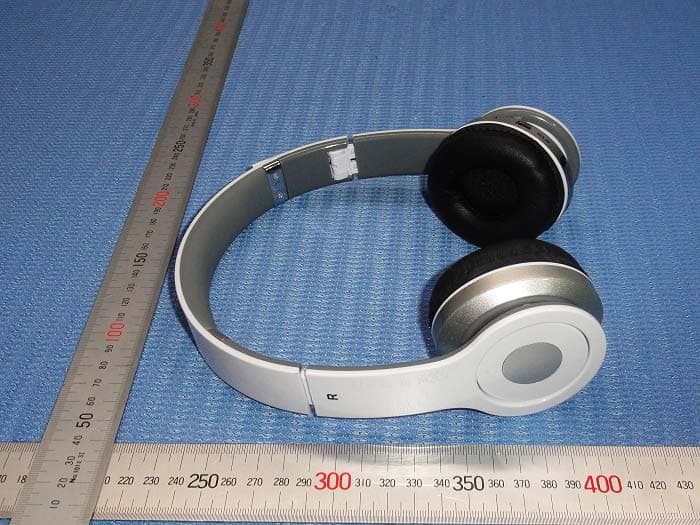
2ADW3-28002
Jul 17, 2015Bluetooth Headphones
Equipment Class
DSS - Part 15 Spread Spectrum Transmitter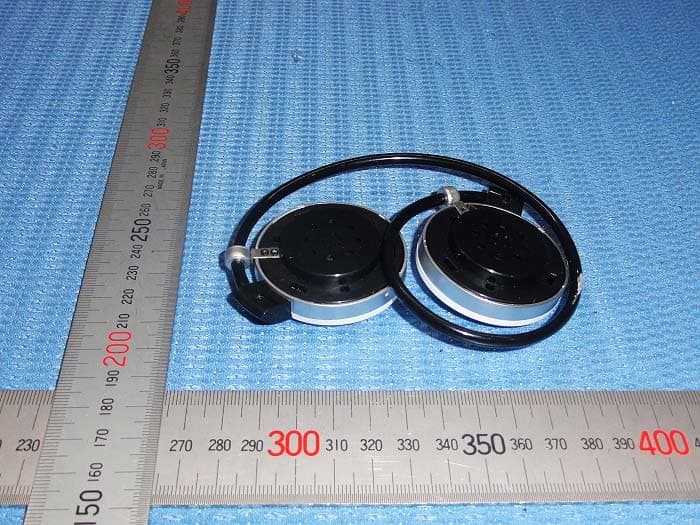
2ADW3-28005
Jan 16, 2015Bluetooth Headphone
Equipment Class
DSS - Part 15 Spread Spectrum Transmitter