2APPZ-I56AIndoor Station
Fanvil Technology Co., LTD.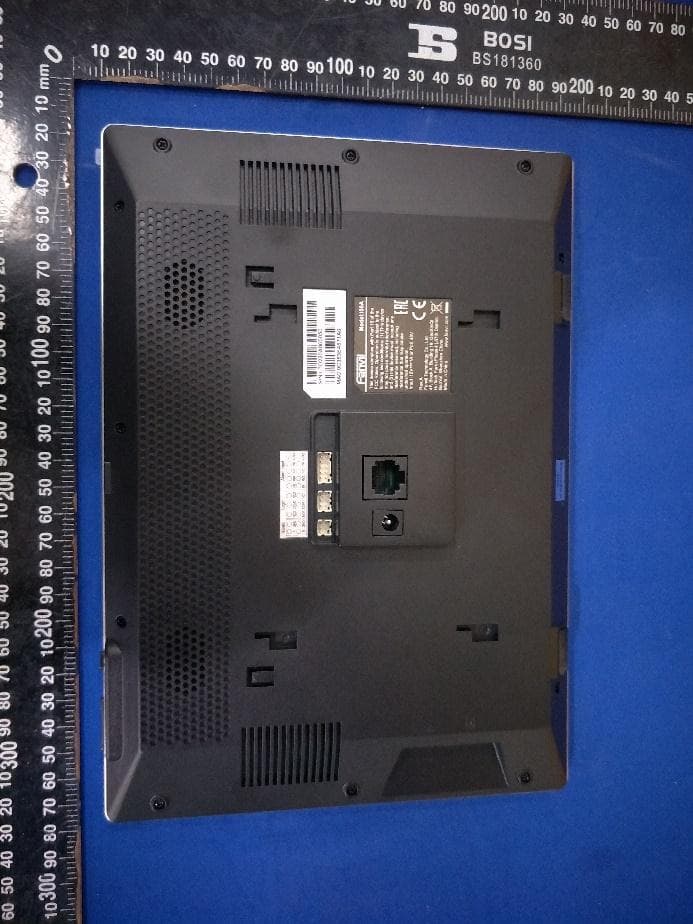
Click to zoom
Application Details
- Equipment Class
- NII - Unlicensed National Information Infrastructure TX
- Date of Grant
- Feb 23, 2021
- Application Purpose
- Original Equipment
- Date of Application
- Feb 23, 2021
- Equipment Note
- Indoor Station
- Frequency Range
- 5745.00000000 - 5825.00000000
- Company
- Fanvil Technology Co., LTD.
- Country
- China
Documents & Files
Document Text
Text extracted from the exhibit documents filed with the FCC. Open a document above to read the original.
Users Manual
SoftwareVersion:1.0.0 ReleaseDate:2020/10.26 i56AUserManual I Directory Directory................................................................................................................................................................I 1Picture..............................................................................................................................................................VI 2Table...................................................................................................................................................................X 3FCCStatement...............................................................................................................................................11 4SafetyInstruction..........................................................................................................................................12 5Overview..........................................................................................................................................................13 5.1Overview..............................................................................................................................................13 5.2ProductIntroduction..........................................................................................................................13 5.2.1i56APhysicalspecifications....................................................................................................13 6InstallGuide....................................................................................................................................................17 6.1UsePoEorexternalPowerAdapter..............................................................................................17 6.2Installation(twomodels)...............................................................................................................18 7AppendixTable..............................................................................................................................................21 7.1AppendixI-Icon................................................................................................................................21 7.2AppendixII–LEDDefinition.............................................................................................................25 8IntroductiontotheUser..............................................................................................................................26 8.1IdleScreen..........................................................................................................................................26 8.2ViewdeviceIP....................................................................................................................................26 8.3Dial.......................................................................................................................................................27 8.4ScreenTouchInstructions...............................................................................................................27 8.5PhoneStatus......................................................................................................................................27 8.6WebManagement.............................................................................................................................29 8.7NetworkConfigurations....................................................................................................................30 8.8SIPConfigurations.............................................................................................................................30 9BasicFunction...............................................................................................................................................33 9.1MakingPhoneCalls..........................................................................................................................33 9.2AnsweringCalls.................................................................................................................................35 9.2.1Talking........................................................................................................................................36 9.2.2Make/ReceivetheSecondCall............................................................................................37 9.3EndoftheCall....................................................................................................................................39 9.4VideoCall............................................................................................................................................39 9.5Redial...................................................................................................................................................40 9.6Dial-upQuery.....................................................................................................................................40 II 9.7Auto-Answering..................................................................................................................................40 9.8CallBack.............................................................................................................................................42 9.9Mute.....................................................................................................................................................43 9.9.1MutetheCall.............................................................................................................................43 9.9.2RingingMute.............................................................................................................................44 9.10CallHold/Resume............................................................................................................................45 9.11DND........................…
Text truncated - open the document above for the full version.
Users Manual
74 Picture72-SetBroadSoftserver IfaFanvilphoneneedstousetheSCAfunction,enableitforthephoneset. Specifically,logintothewebpageofthephoneset, choose[Line]>>[SIP]>>[AdvancedSettings],andselectEnableSCA.If SCAisnotenabled,theregisteredlineisprivateline. Picture73-EnableSCA Afteranaccountisconfiguredandsuccessfullyregistered,youcanconfigureDSSKeys asthelineswhichcanenableSharedCallAppearanceasontheFunctionKeypage tofacilitateviewingthecallstatusofthegroup.Eachlinekeyrepresentsacall appearance.UnderstandthecallstatusbyreferringtoAppendixII6.2. Tofacilitateprivatehold,configurekeyswhoseDSSKeyisPrivateHoldonthe FunctionKeypage.Payattentionthatthepublicholdkeyisthesoftkey[Hold]key 75 duringacall. Picture74-SetPrivateHoldFunctionKey AftereachphoneregisteredwiththeBroadSoftserverisconfiguredasabove,the SCAfunctioncanbeused. 2)LEDStatus Tofacilitateviewingthecallstatusofagroup,configurelineswhoseDSSKeyisSCA. ThefollowingtabledescribestheLEDsoflinesindifferentstates. Table10-LEDStatusofSCA State&DirectionLocalLightRemoteLight IdleOffOff SeizedSteadygreenSteadyred Progressing(outgoingcall)SteadygreenSteadyred Alerting(incomingcall)FastblinkinggreenFastblinkinggreen ActiveSteadygreenSteadyred PublicHeld(hold)SlowblinkinggreenSlowblinkingred Held-private(privatehold)SlowblinkingyellowSteadyred Bridge-active(Barge-in)SteadygreenSteadyred Bridge-heldSteadygreenSteadyred 3)SharedCallAppearance(SCA) Thefollowinglistsacoupleofinstancestofacilitateunderstanding. Inthefollowingscenarios,themanagerandsecretaryregisterthesameSCAaccount andtheaccountisconfiguredbasedontheprecedingsteps. Scenario1:Whenthisaccountreceivesanincomingcall,thephonesetsofboththe 76 managerandthesecretarywillreceivethecallandring.Ifthemanagerisbusy,the managercanrejectthecallandthemanager'sphonesetstopsringingbutthe secretary'sphonesetkeepsringinguntilthesecretaryrejects/answersthecallorthecall timesout. Scenario2:Whenthisaccountreceivesanincomingcall,ifthesecretaryanswersthe callfirstandthemanagerisrequiredtoanswerthecall,thesecretarycanpressthe PublicHoldkeytoholdthiscallandnotifythemanager.Themanagercanpresstheline keycorrespondingtotheSCAtoanswerthecall. Scenario3:Themanagerisinanimportantcallwithacustomerandneedstoleavefora while.Ifthemanagerdoesnotwantotherstoretrievethiscall,themanagercanpress thePrivateHoldkey. Scenario4:Themanagerisinacallwithacustomerandrequiresthesecretarytojoin thecalltomakerecords.ThesecretarycanpressthecorrespondingSCAlinekeyto bargeinthiscall. 10.8Message 10.8.1 MWI(MessageWaitingIndicator) Iftheserviceofthelinessupportsvoicemessagefeature,whentheuserisnotavailable toanswerthecall,thecallercanleaveavoicemessageontheservertotheuser.User willreceivevoicemessagenotificationfromtheserveranddevicewillpromptavoice messagewaitingicononthestandbyscreen. Picture75-NewVoiceMessageNotification 77 Tolistentoavoicemessage,theusermustfirstconfigurethevoicemailnumber.After thevoicemailnumberisconfigured,theusercanretrievethevoicemailofthedefault line. Whenthephoneisinthedefaultstandbystate, Thevoicemailicondisplaysthenumberofunreadvoicemailmessages. Clicktheicontoviewthetotalnumberofvoicemailmessages,orlistentothe messagesdirectlyinthevoicemailinterface Picture76-Voicemessageinterface Picture77-Configurevoicemailnumber 78 10.9SIPHotspot SIPhotspotisasimplebutpracticalfunction.Withsimpleconfigurations,theSIPhotspot functioncanimplementgroupringing.SIPaccountscanbeexpanded. SetaphoneasaSIPhotspotandotherphones(BandC)asSIPhotspotclients.When somebodycallsphoneA,phoneA,B,andCallring.Whenanyphoneanswersthecall, otherphonesstopringing.Thecallcanbeansweredbyonlyonephone.WhenBorC initiatesacall,theSIPnumberregisteredbyphoneAisthecallingnumber. TosetaSIPhotspot,registeratleastoneSIPaccount. Picture78-RegisterSIPaccount Table11-SIPhotspotParameters ParametersDescription DeviceTable Ifyourphoneissetto“SIPhotspotserver”,DeviceTablewilldisplayasClient DeviceTablewhichconnectedtoyourphone. Ifyourphoneissetto“SIPhotspotclient”,DeviceTablewilldisplayasServer DeviceTablewhichyoucanconnectto. SIPhotspot EnablehotspotSetittobeEnabletoenablethefeature. Mode Choosehotspot,phonewillbea“SIPhotspotserver”;ChooseClient,phone willbea“SIPhotspotClient” MonitorType EithertheMulticastorBroadcastisok.Ifyouwanttolimitthebroadcast packets,you’dbetterusebroadcast.But,ifclientchoosebroadcast,theSIP hotspotphonemustbebroadcast. 79 MonitorAddressTheaddressofbroadcast,hotspotserverandhotspotclientmustbesame. Localport Fillinthecustomhotspotcommunicationport.Theserverandclientports needtobeconsistent Name FillinthenameoftheSIPhotspot,thisconfigurationisusedtodistinguish differenthotspotsunderthenetworktoavoidconnectionconflicts Linesettings SetwhethertoassociatetheSIPhotspotfunctiononthecorrespondingSIP line ConfigureSIPhotspotserver: Picture79-SIPhotspotserverconfiguration ConfigureSIPhotspotclient: AsaSIPhotspotclient,noSIPaccountneedstobeset.ThePhonesetwillautomatically obtainandbeconfiguredaSIPaccount.OntheSIPHotspottabpage,setModetoClient. Thevaluesofotheroptionsarethesameasthoseofthehotspot. Picture80-SIPhotspotclientconfiguration 80 Asthehotspotserver,thedefaultextensionnumberis0.Whenthephoneisusedasthe client,theextensionnumberisincreasedfrom1,youcanviewtheextensionnumber throughthe[SIPHotspot]page. Callextensionnumber: Thehotspotserverandtheclientcandialeachotherthroughtheextensionnumber. Forexample,extension1dialsextension0. 81 11PhoneSettings 11.1BasicSettings 11.1.1Language Theusercansetthephonelanguagethroughthephoneinterfaceandwebinterface. Phoneinterface:Afterresettingthefactorysettings,theuserneedstosetthe language;whensettingthelanguageduringstandby,goto[Settings] [Language&input]Settings,asshowninthefigure. Picture81-Phonelanguagesetting Webinterface:Logintothephonewebpageandsetthelanguageinthedrop-down boxatthetoprightcornerofthepage,asshowninthefigure: 82 Picture82-LanguagesettingonWebpage Thefunctionboxontherightsideofthewebinterfacelanguagesettingboxis “Synchronizelanguagetophone”;ifselected,thephonelanguagewillbe sync…
Text truncated - open the document above for the full version.
External Photos
CTC Laboratories, Inc. 1-2/F., Building 2, Jiaquan Building, Guanlan High-Tech Park, Shenzhen, Guangdong, China Tel: +86-755- 27521059 Fax: +86-755- 27521011 Http://www.sz-ctc.org.cn External Photographs Page 2 of 4 Report No.: CTC20210023E Page 3 of 4 Report No.: CTC20210023E Page 4 of 4 Report No.: CTC20210023E
ID Label/Location Info
CTC Laboratories, Inc. 1-2/F., Building 2, Jiaquan Building, Guanlan High-Tech Park, Shenzhen, Guangdong, China Tel: +86-755- 27521059 Fax: +86-755- 27521011 Http://www.sz-ctc.org.cn Page 1 of 1 Label Label Location 1.
Internal Photos
CTC Laboratories, Inc. 1-2/F., Building 2, Jiaquan Building, Guanlan High-Tech Park, Shenzhen, Guangdong, China Tel: +86-755- 27521059 Fax: +86-755- 27521011 Http://www.sz-ctc.org.cn Internal Photographs WIFI/BT Antenna Page 2 of 6 Report No.: CTC20210023E Page 3 of 6 Report No.: CTC20210023E Page 4 of 6 Report No.: CTC20210023E Page 5 of 6 Report No.: CTC20210023E Page 6 of 6 Report No.: CTC20210023E
RF Exposure Info
CTC Laboratories, Inc. 1-2/F., Building 2, Jiaquan Building, Guanlan High-Tech Park, Shenzhen, Guangdong, China Tel: +86-755- 27521059 Fax: +86-755- 27521011 Http://www.sz-ctc.org.cn CTC Laboratories, Inc. 1-2/F., Building 2, Jiaquan Building, Guanlan High-Tech Park, Shenzhen, Guangdong, China Tel.: (86)755-27521059 Fax: (86)755-27521011 Http://www.sz-ctc.org.cn For anti-fake verification, please visit the official website of Certification and Accreditation Administration of the People’s Republic of China : yz.cnca.cn Maximum Permissible Exposure Evaluation FCC ID: 2APPZ-I56A According to FCC 1.1310: The criteria listed in the following table shall be used to evaluate the environment impact of human exposure to radio frequency (RF) Radiation as specified in §1.1307(b) EUT Specification Product Name: Indoor Station Trade Mark: Fanvil Model/Type reference: i56A Listed Model(s): N/A Frequency band (Operating) BT: 2.402GHz ~ 2.480GHz BLE: 2.402GHz ~ 2.480GHz WLAN: 2.412GHz ~ 2.462GHz RLAN: 5.180GHz ~ 5.240GHz RLAN: 5.745GHz ~ 5.825GHz Others Device category Portable (<20cm separation) Mobile (>20cm separation) fixed (>20cm separation) Others ___ Exposure classification Occupational/Controlled exposure (S=5mW/cm2) General Population/Uncontrolled exposure (S=1mW/cm2) Antenna diversity Single antenna Multiple antennas Tx diversity Rx diversity Tx/Rx diversity Antenna gain (Max) 3dBi for 2.4GHz 5.5dBi for 5GHz WIFI Evaluation applied MPE Evaluation SAR Evaluation Limits for Maximum Permissible Exposure (MPE) Frequency Range(MHz) Electric Field Strength(V/m) Magnetic Field Strength(A/m) Power Density(mW/cm 2 ) Average Time (A) Limits for Occupational/Control Exposures 300-1500 -- -- F/300 6 1500-100000 -- -- 5 6 (B) Limits for General Population/Uncontrol Exposures 300-1500 -- -- F/1500 6 1500-100000 -- -- 1 30 Page 2 of 4 Report No.: CTC20210023E14 CTC Laboratories, Inc. 1-2/F., Building 2, Jiaquan Building, Guanlan High-Tech Park, Shenzhen, Guangdong, China Tel.: (86)755-27521059 Fax: (86)755-27521011 Http://www.sz-ctc.org.cn For anti-fake verification, please visit the official website of Certification and Accreditation Administration of the People’s Republic of China : yz.cnca.cn Friis transmission formula: Pd=(Pout*G)\(4*pi*R 2 ) Where Pd= Power density in mW/cm 2 Pout= output power to antenna in mW G= gain of antenna in linear scale Pi= 3.1416 R= distance between observation point and center of the radiator in cm Pd the limit of MPE 1mW/cm 2 . If we know the maximum gain of the antenna and total power input to the antenna, through the calculation, we will know the distance where the MPE limit is reached. Measurement Result BLE Type Channel frequency (MHz) Max. Measured Power (dBm) Tune up tolerance (dBm) Max. Tune up Power (dBm) Antenna Gain (dBi) Power density at 20cm (mW/cm 2 ) Power density Limits (mW/cm 2 ) GFSK 2402 -0.58 0±1 1 3 0.00050 1 2440 1.18 1±1 2 3 0.00063 1 2480 1.41 1±1 2 3 0.00063 1 BR/ EDR Type Channel frequency (MHz) Max. Measured Power (dBm) Tune up tolerance (dBm) Max. Tune up Power (dBm) Antenna Gain (dBi) Power density at 20cm (mW/cm 2 ) Power density Limits (mW/cm 2 ) GFSK 2402 2.37 2±1 3 3 0.00079 1 2441 3.87 3±1 4 3 0.00100 1 2480 4.18 4±1 5 3 0.00126 1 π/4-DQPSK 2402 0.12 0±1 1 3 0.00050 1 2441 1.08 1±1 2 3 0.00063 1 2480 1.71 1±1 2 3 0.00063 1 8-DPSK 2402 0.4 0±1 1 3 0.00050 1 2441 1.57 1±1 2 3 0.00063 1 2480 2.17 3±1 4 3 0.00100 1 Page 3 of 4 Report No.: CTC20210023E14 CTC Laboratories, Inc. 1-2/F., Building 2, Jiaquan Building, Guanlan High-Tech Park, Shenzhen, Guangdong, China Tel.: (86)755-27521059 Fax: (86)755-27521011 Http://www.sz-ctc.org.cn For anti-fake verification, please visit the official website of Certification and Accreditation Administration of the People’s Republic of China : yz.cnca.cn 2.4G WIFI Type Channel frequency (MHz) Max. Measured Power (dBm) Tune up tolerance (dBm) Max. Tune up Power (dBm) Antenna Gain (dBi) Power density at 20cm (mW/cm 2 ) Power density Limits (mW/cm 2 ) 802.11 b 2412 17.13 17±1 18 3 0.02505 1 2437 17.33 17±1 18 3 0.02505 1 2462 17.03 17±1 18 3 0.02505 1 802.11n40 2412 14.40 14±1 15 3 0.01255 1 2437 14.47 14±1 15 3 0.01255 1 2462 14.52 14±1 15 3 0.01255 1 5G WIFI U-NII-1 Type Channel frequency (MHz) Max. Measured Power (dBm) Tune up tolerance (dBm) Max. Tune up Power (dBm) Antenna Gain (dBi) Power density at 20cm (mW/cm 2 ) Power density Limits (mW/cm 2 ) 802.11a 5180 13.24 13±1 14 5.5 0.01773 1 802.11a 5200 13.29 13±1 14 5.5 0.01773 1 802.11 N20 5240 13.09 13±1 14 5.5 0.01773 1 802.11 ac40 5190 12.39 12±1 13 5.5 0.01408 1 5230 12.43 12±1 13 5.5 0.01408 1 802.11 ac80 5210 10.94 10±1 11 5.5 0.00889 1 5G WIFI U-NII-3 Type Channel frequency (MHz) Max. Measured Power (dBm) Tune up tolerance (dBm) Max. Tune up Power (dBm) Antenna Gain (dBi) Power density at 20cm (mW/cm 2 ) Power density Limits (mW/cm 2 ) 802.11 ac20 5745 12.70 12±1 13 5.5 0.01408 1 802.11 a 5785 12.32 12±1 13 5.5 0.01408 1 802.11 n20 5825 12.35 12±1 13 5.5 0.01408 1 802.11 n40 5755 12.13 12±1 13 5.5 0.01408 1 Page 4 of 4 Report No.: CTC20210023E14 CTC Laboratories, Inc. 1-2/F., Building 2, Jiaquan Building, Guanlan High-Tech Park, Shenzhen, Guangdong, China Tel.: (86)755-27521059 Fax: (86)755-27521011 Http://www.sz-ctc.org.cn For anti-fake verification, please visit the official website of Certification and Accreditation Administration of the People’s Republic of China : yz.cnca.cn 802.11 ac40 5795 11.98 11±1 12 5.5 0.01119 1 802.11 ac80 5775 10.80 10±1 11 5.5 0.00889 1 The WLAN or Bluetooth can transmit simultaneously WLAN Power density at 20cm (mW/cm 2 ) BT Power density at 20cm (mW/cm 2 ) Total Power density at 20cm (mW/cm 2 ) Power density Limits (mW/cm 2 ) 0.02505 0.00126 0.02631 1 Note For a more detailed features description, please refer to the RF Test Report. **********************THE END**********************
Test Report
CTC Laboratories, Inc. 1-2/F., Building 2, Jiaquan Building, Guanlan High-Tech Park, Shenzhen, Guangdong, China Tel: +86-755- 27521059 Fax: +86-755- 27521011 Http://www.sz-ctc.org.cn TEST REPORT Report No.................................: CTC20210023E13 FCC ID·······································: 2APPZ-I56A Applicant......................................... : Fanvil Technology Co., Ltd Address......................................: 10/F Block A, Dualshine Global Science Innovation Center, Honglang North 2nd Road, Bao'an District, Shenzhen, China Manufacturer......................................: Fanvil Technology Co., Ltd Address..............................................: 10/F Block A, Dualshine Global Science Innovation Center, Honglang North 2nd Road, Bao'an District, Shenzhen, China Product Name ................................ : Indoor Station Trade Mark ....................................... : Fanvil Model/Type reference ...................... : i56A Listed Model(s) ................................ : NA Standard ......................................... : FCC Part 15, Subpart E 15. 407 Date of receipt of test sample...: Jan. 15, 2021 Date of testing.......................: Jan. 16, 2021 to Jan. 30, 2021 Date of issue.........................: Feb. 3, 2021 Result.................................: PASS Compiled by: (Printed name+signature) Lucy Lan Supervised by: (Printed name+signature) Miller Ma Approved by: (Printed name+signature) Walter Chen $英文检测章$ $Walter$ Testing Laboratory Name .............. : CTC Laboratories, Inc. Address ............................................ : 1-2/F., Building 2, Jiaquan Building, Guanlan High-Tech Park, Shenzhen, Guangdong, China This test report may be duplicated completely for legal use with the approval of the applicant. It should not be reproduced except in full, without the written approval of our laboratory. The client should not use it to claim product endorsement by CTC. The test results in the report only apply to the tested sample. The test report shall be invalid without all the signatures of testing engineers, reviewer and approver. Any objections must be raised to CTC within 15 days since the date when the report is received. It will not be taken into consideration beyond this limit. The test report merely correspond to the test sample. Page 2 of 188 Report No.: CTC20210023E13 CTC Laboratories, Inc. 1-2/F., Building 2, Jiaquan Building, Guanlan High-Tech Park, Shenzhen, Guangdong, China Tel.: (86)755-27521059 Fax: (86)755-27521011 Http://www.sz-ctc.org.cn For anti-fake verification, please visit the official website of Certification and Accreditation Administration of the People’s Republic of China : yz.cnca.cn Table of Contents Page 1. TEST SUMMARY .................................................................................................................................................... 3 1.1. TEST STANDARDS .......................................................................................................................................................... 3 1.2. REPORT VERSION .......................................................................................................................................................... 3 1.3. TEST DESCRIPTION ........................................................................................................................................................ 4 1.4. TEST FACILITY .............................................................................................................................................................. 5 1.5. MEASUREMENT UNCERTAINTY ........................................................................................................................................ 5 1.6. ENVIRONMENTAL CONDITIONS ........................................................................................................................................ 6 2. GENERAL INFORMATION ....................................................................................................................................... 7 2.1. CLIENT INFORMATION ................................................................................................................................................... 7 2.2. GENERAL DESCRIPTION OF EUT ...................................................................................................................................... 8 2.3. OPERATION STATE ......................................................................................................................................................... 9 2.4. MEASUREMENT INSTRUMENTS LIST ............................................................................................................................... 10 3. TEST ITEM AND RESULTS ..................................................................................................................................... 12 3.1. CONDUCTED EMISSION ................................................................................................................................................ 12 3.2. RADIATED EMISSION ................................................................................................................................................... 15 3.3. BAND EDGE EMISSIONS ............................................................................................................................................... 76 3.4. BANDWIDTH TEST .................................................................................................................................................... 121 3.5. OUTPUT POWER TEST ............................................................................................................................................... 123 3.6. POWER SPECTRAL DENSITY TEST ................................................................................................................................. 124 3.7…
Text truncated - open the document above for the full version.
Test Report
Page 95 of 188 Report No.: CTC20210023E13 CTC Laboratories, Inc. 1-2/F., Building 2, Jiaquan Building, Guanlan High-Tech Park, Shenzhen, Guangdong, China Tel.: (86)755-27521059 Fax: (86)755-27521011 Http://www.sz-ctc.org.cn For anti-fake verification, please visit the official website of Certification and Accreditation Administration of the People’s Republic of China : yz.cnca.cn Ant. Pol. Horizontal Test Mode: TX 802.11ac(VHT40) Mode 5230MHz (U-NII-1) Remark: No report for the emission which more than 10 dB below the prescribed limit. Remarks: 1.Factor (dB/m) = Antenna Factor (dB/m)+Cable Factor (dB)-Pre-amplifier Factor 2.Margin value = Level -Limit value Page 96 of 188 Report No.: CTC20210023E13 CTC Laboratories, Inc. 1-2/F., Building 2, Jiaquan Building, Guanlan High-Tech Park, Shenzhen, Guangdong, China Tel.: (86)755-27521059 Fax: (86)755-27521011 Http://www.sz-ctc.org.cn For anti-fake verification, please visit the official website of Certification and Accreditation Administration of the People’s Republic of China : yz.cnca.cn Ant. Pol. Vertical Test Mode: TX 802.11ac(VHT40) Mode 5230MHz (U-NII-1) Remark: No report for the emission which more than 10 dB below the prescribed limit. Remarks: 1.Factor (dB/m) = Antenna Factor (dB/m)+Cable Factor (dB)-Pre-amplifier Factor 2.Margin value = Level -Limit value Page 97 of 188 Report No.: CTC20210023E13 CTC Laboratories, Inc. 1-2/F., Building 2, Jiaquan Building, Guanlan High-Tech Park, Shenzhen, Guangdong, China Tel.: (86)755-27521059 Fax: (86)755-27521011 Http://www.sz-ctc.org.cn For anti-fake verification, please visit the official website of Certification and Accreditation Administration of the People’s Republic of China : yz.cnca.cn Ant. Pol. Horizontal Test Mode: TX 802.11ac(VHT80) Mode 5210MHz (U-NII-1) Remark: No report for the emission which more than 10 dB below the prescribed limit. Remarks: 1.Factor (dB/m) = Antenna Factor (dB/m)+Cable Factor (dB)-Pre-amplifier Factor 2.Margin value = Level -Limit value Page 98 of 188 Report No.: CTC20210023E13 CTC Laboratories, Inc. 1-2/F., Building 2, Jiaquan Building, Guanlan High-Tech Park, Shenzhen, Guangdong, China Tel.: (86)755-27521059 Fax: (86)755-27521011 Http://www.sz-ctc.org.cn For anti-fake verification, please visit the official website of Certification and Accreditation Administration of the People’s Republic of China : yz.cnca.cn Ant. Pol. Vertical Test Mode: TX 802.11ac(VHT80) Mode 5210MHz (U-NII-1) Remark: No report for the emission which more than 10 dB below the prescribed limit. Remarks: 1.Factor (dB/m) = Antenna Factor (dB/m)+Cable Factor (dB)-Pre-amplifier Factor 2.Margin value = Level -Limit value Page 99 of 188 Report No.: CTC20210023E13 CTC Laboratories, Inc. 1-2/F., Building 2, Jiaquan Building, Guanlan High-Tech Park, Shenzhen, Guangdong, China Tel.: (86)755-27521059 Fax: (86)755-27521011 Http://www.sz-ctc.org.cn For anti-fake verification, please visit the official website of Certification and Accreditation Administration of the People’s Republic of China : yz.cnca.cn Ant. Pol. Horizontal Test Mode: TX 802.11a Mode 5745MHz (U-NII-3) Remark: No report for the emission which more than 10 dB below the prescribed limit. Remarks: 1.Factor (dB/m) = Antenna Factor (dB/m)+Cable Factor (dB)-Pre-amplifier Factor 2.Margin value = Level -Limit value Page 100 of 188 Report No.: CTC20210023E13 CTC Laboratories, Inc. 1-2/F., Building 2, Jiaquan Building, Guanlan High-Tech Park, Shenzhen, Guangdong, China Tel.: (86)755-27521059 Fax: (86)755-27521011 Http://www.sz-ctc.org.cn For anti-fake verification, please visit the official website of Certification and Accreditation Administration of the People’s Republic of China : yz.cnca.cn Ant. Pol. Vertical Test Mode: TX 802.11a Mode 5745MHz (U-NII-3) Remark: No report for the emission which more than 10 dB below the prescribed limit. Remarks: 1.Factor (dB/m) = Antenna Factor (dB/m)+Cable Factor (dB)-Pre-amplifier Factor 2.Margin value = Level -Limit value Page 101 of 188 Report No.: CTC20210023E13 CTC Laboratories, Inc. 1-2/F., Building 2, Jiaquan Building, Guanlan High-Tech Park, Shenzhen, Guangdong, China Tel.: (86)755-27521059 Fax: (86)755-27521011 Http://www.sz-ctc.org.cn For anti-fake verification, please visit the official website of Certification and Accreditation Administration of the People’s Republic of China : yz.cnca.cn Ant. Pol. Horizontal Test Mode: TX 802.11a Mode 5825MHz (U-NII-3) Remark: No report for the emission which more than 10 dB below the prescribed limit. Remarks: 1.Factor (dB/m) = Antenna Factor (dB/m)+Cable Factor (dB)-Pre-amplifier Factor 2.Margin value = Level -Limit value Page 102 of 188 Report No.: CTC20210023E13 CTC Laboratories, Inc. 1-2/F., Building 2, Jiaquan Building, Guanlan High-Tech Park, Shenzhen, Guangdong, China Tel.: (86)755-27521059 Fax: (86)755-27521011 Http://www.sz-ctc.org.cn For anti-fake verification, please visit the official website of Certification and Accreditation Administration of the People’s Republic of China : yz.cnca.cn Ant. Pol. Vertical Test Mode: TX 802.11a Mode 5825MHz (U-NII-3) Remark: No report for the emission which more than 10 dB below the prescribed limit. Remarks: 1.Factor (dB/m) = Antenna Fac…
Text truncated - open the document above for the full version.
Contact Information
Applicant
Mengjiao Hu(Certified Engineer)
Test Firm
CTC Laboratories, Inc.Totti Zhao
[email protected]+8675527521059
Technical Specifications
| # | Rule Parts | Frequency Range | Power Output |
|---|---|---|---|
| 2 | 15E | 5.75 GHz - 5.83 GHz | 18.60 mW |
Other Applications from Fanvil Technology Co., LTD.
2APPZ-H603W
Sep 29, 2024Portable Wi-Fi Phone
Equipment Class
NII - Unlicensed National Information Infrastructure TX2APPZ-I60K
Sep 10, 2024Video Door Phone
Equipment Class
DXX - Part 15 Low Power Communication Device Transmitter2APPZ-I60
Sep 10, 2024Video Door Phone
Equipment Class
DXX - Part 15 Low Power Communication Device Transmitter
2APPZ-AP6221
Jul 31, 2023IP Phone
Equipment Class
DTS - Digital Transmission System
2APPZ-W610W
Jul 04, 2023Portable Wi-Fi Phone
Equipment Class
NII - Unlicensed National Information Infrastructure TX