2AVHACV1-PRONOLO Headset Marker
Beijing Lingyu century Information Technology Co., Ltd.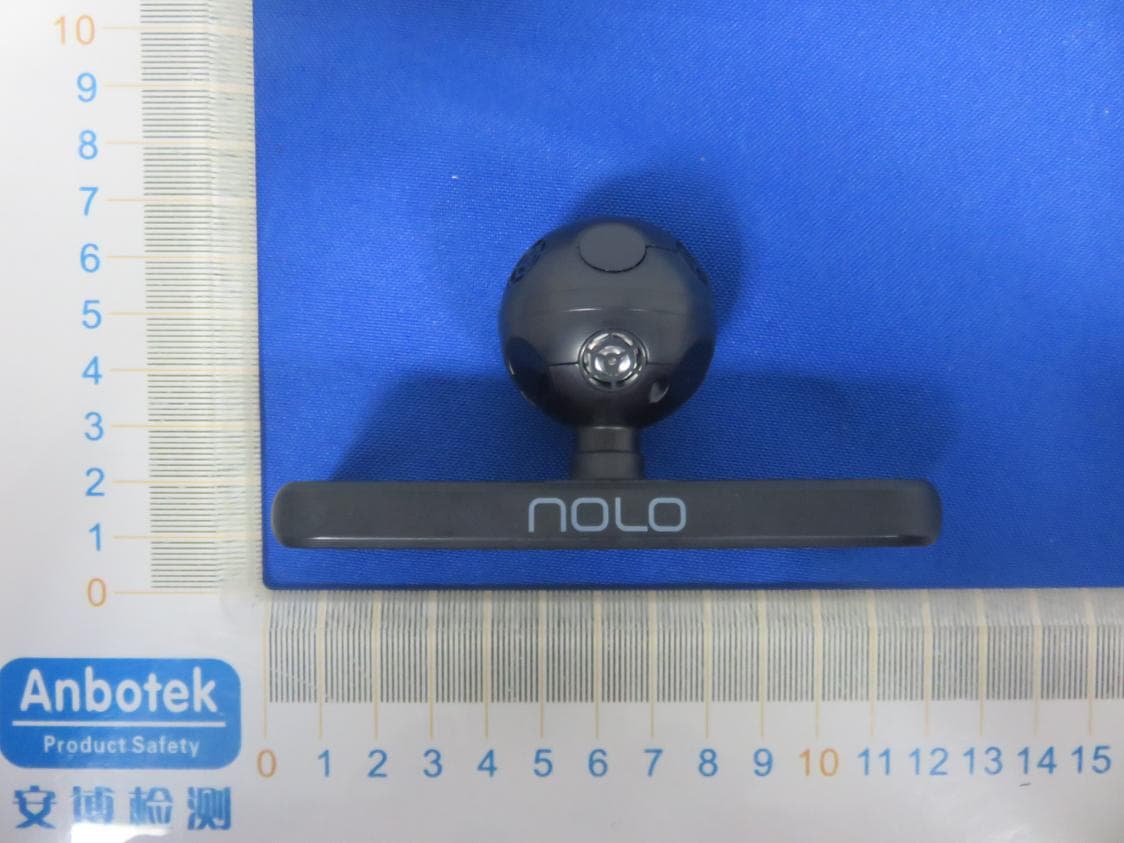
Click to zoom
Application Details
- Equipment Class
- DXT - Part 15 Low Power Transceiver, Rx Verified
- Date of Grant
- Feb 27, 2020
- Application Purpose
- Original Equipment
- Date of Application
- Feb 27, 2020
- Equipment Note
- NOLO Headset Marker
- Frequency Range
- 2402.00000000 - 2475.00000000
- Country
- China
Documents & Files
Document Text
Text extracted from the exhibit documents filed with the FCC. Open a document above to read the original.
Users Manual
NOLO使用说明 NOLO Instructions 详细使用教程,请访问官网(www.nolovr.com/getstarted/)进行査看。 For detailed instructions, please visit the official website (www.nolovr.com/getstarted) 包装内容 Package Contents 定位基站X1 交互手柄X2 头盔定位器X1 Model:CV1 PRO PositioningBaseStation*1 InteractiveController*2 HeadsetMarker*1 电源适配器X1 一字型定位器卡座X1 L型定位器卡座X1 PowerAdapter*1 SlottedPositionerSocket*1 L-typePositionerSocket*1 一分三充电线X1 OTG数据线X2 1米数据线X1 一字型定位器卡座X1 Three-In-OneChargingCable*1 OTGDataCable*2 1mDataCable*1 SlottedPositionerSocket*1 了解设备 LearnMoreabouttheDevice 交互手柄 1扳机键 2配对键 3侧按键 4触控板 5菜单键 6指示灯 7系统/电源键 InteractiveController 1TriggerKey 2PairingKey 3SideKeys(Eachfortheleftandrightsides) 4TouchKey 5MenuKey 6IndicatorLamp 7System/PowerKey 定位基站 电源键 配对键 PositioningBaseStation PowerKey PairingKey 头盔定位器 指示灯 USB接口 配对键 HeadsetMarker IndicatorLamp USBInterface PairingKey 一.配合VR—体机使用说明 I.InstructionsforStandaloneHeadsets 1.搭建网络环境 1.Setupthenetworkenvironment 将路由器和电脑通过网线连接; 将VR—体机和电脑连接至同一路由器的5GWi-Fi频段。 Connecttherouterandthecomputerwiththenetworkcable; Connectthestandaloneheadsetsandcomputertothe5GWi-Fibandofthesamerouter. 2.电脑软件准备 2.SoftwarePreparationofPCs 电脑下裁并安装NOLOHOMEWindows版(http://download.nolovr.com)。 DownloadandinstalltheWindowsversionofNOLOHOME(http://download.nolovr.com). 3.VR_体机端软件准备 使用VR+体机中的应用市场下裁并安装NOLOHOME。 3.SoftwarePreparationoftheStandaloneHeadsets DownloadandinstalltheNOLOHOMEthroughtheapplicationmarketofthestandalone headsets. 4.运行VR—体机中的NOLOHOME 使用VR—体机的手柄操作,打开NOLOHOME。 4.RuntheNOLOHOMEoftheStandaloneHeadsets RuntheNOLOHOMEbythecontrollersofthestandaloneheadsets. 5.开启NOLO设备 将基站放置在与肩同高的水平桌面边缘,并保持基站正面朝外正对使用者,然后开启基站 和手柄的电源开关。 5.TurnontheNOLODevice Placethebasestationontheshoulder-heighttableedgewiththefrontsidefacingtheuser,and thenturnonthepowerswitchesofthebasestationandcontrollers. 6.连接头盔定位器 把NOLO附带的头盔定位器底座粘贴在VR+体机上(注意不要遮挡电源键然后将头盔定位器 插入底座; 使用OTG线连接头盔定位器和VR+体机。 6.ConnecttheHeadsetMarker StickthebaseoftheattachedheadsetmarkerofNOLOtothestandaloneheadsets(Becarefulnot tocoverthepowerkey)andtheninserttheheadsetmarkerintothebase; ConnecttheheadsetmarkerandthestandaloneheadsetsthroughtheOTGcable. 7.建立PC连接 开启电脑上和VR—体机内的NOLOHOME,呆持VR—体机中的NOLOHOME为等待连接 状态,待电脑自动扫描到一体机后,点击连接按纽。 7.ConnectthePC RuntheNOLOHOMEsoftwareofthecomputerandstandaloneheadsets,andkeeptheNOLO HOMEofthestandaloneheadsetsrunning,andthenclickthebuttonofConnectafterthe standaloneheadsetsissearchedbythecomputer. 8.开始游戏 正确佩戴VR—体机进行标定后,手持NOLO手柄,正对基站,开始享受精彩极致的游戏体 验吧! 注:标定方法请参考-四.NOLO使用说明 8.StartGame Aftercorrectlywearingthestandaloneheadsetstocalibrate,taketheNOLOcontrollers,facethe basestationandstarttoenjoytheultimategamingexperience. Notes:PleaserefertoIV.Instructionsforthecalibrationmethod. 二.配合PC头显使用说明 II.InstructionsforthePCHead-MountedDisplay Device 1.连接PC头显 使用PC头显专用数据线连接PC头显。 1.ConnectthePChead-mounteddisplaydevice ConnectthePChead-mounteddisplaydevicewiththespecialdatacable. 2.电脑软件准备 使用电脑下裁并安装NOLOHOMEWindows版(http://download.nolovr.com)。 2.SoftwarePreparationofPC DownloadandinstalltheWindowsversionofNOLOHOME(http://download.nolovr.com). 3.连接头盔定位器 把NOLO附带的头盔定位器底座粘贴在PC头显上,然后将头盔定位器插入底座; 使用OTG线连接头盔定位器和PC头显。 3.ConnecttheHeadsetMarker StickthebaseoftheattachedheadsetmarkerofNOLOtothePChead-mounteddisplaydevice andtheninserttheheadsetmarkerintothebase; ConnecttheheadsetmarkerandthePChead-mounteddisplaydevicethroughtheOTGcable. 4.开启NOLO设备 将基站放置在与肩同高的水平桌面边缘,并保持基站正面朝外正对使用者,然后开启基站 和手柄的电源开关。 4.TurnontheNOLODevice Placethebasestationontheshoulder-heighttableedgewiththefrontsidefacingtheuser,and thenturnonthepowerswitchesofthebasestationandcontrollers. 5.建立PC连接 开启电脑上的NOLOHOME,寺自动扫描到PC头显后,点击连接按纽。 5.ConnectthePC RuntheNOLOHOMEsoftwareofthecomputerandthenclickthebuttonofConnectafterthePC head-mounteddisplaydeviceissearched. 6.开始游戏 正确佩戴PC头显进彳Tfe定后,手持NOL◦手柄,正对基站,开始享受精彩极致的游戏体 验吧! 注:标定方法请参考-四.NOLO使用说明 6.StartGame AftercorrectlywearingthePChead-mounteddisplaydevicetocalibrate,taketheNOLO controllers,facethebasestationandstarttoenjoytheultimategamingexperience. Notes:PleaserefertoIV.Instructionsforthecalibrationmethod. 三.配合安卓手机使用说明 III.InstructionsforAndroidMobilePhone 注:需同时搭配VR眼镜使用。 Note:TheVRglassesareneeded. 1.搭建网络环境 将路由器和电脑通过网线连接; 将手机和电脑连接至同一路由器的5GWi-Fi频段。 1.Setupthenetworkenvironment Connecttherouterandthecomputerwiththenetworkcable; Connectthemobilephoneandcomputertothe5GWi-Fibandofthesamerouter. 2.电脑软件准备 2.SoftwarePreparationofPC 使用电脑下裁并安装NOLOHOMEWindows版(http://download.nolovr.com)。 DownloadandinstalltheWindowsversionofNOLOHOME(http://download.nolovr.com). 3.手机端软件准备 使用手机中的应用市场下裁并安装NOLOHOME手机版;运行手机中的NOLOHOME。 3.SoftwarePreparationoftheStandaloneHeadsets DownloadandinstalltheNOLOHOMEthroughtheapplicationmarketofthemobilephone;Run theNOLOHOMEonthemobilephone. 4.连接头盔定位器 使用OTG短线连接手机和头盔定位器,并允许手机上的USB权限弹窗。 4.ConnecttheHeadsetMarker ConnecttheheadsetmarkerandthemobilephonewiththeOTGcableandallowtheUSB pop-ups. 5.安装手机到VR眼镜上 把NOLO附带的头盔定位器底座粘贴在VR眼镜上,然后将头盔定位器插入底座; 将手机放入VR眼镜中并固定。 5.InstallthemobilephoneintotheHeadsetMarker StickthebaseoftheattachedheadsetmarkerofNOLOtotheVRGlassandtheninsertthe headsetmarkerintothebase; PlacethemobilephoneintotheVRGlassandfixit. 6.开启NOLO设备 将基站放置在高度适当的桌面上,并保持基站正面朝外正对使用者,然后开启基站和手柄的 电源开关。 6.TurnontheNOLODevice Placethebasestationontheshoulder-heighttableedgewiththefrontsidefacingtheuser,and thenturnonthepowerswitchesofthebasestationandcontrollers. 7.建立PC连接 运行电脑上和手机中的NOLOHOME; 保持手机中的NOLOHOME为等待连接状态,待电脑自动扫描到手机后,点击连接按纽。 7.ConnectthePC RuntheNOLOHOMEofthecomputerandthemobilephone; KeeptheNOLOHOMEonthemobilephonerunningandthenclickthebuttonofConnectafter themobilephoneissearchedbythecomputer. 8.开始游戏 正确佩戴手机和VR眼镜进行标定后,手持NOLO手柄,正对基站,享受精彩极致的游戏体 验。 注:标定方法请参考-四.NOL◦使用说明 8.StartGame AftercorrectlywearingthemobilephoneandtheVRGlasstocalibrate,taketheNOLO controllers,facethebasestationandstarttoenjoytheultimategamingexperience. Notes:PleaserefertoIV.Instructionsforthecalibrationmethod. 四.NOLO使用说明 IV.NOLOInstructions 定位基站摆放要求 1.建议将基站摆放在与肩同高的位置; 2.确保基站位于水平桌面的边缘; 3.确保基站正面朝向使用者(带有NOLO标识的为正面)。 PlacementRequirementsforthePositioningBaseStation 1.Thebasestationissuggeste…
Text truncated - open the document above for the full version.
External Photos
FCC ID: 2AVHACV1-PRO
ID Label/Location Info
Label Location On EUT Label Product Name: NOLO Headset Marker Model No.: CV1 PRO FCC ID: 2AVHACV1-PRO
Internal Photos
FCC ID: 2AVHACV1-PRO ANTA ANT B
Operational Description
version01 Beijing Lingyu century Information Technology Co.,Ltd. Declaration concerning Antenna Specification It is hereby declared that the product Model No.: CV1 PRO FCCID:2AVHACV1-PRO fulfills the requirement in FCC test relating to the antenna type. The device specified above confirms to the FCC recommendations for internal antenna type(s) described below: Model No. of antenna: CV1 PRO Type of antenna:PCB Antenna Gain of the antenna: ANT A: 2.83 dBi & ANT B: 2.94 dBi Frequency range:2402~2475MHz The mounting of the antenna is fixed to the radio module and no other antenna should be used. Company name: Beijing Lingyu century Information Technology Co.,Ltd. Address: Room 101-05, 2f, building 20, yard 1, Baosheng South Road, Haidian District, Beijing, China City: Beijing ZIP / Postal code: Country:China Place:ChinaDate: 2020-02-24 Signature:
RF Exposure Info
RFEXPOSUREEVALUATION FCCID:2AVHACV1-PRO AccordingtoFCC1.1310:Thecriterialistedinthefollowingtableshallbeused toevaluatetheenvironmentimpactofhumanexposuretoradiofrequency(RF) Radiationasspecifiedin§1.1307(b): RoutineSARevaluationreferstothatspecificallyrequiredby§2.1093,using measurementsorcomputersimulation.WhenroutineSARevaluationisnot required,portabletransmitterswithoutputpowergreaterthantheapplicable lowthresholdrequireSARevaluationtoqualifyforTCBapproval. Channel (MHz) Max power (dBuV/m) Max output power (dBm) Tuneup tolerance (dBm) MaxTune UpPower (dBm) MaxTuneUp Power (mW/cm 2 ) Distance (mm) Calculation results Limit 240292.78-2.478 ±1 -1.4780.7150.2213 2441 94.64 -0.618±10.3821.0950.3413 247594.16-1.098±1-0.0980.9850.3073 E=EIRP-20LogD+104.8 Where: E=electricfieldstrengthindBuV/m EIRP=equivalentisotropicradiatedpowerindBm D=specifiedmeasurementdistanceinmeters EIRP=E-104.8+20logD=92.78-104.8+20log3=-2.478dbm Note1:CalculationValue=[(max.powerofchannel,includedtune-up tolerance,mW)/(min.testseparationdistance,mm)]·[√f(GHz)]. Foxexample:0.71/5*√2.402=0.221≤3.0 TestResults:PASS.
Test Report
Report No.: SZAWW191118004-01FCC ID: 2AVHACV1-PROPage 1 of 48 Code:AB-RF-05-a FCC TEST REPORT Client Name: Beijing Lingyu century Information Technology Co.,Ltd. Address: Room 101-05, 2f, building 20, yard 1, Baosheng South Road, Haidian District, Beijing, China Product Name: NOLO Headset Marker Date: Feb. 18, 2020 Shenzhen Anbotek Compliance Laboratory Limited Report No.: SZAWW191118004-01FCC ID: 2AVHACV1-PROPage 2 of 48 Code:AB-RF-05-a Contents 1. General Information ............................................................................................................................................... 4 1.1. Client Information ....................................................................................................................................... 4 1.2. Description of Device (EUT) ..................................................................................................................... 4 1.3. Auxiliary Equipment Used During Test ................................................................................................... 5 1.4. Description of Test Modes ........................................................................................................................ 5 1.5. List of Channels .......................................................................................................................................... 6 1.6. Description of Test Setup .......................................................................................................................... 7 1.7. Test Equipment List .................................................................................................................................... 8 1.8. Measurement Uncertainty ......................................................................................................................... 9 1.9. Description of Test Facility ........................................................................................................................ 9 2. Summary of Test Results ................................................................................................................................... 10 3. Conducted Emission Test ................................................................................................................................... 11 3.1. Test Standard and Limit .......................................................................................................................... 11 3.2. Test Setup .................................................................................................................................................. 11 3.3. Test Procedure .......................................................................................................................................... 11 3.4. Test Data .................................................................................................................................................... 12 4. Radiated Emission and Band Edge .................................................................................................................. 15 4.1. Test Standard and Limit .......................................................................................................................... 15 4.2. Test Setup .................................................................................................................................................. 16 4.3. Test Procedure .......................................................................................................................................... 17 4.4. Test Data .................................................................................................................................................... 18 5. 20dB Bandwidth Test .......................................................................................................................................... 32 5.1. Test Standard and Limit .......................................................................................................................... 32 5.2. Test Setup .................................................................................................................................................. 32 5.3. Test Procedure .......................................................................................................................................... 32 5.4. Test Data .................................................................................................................................................... 32 6. Antenna Requirement ......................................................................................................................................... 37 6.1. Test Standard and Requirement ............................................................................................................ 37 6.2. Antenna Connected Construction .......................................................................................................... 37 APPENDIX I -- TEST SETUP PHOTOGRAPH ................................................................................................... 39 APPENDIX II -- EXTERNAL PHOTOGRAPH ..................................................................................................... 41 APPENDIX III -- INTERNAL PHOTOGRAPH ..................................................................................................... 44 Report No.: SZAWW191118004-01FCC ID: 2AVHACV1-PROPage 3 of 48 Code:AB-RF-05-a TEST REPORT Applicant: Beijing Lingyu century Information Technology Co.,Ltd. Manufacturer: Beijing Lingyu century Information Technology Co.,Ltd. Product Name: NOLO Headset Marker Model No.: CV1 PRO Trade Mark: NOLO Rating(s): Input: DC 5V, 90mA, 0.45W Test Standard(s) : FCC Part15 Subpart C, Paragraph 15.249 Test Method(s): ANSI C63.10: 2013 The device described above is tested by Shenzhen Anbotek Compliance Laboratory Limite…
Text truncated - open the document above for the full version.
Test Setup Photos
FCC ID: 2AVHACV1-PRO Photo of Conducted Emission Test Photo of Radiation Emission Test
Contact Information
Applicant
Kevin Guo(G.M.)
Test Firm
Shenzhen Anbotek Compliance Laboratory LimitedJeff Zhu
Technical Specifications
| # | Rule Parts | Frequency Range | Power Output |
|---|---|---|---|
| 1 | 15C | 2.40 GHz - 2.48 GHz | 900.00 µW |
Other Applications from Beijing Lingyu century Information Technology Co., Ltd.
2AVHACV1-03
Mar 01, 2020NOLO Base Station
Equipment Class
DXT - Part 15 Low Power Transceiver, Rx Verified
2AVHACV1-02
Mar 01, 2020NOLO Controller
Equipment Class
DXT - Part 15 Low Power Transceiver, Rx Verified
2AVHA-CV1AIR
Feb 27, 2020NOLO Headset Marker
Equipment Class
DXX - Part 15 Low Power Communication Device Transmitter