2AZRBWT83WIFI SENSOR
NASS (HK) LIMITED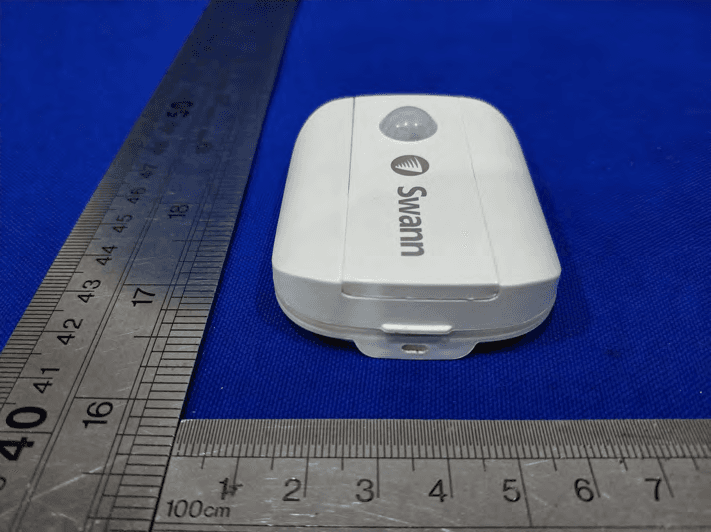
Click to zoom
Application Details
- Equipment Class
- DTS - Digital Transmission System
- Date of Grant
- Jul 26, 2021
- Application Purpose
- Original Equipment
- Date of Application
- Jul 26, 2021
- Equipment Note
- WIFI SENSOR
- Frequency Range
- 2412.00000000 - 2462.00000000
- Company
- NASS (HK) LIMITED
- Country
- China
Documents & Files
Document Text
Text extracted from the exhibit documents filed with the FCC. Open a document above to read the original.
Users Manual
1 EN Motion Alert Sensor Sensor de alerta de movimiento Capteur d’alerte de mouvement Sensore di allarme di movimento Bewegungswarnsensor EN Quick Start Guide ES Guía de inicio rápido FR Guide de démarrage rapide IT Guida rapida DE Schnellstartanleitung 2 EN OVERVIEW Cover Wall side Sensor side Passive Infrared Motion Detector Status Light (Optional) Adjustable Mount Accessory Remove to access battery compartment and QR code 3 EN BATTERY INSTALLATION 1 Using the tab at the bottom, lift off the sensor cover. 2 Insert the supplied two AAA batteries into the battery compartment according to the polarity markings (+ and -) shown. Pairing mode will automatically activate on the sensor for 3 minutes when batteries are inserted. The sensor status light will blink blue slowly during pairing mode. If you have downloaded the Swann Security app on your mobile device (see page 4), you can proceed to the pairing process (see page 5). Note: Pairing mode on the sensor can be activated at any time by re-inserting the batteries. 3 After you have paired the sensor, snap the cover back in place. 4 Should you need to replace the batteries in the future, there is no need to re-pair the sensor. Simply wait for pairing mode to timeout (3 minutes), after which the sensor will automatically reconnect to the previously configured Wi-Fi network. 4 EN DOWNLOAD THE SWANN SECURITY APP 1 Download the latest version of the Swann Security app from the Apple App Store® or Google Play™ Store on your iOS or Android device. Simply search for "Swann Security". 2 Open the app and create your Swann Security account by tapping “Not yet registered? Sign Up” at the bottom of the screen. Then, activate your Swann Security account by confirming the verification email that is sent to the registered email address. 5 EN Open the Swann Security app and tap the Pair Device button on the screen. If you have already paired a device, tap the menu icon in the top left and select “Pair Device”. The app will now guide you through the pairing process and set up the sensor. Before you begin, have the sensor with you and be close to your router. Please note that the sensor can connect to a 2.4GHz Wi-Fi network only. SET UP THE SENSOR 6 EN • Place the sensor around your home as required using the included double-sided tape. Also includ- ed is an optional adjustable mount to allow for flexible positioning around tight spaces. • Make sure the sensor location has strong, reliable Wi-Fi reception available so you can get timely alerts. As a general rule, the nearer your sensor is to your Wi-Fi router, the better the wireless con- nection quality. You can expand the Wi-Fi coverage of your current network by installing a Wi-Fi range extender. • To prevent false detection, avoid aiming the sensor at heat sources (fireplaces, air conditioners, hot air vents, etc), at windows where sunlight can be reflected or placing it in direct sunlight. Also, do not install the sensor on surfaces that can move or vibrate. • For best results, the sensor should ideally be installed pointing downwards at an angle where movement is across the detection area of the sensor. Motion detection is less effective when movement is directly towards or away from the front of the sensor. • For reliable bonding, clean the mounting surface with an alcohol/cleaning wipe, and let dry. Do not use on rough surfaces. When mounting the sensor/adjustable mount, press firmly to the surface for 60 seconds to ensure proper adhesion. • To test the sensor, walk across the detection area. The app will send you a push notification, for example, “Motion Detected on Hallway”, when the sensor detects motion. The sensor tile will also automatically update its status in the app, as shown on the right. To conserve battery power, the sensor will enter sleep mode for 3 minutes each time after it detects motion. During this period, the sensor will not detect any motion activity. Note: You can use the Modes feature in the app to configure whether or not to receive “Motion Alert” push notifications when the sensor is in Home, Away or Night mode. MOUNTING THE SENSOR 7 EN HELP AND RESOURCES Status Light Guide The status light on the sensor tells you what is happening with the device connection. When the sensor is functioning normally, the status light will be off (unless it is out of battery/unpaired). Mounting Examples Swann Security App Manual Access the Swann Security app manual (Menu > User Manual) at any time to learn more about navigating through the various screens and functions in the app. Sensor Battery Level You can check the battery level of the sensor in the app: Devices tab > Sensor > Battery % Slow Blinking BluePairing mode Solid Blue (5 seconds)Motion Detected. Connecting to Wi-Fi. 110° 5m (Actual detection range is subject to environmental conditions) 32 EN Model: WT83 QSGSWIFIMOTIONVER15L FCC STATEMENT This equipment has been tested and found to comply with the limits for Class B digital device, pursuant to part 15 of the FCC Rules. These limits are designed to provide reasonable protection against harmful interference in a residential installation. This equipment generates, uses and can radiate radio frequency energy and, if not installed and used in accordance with the instructions, may cause harmful interference to radio communications. However, there is no guarantee that interference will not occur in a particular installation. If this equipment does cause harmful interference to radio or television reception, which can be determined by turning the equipment off and on, the user is encouraged to try to correct the interference by one or more of the following measures: • Reorient or relocate the receiving antenna • Increase the separation between the equipment and the receiver • Connect the equipment into an outlet on a circuit different from that to which the receiver is connected • Consult the dealer or an experienced radio/TV technician for help. This device complies with Part 15 of the F…
Text truncated - open the document above for the full version.
Cover Letter(s)
RF_160,Issue04 NASS(HK)LIMITED DeclarationofAuthorization We Name:NASS(HK)LIMITED Address:2/FONTINCENTRE1SHEUNGHEISTREETSANPOKONGKOWLOON City:HONGKONG. Country:China. Declarethat: NameRepresentativeofagent:EMTEK(DONGGUAN)CO.,LTD.. (1) AgentCompanyname:SamLv. Address:-1&2/F.,Building2,ZoneA,ZhongdaMarineBiotechnologyReserchand DevelopmentBase,No.9,XinchengAvenue,SongshanhuHigh-technologyIndustrialDevelopmentZone,.. City:Dongguan,Guangdong,.. CountryChina. isauthorizedtoapplyforCertificationofthefollowingproduct(s): Productdescription:WIFISENSOR. Typedesignation:WT05,WT83,SWIFI-MOTION. Trademark:N/A. Validity/expirydate onourbehalf. Date:2021-7-16.. City:HOGGKONG.. Name:Williamma.. (2) Function:...Manager............................ Signature:. Notes: (1):RequiredforFCCapplication (2):ForFCCitmustbetheGranteeCode“owner”ortheauthorizedagent.
Cover Letter(s)
FCC,Requestfornon-disclosureDate:21-Nov-2018 RF_501,Issue8Page1of1 CompanyName:NASS(HK)LIMITED Address:2/FONTINCENTRE1SHEUNGHEISTREETSAN POKONGKOWLOONHONGKONG City:HONGKONG Country:China To:TeleficationB.V.,Dept.FCCTCB Edisonstraat12A 6902PKZEVENAAR TheNetherlands Subject:RequestforconfidentialityFCCID:2AZRBWT83 Referencenumber:WT05,WT83,SWIFI-MOTION DearFCCTCB, 1.Long-TermConfidentiality Pursuantto47CFRSection0.459(a)&(b),weherebyrequestsnon-disclosureandconfidentialtreatment ofthefollowingmaterialssubmittedinsupportofFCCcertificationapplication: Bill(s)ofMaterialBlockDiagrams OperationalDescriptionSchematicDiagramsTune-upProcedure Abovematerialscontainsecrets,proprietaryandtechnicalinformation,whichwouldcustomarilybe guardedfromcompetitorsunder47CFR,section0.457(d)(2).Disclosureorpublicationoranyportionof thiscompanyconfidentialmaterialtootherpartiescouldcausesubstantialcompetitiveharmandprovide unjustifiedbenefitsforcompetitors. 2.Short-TermConfidentiality(STC) PursuanttoPublicNoticeDA04-1705oftheCommission’spolicy,inordertocomplywiththemarketing regulationsin47CFR§2.803andtheimportationrulesin47CFR§2.1204,applicantherebyrequests Short-TermConfidentialtreatmentofthefollowingmaterials(Seenotesbelow): InternalPhotosUser’sManualTestSet-upPhotosExternalPhotos Justification:Theproducthasnotyetbeenreleasedtopreventothermerchantsfromcopyingit Date:2021-07-16Nameandsignatureofapplicant:Williamma Notes: 1)AdocumentortypeofdocumentcanonlyhaveONEtypeofconfidentiality! 2)Short-Termconfidentialityisinprinciplefor45daysfromdateofgrant;itcanbeextendedmax3times(totaltime180daysmax.)! TheplanneddateshouldstatedintheRF731applicationform. 3)FCCmustbeinformedwhenmarketingbeginsearlier. 4)Releasetakesplaceautomaticallythusextensionmustberequestedintime.Teleficationdoesnotremindyouofthis! 5)RequestforextensionorforreleasemustbereceivedbyTeleficationatleast7daysbeforedateofactualmarketingorbefore expirationoftheSTCperiod
Cover Letter(s)
Declarationonmodeldifference Wetheundersignedherebyconfirmthatthesemodelsareidentical,andallmodelshavethesameRFmoduleand antenna,PCBlayout,schematicsandcomponent.Onlydifferentonmodelnumberandcolorofappearance. ProductionnameFCCIDModelno. WIFISENSOR2AZRBWT83WT05,WT83,SWIFI-MOTION Confirmedby: Williamma 2021-07-16
External Photos
FCC ID:2AZRBWT83
Internal Photos
FCC ID: 2AZRBWT83 ANT
Test Report
Report No.: ED210430154WPage 1 of 57 Ver.1.0 $印章$ TEST REPORT Product Name : WIFI SENSOR Model Number : WT05, WT83, SWIFI-MOTION FCC ID : 2AZRBWT83 Prepared for: NASS (HK) LIMITED Address: 2/F ON TIN CENTRE 1 SHEUNG HEI STREET SAN PO KONG KOWLOON HONG KONG Prepared by: EMTEK(DONGGUAN) CO., LTD. Address: -1&2/F.,Buiding 2,Zone A,Zhongda Marine Biotechnology Research and Development Base,N.9,Xincheng Avenue,Songshanhu High-technology Industrial Development Zone, Dongguan, Guangdong, China TEL: +86-0769-22807078 FAX: +86-0769-22807079 Report Number: ED210430154W Date(s) of Tests: May 29, 2021 to Jul 05, 2021 Date of issue: Jul 05, 2021 $二维码$ Report No.: ED210430154WPage 2 of 57 Ver.1.0 TABLE OF CONTENTS 1 TEST RESULT CERTIFICATION........................................................................................................................3 2 EUT TECHNICALDESCRIPTION......................................................................................................................4 3 SUMMARYOFTEST RESULT............................................................................................................................5 4 TEST METHODOLOGY.......................................................................................................................................6 4.1 GENERAL DESCRIPTION OFAPPLIED STANDARDS..............................................................................6 4.2 MEASUREMENT EQUIPMENT USED.........................................................................................................6 4.3 DESCRIPTION OF TEST MODES..................................................................................................................7 4.4 TABLE OF PARAMETERS OF TEXT SOFTWARE SETTING.................................................................... 8 5 FACILITIESANDACCREDITATIONS.............................................................................................................. 9 5.1 FACILITIES......................................................................................................................................................9 5.2 LABORATORYACCREDITATIONSAND LISTINGS..................................................................................9 6 TEST SYSTEM UNCERTAINTY........................................................................................................................10 7 SETUPOFEQUIPMENT UNDER TEST...........................................................................................................11 7.1 RADIO FREQUENCYTEST SETUP1.........................................................................................................11 7.2 RADIO FREQUENCYTEST SETUP2.........................................................................................................11 7.3 CONDUCTED EMISSION TEST SETUP.....................................................................................................12 7.4 BLOCK DIAGRAM CONFIGURATION OF TEST SYSTEM.....................................................................13 7.5 SUPPORT EQUIPMENT................................................................................................................................13 8 TEST REQUIREMENTS..................................................................................................................................... 14 8.1 DTS (6DB) BANDWIDTH.............................................................................................................................14 8.2 MAXIMUM PEAK CONDUCTED OUTPUT POWER................................................................................21 8.3 MAXIMUM POWER SPECTRAL DENSITY...............................................................................................22 8.4 UNWANTED EMISSIONS IN NON-RESTRICTED FREQUENCY BANDS.............................................29 8.5 RADIATED SPURIOUS EMISSION.............................................................................................................46 8.6 CONDUCTED EMISSIONS TEST................................................................................................................54 8.7 ANTENNAAPPLICATION........................................................................................................................... 55 Report No.: ED210430154WPage 3 of 57 Ver.1.0 1 TEST RESULT CERTIFICATION Applicant: NASS (HK) LIMITED. 2/F., On Tin Centre, 1 Sheung Hei Street, San Po Kong, Kowloon, Hong Kong. Manufacturer: NASS (HK) LIMITED. 2/F., On Tin Centre, 1 Sheung Hei Street, San Po Kong, Kowloon, Hong Kong. EUT Description:WIFI SENSOR Model Number:WT05, WT83, SWIFI-MOTION Trade Mark:N/A Measurement Procedure Used: APPLICABLE STANDARDS STANDARDTEST RESULT FCC 47 CFR Part 2, Subpart J FCC 47 CFR Part 15, Subpart C PASS The above equipment was tested by EMTEK (DONGGUAN) CO., LTD. The test data, data evaluation, test procedures, and equipment configurations shown in this report were made in accordance with the procedures given in ANSI C63.10 (2013) and the energy emitted by the sample EUT tested as described in this report is in compliance with the requirements of FCC Rules Part 2 and Part 15.247 The test results of this report relate only to the tested sample identified in this report. Date of Test :May 29, 2021 to Jul 05, 2021 Prepared by : Loren Luo / Editor Reviewer : Tomas Yang/Supervisor Approve & Authorized Signer : Sam Lv/Manager Report No.: ED210430154WPage 4 of 57 Ver.1.0 2 EUT TECHNICAL DESCRIPTION CharacteristicsDescription IEEE 802.11 WLAN Mode Supported 802.11b 802.11g 802.11n(20MHz channel bandwidth) 802.11n(40MHz channel bandwidth) Data Rate WIFI: 802.11 b:1,2,5.5,11Mbps; 802.11 g:6,9,12,18,24,36,48,54Mbps; 802.11n(HT20): up to 144.4Mbps; 802.11n(HT40): up to 300Mbps; Modulation WIFI: DSSS with DBPSK/DQPSK/CCK for 802.11b; OFDM with BPSK/QPSK/16QAM/64QAM for 802.11g/n; Operating Frequency Range WIFI: 2412-2462MHz for 802.11b/g/n(HT20); 2422-2452MHz f…
Text truncated - open the document above for the full version.
Test Setup Photos
FCCID:2AZRBWT83
Contact Information
Applicant
WILLIAM MA(MANAGER)
Technical Contact
Non-Technical Contact
EMTEK(DONGGUAN) CO., LTD.Sam Lv
[email protected]86-769-2280 7078
Test Firm
EMTEK (Dongguan) Co., Ltd.Sam Lv
[email protected]886-0769-22807078
Technical Specifications
| # | Rule Parts | Frequency Range | Power Output |
|---|---|---|---|
| 1 | 15C | 2.41 GHz - 2.46 GHz | 7.80 mW |
Other Applications from NASS (HK) LIMITED
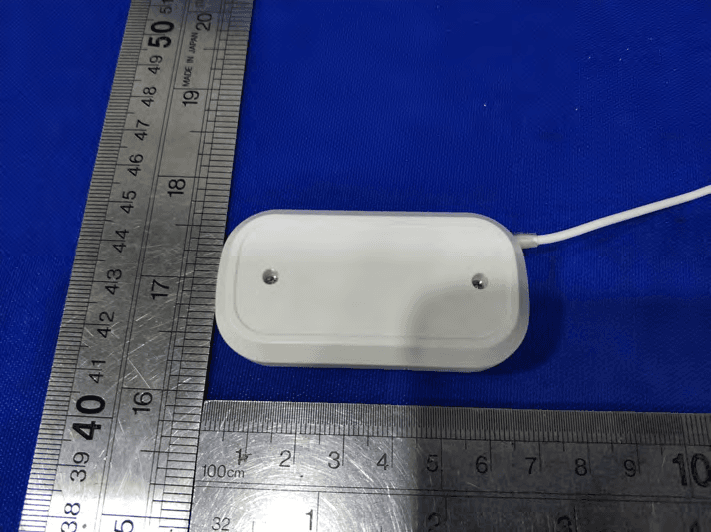
2AZRBWT82
Jul 28, 2021WIFI SENSOR
Equipment Class
DTS - Digital Transmission System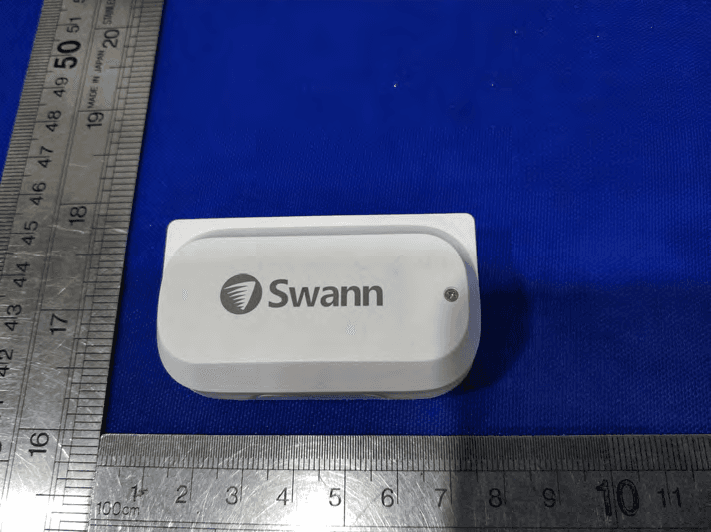
2AZRBWT06
Jul 26, 2021WIFI SENSOR
Equipment Class
DTS - Digital Transmission System