A3LGTN8020Portable Tablet PC with Cellular/ PCS GSM/ EDGE/ WCDMA, WLAN and Bluetooth
Samsung Electronics Co Ltd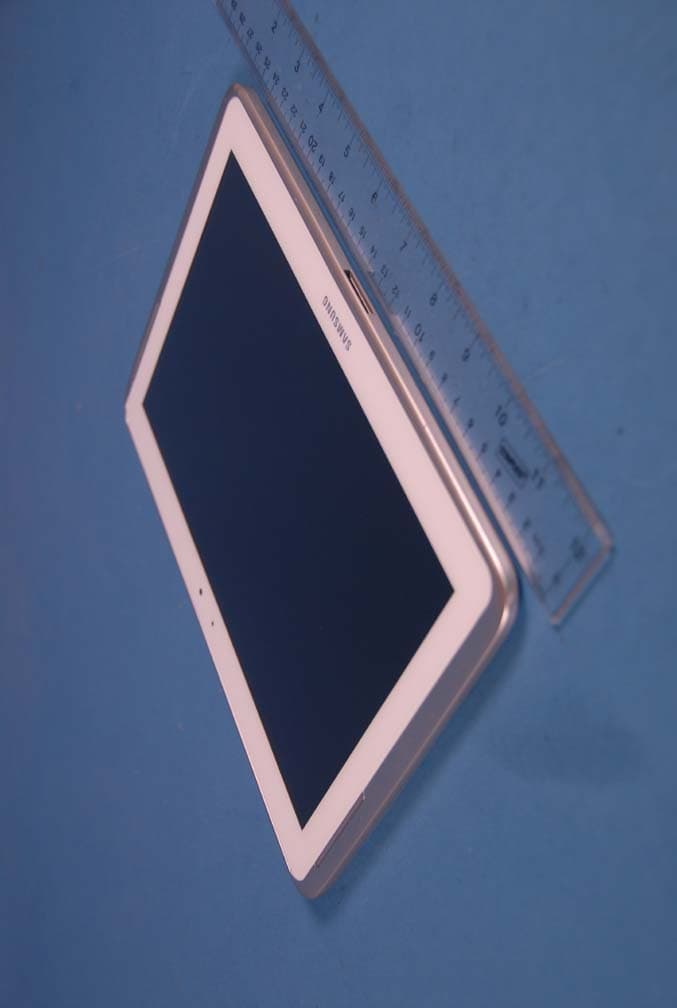
Click to zoom
Application Details
- Equipment Class
- NII - Unlicensed National Information Infrastructure TX
- Date of Grant
- Oct 31, 2012
- Application Purpose
- Original Equipment
- Date of Application
- Oct 08, 2012
- Equipment Note
- Portable Tablet PC with Cellular/ PCS GSM/ EDGE/ WCDMA, WLAN and Bluetooth
- Frequency Range
- 5510.00000000 - 5670.00000000
- Company
- Samsung Electronics Co Ltd
- Country
- United States
Documents & Files
Document Text
Text extracted from the exhibit documents filed with the FCC. Open a document above to read the original.
Users Manual
Some of the contents in this manual may differ from your device depending on the software of the device or your service provider. www.samsung.com English (EU). 09/2012. Rev. 1.0 To install Kies (PC Sync) Download the latest version of Kies from the 1. Samsung website (www.samsung.com/kies) and install it on your PC. Using a USB cable, connect your device to your PC. 2. Samsung Kies will launch automatically. Refer to the Kies help for more information. GT-N8020 user manual Using this manual 2 Using this manual Congratulations on your purchase of the Samsung mobile device. This powerful, “go anywhere” device, puts the best of the web and mobile computing at your fingertips in a lightweight, highly versatile platform that fits your active lifestyle. Built on the Google Android operating system, the Samsung mobile device gives you access to thousands of useful and entertaining applications to enrich your mobile web experience. With integrated wireless access and a responsive touch screen, you can read books and newspapers on the go; stay up-to-date on the latest news, sports, and weather; manage your multimedia and business files; and browse the web for maps, business locations, and more. Read me first Please read all safety precautions and this manual carefully ● before using your device to ensure safe and proper use. The descriptions in this manual are based on the default ● settings of your device. Images and screenshots used in this user manual may differ ● in appearance from the actual product. Content in this user manual may differ from the product, or ● from software provided by service providers or carriers, and is subject to change without prior notice. Refer to www.samsung.com for the latest version of the user manual. Using this manual 3 Available features and additional services may vary by ● device, software, or service provider. Formatting and delivery of this user manual is based ● on Google Android operating systems and may vary depending on the user’s operating system. Applications and their functions may vary by country, ● region, or hardware specifications. Samsung is not liable for performance issues caused by third-party applications. Samsung is not liable for performance issues or ● incompatibilities caused by edited registry settings or modified operating system software. Attempting to customise the operating system may cause your device or applications to work improperly. You may upgrade your mobile device’s software by ● accessing www.samsung.com. Software, sound sources, wallpapers, images, and other ● contents provided in this device are licenced for limited use between Samsung and their respective owners. Extracting and using these materials for commercial or other purposes is an infringement of copyright laws. Samsung is not liable for such copyright infringement by the user. Please keep this manual for future reference. ● Using this manual 4 Instructional icons Before you start, familiarise yourself with the icons you will see in this manual: Warning—situations that could cause injury to yourself or others Caution—situations that could cause damage to your device or other equipment Note—notes, usage tips, or additional information ►Refer to—pages with related information; for example: ► p.12 (represents “see page 12”) → Followed by—the order of options or menus you must select to perform a step; for example: Open the application list and select Settings → About device (represents Settings, followed by About device) Copyright Copyright © 2012 Samsung Electronics This user manual is protected under international copyright laws. No part of this user manual may be reproduced, distributed, translated, or transmitted in any form or by any means, electronic or mechanical, including photocopying, recording, or storing in any information storage and retrieval system, without the prior written permission of Samsung Electronics. Using this manual 5 Trademarks SAMSUNG and the SAMSUNG logo are registered ● trademarks of Samsung Electronics. The Android logo, Google ● ™ , Google Maps ™ , Google Mail ™ , YouTube ™ , Google Play ™ Store, and Google Talk ™ are trademarks of Google, Inc. Bluetooth ● ® is a registered trademark of the Bluetooth SIG, Inc. worldwide. Windows Media Player ● ® is a registered trademark of Microsoft Corporation. Wi-Fi ● ® , Wi-Fi Protected Setup ™ , Wi-Fi Direct ™ , Wi-Fi CERTIFIED ™ , and the Wi-Fi logo are registered trademarks of the Wi-Fi Alliance. DivX ● ® , DivX Certified ® and associated logos are trademarks of Rovi Corporation or its subsidiaries and are used under licence. All other trademarks and copyrights are the property of ● their respective owners. Using this manual 6 ABOUT DIVX VIDEO DivX ® is a digital video format created by DivX, LLC, a subsidiary of Rovi Corporation. This is an official DivX Certified ® device that plays DivX video. Visit www.divx.com for more information and software tools to convert your files into DivX videos. ABOUT DIVX VIDEO-ON-DEMAND This DivX Certified ® device must be registered in order to play purchased DivX Video-on-Demand (VOD) movies. To obtain your registration code, locate the DivX VOD section in your device setup menu. Go to vod.divx.com for more information on how to complete your registration. DivX Certified ® to play DivX ® video up to HD 720p, including premium content. May play DivX ® video up to HD 1080p. Contents 7 Assembling ....................................................... 12 Unpack ................................................................................................. 12 Install the SIM or USIM card ......................................................... 12 Charge the battery .......................................................................... 13 Insert a memory card (optional) ................................................ 15 Getting started ................................................. 18 Turn your device on and off ..........................................…
Text truncated - open the document above for the full version.
Users Manual
Communication 90 Listen to voice mail messages › If you have set missed calls to be diverted to the voice mail server, callers can leave voice messages when you do not answer incoming calls. To access your voice mail inbox and listen to your messages, Open the application list and select 1 Phone → Keypad, and then tap and hold . Follow the instructions from the voice mail server. 2 You must save the voice mail server number before accessing the server. Contact your service provider for the number. Google Mail You can retrieve new email messages from Google Mail ™ to your Inbox. When you access this application, the Inbox screen appears. The total number of unread messages displays in the title bar and unread messages display in bold. This feature may be unavailable depending on your ● region or service provider. This Google Mail menu may be labelled differently ● depending on your region or service provider. Communication 91 Send an email message › Open the application list and select 1 Google Mail → . Select the recipient field and enter an email address. 2 Select the subject field and enter a subject. 3 Select the text field and enter your email text. 4 To attach a photo, select ● . To remove an attached photo, select ● to the right of an attachment’s name. Select 5 SEND to send the message. If you are offline or outside your service area, the message will be held in the message thread until you are online and inside your service area. View an email message › Open the application list and select 1 Google Mail. Select 2 to update the message list. Select an email message. 3 From the message view, use the following options: To create a new message, select ● . To search for an email message, select ● . To archive the message, select ● . To delete the message, select ● . To add a label to the message, select ● . To move to the next or previous message, scroll left or right. ● Communication 92 To reply to the message, select ● . To reply to the message including all recipients, select ● . To forward the message to other people, select ● . To add a star to the message, select ● . To view an attachment, select ● VIEW. To save it to your device, select SAVE. To add a label to the message, select ● → Change labels. To make the message as unread, select ● → Mark unread. To mark the message as important, select ● → Mark as important. To hide the message, select ● → Mute. To move the message to the inbox folder, select All Mail and drag the message to Inbox. To register the message to the spam list, select ● → Report spam. To reload the messages, select ● → Refresh. To add a label to a message, select ● → Manage labels. To customise the email settings, select ● → Settings. Available options may vary depending on the account. Communication 93 Email Learn to send or view email messages via your personal or company email account. Set up an email account › 1 Open the application list and select Email. Enter your email address and password. 2 Select 3 Next (for general email accounts) or Manual setup (for other company email accounts). Follow the on-screen instructions. 4 To add more email accounts, select 5 → Settings → Add account and repeat steps 2-4. When you are finished setting up the email account, the email messages are downloaded to your device. If you have created more than two accounts, you can switch between email accounts. Select an account name at the top left of the screen and select the one you want to retrieve messages from. Communication 94 Send an email message › 1 Open the application list and select Email → . Add recipients of your message. 2 Enter email addresses manually, separating them with a ● semicolon or a comma. Select email addresses from the lists by selecting ● . Select the subject field and enter a subject. 3 Select the text input field and enter your email text. You 4 can enter draw a sketch by selecting . Select 5 → files to attach. Select 6 to send the message. If you are offline or outside your service area, the message will be held in the outbox until you are online and in your service area. View an email message › When you open an email account, you can view previously retrieved email offline or connect to the email server to view new messages. After retrieving email messages, you can view them offline. Open the application list and select 1 Email. Select 2 to update the message list. Select an email message. 3 From the message view, use the following options: To search for an email message, select ● . To create a new message, select ● . To reply to the message, select ● . Communication 95 To reply to the message including all recipients, select ● . To forward the message to other people, select ● . To delete the message, select ● . To add a star to the message, select ● . To make the message as unread, select ● → Mark as unread. To move the message to another folder, select ● → Move. To save the message, select ● → Save email. The message will be saved in My Files → sdcard → Saved Email. To view the messages by category, select ● → Sort by. To change the view mode, select ● → View mode. To print the message using a Wi-Fi or USB connection, ● select → Print. Your device is compatible only with some Samsung printers. To save the email addresses of the recipients to the ● phonebook as a group of contacts, select → Save as group. To delete all messages, select ● → Delete all. To customise the email settings, select ● → Settings. To save an attachment to your device, select the ● attachment tab → . The options available may vary depending on the email account or device’s orientation. Communication 96 Talk Learn to chat with friends and family via Google Talk ™ . This feature may be unavailable depending on your region or service provider. Set your status › Open the application list and select 1 Talk. Add your Google account (if necessary). 2 Customise your status, image, and message to display. 3 Add friends to your friend list › Open the application list and select 1…
Text truncated - open the document above for the full version.
Attestation Statements
SAMSUNG ELECTRONICS CO., LTD 416,Maetan-3dong,Yeongtong-gu Suwon-si,Gyeonggi-do, 443-742 Korea Federal Communications Commission 7435 Oakland Mills Roaad Columbia, MD 21046 SUBJECT : Label Statement FCC ID : A3LGTN8020 Gentlemen: We hereby provide the label statement letter for the above-mentioned device by a new label statement policy instituted at the September 12, 2006, TCB-FCC Teleconference. The label statement is as follows: The FCC ID shown in the FCC ID label page will be readily visible at the time of purchase because the label is permanently engraved on the rear of the device exterior. This statement could not be included in the label. So we inform you of it through this letter. Should you have any questions or comments concerning the above, please contact the undersigned. Sincerely Yours, Seoung Ho Park Senior Manager SAMSUNG ELECTRONICS CO.,LTD Telecommunication Network Business Mobile Communication Division Regulatory Compliance Group. Sep. 20, 2012
Cover Letter(s)
SAMSUNG ELECTRONICS AMERICA, INC. American QA Lab 19 Chapin Rd, Building D. Pine Brook, NJ 07058 Date: September 24, 2012 Federal Communications Commission Authorization and Evaluation Division 7435 Oakland Mills Road, Columbia, MD 21046 RE: Request of Confidentiality for FCC ID: A3LGTN8020 To Whom It May Concern: Pursuant to Sections 0.457 and 0.459 of the Commission’s Rules (CFR 47), and Section 552 (b) (4) of the Freedom of Information Act, SAMSUNG ELECTRONICS CO.,LTD. hereby requests confidentiality and treatment of certain information accompanying this application. The materials contain trade secrets and proprietary information not customarily released to the public. The public disclosure of these matters might be harmful to the Applicant and provide unjustified benefits to its competitors. We are also hereby request Short-Term Confidentiality for 180 days after the grant as outlined in Public Notice DA 04-1705. This provision will give SAMSUNG ELECTRONICS CO.,LTD. temporary confidentiality of commercially sensitive information prior to product release. The requested Permanent and Short-Term Confidential exhibits are listed as follows: PERMANENT AND SHORT-TERM CONFIDENTIAL LIST Exhibit Description 1 Block Diagram 2 Operational Description PERMANENT 3 Schematics 4 External Photos 5 Internal Photos 6 Test-Setup Photos SHORT-TERM 7 Users Manual The Applicant understands that pursuant to Rule 0.457, disclosure of this application and all accompanying documentations, where applicable, will not be made public before the date of the Grant for this application. Sincerely, Peter Ra General Manager American QA Lab SAMSUNG Electronics America INC.
External Photos
SAMSUNG ELECTRONICS FCC ID: A3LGTN8020 Model: GT-N8020 External Photos EUT Type: Portable Tablet Page 1 of 4 © 2012 PCTEST Engineering Laboratory Inc. EXTERNAL PHOTOGRAPHS SAMSUNG ELECTRONICS FCC ID: A3LGTN8020 Model: GT-N8020 External Photos EUT Type: Portable Tablet Page 2 of 4 © 2012 PCTEST Engineering Laboratory Inc. SAMSUNG ELECTRONICS FCC ID: A3LGTN8020 Model: GT-N8020 External Photos EUT Type: Portable Tablet Page 3 of 4 © 2012 PCTEST Engineering Laboratory Inc. SAMSUNG ELECTRONICS FCC ID: A3LGTN8020 Model: GT-N8020 External Photos EUT Type: Portable Tablet Page 4 of 4 © 2012 PCTEST Engineering Laboratory Inc.
ID Label/Location Info
Label and Location Samsung Tablet Model : GT-N8020 FCC ID : A3LGTN8020 Label : Location : Top Back plate of GT-N8020 Tablet: FCC ID is printed on the bottom of device. Back
Internal Photos
SAMSUNG ELECTRONICS FCC ID: A3LGTN8020 Model: GT-N8020 Internal Photos EUT Type: Portable Tablet Page 1 of 9 © 2012 PCTEST Engineering Laboratory Inc. INTERNAL PHOTOGRAPHS SAMSUNG ELECTRONICS FCC ID: A3LGTN8020 Model: GT-N8020 Internal Photos EUT Type: Portable Tablet Page 2 of 9 © 2012 PCTEST Engineering Laboratory Inc. SAMSUNG ELECTRONICS FCC ID: A3LGTN8020 Model: GT-N8020 Internal Photos EUT Type: Portable Tablet Page 3 of 9 © 2012 PCTEST Engineering Laboratory Inc. SAMSUNG ELECTRONICS FCC ID: A3LGTN8020 Model: GT-N8020 Internal Photos EUT Type: Portable Tablet Page 4 of 9 © 2012 PCTEST Engineering Laboratory Inc. SAMSUNG ELECTRONICS FCC ID: A3LGTN8020 Model: GT-N8020 Internal Photos EUT Type: Portable Tablet Page 5 of 9 © 2012 PCTEST Engineering Laboratory Inc. SAMSUNG ELECTRONICS FCC ID: A3LGTN8020 Model: GT-N8020 Internal Photos EUT Type: Portable Tablet Page 6 of 9 © 2012 PCTEST Engineering Laboratory Inc. SAMSUNG ELECTRONICS FCC ID: A3LGTN8020 Model: GT-N8020 Internal Photos EUT Type: Portable Tablet Page 7 of 9 © 2012 PCTEST Engineering Laboratory Inc. SAMSUNG ELECTRONICS FCC ID: A3LGTN8020 Model: GT-N8020 Internal Photos EUT Type: Portable Tablet Page 8 of 9 © 2012 PCTEST Engineering Laboratory Inc. SAMSUNG ELECTRONICS FCC ID: A3LGTN8020 Model: GT-N8020 Internal Photos EUT Type: Portable Tablet Page 9 of 9 © 2012 PCTEST Engineering Laboratory Inc.
RF Exposure Info
FCC ID: A3LGTN8020 SAR EVALUATION REPORT Reviewed by: Quality Manager Document S/N: Test Dates: DUT Type: Page 1 of 34 0Y1208311278-R4.A3L 08/31/12 - 09/10/12 Portable Tablet Computer © 2012 PCTEST Engineering Laboratory, Inc. REV 11.3 M 04/23/2012 Applicant Name: Date of Testing: Samsung Electronics Co., Ltd. 08/31/12 - 09/10/12 416, Maetan 3-dong, Yeongtong-gu, Suwon-si Test Site/Location: Gyeonggi-do, 443-742 PCTEST Lab, Columbia, MD, USA Republic of Korea Document Serial No.: 0Y1208311278-R4.A3L FCC ID: A3LGTN8020 APPLICANT: SAMSUNG ELECTRONICS CO., LTD. DUT Type: Portable Tablet Computer Application Type: Certification FCC Rule Part(s): Model(s): CFR §2.1093 GT-N8020 Test Device Serial No.: Pre-Production [S/N: FCC #1, FCC #3] 1 gm Body (W/kg) GSM/GPRS/EDGE 850824.20 - 848.80 MHz32.081.02 UMTS 850826.40 - 846.60 MHz22.960.67 GSM/GPRS/EDGE 19001850.20 - 1909.80 MHz29.620.97 2.4 GHz W LAN2412 - 2462 MHz12.730.43 5.8 GHz W LAN5745 - 5825 MHz11.180.79 5.2 GHz W LAN5180 - 5240 MHz11.180.31 5.3 GHz W LAN5260 - 5320 MHz11.030.33 5.5 GHz W LAN5500 - 5700 MHz10.850.77 Bluetooth2402 - 2480 MHz11.93 1.53 SAR Band & ModeTx Frequency Conducted Power [dBm] N/A Simultane ous SAR per KDB 690783 D01: Note: Powers in the above table represent output powers for the SAR test configurations and may not represent the highest output powers for all configurations for each mode. Note: This revised Test Report (S/N: 0Y1208311278-R4.A3L) supersedes and replaces the previously issued test report on the same subject EUT for the same type of testing as indicated. Please discard or destroy the previously issued test report(s) and dispose of it accordingly This wireless portable device has been shown to be capable of compliance for localized specific absorption rate (SAR) for uncontrolled environment/general population exposure limits specified in ANSI/IEEE C95.1-1992 and has been tested in accordance with the measurement procedures specified in FCC/OET Bulletin 65 Supplement C (2001), IEEE 1528-2003 and in applicable Industry Canada Radio Standards Specifications (RSS); for North American frequency bands only. I attest to the accuracy of data. All measurements reported herein were performed by me or were made under my supervision and are correct to the best of my knowledge and belief. I assume full responsibility for the completeness of these measurements and vouch for the qualifications of all persons taking them. Test results reported herein relate only to the item(s) tested. PCTEST certifies that no party to this application has been subject to a denial of Federal benefits that includes FCC benefits pursuant to Section 5301 of the Anti-Drug Abuse Act of 1988, 21 U.S.C. 862. PCTEST ENGINEERING LABORATORY, INC. 6660-B Dobbin Road, Columbia, MD 21045 USA Tel. +1.410.290.6652 / Fax +1.410.290.6654 http://www.pctestlab.com SAR EVALUATION REPORT FCC ID: A3LGTN8020 SAR EVALUATION REPORT Reviewed by: Quality Manager Document S/N: Test Dates: DUT Type: Page 2 of 34 0Y1208311278-R4.A3L 08/31/12 - 09/10/12 Portable Tablet Computer © 2012 PCTEST Engineering Laboratory, Inc. REV 11.3 M 04/23/2012 TABLE OF CONTENTS 1 DEVICE UNDER TEST ................................................................................................................... 3 2 INTRODUCTION ............................................................................................................................. 6 3 SAR MEASUREMENT SETUP ....................................................................................................... 7 4 DOSIMETRIC ASSESSMENT ........................................................................................................ 8 5 FCC RF EXPOSURE LIMITS .......................................................................................................... 9 6 SAR TABLET TESTING ................................................................................................................ 10 7 FCC MEASUREMENT PROCEDURES ........................................................................................ 11 8 RF CONDUCTED POWERS ......................................................................................................... 14 9 SYSTEM VERIFICATION .............................................................................................................. 21 10 SAR DATA SUMMARY ................................................................................................................. 23 11 FCC MULTI-TX AND ANTENNA SAR CONSIDERATIONS ......................................................... 26 12 EQUIPMENT LIST ......................................................................................................................... 29 13 MEASUREMENT UNCERTAINTIES ............................................................................................ 30 14 CONCLUSION ............................................................................................................................... 32 15 REFERENCES .............................................................................................................................. 33 FCC ID: A3LGTN8020 SAR EVALUATION REPORT Reviewed by: Quality Manager Document S/N: Test Dates: DUT Type: Page 3 of 34 0Y1208311278-R4.A3L 08/31/12 - 09/10/12 Portable Tablet Computer © 2012 PCTEST Engineering Laboratory, Inc. REV 11.3 M 04/23/2012 1 DEVICE UNDER TEST 1.1 Device Overview GSM/GPRS/EDGE 850824.20 - 848.80 MHz UMTS 850826.40 - 846.60 MHz GSM/GPRS/EDGE 19001850.20 - 1909.80 MHz 2.4 GHz W LAN2412 - 2462 MHz 5.8 GHz W LAN5745 - 5825 MHz 5.2 GHz W LAN5180 - 5240 MHz 5.3 GHz W LAN5260 - 5320 MHz 5.5 GHz W LAN5500 - 5700 MHz Bluetooth2402 - 2480 MHz Band & ModeTx Frequency 1.2 DUT Antenna Locations Figure 1-1 DUT Antenna Locations FCC ID: A3LGTN8020 SAR EVALUATION REPORT Reviewed by: Quality Manager Document S/N: Test Dates: DUT Type: Page 4 of 34 0Y1208311278-R4.A3L 08/31/12 - 09/10/12 Portable Tablet Computer © 2012 PCTEST Engineering Labo…
Text truncated - open the document above for the full version.
Test Report
Reviewed by: FCC ID: A3LGTN8020 FCC Pt. 15.407 802.11a/n UNII MEASUREMENT REPORT (CERTIFICATION) Quality Manager Test Report S/N: Test Dates: EUT Type: 0Y1208311282.A3L 09/11 - 09/19/2012 Portable Tablet Page 1 of 84 © 2012 PCTEST Engineering Laboratory, Inc. REV 1.3U40 09/10/12 Applicant Name: Date of Testing: Samsung Electronics Co., Ltd. 09/11 - 09/19/2012 416 Maetan 3-Dong, Yeongtong-gu Test Site/Location: Suwon-si, Gyeonggi-do PCTEST Lab, Columbia, MD, USA 443-742 , Republic of Korea Test Report Serial No.: 0Y1208311282.A3L FCC ID: A3LGTN8020 APPLICANT: Samsung Electronics Co., Ltd. Application Type: Certification Model(s): GT-N8020 EUT Type: Portable Tablet FCC Classification: Unlicensed National Information Infrastructure (UNII) FCC Rule Part(s): Part 15.407 IC Specification(s): RSS-210 Issue 8 Test Procedure(s): ANSI C63.10-2009, KDB 789033 Max. Power (m W ) Max. Power (dBm ) 12051 80 - 52 4013 .41 1.28 22052 60 - 53 2012 .81 1.08 32055 00 - 57 0012 .41 0.95 12051 80 - 52 4010 .71 0.30 22052 60 - 53 2010 .31 0.12 32055 00 - 57 0010 .61 0.25 14051 90 - 52 3011 .11 0.45 24052 70 - 53 1010 .91 0.38 34055 10 - 56 7011 .11 0.45 Co nd ucte d Po we r Mode Tx Frequency (MHz) UNII Band 802.11n Channel Bandwidth (MHz) 802.11a 802.11n This equipment has been shown to be capable of compliance with the applicable technical standards as indicated in the measurement report and was tested in accordance with the measurement procedures specified in ANSI C63.10-2009 and KDB 789033. Test results reported herein relate only to the item(s) tested. I attest to the accuracy of data. All measurements reported herein were performed by me or were made under my supervision and are correct to the best of my knowledge and belief. I assume full responsibility for the completeness of these measurements and vouch for the qualifications of all persons taking them. PCTEST certifies that no party to this application has been subject to a denial of Federal benefits that includes FCC benefits pursuant to Section 5301 of the Anti-Drug Abuse Act of 1988, 21 U.S.C. 862. PCTEST ENGINEERING LABORATORY, INC. 7185 Oakland Mills Road, Columbia, MD 21046 USA Tel. 410.290.6652 / Fax 410.290.6654 http://www.pctestlab.com MEASUREMENT REPORT FCC PART 15.407 / IC RSS-210 802.11a/n (UNII) Reviewed by: FCC ID: A3LGTN8020 FCC Pt. 15.407 802.11a/n UNII MEASUREMENT REPORT (CERTIFICATION) Quality Manager Test Report S/N: Test Dates: EUT Type: 0Y1208311282.A3L 09/11 - 09/19/2012 Portable Tablet Page 2 of 84 © 2012 PCTEST Engineering Laboratory, Inc. REV 1.3U40 09/10/12 TABLE OF CONTENTS FCC PART 15.407 MEASUREMENT REPORT...................................................................................3 1.0 INTRODUCTION......................................................................................................................................4 1.1 SCOPE....................................................................................................................................................... 4 1.2 PCTEST TEST LOCATION........................................................................................................................ 4 2.0 PRODUCT INFORMATION .....................................................................................................................5 2.1 EQUIPMENT DESCRIPTION..................................................................................................................... 5 2.2 DEVICE CAPABILITIES ............................................................................................................................. 5 2.3 TEST CONFIGURATION ........................................................................................................................... 5 2.4 EMI SUPPRESSION DEVICE(S)/MODIFICATIONS.................................................................................. 5 2.5 LABELING REQUIREMENTS .................................................................................................................... 5 3.0 DESCRIPTION OF TEST ........................................................................................................................6 3.1 EVALUATION PROCEDURE..................................................................................................................... 6 3.2 AC LINE CONDUCTED EMISSIONS......................................................................................................... 6 3.3 RADIATED EMISSIONS ............................................................................................................................ 7 4.0 ANTENNA REQUIREMENTS ..................................................................................................................8 5.0 TEST EQUIPMENT CALIBRATION DATA..............................................................................................9 6.0 TEST RESULTS ....................................................................................................................................10 6.1 SUMMARY ............................................................................................................................................... 10 6.2 26DB BANDWIDTH MEASUREMENT – 802.11A/N................................................................................ 11 6.3 UNII OUTPUT POWER MEASUREMENT – 802.11A/N .......................................................................... 25 6.4 PEAK POWER SPECTRAL DENSITY – 802.11A/N................................................................................ 27 6.5 PEAK EXCURSION RATIO – 802.11A/N................................................................................................. 42 6.6 FREQUENCY STABILITY ........................................................................................................................ 57 6.7 RADIATED SPURIOUS EMISSION MEASUREMENTS.......................................................................... 60 6.8 RADIATED BAND EDGE MEASUR…
Text truncated - open the document above for the full version.
Test Report
Reviewed by: FCC ID: A3LGTN8020 FCC Pt. 15.407 DFS TEST REPORT (CERTIFICATION) Quality Manager Test Report S/N: Test Dates: EUT Type: 0Y1208311281.A3L 09/12 - 09/18/2012 Portable Tablet Page 1 of 22 © 2012 PCTEST Engineering Laboratory, Inc. REV 1.5DFS 5/9/12 Company Name: Date of Testing: Samsung Electronics Co., Ltd. 09/12 - 09/18/2012 416 Maetan 3-Dong, Yeongtong-gu Test Site/Location: Suwon-si, Gyeonggi-do PCTEST Lab. Columbia, MD, USA 443-742 , Republic of Korea Test Report Serial No.: 0Y1208311281.A3L FCC ID: A3LGTN8020 COMPANY: Samsung Electronics Co., Ltd. Model(s): GT-N8020 EUT Type: Portable Tablet Type of Device: Client Only Device, No Radar Detection Capability Frequency Range: 5260 – 5320 MHz (UNII-II Band), 5500 – 5700 MHz (UNII-III Band) Output Power: 12.823 mW (11.08 dBm) Conducted (802.11a UNII Band II) 12.445 mW (10.95 dBm) Conducted (802.11a UNII Band III) FCC Classification: Unlicensed National Information Infrastructure (UNII) FCC Rule Part(s): Part 15.407(UNII) This equipment has been shown to be capable of compliance with the applicable technical standards as indicated in the measurement report and was tested in accordance with the measure…
Text truncated - open the document above for the full version.
Contact Information
Applicant
Jenni Chun(General Manager)
Technical Contact
PCTEST Engineering Lab., Inc.Randy Ortanez
[email protected]410-290-6652
6660-B Dobbin Road · Columbia, Maryland · United States
Test Firm
PCTEST Engineering Laboratory, Inc.Randy Ortanez
Technical Specifications
| # | Rule Parts | Frequency Range | Power Output | Tolerance |
|---|---|---|---|---|
| 6 | 15E | 5.51 GHz - 5.67 GHz | 11.00 mW | 2.5 ppm |
Other Applications from Samsung Electronics Co Ltd
A3LSMS741B
Aug 05, 2026Portable Handset
Equipment Class
6VL - 15E 6 GHZ Very Low Power DeviceA3LSMX940
Jul 31, 2026BT,BLE Tablet DTS,UNII a,b,g,n,ac,ax,be and digitizer
Equipment Class
DTS - Digital Transmission SystemA3LSMS741U
Jul 30, 2026Portable Handset
Equipment Class
6CD - 15E 6 GHz Low Power Dual ClientA3LSMX840
Jul 27, 2026BT,BLE Tablet DTS,UNII a,b,g,n,ac,ax and Digitizer
Equipment Class
DSS - Part 15 Spread Spectrum TransmitterA3LSMX848U
Jul 27, 2026WCDMA, LTE, 5G NR Tablet BT,BLE, DTS,UNII a b g n ac ax and Digitizer
Equipment Class
JBP - Part 15 Class B Computing Device Peripheral