A5MW520Bluetooth headset
Lenovo (Beijing) Limited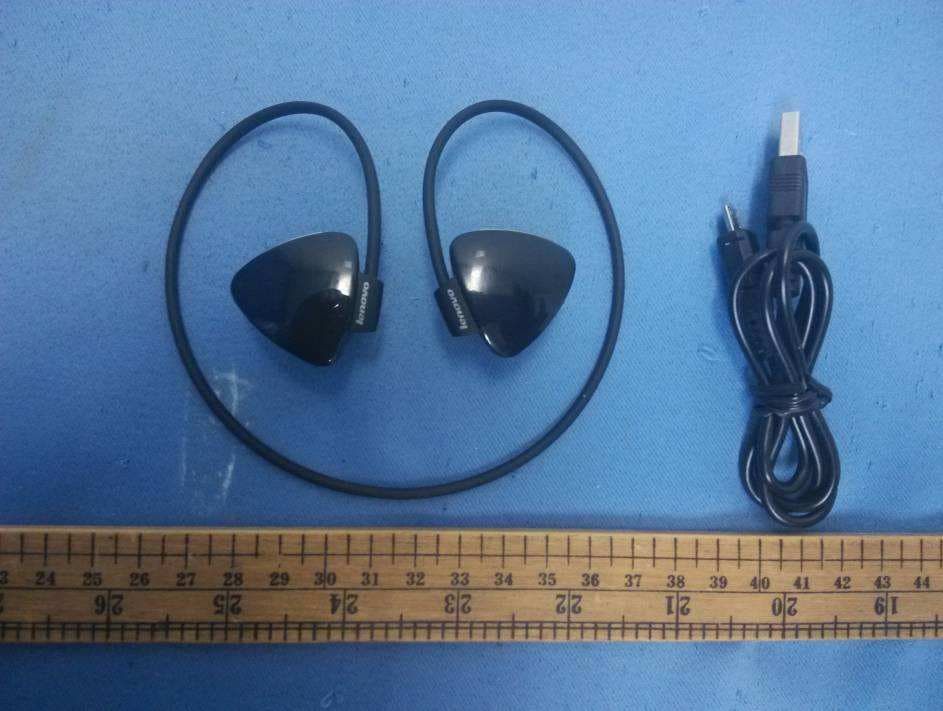
Click to zoom
Application Details
- Equipment Class
- DSS - Part 15 Spread Spectrum Transmitter
- Date of Grant
- Nov 23, 2014
- Application Purpose
- Original Equipment
- Date of Application
- Nov 23, 2014
- Equipment Note
- Bluetooth headset
- Frequency Range
- 2402.00000000 - 2480.00000000
- Company
- Lenovo (Beijing) Limited
- Country
- China
Documents & Files
Document Text
Text extracted from the exhibit documents filed with the FCC. Open a document above to read the original.
Users Manual
Bluetooth Headset W520 User Guide Enjoy the extraordinary flexibility of Lenovo Bluetooth Headset W520 Parts and locations Ear buds Previous/Next buttons LED indicators Flexible wrap Power button Micro USB connector (for charging) Microphone Volume up/Volume down buttons Pairing the headset Before using your Lenovo Bluetooth Headset W520 (hereinafter called headset), pair it with a mobile phone, computer, or other device. To pair the headset, first ensure that it is powered off. Then, press and hold the power button for about 6 seconds until the red and blue LED indicators flash alternately. Enable the Bluetooth function on the pairing device, and pair with “Lenovo W520.” Using the headset After the headset is paired with a device, it is ready for your use. You can take the following operations: Turn on the headset Press and hold the Power button for 3 seconds until the blue LED flashes twice. Turn off the headset Press and hold the Power button for 4 seconds until the red LED flashes once. Re-pair after a disconnection Press the Power button. Turn up the volume Press the Volume up (+) button. Turn down the volume Press the Volume down (-) button. Answer an incoming call Press the Power button. Reject an incoming call Press and hold the Power button for 2 seconds. End a call Press the Power button. Make the most recent call again Press the Power button twice. Mute/unmute Press and hold the Volume up (+) button or Volume down (-) button for 2 seconds. Switch voice between the headset and your phone during a call Press the Power button twice. Pause/resume music play Press the Power button. Switch to the previous track Press the Previous button. Switch to the next track Press the Next button. LED indicators The LED indicators on the headset flash in varied ways to indicate different working states of the headset. Working status LED activity Powered on Blue LED flashes twice Powered off Red LED flashes once Pairing Red and blue LEDs flash alternately Standby (not paired) Blue LED flashes once every 5 seconds Standby (paired) Blue LED flashes twice every 5 seconds In a call Blue LED flashes twice every 3 seconds Initiating a call Blue LED flashes twice every 5 seconds A call incoming Blue LED flashes continuously Playing music Blue LED flashes 3 times every 5 seconds Muted Blue LED flashes twice every 3 seconds Battery low Red LED flashes once every 5 seconds Charging Red LED stays on Fully charged Blue LED stays on Charging the headset To charge the Bluetooth headset, find a USB charging cable of a mobile phone first. Connect one end of the USB cable to the headset and the other end to the USB connector on a computer, a mobile phone power adapter, or a portable power bank. Troubleshooting Problem: The device cannot be powered on by pressing the power button. Solution: Ensure that the headset is sufficiently charged. Problem: The mobile phone or computer cannot be connected to the Bluetooth headset. Solution: Follow the correct pairing operations and ensure that the device to be paired has the Bluetooth function enabled. Problem: The device cannot play music. Solution: Ensure that the pairing is successful. Problem: A call comes in when I’m listening to music on the headset. When I finish the call, the mobile phone cannot automatically resume music play. Solution: This should be a system software issue of the mobile phone. Try restarting the mobile phone. Problem: The mobile phone cannot find the headset through Bluetooth. Solution: Ensure that the Bluetooth headset is powered on. If the Bluetooth headset is powered on but still cannot be located, restart the headset and the mobile phone. Problem: There is always disconnection or noises after the headset and a mobile phone are paired. Solution: Ensure that the headset is sufficiently charged. Ensure that there is no barrier between the mobile phone and the headset that might interrupt signal transmission. Ensure that the distance between the computer or mobile phone and the headset is within 10 meters. Problem: The headset is connected with a mobile phone through Bluetooth, but I cannot listen to the music. Solution: Ensure that both phone audio and media audio are switched to the paired headset in the Bluetooth setting or the player setting on the mobile phone. Some mobile phones do not have a complete stereo Bluetooth module, hence no function of music play through a Bluetooth device. You can connect the headset to other mobile phones to check if the headset works. Problem: Some functions of the player are not available on the headset. Solution: Some functions of a player are not supported by the headset. Ensure that you use a compatible player on the mobile phone. Problem: Slow or no response when buttons are pressed. Solution: This might be a result of the disorder of Bluetooth program caused by incorrect button operations. Charge the headset and reset it. Then, disconnect the charging cable and power on the headset for re-pairing. The device should work again. Problem: Unable to mute the device using the headset. Solution: Limited by the Bluetooth agreement, some devices support the mute operation on only one device. In this case, switch the mute function from the device (mobile phone or computer) to the headset. Notice Long-term exposure to high-volume sounds might result in serious hearing damage. For your safety, do not use the headset under risky conditions, such as when you are driving or riding. Ensure that you distinguish the left and right ear buds when you use the headset. First Edition (October 2014) © Copyright Lenovo 2014. Lenovo and the Lenovo logo are trademarks of Lenovo in the United States, other countries, or both. Other company, product, or service names may be trademarks or service marks of others.
Users Manual
LenovoRegulatoryNotice Aboutthisdocument ThisdocumentprovidesregulatoryinformationabouttheLenovo ® Bluetooth headsetW520. Readfirst—regulatoryinformation Readthisdocumentbeforeusingyourheadset.Thisheadsetcomplieswiththe radiofrequencyandsafetystandardsofanycountryorregioninwhichithas beenapprovedforwirelessuse.Installanduseyourheadsetaccordingtothe followinginstructions. USA—FederalCommunicationsCommission(FCC) PreinstalledintegratedBluetoothdevice •FCCID:A5MW520(Model:LenovoW520) FCCRFsafetyrequirement TheradiatedoutputpoweroftheBluetoothdeviceisfarbelowtheFCCradio frequencyexposurelimits.Therefore,a20cmofseparationbetweenthe Bluetoothantennaandhumanbodyisnotrequired. RadioFrequencyinterferencerequirements TheBluetoothdeviceshavebeentestedandfoundtocomplywiththelimits forbothaClassBdigitaldeviceregardingFCCPart15SubpartBandan intentionalradiatorregardingFCCPart15SubpartC Canada—IndustryCanada(IC) ICCertificationnumber Approvedwirelessdevices ThissectionpresentstheICCertificationandmodelnumberofeachwireless device. 1 PreinstalledintegratedBluetoothdevice •IC:5903G-W520(Model:LenovoW520) Lowpowerlicense-exemptradiocommunicationdevices (RSS-210) ThisdevicecomplieswithIndustryCanadalicence-exemptRSSstandard(s). Operationissubjecttothefollowingtwoconditions: 1.Thisdevicemaynotcauseinterference. 2.Thisdevicemustacceptanyinterference,includinginterferencethatmay causeundesiredoperationofthedevice. ExposureofhumanstoRFfields(RSS-102) ThedeviceemploylowgainintegralantennasthatdonotemitRFfieldinexcessof HealthCanadalimitsforthegeneralpopulation;consultSafetyCode6,obtainable fromHealthCanada'sWebsiteathttp://www.hc-sc.gc.ca/. Theradiatedenergyfromtheantennasconnectedtothe conformstotheIClimitoftheRFexposurerequirementregardingICRSS-102, Issue4clause4.2. Numérod'homologationIC Périphériquessansfilhomologués Cettesectionprésentelenumérod'homologationICetlenumérodemodèlede chaquepériphériquesansfil. ÉmetteurBluetoothintégrépréinstallé •IC:5903G-W520(Model:LenovoW520) Remarquerelativeauxappareilsdecommunicationradiode faiblepuissancesanslicence(CNR-210) Lefonctionnementdecetyped'appareilestsoumisauxdeuxconditions suivantes: 1.Cetappareilnedoitpasperturberlescommunicationsradio. 2.Cetappareildoitsupportertouteperturbation,ycomprislesperturbations quipourraientprovoquersondysfonctionnement. Expositiondesêtreshumainsauxchampsradioélectriques (RF)(CNR-102) L'ordinateurutilisedesantennesintégralesàfaiblegainquin'émettentpasun champélectromagnétiquesupérieurauxnormesimposéesparleMinistéredela santécanadienpourlapopulation.ConsultezleSafetyCode6surlesiteWebdu Ministéredelasantécanadienàl'adressehttp://www.hc-sc.gc.ca. 2 Bluetooth headset L'énergieémiseparlesantennesreliéesauxsansfilrespectelalimite d'expositionauxradiofréquencestellequedéfinieparIndustrieCanadadans laclause4.2dudocumentCNR-102. Electronicemissionnotices FederalCommunicationsCommission(FCC) Models:LenovoW520 ThisequipmenthasbeentestedandfoundtocomplywiththelimitsforaClassB digitaldevice,pursuanttoPart15oftheFCCRules.Theselimitsaredesigned toprovidereasonableprotectionagainstharmfulinterferenceinaresidential installation.Thisequipmentgenerates,uses,andcanradiateradiofrequency energyand,ifnotinstalledandusedinaccordancewiththeinstructions,may causeharmfulinterferencetoradiocommunications.However,thereisno guaranteethatinterferencewillnotoccurinaparticularinstallation.Ifthis equipmentdoescauseharmfulinterferencetoradioortelevisionreception,which canbedeterminedbyturningtheequipmentoffandon,theuserisencouragedto trytocorrecttheinterferencebyoneormoreofthefollowingmeasures: •Reorientorrelocatethereceivingantenna. •Increasetheseparationbetweentheequipmentandreceiver. •Connecttheequipmentintoanoutletonacircuitdifferentfromthattowhich thereceiverisconnected. •Consultanauthorizeddealerorservicerepresentativeforhelp. Lenovoisnotresponsibleforanyradioortelevisioninterferencecausedby unauthorizedchangesormodificationstothisequipment.Unauthorizedchanges ormodificationscouldvoidtheuser'sauthoritytooperatetheequipment. ThisdevicecomplieswithPart15oftheFCCRules.Operationissubjecttothe followingtwoconditions:(1)thisdevicemaynotcauseharmfulinterference, and(2)thisdevicemustacceptanyinterferencereceived,includinginterference thatmaycauseundesiredoperation. ResponsibleParty: Lenovo(UnitedStates)Incorporated 1009ThinkPlace-BuildingOne Morrisville,NC27560 Telephone:1-919-294-5900 IndustryCanadaClassBEmissionComplianceStatement ThisClassBdigitalapparatuscomplieswithCanadianICES-003. 3 écouteur Avisdeconformitéàlaréglementationd'IndustrieCanada CetappareilnumériquedelaclasseBestconformeàlanormeNMB-003du Canada. Lenovo,Einsteinova21,85101Bratislava,Slovakia Europe—EUDeclarationofConformity English Hereby,Lenovo(Singapore)Pte.Ltd.,declaresthatthewirelessequipmentlisted inthissectionareincompliancewiththeessentialrequirementsandotherrelevant provisionsofDirective1999/5/EC. Bulgarian Croatia Czech Danish Lenovo(Singapore)Pte.Ltd.erklærerhermed,atdettrådløstudstyr,derernævnt idetteafsnit,overholderdevæsentligekravogandrerelevantebestemmelseri EU-direktiv1999/5/EC. 4 Dutch HierbijverklaartLenovo(Singapore)Pte.Ltd.,datdedraadlozeapparatuurdie inditgedeeltewordengenoemd,voldoenaandeessentiëlevereistenenandere relevantebepalingenvanDirective1999/5/EC. Estonian Lenovo(Singapore)Pte.Ltd.kinnitabsellesjaotisesnimetatudtraaditaside seadmetevastavustdirektiivi1999/5/EÜpõhinõuetelejanimetatuddirektiivist tulenevatelemuudeleasjakohastelesätetele. Finnish Lenovo(Singapore)Pte.Ltd.ilmoittaatäten,ettätässäjaksossamainittulangaton laitteistoovatdirektiivin1999/5/EYpakollistenvaatimustenjadirektiivinmuiden asiaankuuluvienmääräystenmukaiset. French Parlaprésente,Lenovo(Singapore)Pte.Ltd.déclarequelematérielsansfil répertoriésdanscettesectionsontconformesauxexigencesessentiellesainsi qu'auxautresdispositionsapplicablesdelaDirective1999/5/CE. German HiermiterklärtLenovo(Singapur)Pte.Ltd.,dassdiedrahtlosenGeräte,diein diesemAbschnittaufgeführtsind,dieVoraussetzungenundandererelevanten Richt…
Text truncated - open the document above for the full version.
External Photos
External Photo
ID Label/Location Info
Label
Internal Photos
Internal Photo
RF Exposure Info
1 INTERTEK TESTING SERVICES RF Exposure The Equipment under Test (EUT) is a Bluetooth headset model Lenovo W520. It is powered by DC 3.7V. For more detail information please refer to the user manual. Antenna Type: Integral antenna. Antenna Gain: 0dBi. The nominal conducted output power specified: 1dBm ±3dB. Test radiated output power: -2dBm ~ 4dBm Modulation Type: GFSK, π/4 –DQPSK and 8-DPSK. According to the KDB 447498: Th e maximun conducted output power specified is 4dBm = 2.51mW The source- based time-averaging conducted output power = 2.51* Duty Cycle mW= 2.09mW The SAR Exclusion Threshold Level: = 3 .0 * (min. test separation distance, mm) / sqrt(freq. in GHz) = 3.0 * 5 / sqrt (2.480) mW = 9.53 mW Since the source-based time-averaging conducted output power is well below the SAR low threshold level, so the EUT is considered to comply with SAR requirement without testing. Transmitter Duty Cycle Calculation Based on the Bluetooth Specification (BT version: 3.0 + EDR), the duty cycle is dependent of packet type (DH1, DH3 and DH5).For one period for a pseudo-random hopping through all 79 RF channels, for DH5: One hop set consists of 5 TX slot and 1 RX slot. Duty cycle = 5 / 6 = 0.833 F CC ID: A5MW520
Test Report
• The test results reported in this test report shall refer only to the sample actually tested and shall not refer or be deemed to refer to bulk from which such a sample may be said to have been obtained. • This report is for the exclusive use of Intertek's Client and is provided pursuant to the agreement between Intertek and its Client. Intertek's responsibility and liability are limited to the terms and conditions of the agreement. Intertek assumes no liability to any party, other than to the Client in accordance with the agreement, for any loss, expense or damage occasioned by the use of this report. Only the Client is authorized to copy or distribute this report. Any use of the Intertek name or one of its marks for the sale or advertisement of the tested material, product or service must first be approved in writing by Intertek. The observations and test results referenced from this report are relevant only to the sample tested. This report by itself does not imply that the material, product, or service is or has ever been under an Intertek certification program. • For Terms And Conditions of the services, it can be provided upon request. • The evaluation data of the report will be kept for 3 years from the date of issuance. TRF No.: FCC 15C_TX_b I ntertek Testing Services Shenzhen Ltd. Kejiyuan Branch 6F, D Block, Huahan Building, Langshan Road, Nanshan District, Shenzhen, P. R. China Tel: (86 755) 8601 6288 Fax: (86 755) 8601 6751 Website: www.china.intertek-etlsemko.com L enovo (Beijing) Limited Application For Certification FCC ID: A5MW520 Bluetooth headset Model: Lenovo W520 2.4GHz Transceiver Report No.: 141020019SZN-004 P repared and Checked by: Approved by: Sign on file Leo Lai Project Engineer Andy Yan Senior Project Engineer Date: November 12, 2014 INTERTEK TESTING SERVICES TRF No.: FCC 15C_TX_b FCC ID: A5MW520 i L IST OF EXHIBITS INTRODUCTION EXHIBIT 1: General Description EXHIBIT 2: System Test Configuration EXHIBIT 3: Emission Results EXHIBIT 4: Equipment Photographs EXHIBIT 5: Product Labelling EXHIBIT 6: Technical Specifications EXHIBIT 7: Instruction Manual EXHIBIT 8: Miscellaneous Information EXHIBIT 9: Test Equipment List INTERTEK TESTING SERVICES TRF No.: FCC 15C_TX_b FCC ID: A5MW520 ii MEASUREMENT/TECHNICAL REPORT Lenovo (Beijing) Limited Model: Lenovo W520 FCC ID: A5MW520 This report concerns (check one:) Original Grant X Class II Change Equipment Type: DSS - Part 15 Spread Spectrum Transmitter Deferred grant requested per 47 CFR 0.457(d)(1)(ii)? Yes No X If yes, defer until: date Company Name agrees to notify the Commission by: date of the intended date of announcement of the product so that the grant can be issued on that date. Transition Rules Request per 15.37? Yes No X If no, assumed Part 15, Subpart C for intentional radiator − the new 47 CFR [10-1-13 Edition] provision. Report prepared by: Leo Lai Intertek Testing Services Shenzhen Ltd. Kejiyuan Branch 6F, Block D, Huahan Building, Langshan Road, Nanshan District, Shenzhen, P. R. China Phone: (86 755) 8601 6288 Fax: (86 755) 8601 6751 INTERTEK TESTING SERVICES TRF No.: FCC 15C_TX_b FCC ID: A5MW520 iii Table of Contents 1.0 General Description ............................................................................................ 2 1.1 Product Description ............................................................................................ 2 1.2 Test Methodology ............................................................................................... 2 1.3 Test Facility ........................................................................................................ 2 2.0 System Test Configuration ................................................................................. 4 2.1 Justification ........................................................................................................ 4 2.2 EUT Exercising Software .................................................................................... 4 2.3 Special Accessories ........................................................................................... 4 2.4 Equipment Modification ...................................................................................... 4 2.5 Measurement Uncertainty .................................................................................. 5 2.6 Support Equipment List and Description ............................................................. 5 3.0 Test Results ......................................................................................................... 7 3.1 Radiated Test Result .......................................................................................... 8 3.1.1 Field Strength Calculation ................................................................................ 8 3.1.2 Radiated Emission Data and Configuration Photograp ..................................... 9 3.1.3 Transimitter Spurious Emissions (Radiated) .................................................. 11 3.2 Peak Power ...................................................................................................... 15 3.3 20dB Bandwidth ............................................................................................... 16 3.4 Channel Number (Number of Hopping Frequencies) ........................................ 18 3.5 Channel Separation (Carrier Frequency Separation) ......................................... 21 3.6 Dwell Time (Time of Occupancy) ...................................................................... 22 3.7 Band Edge ....................................................................................................... 29 3.8 Transmitter Spurious Emissions (Conducted) ................................................... 31 4.0 Equipment Photographs ................................................................................... 36 5.0 Product Labelling .............................................................................................…
Text truncated - open the document above for the full version.
Test Setup Photos
Test Setup Photo –Radiated Emission
Contact Information
Applicant
Yang Liu(Compliance Engineer)
Technical Contact
Intertek Testing Services Shenzhen Ltd. Kejiyuan BShawn Xing
[email protected](86-755) 8614 0603
6F, D Block, Huahan Building, Langshan Road · Shenzhen · China
Non-Technical Contact
Intertek Testing Services Shenzhen Ltd. Kejiyuan BShawn Xing
[email protected](86-755) 8614 0603
Test Firm
Intertek Testing Services Shenzhen Ltd.Shawn Xing
Technical Specifications
| # | Rule Parts | Frequency Range | Power Output |
|---|---|---|---|
| 1 | 15C | 2.40 GHz - 2.48 GHz | 1.10 mW |
Other Applications from Lenovo (Beijing) Limited
A5M-PBZT10300A
Sep 18, 2026PORTABLE POWER STATION
Equipment Class
DTS - Digital Transmission SystemA5MH50
Aug 21, 2026TALIX H50 Noise Cancelling Over-ear Headphones
Equipment Class
DTS - Digital Transmission SystemA5MWT1206
Jul 30, 2026wegear T10 True Wireless Earbuds
Equipment Class
DSS - Part 15 Spread Spectrum Transmitter
A5M-M830
Jul 16, 2026Lenovo Al Mouse
Equipment Class
DTS - Digital Transmission System
A5M-SE01
Jul 07, 2026Lenovo Pen Pro for Googlebook
Equipment Class
DTS - Digital Transmission System