AXATR-414-A2GSM Portable Phone - computer interface
HARRIS CORPORATION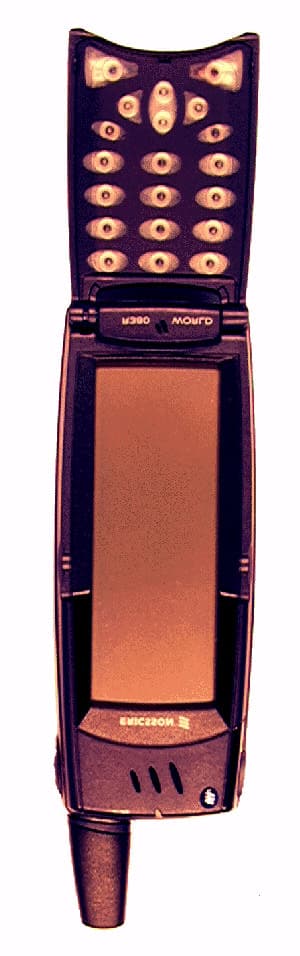
Click to zoom
Application Details
- Equipment Class
- JBP - Part 15 Class B Computing Device Peripheral
- Date of Grant
- Nov 29, 2000
- Application Purpose
- Original Equipment
- Date of Application
- Oct 04, 2000
- Equipment Note
- GSM Portable Phone - computer interface
- Company
- HARRIS CORPORATION
- Country
- United States
Documents & Files
Document Text
Text extracted from the exhibit documents filed with the FCC. Open a document above to read the original.
Users Manual
Contents1 Contents Contents1 General Information3 Phone Information ............. 3 Documentation................... 5 Information and Communications Suite CD 6 Preparing for Use7 Checklist............................. 7 Operational Modes ............. 7 SIM Card ........................... 8 Battery ................................ 9 Turning on the Phone ...... 12 Initial Settings................... 13 Flip Closed Display........... 20 Flip Open Display ............ 21 Interface and Navigation 25 Flip Closed ....................... 25 Flip Open ......................... 31 Voice Memo ..................... 36 Making and Receiving Calls 37 Making Calls .................... 37 Receiving Calls.................. 44 When a Call is in Progress 45 Fax and Data Calls............ 51 Conference Calls............... 52 After Calls......................... 57 Entering Information59 On-screen Keyboards ........ 59 Handwriting Recognition . 62 Security69 Keypad Lock ..................... 69 SIM Card Lock ................. 69 Phone Lock ....................... 71 Settings73 Customizing Settings ........ 73 Phone................................ 74 Settings ............................. 77 System .............................. 88 Phone105 Phone Menu ................... 105 Flip Open Functionality.. 107 Office Handsfree............. 112 Contacts115 Personal Details............... 116 Contents List .................. 117 New Contact................... 124 Find ................................ 124 Messaging127 Inbox .............................. 129 New E-mail..................... 144 New SMS........................ 148 Find ................................ 150 Generate Password .......... 151 Calendar155 Month View.................... 156 Week View...................... 157 Day View ........................ 158 New Calendar Events...... 159 WAP Services165 Browser ........................... 166 Bookmarks ...................... 169 2Contents Open Location................ 171 History ........................... 171 Getting started with E-mail and WAP173 E-mail Set Up ................. 173 Sending an E-mail for the First Time ............................... 180 WAP............................... 182 Using WAP for the First Time 185 Locating Settings in Windows 95 or 98 .......................... 187 Extras189 Notepad.......................... 189 Clock .............................. 191 Calculator ....................... 198 Game .............................. 199 System ............................ 200 R380 Communications Suite 205 Synchronization .............. 205 Connecting your R380 to your Computer ............... 206 Future Synchronizations . 210 Backing up your R380 .... 211 Restoring your R380....... 212 Changing the Language in your R380....................... 212 Getting Help .................. 213 Troubleshooting215 Important Information 219 Safe and Efficient Use ..... 219 FDA Consumer Update.. 227 Technical Data ............... 234 Limited Warranty ........... 235 Copyright ....................... 237 License Agreement .......... 239 Regulatory Information... 242 Declaration of Conformity.... 243 General Information3 General Information Congratulations and thank you for buying the Ericsson R380 Smartphone, the ultimate mobile phone and personal digital assistant. This is an advanced, yet easy to use, product with a wide range of features, designed to make everyday life much easier. Your R380 gives you the freedom to communicate wherever you are and whenever you want. Along with a host of mobile phone functions, your R380 can send and receive e-mail and SMS messages, browse the Internet via a WAP services browser and much, much more. The advanced software in your R380 introduces a new era in mobile communications. Welcome to our wireless world! Operators and Subscription To be able to use your phone, you need to have a subscription to a network. This is obtained from the network operator. The services included in your subscription depend on your choice of operator and/ or subscription. Therefore, some of the services and functions described in this manual may not be accessible to you. If you want a complete list of the services included in your subscription, please contact your network operator. Phone Information 4General Information GSM 900/1900 Dual Band The Ericsson R380 is a dual band phone, which means that you can use your phone in two different kinds of networks - the GSM 900 and GSM 1900 systems. The GSM 1900 system is used primarily in the US and other parts of the Americas, and the GSM 900 system is used primarily in Europe, the Asia/Pacific region and in some parts of Africa. This means that you can used your R380 on six continents. Switching between the two systems is done automatically, which means that you can use your phone without ever having to consider which system is being used. This is taken care of by the networks. However, you should note that the functions offered and the network coverage differ depending on your choice of operator and/or subscription. SIM and PIN You will obtain a SIM (Subscriber Identity Module) card with your subscription. The SIM card contains a computer chip that keeps track of your phone number, the services you have ordered from your network operator and your Phone Book information, among other things. Your SIM card is supplied with a security code or PIN (Personal Identity Number), which you need in order to gain access to the network. Your PIN may also be required when you want to change settings in your phone. Furthermore, some operators may have services that require a second PIN, your PIN2. You will find your PIN (and PIN2) in the information from your operator. If you have set certain security options in your phone, when you turn on your phone, it prompts you to enter your PIN. If the PIN is entered incorrectly three times in a row, the SIM card will be blocked. If this happens you can unlock it by using your PUK (Personal Un-blocking Key cod…
Text truncated - open the document above for the full version.
Users Manual
Text added: To comply with FCC RF exposure requirements for mobile transmitting devices, the external antenna used for this device must be vehicle-mounted to provide a minimum separation distance of 20cm from all persons, with the antenna gain not exceeding 3dBi. Note! Always have your handsfree unit, antenna and cables installed by qualified personnel. The installation chart on page 90 shows connections and recommended locations for all parts of the handsfree equipment, as well additional accessories. We recommend that you use an external antenna for best reception. For advice on which antenna to use and for professional installation, please refer to your local car dealer. Some car manufacturers require that you use an external antenna for your mobile telephone, please consult your car manual. The holder should be placed so that you can see the display and reach the keys from your normal driving position. However, it should not interfere with the operation of the vehicle, block the driver’s view, or distract the driver. General 1. Mount the electronics unit behind the instrument panel or under the passenger seat. Use the screws delivered with the equipment to mount the electronics unit by the fastening device. 2. The loudspeaker should be mounted on a fixed part of the car interior, e.g. on the wall in the foot space at the passenger side. Connect the loudspeaker to terminal B on the electronics unit. 3. The microphone should be mounted on a fixed part of the car interior. It should be mounted as close to the speaker’s mouth as possible and be directed towards him. The distance between the loudspeaker and the microphone should be at least 50cm. Connect the microphone to terminal D on the electronics unit. Note! Do not mount the microphone on the sun visor. Vibrations will cause echoing. You will get the best conditions if you mount the microphone close to the rearview mirror, see installation chart on page 90. 4. Your handsfree equipment also includes a music mate cable. The cable should be connected to terminal E on the electronics unit. For instructions on how to connect the cable to your car stereo, see your car stereo manual. INSTALLATION PROCEDURE To comply with FCC RF exposure requirements for mobile transmitting devices, the external antenna used for this device must be vehicle-mounted to provide a minimum separation distance of 20cm from all persons, with the antenna gain not exceeding 3dBi.
Cover Letter(s)
September 29, 2000 Federal Communications Commission Authorization & Evaluation Division 7435 Oakland Mills Road Columbia, Maryland 21046 Attention: Equipment Authorization Branch Subject:Certification for FCC ID: AXATR-414-A2 Gentlemen, Ericsson Inc. requests a grant of certification to Part 15 for the above mentioned FCC Identifier. This portable transceiver is designed for use in the GSM 1900 cellular telephone system. The mobile operates in the 1900 MHz Domestic Public Cellular Radiotelephone Communications Services, as per 47 CFR Part 24. It also is designed to operate in the 900MHz band in Europe. The mobile will only communicate in the 1900MHz band in the Americas and not the 900MHz band. The organizer function of the mobile is considered a peripheral device as it allows the user to download contact information as well as Email information to the mobile from a personal computer via a RS232 cable. The mobile was tested with the RS232 cable and personal computer and found compliant with 47 CFR Part 15, subpart B. This mobile requires dual approval and has also been submitted for FCC certification under Pt. 24. The same FCC ID number is requested for both applications. Confirmation number for the Part 24 filing is EA98874. Technical information is included in the Test Report outlining the adherence to the applicable rules part. Ericsson Inc. requests confidentiality under 47 CFR 0.459 for the following exhibit listed: Exhibit 4Block Diagrams Exhibit 5Circuit Diagrams Exhibit 10Parts List and Tune Up Information Exhibit 12Operational Description Exhibits 4, 5, 10 and 12 are marked CONFIDENTIAL on the electronic filing submission. Justification of this request is that in order to facilitate the circuit miniaturization of the AXATR-414-A2, certain proprietary techniques and custom components were implemented to reduce the board space required for the RF circuitry layout and the unique method of employing an organizer capabilities in the mobile. To protect Ericsson’s competitive advantage on these proprietary techniques, we request the above listed exhibit be held as confidential and withheld from the Public Information File. Sincerely, Jim Sponsler Regulatory Manager 7001 Development Drive Research Triangle Park, NC, 27709 Email: [email protected] (919) 472-6460
External Photos
APPLICANT:Exhibit 3 FCC ID NO: ERICSSON INCAXATR-414-A2 ©2000 Ericsson Inc. APPLICANT:Exhibit 3 FCC ID NO: ERICSSON INCAXATR-414-A2 ©2000 Ericsson Inc. APPLICANT:Exhibit 3 FCC ID NO: ERICSSON INCAXATR-414-A2 ©2000 Ericsson Inc.
ID Label/Location Info
APPLICANT:Exhibit 1 FCC ID NO: ERICSSON INCAXATR-414-A2 ©2000 Ericsson Inc.
ID Label/Location Info
APPLICANT:Exhibit 1 FCC ID NO: ERICSSON INCAXATR-414-A2 ©2000 Ericsson Inc.
Internal Photos
APPLICANT:Exhibit 9 FCC ID NO: ERICSSON INCAXATR-414-A2 ©2000 Ericsson Inc. APPLICANT:Exhibit 9 FCC ID NO: ERICSSON INCAXATR-414-A2 ©2000 Ericsson Inc. APPLICANT:Exhibit 9 FCC ID NO: ERICSSON INCAXATR-414-A2 ©2000 Ericsson Inc.
Test Report
Applicant:FCC ID no. Ericsson Inc.AXATR-414-A2 © 2000 Ericsson Inc. Technical Information and Intended use Per 2.1033 and Part 15 of the Federal Communications Rules and Regulations, the following is submitted to substantiate adherence to those specifications. 1) Name of Manufacturer: Ericsson Inc. 2) Model number of Transceiver: FCC ID: AXATR-414-A2 3) Description of Transceiver: This portable transceiver is designed for use in the GSM 1900 cellular telephone system. a) Transmitter range: 1850 MHz to 1910 MHz b) Receiver range: 1930MHz to 1990MHz c) IF Frequencies: 1 st IF- 188MHz2 nd IF- 6MHz 4) Measurement procedure: reference Part 15, Subpart B as applicable to this unit and measurement standard as outlined in part 15.31. The unit was tested using ANSI C63.4 1992. The site where the measurements were performed is on file with the FCC. a) Site location: Underwriters Laboratory Inc., 12 Laboratory Drive, Research Triangle Park, NC 27709 5) Date of measurement: August 31, 2000 6) Summary of measurements: No radiation was found to exceed the limit set forth is Part 15. Test results are plotted and attached. 7) On the basis of these requirements, this transceiver is certified as capable of complying with the radiation requirements of Part 15 under normal operation and with the usual maintenance. Jim Sponsler Regulatory Manager 9-29-00
Contact Information
Applicant
Thomas Camper, Jr.(Regulatory Manager)
Technical Contact
Ericsson IncJim Sponsler
[email protected]919-472-6460
7001 Development Drive · RTP, North Carolina · United States
Non-Technical Contact
Ericsson IncJim Sponsler
919-472-6460
Test Firm
Ericsson Inc.Bryan McWatters
Technical Specifications
| # | Rule Parts | Frequency Range | Power Output | Tolerance |
|---|---|---|---|---|
| 1 | 15B | - | - | ppm |
Other Applications from HARRIS CORPORATION

AXATR-423-A2
Jul 14, 2004CM-42
Equipment Class
PCB - PCS Licensed Transmitter
AXATR-420-A2
Mar 21, 2002DM-15
Equipment Class
TNB - Licensed Non-Broadcast Station Transmitter
AXATR-422-A2
Mar 13, 2002Dual Mode TDMA Cellular Handset
Equipment Class
TNE - Licensed Non-Broadcast Transmitter Held to Ear
AXATR-421-A2
Dec 19, 2001Dual Mode TDMA Cellular Transceiver
Equipment Class
TNE - Licensed Non-Broadcast Transmitter Held to EarAXATR-413-A2
Aug 14, 2001cellular/pcs portable terminal
Equipment Class
PCE - PCS Licensed Transmitter held to ear