BABFT0032ACD Receiver with Bluetooth and Display
DENSO TEN Limited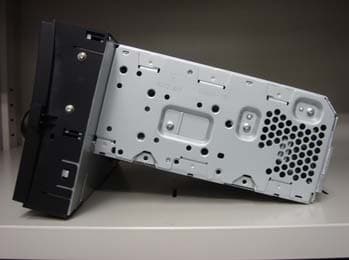
Click to zoom
Application Details
- Equipment Class
- DSS - Part 15 Spread Spectrum Transmitter
- Date of Grant
- Jun 15, 2011
- Application Purpose
- Original Equipment
- Date of Application
- Jun 12, 2011
- Equipment Note
- CD Receiver with Bluetooth and Display
- Frequency Range
- 2402.00000000 - 2480.00000000
- Company
- DENSO TEN Limited
- Country
- Japan
Documents & Files
Document Text
Text extracted from the exhibit documents filed with the FCC. Open a document above to read the original.
Users Manual
79 1. SETUP OPERATION 5 SETUP 4. Bluetooth ® SETTINGS 1Press the “SETUP” button. 2Touch “Bluetooth*”. *: Bluetooth is a registered trademark of Bluetooth SIG, Inc. 3Touch the items to be set. Please refer to the following pages for each setting. 1Press the “SETUP” button. 2Touch “Bluetooth*” on the “Setup” screen. *: Bluetooth is a registered trademark of Bl uetooth SIG, Inc. 3Touch “Registered devices”. 4This screen is displayed. 1Touch “Add new” to register your Bluetooth ® device to the system. You can confirm and change the Bluetooth ® settings. REGISTERED DEVICES ADDING A NEW DEVICE 80 1. SETUP OPERATION 2When this screen is displayed, perform a device discovery from your Bluetooth device. 3Input the passcode displayed on the screen into your Bluetooth device. Passcodes are not required for SSP (Secure Simple Pairing) compatible Bluetooth devices. I f you want to cancel it, touch “Cancel”. If the Bluetooth ® phone to be registered has a Bluetooth ® audio function, this can be registered at the same time. 4When the connection is completed, this screen is displayed. Once you have registered it, the system automatically connects to your Bluetooth ® device every time you start your vehicle. 1Touch “Remove” to remove your Bluetooth ® device from the system. 2Select the device to remove. INFORMATION lFor details on device discovery for your Bluetooth phone, refer to the Bluetooth phone’s user’s guide. lWhen you register your phone, Bluetooth ® audio will disconnect. lIf the Bluetooth ® device has Bluetooth ® phone and Bluetooth ® audio functions, it will register phone and audio simulta- neously. If an on-screen message appears, follow the message and regis- ter either or both Bluetooth ® phone and/ or Bluetooth ® audio functions. REMOVING A Bluetooth ® DEVICE INFORMATION lWhen you delete a Bluetooth ® phone, the phonebook data will be deleted at the same time. 81 1. SETUP OPERATION 5 SETUP 1Touch “Details” to display a device detail. 2Select the device to display. 3This screen is displayed. Touch or to scroll the list. Th e information displays the following items. nCHANGING THE CONNECTION METHOD 1Touch “Connection method” and se- lect “ From vehicle” or “From audio player”. DISPLAYING DEVICE DETAILSNameFunction “Device name” The name in the Bluetooth ® network. “Device address” The address peculiar to the system. You cannot change it. If the same device name is dis- played on the screen of your device, refer to it. “My telephone number” Telephone number of your phone. The number may not be displayed de- pending on the phones. “Profiles” The profiles which sup- port your Bluetooth ® de- vice. (For details of each profile, see pages XX and XX.) “Connection method” The connection method can be switched be- tween “From vehicle” and “From audio play- er”. The connection method can be select- ed. 82 1. SETUP OPERATION 2Touch “OK”. “From vehicle”: Connect the audio sys- tem to the portable audio player. “From audio player”: Connect the porta- ble audio player to the audio system. nINITIALIZING THE Bluetooth ® SETTINGS 1Touch “Default”. 1Press the “SETUP” button. 2Touch “Bluetooth*” on the “Setup” screen. *: Bluetooth is a registered trademark of Bl uetooth SIG, Inc. 3Touch “Connect telephone”. 4Select the device to connect. The Bluetooth ® mark is displayed when you connect the device. When you touch the device name with the selection indicator and the Bluetooth ® mark, the device will be disconnected. 5When the connection is completed, this screen is displayed. 1Press the “SETUP” button. You can initialize the settings. CONNECT TELEPHONE In case you register more than one Bluetooth ® device, you need to choose a favorite one. You can select the Bluetooth ® device from a maximum of 5 numbers. CONNECT AUDIO PLAYER In case you register more than one Bluetooth ® device, you need to choose a favorite one. You can select the Bluetooth ® device from a maximum of 5 numbers. 83 1. SETUP OPERATION 5 SETUP 2Touch “Bluetooth*” on the “Setup” screen. *: Bluetooth is a registered trademark of Bl uetooth SIG, Inc. 3Touch “Connect audio player”. 4Select the device to connect. The Bluetooth ® mark is displayed when you connect the device. When you touch the device name with the selection indicator and the Bluetooth ® mark, the device will be disconnected. 5When the connection is completed, this screen is displayed. 1Press the “SETUP” button. 2Touch “Bluetooth*” on the “Setup” screen. 3Touch “Detailed Bluetooth* settings”. *: Bluetooth is a registered trademark of Bl uetooth SIG, Inc. 4This screen is displayed. Touch or to scroll the list. DETAILED Bluetooth ® SETTINGS 84 1. SETUP OPERATION The information displays the following items. *: Bluetooth is a registered trademark of Bluetooth SIG, Inc. 1Touch “Bluetooth* power”. 2Touch “On” or “Off”. 3Touch “OK”. In case that the state of “Bluetooth* power” is changed from “Off” into “On”, Bluetooth ® connection will begin. The “Bluetooth* power” display shows the following state. When “Bluetooth* power” is “On”: The Bluetooth ® device is automatically con- nected when you start your vehicle. When “Bluetooth* power” is “Off”: The Bluetooth ® device is disconnected, and the system will not connect to it next time. You can select the state of “Bluetooth* power”. On: The automatic connection is turned on. Off: The automatic connection is turned off. *: Bluetooth is a registered trademark of Bluetooth SIG, Inc. NameFunction “Bluetooth* power” It is available to set wheth- er registered devices will be connected automatical- ly or not. “Device name” The name in the Bluetooth ® network. You cannot change it. “Passcode” The password when you register your Bluetooth de- vice in the system. You can change it. “Device address” The address peculiar to the system. You can not change it. “Profiles” The name of the profile which your Bluetooth ® de- vice corresponds to. (For details of each profile, see pages XX and XX.) “Display tele- phone status” The Bluetooth ® phone connecti…
Text truncated - open the document above for the full version.
External Photos
FT0032A External Photos Rear View Top View Left ViewFront ViewRight View Bottom View FUJITSU TEN CONFIDENTIAL
ID Label/Location Info
FT0032A Label Drawing and Location FUJITSU TEN CONFIDENTIAL 1. Label Location 2. Label Drawing FCC and IC Label
Internal Photos
FT0032A Internal Photos FUJITSU TEN CONFIDENTIAL Back side of front panel Front side of Bluetooth moduleBack side of Bluetooth module Inside of Bluetooth module Antenna mounting position Antenna cable Front panel without panel board
Internal Photos
Antenna Photos
RF Exposure Info
FCC ID. : BABFT0032A Sheet 1 of 2 Sheets ETC Report No. : 11-05-MAS-012-06 Rev. No 1.0 MAXIMUM PERMISSIBLE EXPOSURE Standard Applicable Section 15.247 (b)(5) : Systems operating under the provisions of this section shall be operated in a manner that ensures that the public is not exposed to radio frequency energy levels in excess of the Commission's guidelines. See § 1.1307(b)(1) of this Chapter. Section 1.1310: The criteria listed in the following table shall be used to evaluate the environment impact of human exposure to radio frequency radiation as specified in 1.1307(b) LIMITS FOR MAXIMUM PERMISSIBLE EXPOSURE (MPE) Frequency Range (MHz) Electric Field Strength (V/m) Magnetic Field Strength (A/m) Power Density (nW/cm 2 ) Average Time (Minutes) (A) Limits for Occupational/control Exposures 300-1500 -- -- F/300 6 1500-100,000 -- -- 5 6 (B) Limits for General Population/Uncontrolled Exposures 300-1500 -- -- F/300 6 1500-100,000 -- -- 1 30 F = Frequency in MHz Calculations Friis transmission formula: P d = ( P out * G ) / ( 4 * pi * r 2 ) Where P d = power density in mW/cm 2 P out = output power to antenna in mW G = gain of antenna in linear scale pi = 3.1416 r = distance between observation point and center of the radiator in cm The limit of P d is 1 mW/cm 2 . If we know the maximum gain of the antenna and the total power input to the antenna, through the calculation, we will know the distance where the P d at 20 cm is meet the limit of MPE. FCC ID. : BABFT0032A Sheet 2 of 2 Sheets ETC Report No. : 11-05-MAS-012-06 Rev. No 1.0 Result Operation Frequency (GHz) Distance (cm) Maximum Peak Output Power (dBm) Maximum Peak Output Power (mW) Antenna Gain (dBi) FCC Power Density (mW/cm 2 ) 2.441 20 2.22 1.667 -1.37 0.00024 The P d at 20 cm distance calculated from the Friis transmission formula is mush smaller than the limit requirement 1 mW/cm 2 or 10W/m 2 . The Installation Manual instructs the user to install the device such that it has a separation of at least 20 cm from persons to comply with the FCC's requirements. This separation of 20 cm more than meets the FCC's and Industry Canada RF exposure requirements.
Test Report
FCC ID: BABFT0032A Sheet 1 of 80 Sheets ETC Report No. : 11-05-MAS-012-01 Rev. No 1.0 CONFORMANCE TEST REPORT FOR FCC 47 CFR, Part 15 Subpart C Report No.: 11-05-MAS-012-01 Client: FUJITSU TEN LIMITED Product: CD Receiver with Bluetooth and Display Model: FT0032A FCC ID: BABFT0032A Manufacturer/supplier: FUJITSU TEN LIMITED Date test item received: 2011/04/15 Date test campaign completed: 2011/05/16 Date of issue: 2011/05/16 The test result onl y corresponds to the tested sample. It is not permitted to copy this report, in part or in full, without the permission of the test laboratory. Total number of pages of this test report: 80 pages Total number of pages of photos: Setup photos 1 page Test Engineer Checked By Approved By David You James Cheng Joe Hsieh ELECTRONICS TESTING CENTER, TAIWAN NO.8, LANE 29, WENMING RD., LESHAN TSUEN, GUISHAN SHIANG, TAOYUAN COUNTY, TAIWAN 33383, R.O.C.TAIWAN, R.O.C. TEL: (03) 3276170~4 INT: +886-3-3276170~4 FAX: (03) 3276188 INT: +886-3-3276188 FCC ID: BABFT0032A Sheet 2 of 80 Sheets ETC Report No. : 11-05-MAS-012-01 Rev. No 1.0 Client : FUJITSU TEN LIMITED Address : 2-28, Gosho-dori, 1-chome, Hyogo-ku, kobe 652-8510 Japan Manufacturer : FUJITSU TEN LIMITED Address : 2-28, Gosho-dori, 1-chome, Hyogo-ku, kobe 652-8510 Japan EUT : CD Receiver with Bluetooth and Display Trade name : ---- Model No. : FT0032A Power Source : 13.2Vdc battery Regulations applied : FCC 47 CFR, Part 15 Subpart C The testing described in this report has been carried out to the best of our knowledge and ability, and our responsibility is limited to the exercise of reasonable care. This certification is not intended to believe the sellers from their legal and/or contractual obligations. The compliance test is only certified for the test equipment and the results of the testing report relate only to the item tested. The compliance test of this report was conducted in accordance with the appropriate standards. It’s not intention to assure the quality and performance of the product. This report shall not be reproduced except in full, without the approval of ETC. This report must not be used by the client to claim product endorsement by NVLAP or any agency of the U.S. Government. Laboratory Introduction: Electronics Testing Center, Taiwan is recognized, filed and mutual recognition arrangement as following: 1 ISO9001: TüV Product Service 2 ISO/IEC 17025: BSMI, CNLA, NCC, NVLAP, CCIBLAC, UL, Compliance 3 Filing: FCC, Industry Canada, VCCI 4 MRA: Australia, Hong Kong, New Zealand, Singapore, USA, Japan, Korea, China, APLAC through TAF 5 FCC Registration Number: 90588, 91094, 91095 h Industry Canada Site Regisitation number: IC 2949A NVLAP Lab Code 200133-0 FCC ID: BABFT0032A Sheet 3 of 80 Sheets ETC Report No. : 11-05-MAS-012-01 Rev. No 1.0 Table of Contents Page 1 GENERAL INFORMATION ....................................................................................................... 5 1.1 Product Description...................................................................................................................... 5 1.2 Characteristics of Device ............................................................................................................. 5 1.3 Test Methodology ........................................................................................................................ 5 1.4 Modifiction List of EUT .............................................................................................................. 5 1.5 Test Facility.................................................................................................................................. 5 1.6 Test Summary .............................................................................................................................. 5 2 PROVISIONS APPLICABLE...................................................................................................... 6 2.1 Definition ..................................................................................................................................... 6 2.2 Requirement for Compliance ....................................................................................................... 7 2.3 Restricted Bands of Operation ..................................................................................................... 9 2.4 Labeling Requirement .................................................................................................................. 9 2.5 User Information ........................................................................................................................ 10 3. SYSTEM TEST CONFIGURATION ........................................................................................ 11 3.1 Justification ................................................................................................................................ 11 3.2 Devices for Tested System......................................................................................................... 11 4 RADIATED EMISSION MEASUREMENT ............................................................................ 13 4.1 Applicable Standard ................................................................................................................... 13 4.2 Measurement Procedure............................................................................................................. 13 4.3 Measuring Instrument ................................................................................................................ 15 4.4 Radiated Emission Data ............................................................................................................. 16 4.5 Field Strength Calculation ......................................................................................................... 20 5 CONDUCTED EMISSION MEASUREMENT ........................................................................ 21 6 ANTENNA REQUIREMENT …
Text truncated - open the document above for the full version.
Test Setup Photos
FCC ID: BABFT0032A Sheet 1 of 1 Sheets ETC Report No. : 11-05-MAS-012-01 Photos of Radiation Measuring Setup
Contact Information
Applicant
Kaoru Abe(Department General Manager)
Technical Contact
ELECTRONICS TESTING CENTER, TAIWANJoe Hsieh
[email protected]+886-3-3280026
NO.8, LANE 29, WENMING RD., LESHAN TSUEN, · TAOYUAN COUNTY · Taiwan
Test Firm
Electronics Testing Center, TaiwanWinpo Tsai
Technical Specifications
| # | Rule Parts | Frequency Range | Power Output |
|---|---|---|---|
| 1 | 15C | 2.40 GHz - 2.48 GHz | 1.70 mW |
Other Applications from DENSO TEN Limited
BABTN0052E
May 26, 2026Car Audio
Equipment Class
CXX - Communications Rcvr for use w/ licensed Tx and CBsBABTN0051A
Apr 10, 2026Car Navigation
Equipment Class
CXX - Communications Rcvr for use w/ licensed Tx and CBs
BABTN0046A
Feb 12, 2024Car Audio
Equipment Class
CXX - Communications Rcvr for use w/ licensed Tx and CBs
BABTN0040B
Jul 23, 2023Car Audio
Equipment Class
DTS - Digital Transmission System
BABTN0040A
Jul 23, 2023Car Audio
Equipment Class
CXX - Communications Rcvr for use w/ licensed Tx and CBs