BBP-MFSP100SF1Multifunction Digital Product
Ricoh Company Ltd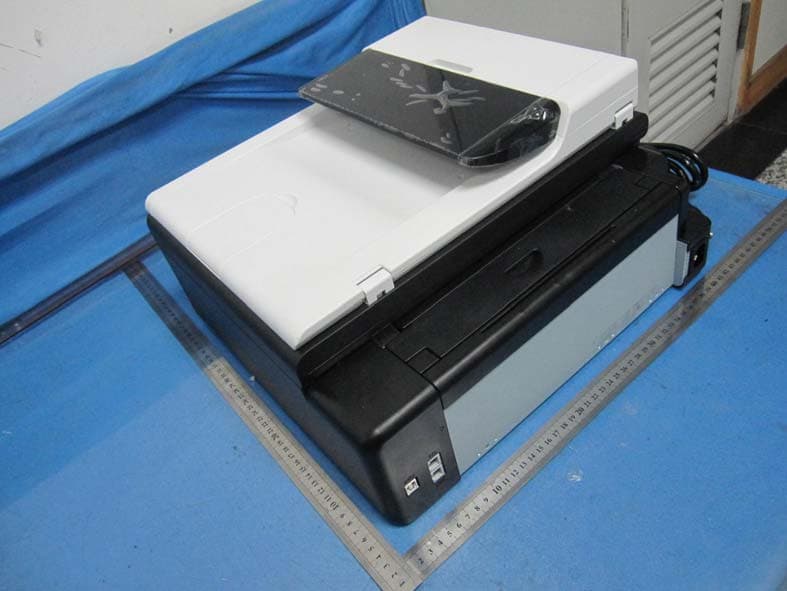
Click to zoom
Application Details
- Equipment Class
- JBP - Part 15 Class B Computing Device Peripheral
- Date of Grant
- Dec 07, 2011
- Application Purpose
- Original Equipment
- Date of Application
- Dec 07, 2011
- Equipment Note
- Multifunction Digital Product
- Company
- Ricoh Company Ltd
- Country
- Japan
Documents & Files
Document Text
Text extracted from the exhibit documents filed with the FCC. Open a document above to read the original.
Users Manual
1 English Information Introduction This manual contains detailed instructions and notes on the operation and use of this machine. For your safety and benefit, read this manual carefully before using the machine. Keep this manual in a handy place for quick reference. Important Contents of this manual are subject to change without prior notice. In no event will the company be liable for direct, indirect, special, incidental, or consequen- tial damages as a result of handling or operating the machine. -Note Some illustrations in this manual might be slightly different from the machine. Caution For good output quality, the manufacturer recommends that you use genuine toner from the manufacturer. The manufacturer shall not be responsible for any damage or expense that might result from the use of parts other than genuine parts from the manufac- turer with your office products. Power Source 120 V, 8 A, 60 Hz Be sure to connect the power cord to a power source as above. 2 Laws and Regulations Legal Prohibition Do not copy or print any item for which reproduction is prohibited by law. Copying or printing the following items is generally prohibited by local law: bank notes, revenue stamps, bonds, stock certificates, bank drafts, checks, pass- ports, driver's licenses. The preceding list is meant as a guide only and is not inclusive. We assume no responsibility for its completeness or accuracy. If you have any questions concerning the legality of copying or printing certain items, consult with your legal advisor. Laser Safety CDRH Regulations This equipment complies with requirements of 21 CFR subchapter J for class I laser products. This equipment contains multiple AlGalnP laser diode, 11-milli- watt, 775-790.7 nanometer wavelength for each emitter. The divergence of laser beams is θ⊥ 28 deg(Ave.), θ// 9 deg(Ave.) and laser beams are generated by CW (Continuous Wave) mode. Caution: Use of controls or adjustments or performance of procedures other than those specified in this manual might result in hazardous radiation exposure. 3 English Notes to USA Users of FCC Requirements Part 15 of the FCC Rules Declaration of Conformity This device complies with Part 15 of the FCC Rules. Operation is subject to the following two conditions: (1) This device may not cause harmful interference, and (2) this device must accept any interference received, including interference that may cause undesired operation. Responsible party: Ricoh Americas Corporation Address: 5 Dedrick Place, West Caldwell, NJ 07006 Telephone number: 973-882-2000 Properly shielded and grounded cables and connectors must be used for connections to a host computer (and/or peripheral) in order to meet FCC emission limits. Product Name: Laser Printer Model Number: SP 100 / Aficio SP100, SP 100SU / Aficio SP 100SU, SP 100SF / Aficio SP 100SF Note This equipment has been tested and found to comply with the limits for a Class B digital device, pursuant to Part 15 of the FCC Rules. These limits are designed to provide reasonable protection against harmful interference in a residential installation. This equipment generates, uses and can radiate radio frequency energy and, if not installed and used in accordance with the instruc- tions, may cause harmful interference to radio communications. However, there is no guarantee that interference will not occur in a particular installation. If this equipment does cause harmful interference to radio or television recep- tion, which can be determined by turning the equipment off and on, the user is encouraged to try to correct the interference by one more of the following measures: Reorient or relocate the receiving antenna. Increase the separation between the equipment and receiver. Connect the equipment into an outlet on a circuit different from that to which the receiver is connected. Consult the dealer or an experienced radio /TV technician for help. Caution Changes or modifications not expressly approved by the party responsible for compliance could void the user's authority to operate the equipment. ❖ • ❖ • • • • ❖ 4 Part 68 of the FCC Rules FCC Requirements 1) This equipment complies with Part 68 of the FCC rules and requirements adopted by the ACTA. On the cover of this equipment is a label that contains, among other information, a product identifi er in the format US:AAAEQ##TXXXXX. If requested, this number must be provided to the telephone company. 2) This equipment uses the RJ11C USOC jack. 3) A plug and jack used to connect this equipment to the premises wiring and tele- phone network must comply with the applicable FCC Part 68 rules and require- ments adopted by the ACTA. A compliant telephone cord and modular plug is provided with this product. It is designed to be connected to a compatible modular jack that is also compliant. See installation instructions for detail. 4) The REN is used to determine the number of devices that may be connected to a telephone line. Excessive RENs on a telephone line may result in the devices not ringing in response to an incoming call. In most but not all areas, the sum of RENs should not exceed fi ve (5.0). To be certain of the number of devices that may be connected to a line, as determined by the total RENs, contact the local telephone company. The REN for this product is part of the product identifi er that has the format US:AAAEQ##TXXXXX. The digits represented by ## are the REN without a decimal point (e.g., 03 is a REN of 0.3). 5) If this equipment causes harm to the telephone network, the telephone company will notify you in advance that temporary discontinuance of service may be required. But if advance notice is not practical, the telephone company will notify the customer as soon as possible. Also, you will be advised of your right to fi le a complaint with the FCC if you believe it is necessary. 6) The telephone company may make changes in its facilities, equipment, operations or procedures that could affect the operation of the equipment. If this ha…
Text truncated - open the document above for the full version.
Users Manual
1 Information for mainly European and Asian Users Introduction This manual contains detailed instructions and notes on the operation and use of this machine. For your safety and benefit, read this manual carefully before using the machine. Keep this manual in a handy place for quick reference. Important Contents of this manual are subject to change without prior notice. In no event will the company be liable for direct, indirect, special, incidental, or consequen- tial damages as a result of handling or operating the machine. -Notes: Some illustrations in this manual might be slightly different from the machine. Caution For good output quality, the manufacturer recommends that you use genuine toner from the manufacturer. The manufacturer shall not be responsible for any damage or expense that might result from the use of parts other than genuine parts from the manufac- turer with your office products. Power Source 220-240V, 4A, 50/60 Hz Be sure to connect the power cord to a power source as above. 2 Laws and Regulations Legal Prohibition Do not copy or print any item for which reproduction is prohibited by law. Copying or printing the following items is generally prohibited by local law: bank notes, revenue stamps, bonds, stock certificates, bank drafts, checks, pass- ports, driver's licenses. The preceding list is meant as a guide only and is not inclusive. We assume no responsibility for its completeness or accuracy. If you have any questions concerning the legality of copying or printing certain items, consult with your legal advisor. Laser Safety This machine complies with the requirements of IEC60825-1:2007 for class 1 la- ser product. The machine contains multiple AlGalnP laser diode, 11-milliwatt, 775-790.7 nanometer wavelength for each emitter. The divergence of laser beams is θ⊥ 28 deg(Ave.), θ// 9 deg(Ave.) and laser beams are generated by CW (Continuous Wave) mode. The following label is attached on rear side of the machine. Caution Use of controls or adjustments or performance of procedures other than those specified in this manual might result in hazardous radiation exposure. 3 User Information on Electrical & Electronic Equipment Users in the countries where this symbol shown in this section has been specified in national law on collection and treatment of E-waste Our Products contain high quality components and are designed to facilitate recycling. Our products or product packaging are marked with the symbol below. The symbol indicates that the product must not be treated as municipal waste. It must be disposed of separately via the appropriate return and collection systems available. By following these instructions you ensure that this product is treated correctly and help to reduce potential impacts on the environment and human health, which could otherwise result from inappropriate handling. Recycling of products helps to conserve natural resources and protect the environment. For more detailed information on collection and recycling systems for this product, please contact the shop where you purchased it, your local dealer or sales/service representatives. All Other Users If you wish to discard this product, please contact your local authorities, the shop where you bought this product, your local dealer or sales/service repre- sentatives. For Turkey only 4 Note for the Battery and/or Accumulator Symbol (For EU countries only) In accordance with the Battery Directive 2006/66/EC Article 20 Information for end-users Annex II, the above symbol is printed on batteries and accumulators. This symbol means that in the European Union, used batteries and accumula- tors should be disposed of separately from your household waste. In the EU, there are separate collection systems for not only used electrical and electronic products but also batteries and accumulators. Please dispose of them correctly at your local community waste collection/re- cycling centre. 5 Notice about the use of Facsimile Declaration of Conformity Notice to Users in EEA Countries This product complies with the essential requirements and provisions of Direc- tive 1999/5/EC of the European Parliament and of the Council of 9 March 1999 on radio equipment and telecommunications terminal equipment and the mutual recognition of their conformity. Notice to Users Accessing Analog PSTN in EEA Countries This product is designed to be able to access analog PSTN in all EEA countries. Local PSTN compatibility is dependent on software switch settings. Please con- tact your service representative if relocating this product to another country. In the event of problems, please contact your service representative in the first instance. The CE Declaration of Conformity is available by accessing the URL: http://www.ricoh.co.jp/fax/ce_doc/ and selecting the product applicable. 6 NOTICE TO USERS (NEW ZEALAND) The grant of a Telepermit for any item of terminal equipment indicates only that Telecom has accepted that the item complies with minimum conditions for connection to its network. It indicates no endorsement of the product by Telecom, nor does it provide any sort of warranty. Above all, it provides no assurance that any item will work correctly in all respects with another item of Telepermitted equipment of a different make or model, nor does it imply that any product is compatible with all of Telecom's network services. This equipment is not capable, under all operating conditions, of correct operation at the higher speeds for which it is designed. Telecom will accept no responsibility should difficulties arise in such circumstances. This equipment shall not be set up to make automatic calls to the Telecom “111” Emergency Service. If a charge for local calls is unacceptable, the “Dial” button should NOT be used for local calls. Only the 7-digits of the local number should be dialled from your telephone. DO NOT dial the area code digit or the “0” prefix. This equipment may not provide for the effective hand-over of a call to …
Text truncated - open the document above for the full version.
Users Manual
Operating Instructions User Guide For safe and correct use, be sure to read "Safety Information" before using the machine. TABLE OF CONTENTS 1. Guide to the Machine How to Read This Manual.................................................................................................................................5 Introduction.....................................................................................................................................................5 Legal Prohibition.............................................................................................................................................5 Disclaimer........................................................................................................................................................5 Model-Specific Information...............................................................................................................................6 Guide to Components........................................................................................................................................7 Exterior............................................................................................................................................................7 Interior.............................................................................................................................................................8 Control Panel..................................................................................................................................................9 Installing the Driver and Software...................................................................................................................11 Quick Install..................................................................................................................................................11 Upgrading or Deleting the Printer Driver...................................................................................................11 Installing the Smart Organizing Monitor...................................................................................................12 Initial Setup.......................................................................................................................................................13 What is Smart Organizing Monitor?..............................................................................................................14 2. Loading Paper Supported Paper..............................................................................................................................................15 Non-Recommended Paper Types...................................................................................................................16 Print Area..........................................................................................................................................................17 Loading Paper..................................................................................................................................................20 Specifying Paper Type and Paper Size Using Control Panel...................................................................22 Specifying Paper Type and Paper Size Using Smart Organizing Monitor.............................................24 Placing Originals..............................................................................................................................................25 About Originals............................................................................................................................................25 Placing Originals on the Exposure Glass...................................................................................................27 Placing Originals in the Auto Document Feeder.......................................................................................27 3. Printing Documents Basic Operation...............................................................................................................................................29 Printing on Both Sides of Sheets..................................................................................................................30 Canceling a Print Job...................................................................................................................................31 If a Paper Mismatch Occurs............................................................................................................................33 Continuing Printing Using Mismatched Paper...........................................................................................33 1 Resetting the Print Job..................................................................................................................................33 4. Copying Originals Copier Mode Screen.......................................................................................................................................35 Basic Operation...............................................................................................................................................36 Canceling a Copy.......................................................................................................................................37 Making Enlarged or Reduced Copies............................................................................................................38 Specifying Reduce/Enlarge.......................................................................................................................39 Combining Multiple Pages..............................................................................................................................40 Specifying Combine......................................................................................................…
Text truncated - open the document above for the full version.
Cover Letter(s)
Model Difference The EUT is a Multifunction Digital Product (Copier/Printer/Scanner/Fax),Models SP 100SF /Aficio SP 100SF were similar to Models SP 100SU /Aficio SP 100SU,except Models SP 100SU/Aficio SP 100SU unemployed ADF and FAX Board for FAX function .
External Photos
External photos of the EUT
ID Label/Location Info
SP 100SU/Aficio SP 100SU SP 100SF/Aficio SP 100SF
Internal Photos
Internal photos of the EUT
Test Report
TEST REPORT 47 CFR FCC Part 15 Subpart B (Class B) Radio Frequency Devices – Unintentional Radiators – Limits and methods of measurement ANSI C63.4: 2009 American National Standard for Methods of Measurement of Radio-Noise Emissions from Low-Voltage Electrical and Electronic Equipment in the Range of 9 kHz to 40 GHz Report Reference No......................: TRE11100074 FCC ID..............................................: BBP-MFSP100SF1 Compiled by ( position+printed name+signature)..: File administrators Tim Zhang Supervised by ( position+printed name+signature)..: Test Engineer Eric Zhang Approved by ( position+printed name+signature)..: Manager Wenliang Li Date of issue.....................................: Nov 11, 2011 Testing Laboratory Name..............: Shenzhen Huatongwei International Inspection Co., Ltd Address ............................................: Keji Nan No.12 Road, Hi-tech Park, Shenzhen, China Testing location/ procedure ..............: Full application of Harmonised standards Partial application of Harmonised standards Other standard testing methods Applicant’s name............................: Ricoh Company Ltd Address ............................................: 810, Shimoimaizum, Ebina-Shi, Kanagawa-ken, 243-0460 Japan Test specification: Standard ...........................................: 47 CFR FCC Part 15 Subpart B (Class B) ANSI C63.4: 2009 Non-standard test method..............: / Test Report Form No......................: HTWEMCFCC_1A TRF Originator..................................: Shenzhen Huatongwei International Inspection Co., Ltd Master TRF.......................................: Dated 2006-06 Shenzhen Huatongwei International Inspection Co., Ltd. All rights reserved. This publication may be reproduced in whole or in part for non-commercial purposes as long as the Shenzhen Huatongwei International Inspection Co., Ltd is acknowledged as copyright owner and source of the material. Shenzhen Huatongwei International Inspection Co., Ltd takes no responsibility for and will not assume liability for damages resulting from the reader's interpretation of the reproduced material due to its placement and context. Test item description .....................: Multifunction Digital Product (Copier/Printer/Scanner/Fax) Trade Mark .......................................: / Manufacturer ....................................: Ricoh Asia Industry (Shenzhen) Ltd. Model/Type reference.......................: SP 100SU/Aficio SP 100SU,SP 100SF/Aficio SP 100SF Listed Model..... ...............................: / Ratings .............................................: 120V 60Hz 6A 600W Result................................................: Positive V1.0 Page 2 of 47 Report No.: TRE11100074 FCC ID: BBP- MFSP100SF1 Shenzhen Huatongwei International Inspection Co., Ltd EMC -- T E S T R E P O R T Test Report No. : TRE11100074 Nov 11, 2011 ______________________________________________________________________________________________ Date of issue Equipment under Test : Multifunction Digital Product (Copier/Printer/Scanner/Fax) Model / Type : SP 100SU/Aficio SP 100SU,SP 100SF/Aficio SP 100SF Listed Model : / Applicant : Ricoh Company Ltd Address : 810, Shimoimaizum, Ebina-Shi, Kanagawa-ken, 243-0460 Japan Manufacturer : Ricoh Asia Industry (Shenzhen) Ltd. Address : North Huang Gang Road, Shenzhen, P.R.China Test Result according to the standards on page 4: Positive The test report merely corresponds to the test sample. It is not permitted to copy extracts of these test result without the written permission of the test laboratory. V1.0 Page 3 of 47 Report No.: TRE11100074 FCC ID: BBP- MFSP100SF1 Shenzhen Huatongwei International Inspection Co., Ltd Contents 1. TEST STANDARDS .................................................................... 4 2. SUMMARY............................................................................... 4 2.1. General Remarks: 4 2.2. Equipment under Test 4 2.3. Short description of the Equipment under Test (EUT) 4 2.4. EUT operation mode: 4 2.5. EUT configuration 5 3. TEST ENVIRONMENT ................................................................. 6 3.1. Address of the test laboratory 6 3.2. Test Facility 6 3.3. Environmental conditions 7 3.4. Test Description 7 3.5. Statement of the measurement uncertainty 7 3.6. Equipments Used during the Test 8 4. TEST CONDITIONS AND RESULTS ............................................... 9 4.1. Radiated Emission 9 4.2. Conducted Disturbance 23 5. EXTERNAL AND INTERNAL PHOTOS OF THE EUT ......................... 37 5.1. External photos of the EUT 37 5.2. Internal photos of the EUT 39 V1.0 Page 4 of 47 Report No.: TRE11100074 FCC ID: BBP- MFSP100SF1 Shenzhen Huatongwei International Inspection Co., Ltd 1. TEST STANDARDS The tests were performed according to following standards: 47 CFR FCC Part 15 Subpart B (Class B) Radio Frequency Devices – Unintentional Radiators – Limits and methods of measurement. ANSI C63.4: 2009 American National Standard for Methods of Measurement of Radio-Noise Emissions from Low-Voltage Electrical and Electronic Equipment in the Range of 9 kHz to 40 GHz. 2. SUMMARY 2.1. General Remarks: Date of receipt of test sample : Nov 06, 2011 Testing commenced on : Nov 06, 2011 Testing concluded on : Nov 11, 2011 2.2. Equipment under Test Power supply system utilised Power supply voltage : o 230V / 50 Hz o 115V / 60Hz o 12 V DC o 24 V DC Other (specified in blank below) AC 120V/60Hz 2.3. Short description of the Equipment under Test (EUT) The EUT is a laser Printer, Models SP 100SF /Aficio SP 100SF were similar to Models SP 100SU /Aficio SP 100SU, except Models SP 100SU/Aficio SP 100SU unemployed ADF and FAX Board for FAX function . 2.4. EUT operation mode: The equipment under test was operated during the measurement under the following conditions: Test program (customer specific) Emissions tests.............: 47 CFR FCC Part 15 Subpart B (Class B) and ANSI C63.4 2009, searching for the highe…
Text truncated - open the document above for the full version.
Test Setup Photos
Test Setup Photos of the EUT
Contact Information
Applicant
Atsushi Yasuda(Manager)
Test Firm
Shenzhen Huatongwei International Insp. Co., LtdMoffy Yu
Technical Specifications
| # | Rule Parts | Frequency Range | Power Output |
|---|---|---|---|
| 1 | 15B | - | - |
Other Applications from Ricoh Company Ltd

BBP-OTY0GV1
Aug 06, 2024PROJECTOR
Equipment Class
JAB - Part 15 Class B Digital Device
BBP-OTY3251
Jun 23, 2024Interactive Whiteboard
Equipment Class
JAD - Part 15 Class A Digital Device
BBP-OTY3241
Jun 23, 2024Interactive Whiteboard
Equipment Class
JAD - Part 15 Class A Digital Device
BBP-OTY3261
Jun 23, 2024Interactive Whiteboard
Equipment Class
JAD - Part 15 Class A Digital Device
BBP-OTE0A91
Dec 14, 2023Meeting Device
Equipment Class
JBP - Part 15 Class B Computing Device Peripheral