BBP-MFSPC252SF1Part15 Subpart B-Printer
Ricoh Company Ltd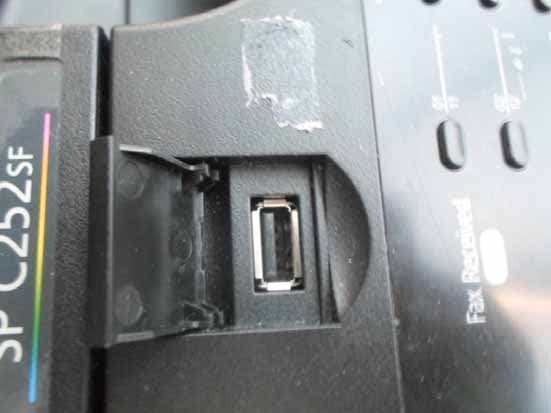
Click to zoom
Application Details
- Equipment Class
- JBP - Part 15 Class B Computing Device Peripheral
- Date of Grant
- Dec 04, 2013
- Application Purpose
- Original Equipment
- Date of Application
- Dec 04, 2013
- Equipment Note
- Part15 Subpart B-Printer
- Company
- Ricoh Company Ltd
- Country
- Japan
Documents & Files
Document Text
Text extracted from the exhibit documents filed with the FCC. Open a document above to read the original.
Users Manual
Operating Instructions For safe and correct use, be sure to read "Safety Information" before using the machine. TABLE OF CONTENTS How to Read This Manual.................................................................................................................................9 Introduction.....................................................................................................................................................9 Legal Prohibition.............................................................................................................................................9 Disclaimer........................................................................................................................................................9 Differences in Functions between Different Models..................................................................................10 Note to Administrator..................................................................................................................................10 About IP Address......................................................................................................................................... 11 List of Option................................................................................................................................................ 11 Model-Specific Information.............................................................................................................................12 Important Safety Instructions ......................................................................................................13 User Information on Electrical & Electronic Equipment.............................................................................13 Environmental Advice for Users..................................................................................................................13 Note for the Battery and/or Accumulator Symbol (For EU countries only)............................................14 Notes to Users of Facsimile Unit.................................................................................................................15 Important Safety Instructions .......................................................................................................16 Notes to Users in the State of California....................................................................................................16 ENERGY STAR Program..................................................................................................................................17 Saving Energy..............................................................................................................................................17 1. Getting Started Guide to Components......................................................................................................................................19 Exterior: Front View......................................................................................................................................19 Exterior: Rear View......................................................................................................................................21 Interior...........................................................................................................................................................23 Control Panel................................................................................................................................................24 Installing the Machine......................................................................................................................................27 Where to Put the Machine.......................................................................................................................... 27 Installing Option...............................................................................................................................................30 Attaching Paper Feed Unit..........................................................................................................................30 About Operation Tools....................................................................................................................................33 Initial Setup.......................................................................................................................................................34 Initial Setup...................................................................................................................................................34 Changing Operation Modes......................................................................................................................35 Multi-access................................................................................................................................................. 35 1 Assigning a Setting to the [ID Card Copy] Key (Shortcut Function)........................................................40 Configuring Network Settings.........................................................................................................................42 Configuring the IP Address Settings........................................................................................................... 42 Sharing the Printer on a Network...............................................................................................................46 Wireless LAN Setup.....................................................................................................................................47 Restricting Machine Functions According to User.........................................................................................50 Enabling the User Restriction Settings.....................................................................…
Text truncated - open the document above for the full version.
Users Manual
Read this manual carefully before you use this machine and keep it handy for future reference. For safe and correct use, be sure to read the Safety Information in This manual before using the machine. For information not in this manual, refer to the PDF files on the supplied CD-ROM. Important Safety Instructions Laws and Regulations Safety Labels of This Machine Safety During Operation Information 5. 4. 3. 2. 1. Safety Information English English 1 Information Introduction This manual contains detailed instructions and notes on the operation and use of this machine. For your safety and benefit, read this manual carefully before using the machine. Keep this manual in a handy place for quick reference. Power Source 120-127 V, 11 A, 60 Hz Be sure to connect the power cord to a power source as above. 2 Safety During Operation In this manual, the following important symbols are used: WARNING: Indicates a potentially hazardous situation which, if instructions are not followed, could result in death or serious injury. CAUTION: Indicates a potentially hazardous situation which, if instructions are not followed, may result in minor or moderate injury or damage to property. R R Environments Where the Machine Can be Used WARNING: Do not use flammable sprays or solvents in the vicinity of this ma- chine. Doing so could result in fire or electric shock. • Do not place vases, plant pots, cups, toiletries, medicines, small metal objects, or containers holding water or any other liquids, on or close to this machine. Fire or electric shock could result from spillage or if such objects or substances fall inside this machine. • CAUTION: Keep the machine away from humidity and dust. Otherwise a fire or an electric shock might occur. • Do not place the machine on an unstable or tilted surface. If it topples over, an injury might occur. • Do not place heavy objects on the machine. Doing so can cause the ma- chine to topple over, possibly resulting in injury. • Make sure the room where you are using the machine is well ventilated and spacious. Good ventilation is especially important when the machine is used heavily. • Keep the machine in an area that is within optimum environmental condi- tions. Operating the machine in an environment that is outside the recom- mended ranges of humidity and temperature can cause an electrical fire hazard. Keep the area around the socket free of dust. Accumulated dust can become an electrical fire hazard. • R R 3 Do not obstruct the machine's vents. Doing so risks fire caused by over- heated internal components. • Handling Power Cords and Power Plugs WARNING: Touching the prongs of the power cable's plug with anything metallic constitutes a fire and electric shock hazard. • Do not use any frequencies other than those that match the specifica- tions shown. Doing so could result in fire or electric shock. • Do not use any power sources other than those that match the speci- fications shown in this manual. Doing so could result in fire or electric shock. • Do not use multi-socket adaptors. Doing so could result in fire or electric shock. • Do not use extension cords. Doing so could result in fire or electric shock. • Do not use power cords that are damaged, broken, or modified. Also, do not use power cords that have been trapped under heavy objects, pulled hard, or bent severely. Doing so could result in fire or electric shock. • It is dangerous to handle the power cord plug with wet hands. Doing so could result in electric shock. • If the power cord is damaged and its inner wires are exposed or broken, contact your service representative for a replacement. Use of damaged power cords could result in fire or electric shock. • Be sure to disconnect the power cord from the wall outlet at least once a year and check for the following: The power cord's inner wires are exposed, broken, etc. The power cord's coating has a crack or dent. When bending the power cord, the power turns off and on. Part of the power cord becomes hot. The power cord is damaged. If any of the above conditions exist, do not use the power cord and consult your dealer or service representative. Use of the power cord could result in fire or electric shock. • • • • • • • R 4 Be sure to disconnect the plug from the wall outlet at least once a year and check for the following: There are burn marks on the plug. The prongs on the plug are deformed. If any of the above conditions exist, do not use the plug and consult your dealer or service representative. Use of the plug could result in fire or electric shock. • • • • The supplied power cord is for use with this machine only. Do not use it with other appliances. Doing so could result in fire or electric shock. • CAUTION: Be sure to disconnect the plug from the wall outlet and clean the prongs and the area around the prongs at least once a year. Allowing dust to build up on the plug constitutes a fire hazard. • Be sure to push the plug of the power cord fully into the wall outlet. Par- tially inserted plugs create an unstable connection that can result in unsafe buildup of heat. • If this machine is not going to be used for several days or longer at a time, disconnect its power cord from the wall outlet. • When disconnecting the power cord from the wall outlet, always pull the plug, not the cord. Pulling the cord can damage the power cord. Use of damaged power cords could result in fire or electric shock. • When performing maintenance on the machine, always disconnect the power cord from the wall outlet. • To reduce the risk of fire, use only No.26 AWG or larger telecommunication line cord. • R 5 Handling the Machine WARNING: Be sure to locate the machine as close as possible to a wall outlet. This will allow easy disconnection of the power cord in the event of an emergency. • If the machine emits smoke or odours, or if it behaves unusually, you must turn off its power immediately. After turning off the power, be sure to disconnect the power cord plug from the wall outle…
Text truncated - open the document above for the full version.
External Photos
FIGURE 1 PRINTER (M/N: SP C252SF) GENERAL APPEARANCE (FRONT VIEW) F IGURE 2 PRINTER (M/N: SP C252SF) GENERAL APPEARANCE (BACK VIEW) FIGURE 3 PRINTER (M/N: SP C252SF) PANEL F IGURE 4 PRINTER (M/N: SP C252SF) POWER PORT FIGURE 5 PRINTER (M/N: SP C252SF) PORTS F IGURE 6 PRINTER (M/N: SP C252SF) PORTS
ID Label/Location Info
Label Location Information Refer to the below red arrow: (For example)
Internal Photos
FIGURE 1 PRINTER (M/N: SP C252SF) COVER REMOVED #1 F IGURE 2 PRINTER (M/N: SP C252SF) COVER REMOVED #2 FIGURE 3 PRINTER (M/N: SP C252SF) COVER REMOVED #3 FIGURE 4 PRINTER (M/N: SP C252SF) POTS BOARD (COMPONENT SIDE) F IGURE 5 PRINTER (M/N: SP C252SF) POTS BOARD (SOLDERED SIDE) FIGURE 6 PRINTER (M/N: SP C252SF) SIGNAL BOARD (COMPONENT SIDE) F IGURE 7 PRINTER (M/N: SP C252SF) SIGNAL BOARD (SOLDERED SIDE) FIGURE 8 PRINTER (M/N: SP C252SF) CHIP ON SIGNAL BOARD F IGURE 9 PRINTER (M/N: SP C252SF) MAIN BOARD (COMPONENT SIDE) FIGURE 10 PRINTER (M/N: SP C252SF) MAIN BOARD (SOLDERED SIDE) F IGURE 11 PRINTER (M/N: SP C252SF) CHIP #1 ON MAIN BOARD FIGURE 12 PRINTER (M/N: SP C252SF) CHIP #2 ON MAIN BOARD F IGURE 13 PRINTER (M/N: SP C252SF) CHIP #3 ON MAIN BOARD FIGURE 14 PRINTER (M/N: SP C252SF) POWER BOARD #1 (COMPONENT SIDE) F IGURE 15 PRINTER (M/N: SP C252SF) POWER BOARD #1 (SOLDERED SIDE) FIGURE 16 PRINTER (M/N: SP C252SF) POWER BOARD #2 (COMPONENT SIDE) F IGURE 17 PRINTER (M/N: SP C252SF) POWER BOARD #2 (SOLDERED SIDE) FIGURE 18 PRINTER (M/N: SP C252SF) MOTOR #1 F IGURE 19 PRINTER (M/N: SP C252SF) MOTOR #2 FIGURE 20 PRINTER (M/N: SP C252SF) MOTOR #3 F IGURE 21 PRINTER (M/N: SP C252SF) FAN FIGURE 22 PRINTER (M/N: SP C252SF) SPEAKER F IGURE 23 PRINTER (M/N: SP C252SF) WIFI BOARD (SHIELDED SHELL REMOVED) FIGURE 24 PRINTER (M/N: SP C252SF) WIFI BOARD (COMPONENT SIDE) F IGURE 25 PRINTER (M/N: SP C252SF) WIFI BOARD (SOLDERED SIDE) FIGURE 26 PRINTER (M/N: SP C252SF) DEBUG #1 F IGURE 27 PRINTER (M/N: SP C252SF) DEBUG #2
Test Report
Ricoh Company Ltd FCC ID: BBP-MFSPC252SF1 Page 1 of 46 Audix Technology (Shanghai) Co., Ltd. Report No.: ACI-F13190 Prepared For : Ricoh Company Ltd 810, Shimoimaizumi Ebina-shi, Kanagawa, 243-0460 Japan Prepared By : Audix Technology (Shanghai) Co., Ltd. 3F and 4F, 34Bldg 680 Guiping Rd, Caohejing Hi-Tech Park, Shanghai 200233, China Tel: +86-21-64955500 Fax: +86-21-64955491 Report No. : ACI-F13190 Date of Test : Oct 28 – Nov 11, 2013 Date of Report : Nov 14, 2013 Application for FCC Certificate On Behalf of Ricoh Company Ltd Printer Model No.: SP C250SF/SP C252SF FCC ID : BBP-MFSPC252SF1 Ricoh Company Ltd FCC ID: BBP-MFSPC252SF1 Page 2 of 46 Audix Technology (Shanghai) Co., Ltd. Report No.: ACI-F13190 TABLE OF CONTENTS Page 1 SUMMARY OF STANDARDS AND RESULTS .......................................................................... 4 1.1 Description of Standards and Results ......................................................................................... 4 2 GENERAL INFORMATION .......................................................................................................... 5 2.1 Description of Equipment Under Test ........................................................................................ 5 2.2 Peripherals .................................................................................................................................. 6 2.3 Cable list ..................................................................................................................................... 6 2.4 Description of Test Facility ........................................................................................................ 7 2.5 Measurement Uncertainty .......................................................................................................... 7 3 CONDUCTED EMISSION TEST .................................................................................................. 8 3.1 Test Equipment ........................................................................................................................... 8 3.2 Block Diagram of Test Setup ..................................................................................................... 8 3.3 Conducted Emission Limit [FCC Part 15 Subpart B 15.107(a)] ................................................ 9 3.4 Test Configuration ...................................................................................................................... 9 3.5 Operating Condition of EUT ...................................................................................................... 9 3.6 Test Procedures ........................................................................................................................ 10 3.7 Test Results .............................................................................................................................. 10 4 RADIATED EMISSION TEST ..................................................................................................... 21 4.1 Test Equipment ......................................................................................................................... 21 4.2 Block Diagram of Test Setup ................................................................................................... 21 4.3 Radiated Emission Limit [FCC Part 15 Subpart B 15.109(a)] ................................................. 23 4.4 Test Configuration .................................................................................................................... 23 4.5 Operating Condition of EUT .................................................................................................... 23 4.6 Test Procedures ........................................................................................................................ 23 4.7 Test Results .............................................................................................................................. 24 5 DEBUG DESCRIPTION ............................................................................................................... 45 6 DEVIATION TO TEST SPECIFICATIONS .............................................................................. 46 Ricoh Company Ltd FCC ID: BBP-MFSPC252SF1 Page 3 of 46 Audix Technology (Shanghai) Co., Ltd. Report No.: ACI-F13190 TEST REPORT FOR FCC CERTIFICATE Applicant : Ricoh Company Ltd Manufacturer : Ricoh Company Ltd Factory : Shanghai Ricoh Digital Equipment Co., Ltd. EUT Description : Printer (A) Model No. : SP C250SF/SP C252SF (B) Power Supply : 120V/60Hz Test Procedure Used: FCC RULES AND REGULATIONS PART 15 SUBPART B CLASS B OCTOBER 2012 AND ANSI C63.4-2003 The device described above is tested by Audix Technology (Shanghai) Co., Ltd. to determine the maximum emission levels emanating from the device. The maximum emission levels are compared to the FCC Part 15 Subpart B (Class B) limits both radiated and conducted emissions. The test results are contained in this test report and Audix Technology (Shanghai) Co., Ltd. is assumed full responsibility for the accuracy and completeness of these measurements. This report shows that the EUT (M/N: Refer to Sec2.1) which was tested in 3m anechoic chamber Oct 28 – Nov 11, 2013 is technically compliance with the FCC official limits also. This report applies to above tested sample only. This report shall not be reproduced in part without written approval of Audix Technology (Shanghai) Co., Ltd. This report contains data that are not covered by the NVLAP accreditation. This report must not be used by the client to claim product certification, approval, or endorsement by NVLAP, NIST, or any agency of the federal government. Date of Test : Oct 28 – Nov 11, 2013 Date of Report : Nov 14, 2013 Producer : KATHY WANG / Supervisor Review : DIO YANG / Assistant Manager Signatory : BYRON KWO / Assistant General Manager Ricoh Company Ltd FCC ID: BBP-MFSPC252SF1 Page 4 of 46 Audix Technolog…
Text truncated - open the document above for the full version.
Test Setup Photos
Test Set-Up Photos 1. Conducted Emission Test F RONT VIEW B ACK VIEW 2. Radiated Electromagnetic Emission Test FRONT VIEW OF RADIATED EMISSION TEST (BELOW 1GHZ) B ACK VIEW OF RADIATED EMISSION TEST (BELOW 1GHZ) FRONT VIEW OF RADIATED EMISSION TEST (ABOVE 1GHZ) BACK VIEW OF RADIATED EMISSION TEST (ABOVE 1GHZ) S ETUP WITH MAXIMUM DETECTED EMISSION AT HORIZONTAL POLARIZATION (TEST MODE: WIFI PRINT) SETUP WITH MAXIMUM DETECTED EMISSION AT VERTICAL POLARIZATION (TEST MODE: WIFI PRINT)
Contact Information
Applicant
Atsushi Yasuda(Manager)
Technical Contact
Audix Technology (Shanghai) Co., Ltd.Byron Kwo
[email protected]86-21-64955500
3F 34Bldg 680 Guiping Rd., Caohejing Hi-Tech Park · Shanghai · China
Test Firm
Audix Technology ( Shanghai ) Co., Ltd.Byron Kwo
Technical Specifications
| # | Rule Parts | Frequency Range | Power Output |
|---|---|---|---|
| 1 | 15B | - | - |
Other Applications from Ricoh Company Ltd

BBP-OTY0GV1
Aug 06, 2024PROJECTOR
Equipment Class
JAB - Part 15 Class B Digital Device
BBP-OTY3251
Jun 23, 2024Interactive Whiteboard
Equipment Class
JAD - Part 15 Class A Digital Device
BBP-OTY3241
Jun 23, 2024Interactive Whiteboard
Equipment Class
JAD - Part 15 Class A Digital Device
BBP-OTY3261
Jun 23, 2024Interactive Whiteboard
Equipment Class
JAD - Part 15 Class A Digital Device
BBP-OTE0A91
Dec 14, 2023Meeting Device
Equipment Class
JBP - Part 15 Class B Computing Device Peripheral