BBP-RFTAU02Multi-Function Printer
Ricoh Company Ltd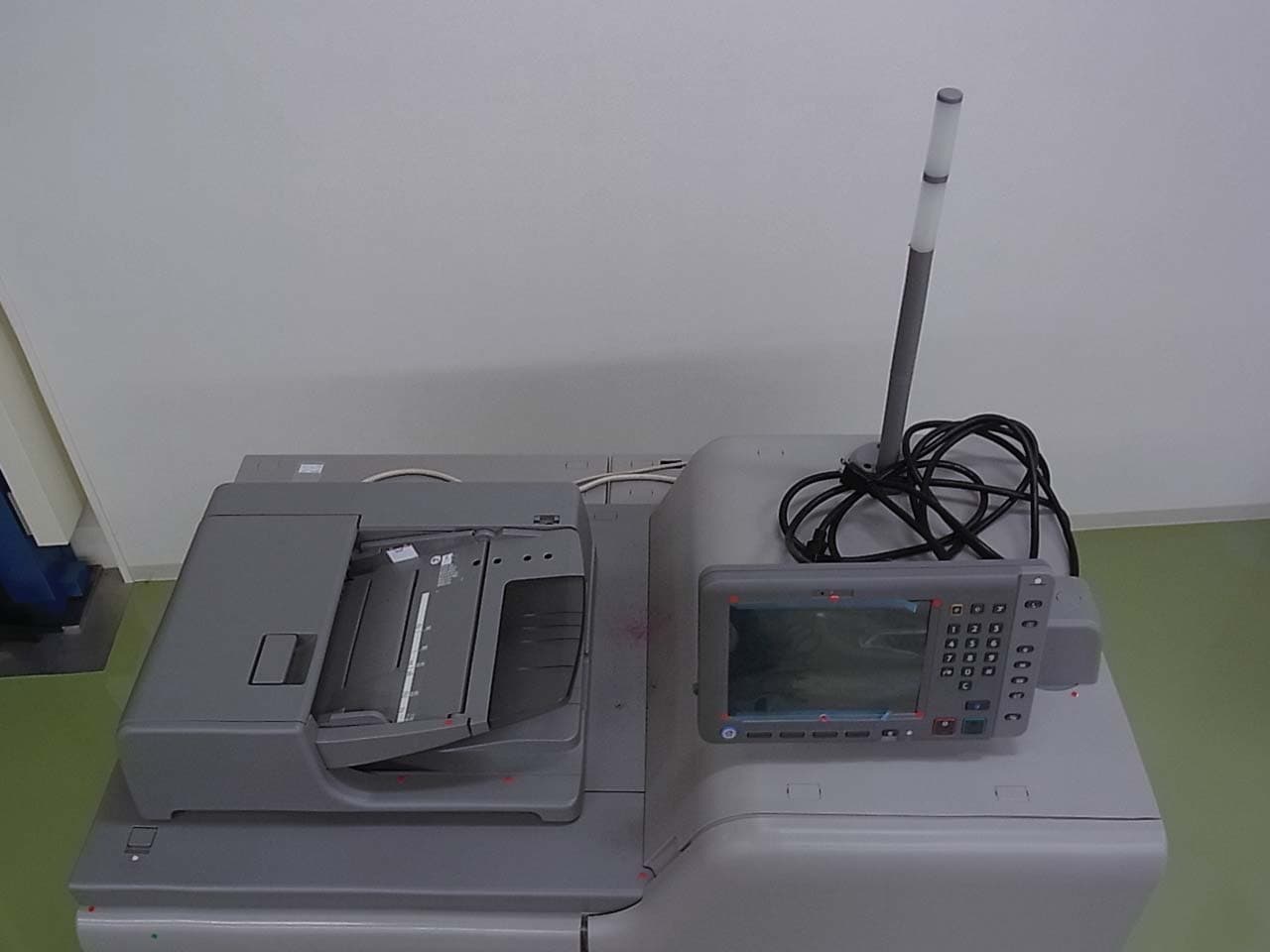
Click to zoom
Application Details
- Equipment Class
- DXX - Part 15 Low Power Communication Device Transmitter
- Date of Grant
- Jul 28, 2014
- Application Purpose
- Original Equipment
- Date of Application
- Jul 28, 2014
- Equipment Note
- Multi-Function Printer
- Frequency Range
- 13.56000000 - 13.56000000
- Company
- Ricoh Company Ltd
- Country
- Japan
Documents & Files
Document Text
Text extracted from the exhibit documents filed with the FCC. Open a document above to read the original.
Users Manual
TABLE OF CONTENTS How to Read the Manuals.................................................................................................................................2 Symbols Used in the Manuals.......................................................................................................................2 Disclaimer........................................................................................................................................................2 Notes...............................................................................................................................................................3 Machine Types...............................................................................................................................................3 1. Manuals Provided with This Machine Manuals for This Machine................................................................................................................................. 5 Manuals List.................................................................................................................................................... 7 How to Use the Operating Instructions.............................................................................................................8 Formats of the Operating Instructions...........................................................................................................8 Reading the HTML Manuals on the CD-ROM.............................................................................................8 Installing and Opening the HTML Manuals.................................................................................................9 Reading the PDF Manuals on the CD-ROM................................................................................................ 9 2. Safety Information for This Machine Safety Information............................................................................................................................................11 Safety During Operation.............................................................................................................................11 Safety Precautions to Be Followed.............................................................................................................11 Safety Labels of This Machine.........................................................................................................................18 Positions of WARNING and CAUTION labels.........................................................................................18 Power Switch Symbols.................................................................................................................................28 3. Other Information for This Machine Laws and Regulations...................................................................................................................................... 29 Duplication and Printing Prohibited............................................................................................................29 Laser Safety..................................................................................................................................................29 Notes to USA Users of FCC Requirements................................................................................................ 30 Notes to Canadian Users of IC Rules for Type 2 and 4...........................................................................31 4. Appendix Trademarks.......................................................................................................................................................33 1 How to Read the Manuals Symbols Used in the Manuals This manual uses the following symbols: Indicates points to pay attention to when using the machine, and explanations of likely causes of paper misfeeds, damage to originals, or loss of data. Be sure to read these explanations. Indicates supplementary explanations of the machine's functions, and instructions on resolving user errors. This symbol is located at the end of sections. It indicates where you can find further relevant information. [ ] Indicates the names of keys on the machine's display or control panels. Indicates instructions stored in a file on a provided CD-ROM. (mainly Europe and Asia), (mainly Europe), or (mainly Asia) (mainly North America) Differences in the functions of Region A and Region B models are indicated by two symbols. Read the information indicated by the symbol that corresponds to the region of the model you are using. For details about which symbol corresponds to the model you are using, see "Model-Specific Information", Getting Started. Disclaimer To the maximum extent permitted by applicable laws, in no event will the manufacturer be liable for any damages whatsoever arising out of failures of this machine, losses of the registered data, or the use or non-use of this product and operation manuals provided with it. Make sure that you always copy or have backups of the data registered in this machine. Documents or data might be erased due to your operational errors or malfunctions of the machine. In no event will the manufacturer be responsible for any documents created by you using this machine or any results from the data executed by you. 2 Notes Contents of this manual are subject to change without prior notice. The manufacturer shall not be responsible for any damage or expense that might result from the use of parts other than genuine parts from the manufacturer with your office products. For good output quality, the manufacturer recommends that you use genuine toner from the manufacturer. Some illustrations in this manual might be slightly different from the machine. Colors on color keys or the color circle may differ slightly from the colors of actual copies. The color samples in this manual may differ slightly from the color…
Text truncated - open the document above for the full version.
Users Manual
TABLE OF CONTENTS How to Read the Manuals.................................................................................................................................2 Symbols Used in the Manuals.......................................................................................................................2 Disclaimer........................................................................................................................................................2 Notes...............................................................................................................................................................3 Machine Types...............................................................................................................................................3 1. Manuals Provided with This Machine Manuals for This Machine................................................................................................................................. 5 Manuals List.................................................................................................................................................... 6 How to Use the Operating Instructions.............................................................................................................8 Formats of the Operating Instructions...........................................................................................................8 Reading the HTML Manuals on the CD-ROM.............................................................................................8 Installing and Opening the HTML Manuals.................................................................................................9 Reading the PDF Manuals on the CD-ROM................................................................................................ 9 2. Safety Information for This Machine Safety Information............................................................................................................................................11 Safety During Operation.............................................................................................................................11 Safety Precautions to Be Followed.............................................................................................................11 Safety Labels of This Machine.........................................................................................................................18 Positions of WARNING and CAUTION labels.........................................................................................18 Power Switch Symbols.................................................................................................................................28 3. Other Information for This Machine Laws and Regulations...................................................................................................................................... 29 Legal Prohibition.......................................................................................................................................... 29 Laser Safety..................................................................................................................................................29 Notes to USA Users of FCC Requirements................................................................................................ 30 Notes to Canadian Users of IC Rules for Type 2 and 4...........................................................................31 4. Appendix Trademarks.......................................................................................................................................................33 1 How to Read the Manuals Symbols Used in the Manuals This manual uses the following symbols: Indicates points to pay attention to when using the machine, and explanations of likely causes of paper misfeeds, damage to originals, or loss of data. Be sure to read these explanations. Indicates supplementary explanations of the machine's functions, and instructions on resolving user errors. This symbol is located at the end of sections. It indicates where you can find further relevant information. [ ] Indicates the names of keys on the machine's display or control panels. Indicates instructions stored in a file on a provided CD-ROM. (mainly Europe and Asia), (mainly Europe), or (mainly Asia) (mainly North America) Differences in the functions of Region A and Region B models are indicated by two symbols. Read the information indicated by the symbol that corresponds to the region of the model you are using. For details about which symbol corresponds to the model you are using, see "Model-Specific Information", Getting Started. Disclaimer To the maximum extent permitted by applicable laws, in no event will the manufacturer be liable for any damages whatsoever arising out of failures of this machine, losses of the registered data, or the use or non-use of this product and operation manuals provided with it. Make sure that you always copy or have backups of the data registered in this machine. Documents or data might be erased due to your operational errors or malfunctions of the machine. In no event will the manufacturer be responsible for any documents created by you using this machine or any results from the data executed by you. 2 Notes Contents of this manual are subject to change without prior notice. The manufacturer shall not be responsible for any damage or expense that might result from the use of parts other than genuine parts from the manufacturer with your office products. For good output quality, the manufacturer recommends that you use genuine toner from the manufacturer. Some illustrations in this manual might be slightly different from the machine. Machine Types Check the type of your machine before reading the manuals. • Type 1: Pro C7100 • Type 2: Pro C7100X • Type 3: Pro C7110 • Type 4: Pro C…
Text truncated - open the document above for the full version.
ID Label/Location Info
FCC, IC Label Position
ID Label/Location Info
FCC, IC Label Position
Internal Photos
Pattern Antenna
Test Report
Test report No. : 10312699S-C Page : 2 of 27 Issued date : June 24, 2014 Revised date : July 24, 2014 FCC ID : BBP-RFTAU02 UL Japan, Inc. Shonan EMC Lab. 1-22-3 Megumigaoka, Hiratsuka-shi, Kanagawa-ken, 259-1220 JAPAN Telephone : +81 463 50 6400 Facsimile : +81 463 50 6401 REVISION HISTORY Original Test Report No.: 10312699S-C Revision Test report No. Date Page revised Contents - (Original) 10312699S-C June 24, 2014 - - 1 10312699S-C July 2, 2014 4, 19-23 P4: Update of Rating, Country of Mass-production P19-23: Correction of typo 2 10312699S-C July 18, 2014 4, 6 P4: Update of Variation of the family model(s) P6: Update of Frequency list 3 10312699S-C July 24, 2014 11, 19 P11: Correction of the tables: Description of EUT, Auxiliary equipment P19: Update of data Test report No. : 10312699S-C Page : 3 of 27 Issued date : June 24, 2014 FCC ID : BBP-RFTAU02 UL Japan, Inc. Shonan EMC Lab. 1-22-3 Megumigaoka, Hiratsuka-shi, Kanagawa-ken, 259-1220 JAPAN Telephone : +81 463 50 6400 Facsimile : +81 463 50 6401 Contents Page SECTION 1: Customer information .................................................................................... 4 SECTION 2: Equipment under test (E.U.T.) ...................................................................... 4 SECTION 3: Test specification, procedures & results ........................................................ 7 SECTION 4: Operation of E.U.T. during testing ................................................................ 9 SECTION 5: Conducted emission ..................................................................................... 12 SECTION 6: Radiated emission (Fundamental and Spurious emission) ......................... 13 SECTION 7: 20dB bandwidth & Occupied bandwidth (99%) ........................................ 14 SECTION 8: Frequency tolerances .................................................................................... 15 Contents of APPENDIXES .................................................................................................. 16 APPENDIX 1: Data of radio tests ...................................................................................... 17 APPENDIX 2: Test instruments ........................................................................................ 25 APPENDIX 3: Photographs of test setup .......................................................................... 26 Test report No. : 10312699S-C Page : 4 of 27 Issued date : June 24, 2014 Revised date : July 18, 2014 FCC ID : BBP-RFTAU02 UL Japan, Inc. Shonan EMC Lab. 1-22-3 Megumigaoka, Hiratsuka-shi, Kanagawa-ken, 259-1220 JAPAN Telephone : +81 463 50 6400 Facsimile : +81 463 50 6401 SECTION 1: Customer information Company Name : Ricoh Company, Ltd. Brand Name : RICOH Address : 810 Shimoimaizumi, Ebina-shi, Kanagawa, 243-0460 Japan Telephone Number : +81-50-3814-5604 Facsimile Number : +81-3-6893-1409 Contact Person : Hiroyuki Kuroda SECTION 2: Equipment under test (E.U.T.) 2.1 Identification of E.U.T. Type of Equipment : Multi-Function Printer Model Number : Pro C7110SX Serial Number : Refer to clause 4.2 Rating : AC208-240V, 50/ 60Hz Country of Mass-production : U.S.A., Japan Condition of EUT : Production prototype (Not for Sale: This sample is equivalent to mass-produced items.) Receipt Date of Sample : May 7, 2014 Modification of EUT : No modification by the test lab. 2.2 Variation of the family model(s) - Pro C7110SX (Tested model) - Pro C7100SX - Pro C7110X - Pro C7100X The difference of these models is as follows. Model Scanner Unit (Scanner & Copy Function) Copy Speed Print Speed Pro C7100SX Equipped 80 ppm 80 ppm Pro C7110SX Equipped 90 ppm 90 ppm Pro C7100X Not Equipped None 80 ppm Pro C7110X Not Equipped None 90 ppm Test report No. : 10312699S-C Page : 5 of 27 Issued date : June 24, 2014 FCC ID : BBP-RFTAU02 UL Japan, Inc. Shonan EMC Lab. 1-22-3 Megumigaoka, Hiratsuka-shi, Kanagawa-ken, 259-1220 JAPAN Telephone : +81 463 50 6400 Facsimile : +81 463 50 6401 2.3 Product description Model: Pro C7110SX (referred to as the EUT in this report) is a Multi-Function Printer. The EUT is the color digital copy machine with high speed and high endurance, which is available also for a printer and a scanner. General Features 1. The machine fits seemliness into high volume production environments with its optimum reliability, sophisticated finishing and professional software solutions. 2. The machine employs advanced 4 or 5-tandem drums system and image transfer belt technology to ensure dependability in even the most demanding environments. 3. The machine offers the choice of a number of finishing options including stapling, booklet making and online punching. 4. Scan- to-email and Scan-to-folder allow efficient distribution of scanned files and documents. <Radio part> Radio Type : Transceiver Frequency of Operation : 13.56MHz Modulation : ASK 100% Power Supply (inner) : DC 5.0V Antenna type : Print pattern antenna ITU code : A1D Operating Temperature : +10 to +32 deg C. FCC 15.31 (e) Host device provides the radio block with stable power supply, and the power is not changed when voltage of the printer is varied. Therefore, this EUT complies with the requirement. FCC 15.203 The antenna is not removable from the EUT. Therefore, the equipment complies with the requirement. Test report No. : 10312699S-C Page : 6 of 27 Issued date : June 24, 2014 Revised date : July 18, 2014 FCC ID : BBP-RFTAU02 UL Japan, Inc. Shonan EMC Lab. 1-22-3 Megumigaoka, Hiratsuka-shi, Kanagawa-ken, 259-1220 JAPAN Telephone : +81 463 50 6400 Facsimile : +81 463 50 6401 The clock frequency used in EUT: Highest Frequency: Kind of equipment Model name Operates Frequency Remarks Multi-function Printer Pro C7110SX 3000MHz HDD I/F Frequency list: Derived Frequency Description of Use Remarks 1860.00MHz Controller CPU 800.00MHz Controller DDR3 2500.00MHz PCI-Express 480.00MHz Controller USB-Host 14.32MHz Controller PCH 33.30MHz PCI 133.30MHz Controller ASIC 3000.00MHz HDD I/F 50.00MHz…
Text truncated - open the document above for the full version.
Test Setup Photos
Test report No. : 10005707S-A Page : 21 of 23 UL Japan, Inc. Shonan EMC Lab. 1-22-3 Megumigaoka, Hiratsuka-shi, Kanagawa-ken, 259-1220 JAPAN Telephone : +81 463 50 6400 Facsimile : +81 463 50 6401 APPENDIX 3: Photographs of test setup Conducted emission Test Report No 10312699S-C 26 of 27 Test report No. : 10005707S-A Page : 22 of 23 UL Japan, Inc. Shonan EMC Lab. 1-22-3 Megumigaoka, Hiratsuka-shi, Kanagawa-ken, 259-1220 JAPAN Telephone : +81 463 50 6400 Facsimile : +81 463 50 6401 Radiated emission Front Rear (9kHz-30MHz) Rear (30-1000MHz) END OF REPORT Test Report No 10312699S-C 27 of 27
Contact Information
Applicant
Atsushi Yasuda(Manager)
Technical Contact
UL Japan, Inc.Ichiro Isozaki
[email protected]81-463-50-6400
1-22-3 Megumigaoka, Hiratsuka-shi · Kanagawa-ken · Japan
Test Firm
UL Japan, Inc. Shonan EMC EMC Lab.Tetsuya Hashimoto
Technical Specifications
| # | Rule Parts | Frequency Range | Power Output |
|---|---|---|---|
| 1 | 15C | 13.56 MHz - 13.56 MHz | - |
Other Applications from Ricoh Company Ltd

BBP-OTY0GV1
Aug 06, 2024PROJECTOR
Equipment Class
JAB - Part 15 Class B Digital Device
BBP-OTY3251
Jun 23, 2024Interactive Whiteboard
Equipment Class
JAD - Part 15 Class A Digital Device
BBP-OTY3241
Jun 23, 2024Interactive Whiteboard
Equipment Class
JAD - Part 15 Class A Digital Device
BBP-OTY3261
Jun 23, 2024Interactive Whiteboard
Equipment Class
JAD - Part 15 Class A Digital Device
BBP-OTE0A91
Dec 14, 2023Meeting Device
Equipment Class
JBP - Part 15 Class B Computing Device Peripheral