BCGA2991Laptop Computer
Apple Inc.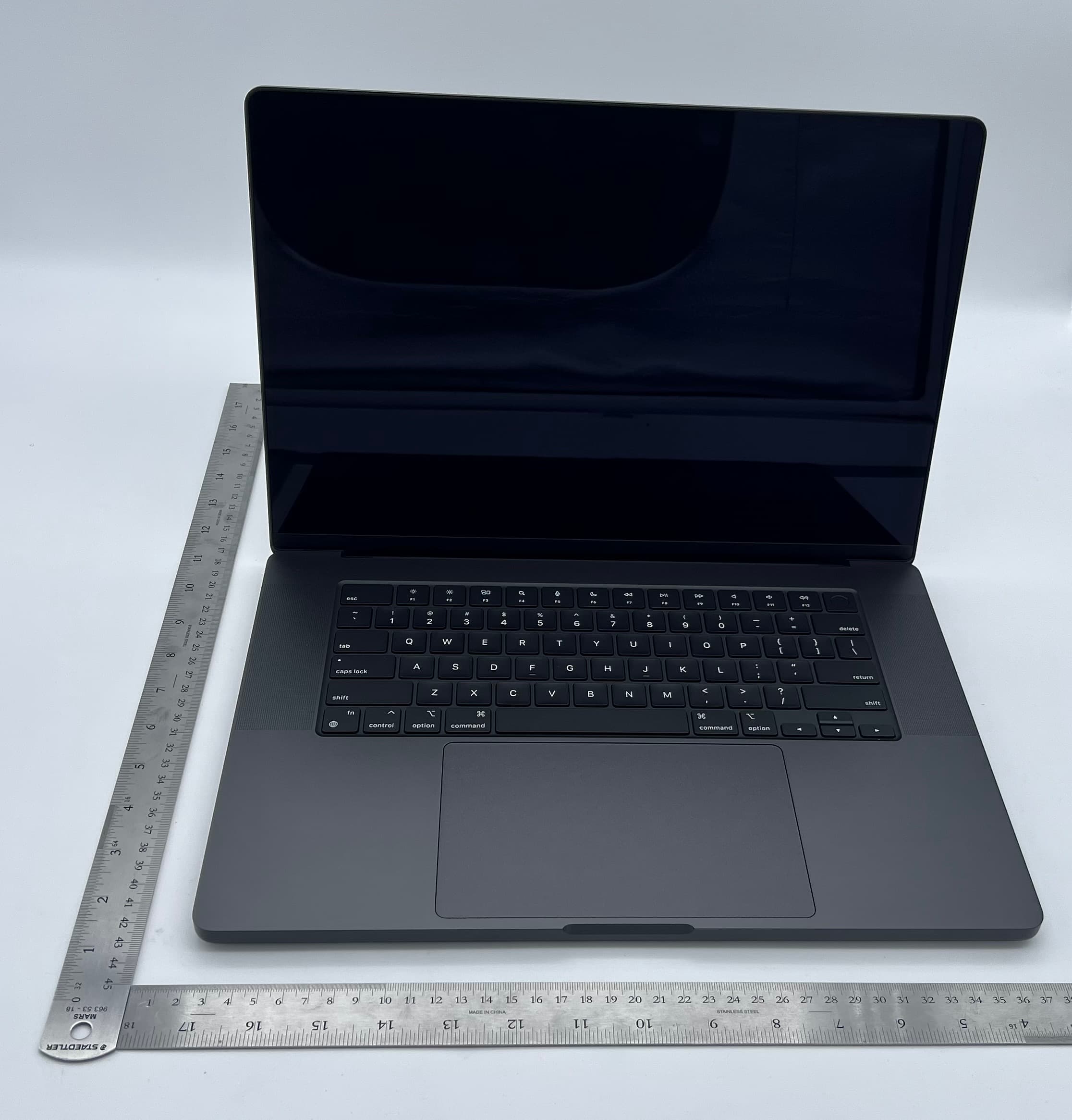
Click to zoom
Application Details
- Equipment Class
- DSS - Part 15 Spread Spectrum Transmitter
- Date of Grant
- Oct 29, 2023
- Application Purpose
- Original Equipment
- Date of Application
- Oct 19, 2023
- Equipment Note
- Laptop Computer
- Frequency Range
- 2402.00000000 - 2480.00000000
- Company
- Apple Inc.
- Country
- United States
Documents & Files
Document Text
Text extracted from the exhibit documents filed with the FCC. Open a document above to read the original.
Users Manual
Review the MacBook Pro Essentials guide before using your MacBook Pro. View the guide at support.apple.com/ guide/macbook-pro or download it from Apple Books (where available). Retain documentation for future reference. Safety and Handling See “Safety, handling, and regulatory information” in the MacBook Pro Essentials guide. Avoid Hearing Damage To prevent possible hearing damage, do not listen at high volume levels for long periods. More information about sound and hearing is available online at apple.com/sound. Medical Device Interference MacBook Pro contains magnets that may interfere with medical devices. See “Important safety information” in the MacBook Pro Essentials guide. Prolonged Heat Exposure Your MacBook Pro may become very warm during normal use. It’s important to keep your MacBook Pro on a hard, stable, and well-ventilated work surface when in use or charging. Use common sense to avoid situations where your body is in prolonged contact with a device or its power adapter when it’s operating or plugged into a power source, as sustained contact with warm surfaces may cause discomfort or injury. Take special care if you have a physical condition that affects your ability to detect heat against the body. Regulatory Information Regulatory certification information is available on-device. Choose Apple menu > About This Mac > Resources > Regulatory Certification. Additional regulatory information is in “Safety, handling, and regulatory information” in the MacBook Pro Essentials guide. FCC and ISED Canada Compliance This device complies with part 15 of the FCC Rules and ISED Canada licence-exempt RSS standard(s). Operation is subject to the following two conditions: (1) this device may not cause harmful interference, and (2) this device must accept any interference received, including interference that may cause undesired operation. EU / UK Compliance Apple Inc. hereby declares that this wireless device is in compliance with Directive 2014/53/EU and Radio Equipment Regulations 2017. A copy of the Declaration of Conformity is available at apple.com/euro/compliance. Apple’s EU representative is Apple Distribution International Ltd., Hollyhill Industrial Estate, Cork, Ireland. Apple’s UK representative is Apple UK Ltd., 2 Furzeground Way, Stockley Park, Middlesex, UB11 1BB. Use Restriction This device is restricted to indoor use when operating in the 5150 to 5350 MHz frequency range. This restriction applies in: AT, BE, BG, CH, CY, CZ, DE, DK, EE, EL, ES, FI, FR, HR, HU, IE, IS, IT, LI, LT, LU, LV, MT, NL, NO, PL, PT, RO, SE, SI, SK, TR, UA, UK(NI). ENERGY STAR® Compliance As an ENERGY STAR partner, Apple has determined that standard configurations of this product meet the ENERGY STAR guidelines for energy efficiency. The ENERGY STAR program is a partnership with electronic equipment manufacturers to promote energy-efficient products. Reducing energy consumption of products saves money and helps conserve valuable resources. This computer is shipped with power management enabled, with the computer set to sleep after 10 minutes of user inactivity. To wake your computer, click the trackpad or press any key on the keyboard. For more information about ENERGY STAR, visit energystar.gov. Disposal and Recycling Information The symbol above means that according to local laws and regulations your product and/or its battery shall be disposed of separately from household waste. When this product reaches its end of life, take it to a collection point designated by local authorities. The separate collection and recycling of your product and/or its battery at the time of disposal will help conserve natural resources and ensure that it is recycled in a manner that protects human health and the environment. For information about Apple’s recycling program, recycling collection points, restricted substances, and other environmental initiatives, visit apple.com/environment. Built-in Battery and Charging Don’t attempt to replace or remove the battery yourself— you may damage the battery, which could cause overheating, fire, and injury. The built-in battery should be replaced by Apple or an authorized service provider, and must be recycled or disposed of separately from household waste. Dispose of batteries according to your local environmental laws and guidelines. For information about battery recycling and replacement, go to apple.com/batteries/service-and-recycling. For information about charging, see “Important safety information” in the MacBook Pro Essentials guide. Software License Agreement Use of MacBook Pro constitutes acceptance of the Apple and third-party software license terms found at apple.com/legal/sla. Apple One-Year Limited Warranty Summary Apple warrants the included hardware product and accessories against defects in materials and workmanship for one year from the date of original retail purchase. Apple does not warrant against normal wear and tear, nor damage caused by accident or abuse. To obtain service, call Apple or visit an Apple Store or an Apple Authorized Service Provider—available service options are dependent on the country in which service is requested and may be restricted to the original country of sale. Call charges and international shipping charges may apply, depending on the location. Subject to the full terms and detailed information on obtaining service available at apple.com/legal/warranty and support.apple.com, if you submit a valid claim under this warranty, Apple will either repair, replace, or refund your hardware device at its own discretion. Warranty benefits are in addition to rights provided under local consumer laws. You may be required to furnish proof of purchase details when making a claim under this warranty. For Australian consumers: Our goods come with guarantees that cannot be excluded under the Australian Consumer Law. You are entitled to a replacement or refund for a major failure and for compensation for any other reasonably foreseeable loss or …
Text truncated - open the document above for the full version.
Users Manual
MacBook Pro Essentials Introducing the new 14-inch and 16-inch MacBook Pro See it all on your bold and bright display The Liquid Retina XDR display delivers extreme dynamic range, high contrast ratio, adaptive refresh rates, and advanced color accuracy. Everyone will enjoy the vivid quality, whether theyʼre grading 8K video on-set, or watching a movie in HDR to get a truly cinematic experience. Use all the functionality on your keyboard The Magic Keyboard includes a row of full-height function keys with new keyboard shortcuts for Spotlight search , Siri/Dictation , and Do Not Disturb , which allow you to quickly focus on the task at hand. Connect all your devices The new MacBook Pro models have versatile connectivity—including three Thunderbolt 4 (USB-C) ports, an HDMI port, an SDXC card slot, a MagSafe 3 port for the power adapter, and a 3.5 mm headphone jack that supports high-impedance headphones—so you can connect and use all your devices easily. Charge quickly and safely Connect the USB-C to MagSafe 3 Cable to the power adapter and the MagSafe 3 port. As the connector gets close to the port, youʼll feel a magnetic pull drawing it in. With the 96W USB-C Power Adapter for the 14-inch model and the 140W USB-C Power Adapter for the 16-inch model, MacBook Pro can be charged up to 50 percent in about 30 minutes. Want to learn more? See Take a tour: New 14-inch and 16-inch MacBook Pro. MacBook Pro at a glance Take a tour: New 14-inch and 16-inch MacBook Pro Note: This guide is for the currently shipping MacBook Pro models. If youʼre not sure which model you have or want to find information and documentation for other models, see the Apple Support article Identify your MacBook Pro model. The 14-inch and 16-inch MacBook Pro models have the following features. Not all features are available on all MacBook Pro models. MagSafe 3 port: Plug in the included USB-C Power Adapter to recharge the MacBook Pro battery. The indicator light glows amber when the battery needs to be charged, and green when itʼs fully charged. Charge your battery quickly—up to 50 percent in 30 minutes—on the 14-inch model with the 96W USB-C Power Adapter, and on the 16-inch model with the 140W USB-C Power Adapter. Thunderbolt 4 (USB-C) ports: Transfer data at Thunderbolt speeds (up to 40 Gbps), connect to a display or projector, connect to USB 4 peripherals, and more. See Use an external display with your MacBook Pro. 3.5 mm headphone jack: Plug in stereo headphones or external speakers to listen to your favorite music or movies. Use high-impedance headphones without a digital-to-analog converter or an amplifier. SDXC card slot: Transfer photos, videos, and data to and from your MacBook Pro, with support for high-capacity SD 4.0 cards. HDMI port: Connect your MacBook Pro to a TV or external display. See Use an external display with your MacBook Pro. 1080p FaceTime HD camera: Make FaceTime video calls or take pictures and video. The camera system provides high-quality video and better low-light performance. If the green indicator light next to the camera is glowing, the camera is on. See FaceTime and Use the built-in camera on Mac in the macOS User Guide. Studio-Quality Microphones: Three microphones with high signal-to-noise ratio and directional beamforming deliver super-clear audio for videoconferencing and phone calls, as well as high- quality voice recordings for audio tracks, podcasts, and voice memos. Speakers: The high-fidelity six-speaker sound system consists of two pairs of dual force- canceling woofers and two tweeters. Enjoy a robust and high-quality audio experience, including spatial audio support for videos and songs with Dolby Atmos. Touch ID (the power button): Press to turn on your MacBook Pro (or just lift the lid or press any key). A metallic trim ring guides your finger to the Touch ID sensor that analyzes your fingerprint. When you first start up or restart, you need to log in by typing your password. To learn more about how to use Touch ID, see Magic Keyboard for 14-inch and 16-inch MacBook Pro. Force Touch trackpad: Control your MacBook Pro with gestures. The entire trackpad surface acts as a button so you can easily click anywhere. For more about using gestures, see MacBook Pro trackpad. Take a tour: 13-inch MacBook Pro Note: This guide is for the currently shipping MacBook Pro models. If youʼre not sure which model you have or want to find information and documentation for other models, see the Apple Support article Identify your MacBook Pro model. The 13-inch MacBook Pro with M1 chip has the following features. Not all features are available on all MacBook Pro models. Thunderbolt / USB 4 port: Charge your computer, transfer data at Thunderbolt speeds (up to 40 Gbps), connect to a display or projector, USB 4 peripherals, and more. 3.5 mm headphone jack: Plug in stereo headphones or external speakers to listen to your favorite music or movies. Microphones: Record live music, make conference calls, and mix audio on the go. The three- microphone array on the MacBook Pro delivers studio-quality recordings with high signal-to-noise ratio and directional beamforming. Touch Bar: The Touch Bar at the top of the keyboard dynamically adapts to the app youʼre using. The Touch Bar is an extension of the keyboard—it presents intuitive shortcuts and application controls, when and where you need them. You can use familiar gestures like swipe and tap in the Touch Bar. See Magic Keyboard for 13-inch MacBook Pro. FaceTime HD camera: Make FaceTime video calls or take pictures and video. If the light is glowing, the camera is on. See FaceTime and Use the built-in camera on Mac in the macOS User Guide. Touch ID (the power button): Press to turn on your MacBook Pro (or just lift the lid or press any key). When you first start up or restart, you need to log in by typing your password. To learn more about how to use Touch ID, see Magic Keyboard for 13-inch MacBook Pro. Force Touch trackpad: Control your MacBook Pro with g…
Text truncated - open the document above for the full version.
Attestation Statements
One Apple Park Way Cupertino, California 95014 USA V1.0 www.apple.com Date: 26 April 2023 Federal Communications Commission Office of Engineering and Technology Laboratory Division 7435 Oakland Mills Rd. Columbia MD 21046 Subject: CFR 47 §2.911 (d)(5) Attestation Ref: FCC numbers Model(s) FCC ID A2991 BCGA2991 To whom it may concern: Apple Inc. (“Apple”) certifies that the equipment for which authorization is sought is not “covered” equipment prohibited from receiving an equipment authorization pursuant to section 2.903 of the FCC rules. Apple certifies that, as of the date of the filing of the application, Apple is not identified on the Covered List as an entity producing “covered” equipment and is not an affiliate or a subsidiary of an entity identified on the Covered List. Sincerely, ____________________ Stuart Thomas Apple Inc. Senior Engineering Manager [email protected]
Attestation Statements
One Apple Park Way Cupertino, California 95014 USA V1.0 www.apple.com Date: 26 April 2023 Federal Communications Commission Office of Engineering and Technology Laboratory Division 7435 Oakland Mills Rd. Columbia MD 21046 Subject: CFR 47 §2.911 (d)(7) Agent Designation Attestation Grantee Code: BCG To whom it may concern: Apple Inc. (“Apple”) as required by section §2.911(d)(7), will also serve as the agent for service of process for the above-referenced grantee code. Apple acknowledges that it will maintain an agent for no less than one year after Apple has terminated all marketing and importation or the conclusion of any Commission- related proceeding involving the equipment. Apple further acknowledges its responsibility under CFR 47 §2.929(c) to inform the FCC whenever the agent information changes. Contact person: Abhishek Rala Company name: Apple Inc. FCC FRN: 0005899216 Company Address: One Apple Park Way, Cupertino, CA 95014 Email: [email protected] Sincerely, ____________________ Stuart Thomas Apple Inc. Senior Engineering Manager [email protected]
Attestation Statements
Date: 04 September 2023 One Apple Park Way Cupertino, California 95014 USA v1.1 www.apple.com Federal Communications Commission Office of Engineering and Technology Laboratory Division 7435 Oakland Mills Rd. Columbia MD 21046 Subject: Statement of Attestation – Dual Client Ref: FCC numbers Model(s) FCC ID A2991 BCGA2991 To whom it may concern: Apple Inc., attest that these devices comply with the device protocol requirements and operational restrictions for indoor client 6CD. a. This device does not support the indoor subordinate (6PP) category and the maximum power does not exceed the authorised value. b. This device will only associate and connect with a low-power indoor access point, subordinate device or standard access point and never directly link to any other client devices. c. This device will always initiate transmission under the control of a low-power indoor access point, subordinate device, or standard-power access point except for brief communications before joining a network. These brief messages will only occur if the client has detected an indoor access point or subordinate device, or standard access point operating on a channel. These brief messages will have a time-out mechanism such that if it does not receive a response from an access point it will not continually repeat the request. d. This device, when associated and connected with a low-power indoor access point, subordinate device, or standard access point, will operate at a power lower as advertised by the indoor access point, subordinate device, or standard access point: i. lower than or equal to the power advertised by the low-power indoor access point and never above the maximum output power allowed by the FCC grant for clients associated with indoor access points. ii. lower than or 6 dB below the power advertised by the standard access point. e. Furthermore, we fully understand this device is prohibited from the control of or communicating with unmanned aircraft systems, including drones. For any questions, please feel free to contact me. Date: 04 September 2023 One Apple Park Way Cupertino, California 95014 USA v1.1 www.apple.com Sincerely, ____________________ Stuart Thomas Apple Inc. Senior Engineering Manager [email protected]
Attestation Statements
One Apple Park Way Cupertino, California 95014 USA v1.0 www.apple.com Date: 04 September 2023 Federal Communications Commission Office of Engineering and Technology Laboratory Division 7435 Oakland Mills Rd. Columbia MD 21046 Subject: Statement of Conformity for the Client in Non-Associated mode Ref: FCC numbers Model(s) FCC ID A2991 BCGA2991 To whom it may concern: Pursuant to the provisions of KDB 905462 D03, (c). Apple Inc. declares that the above-mentioned devices client software and associated drivers will not initiate any transmission on DFS frequencies without initiation by a master. This includes restriction on transmissions for beacons and support for ad-hoc peer-to- peer modes. Sincerely, ____________________ Stuart Thomas Apple Inc. EMEIA Engineering Manager [email protected]
Cover Letter(s)
One Apple Park Way Cupertino, California 95014 USA www.apple.com Date: 04 September 2023 Federal Communications Commission Equipment Authorization Branch 7435 Oakland Mills Rd. Columbia MD 21046 Attn: Equipment Authorization Branch Ref: FCC ID: BCGA2991, Model: A2991 To whom it may concern: I, the undersigned, hereby authorize TUV SUD BABT. to act on our behalf in all manners relating to application for equipment authorization, including signing of all documents relating to these matters. Any and all acts carried out by TUV SUD BABT. on our behalf shall have the same effect as acts of our own. I, the undersigned, hereby certify that we are not subject to a denial of federal benefits, that includes FCC benefits, pursuant to Section 5301 of the Anti-Drug Abuse Act of 1988, 21 U.S.C. 853(a). In authorizing TUV SUD BABT. as our representative, we still recognize that we are responsible to: a) comply with the relevant provisions of the certification program; b) make all necessary arrangements for the conduct of the evaluation, including provision for examining documentation and access to all areas, records (including internal audit reports) and personnel for the purposes of evaluation (e.g. testing, inspection, assessment, surveillance, reassessment) and resolution of complaints; c) make claims regarding certification only in respect of the scope for which certification has been granted; d) do not use our product certification in such a manner as to bring the Certification Division into disrepute and not make any statement regarding our product certification which the Certification Division may consider misleading or unauthorized; One Apple Park Way Cupertino, California 95014 USA www.apple.com e) upon suspension or cancellation of certification, discontinue use of all advertising matter that contains any reference thereto and return any certification documents as required by the Certification Division; f) use certification only to indicate the products are certified as being in conformity with specified standards; g) endeavor to ensure that no certificate or report nor any part thereof is used in a misleading manner; h) ensure that any reference to our product certification in communication media such as documents, brochures or advertising, complies with the requirements of the Certification Division; i) keep a record of all complaints made known to the us relating to the product’s compliance with requirements of the relevant standard and to make these records available to the when requested; j) take appropriate action with respect to such complaints and any deficiencies found in products or services that affect compliance with the requirements for certification; k) document the actions taken. This authorization is valid until further written notice from the applicant. Sincerely, ____________________ Stuart Thomas Apple Inc. EMEIA Engineering Manager [email protected]
Cover Letter(s)
One Apple Park Way Cupertino, California 95014 USA v1.0 www.apple.com Date: 04 September 2023 Federal Communications Commission Office of Engineering and Technology Laboratory Division 7435 Oakland Mills Rd. Columbia MD 21046 Subject: Request for Confidentiality FCC ID: BCGA2991, Model A2991 To whom it may concern: Pursuant to the provisions of Sections 0.457 and 0.459 of the Commission’s rules (47 CFR §§ 0.457, 0.459), Apple Inc. hereby requests confidential treatment for documents filed with the Commission in connection with the application for equipment authorization referenced above. Permanent Confidentiality Apple Inc. requests that the Commission withholds the following documents from public viewing indefinitely: • Block Diagrams • Schematics • Operational Description • Software Security Description • Tune Up Procedure These documents reveal detailed technical and design information that is protected by Apple Inc. as confidential and proprietary trade secrets. This information has been disclosed to those required to maintain its confidentiality, and is not customarily disclosed to the public even after commercial release of a device. As a result, disclosure of this information by the Commission would harm Apple Inc. by giving competitors an unfair advantage even after commercial release of the device. One Apple Park Way Cupertino, California 95014 USA v1.0 www.apple.com Short Term Confidentiality In addition to the above mentioned documents, pursuant to Public Notice DA 04-1705 of the Commission’s policy, in order to comply with the marketing regulations in 47 CFR §2.803 and the importation rules in 47 CFR §2.1204, while ensuring that business sensitive information remains confidential until the actual marketing of newly authorized devices, Apple Inc. requests that the Commission withholds the following documents from public viewing for one hundred eighty days after the date the grant of equipment authorization is issued: • External Photographs • Internal Photographs • Test Setup Photographs • User Manual These documents reveal technical and design information that has not been publicly disclosed in marketing materials and is protected by Apple Inc. as confidential and proprietary trade secrets. This information has been disclosed to those required to maintain its confidentiality, and is not customarily disclosed publicly prior to the commercial release of the device. As a result, disclosure of this information by the Commission prior to commercial release would harm Apple Inc. by giving competitors an unfair market advantage. Apple Inc. believes the period of confidentiality requested is necessary to protect the information until the commercial release of a device. It is our understanding that measurement test reports and FCC ID label format cannot be granted as confidential documents and this information will be available for public review once the grant of equipment authorization is issued. Sincerely, ____________________ Stuart Thomas Apple Inc. EMEIA Engineering Manager [email protected]
Cover Letter(s)
One Apple Park Way Cupertino, California 95014 USA www.apple.com Date: 04 September 2023 TUV SUD Product Service Octagon House Concorde Way Segensworth North Fareham Hampshire PO15 5RL United Kingdom Subject: Certification Application, Cover Letter FCC ID: BCGA2991 To whom it may concern We, Apple Inc., are applying for an FCC grant for a Single Certification of the device: MacBook Pro The MacBook Pro, Model A2991 is a laptop computer, with built-in IEEE 802.11a/b/g/n/ac/ax, Narrowband UNII, Thread and Bluetooth radio. The product has been tested against CFR 47 parts: • 15B • 15C • 15E The measurement facility is on file with FCC under the US-EU MRA, with the designation number UK0010 and UK2011. Yours faithfully, Stuart Thomas Senior Engineering Manager [email protected]
Cover Letter(s)
Apple Park, Cupertino, CA 95014 October 27, 2020 Federal Communications Commission 7435 Oakland Mills Road Columbia MD 21046 Re: Authorized Individual To whom it may concern: Pursuant to the provisions of KDB 852134 D01 Authorized Policy Form 731, I, grantee contact, hereby authorize Stuart Thomas to act on behalf of Apple Inc. for all matters relating to equipment authorization, including signing Form 731, attestations, and confidentiality request letters. This authorization is valid until further written notice from the applicant. Sincerely, ____________________ Abhishek Rala Apple Inc. Global Certification Manager [email protected]
External Photos
A2991 Top A2991 Bottom A2991 Left - MagSafe Charging Port, 2xUSB-C, Audio Jack A2991 Right- SD Card Slot, USB-C Port, HDMI Port A2991 Front A2991 Back A2991 LCD Screen, Keyboard
ID Label/Location Info
v 1.0 Apple Proprietary and Confidential Apple Inc. One Apple Park Way Cupertino, CA Page 1 of 2 www.apple.com FCC E-Label Information: Model A2991 A. Information to be displayed 1. The information that will be displayed on the e-label and information that will remain in the user manual is shown below: Information on E-label In Manual FCC ID number Yes No DoC logo Yes No 15.19 statement (“This device complies with part 15 of the FCC Rules. Operation is subject to the following two conditions: (1) This device may not cause harmful interference, and (2) this device must accept any interference received, including interference that may cause undesired operation.”) No Yes Class A / B Digital Device user manual statements 1 No Yes DoC declaration 1 No Yes Caution to the user that changes, or modifications not expressly approved by the party responsible for compliance could void the user's authority to operate the equipment 1 No Yes Describe any other FCC regulatory information included in e-label 1 1 If the e-label includes information typically included in the manual then the e-label shall clearly differentiate between information required to be on the device’s surface and information required to be in the manual – refer to 784748 D02 e labelling v01 section II D 3(b) Image of the e-label screen are provided below: Model A2991: B. Access to the required information on the e-label 1. Users are able to access the information in no more than three steps in a device’s menu. The actual steps are: To access the e-label information, in the device, Choose: Apple Menu > About This Mac > Regulatory Certification v 1.0 Apple Proprietary and Confidential Apple Inc. One Apple Park Way Cupertino, CA Page 2 of 2 www.apple.com No special access codes or permissions are required to go through the above steps beyond entering a user- defined password to protect against unauthorized access to the device. 2. The information is stored on the device, no special accessories or supplemental plug-ins (e.g., a SIM/USIM card) are required to access the information. Yes. 3. Users are provided specific instructions on how to access the information. The information to the user is provided in the MacBook Info Guide document. A copy is attached as an exhibit document Info_Guide_v1.0.pdf. C. Labeling for Importation and Purchasing 1. Products utilizing e-labels are required to have a physical label on the product at the time of importation, marketing and sales. For devices imported in bulk and not packaged individually, a removable adhesive label or, for devices in protective bags, a label on the bags is acceptable for this purpose. Any removable label shall be of a type intended to survive normal shipping and handling and must only be removed by the customer after purchase. For devices imported already in individual packages ready for sale, the information may alternatively be provided on the package. It shall contain: 1. The FCC ID and/or the DoC logo (if applicable); and 2. Any other information required by specific rule to be provided on the surface of the product unless such information is permitted to be included in the User’s manual or other packaging inserts. The FCC ID and/or DoC logo are present on the product packaging. D. Other considerations 1. The above information must be programmed by the responsible party and the information must be secured in such a manner that third-parties cannot modify it. The e-label information is pre-programmed by the grantee. The user cannot modify the e-label information. 2. All the applicable regulatory information required on the packaging or user instructions must be provided according to the rules even if it is displayed electronically. For example, hearing aid compatibility (HAC) ratings for the phones as specified in 47 C.F.R. § 20.19. Yes, it is provided.
ID Label/Location Info
A2991 - Regulatory Label Location Apple Proprietary and Confidential Apple Proprietary and Confidential
Internal Photos
A2991 Internal View WF3 (BT) antenna structure WF2/BT antenna structure WF1/BT antenna structure Audio port 2 x USB-C Port MagSafe Port MLB Speaker structure BatteryBatteryBattery Multi-touch Trackpad Speaker structure HDMI Port USB-C Port SD Card Slot A2991 WF1/BT, WF2/BT, WF3 (BT) antenna structure and feed - Front A2991 WF1/BT, WF2/BT, WF3 (BT) antenna structure and feed - Back A2991 Left and right speaker structure - Front A2991 Left and right speaker structure - Back A2991 Headphone jack assembly - Front A2991 Headphone jack assembly - Back A2991 USB-C Port - Front A2991 USB-C Port - Back A2991 MagSafe Port - Front A2991 MagSafe Port - Back A2991 MLB without shields - Front WiFi/BT Module A2991 MLB without shields - Back A2991 Multi-touch Trackpad - Front A2991 Multi-touch Trackpad - Back
Internal Photos
A2991 Keyboard - Front A2991 Keyboard - Back A2991 Display assembly - Front A2991 Display assembly - Back
RF Exposure Info
Document 75958013 Report 14 Issue 1 October 2023 Report On Specific Absorption Rate Testing of the A2991 In accordance with FCC 47 CFR 2.1093 FCC ID: BCGA2991 COMMERCIAL-IN-CONFIDENCE TUV SUD Digitally signed by TUV SUD Date: 2023.10.11 11:09:09 +01'00' TÜV SÜD Product Service, Octagon House, Concorde Way, Segensworth North, Fareham, Hampshire, United Kingdom, PO15 5RL Tel: +44 (0) 1489 558100. Website: http://www.tuvsud.com COMMERCIAL-IN-CONFIDENCE Document 75958013 Report 14 Issue 1Page 1 of 88 REPORT ON Specific Absorption Rate Testing of the…
Text truncated - open the document above for the full version.
Contact Information
Applicant
Abhishek Rala(Regulatory Compliance Manager)
Test Firm
TUV SUD LimitedNathan Emery
Technical Specifications
| # | Rule Parts | Frequency Range | Power Output | Tolerance |
|---|---|---|---|---|
| 1 | 15C | 2.40 GHz - 2.48 GHz | 101.00 mW | 25.0000000000 ppm |
Other Applications from Apple Inc.
BCGA3577
May 22, 2026Wireless Headphones
Equipment Class
DTS - Digital Transmission SystemBCG-A3454
Mar 16, 2026AirPods Max
Equipment Class
6VL - 15E 6 GHZ Very Low Power DeviceBCGA3404
Mar 03, 2026Laptop computer
Equipment Class
DSS - Part 15 Spread Spectrum TransmitterBCGA3429
Mar 03, 2026Laptop computer
Equipment Class
6VL - 15E 6 GHZ Very Low Power DeviceBCGA3449
Mar 03, 2026Laptop computer
Equipment Class
NII - Unlicensed National Information Infrastructure TX