BEJE2242TAPart15 Subpart B-LCD Monitor
LG Electronics USA, Inc.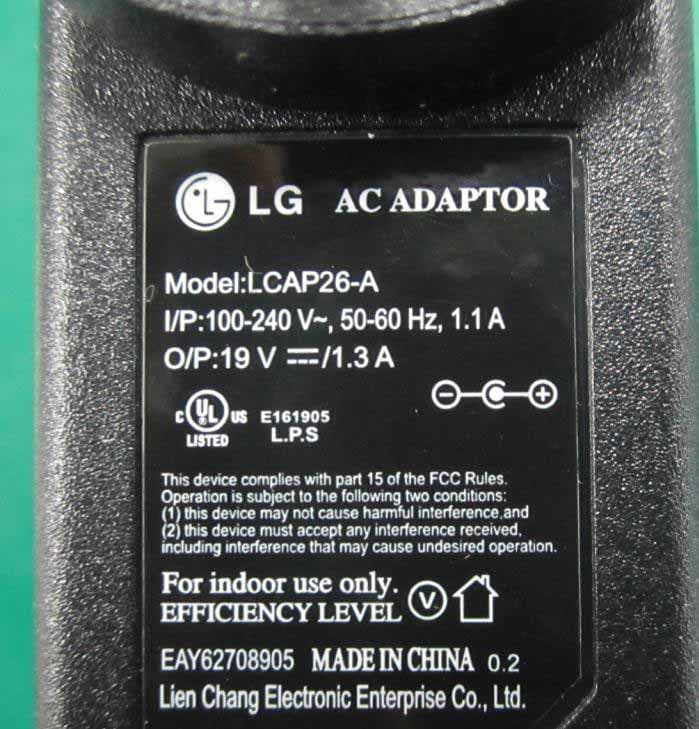
Click to zoom
Application Details
- Equipment Class
- JBP - Part 15 Class B Computing Device Peripheral
- Date of Grant
- Jan 14, 2012
- Application Purpose
- Original Equipment
- Date of Application
- Jan 12, 2012
- Equipment Note
- Part15 Subpart B-LCD Monitor
- Company
- LG Electronics USA, Inc.
- Country
- United States
Documents & Files
Document Text
Text extracted from the exhibit documents filed with the FCC. Open a document above to read the original.
Users Manual
www.lg.com OWNER'S MANUAL LED LCD MONITOR Ple ase read this manual carefully before operating your set and retain it for future reference. LED LCD MONITOR MODEL ENGLISH E1942S E2042S E2242S E2042T E2242T E2342T E2442T 2 ENG ENGLISH TABLE OF CONTENTS CONTENTS 3 ASSEMBLING AND PREPAR- ING 3 Unpacking 4 Parts and buttons 6 Setting up the Monitor set 6 - Attaching the Stand 6 - Detaching the Stand 7 - Mounting on a table 8 - Mounting on a wall 10 USING THE MONITOR SET 10 Connecting to a PC 10 - D-SUB connection 10 - DVI-D connection 12 CUSTOMIZING SETTINGS 12 Accessing The Main Menus 13 Customizing Settings 13 - Menu Settings 14 - PICTURE 15 - COLOR 16 - DISPLAY 17 - OTHERS 18 MODE Setting 19 SUPER ENERGY SAVING 20 TROUBLESHOOTING 22 SPECIFICATIONS 21 E1942S 28Preset Modes (Resolution) 29 Indicator 22 E2042S 23 E2042T 24 E2242S 25 E2242T 26 E2342T 27 E2442T 3 ENG ENGLISH ASSEMBLING AND PREPARING ASSEMBLING AND PREPARING Unpacking Check your product box for the following items. If there are any missing accessories, contact the local dealer where you purchased your product. The illustrations in this manual may differ from the actual product and accessories. y Do not use any unapproved accessories to ensure the safety and product life span. y Any damages or injuries by using unapproved accessories are not covered by the warranty. y The accessories supplied with your product may vary depending on the model. y Product specifications or contents in this manual may be changed without prior notice due to upgrade of product functions. CAUTION NOTE CD(Owner's Manual) / Card D-SUB Cable DVI-D Cable (This cable is not included in all countries.) or Power CordAC-DC Adapter AC-DC adapter (Depending on the country) (Only E2042T/E2242T/E2342T/E2442T) Stand Body Stand Base (Depending on the country) 4 ENG ENGLISH ASSEMBLING AND PREPARING Parts and buttons Power Indicator y Lighting On: Turned on y Lighting Off: Turned off Button (See p.11) (Power Button) MENU / / INPUT / EXIT MODE / AUTO / MENU / / INPUT / EXIT MODE / AUTO / Connection panel (See p.9) D-SUB DVI-D DC-IN / D-SUB DC-IN / Setting up the Monitor set Attaching the Stand 1 Place the Monitor set with the screen side down on a flat and cushioned surface. Lay a foam mat or soft protective cloth on the surface to protect the screen from damage. y This illustration depicts the general model of connection. Your monitor may differ from the items shown in the picture. y Do not carry the product upside down holding only the stand base. The product may fall and get damaged or injure your foot. CAUTION CAUTION Detaching the Stand 1 Place the Monitor set with the screen side down on a flat and cushioned surface. 2 2 Attach the Stand body and then attach the Stand Base,then tighten the screw to the right with a Coin. Stand Base 2 3 Stand Body Turn the screw to the left with a Coin, and then pull out the Stand Base from the Stand Body, then pull out the Stand Body from the Monitor set . Stand Base 2 3 Stand Body 5 ENG ENGLISH ASSEMBLING AND PREPARING Mounting on a table 1 Lift and tilt the Monitor set into its upright position on a table. Leave a 10 cm (minimum) space from the wall for proper ventilation. 2 Connect the AC-DC Adapter and Power Cord to wall outlet. 3 Press (Power) button on the bottom switch panel to turn the power on. Unplug the power cord before moving the Monitor to another location. Otherwise electric shock may occur. CAUTION 10 cm 10 cm 10 cm 10 cm Using the cable holder 6 ENG ENGLISH ASSEMBLING AND PREPARING 电源输入/ DC-IN / or Cable holder Using the Kensington security system The Kensington security system connector is located at the back of the Monitor set. For more information of installation and using, refer to the manual supplied with the Kensington security system or visit http://www.kensington.com. Connect the Kensington security system cable between the Monitor set and a table. The Kensington security system is optional. You can obtain it from most electronics stores. NOTE 7 ENG ENGLISH ASSEMBLING AND PREPARING Tilt from +20 to -5 degrees up or down to adjust the angle of the Monitor set to suit your view. NOTE FrontRear 20- 5 ENGLISH When you adjust the angle, do not hold the bottom of the Monitor set frame as shown on the following illustration, as may injure your fingers. Do not touch or press the screen when adjusting the angle of the monitor. WARNING Do not hold this set like below picture. Monitor screen can detach from stand base and injure your body. y Disconnect the power cord first, and then move or install the Monitor set. Otherwise electric shock may occur. y If you install the Monitor set on a ceiling or slanted wall, it may fall and result in severe injury. y Use only an authorized LG wall mount and contact the local dealer or qualified personnel. y Do not over tighten the screws as this may cause damage to the Monitor set and void your warranty. y Use only screws and wall mounts that meet the VESA standard. Any damages or injuries by misuse or using an improper accessory are not covered by the warranty. y Use the screws that are listed on the VESA standard screw specifications. y The wall mount kit will include an installation manual and necessary parts. y The wall mount bracket is optional. You can obtain additional accessories from your local dealer. y The length of screws may differ depending on the wall mount. Be sure to use the proper length. y For more information, refer to the instructions supplied with the wall mount. CAUTION NOTE Mounting on a wall For proper ventilation, allow a clearance of 10 cm on each side and from the wall. Detailed instructions are available from your dealer, see the optional Tilt Wall Mounting Bracket Installation and Setup Guide. If you intend to mount the Monitor set to a wall, attach Wall mounting interface (optional parts) to the back of the set. When you install the Monitor set using a wall mounting interface (optional parts), attach it carefully so it will not drop. 1 Please, Use th…
Text truncated - open the document above for the full version.
Users Manual
Regulatory Information cont. FCC Compliance Statement This equipment has been tested and found to comply within the limits of a Class B digital device pursuant to Part 15 of the FCC Rules. These limits are designed to provide reasonable protection against harmful interference in a residential installation. This equipment generates, uses, and can radiate radio frequency energy and if not installed and used in accordance with the instructions, may cause harmful interference to radio communications. However, there is no guarantee that interference will not occur in a particular installation. If this equipment does cause harmful interference to radio or television reception (which can be determined by turning the equipment on and off), the user is encouraged to try to correct the interference by using one or more of the following measures: Reorient or relocate the receiving antenna. Increase the separation between the equipment and the receiver. Connect the equipment into an outlet on a circuit different from that to which the receiver is connected. Consult the dealer or an experienced radio/TV technician for help. Caution: Changes or modifications not expressly approved by the party responsible for compliance could void the user's (or your) authority to operate the equipment. Only peripherals (digital input/output devices, terminals, printers, etc.) certified to comply with the Class B limits may be attached to this monitor. Operation with non-certified peripherals is likely to result in interference to radio and TV reception. Only shielded signal cables may be used with this System. Canadian DOC Notice This Class B digital apparatus meets all requirements of the Canadian Interference-Causing Equipment Regulations. Cet appareil numérique de la classe B respecte toutes les exigences du Règlement sur le matériel brouilleur du Canada. TCO Displays 5.0 Congratulations, Your display is designed for both you and the planet! This display carries the TCO Certified label. This ensures that the display is designed for minimal impact on the climate and natural environment, while offering all the performance expected from top of the line electronic products. TCO Certified is a third party verified program, where every product model is tested by an accredited independent test laboratory. TCO Certified represents one of the toughest certifications for displays worldwide. Some of the Usability features of the TCO Displays 5.0 requirements: Visual Ergonomics Good visual ergonomics in order to improve the working environment for the user and to reduce sight and strain problems. Important parameters are: • Light levels without color tint, Uniform color and luminance, Wide color gamut • Calibrated color temperature and gamma curve • Wide luminance level, Dark black levels, Low motion blur Electrical Safety • Product fulfills rigorous safety standards 1 NOTICE The regulations are applied only to the products with the ID LABEL indicating specific requirements. NOTICE The regulations are applied only to the products with the ID LABEL indicating specific requirements. NOTICE The following information is for the models certified by TCO. If you want to know the specification of the purchased product, see the label attached on the back of the product. Regulatory Information cont. 2 Emissions • Low alternating electric and magnetic fields emissions • Low acoustic noise emissions Some of the environmental features of the TCO Displays 5.0 requirements: • The brand owner demonstrates corporate social responsibility and has a certified environmental management system (EMAS or ISO 14001) • Very low energy consumption both in on-and standby mode • Restrictions on chlorinated and brominated flame retardants, plasticizers and polymers • Restrictions on heavy metals such as cadmium, mercury and lead (RoHS compliance) • Both product and product packaging is prepared for recycling • The brand owner offers take-back options The requirements included in this label have been developed by TCO Development in co-operation with scientists, experts, users as well as manufacturers all over the world. Since the end of the 1980s TCO has been involved in influencing the development of IT equipment in a more user-friendly direction. Our labeling system started with displays in 1992 and is now requested by users and IT-manufacturers all over the world. For more information, please visit: www.tcodevelopment.com Information for Environmental Preservation LGE. announced the 'LG Declaration for a Cleaner Environment' in 1994, and this ideal has served as a guiding managerial principle ever since. The Declaration is a foundation that has allowed us to undertake environmentally friendly activities in careful consideration of economic, environmental, and social aspects. We promote activities for environmental preservation, and we specifically develop our products to embrace the concept of environment-friendly. We minimize the hazardous materials contained in our products. For example, there is no cadmium to be found in our monitors. Information for recycling This monitor may contain parts which could be hazardous to the environment. It is important that this monitor be recycled after use. LGE. handles all waste monitors through an environmentally acceptable recycling method. There are several take-back and recycling systems currently in operation worldwide. Many parts will be reused and recycled, while harmful substances and heavy metals are treated by an environmentally friendly method. If you want to find out more information about our recycling program, please contact your local LG vendor or a corporate representative of LG. We set our vision and policies on a cleaner world by selecting the issue of the global environment as a task for corporate improvement. Please visit our website for more information about our ‘green’ policies. http://www.lg.com/global/sustainability/environment/take-back- recycling.jsp English Informationen zur Erhaltung der…
Text truncated - open the document above for the full version.
Block Diagram
E2242T Block Diagram LED PANEL (21.5”) LVDS V_LED F/B 19V From Adapter LED B / L LED B / L NT68652U LVDS DVIDVI- -D D 24C02 DVI_TMDS DVI IIC 1919- -to to- -5V 5V DC/DCDC/DC // TT- -Con 5V Con 5V LED driver NT68652U (Novatek) Embedded LED Driver RGBRGB R/G/B/H/V RGB IIC 1Ch. LDO1Ch. LDO Core 1.2VCore 1.2V SERIALSERIAL FlashFlash SPI Data/ CLK Key1/Key2 LED (Blue) System 3.3 V System 3.3 V CrystalCrystal 6 Keys : Power/MENU/DUAL /AUTO/INPUT/EXIT 14.318MHz
Cover Letter(s)
Statement FCC ID: BEJE2242TA Data: Jan 10, 2012 We LG Electronics U.S.A., Inc. declare under our own responsibility that the product LCD Monitor to which this declaration refers conforms with all electrical and mechanical devices employed for spurious radiation suppression, including any modifications made during certification testing, must be incorporated in each unit marked. 2012.01.10 [Data] [Name and Signature of person responsible]
Cover Letter(s)
Power of Attorney Federal Communication Commission Office of Engineering and Technology Equipment Authorization Division 7345 Oakland Mills Road Columbia, Maryland 21046 We, Company: LG Electronics U.S.A., Inc. Address: 1000 Sylvan Avenue, Englewood Cliffs, NJ 07632 Would like to inform you that we nominated Audix Technology (Shanghai) Co., Ltd, Mr. Byron Kwo to act on behalf of our LG Electronics Inc. to apply FCC ID for the LCD Monitors with LG brand. Kind Regards, Place, date Signature 2012-01-10 Christopher Johnson ________________ ________________
External Photos
FIGURE 1 LCD MONITOR (M/N: E2242TA) GENERAL APPEARANCE (FRONT VIEW) F IGURE 2 LCD MONITOR (M/N: E2242TA) GENERAL APPEARANCE (BACK VIEW) FIGURE 3 LCD MONITOR (M/N: E2242TA) PORTS F IGURE 4 LCD MONITOR (M/N: E2242TA) D-SUB CABLE FIGURE 5 LCD MONITOR (M/N: E2242TA) DVI CABLE F IGURE 6 LCD MONITOR (M/N: E2242TA) ADAPTER #1 (GENERAL APPEARANCE) FIGURE 7 LCD MONITOR (M/N: E2242TA) ADAPTER #1 (GENERAL APPEARANCE – AC PORT) FIGURE 8 LCD MONITOR (M/N: E2242TA) ADAPTER #1 (GENERAL APPEARANCE – LABEL) FIGURE 9 LCD MONITOR (M/N: E2242TA) ADAPTER #2 (GENERAL APPEARANCE) F IGURE 10 LCD MONITOR (M/N: E2242TA) ADAPTER #2 (GENERAL APPEARANCE – AC PORT) FIGURE 11 LCD MONITOR (M/N: E2242TA) ADAPTER #2 (GENERAL APPEARANCE – LABEL) FIGURE 12 LCD MONITOR (M/N: E2242TA) ADAPTER #3 (GENERAL APPEARANCE) FIGURE 13 LCD MONITOR (M/N: E2242TA) ADAPTER #3 (GENERAL APPEARANCE – LABEL) FIGURE 14 LCD MONITOR (M/N: E2242TA) ADAPTER #4 (GENERAL APPEARANCE) FIGURE 15 LCD MONITOR (M/N: E2242TA) ADAPTER #4 (GENERAL APPEARANCE – LABEL)
ID Label/Location Info
Label Location Information Refer to the below red arrow: (For example)
Internal Photos
FIGURE 1 LCD MONITOR (M/N: E2242TA) COVER REMOVED FIGURE 2 LCD MONITOR (M/N: E2242TA) LABEL ON LCD PANEL FIGURE 3 LCD MONITOR (M/N: E2242TA) MAIN BOARD (COMPONENT SIDE) F IGURE 4 LCD MONITOR (M/N: E2242TA) MAIN BOARD (SOLDERED SIDE) FIGURE 5 LCD MONITOR (M/N: E2242TA) CRYSTAL ON MAIN BOARD FIGURE 6 LCD MONITOR (M/N: E2242TA) KEY BOARD (COMPONENT SIDE) F IGURE 7 LCD MONITOR (M/N: E2242TA) KEY BOARD (SOLDERED SIDE) FIGURE 8 LCD MONITOR (M/N: E2242TA) LCD PANEL CONTROL BOARD (COMPONENT SIDE) F IGURE 9 LCD MONITOR (M/N: E2242TA) LCD PANEL CONTROL BOARD (SOLDERED SIDE) FIGURE 10 LCD MONITOR (M/N: E2242TA) DEBUG
Operational Description
LG Electronics U.S.A., Inc. FCC ID: BEJE2242TA 1 Equipment Description The Equipment Under Test (EUT) is the LG Electronics U.S.A., Inc. LCD Monitor. General Specification LG Electronics U.S.A., Inc. FCC ID: BEJE2242TA 2 EUT Operating Conditions a. Setup the EUT and Peripherals as shown in Sec. 3.2 of the test report. b. Turn on the power of all equipment and the EUT. c. Set the contrast & brightness of EUT to maximum. d. PC system ran the self-test program "EMC Test" by windows XP and sent "H" characters to EUT through graphic card (we use white letters on a black background to represent all colors), the EUT's screen displayed and filled with "H" pattern by its resolution (Via D-Sub/DVI Input). e. Repeat above procedure from c to d for difference test mode. f. The other peripherals devices were driven and operated during the test. g. The test modes are as follows: NOTE: We tested the EUT with adapter #1 and selected the worst test mode to perform test with adapter #2/#3/#4. Adapter Test Mode Adapter #1 D-Sub 640*480@60Hz D-Sub 1280*1024@75Hz D-Sub 1680*1050@60Hz D-Sub 1920*1080@60Hz DVI 640*480@60Hz DVI 1280*1024@75Hz DVI 1680*1050@60Hz DVI 1920*1080@60Hz Adapter #2 D-Sub 1680*1050@60Hz Adapter #3 D-Sub 1680*1050@60Hz Adapter #4 D-Sub 1680*1050@60Hz
Schematics
PDF created with pdfFactory Pro trial version www.pdffactory.com PDF created with pdfFactory Pro trial version www.pdffactory.com
Test Report
LG Electronics U.S.A., Inc. FCC ID: BEJE2242TA Page 1 of 50 Audix Technology (Shanghai) Co., Ltd. Report No.: ACI-F12002 Prepared For : LG Electronics U.S.A., Inc. 1000 Sylvan Avenue, Englewood Cliffs, NJ 07632, United States Prepared By : Audix Technology (Shanghai) Co., Ltd. 3F and 4F 34Bldg 680 Guiping Rd, Caohejing Hi-Tech Park, Shanghai 200233, China Tel: +86-21-64955500 Fax: +86-21-64955491 Report No. : ACI-F12002 Date of Test : Dec 20, 2011 Date of Report : Jan 06, 2012 Application for FCC Certificate On Behalf of LG Electronics U.S.A., Inc. LCD Monitor Model No.: E2242TA Serial No.: E11121554-01/01 FCC ID : BEJE2242TA LG Electronics U.S.A., Inc. FCC ID: BEJE2242TA Page 2 of 50 Audix Technology (Shanghai) Co., Ltd. Report No.: ACI-F12002 TABLE OF CONTENTS Page 1 SUMMARY OF STANDARDS AND RESULTS .......................................................................... 4 1.1 Description of Standards and Results ......................................................................................... 4 2 GENERAL INFORMATION .......................................................................................................... 5 2.1 Description of Equipment Under Test ........................................................................................ 5 2.2 Peripherals .................................................................................................................................. 7 2.3 Description of Test Facility ........................................................................................................ 8 2.4 Measurement Uncertainty .......................................................................................................... 8 3 CONDUCTED EMISSION TEST .................................................................................................. 9 3.1 Test Equipment ........................................................................................................................... 9 3.2 Block Diagram of Test Setup ..................................................................................................... 9 3.3 Conducted Emission Limit [FCC Part 15 Subpart B 15.107(a)] .............................................. 10 3.4 Test Configuration .................................................................................................................... 10 3.5 Operating Condition of EUT .................................................................................................... 11 3.6 Test Procedures ........................................................................................................................ 12 3.7 Test Results .............................................................................................................................. 12 4 RADIATED EMISSION TEST ..................................................................................................... 24 4.1 Test Equipment ......................................................................................................................... 24 4.2 Block Diagram of Test Setup ................................................................................................... 24 4.3 Radiated Emission Limit [FCC Part 15 Subpart B 15.109(a)] ................................................. 26 4.4 Test Configuration .................................................................................................................... 26 4.5 Operating Condition of EUT .................................................................................................... 26 4.6 Test Procedures ........................................................................................................................ 27 4.7 Test Results .............................................................................................................................. 28 5 DEVIATION TO TEST SPECIFICATIONS .............................................................................. 49 6 DEBUG DESCRIPTION ............................................................................................................... 50 LG Electronics U.S.A., Inc. FCC ID: BEJE2242TA Page 3 of 50 Audix Technology (Shanghai) Co., Ltd. Report No.: ACI-F12002 TEST REPORT FOR FCC CERTIFICATE Applicant : LG Electronics U.S.A., Inc. Manufacturer : LG Electronics Nanjing Display Co., Ltd. EUT Description : LCD Monitor (A) Model No. : E2242TA (B) Serial No. : E11121554-01/01 (C) Power Supply : 120V/60Hz Test Procedure Used: FCC RULES AND REGULATIONS PART 15 SUBPART B CLASS B OCTOBER 2010 AND ANSI C63.4-2003 The device described above is tested by Audix Technology (Shanghai) Co., Ltd. to determine the maximum emission levels emanating from the device. The maximum emission levels are compared to the FCC Part 15 Subpart B (Class B) and ICES-003, Issue 4 February 2004 (CISPR 22:2002) limits both radiated and conducted emissions. The test results are contained in this test report and Audix Technology (Shanghai) Co., Ltd. is assumed full responsibility for the accuracy and completeness of these measurements. This report shows that the EUT (M/N: E2242TA; S/N: E11121554-01/01) which was tested in 3m anechoic chamber Dec 20, 2011 is technically compliance with the FCC official limits also. This report applies to above tested sample only. This report shall not be reproduced in part without written approval of Audix Technology (Shanghai) Co., Ltd. This report contains data that are not covered by the NVLAP accreditation. This report must not be used by the client to claim product certification, approval, or endorsement by NVLAP, NIST, or any agency of the federal government. Date of Test : Dec 20, 2011 Date of Report : Jan 06, 2012 Producer : YENNY YU / Assistant Review : DIO YANG / Assistant Manager Signatory : SAMMY CHEN / Deputy Manager LG Electronics U.S.A., Inc. FCC ID: BEJE2242TA Page 4 of 50 Audix Technology (Shanghai) Co., Ltd. Report No.: ACI-F12002 1 SUMMARY OF STA…
Text truncated - open the document above for the full version.
Test Setup Photos
Test Set-Up Photos 1. Conducted Emission Test F RONT VIEW B ACK VIEW 2. Radiated Electromagnetic Emission Test FRONT VIEW OF RADIATED EMISSION TEST (BELOW 1GHZ) BACK VIEW OF RADIATED EMISSION TEST (BELOW 1GHZ) F RONT VIEW OF RADIATED EMISSION TEST (ABOVE 1GHZ) B ACK VIEW OF RADIATED EMISSION TEST (ABOVE 1GHZ) S ETUP WITH MAXIMUM DETECTED EMISSION AT HORIZONTAL POLARIZATION (TEST MODE: DVI 1920*1080@60Hz Adapter #1) SETUP WITH MAXIMUM DETECTED EMISSION AT VERTICAL POLARIZATION (T EST MODE: DVI 1920*1080@60Hz Adapter #1)
Contact Information
Applicant
David Kim(Team leader, LGEUS NA Policy & Regulatory Affairs)
Technical Contact
Audix Technology (Shanghai) Co., Ltd.Byron Kwo
[email protected]+86-21-64955500
3F 34Bldg 680 Guiping Rd., Caohejing Hi-Tech Park · Shanghai · China
Non-Technical Contact
Audix Technology (Shanghai) Co., Ltd.Alan He
[email protected]+86-21-64955500
Test Firm
Audix Technology ( Shanghai ) Co., Ltd.Byron Kwo
Technical Specifications
| # | Rule Parts | Frequency Range | Power Output |
|---|---|---|---|
| 1 | 15B | - | - |
Other Applications from LG Electronics USA, Inc.

BEJTFHOBINI1F1
Jan 08, 2025Telematics
Equipment Class
DTS - Digital Transmission SystemBEJNT-16Z90TS
Oct 02, 2024Notebook Computer
Equipment Class
DSS - Part 15 Spread Spectrum TransmitterBEJSP-PEW8
Sep 26, 2024Stylus Pen
Equipment Class
DCD - Part 15 Low Power Transmitter Below 1705 kHzBEJ-RSMV2
Sep 24, 2024RF Module
Equipment Class
FDS - Part 15 Field Disturbance SensorBEJTFBMEIBN3EU
Sep 24, 2024Telematics
Equipment Class
NII - Unlicensed National Information Infrastructure TX