CNFACVT1Grip supports Bluetooth Low Energy
GoPro, Inc.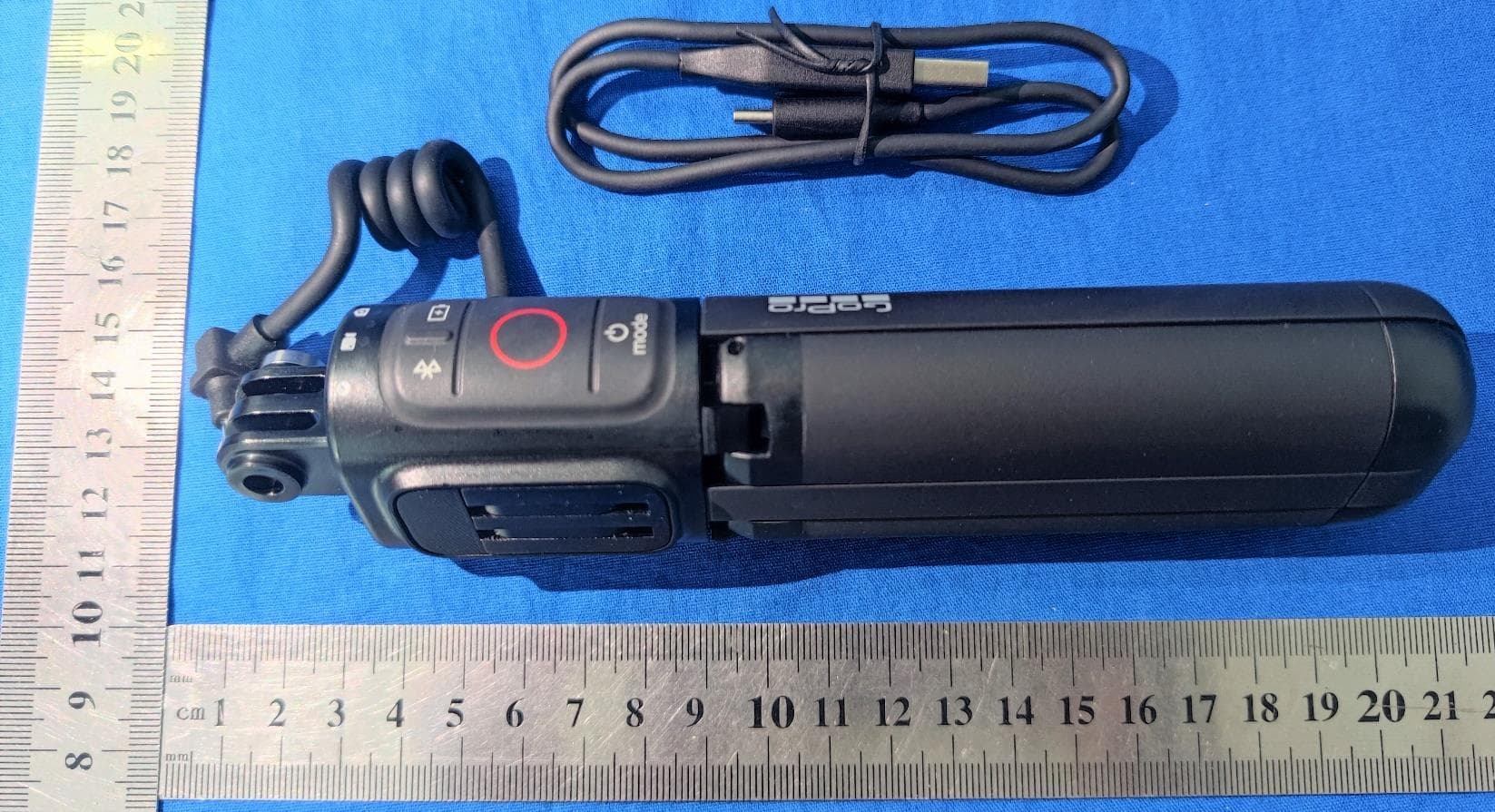
Click to zoom
Application Details
- Equipment Class
- DTS - Digital Transmission System
- Date of Grant
- Aug 09, 2021
- Application Purpose
- Original Equipment
- Date of Application
- Aug 08, 2021
- Equipment Note
- Grip supports Bluetooth Low Energy
- Frequency Range
- 2402.00000000 - 2480.00000000
- Company
- GoPro, Inc.
- Country
- United States
Documents & Files
Document Text
Text extracted from the exhibit documents filed with the FCC. Open a document above to read the original.
Users Manual
Volta BATTERY GRIP / TRIPOD / REMOTE USER GUIDE The Basics The First Step You may need to upgrade your camera’s software before you can use Volta. For step-by-step instructions, go to GoPro.com/update. 1. Camera Mounting Fingers 2. LED Battery/Camera Status Indicators 3. Bluetooth® Button 4. Flip-Out Mounting Fingers 5. Mode Button 6. Tripod Legs 7. 1/4-20 Mount 8. Camera Cable 9. Battery Status Button 10. Shutter Button 11. USB Charging Port (Under Port Cover) 12. Lanyard Attachment Point 1 2 3 5 6 7 4 9 8 12 10 11 USB Pass-Through Door Lets you plug your GoPro into Volta while keeping it weather resistant. Thumb Screw Secures your GoPro to Volta. Volta (Battery Grip/Tripod/Remote) Charging Flip open the USB charging port cover. Insert the included USB cable into the port. Connect the other end of the cable to a computer or other USB power source. CAUTION: Be sure the USB-C port is dry before inserting the cable. Press the Battery Status (Battery icon) button to check the charge status. TECH SPECS Battery capacity: 4900 mAh Po wer output: 5Vdc/2.4A (12W max) Charge time: 3 hours A fully charged Volta will triple a fully charged camera’s normal battery life Heads Up: Be sure that the computer is connected to a power source. Try using a different USB port if the battery charge indicator shows that Volta is not charging. Mounting Your GoPro INSTALLING THE USB PASS-THROUGH DOOR Replace your camera’s standard door with the included USB Pass-Through Door. 1.Unlock the latch and flip the door open. 2. With the door in the horizontal position, gently pull outward until the door snaps off. 3.Line the USB Pass-Through Door up with the small silver bar. 4.P ress the door tightly into the small silver bar until it snaps into place and is securely attached. WARNING: The USB Pass-Through Door will protect against rain and snow, but is not waterproof. Using it underwater with your GoPro will damage your camera and void the warranty. Mounting Your GoPro AT TACH ING YOUR CAM ER A 1.Mount your GoPro to Volta using the top mounting fingers. Heads Up: Be sure to insert your camera into the mounting fingers with the USB Pass-Through Door on the side opposite the Thumb Screw. This will prevent the Thumb Screw from blocking the USB port. Rotate the mounting fingers if needed before mounting your camera. 2.Plug Volta’s USB cable into your camera. Your camera will start charging as soon as it’s plugged in. Using Volta to Control Your GoPro WIRED CONTROL Volta’s integrated camera buttons gives you easy one-hand control of your GoPro. 1.Press the Battery (Battery icon) button to wake Volta. 2.Press Voltas’ Mode button to turn you GoPro on. 3.Press Volta’s Mode button repeatedly to cycle to the mode that you want. 4.Press Volta’s Shutter button to start capturing. 5.To stop capturing video or time lapse, press Volta’s Shutter button again. WIRELESS CONTROL Use Bluetooth to turn Volta into a wireless remote. Simply detach your GoPro from Volta and follow these setup instructions: 1.On your camera, complete these steps: a.From the rear screen, swipe down to access the Dashboard. b.Swipe left, and then tap Connections > Connect Device > Volta. 2.P ress the Bluetooth (Bluetooth icon) button on Volta. Your camera will automatically begin pairing. After pairing, Volta and your camera will automatically connect when they are both on. Heads Up: Volta can only connect to one camera at a time. PRO TIP: After detaching your GoPro, plug Volta’s USB cable into the charging port to keep it out of the way. WARNING: Volta is not weather resistant when used as a wireless remote or any time the USB-C cable is disconnected from your camera. Tripod Flip out the built-in tripod legs any time you need to set Volta down to capture stationary shots. You can swivel or tilt your camera to adjust the capture angle. PRO TIP: Volta’s additional battery power and tripod legs make it great for capturing extra-long time lapse shots. Mounting Volta RETRACTABLE MOUNTING FINGERS Volta’s retractable mounting fingers make it easy to attach Volta to GoPro backpack straps, Chesty and other mounts. 1/4-20 MOUNT Volta has 1/4-20 mount built into its base for added mounting flexibility. LANYARD Use the hole in Volta’s base to secure the included wrist lanyard. Using Volta with Media Mod Insert your GoPro into Media Mod as you normally would and follow these steps: 1.Use your camera’s mounting fingers to attach your GoPro to Volta 2. P lug Volta’s USB-C cable into the USB-C port on the back of your Media Mod. Heads Up: To use Volta’s built-in camera controls with your GoPro and Media Mod, connect Volta to your camera with Bluetooth. WARNING: Volta is not weather resistant when used with Media Mod. Resetting Volta Press and hold the Mode and Shutter buttons simultaneously for 8 seconds if you need to reset Volta. Notes Here are a few important things to keep in mind while you’re using Volta: •Volta’s camera mounting fingers swivel. Rotate your GoPro in either direction to line up the Volta’s camera buttons for right-handed or left- handed control. •Volta will sleep if the camera controls are not used for a prolonged period. Tap the Battery (Battery icon) button to wake it up. •Your camera cannot be connected to Volta and the Quik app at the same time. Turn off your Volta’s Bluetooth to connect your camera to the app or disconnect the app to connect Volta. •QuikCapture is not available using Volta’s Shutter button. Use the camera’s Shutter button to start QuikCapture. WARNING: Volta is not waterproof. Using it underwater with your GoPro will damage your camera and void the warranty. Regulatory Information To see additional information regarding country certifications, refer to the Important Product + Safety Instructions included with your remote. The Bluetooth word mark and logos are registered trademarks owned by Bluetooth SIG, Inc., and any use of such marks is under license. Your VOLTA was designed to recognize when it’s at risk of overheating and will st…
Text truncated - open the document above for the full version.
Users Manual
IMPORTANT PRODUCT + SAFETY INSTRUCTIONS English IMPORTANT PRODUCT AND SAFETY INSTRUCTIONS (ENGLISH) Exercise caution when using your GoPro camera and Regulatory Model Number ACVT1 as part of your active lifestyle. Always be aware of your surroundings to avoid injury to yourself and others. Observe the following precautions to avoid a battery explosion or fire: •Do not drop, disassemble, open, crush, bend, deform, puncture, shred, microwave, incinerate, paint or in any other way alter the GoPro Regulatory Model Number ACVT1. •Do not insert any foreign objects not intended for use with Regulatory Model Number ACVT1 into any openings, such as the USB port. •Do not use the Regulatory Model Number ACVT1 if it has been damaged—for example, if cracked, punctured or harmed by water. Disassembling or puncturing the battery (whether integrated or removable) can cause an explosion or fire. •Do not dry the Regulatory Model Number ACVT1 with an external heat source such as a microwave oven or hair dryer. •In the event of a battery leaking, do not allow the liquid to come in contact with the skin or eyes. If contact has been made, wash the affected area with copious amounts of water and seek medical advice. •The Regulatory Model Number ACVT1 battery was not designed to be removed. If the battery is separated from Regulatory Model Number ACVT1, be sure it does not come in contact with metal objects such as coins, keys or necklaces. If the battery terminals come in contact with metal objects, this may cause a fire. •The Regulatory Model Number ACVT1 battery is not serviceable. When charging the Regulatory Model Number ACVT1, do not handle the plug or charger with wet hands. Failure to observe this precaution could result in electric shock. Using a wall c harger other than a GoPro Supercharger can damage the GoPro product and could result in fire or leakage. Only use chargers marked: Output 5Vdc 3A. If you do not know the voltage and current of your charger, use the included USB cable to charge your Regulatory Model Number ACVT1 from your computer. If using your camera with a GoPro helmet mount, always select a helmet that meets the applicable safety standard. Ch oose the right helmet for your particular sport or activity and make sure that it is the right fit and size for you. Inspect your helmet to ensure that it is in good condition and follow the helmet manufacturer’s instructions on safe helmet use. Any helmet that has sustained a major impact should be replaced. No helmet can protect ag ainst injury in every acci dent. Use caution when using Volta (ACVT1) during any and all activities involving movement to ensure that the cable does not catch, snag, or become tangled with or on other objects. CAUTION: When using GoPro products near another device, read that device’s user guide for any safety instructions. To limit potential interference with digital transceivers such as avalanche beacons, consult with the transceiver’s user manual regarding the use of other GPS or electronic devices, such as the GoPro camera, when engaged in the avalanche beacon search mode. Power your camera off whenever it is forbidden to use it or when it may cause interference. NOTICES: Avoid exposing your GoPro Regulatory Model Number ACVT1 to very cold or very hot temperatures. Low or high temperature conditions may temporarily shorten the battery life or cause the Regulatory Model Number ACVT1 to temporarily stop working properly. Avoid dramatic changes in temperature or humidity when using the Regulatory Model Number ACVT1, as condensation may form on or within the product. 1.Read these instructions. 2. Ke ep these instructions. 3. Heed all warnings. 4. Fo llow all instructions. 5. Clean only with a dry cloth. 6.Do not block any ventilation openings. Install in accordance with the manufacturer’s instructions. 7. Do not charge and or use near any heat sources such as radiators, heat registers, stoves, or other apparatus that produce heat. 8. Pr otect the power cord from being walked on or pinched particularly at plugs, convenience receptacles, and the point where they exit from the apparatus. 9. Using attachments/accessories that are not specified by manufacturer may cause damage to your product and or result in fire. 10. Un plug this apparatus during lightning storms or when unused for long periods of time. 11. Refer all servicing GoPro. Servicing is required when the apparatus has been damaged in any way, such as power-supply cord or plug is damaged, liquid has been spilled or objects have fallen into the apparatus, the apparatus has been exposed to rain or moisture, does not operate normally, or has been dropped. Abide by all local laws when using your GoPro and related mounts and accessories, including all privacy laws, which may restrict recording in certain areas. LIMITED LIFETIME WARRANTY: GoPro warrants this product for its useful life (not to exceed two year for products with electrical or electronic components) against deficiencies in material and workmanship. This LIMITED LIFETIME WARRANTY does not cover products that are improperly used, abused, altered or repaired. Products found to be defective within the warranty period will be repaired or replaced at GoPro’s discretion. GoPro reserves the right to make all determinations under this warranty. Products failing due to normal wear and tear, abuse or natural breakdown of materials over extended use and time may be repaired or replaced for a fee. For product support please visit gopro.com/help. ALL IMPLIED WARRANTIES OF MERCHANTABILITY OR FITNESS FOR A PARTICULAR PURPOSE ARE LIMITED TO THE DURATION OF THIS WARRANTY. GOPRO DISCLAIMS ALL OTHER EXPRESSED OR IMPLIED WARRANTIES OR CONDITIONS. TO THE EXTENT NOT PROHIBITED BY LAW, IN NO EVENT WILL GOPRO BE LIABLE FOR ANY LOSS OF REVENUE OR PROFIT, OR FOR ANY SPECIAL, INDIRECT, CONSEQUENTIAL, INCIDENTAL OR PUNITIVE DAMAGES, HOWEVER CAUSED, ARISING OUT OF OR RELATED TO THE USE OF OR INOPERABILITY OF THE PRODUCT, EVEN IF GOP…
Text truncated - open the document above for the full version.
Cover Letter(s)
GoPro, Inc. 3025 Clearview Way, San Mateo, CA 94402, USA Date (28/07/2021) TUV SUD BABT UNLIMITED TCB Octagon House, Segensworth North, Fareham, Hampshire, PO15 5RL, United Kingdom Confidentiality Request FCC ID: CNFACVT1 Pursuant to Sections 0.457(d)(1)(ii) and 0.459 of the Commission’s Rules, we GoPro, Inc. hereby requests permanent confidential treatment of information accompanying this application as outlined below: • Schematics/PCB Layout • Bill of Materials/Parts List • Block Diagrams • Operational Description We GoPro, Inc. also hereby requests short-term confidential treatment of information accompanying this application as outlined below for a period of 180 days: • Internal Photos • External Photos • User Manual • Test Set-up Photographs The above materials contain trade secrets and proprietary information not customarily released to the public. The public disclosure of these matters might be harmful to the Applicant and provide unjustified benefits to its competitors. The Applicant understands that pursuant to Rule 0.457(d)(1)(ii), disclosure of this Application and all accompanying materials will not be made before the date of the Grant for this Application. Yours sincerely, Manufacturer: GoPro, Inc. Name: Michelle Tsai Title: Director of Product Safety and Compliance E-mail: [email protected] Tel: +1 650 436-5292 Fax: +1 480-275-3094
External Photos
Appendix I External Photographs For Grip MODEL: ACVT1 ACVT1 and USB cable ACVT1-Front ACVT1-Back ACVT1-after opening Tripod Legs USB port, ACVT1
ID Label/Location Info
GoPro, Inc. 3025 Clearview Way, San Mateo, CA 94402, USA Model: ACVT1 Label artwork:
Internal Photos
Appendix II Internal Photographs For Grip MODEL: ACVT1 Three finger and button enclosure removed, ACVT1 Three finger, button enclosure, Li-ion Rechargeable Battery Pack and USB cable removed, ACVT1 Three finger, button enclosure, batery, USB cable and all PCBA removed, ACVT1 330-002-052 PCBA, MAIN board, Front, ACVT1 330-002-052 PCBA, MAIN board, Back, ACVT1 330-002-064 PCBA, KB board, Front, ACVT1 330-002-064 PCBA, KB board, Back, ACVT1 Antenna (on main board), BT, ACVT1 BT antenna location, ACVT1 Li-ion Rechargeable Battery Pack, ACVT1
RF Exposure Info
Report Number: 68.950.21.0475.01 TÜV SÜD Certification and Testing (China) Co., Ltd. Shenzhen Branch Building 12 & 13, Zhiheng Wisdomland Business Park, Guankou Erlu, Nantou, Nanshan District, Shenzhen, Guangdong, China Tel. +86 755 8828 6998, Fax: +86 755 8828 5299 RF exposure Estimation-SAR Exempt Evaluation 1. Introduction The EUT is a Grip operated at 2.4GHz Bluetooth Low Energy. Model: ACVT1 FCC ID: CNFACVT1 2. Limit and Guidelines on Exposure to Electromagnetic Fields According to§15.247(e)(i) and §1.1307(b)(1), systems operating under the provisions of this section shall be operated in a manner that ensure that the public is not exposed to radio frequency energy level in excess of the Commission’s guideline. According to 447498 D01 General RF Exposure Guidance v06, no SAR required if power is lower than the flowing threshold: The 1-g and 10-g SAR test exclusion thresholds for 100 MHz to 6 GHz at test separation distances ≤ 50 mm are determined by: [(max. power of channel, including tune-up tolerance, mW)/(min. test separation distance, mm)] [√f(GHz)] ≤ 3.0 for 1-g SAR and ≤ 7.5 for 10-g extremity SAR, where • f(GHz) is the RF channel transmit frequency in GHz • Power and distance are rounded to the nearest mW and mm before calculation25 • The result is rounded to one decimal place for comparison • 3.0 and 7.5 are referred to as the numeric thresholds in the step 2 below The test exclusions are applicable only when the minimum test separation distance is ≤ 50 mm and for transmission frequencies between 100 MHz and 6 GHz. 3. Calculation method [(max. power of` channel, including tune-up tolerance, mW)/(min. test separation distance, mm)] *·[√f(GHz)] ≤ 3.0 Conducted Power + tune up tolerance =5.60dBm + 1dB= 4.57mW Distance = 5 mm f = 2.402 GHz [2.40/5] * SQRT (2.402) =1.417 1.417≤ 3.0 Therefore, excluded from SAR testing. - TÜV SÜD Shenzhen LTD. - Reviewed by: Prepared By: John Zhi/Project Manager Joe Gu/Project Engineer Date: 2021-07-19 Date: 2021-07-19
Test Setup Photos
Conducted Emission Radio Emission (30MHz-1GHz) Radio Emission (1GHz-18GHz) Radio Emission (18GHz-40GHz)
Contact Information
Applicant
Michelle Tsai(Director of Product Safety and Compliance)
Test Firm
TUV SUD Cert & Testing (China) Co., Ltd.Harry Zhou
[email protected]86 755 3332 3281
Technical Specifications
| # | Rule Parts | Frequency Range | Power Output |
|---|---|---|---|
| 1 | 15C | 2.40 GHz - 2.48 GHz | 3.63 mW |
Other Applications from GoPro, Inc.
CNFACVT2
Apr 09, 2026BATTERY GRIP/TRIPOD/REMOTE
Equipment Class
DTS - Digital Transmission SystemCNFCPSS1
Aug 28, 2024Camera with Bluetooth and Wi-Fi
Equipment Class
NII - Unlicensed National Information Infrastructure TXCNFAMFR1
Mar 25, 2024Camera
Equipment Class
DTS - Digital Transmission System
CNFACCH1
Aug 31, 2023Remote Control
Equipment Class
DTS - Digital Transmission System
CNFSPBL1
May 05, 2020Camera
Equipment Class
DTS - Digital Transmission System