EF9MRS-600V48UImage Scanner
Microtek International Inc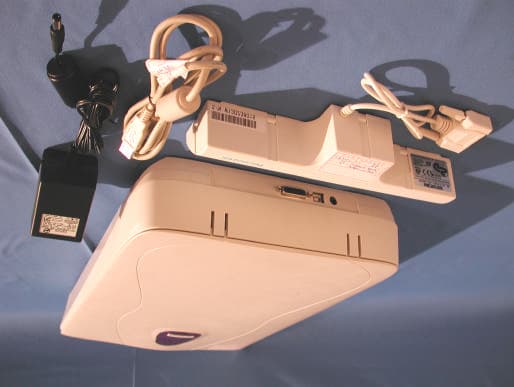
Click to zoom
Application Details
- Equipment Class
- JBP - Part 15 Class B Computing Device Peripheral
- Date of Grant
- Aug 01, 2001
- Application Purpose
- Original Equipment
- Date of Application
- Aug 01, 2001
- Equipment Note
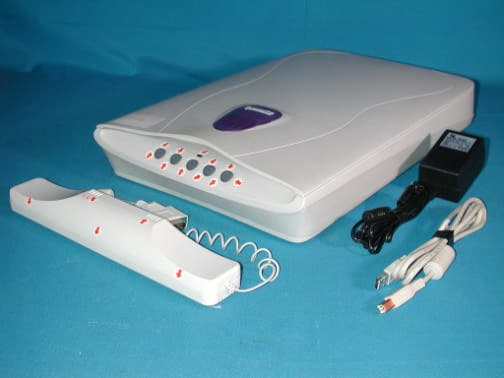
- Image Scanner
- Company
- Microtek International Inc
- Country
- Taiwan
Documents & Files
Document Text
Text extracted from the exhibit documents filed with the FCC. Open a document above to read the original.
Users Manual
1234 5 Documentation P CMAC Unpack the scanner and check components Unpack the scanner package and check for major components. Please refer to the enclosed Packing List for a detailed listing of your components. •Microtek Scanner •Power Adapter •USB (Universal Serial Bus) Cable •Documentation •Microtek CD-ROM Install the software PC: A.Place the Microtek CD-ROM into the CD-ROM drive. B.Follow the on-screen instructions to install the driver and software. Do not turn off your computer until all the software has been installed. NOTE: If the Microtek Software Installer screen does not come up automatically, double-click the following in succession: “My Computer” on your Windows desktop; the CD- ROM icon; then cdsetup.exe to start the installer program. C.Install the image-editing software application that came with your scanner. D.Restart your computer. Unlock the scanner carriage •With the scanner power switched off, lift the scanner front end and locate the carriage safety lock lever (located at the front-right corner of the scanner bottom). •Slightly slide the lever to the right until you hear a “click”, indicating that the scanner carriage has been unlocked. Connect the USB cable A.Connect the computer end of the USB cable to your computer. B.Connect the other end of the USB cable to the USB port of the scanner. The system will detect your scanner automatically. Connect the power adapter to a power source to apply power to scanner A.Connect the power adapter to the back of the scanner. B.Plug the power adapter into a wall outlet or power source and observe the green LED in the front panel lights up. MAC: A.Install the image-editing software application that came with your scanner. B.Place the Microtek CD-ROM into the CD-ROM drive and install all the software components. C.Restart your computer. Microtek International, Inc. http://www.microtek.com I49-003093 A Installing B A B A PC MAC Energy Star Notice As an ENERGY STAR Partner, Microtek International, Inc. has determined that this scanner meets the ENERGY STAR guidelines for energy efficiency. Unlock Place the scan material A.Place the original to be scanned on the scanner bed. B.The top end of the original should be oriented towards the front end of the scanner with the surface to be scanned facing down. Launch ScanWizard 5 To launch ScanWizard 5 as a stand-alone program, double-click the ScanWizard 5 icon on your desktop. By default, the scanner will detect the settings under Original, Scan Type and Purpose; and automatically perform a “fast preview” of your image based on those settings. Select preferences You can use the following tool buttons to change the settings according to your preferences. Original – defines category of the original (scan material). Scan Type – selects output image type (color, gray, or B&W). Purpose – defines image resolution to match your target application. NOTE: Click the Scale Output, Adjust, and Reset buttons if you need to make further adjustments. 678 A For More Help... If you experience problems with installation, refer to the Troubleshooting file in the Techinfo folder on your Microtek CD- ROM. For more information on operating your scanner with ScanWizard 5, launch your Internet browser to further view the software manual (in HTML format). Alternatively, PC users can also view the same manual directly from the Microtek CD-ROM Installer window by simply double-clicking the “View Manual” button. ? Scan your material A.Click the Scan to button from the ScanWizard 5 Control Panel. B.When the Save As dialog box appears, specify the folder location, a file name, and the format for the output image, then click Save. The image is then scanned and saved to the specified location. Send image to application after saving: If this option is checked, the scanned image is saved first, then automatically delivered to an image-editing software, an e-mail editor, or a web browser as indicated in the destination box. 9 Scanner Button Controls The ScanMaker 3800 is equipped with five scanner buttons providing quick access to the most frequently used functions. These buttons are Scan, Copy, E-mail, OCR , and Scan-to-Web. The parameters for each button can be set through the Microtek Scanner Configuration (MSC) utility. (Note that you need to exit ScanWizard 5 before accessing tge MSC utility) . To launch the MSC utility, you can either: (For PCs) Go through the Windows menu -- click Start, Programs, ScanWizard 5, MSC; or (For PCs or Macs) Double-click the MSC icon on your desktop. When the MSC panel appears, click any of the 5 tabs to specify the Scan settings accordingly. (For detailed information, refer to the online help in the Microtek Scanner Configuration Utility software). Scan Captures images that can be saved as files or sent to an image editing application for further processing. Copy Scans image and sends it to your printer. E-mail Scans the image and delivers it directly to your e- mail editor. OCR Scans a text document, convert and saves it as a text file format. File may be immediately edited if configured in the MSC utility. Scan-to-Web Scans an image and sends output to a website. It opens your default browser and displays the captured image. PC MAC 9B Getting Started 9A Scan E-mail Copy OCR Scan-to -Web Federal Communications Commission Interference Statement This equipment has been tested and found to comply with the limits for a Class B digital device, pursuant to Part 15 of the FCC rules. These limits are designed to provide reasonable protection against harmful interference in a residential installation. This equipment generates, uses and can radiate radio frequency energy and, if not installed and used in accordance with the instructions, may cause harmful interference to radio communications. However, there is no guarantee that interference will not occur in a particular installation. If this equipment does cause harmful interference to radio or television reception, which can be determined by …
Text truncated - open the document above for the full version.
External Photos
Report No.: 015H042FI Page : 1 of 15 Version : 1.0 Attachment 2 : EUT Detailed Photographs M/N: MRS-600V48U (Adapter: High Power, HPW-1512A) (1) EUT Photo (2) EUT Photo Report No.: 015H042FI Page : 2 of 15 Version : 1.0 M/N: MRS-600V48U (Adapter: Li Shin, LSE9801B12 (USA)) (3) EUT Photo (4) EUT Photo
ID Label/Location Info
MICROTEK FCC ID.: EF9MRS-600V48U No. 6 Industry East Road 3, Science-Based Industrial Park, Hsinchu, Taiwan, R.O.C. Tel: 886 3 5772155#213 Fax: 886 3 5772155#599 Image Scanner Model No.: MRS-600V48U F F C C C C I I D D : : E E F F 9 9 MRS-600V48U This device complies with Part 15 of the FCC Rules. Operation is subject to the following two conditions: (1) this device may not cause harmful interference and (2) this device must accept any interference received, including interference that may cause undesired operation. S/N: Made in Taiwan
ID Label/Location Info
MICROTEK FCC ID.: EF9MRS-600V48U No. 6 Industry East Road 3, Science-Based Industrial Park, Hsinchu, Taiwan, R.O.C. Tel: 886 3 5772155#213 Fax: 886 3 5772155#599 FCC ID The FCC ID Label will be placed on the equipment as shown in the photograph below.
Internal Photos
Report No.: 015H042FI Page : 3 of 15 Version : 1.0 (5) EUT Photo (6) EUT Photo Report No.: 015H042FI Page : 4 of 15 Version : 1.0 (7) EUT Photo (8) EUT Photo Report No.: 015H042FI Page : 5 of 15 Version : 1.0 (9) EUT Photo (10) EUT Photo Report No.: 015H042FI Page : 6 of 15 Version : 1.0 (11) EUT Photo (12) EUT Photo Report No.: 015H042FI Page : 7 of 15 Version : 1.0 (13) EUT Photo (14) EUT Photo Report No.: 015H042FI Page : 8 of 15 Version : 1.0 (15) EUT Photo (16) EUT Photo Report No.: 015H042FI Page : 9 of 15 Version : 1.0 (17) EUT Photo (18) EUT Photo Report No.: 015H042FI Page : 10 of 15 Version : 1.0 (19) EUT Photo Report No.: 015H042FI Page : 11 of 15 Version : 1.0 (20) EUT Photo Report No.: 015H042FI Page : 12 of 15 Version : 1.0 Adapter: High Power, HPW-1512A (21) EUT Photo (22) EUT Photo Report No.: 015H042FI Page : 13 of 15 Version : 1.0 (23) EUT Photo (24) EUT Photo Report No.: 015H042FI Page : 14 of 15 Version : 1.0 Adapter: Li Shin, LSE9801B12 (USA) (25) EUT Photo (26) EUT Photo Report No.: 015H042FI Page : 15 of 15 Version : 1.0 (27) EUT Photo (28) EUT Photo
Test Report
ReportNo. 015H042FI Page : 1 of 20 Version:1.0 Test Report Product Name : Image Scanner Model No. : MRS-600V48U FCC ID.: EF9MRS-600V48U Applicant : Microtek International Inc. Address : No.6, Industry East Rd.3, Science-Based Industrial Park, Hsin Chu, Taiwan, R.O.C. Date of Receipt : May 8, 2001 Date of Test : May 14, 2001 Report No. : 015H042FI The Test Results relate only to the samples tested. The test report shall not be reproduced except in full without the written approval of QuieTek Corporation. This report must not be used to claim product endorsement by NVLAP any agency of the U.S. Government ReportNo. 015H042FI Page : 2 of 19 Version:1.0 Test Report Certification Test Date : May 14, 2001 Report No. : 015H042FI Product Name : Image Scanner Applicant : Microtek International Inc. Address : No.6, Industry East Rd.3, Science-Based Industrial Park, Hsin Chu, Taiwan, R.O.C. Manufacturer : Microtek International Inc. Model No. : MRS-600V48U FCC ID. : EF9MRS-600V48U Rated Voltage : AC 120V/60Hz Trade Name : Microtek Measurement Standard : CISPR 22:1997 Measurement Procedure : ANSI C63.4:1992 Classification : Class B Test Result : Complied The Test Results relate only to the samples tested. The test report shall not be reproduced except in full without the written approval of QuieTek Corporation. This report must not be used to claim product endorsement by NVLAP any agency of the U.S. Government Documented By : ( Kim Hung ) Tested By : ( Guofeng Fang ) Approved By : ( Gene Chang ) Accredited by NIST (NVLAP) NVLAP Lab Code: 200347-0 ReportNo. 015H042FI Page : 3 of 18 Version:1.0 TABLE OF CONTENTS Description Page 1. GENERAL INFORMATION.....................................................................................................4 1.1. EUT Description.....................................................................................................................................................................4 1.2. Tested System Details.............................................................................................................................................................5 1.3. Configuration of tested System.............................................................................................................................................5 1.4. EUT Exercise Software..........................................................................................................................................................6 1.5. Test Facility..............................................................................................................................................................................6 2. Conducted Emission..................................................................................................................7 2.1. Test Equipment List................................................................................................................................................................7 2.2. Test Setup.................................................................................................................................................................................7 2.3. Limits........................................................................................................................................................................................8 2.4. Test Procedure..........................................................................................................................................................................8 2.5. Test Result................................................................................................................................................................................8 3. Radiated Emission.....................................................................................................................9 3.1. Test Equipment........................................................................................................................................................................9 3.2. Test Setup.................................................................................................................................................................................9 3.3. Limits......................................................................................................................................................................................10 3.4. Test Procedure........................................................................................................................................................................10 3.5. Test Result..............................................................................................................................................................................10 4. EMI Reduction Method During Compliance Testing...............................................................11 5. Summary of Test Datas............................................................................................................12 5.1. Test Data of Conducted Emission......................................................................................................................................13 5.2. Test Data of Radiated Emission..........................................................................................................................................15 Attachment 1: EUT Test Photographs Attachment 2: EUT Detailed Photographs ReportNo. 015H042FI Page : 4 of 18 Version:1.0 1. GENERAL INFORMATION 1.1. EUT Description Product Name : Image Scanner Trade Name : Microtek FCC ID. : EF9MRS-600V48U Model No. : MRS-600V48U USB Cable : Shielded, 1.5m, a ferrite core bonded Power Adapter : High Power, HPW-1512A, Cable Out: Non-shielded, 1.8m, a ferrite core bonded Power Adapter : Li Shin, LSE9801B12(USA), Cable Out: Non-shielded, 1.8m, a ferrite core bonded Note: …
Text truncated - open the document above for the full version.
Test Setup Photos
Report No.: 015H042FI Page: 1 of 4 Version: 1.0 Attachment 1 : EUT Test Photographs Front View of Conducted Test (Mode 1) Back View of Conducted Test (Mode 1) Report No.: 015H042FI Page: 2 of 4 Version: 1.0 Front View of Conducted Test (Mode 2) Back View of Conducted Test (Mode 2) Report No.: 015H042FI Page: 3 of 4 Version: 1.0 Front View of Radiated Test (Mode 1) Back View of Radiated Test (Mode 1) Report No.: 015H042FI Page: 4 of 4 Version: 1.0 Front View of Radiated Test (Mode 2) Back View of Radiated Test (Mode 2)
Contact Information
Applicant
Steve Huang(Project Manager)
Test Firm
DEKRA Testing and Certification Co., Ltd.Sky Hsu
Technical Specifications
| # | Rule Parts | Frequency Range | Power Output |
|---|---|---|---|
| 1 | 15B | - | - |
Other Applications from Microtek International Inc
EF9MRS-1200T48U
Jul 12, 2001Image Scanner
Equipment Class
JBP - Part 15 Class B Computing Device Peripheral
EF9MRS-4800FU
May 14, 2001Video Sender
Equipment Class
JBP - Part 15 Class B Computing Device Peripheral
EF9DUOSCANF40
Dec 25, 2000Image Scanner
Equipment Class
JBP - Part 15 Class B Computing Device Peripheral
EF9DUOSCANF80
Oct 04, 2000Image Scanner With SCSI Interface
Equipment Class
JBP - Part 15 Class B Computing Device Peripheral
EF9MRS-2400FU
Sep 18, 2000Image Scanner With USB & 1994 Interface
Equipment Class
JBP - Part 15 Class B Computing Device Peripheral