EMJKKBBT41811iPad Keyboard Capsule
Primax Electronics Ltd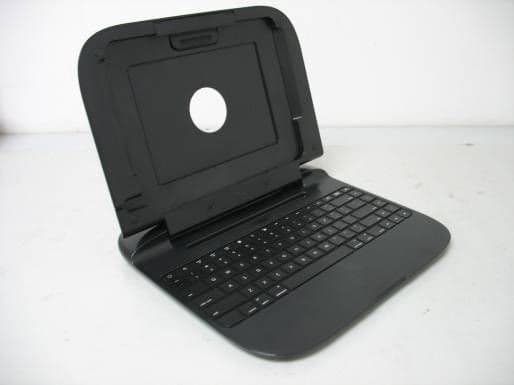
Click to zoom
Application Details
- Equipment Class
- DSS - Part 15 Spread Spectrum Transmitter
- Date of Grant
- Nov 17, 2010
- Application Purpose
- Original Equipment
- Date of Application
- Nov 14, 2010
- Equipment Note
- iPad Keyboard Capsule
- Frequency Range
- 2402.00000000 - 2480.00000000
- Company
- Primax Electronics Ltd
- Country
- Taiwan
Documents & Files
Document Text
Text extracted from the exhibit documents filed with the FCC. Open a document above to read the original.
Users Manual
Keyboard Installing the batteries 1 Remove the battery cover on the bottom of the iCapsule by pressing the release buttons and sliding off the cover. 2 Install the two AA batteries. Make sure that the + and - ends of the batteries match the markings on the battery compartment. 3 Replace the battery cover. RF-iCAP12 I iCapsule Quick Setup Guide # Component Description 1 LED indicator Green - Lights for three seconds when keyboard is turned on Green (flashing) - Pairing Green - Caps lock on Red (flashing) - Low battery indicator 2 Battery compartment Install batteries here Package contents • Keyboard (1) • AA batteries (2) • Quick Setup Guide Features • 85-key design • 16 special keys designed for iPad • Compact design for mobility and saving space • Low power consumption • Dual-color status LED indicator iCapsule open iCapsule back Setting up your iCapsule Landscape mode 1 Align and place the iPad onto the panel while 2 Release the latch to lock the iPad in place. pressing up the latch. Portrait mode • Align and place the iPad onto the gap. # Description 1 Home button 2 Search button 3 Select all button 4 Select left button 5 Select right button 6 Copy button 7 Cut button 8 Paste button # Description 9 Previous track button 10 Play/Pause button 11 Next track button 12 Mute button 13 Volume down button 14 Volume up button 15 Virtual keyboard button 16 Connect button RF-iCAP12_10-1198_QSG_V2_EN.eps 1 11/12/2010 9:52:55 AMRF-iCAP12_10-1198_QSG_V2_EN.eps 1 11/12/2010 9:52:55 AM Pairing with an iPad To pair and connect with an iPad for the first time: 1 On the iCapsule, press and hold the Connect button ( ) for five seconds. 2 On the iPad, tap Settings > General > Bluetooth to turn on Bluetooth. The iPad searches for devices. 3 Ta p iCapsule Bluetooth Keyboard. 4 When prompted, enter the passkey shown on the iPad using the iCapsule keyboard, then press Enter. After the iCapsule is paired with the iPad, you don’t need to pair again. Note: After a period of no activity, the keyboard enters sleep mode. To wake up the keyboard from sleep, tap a few keys and the Bluetooth icon appears in the upper right corner of the iPad. Using the special keys Legal notices FCC Part 15 This device complies with Part 15 of the FCC Rules. Operation is subject to the following two conditions: (1) this device may not cause harmful interference, and (2) this device must accept any interference received, including interference that may cause undesired operation. FCC warning Changes or modifications not expressly approved by the party responsible for compliance with the FCC Rules could void the user’s authority to operate this equipment. IC RSS210 Operation is subject to the following two conditions: (1) this device may not cause interference, and (2) this device must accept any interference, including interference that may cause undesired operation of the device. One-year limited warranty Visit www.rocketfishproducts.com for details. Contact Rocketfish: For customer service, please call 1-800-620-2790. www.rocketfishproducts.com Distributed by Best Buy Purchasing, LLC 7601 Penn Avenue South, Richfield, MN 55423-3645 USA © 2010 BBY Solutions, Inc., All Rights Reserved. ROCKETFISH is a trademark of BBY Solutions, Inc. All other products and brand names are trademarks of their respective owners. Best Buy Imports, S. de R.L. de C.V. Av. Santa Fe 485, Segundo Piso, Colonia Cruz Manca, Programa Parcial de Desarrollo Santa Fe, Delegación Cuajimalpa, Distrito Federal, México 05349 © 2010 Best Buy UK Distributions Limited. All rights reserved. Distributed by Best Buy Europe Distributions Limited. 1 Portal Way, London W3 6RS ENGLISH 10-1198 Button Description Home Return to the home screen Search Search keywords on the iPad or the Internet Virtual keyboard Activate or deactivate the on-screen keyboard Select all, Select left, or Select right Select text Copy or Cut Copy text Paste Paste text Play/Pause Play or pause the music Next track or Previous track Listen to the next or previous song Volume up or Volume down Adjust the volume Mute Mute the volume RF-iCAP12_10-1198_QSG_V2_EN.eps 2 11/12/2010 9:53:06 AMRF-iCAP12_10-1198_QSG_V2_EN.eps 2 11/12/2010 9:53:06 AM
External Photos
Page 1 of 2 Type Designation: RF-iCAP12 External Photo Report Number: 17018365 001 Page 2 of 2 Type Designation: RF-iCAP12 External Photo Report Number: 17018365 001
ID Label/Location Info
1234567 1234567 A B C D E A B C D E REV. DESCRIPTION ENG. APPROVAL USED FINISH SCALE TITLE DWG NO . FILE NAMESHEET REV. SIZE A4 DR. CHKD. APPD. UNIT mm 1 1 DO NOT SCALE DRAWING DIMENSIONS 0.00 TO 30.00mm +0.10mm 30.01 TO 80.00mm +0.13mm 80.01 TO 150.00mm +0.15mm 150.01 +0.20mm TOLERANCE MATERIAL UNLESS OTHERWISE SPECIFIED: DIMENSIONS ARE IN MILLIMETERS ANGULAR TOLERANCE:+1.0 1 THESE DRAWINGS AND SPECIFICATIONS ARE THE PROPERTY OF PRIMAX ELECTRONICS LTD. AND SHALL NOT BE REPRODUCED COPIED OR USED IN ANY MANNER WITHOUT THE PRIOR WRITTEN CONSENT OF PRIMAX ELECTRONICS LTD. 50#反銀龍+亮OPP 304007712XXX BOTTOM LABEL 29-84101B611 RUBY RUBY AI AI 304007712XXX Sarah.Lee 2010/11/12 iPad Keyboard Capsule Model No. : KBBT41811 FCC ID:EMJKKBBT41811 IC:4251A-KKBBT41811 Rating: 3V 25mA Power:2 AA Batteries S/N:YYMDDAXXXXXX Made in China 1:1 99.00 mm 6 . 0 0 m m 2:1 iPad Keyboard Capsule Model No. : KBBT41811 FCC ID:EMJKKBBT41811 IC:4251A-KKBBT41811 Rating: 3V 25mA Power:2 AA Batteries S/N:YYMDDAXXXXXX Made in China 7 m m 35 mm 材質:80P銅板紙+亮OPP This device complies with Part 15 of the FCC Rules and IC RSS210. Operation is subject to the following two conditions: (1) this device may not cause harmful interference, and (2) this device must accept any interference received, including interference that may cause undesired operation
ID Label/Location Info
Label location
Internal Photos
Page 1 of 5 Type Designation: RF-iCAP12 Internal Photo Report Number: 17018365 001 Page 2 of 5 Type Designation: RF-iCAP12 Internal Photo Report Number: 17018365 001 Page 3 of 5 Type Designation: RF-iCAP12 Internal Photo Report Number: 17018365 001 Page 4 of 5 Type Designation: RF-iCAP12 Internal Photo Report Number: 17018365 001 Page 5 of 5 Type Designation: RF-iCAP12 Internal Photo Report Number: 17018365 001
Test Report
Produkte Products Prüfbericht - Nr.: Test Report No. 17018365 001 Seite 2 von 36 Page 2 of 36 TEST SUMMARY 5.1.1 ANTENNA REQUIREMENT RESULT: Passed 5.1.2 PEAK OUTPUT POWER RESULT: Passed 5.1.3 20DB BANDWIDTH AND 99% BANDWIDTH RESULT: Passed 5.1.4 CONDUCTED SPURIOUS EMISSIONS MEASURED IN 100 KHZ BANDWIDTH RESULT: Passed 5.1.5 SPURIOUS EMISSIONS RESULT: Passed 5.1.6 FREQUENCY SEPARATION RESULT: Passed 5.1.7 NUMBER OF HOPPING FREQUENCY RESULT: Passed 5.1.8 TIME OF OCCUPANCY RESULT: Passed 6.1.1 ELECTROMAGNETIC FIELDS RESULT: Passed Produkte Products Prüfbericht - Nr.: Test Report No. 17018365 001 Seite 3 von 36 Page 3 of 36 Contents 1. GENERAL REMARKS.........................................................................................................4 1.1 COMPLEMENTARY MATERIALS...........................................................................................4 2. TEST SITES.......................................................................................................................4 2.1 TEST FACILITIES...............................................................................................................4 2.2 LIST OF TEST AND MEASUREMENT INSTRUMENTS...............................................................5 2.3 TRACEABILITY..................................................................................................................6 2.4 CALIBRATION....................................................................................................................6 2.5 MEASUREMENT UNCERTAINTY...........................................................................................6 2.6 LOCATION OF ORIGINAL DATA...........................................................................................6 2.7 STATUS OF FACILITY USED FOR TESTING...........................................................................6 3. GENERAL PRODUCT INFORMATION....................................................................................7 3.1 PRODUCT FUNCTION AND INTENDED USE...........................................................................7 3.2 RATINGS AND SYSTEM DETAILS.........................................................................................7 3.3 INDEPENDENT OPERATION MODES.....................................................................................8 3.4 NOISE GENERATING AND NOISE SUPPRESSING PARTS........................................................9 3.5 SUBMITTED DOCUMENTS...................................................................................................9 4. TEST SET-UP AND OPERATION MODES...............................................................................9 4.1 PRINCIPLE OF CONFIGURATION SELECTION........................................................................9 4.2 TEST OPERATION AND TEST SOFTWARE............................................................................9 4.3 SPECIAL ACCESSORIES AND AUXILIARY EQUIPMENT........................................................10 4.4 COUNTERMEASURES TO ACHIEVE EMC COMPLIANCE.......................................................10 4.5 TEST SETUP DIAGRAM....................................................................................................10 5. TEST RESULTS...............................................................................................................12 5.1 TRANSMITTER REQUIREMENT & TEST SUITES...................................................................12 5.1.1 Antenna Requirement................................................................................................................ 12 5.1.2 Peak Output Power ................................................................................................................... 13 5.1.3 20dB Bandwidth and 99% Bandwidth ....................................................................................... 16 5.1.4 Conducted Spurious Emissions measured in 100 kHz Bandwidth ........................................... 19 5.1.5 Spurious Emissions ................................................................................................................... 24 5.1.6 Frequency Separation ............................................................................................................... 25 5.1.7 Number of hopping frequency ................................................................................................... 28 5.1.8 Time of Occupancy.................................................................................................................... 30 6. SAFETY HUMAN EXPOSURE.............................................................................................33 6.1 RADIO FREQUENCY EXPOSURE COMPLIANCE...................................................................33 6.1.1 Electromagnetic Fields .............................................................................................................. 33 7. PHOTOGRAPHS OF THE TEST SET-UP..............................................................................34 8. LIST OF TABLES..............................................................................................................36 9. LIST OF PHOTOGRAPHS...................................................................................................36 Produkte Products Prüfbericht - Nr.: Test Report No. 17018365 001 Seite 4 von 36 Page 4 of 36 1. General Remarks 1.1 Complementary Materials All attachments are integral parts of this test report. This applies especially to the following appendix: Appendix 1: Test Result 2. Test Sites 2.1 Test Facilities AUDIX Technology (Shenzhen) Co., Ltd. ( FCC Registration No.: 90454 & Test Site Industry Canada No.: 5183A01) No. 6, Ke Feng Road, Block 52 Shenzhen Science & Industry Park Nantou, Shenzhen Guangdong, P.R. China The tests at the test site have been conducted under the supervision of a TÜV engineer. Produkte Products Prüfbericht - Nr.: Test Report No. 17018365 001…
Text truncated - open the document above for the full version.
Test Setup Photos
Produkte Products Prüfbericht - Nr.: Test Report No. 17018365 001 Seite 34 von 36 Page 34 of 36 7. Photographs of the Test Set-Up Photograph 1: Set-up for Spurious Emissions (9kHz-30MHz) Photograph 2: Set-up for Spurious Emissions (30MHz-1GHz) Produkte Products Prüfbericht - Nr.: Test Report No. 17018365 001 Seite 35 von 36 Page 35 of 36 Photograph 3: Set-up for Spurious Emissions (1GHz-18GHz) Photograph 4: Set-up for Spurious Emissions (18GHz-26GHz)
Contact Information
Applicant
Nelson Chou(Manager)
Technical Contact
TUV Rheinland (Shenzhen) Co., Ltd.Sam Lin
[email protected]86-755-82681341
34/F World Finance Centre, Shennan East Road 4003 · China
Test Firm
Audix Technology (Shenzhen) Co.Smart Tsai
Technical Specifications
| # | Rule Parts | Frequency Range | Power Output |
|---|---|---|---|
| 1 | 15C | 2.40 GHz - 2.48 GHz | 550.00 µW |
Other Applications from Primax Electronics Ltd
EMJ-BHS2705
Aug 28, 2026Wireless Headset
Equipment Class
DTS - Digital Transmission SystemEMJMMOBTN5O
Aug 22, 2024wegear MW1 Creator Mouse
Equipment Class
DTS - Digital Transmission SystemEMJDDGRFN5
Aug 22, 2024wegear MW1 2.4G Dongle
Equipment Class
DXX - Part 15 Low Power Communication Device Transmitter
EMJDTPA-P002D
Jan 14, 2024Dongle
Equipment Class
DXX - Part 15 Low Power Communication Device Transmitter
EMJOH1
Oct 29, 2023Level Bridge
Equipment Class
DTS - Digital Transmission System